Email Automation Tools in 2026: The No-Fluff Buyer's Guide
Most email automation tools solve sending, not data. Here's how the 2026 stack actually splits — sequencers, deliverability layers, and enrichment — plus what each tier really costs.
TL;DR
- "Email automation tools" is three different product categories wearing one label: marketing automation (lifecycle email to people who opted in), sales engagement (cold sequences to people who didn't), and the data/deliverability plumbing that decides whether either one lands.
- Buying a sequencer before you fix your list is the single most common and most expensive mistake. A 22% bounce rate kills a domain no amount of A/B testing will revive.
- Expect to pay $30–$100/user/mo for a sequencer, $30–$50/mo for a warmup and inbox-rotation layer, and $49–$249/mo for finding and verifying contacts.
- Native CRM automation (HubSpot, Salesforce) is fine for lifecycle email and usually terrible for cold outbound volume — different sending infrastructure, different risk profile.
- The stack that works in 2026: verified data in → sequencer with inbox rotation → reply routing back to CRM. Everything else is optional.
What are email automation tools, exactly?#
Email automation tools send email based on triggers or schedules instead of a human hitting "send" each time. That's the whole definition, and it's why the category is so confusing — a Mailchimp drip and a 12-step cold sequence both technically qualify while sharing almost no infrastructure, compliance posture, or success metric.
Split them into four honest buckets before you evaluate a single vendor:
- Marketing automation platforms — Mailchimp, Klaviyo, HubSpot Marketing, ActiveCampaign. Built for opted-in lists, lifecycle nurture, behavioral triggers, and shared sending IPs. Success metric: revenue per recipient. Cold outbound on these will get your account suspended.
- Sales engagement / sequencers — Outreach, Salesloft, Instantly, Smartlead, Reply.io, Lemlist. Built for one-to-few outbound from your own mailboxes, with inbox rotation, reply detection, and task queues. Success metric: reply rate and meetings booked.
- Deliverability and infrastructure layers — warmup services, secondary domain providers, SPF/DKIM/DMARC tooling, inbox placement testing. Invisible when they work, catastrophic when they don't.
- Data layers — email finders, verifiers, enrichment, and intent providers. This is the input tier. Nothing downstream compensates for bad data here.
Most teams buy from bucket 2, ignore buckets 3 and 4, then blame bucket 2 when reply rates collapse. The failure was upstream.
Which type of email automation tool do you actually need?#
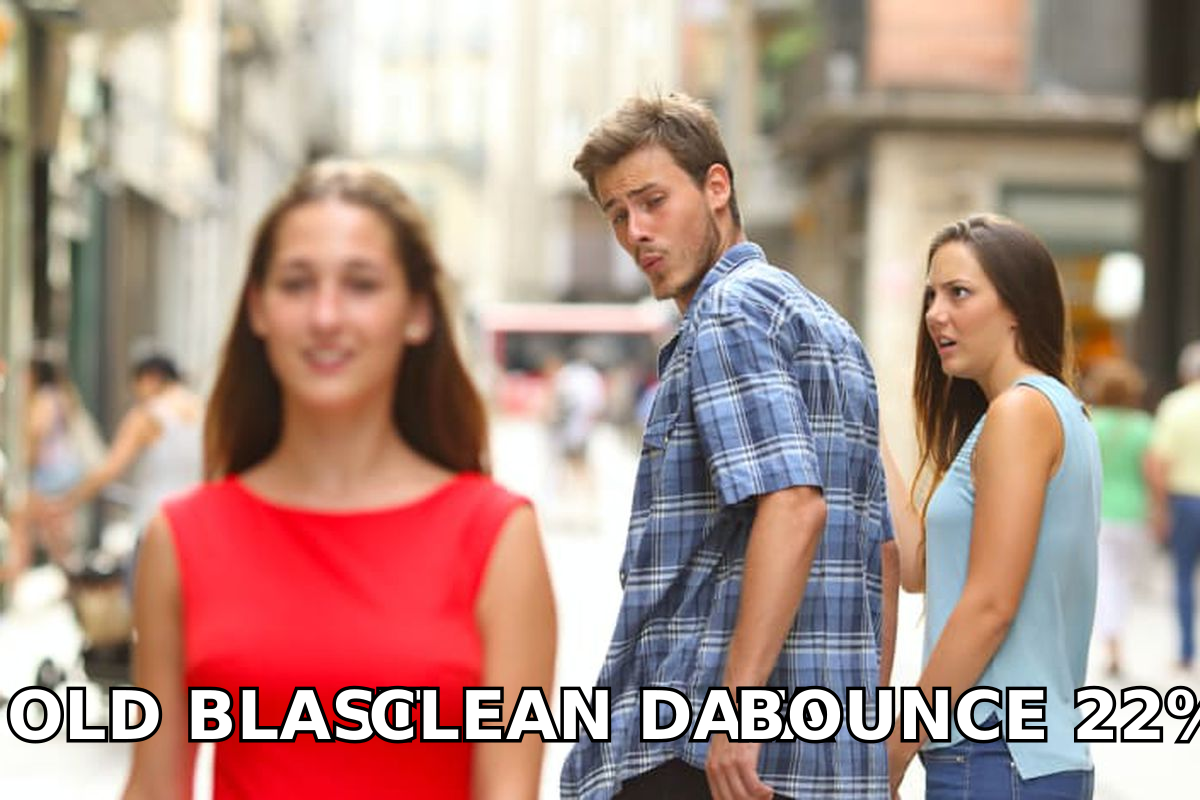
Match the tool to the relationship, not to the feature list. Here's the decision in one table:
| Your situation | Right category | Typical entry price | What kills you if you get it wrong |
|---|---|---|---|
| Nurturing signups and trial users | Marketing automation | $20–$150/mo by list size | Sending cold outbound from it → account ban |
| Cold outbound to net-new accounts | Sales engagement / sequencer | $30–$100/user/mo | No inbox rotation → domain burn in 3 weeks |
| Post-demo follow-up by AEs | CRM-native sequences | Bundled with CRM seat | Volume caps hit around 200–500/day |
| Scaling from 500 to 5,000 sends/mo | Sequencer + warmup + verification | $150–$400/mo combined | Skipping verification → 15%+ bounce rate |
| Enriching an existing CRM of stale records | Data enrichment + verifier | $49–$249/mo | Enriching without verifying → same bounce problem |
The pattern: as volume climbs, the tool you need shifts from "better templates" to "better plumbing." A team sending 300 emails a month can survive on almost anything. A team sending 8,000 needs rotation, verification, and monitoring or it will be blocked inside a quarter.
How do the major email automation tools compare on price and fit?#
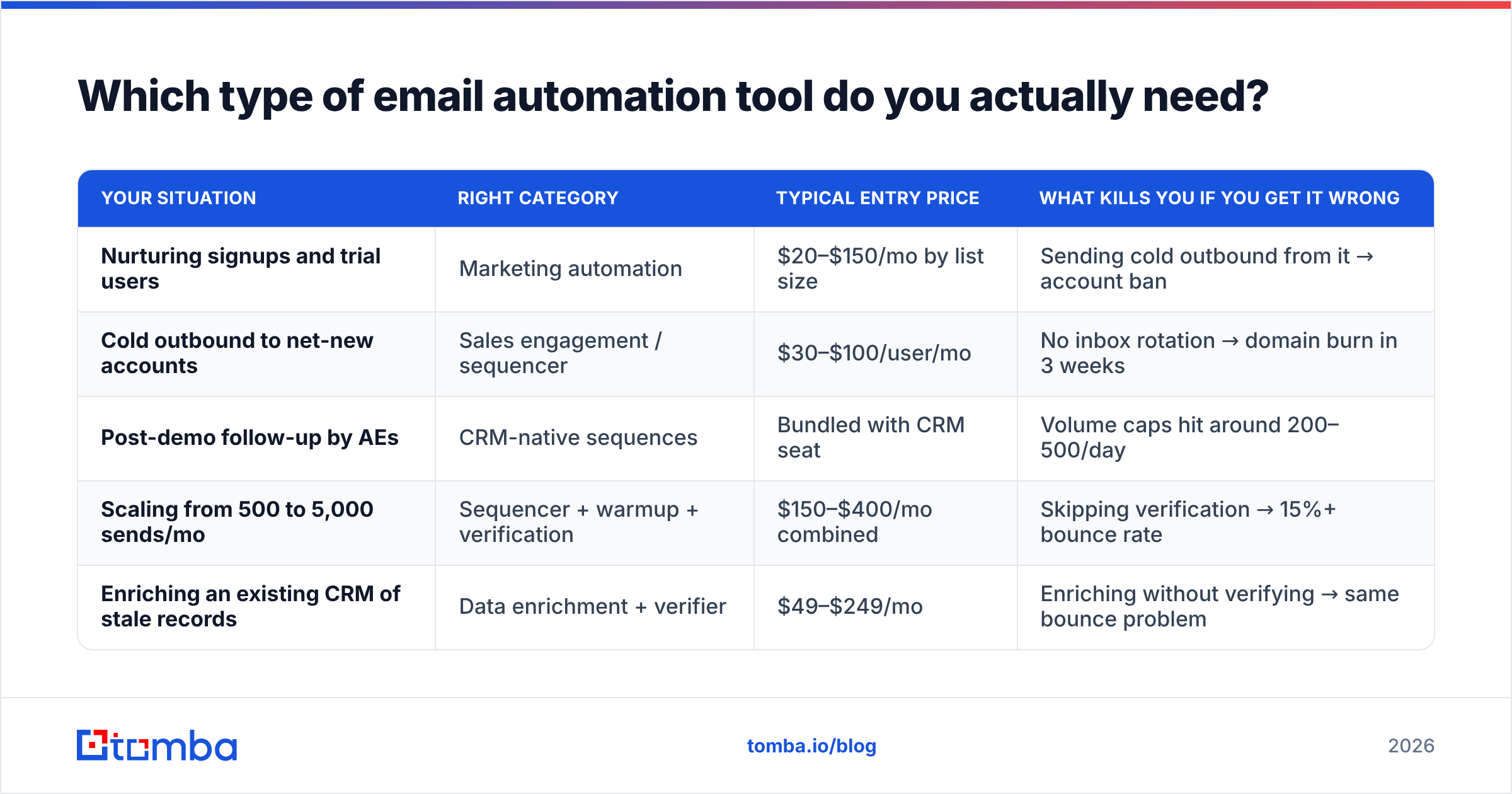
Prices below are list prices as published by each vendor at the time of writing; annual billing and seat minimums move them significantly. Always confirm on the vendor's own pricing page before you budget.
| Tool | Category | Entry price | Best for | Main limitation |
|---|---|---|---|---|
| Instantly | Sequencer | ~$37/mo | High-volume cold outbound, unlimited inboxes on paid tiers | Thin CRM sync; leads DB quality varies |
| Smartlead | Sequencer | ~$39/mo | Agencies running many client domains | Steeper learning curve, sparse reporting |
| Salesloft | Sales engagement | ~$100/user/mo | Enterprise AE teams inside a defined process | Overkill and overpriced for <10 reps |
| Outreach | Sales engagement | Custom (~$100+/user/mo) | Large orgs needing forecasting + engagement in one | Long implementation, annual contracts |
| HubSpot Sequences | CRM-native | Sales Pro from ~$100/user/mo | Teams already living in HubSpot | Daily send caps; not built for cold volume |
| Mailchimp | Marketing automation | Free–$20+/mo | Newsletters and lifecycle to opted-in lists | Terms prohibit purchased/cold lists |
| Lemlist | Sequencer | ~$69/mo | Personalized images and multichannel touches | Deliverability tooling costs extra |
| Reply.io | Sequencer | ~$59/user/mo | Multichannel (email + LinkedIn + calls) | Credit model gets expensive at scale |
Two things to notice. First, the per-user versus per-workspace split is the biggest cost driver — a 6-rep team pays roughly $600/mo on Salesloft and roughly $40/mo on Instantly for comparable send capacity. Second, none of these tools find or verify contacts. That's a separate line item every time, and it's the one most budgets forget.
If you're weighing specific swaps, our breakdowns of an Instantly alternative and a Salesloft alternative go deeper on migration cost and feature parity.
Why does data quality matter more than the sequencer?#
Because bounce rate is a reputation input, not a vanity metric. Mailbox providers read hard bounces as a signal that you don't know who you're emailing — and they apply that judgement to your domain, not your campaign.
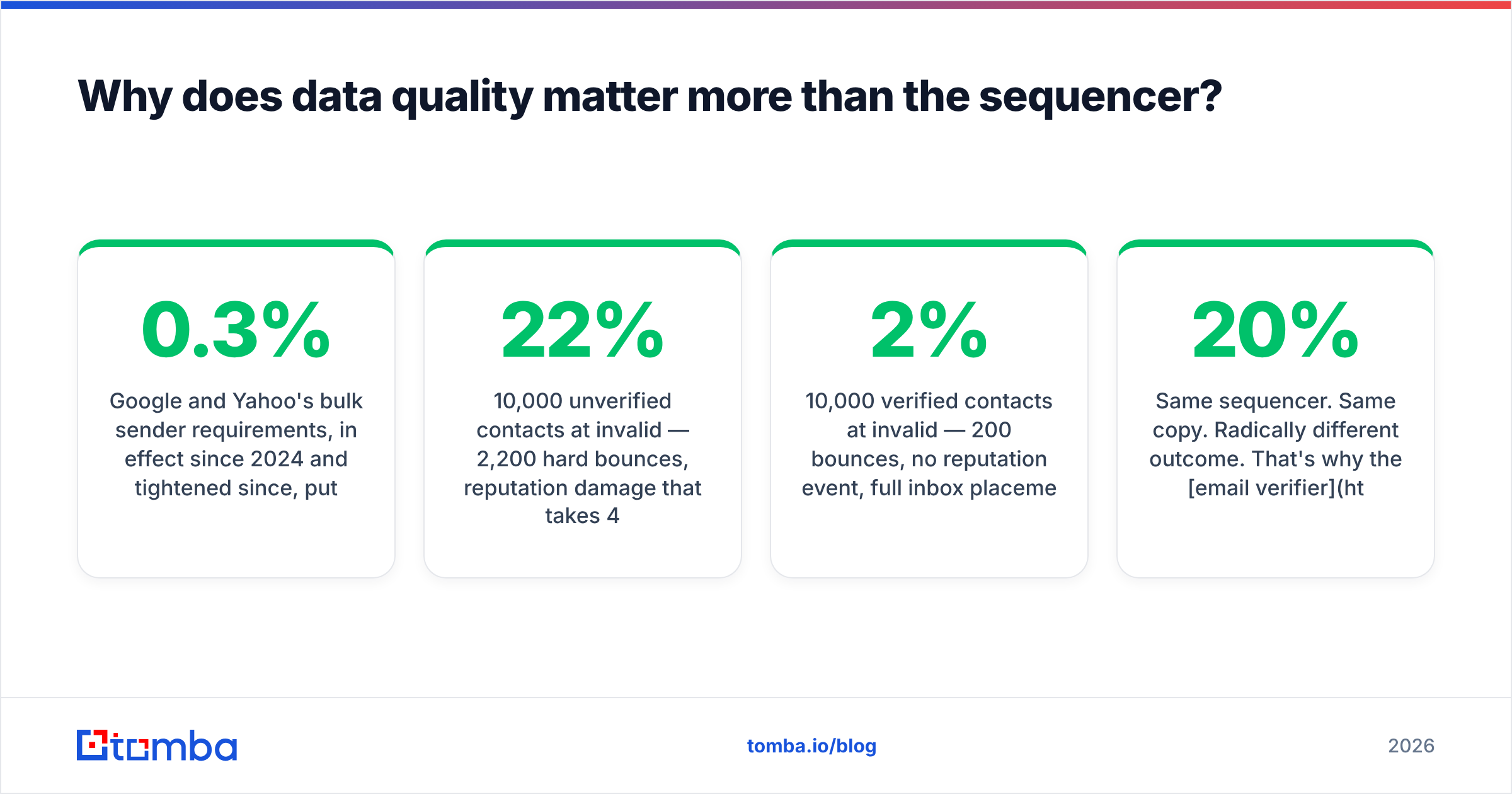
Google and Yahoo's bulk sender requirements, in effect since 2024 and tightened since, put a hard spam-complaint ceiling at 0.3% and require authenticated sending with one-click unsubscribe. Blow past the complaint threshold and your mail goes to spam across the board. Sustained hard bounces above roughly 3–5% put you in the same territory faster. You can read the current requirements directly in Google's sender guidelines.
Here's the arithmetic that decides your campaign before you write a subject line:
- 10,000 unverified contacts at 22% invalid — 2,200 hard bounces, reputation damage that takes 4–8 weeks of reduced volume to repair, and every valid contact in that batch gets worse placement.
- 10,000 verified contacts at 2% invalid — 200 bounces, no reputation event, full inbox placement for the other 9,800.
Same sequencer. Same copy. Radically different outcome. That's why the email verifier step is non-negotiable rather than an upsell, and why catch-all verification matters for the roughly 15–20% of B2B domains that accept everything at the SMTP layer and tell you nothing useful.

What does a working 2026 email automation stack look like?#
Four layers, in this order. Build them in reverse and you'll waste money at every step.
- Source layer — find the right contacts. Domain search for account-based lists, name-plus-domain lookup for known targets, LinkedIn-based finding for people you've already qualified. Tools: Tomba Email Finder, Apollo, BookYourData for pre-built verified lists when you'd rather buy than build.
- Validation layer — remove what will bounce. Syntax, MX, SMTP, role-account detection, catch-all classification. Run this immediately before import, not at list-build time — B2B data decays roughly 2–2.5% per month as people change jobs.
- Sending layer — rotate and pace. Secondary domains (never your primary), 3–5 mailboxes per domain, 30–50 sends per mailbox per day, warmup running continuously in the background. This is where Instantly, Smartlead, and Salesloft live.
- Routing layer — get replies into the CRM. Reply detection, auto-pause on response, ownership assignment, and disposition logging. If a positive reply sits unread for 6 hours, everything upstream was wasted.
Most teams have layers 3 and 4 and are missing 1 and 2. That's why their reply rates look like everyone else's — the differentiation lives in who you email, not in which tool sends it.
Should you use native CRM automation instead?#
Use it for post-demo follow-up and lifecycle. Don't use it for cold volume.
HubSpot Sequences and Salesforce's engagement tooling are excellent when the contact already knows you: the data is already in the record, the reply logs to the timeline automatically, and there's no sync to break. HubSpot's own sequence documentation is clear about the daily send limits, which sit far below what an outbound team needs.
The structural problem is sending identity. CRM sequences send from your primary corporate domain — the one your invoices, support replies, and renewal notices go out on. Burning that domain with cold volume is an unforced error that no reply rate justifies. Dedicated sequencers exist largely to keep cold sending on disposable secondary domains, isolated from the domain your business actually depends on.
The pragmatic split most mid-market teams land on: CRM sequences for anyone who's ever replied or booked, a dedicated sequencer on secondary domains for everyone else, and a HubSpot integration or similar sync so the contact record stays single-source-of-truth regardless of which system sent the last touch.
How much should you budget for email automation tools?#
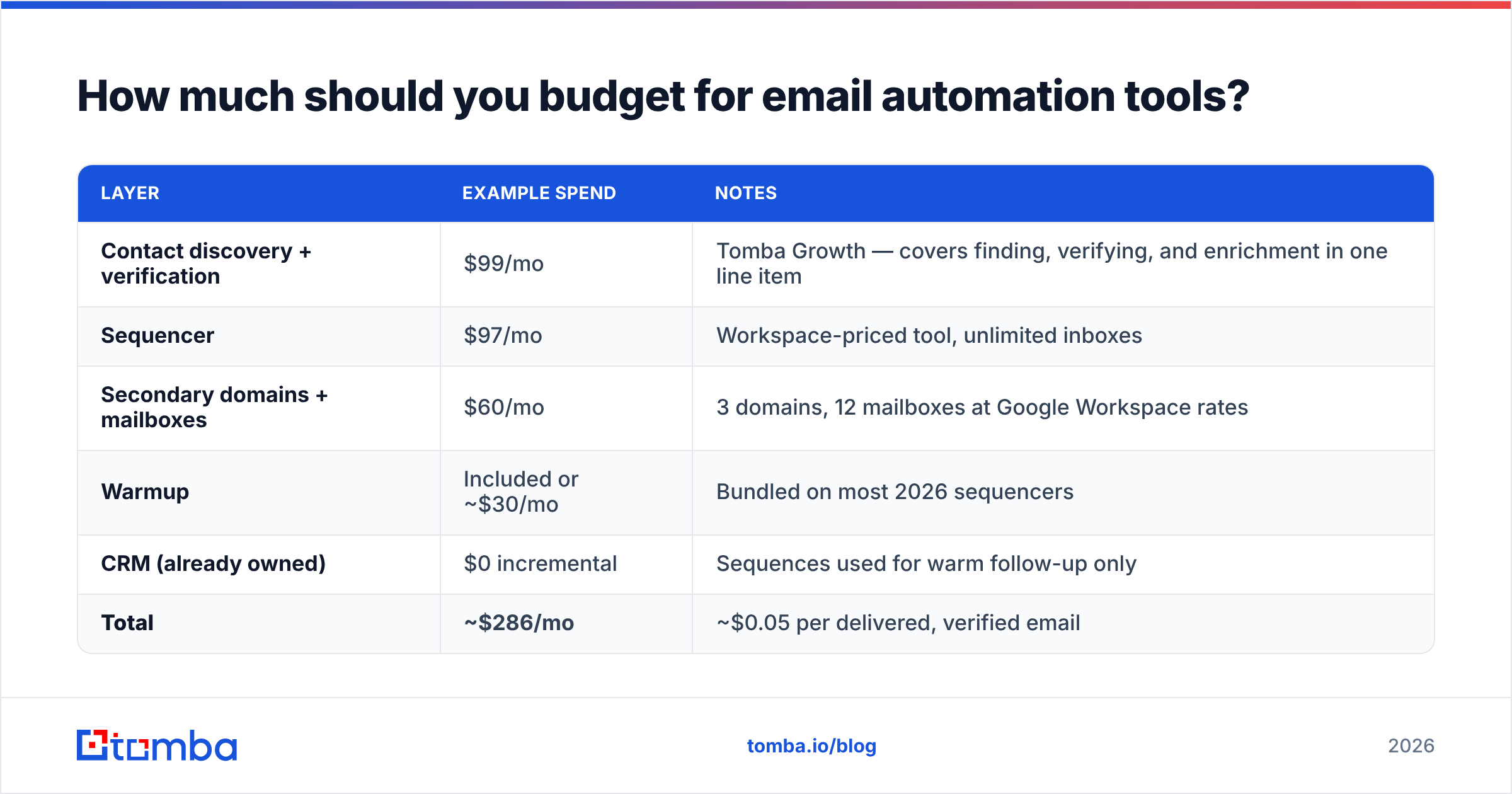
Model it per-outcome rather than per-tool. A realistic mid-market stack for a 5-person outbound team sending ~6,000 emails/month:
| Layer | Example spend | Notes |
|---|---|---|
| Contact discovery + verification | $99/mo | Tomba Growth — covers finding, verifying, and enrichment in one line item |
| Sequencer | $97/mo | Workspace-priced tool, unlimited inboxes |
| Secondary domains + mailboxes | $60/mo | 3 domains, 12 mailboxes at Google Workspace rates |
| Warmup | Included or ~$30/mo | Bundled on most 2026 sequencers |
| CRM (already owned) | $0 incremental | Sequences used for warm follow-up only |
| Total | ~$286/mo | ~$0.05 per delivered, verified email |
Compare that to the per-seat enterprise path — 5 Salesloft seats at $100 plus a separate data vendor at $500/mo — and you're at $1,000+/mo for the same send volume. The enterprise tools buy you governance, forecasting, and manager coaching workflows. If you don't need those three things, you're paying for org chart, not output.
For the data layer specifically, Tomba's pricing runs a free tier at 25 searches/mo, Starter at $49/mo, Growth at $99/mo, and Pro at $249/mo, with Enterprise custom — and unlike credit-metered competitors, verification isn't billed as a separate consumable on top of finding.
What mistakes should you avoid when automating email?#
- Automating before you've validated the message manually. If 20 hand-sent emails get zero replies, 2,000 automated ones get zero replies faster. Sequence what already works.
- Treating "verified" as permanent. A contact verified in January is meaningfully stale by June. Re-verify any list older than 90 days before a new campaign.
- Over-personalizing with junk variables.
{{company}}pulling in "Inc." or a blank first name looks worse than no personalization. Set fallbacks and audit a 20-row sample before launch. - Ignoring the reply side. Automation that books meetings but leaves them unclaimed for a day converts worse than a slower manual process. Route replies within the hour.
- Running everything from one domain. One spam trap hit shouldn't be able to take down your billing email. Isolate cold sending, always.
- Buying seats for people who don't prospect. Per-user pricing punishes teams that add licenses "just in case." Start narrow, expand on evidence.
One more that's easy to miss: measure per-domain, not just per-campaign. Aggregate open rates hide the case where Outlook tenants are silently filtering you while Gmail is fine. Segment your reporting by recipient provider and you'll spot deliverability problems weeks before your reply rate makes them obvious. A sender reputation check on your sending domains monthly is the cheapest insurance in the stack.
Which email automation tool should you pick?#
- Solo founder or <500 sends/mo: a workspace-priced sequencer plus a free-tier data source. Total under $100/mo.
- Small outbound team, 2,000–10,000 sends/mo: Instantly or Smartlead for sending, a dedicated finder-plus-verifier for data, 3+ secondary domains. Roughly $250–$400/mo.
- Enterprise with process governance needs: Outreach or Salesloft, integrated to Salesforce, with a contracted data provider. $1,000+/mo and worth it only if managers genuinely use the coaching layer.
- Marketing-led lifecycle email: Klaviyo or HubSpot Marketing. Don't touch a cold sequencer for this.
- Agency running many clients: Smartlead for domain isolation per client, plus bulk email finding so list-building doesn't become a per-client manual project.
The honest summary: sequencers have largely commoditized. Feature gaps between the top five closed in 2024–2025, and the remaining differentiators are pricing model and deliverability tooling. What hasn't commoditized is contact data — accuracy still varies wildly between providers, and it's the variable with the largest effect on whether any of this works.
Get the data layer right first#
Before you compare another sequencer feature matrix, fix the input. Tomba's Email Finder finds professional email addresses by domain, name, or company, verifies them in the same pass, and pushes clean records straight into your sequencer through Zapier, HubSpot, Sheets, or the API — so your automation runs on contacts that actually exist. Start on the free tier at 25 searches a month, and only scale spend once your reply rate proves the message works.
Related guides#
Ready to find emails that actually work?
Join 150,000+ professionals who stopped guessing and started sending. Free credits on signup — no credit card required.
Get the Tomba newsletter
Practical outbound tactics and product updates — once every two weeks.
About the author