Email Blasts in 2026: What They Cost You and What to Send Instead
Email blasts still hit inboxes in 2026 — just far fewer of them. Here's what a blast actually costs you in deliverability, when it still works, and the segmented alternative that outperforms it.
TL;DR
- An email blast is one message sent to your entire list at once, with no segmentation and little or no personalization. It still exists in 2026 — it just costs more than it used to.
- Google and Yahoo's bulk-sender rules (5,000+ messages/day) made spam complaints a hard gate: cross 0.3% and your delivery degrades across the whole domain, not just that campaign.
- Blasts aren't universally wrong. Product outages, legal notices, and genuine all-audience announcements are legitimate blast use cases.
- For anything sales-related, a segmented send to a verified list beats a blast on almost every metric — usually at a fraction of the volume.
- The fix is boring: clean the list, split it into 3-6 real segments, verify addresses before send, and stop measuring success by "emails delivered."
What is an email blast?#
An email blast is a single email sent simultaneously to your entire contact list, with no segmentation, no personalization beyond a merge tag, and no branching logic. Marketers also call it a "batch and blast" or "email broadcast."
The defining trait isn't volume — it's undifferentiated volume. A 200,000-recipient newsletter that's split into eight behavior-based segments is not a blast. A 900-recipient announcement pushed to everyone who ever gave you an address, including people who bounced twice last quarter, is.
That distinction matters because the mailbox providers judge you on the second thing, not the first. Gmail doesn't care how many emails you send. It cares whether the people receiving them wanted them.
Blasts persist because they're fast. One draft, one send, one number in the report. The cost shows up somewhere else — in your domain reputation, three campaigns later, when a completely unrelated email stops landing.
Why do email blasts still get sent in 2026?#
Four reasons, all of them structural rather than stupid:
- Speed under pressure. A CMO asks for a promo by Friday. Segmenting takes two days of data work. Blasting takes twenty minutes. Deadlines beat deliverability every time in a quarter-end scramble.
- Vanity metrics reward it. "We reached 48,000 people" reads better in a board deck than "we reached 6,200 people who actually match the offer." Reach is the easiest number to inflate and the hardest to defend.
- Tooling gaps. Plenty of teams run on a CRM whose segmentation is a static list built in 2023. If your data model can't express "opened in the last 90 days AND is in the ICP," you physically can't segment.
- Genuine all-audience events. A security incident, a pricing change, a service migration, a terms-of-service update. These should go to everyone. Blasting is correct here.
Reason four is the one people forget when they declare blasts dead. They're not dead — they're specialized. The problem is teams using a specialized tool as a default.

Correction — the meme above renders from the placeholder; the caption is the argument most teams still make.

What does an email blast actually cost you?#
The cost is not the send. It's the reputation debt, and it compounds.
Since February 2024, Google and Yahoo have enforced requirements on anyone sending 5,000+ messages a day to their users: authenticated mail (SPF, DKIM, DMARC), one-click unsubscribe, and a spam complaint rate kept below 0.3%. Google's own bulk sender guidelines state the target should be under 0.1%, with 0.3% as the line you must never cross.
Run the arithmetic on a blast. Send to 50,000 addresses. Even a mild 0.35% complaint rate — perfectly achievable when a third of the list has no idea who you are — means 175 complaints. You're over the threshold. Gmail throttles. And because reputation attaches to your sending domain, your onboarding emails, receipts, and reply-to-a-demo-request messages start landing in Promotions or worse.
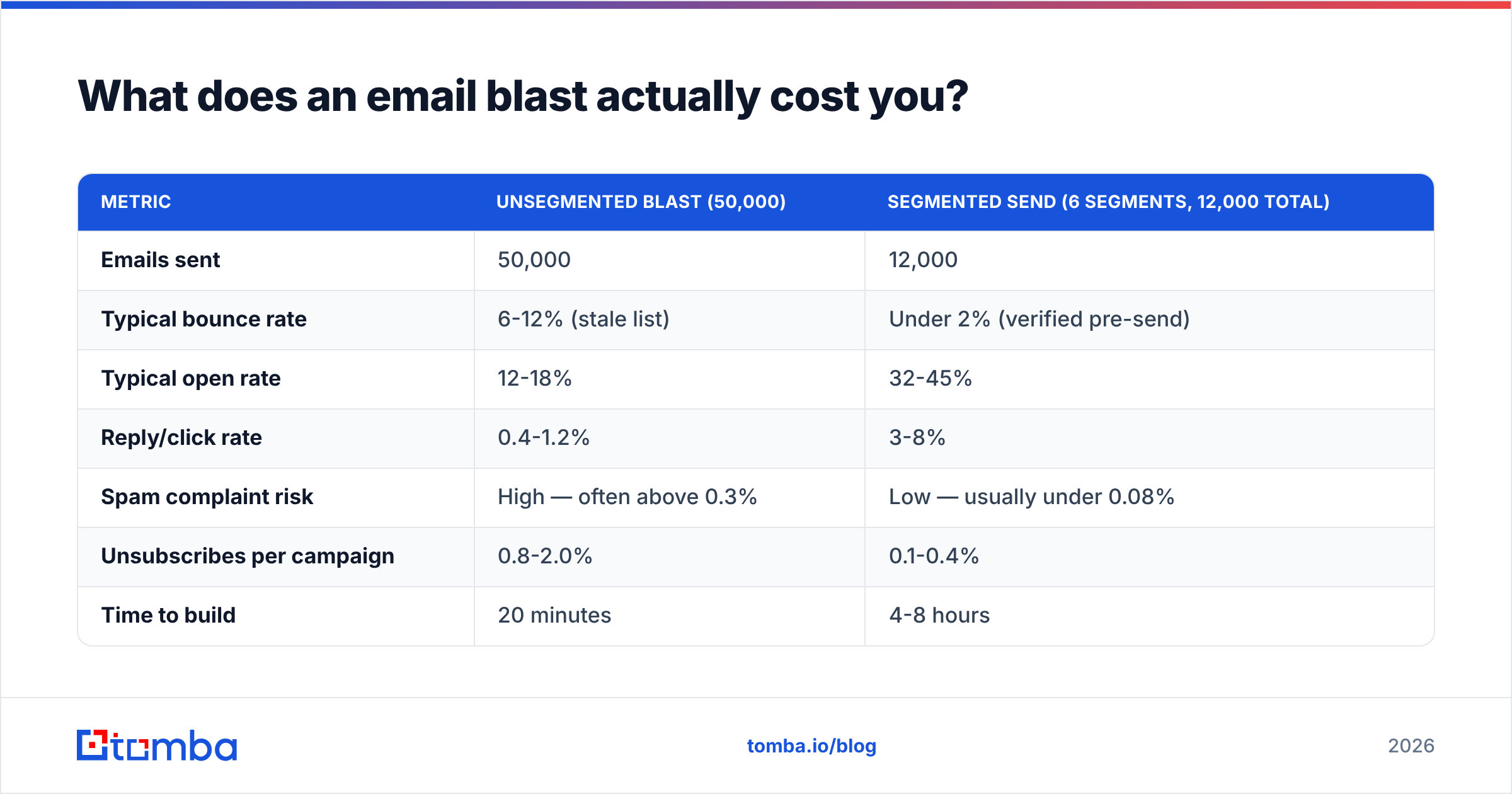
Here's what the two approaches actually look like side by side:
| Metric | Unsegmented blast (50,000) | Segmented send (6 segments, 12,000 total) |
|---|---|---|
| Emails sent | 50,000 | 12,000 |
| Typical bounce rate | 6-12% (stale list) | Under 2% (verified pre-send) |
| Typical open rate | 12-18% | 32-45% |
| Reply/click rate | 0.4-1.2% | 3-8% |
| Spam complaint risk | High — often above 0.3% | Low — usually under 0.08% |
| Unsubscribes per campaign | 0.8-2.0% | 0.1-0.4% |
| Time to build | 20 minutes | 4-8 hours |
| Reputation impact | Cumulative damage | Neutral to positive |
| Best fit | Outages, legal notices | Everything commercial |
The segmented column sends 76% fewer emails and produces more conversations. That's not a rhetorical flourish; it's what happens when you stop mailing people who bounce.
There's a second cost that rarely gets counted: list burn. Every blast to a marginal segment converts a few "maybe later" contacts into permanent unsubscribes. You can only spend that inventory once. A list of 50,000 that you blast monthly is a list of 30,000 by year end, and the 20,000 you lost included people who would have bought in Q3.
Is an email blast ever the right call?#
Yes — under three conditions, all of which must be true:
- The message is genuinely relevant to every single recipient. Not "broadly relevant." Every one.
- The list is permission-based and recently active. No purchased data, no scraped addresses, nothing that hasn't engaged in 12 months.
- The message is operational or informational, not promotional. Nobody complains about a service outage notice. Everybody complains about a fourth discount email.
Classic legitimate blasts: a data breach disclosure, a domain migration ("we're moving from @old.com to @new.com"), a scheduled downtime window, a privacy policy update, an event cancellation.
Classic illegitimate blasts: any product launch, any discount, any "just checking in," any newsletter you built by merging four unrelated lists.
If you're unsure which bucket you're in, apply the reply test: would a reasonable recipient reply "why am I getting this?" If yes, it's not a blast candidate.
How do you replace a blast with a segmented send?#
Six steps. None of them require a new platform.
- Clean before you segment. Run the full list through an email verifier and drop hard bounces, role addresses (info@, sales@), and syntax failures. On a list that hasn't been cleaned in a year, expect to remove 15-25%. That removal alone often fixes your deliverability.
- Handle catch-all domains explicitly. Roughly 15-20% of B2B domains accept every address at the MX layer, which means standard verification returns "unknown." Use a catch-all verifier to score these rather than guessing — sending blind to catch-alls is how bounce rates stay stubbornly high even after a cleanup.
- Build 3-6 segments, not 30. Start with the axes that actually change the message: engagement recency (opened in 90 days / 90-365 / never), company size, and lifecycle stage. Three axes gives you plenty. Over-segmentation is its own failure mode — you end up with segments of 40 people and no statistical signal.
- Suppress the dead weight. Anyone who hasn't opened in 12+ months goes to a suppression list, not the send. Run them through a separate, single re-permission email. If they don't respond, they're gone. This one move does more for complaint rates than any subject-line optimization.
- Rewrite the message per segment. Not just the merge tag. The offer, the proof point, and the CTA should differ. If the copy is identical across segments, you've segmented the list but not the campaign, and you'll get blast-tier results with segmented-tier effort.
- Throttle the send. Spread each segment over hours, not seconds. Sudden volume spikes from a domain look exactly like a compromised account, and filters treat them that way.

How do blast tools compare to targeted outreach tools?#
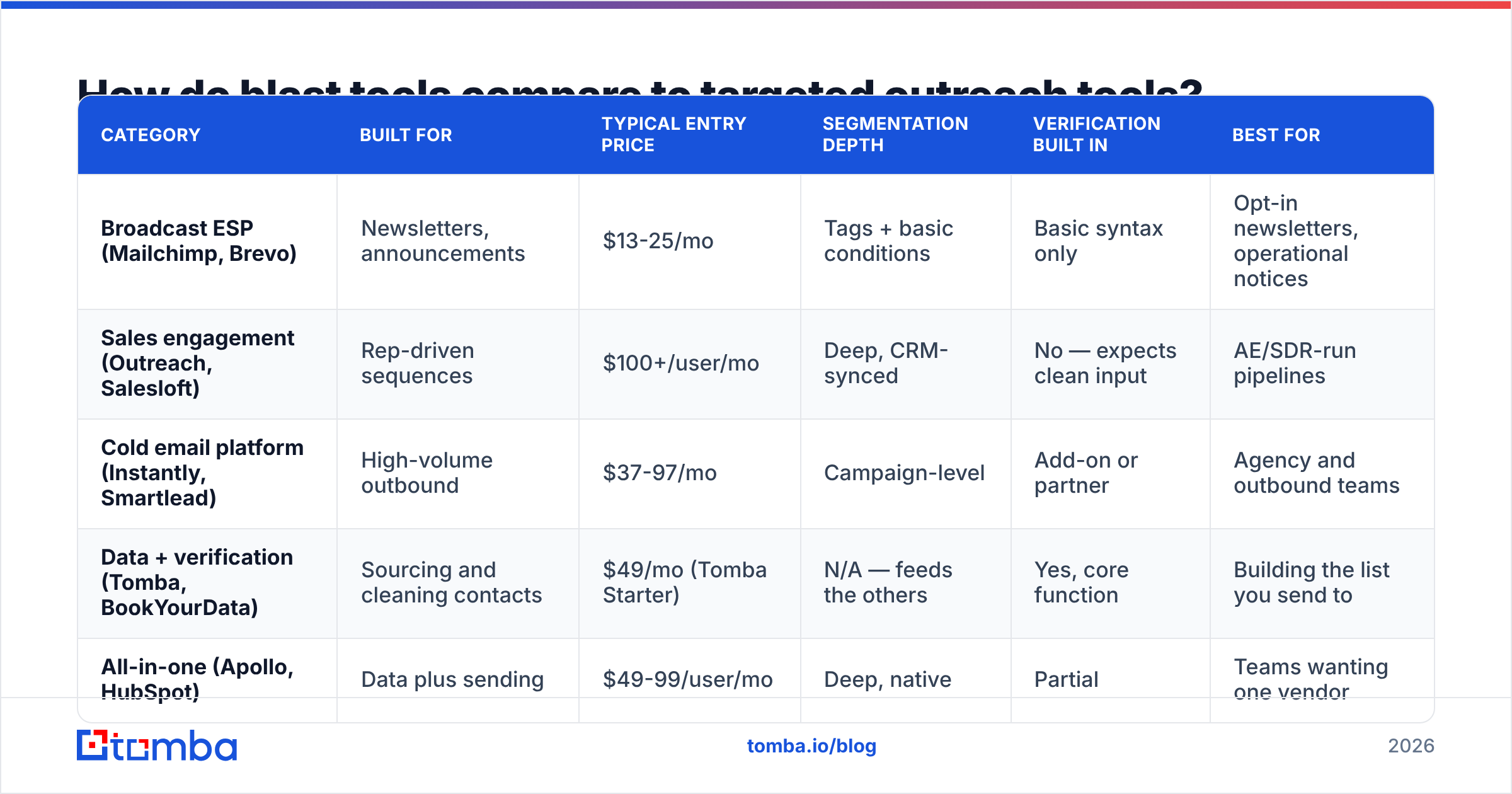
The tooling categories have genuinely diverged. Broadcast ESPs are built for one-to-many; outreach and data platforms are built for one-to-few-thousand with per-record accuracy. Picking the wrong category is how teams end up blasting by accident.
| Category | Built for | Typical entry price | Segmentation depth | Verification built in | Best for |
|---|---|---|---|---|---|
| Broadcast ESP (Mailchimp, Brevo) | Newsletters, announcements | $13-25/mo | Tags + basic conditions | Basic syntax only | Opt-in newsletters, operational notices |
| Sales engagement (Outreach, Salesloft) | Rep-driven sequences | $100+/user/mo | Deep, CRM-synced | No — expects clean input | AE/SDR-run pipelines |
| Cold email platform (Instantly, Smartlead) | High-volume outbound | $37-97/mo | Campaign-level | Add-on or partner | Agency and outbound teams |
| Data + verification (Tomba, BookYourData) | Sourcing and cleaning contacts | $49/mo (Tomba Starter) | N/A — feeds the others | Yes, core function | Building the list you send to |
| All-in-one (Apollo, HubSpot) | Data plus sending | $49-99/user/mo | Deep, native | Partial | Teams wanting one vendor |
The important row is the fourth. Verification and sourcing are upstream of every other category — a sales engagement platform with a 30% invalid list will produce blast-quality results regardless of how good its sequencing is. That's why teams increasingly run a data layer separately from a sending layer, rather than trusting one vendor to do both well. BookYourData, for example, sells verified B2B records outright, while Tomba's email finder and bulk verify workflows build and clean lists from domains you specify. Different acquisition models, same goal: don't send to addresses that don't exist.
For a broader view of the sending-side landscape, G2's email marketing category is a reasonable starting point — filter by company size, since the tools that suit a 5-person team and a 500-person team share almost nothing.
What metrics should replace "emails sent"?#
Kill the reach metric. It measures effort, not outcome. Replace it with four:
- Delivered-to-inbox rate, not delivered rate. Your ESP reports "delivered" when the receiving server accepts the message — including into spam. Use seed testing or Google Postmaster Tools to see where mail actually lands.
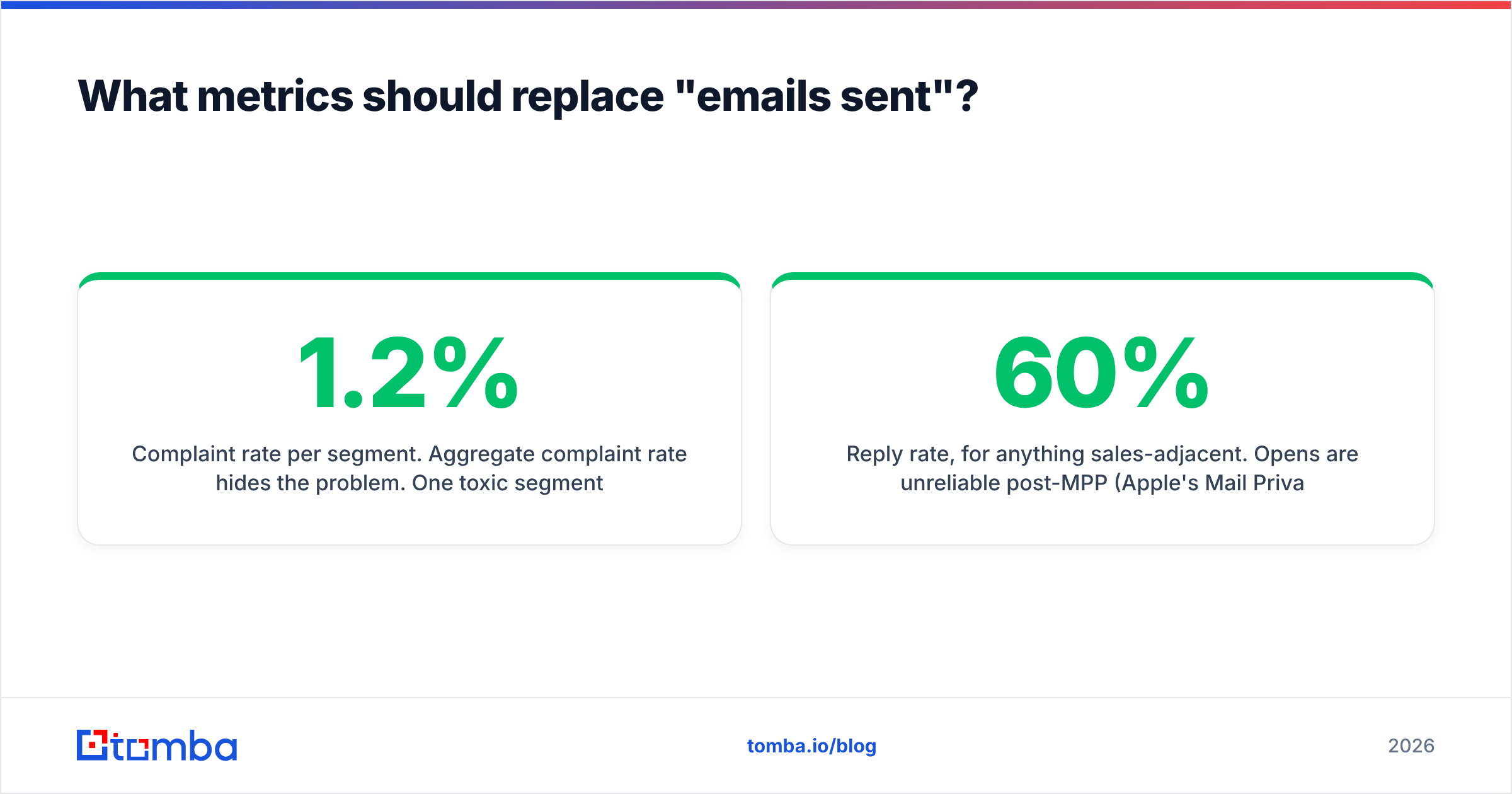
- Complaint rate per segment. Aggregate complaint rate hides the problem. One toxic segment at 1.2% can drag the whole domain down while the average looks fine at 0.25%.
- Reply rate, for anything sales-adjacent. Opens are unreliable post-MPP (Apple's Mail Privacy Protection inflates them roughly 25-60% depending on your audience mix). Replies are hard to fake.
- List health trend. Track your valid-address percentage month over month. If it's falling, your acquisition sources are degrading, and no amount of copy work fixes that.
Two supporting habits: check your sender reputation monthly rather than after a crisis, and confirm your SPF, DKIM, and DMARC records still pass after any change to your sending infrastructure. Authentication failures cause more silent delivery loss than bad copy ever will. Microsoft's sender guidance covers the Outlook side, which behaves differently from Gmail on several thresholds.
What does the transition actually look like in practice?#
A pattern worth copying, from teams that have made the switch:
Month 1 — stop the bleeding. Pause all promotional blasts. Run the full list through verification. Suppress anyone inactive 12+ months. Fix authentication records. Send nothing but transactional mail. Domain reputation typically starts recovering within 3-4 weeks of reduced complaint volume.
Month 2 — rebuild on smaller, better lists. Define your segments. Re-permission the dormant contacts with one honest email ("we'll remove you unless you click"). Expect to lose 40-60% of the dormant pool; that's the point. Start sending to engaged segments only, at low volume, ramping gradually.
Month 3 — scale what works. Add segments back one at a time, watching complaint rate per segment. Anything above 0.15% gets pulled and diagnosed rather than tolerated.
The uncomfortable part is month 1, when your reach number drops by 70% and someone asks why. The answer: you weren't reaching those people anyway — you were reaching their spam folders, and paying for the privilege with your domain's reputation.
Teams that build their lists intentionally rather than accumulating them tend not to need this reset at all. If you're sourcing new contacts, pulling verified addresses by company through domain search produces a fundamentally different list than an exported CRM dump — smaller, targeted, and valid at send time rather than valid whenever it was captured.
The bottom line#
Email blasts aren't a moral failure, they're a mismatch. They're an operational tool — built for announcements everyone needs — being used as a commercial tool for offers most people don't want. Mailbox providers have spent the last three years making that mismatch expensive, and the price only goes up from here.
Keep the blast for outages and legal notices. For everything else, send less mail to better addresses.
If your list is the weak link, start there. Tomba's Email Finder sources verified professional addresses by domain, name, or company, so the list you're segmenting is valid before it ever hits your ESP — not discovered to be invalid three campaigns later when your bounce rate has already cost you the inbox. The free tier covers 25 searches a month; paid plans start at $49/mo, with full Tomba pricing laid out if you're sizing a larger migration.
Related guides#
Ready to find emails that actually work?
Join 150,000+ professionals who stopped guessing and started sending. Free credits on signup — no credit card required.
Get the Tomba newsletter
Practical outbound tactics and product updates — once every two weeks.
About the author