Email Bounce Explained: Hard vs Soft Bounces and How to Fix Them
A single email bounce is not one lost lead — it is a vote against your sending domain. Here is what actually causes hard and soft bounces, how mailbox providers score them, and how to get your rate under 2%.
TL;DR
- An email bounce is a rejection notice from the recipient's mail server. Hard bounces are permanent (address doesn't exist), soft bounces are temporary (full mailbox, server down, throttling).
- Mailbox providers treat your bounce rate as a proxy for how you built your list. Above roughly 2%, deliverability starts sliding; above 5%, most ESPs will pause or suspend your account.
- The SMTP reply code in the bounce message tells you exactly what happened — 5xx is permanent, 4xx is retryable. Read the code, not just the "delivery failed" subject line.
- Catch-all domains are the blind spot: they accept everything at the SMTP handshake and silently discard invalid addresses later, so bounces show up as fake "delivered" numbers.
- The fix is boring and it works: verify before you send, suppress hard bounces immediately, retry soft bounces on a schedule, and re-verify any list older than 90 days.
What is an email bounce?#
An email bounce is the mail equivalent of a returned letter with a stamp on it explaining why. You hand your message to a receiving server, the server refuses it, and it sends back a Non-Delivery Report (NDR) — also called a bounce message — describing the refusal.
That NDR is not a vague complaint. It carries a three-digit SMTP reply code plus an enhanced status code defined in RFC 3463, which is the machine-readable reason. 550 5.1.1 means the mailbox doesn't exist. 452 4.2.2 means the mailbox is full right now. Same word — "bounce" — completely different action required.
Here is the part most teams miss: a bounce is not a private event between you and one recipient. Gmail, Outlook, and Yahoo all log how often your domain sends to addresses that don't exist. High invalid-address rates are one of the strongest signals that a sender is working from scraped or purchased data, because legitimate senders who collect their own contacts simply don't accumulate that many dead mailboxes. So each bounce is a small deposit into a reputation account you'd rather keep in credit.
What's the difference between a hard bounce and a soft bounce?#
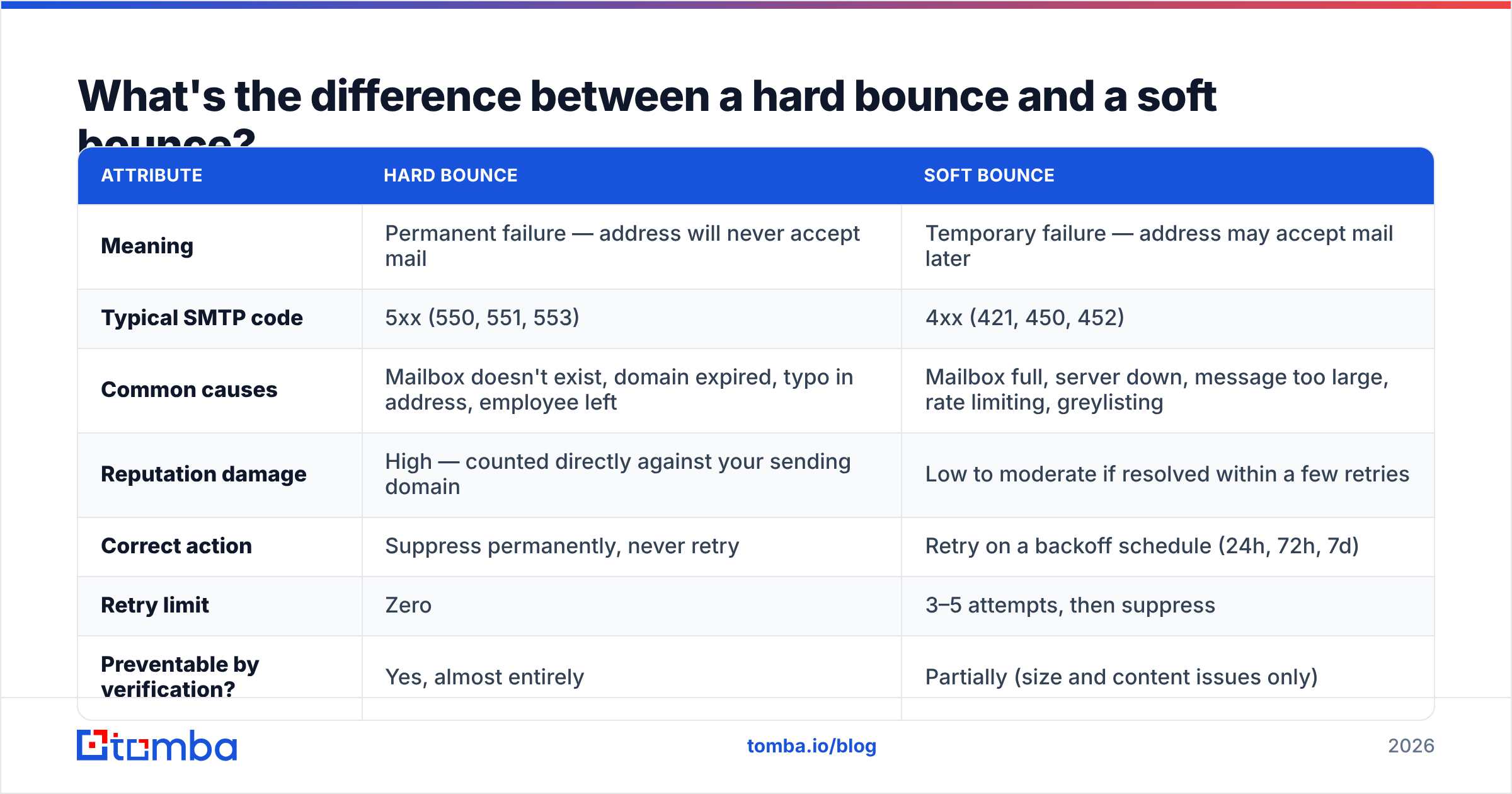
The split matters because the correct response is opposite in each case. A hard bounce means stop forever. A soft bounce means try again later. Treating a soft bounce as permanent throws away real prospects; treating a hard bounce as temporary is how you get suspended.
| Attribute | Hard bounce | Soft bounce |
|---|---|---|
| Meaning | Permanent failure — address will never accept mail | Temporary failure — address may accept mail later |
| Typical SMTP code | 5xx (550, 551, 553) | 4xx (421, 450, 452) |
| Common causes | Mailbox doesn't exist, domain expired, typo in address, employee left | Mailbox full, server down, message too large, rate limiting, greylisting |
| Reputation damage | High — counted directly against your sending domain | Low to moderate if resolved within a few retries |
| Correct action | Suppress permanently, never retry | Retry on a backoff schedule (24h, 72h, 7d) |
| Retry limit | Zero | 3–5 attempts, then suppress |
| Preventable by verification? | Yes, almost entirely | Partially (size and content issues only) |
Two nuances worth knowing:
- Some 5xx codes are not about the address at all.
550 5.7.1frequently means "message rejected by policy" — a content filter, a blocklisted IP, or a failed SPF record check. Suppressing that contact is the wrong move; fixing your authentication is. - Repeated soft bounces harden. Most ESPs promote an address to the hard-bounce list after a set number of consecutive soft failures. A mailbox that's been full for three weeks is functionally dead.
- Blocks are a third category. Many platforms report "blocked" separately from "bounced." A block usually means the receiving server recognized your IP or domain as a problem sender. Zero of those are fixed by list hygiene — they're fixed by warming up, authenticating, and slowing down.
- Auto-replies are not bounces. Out-of-office responses come back through a different path and should never enter your suppression logic. Some naive parsers get this wrong and quietly kill good contacts.
What causes most email bounces in B2B outreach?#
In consumer email marketing, bounces are usually typos and abandoned free mailboxes. In B2B, the causes are structural and more predictable:
- Job change churn. B2B contact data decays at roughly 25–30% per year because people change roles, companies restructure, and mailboxes get deprovisioned. A list you built in January is measurably worse in July.
- Guessed patterns. Tools that infer
first.last@company.comwithout confirming it against a real source will be right often enough to feel useful and wrong often enough to wreck your domain. - Domain changes and acquisitions. A company rebrands or gets acquired, and the old MX records stop accepting mail. Every contact at that company hard bounces at once — which is a nasty spike, not a slow drift.
- Role-based addresses.
info@,sales@, andsupport@often exist but route to shared inboxes with aggressive filtering, so you get blocks and complaints rather than replies. - Aggressive scraping. Addresses pulled from web pages include obfuscated, expired, and honeypot addresses. Spam traps in particular are recycled dead mailboxes that mailbox providers monitor specifically to catch senders who never clean their lists.
Google's own sender guidelines are explicit that bulk senders must keep spam rates low and validate their lists — and Gmail's Postmaster Tools dashboard will show you exactly how your domain reputation is trending once you're sending at volume.
What is a good email bounce rate in 2026?#
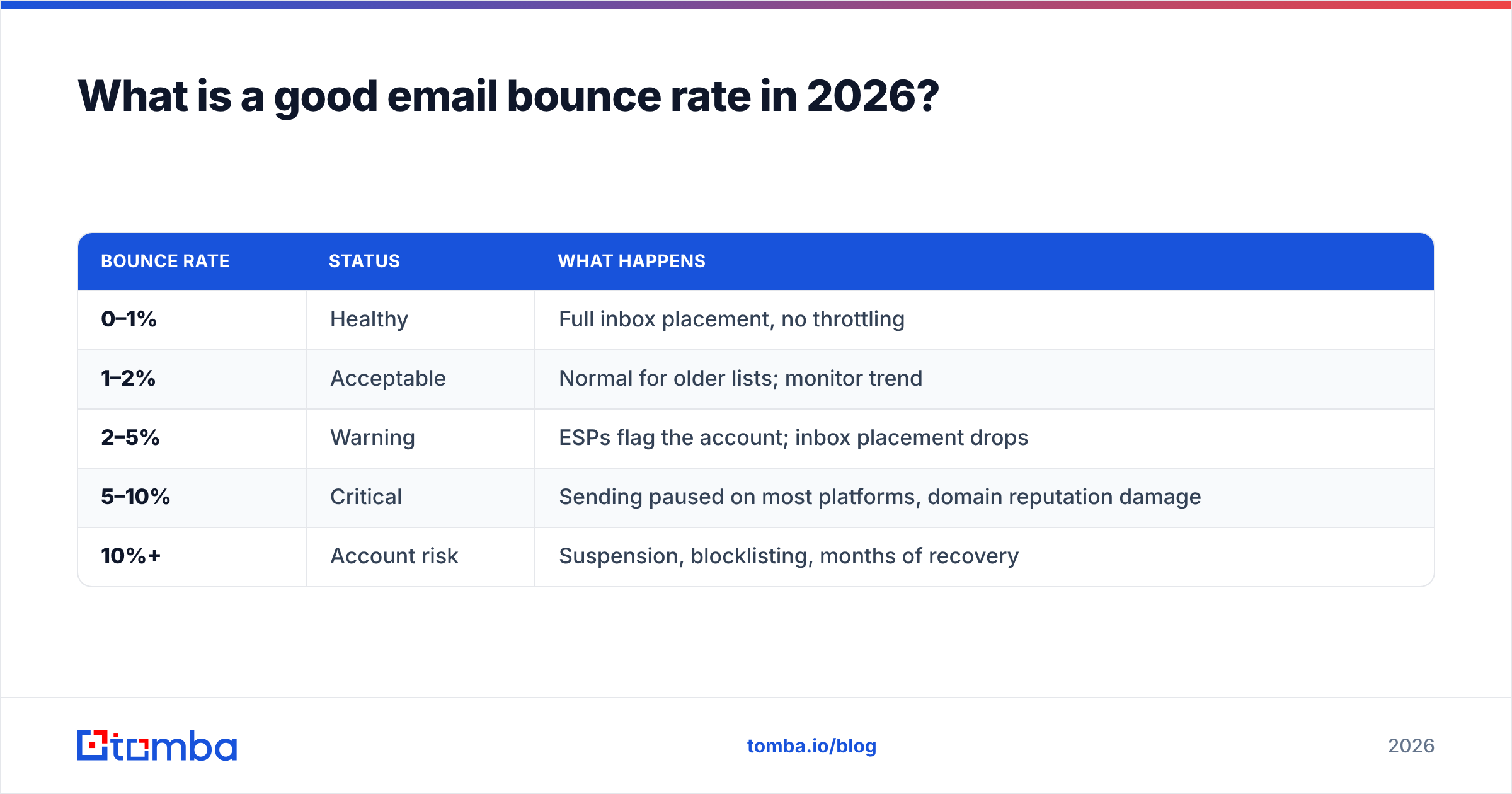
Under 2% is the working target. Under 1% is what a properly verified list looks like. Here's how the thresholds map to real consequences:
| Bounce rate | Status | What happens |
|---|---|---|
| 0–1% | Healthy | Full inbox placement, no throttling |
| 1–2% | Acceptable | Normal for older lists; monitor trend |
| 2–5% | Warning | ESPs flag the account; inbox placement drops |
| 5–10% | Critical | Sending paused on most platforms, domain reputation damage |
| 10%+ | Account risk | Suspension, blocklisting, months of recovery |
Two caveats on that table. First, the rate that matters is the hard bounce rate — a 4% total that is mostly greylisting on a new domain is a different problem than a 4% total that is all 550 5.1.1. Second, rate hides volume. Two hundred hard bounces out of 10,000 sends is 2% and looks fine on a dashboard, but 200 invalid addresses in one campaign is a strong "this list was not built by us" signal to a receiving server.
How do you actually reduce your bounce rate?#
The order of operations matters more than any individual tactic.
1. Verify before the address enters your sequencer, not after. Verification is cheap; a burned domain is not. Run every new contact through an email verifier at the point of import. Real-time SMTP validation catches non-existent mailboxes before your sending domain ever touches them.
2. Handle catch-all domains explicitly. A catch-all server accepts mail for any address at the domain, then decides internally whether to deliver or silently drop it. Standard verification returns "accept-all" and stops there. That's why a dedicated catch-all verifier matters for enterprise prospecting — a large share of mid-market and enterprise domains are catch-all, and treating them all as valid inflates your apparent deliverability while your real reply rate craters.
3. Suppress hard bounces the same day. Not at the end of the campaign. Not at the end of the month. A hard-bounced address that receives a second send is a self-inflicted wound, and sequencers that keep firing follow-ups at dead mailboxes are the single most common cause of bounce-rate spirals.
4. Set a retry policy for soft bounces. Three attempts spaced 24 hours, 72 hours, and 7 days out. After that, suppress. Full mailboxes rarely un-fill.
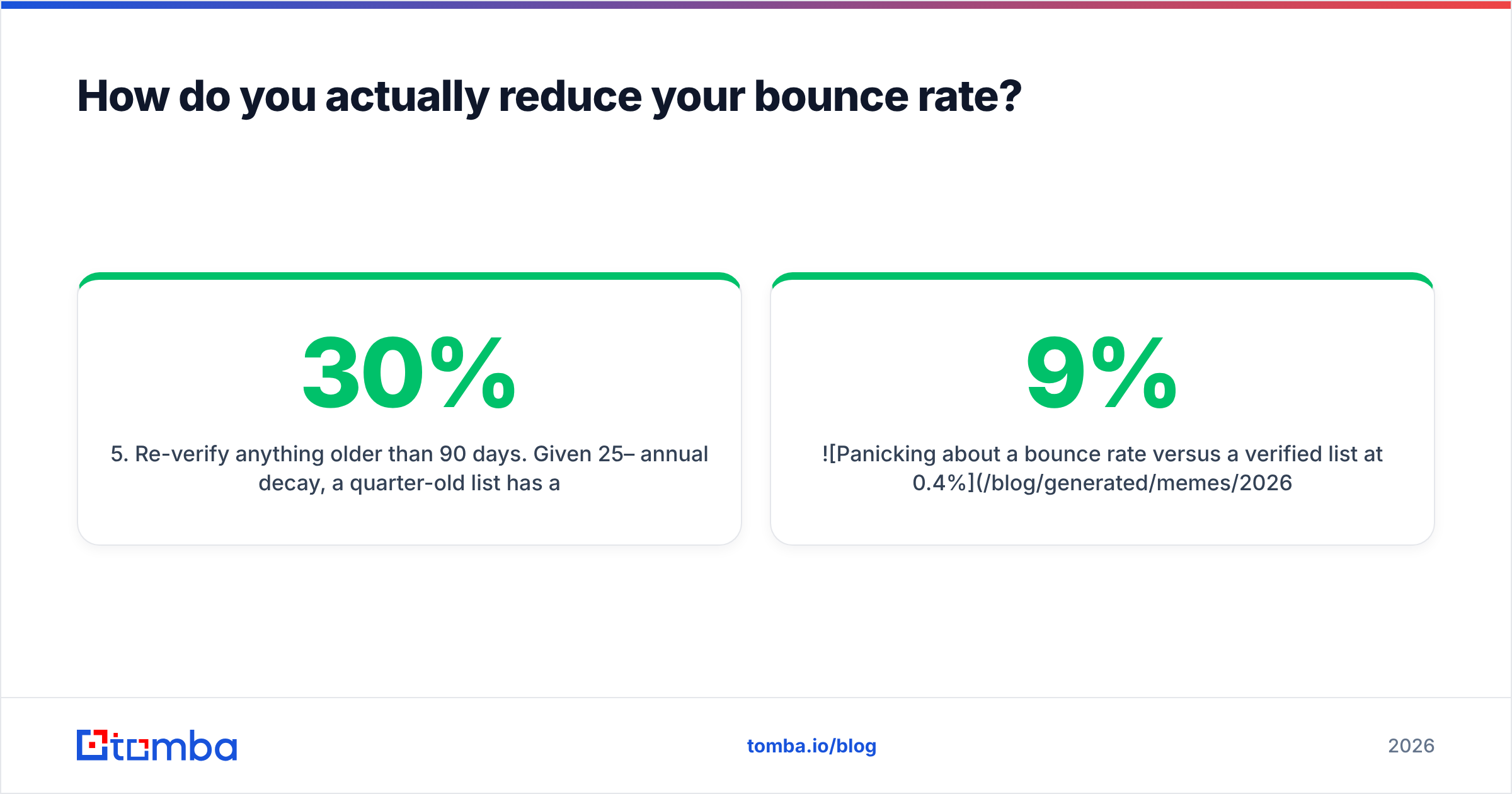
5. Re-verify anything older than 90 days. Given 25–30% annual decay, a quarter-old list has already lost several percent of its addresses. Running a bulk verify pass before a big campaign takes minutes and prevents the spike.
6. Fix authentication before blaming the list. SPF, DKIM, and DMARC all aligned. Policy rejections show up as bounces and get misdiagnosed as data quality problems constantly. If your bounce reasons are heavy on 5.7.x codes, the problem is your setup, not your contacts.
7. Warm new domains slowly. A brand-new sending domain that opens with 500 emails a day will collect throttling soft bounces regardless of list quality. Ramp over two to four weeks.

How do verification approaches compare?#
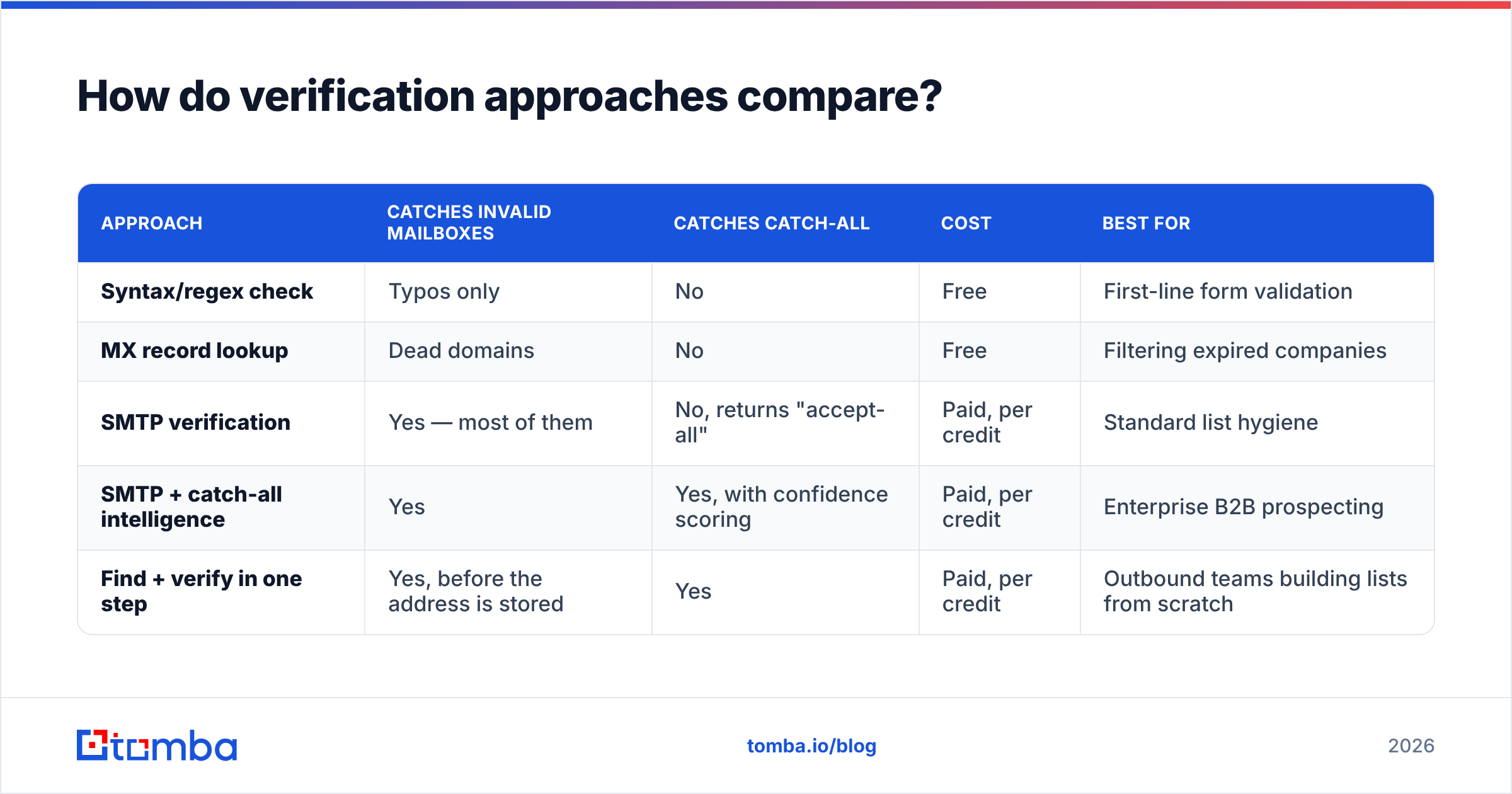
Not all prevention is equal. These are the four approaches teams actually use, and what each one is worth:
| Approach | Catches invalid mailboxes | Catches catch-all | Cost | Best for |
|---|---|---|---|---|
| Syntax/regex check | Typos only | No | Free | First-line form validation |
| MX record lookup | Dead domains | No | Free | Filtering expired companies |
| SMTP verification | Yes — most of them | No, returns "accept-all" | Paid, per credit | Standard list hygiene |
| SMTP + catch-all intelligence | Yes | Yes, with confidence scoring | Paid, per credit | Enterprise B2B prospecting |
| Find + verify in one step | Yes, before the address is stored | Yes | Paid, per credit | Outbound teams building lists from scratch |
The last row is the one that changes your workflow rather than just patching it. If addresses are validated at discovery — when you run a domain search against a target company, or enrich a list of names — invalid data never reaches your CRM in the first place. You stop running cleanup campaigns because there's nothing to clean.
That distinction shows up in the pricing math too. Verifying a purchased 10,000-row list costs credits and discards maybe 30% of what you paid for. Building 7,000 verified contacts directly costs credits once. Tomba's plans start free at 25 searches per month, with Starter at $49/mo, Growth at $99/mo, and Pro at $249/mo — full Tomba pricing covers where find and verify credits sit on each tier.
How do you read a bounce message?#
Open the raw NDR and look for three things:
- The SMTP reply code. First digit tells you everything: 5 = permanent, 4 = temporary, 2 = accepted.
- The enhanced status code.
5.1.1(no such user),5.2.2(mailbox full — yes, sometimes reported as permanent),5.7.1(policy rejection),4.7.0(temporary policy, often greylisting or rate limiting). - The reporting MTA. If the bounce came from your own outbound server rather than the recipient's, the message never left your infrastructure — that's a configuration issue.
A quick triage rule: if more than a third of your bounces are 5.7.x, stop cleaning your list and audit authentication instead. If they're overwhelmingly 5.1.1, your data source is the problem. If they're 4.x and clustered on a single receiving domain, that domain is throttling you and you should slow your send rate to it.
What does a healthy sending workflow look like?#
Put together, the sequence is short:
- Source contacts from a system that validates at discovery rather than guessing patterns.
- Verify every address, with explicit handling for catch-all domains.
- Segment by confidence score — send to high-confidence addresses first on any new domain.
- Monitor bounce reasons by code, not just the aggregate rate.
- Suppress hard bounces immediately and permanently.
- Re-verify quarterly, and always before a large campaign.
None of this is clever. It's just the difference between a domain that lands in the inbox in month eighteen and one that quietly stopped working in month four. If you want a deeper primer on the surrounding metrics, the email deliverability entry in the glossary covers how bounce rate interacts with complaint rate and sender reputation.
Where to start#
If your bounce rate is above 2% today, the fastest fix is upstream: stop importing addresses you haven't confirmed. Run your current active list through verification, suppress every hard bounce, and change how new contacts enter the system.
The Tomba Email Finder is built for that last step — it finds professional email addresses by domain, name, or company and validates them at the point of discovery, so the contacts that reach your sequencer are ones a real mail server has already acknowledged. Start on the free tier with 25 searches a month, check the bounce rate on your next campaign, and scale up only when the numbers hold.
Related guides#
Ready to find emails that actually work?
Join 150,000+ professionals who stopped guessing and started sending. Free credits on signup — no credit card required.
Get the Tomba newsletter
Practical outbound tactics and product updates — once every two weeks.
About the author