Email Bounce Handling: The Complete 2026 Playbook for Senders
Bounces are not a cleanup task you do after a campaign — they are a live signal about your sender reputation. Here's how to classify, suppress, and prevent them before mailbox providers throttle you.

TL;DR
- Email bounce handling starts with one idea: a bounce is a mailbox provider telling you something about your data quality. Hard bounces mean the address does not exist. Soft bounces mean it exists but could not take mail right now.
- Keep your total bounce rate under 2%. Above 3%, Google and Microsoft start throttling. Above 5%, most ESPs will suspend the account.
- Suppress hard bounces permanently on the first failure. Retry soft bounces on a decay schedule, then suppress after 3-5 consecutive failures.
- The SMTP response code is the whole story — parse it, log it, and route on it. "Bounced" as a single boolean is useless.
- Most bounce handling happens too late. Verifying addresses before send removes 90%+ of avoidable hard bounces.
Email bounce handling is where deliverability quietly dies. Nobody sets out to send to dead addresses. But lists decay at roughly 22-30% a year as people change jobs, companies get acquired, and IT teams retire mailboxes. If you are not classifying and suppressing bounces, your list is rotting faster than you clean it.
This guide covers what bounces are at the protocol level, how to classify them, what thresholds matter in 2026, and how to build a suppression system that keeps you out of the spam folder.
What is an email bounce, exactly?#
A bounce is a non-delivery report (NDR). Your sending server hands a message to the recipient's mail server. That server either accepts it or rejects it with a numeric response code. If it rejects, you get a bounce back — either right away (during the SMTP conversation) or later, as a DSN to your Return-Path address.
Think of it like sending a physical letter. A hard bounce is "no such address, returned to sender." A soft bounce is "mailbox full, we'll try again tomorrow." Same envelope, very different meaning. Treating them the same way is the most common mistake in outbound programs.
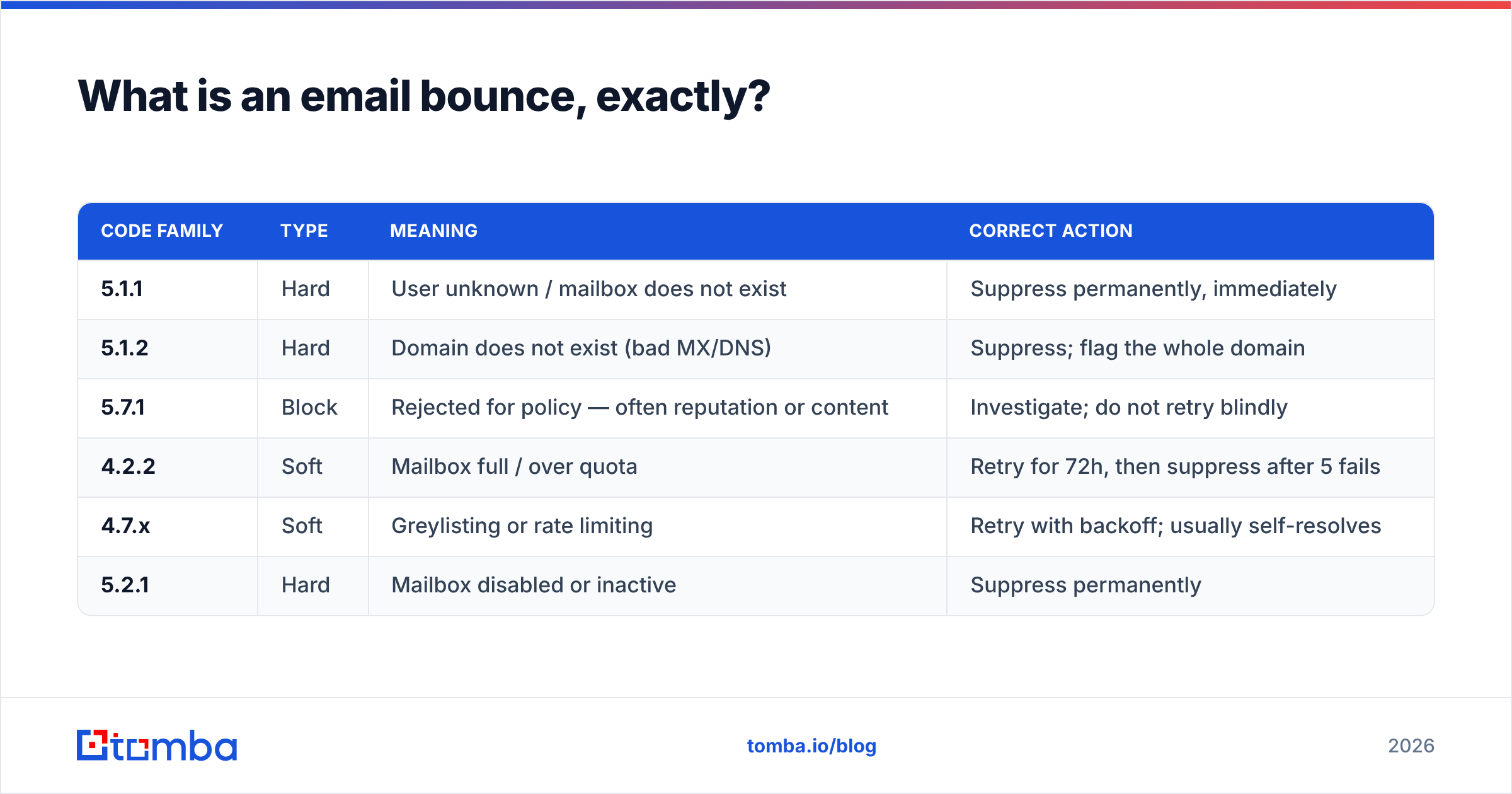
The classification lives in the SMTP status code:
| Code family | Type | Meaning | Correct action |
|---|---|---|---|
| 5.1.1 | Hard | User unknown / mailbox does not exist | Suppress permanently, immediately |
| 5.1.2 | Hard | Domain does not exist (bad MX/DNS) | Suppress; flag the whole domain |
| 5.7.1 | Block | Rejected for policy — often reputation or content | Investigate; do not retry blindly |
| 4.2.2 | Soft | Mailbox full / over quota | Retry for 72h, then suppress after 5 fails |
| 4.7.x | Soft | Greylisting or rate limiting | Retry with backoff; usually self-resolves |
| 5.2.1 | Hard | Mailbox disabled or inactive | Suppress permanently |
Notice the split: 4.x.x is temporary, 5.x.x is permanent. That first digit is the most valuable byte in your deliverability stack. Most teams throw it away by storing bounces as a yes/no flag.
A third category trips people up: block bounces. A 5.7.1 is technically permanent, but it is usually not about the recipient. It is about you. Your IP is on a blocklist, your SPF record fails, or the content matched a filter. Suppressing the address is the wrong fix. Fixing your sending setup is.
Why does bounce rate matter more than open rate?#
Because mailbox providers use it as a primary spam signal. And unlike open rate, it is not inflated by privacy proxies.
Gmail watches senders that repeatedly hit nonexistent addresses. The inference is obvious: this sender does not know who their recipients are. That means the list was scraped, purchased, or never cleaned — textbook spammer behavior. Google's bulk sender guidelines make reputation-based filtering explicit. Microsoft's Outlook filtering works much the same way.
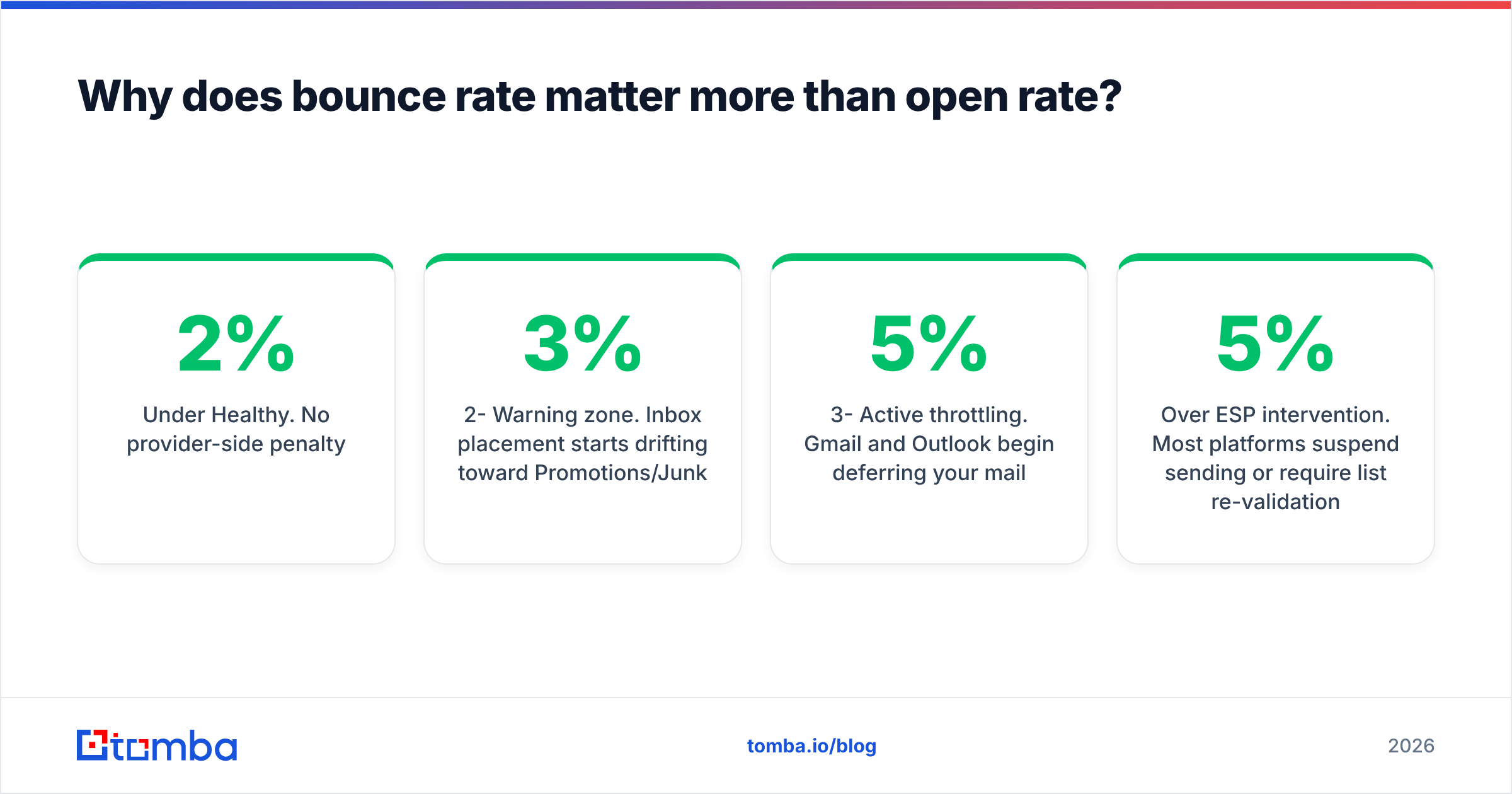
Here are the thresholds that actually govern outcomes in 2026:
| Bounce rate | What happens |
|---|---|
| Under 2% | Healthy. No provider-side penalty. |
| 2-3% | Warning zone. Inbox placement starts drifting toward Promotions/Junk. |
| 3-5% | Active throttling. Gmail and Outlook begin deferring your mail. |
| Over 5% | ESP intervention. Most platforms suspend sending or require list re-validation. |
| Over 10% | Domain reputation damage that takes weeks of warmup to repair. |
The compounding problem: bounces do not just cost you the bounced sends. They drag down placement for every valid address in the same campaign. A 6% bounce rate on a 10,000-address send does not fail 600 emails. It degrades the inbox odds of the remaining 9,400.
Track it alongside sender reputation rather than as a standalone metric. A 1.5% bounce rate with a clean complaint rate is fine. The same 1.5% next to a 0.4% spam complaint rate means something structural is wrong with your targeting.
How should you classify and route each bounce type?#
Build a decision tree, not a flag. Here is the routing logic that holds up in production:
Parse the SMTP code, not the human-readable text. Bounce wording varies wildly between providers — "User unknown," "Recipient address rejected," "550 5.1.1 The email account that you tried to reach does not exist." The code is the stable part. Regex the
X.Y.Zenhanced status code first, then fall back to the three-digit reply code.Suppress 5.1.x and 5.2.1 on the first occurrence. No retries, no grace period. The address does not exist and will not start existing. Write it to a global suppression list that every campaign checks before send.
Retry 4.x.x on exponential backoff. 15 minutes, 1 hour, 6 hours, 24 hours, 72 hours. Greylisting resolves on retry #1 or #2. Full mailboxes often clear within a week.
Suppress soft bounces after 3-5 consecutive failures across separate campaigns. A mailbox that has been full for three weeks is functionally dead. Reset the counter on any successful delivery.
Quarantine 5.7.x for human review. These are policy blocks. If you see a spike, the problem is your authentication, your IP, or your content. Check your SPF record and run a blocklist check before you touch the list.
Track domain-level patterns. If 40% of bounces come from one domain, you probably have a bad email pattern for that company, not 40 bad contacts. Re-derive the format with a domain search instead of deleting the records.
That last point is worth dwelling on. Teams routinely delete good prospects over a guess. They tried first.last@company.com when the company uses flast@company.com. The contact is real; the address was wrong. Good routing tells "bad person" apart from "bad guess."
What is the difference between reactive and preventive email bounce handling?#
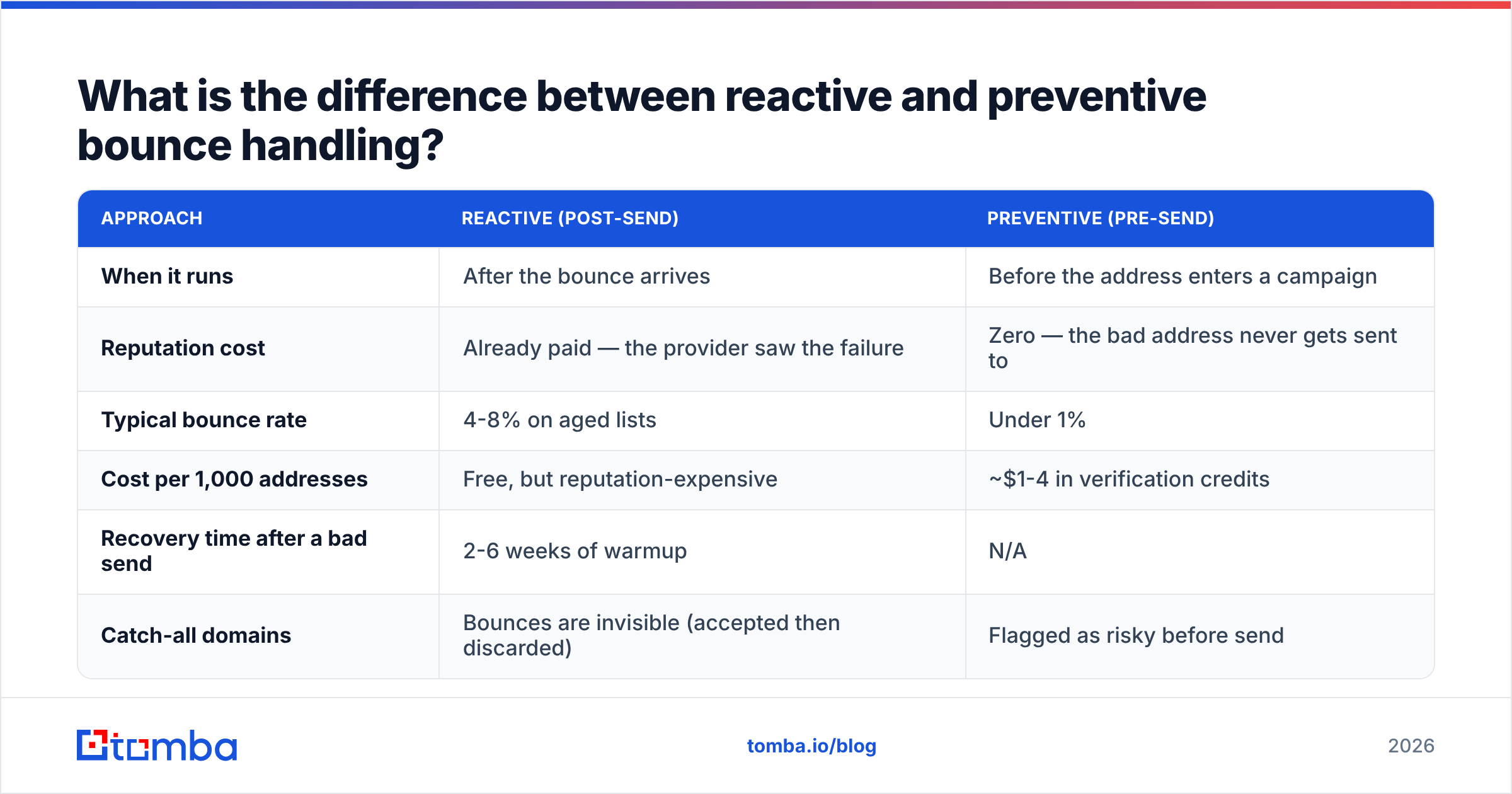
Reactive handling is damage control. Preventive handling is the actual solution.
| Approach | Reactive (post-send) | Preventive (pre-send) |
|---|---|---|
| When it runs | After the bounce arrives | Before the address enters a campaign |
| Reputation cost | Already paid — the provider saw the failure | Zero — the bad address never gets sent to |
| Typical bounce rate | 4-8% on aged lists | Under 1% |
| Cost per 1,000 addresses | Free, but reputation-expensive | ~$1-4 in verification credits |
| Recovery time after a bad send | 2-6 weeks of warmup | N/A |
| Catch-all domains | Bounces are invisible (accepted then discarded) | Flagged as risky before send |
The economics are not close. A verification pass costs a few dollars per thousand records. A week of throttled inbox placement across your whole domain costs pipeline.
Preventive handling has three layers:
- Validation at capture. Syntax and MX checks on form submission. Catches typos (
gmial.com) before they ever hit your database. - Verification before send. Real-time SMTP-level checks against the receiving server. This is where an email verifier earns its keep — it asks the recipient server whether the mailbox exists without delivering a message.
- Re-verification on schedule. Any address older than 90 days should be re-checked before a campaign. B2B data decays fastest. A 6-month-old list of job-title-targeted contacts can be 15% stale.

How do you handle catch-all domains?#
Catch-all domains are the hardest case, and they are common in B2B. Plenty of mid-market companies set their mail server to accept everything at the domain rather than reject unknown recipients.
The problem: a catch-all server returns 250 OK for definitely.not.real@company.com. You get no bounce, so your bounce rate looks great. But the message lands nowhere, or in an unmonitored catch-all inbox. Your engagement metrics quietly collapse and you have no idea why.
Handling them properly:
- Do not treat "accepted" as "valid" on a catch-all domain. Flag them as a separate status:
riskyoraccept-all, nevervalid. - Use pattern confidence instead of SMTP confirmation. Say you know the company uses
first.last@, and the contact is confirmed to work there. A pattern-derived address on a catch-all domain is then a reasonable bet. A guessed address is not. - Segment catch-alls into their own sends. Keep them off your primary sending domain until they have engaged once. A dedicated catch-all verifier that cross-references pattern data and third-party signals beats a raw SMTP probe here.
- Watch engagement, not bounces, as the health signal. For catch-all segments, a 0% reply rate over 200 sends is your bounce equivalent.

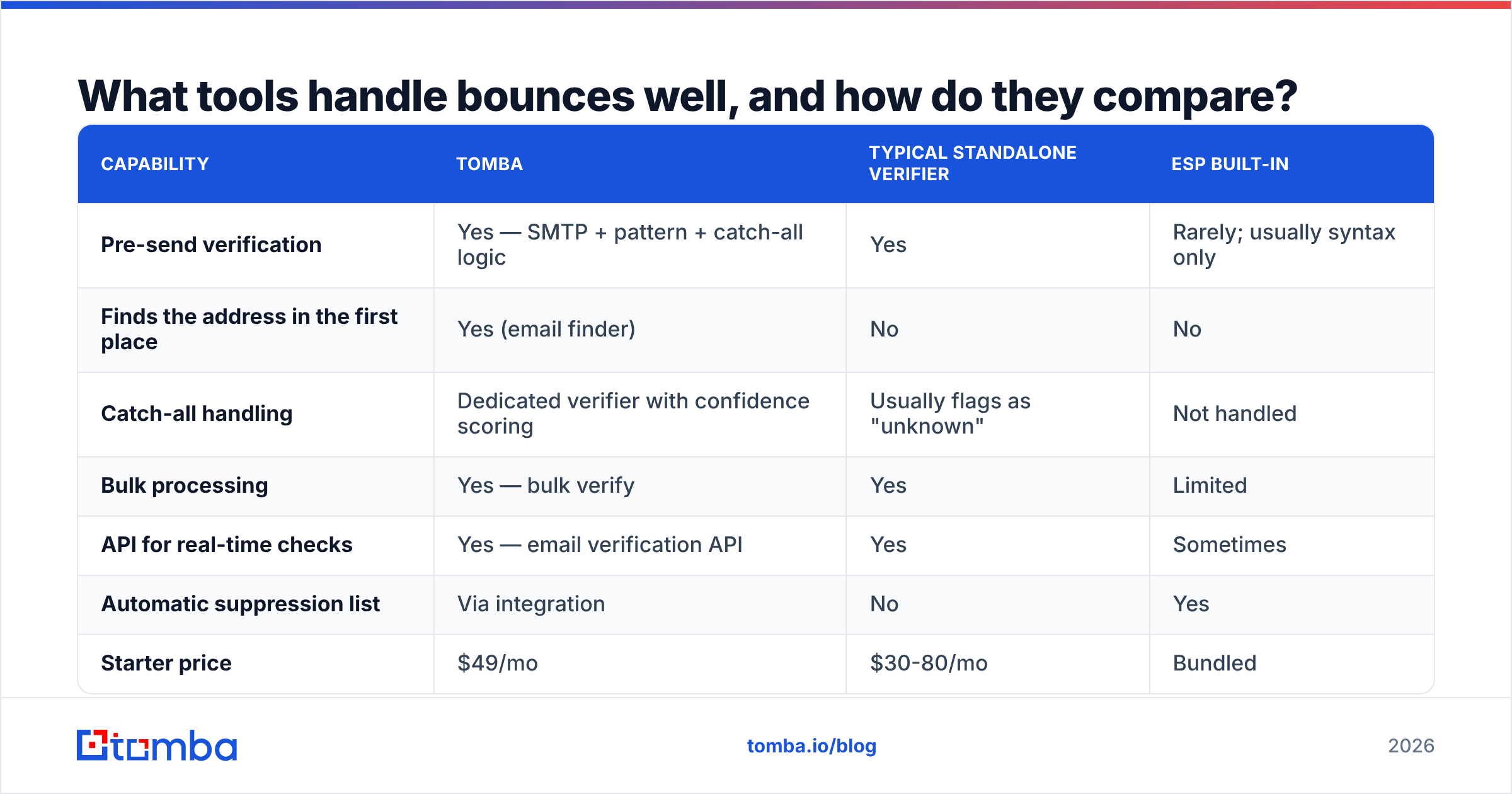
What tools handle bounces well, and how do they compare?#
Bounce handling spans three tool categories: verifiers (pre-send), sending platforms (bounce capture and suppression), and data providers (source quality). Most teams need at least two.
| Capability | Tomba | Typical standalone verifier | ESP built-in |
|---|---|---|---|
| Pre-send verification | Yes — SMTP + pattern + catch-all logic | Yes | Rarely; usually syntax only |
| Finds the address in the first place | Yes (email finder) | No | No |
| Catch-all handling | Dedicated verifier with confidence scoring | Usually flags as "unknown" | Not handled |
| Bulk processing | Yes — bulk verify | Yes | Limited |
| API for real-time checks | Yes — email verification API | Yes | Sometimes |
| Automatic suppression list | Via integration | No | Yes |
| Starter price | $49/mo | $30-80/mo | Bundled |
| Free tier | 25 searches/mo | Varies (50-100 credits typical) | N/A |
A few honest notes on the landscape. If you only need verification and already have a clean source of addresses, a dedicated verifier like ZeroBounce or Bouncer does the job fine. If you need contacts and verification in one flow, a combined finder/verifier removes a hand-off step and a second vendor bill. And if your bottleneck is sourcing verified B2B contacts rather than cleaning old ones, a curated database such as BookYourData is a legitimate path. Buying pre-verified records can beat verifying a decayed list you scraped yourself.
For suppression mechanics, your sending platform matters more than your verifier. Check that it writes hard bounces to a global suppression list automatically. Check that it exposes the raw SMTP code via API or webhook. And check that it separates block bounces from address bounces. Platforms that collapse everything into "bounced" force you to rebuild the classification yourself. You can compare vendor documentation on G2 before committing.

What does a working email bounce handling workflow look like?#
Here is the end-to-end sequence that keeps a B2B sending program under 1% bounce rate:
Before the campaign
- Pull the segment. Filter out anything already on the suppression list.
- Check record age. Anything verified more than 90 days ago goes to re-verification.
- Run bulk verification. Split results into
valid,risky/catch-all, andinvalid. - Drop
invalidentirely. Routeriskyto a separate sending domain or a lower-volume sequence. - Confirm authentication is intact — SPF, DKIM, DMARC all passing. A misconfigured record turns valid addresses into 5.7.1 blocks.
During the campaign
- Cap daily volume per sending mailbox. Ramping too fast produces 4.7.x rate-limit soft bounces. Those look like a data problem but are a volume problem.
- Monitor bounce rate in real time, not post-mortem. Set an automatic pause at 2%.
After the campaign
- Ingest bounce webhooks. Parse the enhanced status code.
- Route per the decision tree above: permanent suppress, retry queue, or human review.
- Feed domain-level patterns back into your data process. Repeated failures at one company mean the pattern is wrong, not the people.
- Log everything. Six months from now you want to answer "what was our 5.1.1 rate by source." That is how you find the vendor or scraper polluting your database.
One more discipline pays off: keep a seed list. Use ten mailboxes you control across Gmail, Outlook, and a corporate domain, and include them in every send. When bounce rate is fine but seeds land in Junk, you have a reputation problem, not a data problem. That distinction saves days of chasing the wrong fix. It also pairs well with tracking email deliverability as its own metric rather than a byproduct of open rate.
What should you do first?#
If your bounce rate is above 3% right now, stop sending to the affected list. Re-verify it before your next campaign. That single action recovers more inbox placement than any subject-line rewrite ever will.
Then move the work upstream. Bounce handling is only reactive because address collection was careless. Source verified addresses at the point of discovery instead of guessing patterns and letting the mailbox provider grade your homework. That is what takes a program from 5% bounces to under 1%.
The Tomba Email Finder finds professional addresses by domain, name, or company. Every result comes back with a verification status, so bad addresses never reach your sequence. Start on the free tier with 25 searches a month, or check Tomba pricing — Starter is $49/mo — if you are cleaning up at volume.
Related guides#
Ready to find emails that actually work?
Join 150,000+ professionals who stopped guessing and started sending. Free credits on signup — no credit card required.
Get the Tomba newsletter
Practical outbound tactics and product updates — once every two weeks.
About the author