Email Bounce Rate: How to Calculate, Diagnose, and Fix It
Your bounce rate is the fastest signal that something is wrong with your list or your sending setup. Here's how to calculate it, what counts as normal in 2026, and the fixes that actually move the number.
TL;DR
- Email bounce rate = (bounced emails ÷ emails sent) × 100. Anything above 2% is a warning sign; above 5% and mailbox providers start throttling you.
- Hard bounces are permanent (address doesn't exist) and are the ones that wreck your sender reputation. Soft bounces are temporary (full inbox, server down) and matter far less.
- Roughly 70% of high bounce rates trace back to list quality, not infrastructure — stale data, scraped lists, and unverified imports.
- Verification before send is the single highest-leverage fix. It typically takes a 9-12% bounce rate down under 2% in one pass.
- Authentication (SPF, DKIM, DMARC), gradual volume ramps, and quarterly list hygiene handle most of what's left.
What is email bounce rate?#
Email bounce rate is the percentage of the emails you sent that were returned undelivered by the receiving mail server. Think of it like posting physical letters: a bounce is the envelope coming back stamped "no such address" or "recipient moved." The postal service doesn't care once or twice — but if half your mail comes back, they start treating everything you post as suspect.
The formula is simple:
Bounce rate = (total bounced emails / total emails sent) × 100Send 5,000 emails, get 140 back undelivered, and your bounce rate is 2.8%.
What makes bounce rate matter more than most metrics is that it's a leading indicator. Open rates and reply rates tell you whether your message landed well. Bounce rate tells you whether your entire sending program is about to stop working. Mailbox providers — Gmail, Outlook, Yahoo — use bounce rate as a proxy for "does this sender know who they're emailing?" A sender with a 12% bounce rate looks like someone working from a purchased list, and gets filtered accordingly.
What is the difference between hard and soft bounces?#
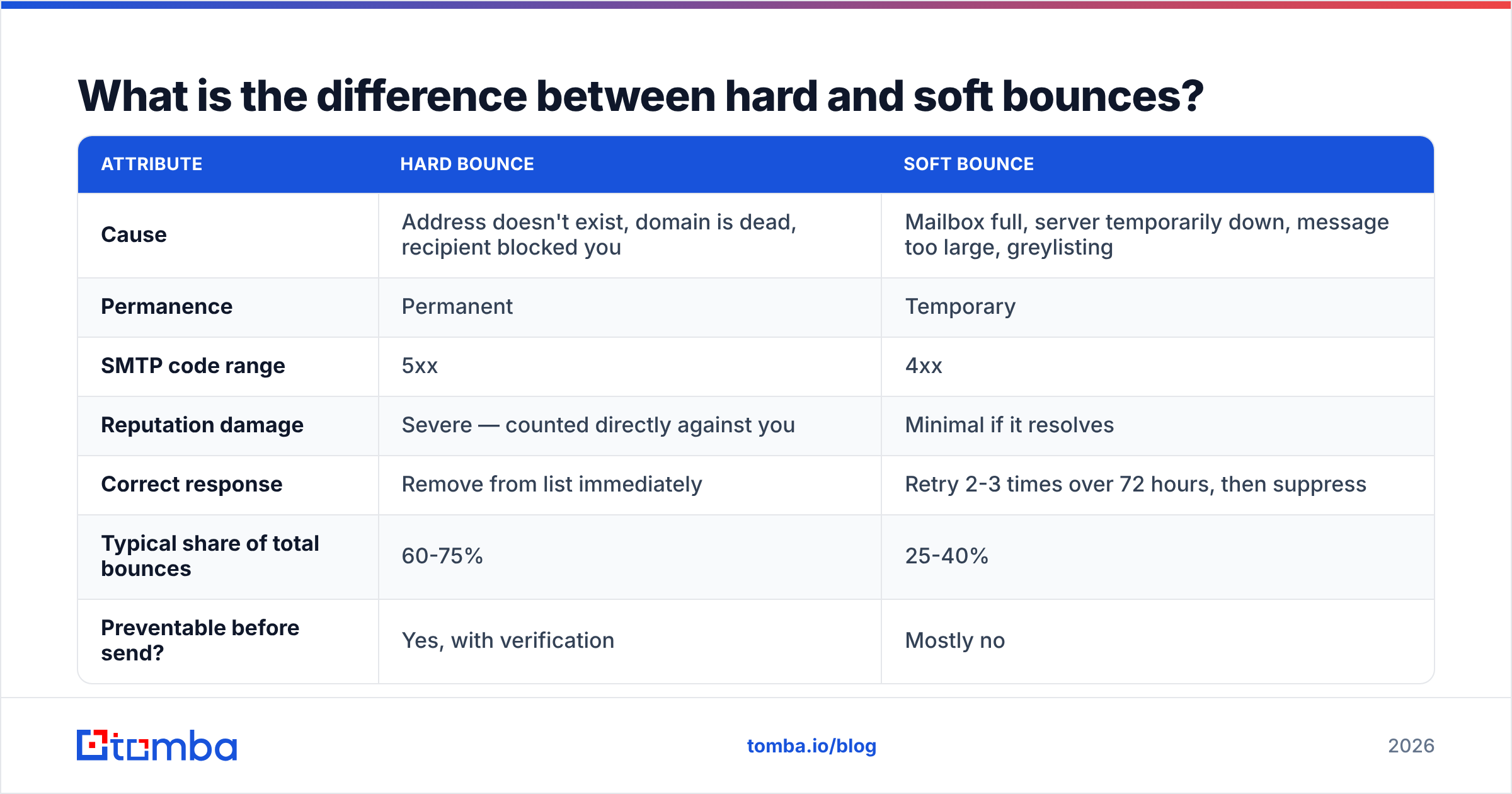
This distinction decides your entire remediation plan. Treat them the same and you'll waste effort on the wrong problem.
| Attribute | Hard bounce | Soft bounce |
|---|---|---|
| Cause | Address doesn't exist, domain is dead, recipient blocked you | Mailbox full, server temporarily down, message too large, greylisting |
| Permanence | Permanent | Temporary |
| SMTP code range | 5xx | 4xx |
| Reputation damage | Severe — counted directly against you | Minimal if it resolves |
| Correct response | Remove from list immediately | Retry 2-3 times over 72 hours, then suppress |
| Typical share of total bounces | 60-75% | 25-40% |
| Preventable before send? | Yes, with verification | Mostly no |
Hard bounces are the expensive ones. Every hard bounce is a signal to the receiving server that you sent mail to an address you had no business having. Accumulate enough of them in a short window and Gmail will start routing your legitimate mail to spam, or reject it at the gateway entirely.
Soft bounces are noise until they aren't. A mailbox that's been full for three weeks is functionally a dead address. Most sending platforms auto-suppress after three consecutive soft bounces, which is the right default.
There's a third category people forget: blocks. These look like bounces in your reporting but are actually your reputation being rejected — the address exists, the server just refused your mail. If your "bounce rate" spikes without any change to your list, check whether those are 550 rejections referencing a blocklist rather than genuine unknown-recipient errors. A blacklist checker will confirm it in under a minute.
What is a good email bounce rate in 2026?#
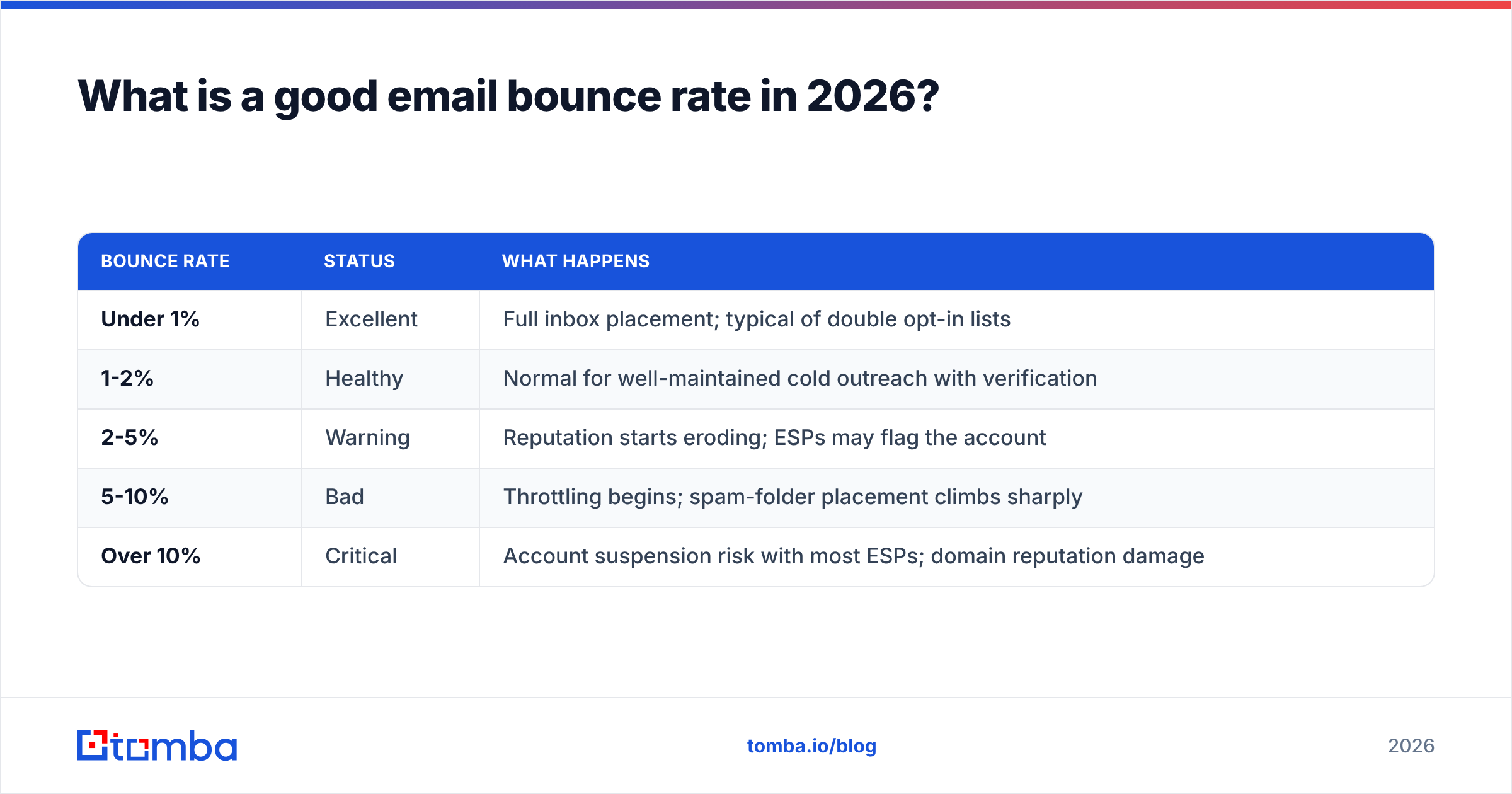
Benchmarks have tightened. Gmail and Yahoo's 2024 bulk-sender requirements, now fully enforced, pushed the acceptable ceiling lower across the board. Here's where the lines sit today:
| Bounce rate | Status | What happens |
|---|---|---|
| Under 1% | Excellent | Full inbox placement; typical of double opt-in lists |
| 1-2% | Healthy | Normal for well-maintained cold outreach with verification |
| 2-5% | Warning | Reputation starts eroding; ESPs may flag the account |
| 5-10% | Bad | Throttling begins; spam-folder placement climbs sharply |
| Over 10% | Critical | Account suspension risk with most ESPs; domain reputation damage |
Context matters. A B2B cold outreach campaign to a freshly built list will legitimately run higher than a newsletter to people who confirmed their address six weeks ago. But "legitimately higher" means 1.8%, not 8%. The email deliverability rules that govern this don't grant exemptions for prospecting.
Also watch the trend, not just the snapshot. A stable 1.5% is fine. A rate that climbed from 0.8% to 1.5% over three sends means something changed — a new data source, an expired segment, or a compromised sending domain.
Why is your email bounce rate high?#
Six causes account for nearly all high-bounce situations. Work through them in order — the list is roughly ordered by how often each one is the actual culprit.
Stale contact data. B2B email addresses decay at roughly 22-30% per year as people change jobs. A list you built 18 months ago is now half-invalid even if it was perfect at the time. This is the single most common cause and the easiest to fix.
Unverified imports. Scraped lists, conference attendee exports, and CSVs from a colleague's laptop go straight into the sending tool without a verification pass. You find out the hard way, at scale, on a Tuesday morning.
Guessed email patterns. Generating
first.last@company.comfor every prospect works about 60% of the time. The other 40% bounces. A permutation guess is a hypothesis, not a contact — validate it before sending. If you're generating patterns manually, at least run them through an email permutator and then verify the outputs rather than sending all variants.Broken authentication. Missing or misconfigured SPF, DKIM, and DMARC records cause outright rejection at the gateway on major providers. Check your SPF record first — it's the most common misconfiguration and the fastest to fix.
Sudden volume spikes. Going from 200 sends/day to 4,000 on a domain with no history triggers rate limiting and rejections that show up in your bounce column. Ramp over 4-6 weeks instead.
Role-based and catch-all addresses.
info@,sales@, andsupport@addresses have inconsistent delivery behavior. Catch-all domains accept everything at the gateway, then silently drop or bounce later — which is why they need their own handling rather than a binary valid/invalid call.
How do you reduce email bounce rate?#
The fix sequence below is ordered by impact per hour of effort.
Verify every address before it enters a campaign. This is not optional in 2026. A verification pass checks syntax, domain existence, MX records, and mailbox existence via SMTP handshake without sending mail. Running an unverified 10,000-contact list is a decision to accept a several-hundred-bounce hit that you could have avoided in eleven minutes. Use an email verifier on import, on schedule, and before any large send.
Handle catch-all domains separately. Standard verification returns "unknown" on catch-all domains because the server accepts everything. That's roughly 15-20% of B2B domains. Rather than guessing, use a dedicated catch-all verifier that applies pattern confidence and secondary signals to score those addresses instead of leaving them as coin flips.
Suppress hard bounces immediately and permanently. One hard bounce means remove, not retry. Most reputation damage from bounces comes from re-sending to the same dead addresses across multiple campaigns.
Re-verify quarterly. Given a ~25% annual decay rate, a list verified in January is meaningfully worse by April. Set a recurring job. Bulk re-verification through a bulk verify workflow costs a fraction of what a suspended sending domain costs.
Fix authentication before blaming your list. SPF, DKIM, and DMARC take an afternoon to configure and eliminate an entire category of rejections. Google's Postmaster Tools and Gmail's bulk sender guidelines tell you exactly what they expect.
Warm up new domains and mailboxes. A brand-new sending domain has no reputation, so providers apply the strictest defaults. Ramp volume gradually — a warmup calculator will give you a realistic schedule rather than a guess.
Use double opt-in where the channel allows it. For newsletters and product signups, confirmed opt-in cuts bounce rates to near zero and improves every downstream metric. It doesn't apply to cold outbound, but where it applies, it's the strongest control available.

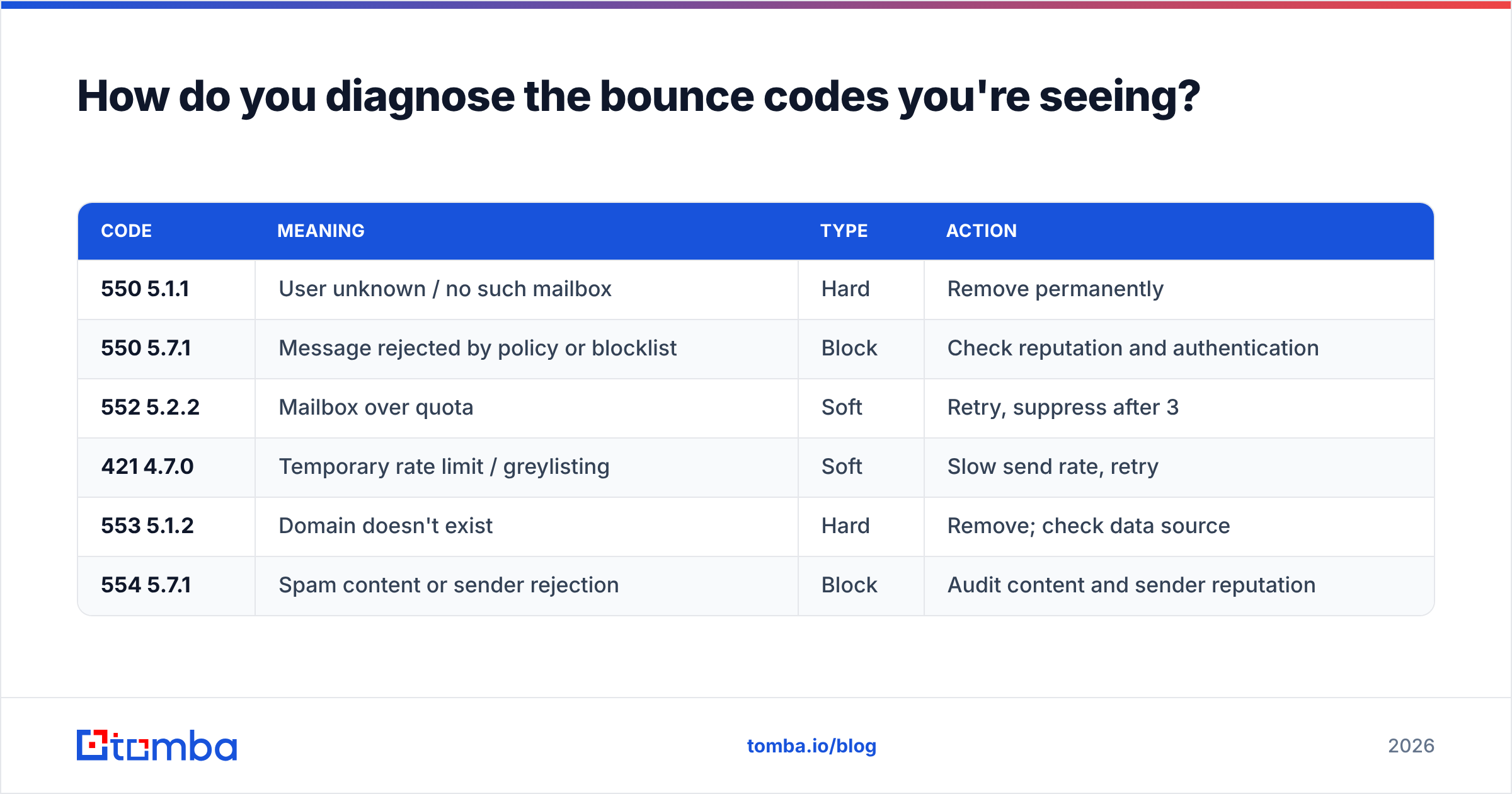
How do you diagnose the bounce codes you're seeing?#
Your ESP reports bounces with SMTP codes attached. Reading them tells you what to fix without guessing.
| Code | Meaning | Type | Action |
|---|---|---|---|
| 550 5.1.1 | User unknown / no such mailbox | Hard | Remove permanently |
| 550 5.7.1 | Message rejected by policy or blocklist | Block | Check reputation and authentication |
| 552 5.2.2 | Mailbox over quota | Soft | Retry, suppress after 3 |
| 421 4.7.0 | Temporary rate limit / greylisting | Soft | Slow send rate, retry |
| 553 5.1.2 | Domain doesn't exist | Hard | Remove; check data source |
| 554 5.7.1 | Spam content or sender rejection | Block | Audit content and sender reputation |
If most of your bounces are 550 5.1.1, you have a data problem — go verify. If most are 550 5.7.1 or 554, you have a reputation problem — verification alone won't save you, and you'll need to pause, fix authentication, reduce volume, and rebuild trust over several weeks. Running a spam checker on your actual message body will surface the content-side triggers.
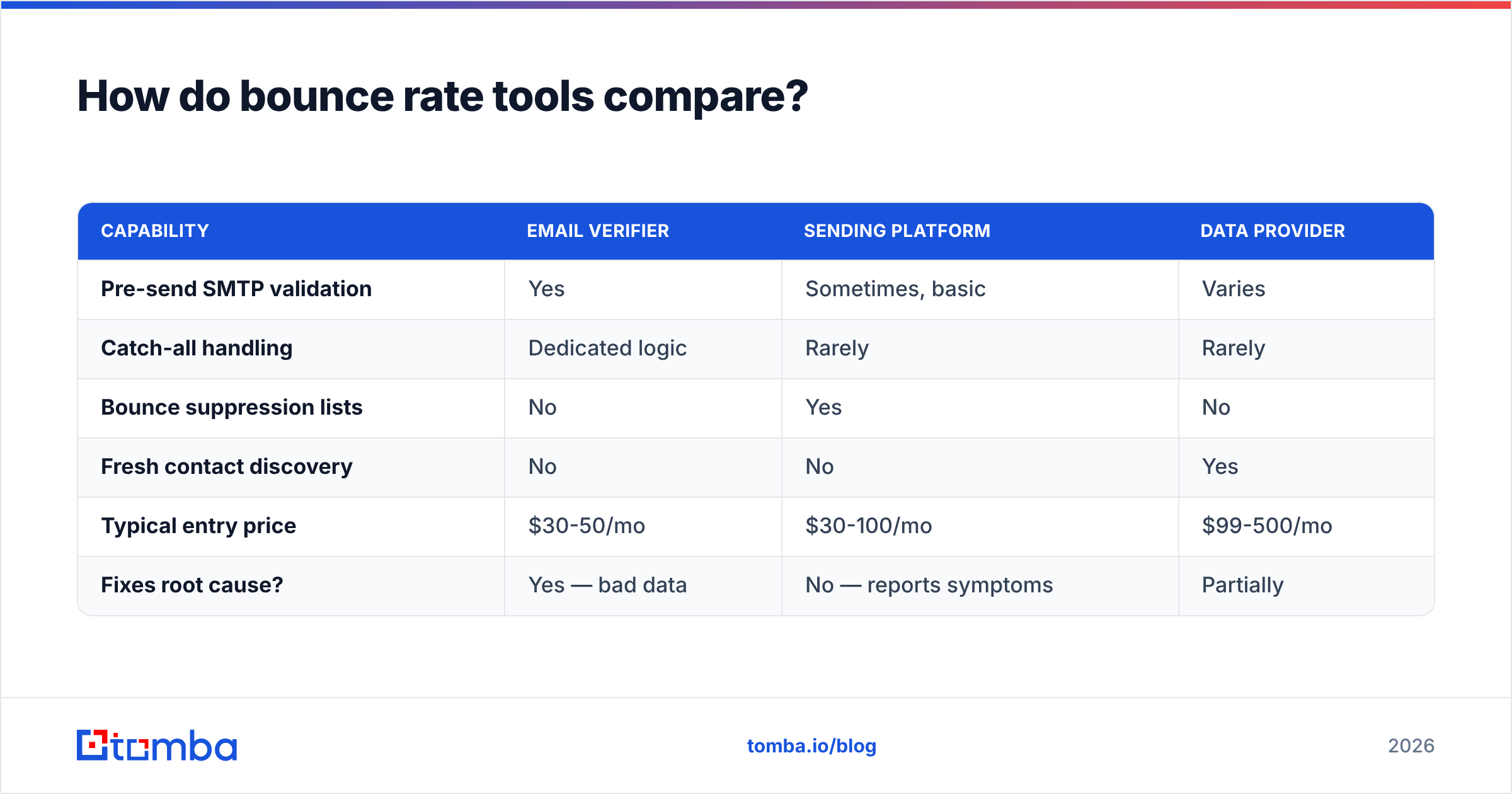
How do bounce rate tools compare?#
Not every tool that touches email addresses actually reduces bounces. Here's what different categories do:
| Capability | Email verifier | Sending platform | Data provider |
|---|---|---|---|
| Pre-send SMTP validation | Yes | Sometimes, basic | Varies |
| Catch-all handling | Dedicated logic | Rarely | Rarely |
| Bounce suppression lists | No | Yes | No |
| Fresh contact discovery | No | No | Yes |
| Typical entry price | $30-50/mo | $30-100/mo | $99-500/mo |
| Fixes root cause? | Yes — bad data | No — reports symptoms | Partially |
The realistic stack is a data source that returns verified addresses, plus a verifier that re-checks before each campaign, plus a sending platform that suppresses bounces automatically. Tools like BookYourData sell pre-verified B2B contact lists with bounce guarantees attached, which is a solid option when you'd rather buy verified data than build and verify it yourself. If you prefer to source contacts yourself, a combined finder-plus-verifier keeps the loop tight — Tomba pricing starts free at 25 searches/month and moves to $49/mo on Starter, which bundles finding and verification rather than charging separately for each.
What bounce rate benchmarks should you track alongside it?#
Bounce rate on its own can mislead. A 0.5% bounce rate with a 2% open rate means your mail is being accepted and then filtered to spam — technically delivered, practically invisible. Track these together:
- Delivery rate — accepted / sent. Should be the inverse of bounce rate; if there's a gap, mail is being silently dropped.
- Inbox placement rate — where accepted mail actually lands. Requires seed testing; this is the number that matters most.
- Spam complaint rate — must stay under 0.30% per Gmail's requirements, ideally under 0.10%.
- Unsubscribe rate — a spike alongside rising bounces usually means a targeting problem, not a data problem.
- Response rate — the only metric that pays. Everything above exists to protect it.
Google's own guidance in Postmaster Tools gives you domain reputation and spam rate directly from the source, which beats inferring it from your ESP's dashboard.
What's the fastest path from a high bounce rate to a healthy one?#
Run this sequence:
- Stop sending. Pause active campaigns on the affected domain. Continuing to send while bouncing at 8% compounds the damage daily.
- Export and segment. Split your list by source and by last-verified date. The damage is almost always concentrated in one or two segments.
- Verify everything. Run the full list through verification. Delete hard-invalid, quarantine catch-all and unknown, keep only valid.
- Audit authentication. Confirm SPF, DKIM, and DMARC pass on the sending domain. Fix before resuming.
- Resume at 20% of prior volume. Ramp back over 3-4 weeks while watching bounce rate per send.
- Institutionalize it. Verification on import, re-verification quarterly, automatic hard-bounce suppression. The problem doesn't come back if the process closes the loop.
Most teams see bounce rate drop from high single digits to under 2% within one verification pass. The reputation recovery takes longer — plan on four to six weeks before inbox placement fully normalizes.
Where should you start?#
Start with the data, because that's where 70% of the problem lives. If you're building prospect lists and watching bounces climb, the fix isn't a better sending tool — it's addresses that were correct before they entered the campaign.
Tomba's Email Finder returns professional email addresses with a confidence score and runs verification as part of the lookup, so the contacts entering your sequences are validated at the point of discovery rather than triaged after the damage. The free tier gives you 25 searches a month to test it against a list you already know the answers to — find a domain where you know the real addresses, run it, and compare. That's a more honest evaluation than any benchmark table, including the ones above.
Related guides#
Ready to find emails that actually work?
Join 150,000+ professionals who stopped guessing and started sending. Free credits on signup — no credit card required.
Get the Tomba newsletter
Practical outbound tactics and product updates — once every two weeks.
About the author