Email Cadence Examples: 7 Proven Sequences for 2026
Seven real email cadence examples with exact day-by-day timing, touch counts, and channel mixes — plus the spacing mistakes that quietly kill reply rates before your copy ever gets read.
TL;DR
- A cadence is the timing and channel schedule around your messages. Copy decides whether someone replies; cadence decides whether they ever see you at all.
- Most B2B teams underperform because they stop at 2–3 touches. The reply curve for cold outbound usually doesn't flatten until touch 5–8.
- Spacing beats volume. Front-load the first three touches over 5–7 days, then stretch to 4–7 day gaps so the sequence lasts 3–4 weeks without feeling like harassment.
- Different motions need different shapes: inbound-lead cadences are fast and short, enterprise cold cadences are slow and multi-threaded, re-engagement cadences are two touches and out.
- None of it works on bad data. A cadence sent to unverified addresses just teaches mailbox providers that you're a spammer.
What Is an Email Cadence, Exactly?#
An email cadence is the schedule: how many touches you send, how far apart, on which channels, and when you stop. Think of it like watering a plant. The water is your message; the cadence is whether you pour a gallon on day one and vanish, or give it a cup every few days for a month. Same volume, completely different outcome.
People use "cadence," "sequence," and "drip" interchangeably, but there's a useful distinction in practice:
- Sequence — the ordered list of messages themselves (email 1, email 2, LinkedIn note, call).
- Cadence — the timing layer on top: day 0, day 3, day 8, day 14, plus the send windows and stop conditions.
- Drip — usually a marketing-owned, trigger-based nurture that runs for months on autopilot.
- Play — a cadence bound to a specific trigger (new funding round, job change, competitor churn signal) rather than a static list.
The distinction matters because teams debug the wrong layer. When reply rates drop, everyone rewrites subject lines. Nine times out of ten the actual problem is that the sequence had three touches over four days and then died, or that half the list bounced on touch one and tanked domain reputation for everyone else.
What Does a Good Email Cadence Look Like in 2026?#
The shape has shifted. Mailbox providers now weight engagement and complaint rate much more heavily than they did five years ago, and Google and Yahoo's bulk-sender requirements pushed the whole industry toward smaller, better-targeted sends. Volume-first cadences that worked in 2021 now get filtered before touch two lands.
Here's what actually holds up:
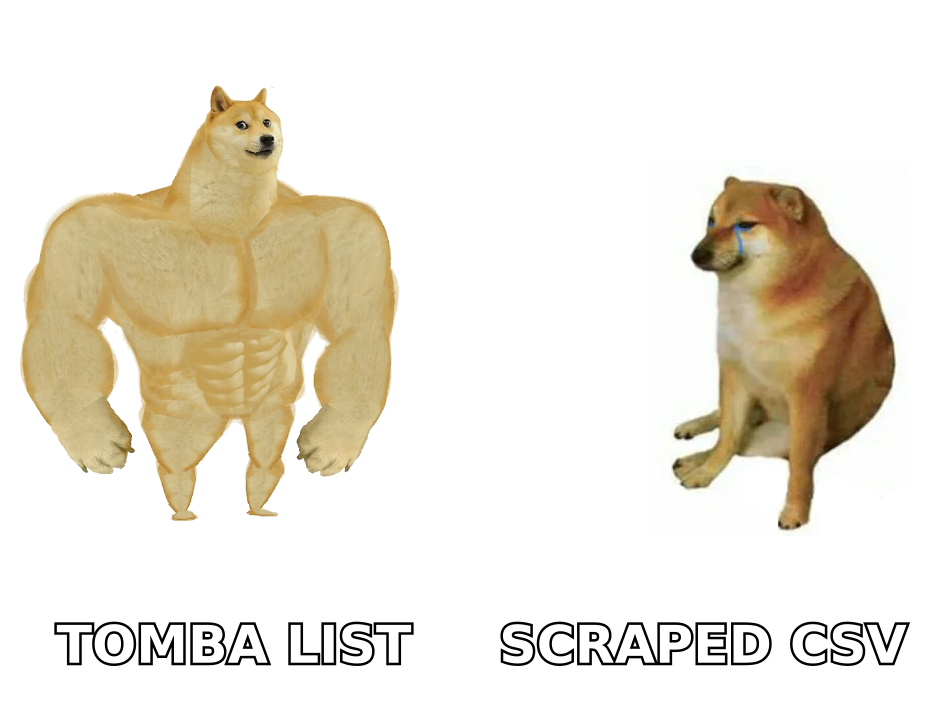
- 5 to 9 total touches, spread across 21–30 days. Fewer than five leaves reply volume on the table; more than nine mostly generates unsubscribes and complaints.
- Two or more channels. Email-only cadences plateau. Email plus LinkedIn plus one call typically lifts total reply rate by a meaningful margin over email alone, because you're catching people wherever they actually pay attention.
- Escalating specificity, not escalating desperation. Touch one is about them, touch three brings a proof point, touch five brings a different angle entirely. "Just bumping this" is not an angle.
- Asymmetric spacing. Tight at the start (2–3 days), wide at the end (5–7 days). Early touches ride the residual memory of the first email; later touches are lottery tickets on a changed circumstance.
- A real breakup, then a real stop. One clean close-the-loop message, then remove from the cadence. Re-approach in 90 days with a new trigger, not a new bump.
- Hard stop conditions. Reply, meeting booked, unsubscribe, out-of-office (pause, don't burn touches), or bounce.
What Are the Best Email Cadence Examples by Use Case?#
Below are seven cadences that map to distinct motions. Day 0 is the first send. Every one of them assumes you've already verified the addresses — more on why that's non-negotiable further down.
1. Classic cold outbound (SMB / mid-market)#
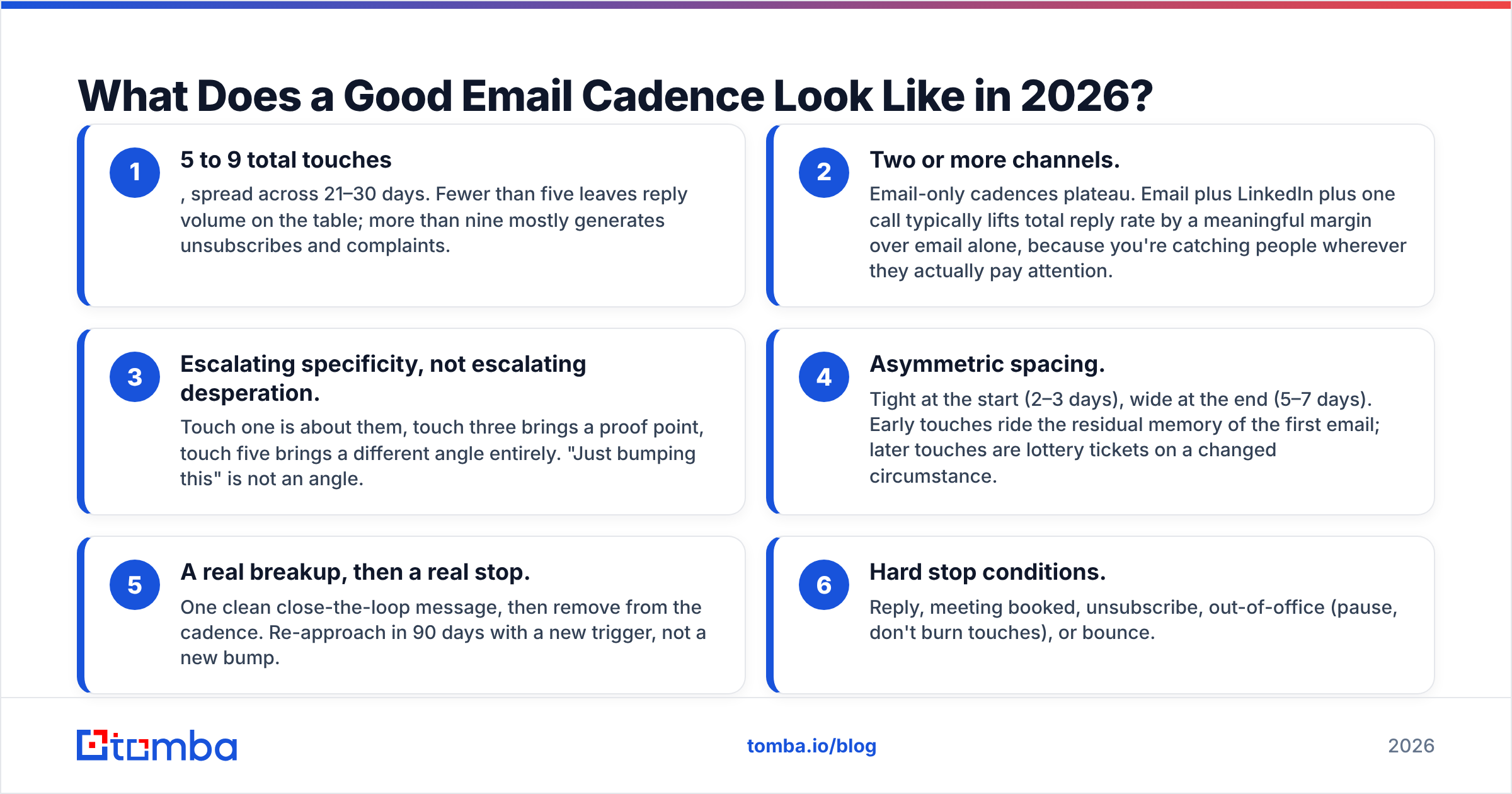
The workhorse. Eight touches over 24 days, three channels.
| Day | Channel | Purpose |
|---|---|---|
| 0 | Trigger-based opener, one ask | |
| 2 | Connection request, no pitch | |
| 4 | Proof point / customer result | |
| 7 | Call | Reference the email, 20 seconds |
| 11 | New angle — different pain, different persona lens | |
| 15 | Comment or DM on something they posted | |
| 19 | Short case study, one metric | |
| 24 | Breakup, permission to close the file |
2. Inbound-lead speed cadence#
Someone downloaded something or hit a pricing page. Speed is the entire strategy — response odds collapse after the first hour.
| Time | Channel | Purpose |
|---|---|---|
| 0–5 min | Call | Attempt while intent is live |
| 10 min | "Just tried you — here's what I'd cover" | |
| Day 1 | Relevant resource tied to what they viewed | |
| Day 2 | Call + voicemail | Second attempt, different time of day |
| Day 4 | Direct ask for 15 minutes | |
| Day 8 | Soft close, keep the door open |
3. Enterprise multi-threaded cadence#
Six touches over 35 days, but run in parallel across three to five people at the account. The champion, the economic buyer, and one adjacent stakeholder each get a variant with the same underlying thesis.
| Day | Channel | Persona focus |
|---|---|---|
| 0 | Champion — operational pain | |
| 3 | Champion — connect | |
| 6 | Economic buyer — cost/risk framing | |
| 13 | Champion — social proof from a peer logo | |
| 21 | Call | Whoever engaged most |
| 35 | Multi-recipient wrap-up to the thread |
4. Event follow-up cadence#
Conferences generate warm-ish contacts with a hard expiry date. Four touches over 10 days.
| Day | Channel | Purpose |
|---|---|---|
| 1 | Specific recall — booth, session, conversation detail | |
| 3 | Connect referencing the event | |
| 6 | The thing you promised to send | |
| 10 | Meeting ask with two concrete slots |
5. Re-engagement cadence (closed-lost / gone dark)#
Two touches. That's it. Anything more on a dead deal is noise.
| Day | Channel | Purpose |
|---|---|---|
| 0 | What changed on your side since you last spoke | |
| 7 | One-line "should I close the file?" |
6. Job-change trigger cadence#
Your former champion started somewhere new. This is the highest-converting cadence most teams never build.
| Day | Channel | Purpose |
|---|---|---|
| 0 | Congratulate, no pitch, genuinely no pitch | |
| 5 | Reference what you built together previously | |
| 12 | Offer the same outcome at the new company | |
| 20 | Breakup with an open standing offer |
7. Founder-led / low-volume cadence#
Under 30 sends a week, written by hand. Five touches over 18 days, no templates, no merge tags beyond first name. Reply rates here routinely run three to five times higher than automated equivalents because the personalization is real, not tokenized.
How Do These Cadences Compare Head to Head?#
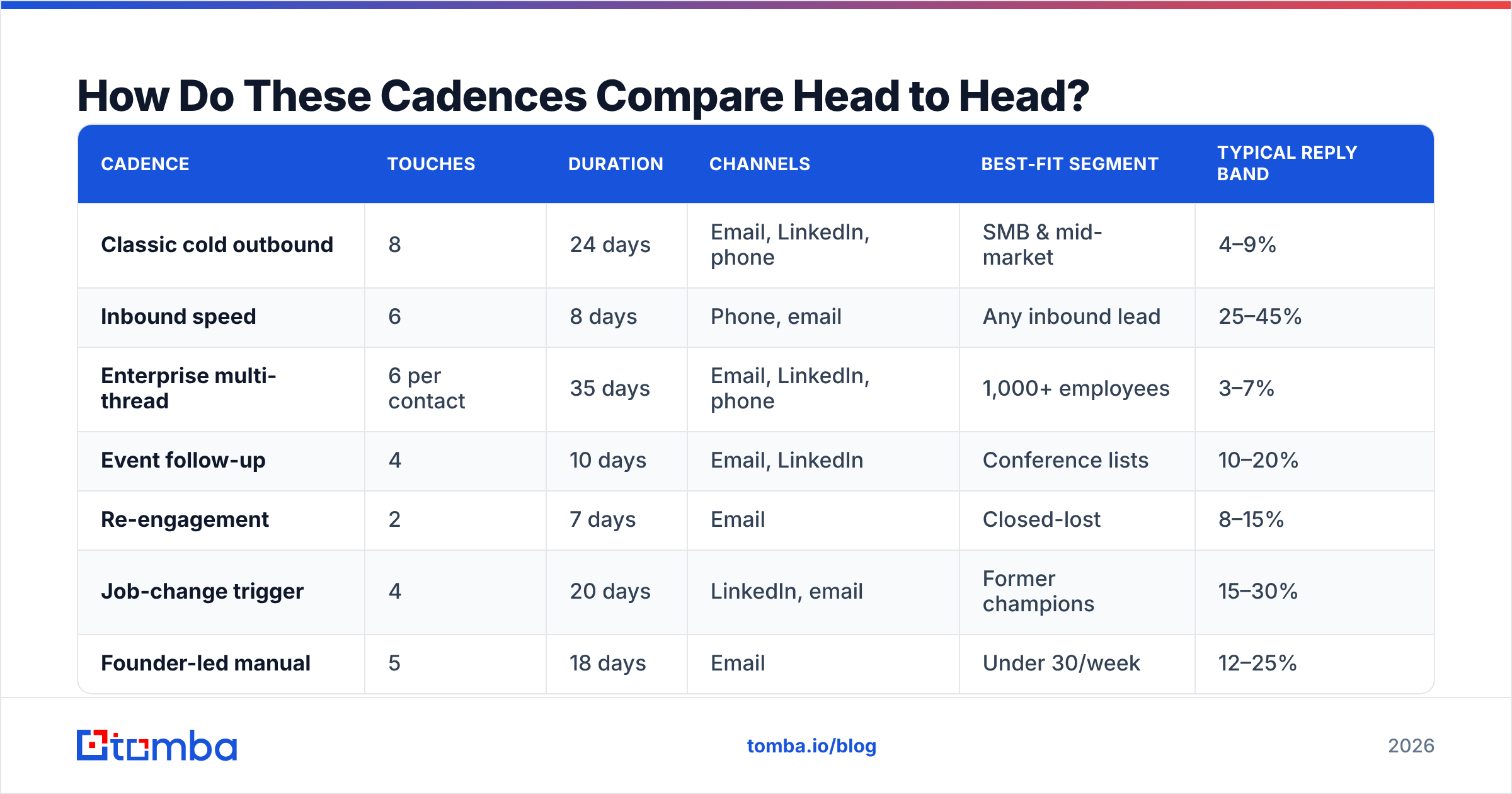
| Cadence | Touches | Duration | Channels | Best-fit segment | Typical reply band |
|---|---|---|---|---|---|
| Classic cold outbound | 8 | 24 days | Email, LinkedIn, phone | SMB & mid-market | 4–9% |
| Inbound speed | 6 | 8 days | Phone, email | Any inbound lead | 25–45% |
| Enterprise multi-thread | 6 per contact | 35 days | Email, LinkedIn, phone | 1,000+ employees | 3–7% |
| Event follow-up | 4 | 10 days | Email, LinkedIn | Conference lists | 10–20% |
| Re-engagement | 2 | 7 days | Closed-lost | 8–15% | |
| Job-change trigger | 4 | 20 days | LinkedIn, email | Former champions | 15–30% |
| Founder-led manual | 5 | 18 days | Under 30/week | 12–25% |
Treat those reply bands as directional, not as a promise. They shift wildly by industry, offer strength, and list quality. What holds consistently is the relative ordering: warm and triggered beats cold, and short-fast beats long-slow when intent is fresh.
How Many Touches and How Much Spacing Actually Work?#
Two rules survive most A/B tests.
Rule one: the marginal touch keeps paying until roughly touch six. Teams that stop at three touches leave a large share of their eventual replies unclaimed, because a meaningful chunk of positive responses arrive on touches four through seven. The person wasn't ignoring you — they were in a quarter-close, on parental leave, or genuinely didn't have the problem in week one.
Rule two: gaps should widen, not stay fixed. A cadence of 3-3-3-3-3 days feels mechanical because it is mechanical, and recipients notice. A 2-3-4-5-7 pattern covers the same 21 days while feeling like a person who's busy rather than a robot on a timer.
Two spacing traps worth naming:
- The weekend collapse. A fixed 2-day gap sends touch two on Saturday for anyone who entered on Thursday. Restrict sends to business days and business hours in the recipient's timezone.
- The all-at-once launch. Dumping 2,000 contacts into day 0 means touch two hits 2,000 inboxes on the same morning. Trickle enrollment across the week instead — better for email deliverability and better for your ability to actually handle the replies.
Why Do Most Email Cadences Fail Before the Copy Matters?#
Because the list is bad. This is the least glamorous answer and by far the most common one.
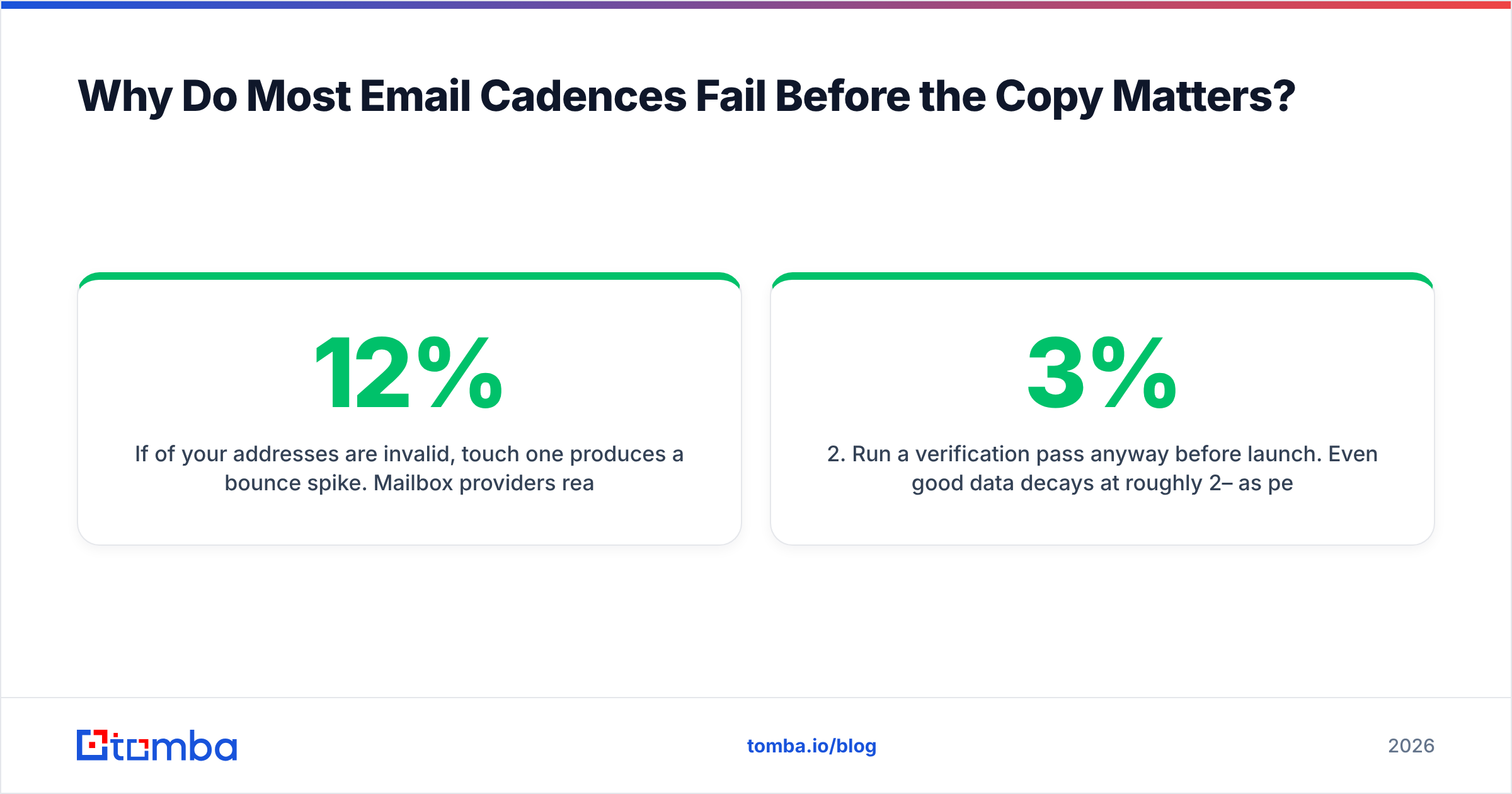
If 12% of your addresses are invalid, touch one produces a bounce spike. Mailbox providers read that spike as a signal that you don't know who you're emailing, and they start routing your subsequent touches to spam — including the touches going to the 88% of addresses that were fine. Your cadence is now technically running and functionally invisible. You'll spend the next month rewriting subject lines to fix a problem that lives entirely in your CSV.
The sequence that fixes this is boring and it works:
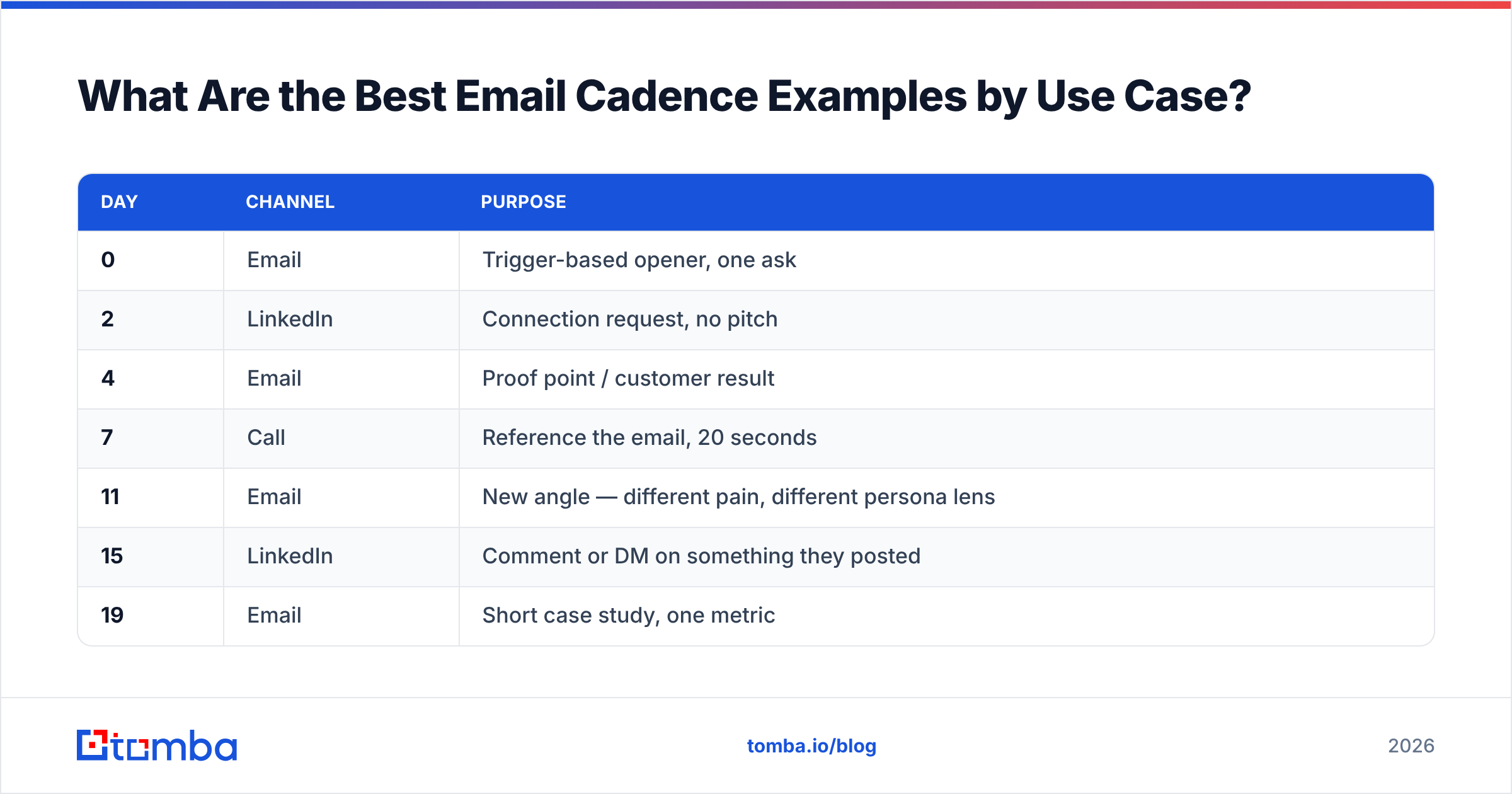
- Source addresses from a system that verifies at lookup time, rather than scraping and hoping. An email finder that returns a confidence score gives you something to filter on before anyone gets enrolled.
- Run a verification pass anyway before launch. Even good data decays at roughly 2–3% per month as people change jobs. An email verifier pass on a list older than 60 days is cheap insurance.
- Handle catch-all domains separately. They neither confirm nor deny, so segment them into a lower-volume cadence instead of letting them pollute your bounce math. A dedicated catch-all verifier gives you a defensible call rather than a coin flip.
- Suppress aggressively. Unsubscribes, hard bounces, competitor domains, and existing customers should never enter a cold cadence. One angry reply from a current customer costs more than fifty cold sends earn.
Beyond data, the other three failure modes:
- No angle change. Five emails restating the same value prop is one email sent five times.
- Asking for 30 minutes on touch one. The ask should scale with the relationship. Start with a question, not a calendar link.
- No stop condition on out-of-office. Burning three touches into an auto-responder is pure waste. Pause and resume.
How Do You Build and Launch a Cadence That Holds Up?#
Work in this order. Skipping steps is how cadences end up as expensive spam.
- Pick one segment. One industry, one persona, one trigger. A cadence built for "B2B companies" is a cadence built for nobody.
- Write the thesis before the emails. One sentence: why this person, why this problem, why now. If you can't write it, the cadence won't work no matter how you space it.
- Build the list and enrich it. Names, roles, domains, and a personalization hook per contact. Data enrichment at this stage is what separates a merge tag from an actual reason to reply.
- Verify and segment. Valid, catch-all, and risky go into three different treatments.
- Draft the angles, then the copy. Four distinct angles across eight touches. Reuse angles across channels, not within them. If you're stuck, a subject line generator is a faster starting point than a blank page.
- Set spacing, send windows, and stop conditions. Business days only, recipient timezone, hard stop on reply.
- Launch small. 50–100 contacts. Read every reply yourself. Fix what's obviously broken.
- Measure per touch, not per cadence. Reply rate by touch number tells you exactly where to cut and where to add. Aggregate response rate tells you almost nothing actionable.
For benchmarking your own numbers against the wider market, HubSpot's sales research and the sales engagement category pages on G2 are reasonable neutral reference points — vendor blogs will always quote the flattering end of the range. Salesforce's State of Sales reporting is useful for the structural trends, less so for tactical benchmarks.
What Should You Do Next?#
Pick one cadence from the seven above that matches a motion you're already running, rebuild it with proper spacing and stop conditions, and launch it against a hundred verified contacts. That's a week of work and it will tell you more than another month of subject line testing.
The one prerequisite is a list that doesn't bounce. Tomba's Email Finder returns verified professional addresses with a confidence score at lookup time, so contacts land in your cadence already filtered rather than getting filtered by Gmail three days later. The free tier covers 25 searches a month if you want to test the data quality first; paid plans start at $49/mo for Starter and $99/mo for Growth, with full Tomba pricing published rather than quoted. Build the cadence second. Build the list first.
Related guides#
Ready to find emails that actually work?
Join 150,000+ professionals who stopped guessing and started sending. Free credits on signup — no credit card required.
Get the Tomba newsletter
Practical outbound tactics and product updates — once every two weeks.
About the author