Email Campaign Examples That Actually Convert in 2026
Nine real email campaign structures — cold outbound, onboarding, win-back, re-engagement — with the copy, the sequencing logic, and the numbers that decide whether each one is worth stealing.
TL;DR
- The best email campaign examples share one trait: a single, obvious next action per send. Everything else — length, imagery, personalization depth — is negotiable.
- Cold outbound campaigns live or die on list quality. A 4-email sequence to a 62% deliverable list underperforms a 2-email sequence to a 97% deliverable one.
- Lifecycle campaigns (onboarding, win-back, renewal) reliably beat one-off blasts because timing is tied to behavior, not to your marketing calendar.
- Reply-driven sequences outperform click-driven ones in B2B by a wide margin. Optimize for "hit reply," not "click here."
- Nine campaign structures are broken down below with the actual sequencing, the trigger logic, and where each one tends to break.
What Counts as an Email Campaign in 2026?#
An email campaign is a coordinated series of messages sent to a defined segment with one measurable objective. That definition rules out a lot of what people call campaigns: a single newsletter blast is a broadcast, and a drip that fires the same three emails at every contact regardless of behavior is closer to a mailing list with extra steps.
Three things separate a campaign from a send:
- A defined segment. Not "everyone in HubSpot." A slice with a shared attribute — trial users who never invited a teammate, accounts renewing in 60 days, prospects who hit your pricing page twice.
- A trigger. Either time-based (day 0, day 3, day 7) or behavior-based (opened but didn't reply, downloaded but didn't book). Behavior-based nearly always wins.
- An exit condition. The campaign stops when the goal is met. Sequences that keep firing after someone replies are the single most common reason prospects mark B2B mail as spam.
The rest of this post walks through nine campaign structures — what they look like, when to run them, and the specific failure mode each one has.
Which Cold Outbound Campaign Examples Actually Work?#
Example 1: The three-touch problem-first sequence#
The most durable cold structure in B2B. Three emails over eight days, each one shorter than the last.
Email 1 (Day 0) — The observation. Two sentences of specific context about the prospect's company, one sentence naming a problem that context implies, one question. Under 90 words. No links, no attachments, no calendar embed.
Subject: your Q3 hiring page
Noticed you posted four SDR roles in the last six weeks — usually that means the pipeline target moved before the team did.
Most teams at that stage hit the same wall: reps burn 11 hours a week finding contact data instead of selling.
How are you handling list-building right now?
Email 2 (Day 3) — The proof. One customer with a comparable profile, one number, one question. Roughly 60 words.
Email 3 (Day 8) — The close-the-loop. Explicitly permission-based. "Sounds like this isn't a priority — want me to close the loop?" This email produces the highest reply rate of the three in most teams' data, largely because it's easy to answer with a single word.
Where it breaks: teams add emails 4 through 7. Reply rates on touches beyond the fourth are marginal, and spam complaints climb sharply.
Example 2: The trigger-based signal campaign#
Fires when a public event happens: a funding round, a new exec hire, a job posting for a role your product supports, a tech-stack change. The email references the event in the first line and never mentions "reaching out."
The advantage is timing, not copy. A generic email sent within 72 hours of a Series B announcement outperforms a beautifully written one sent at random. The constraint is volume — signal campaigns are naturally low-throughput, which is why teams pair them with a broader sequence rather than running them alone.
Example 3: The referral-path campaign#
Instead of emailing the decision-maker, you email an adjacent person one level down and ask who owns the problem. The ask is small, the reply is easy, and you get an internal referral instead of a cold intro.
Subject: right person for outbound tooling?
Hi Dana — is contact data sourcing something you own, or does that sit with Marcus on demand gen?
Happy to send the two-line version to whoever it is.
Reply rates on this format run high because the recipient isn't being sold anything. The trade-off: you spend one touch getting a name, so your total sequence is longer.
How Do Lifecycle Campaign Examples Differ?#
Lifecycle campaigns are triggered by something the contact did inside your product or on your site. They convert better than cold campaigns for an obvious reason — the recipient already knows who you are.
Example 4: The activation onboarding sequence#
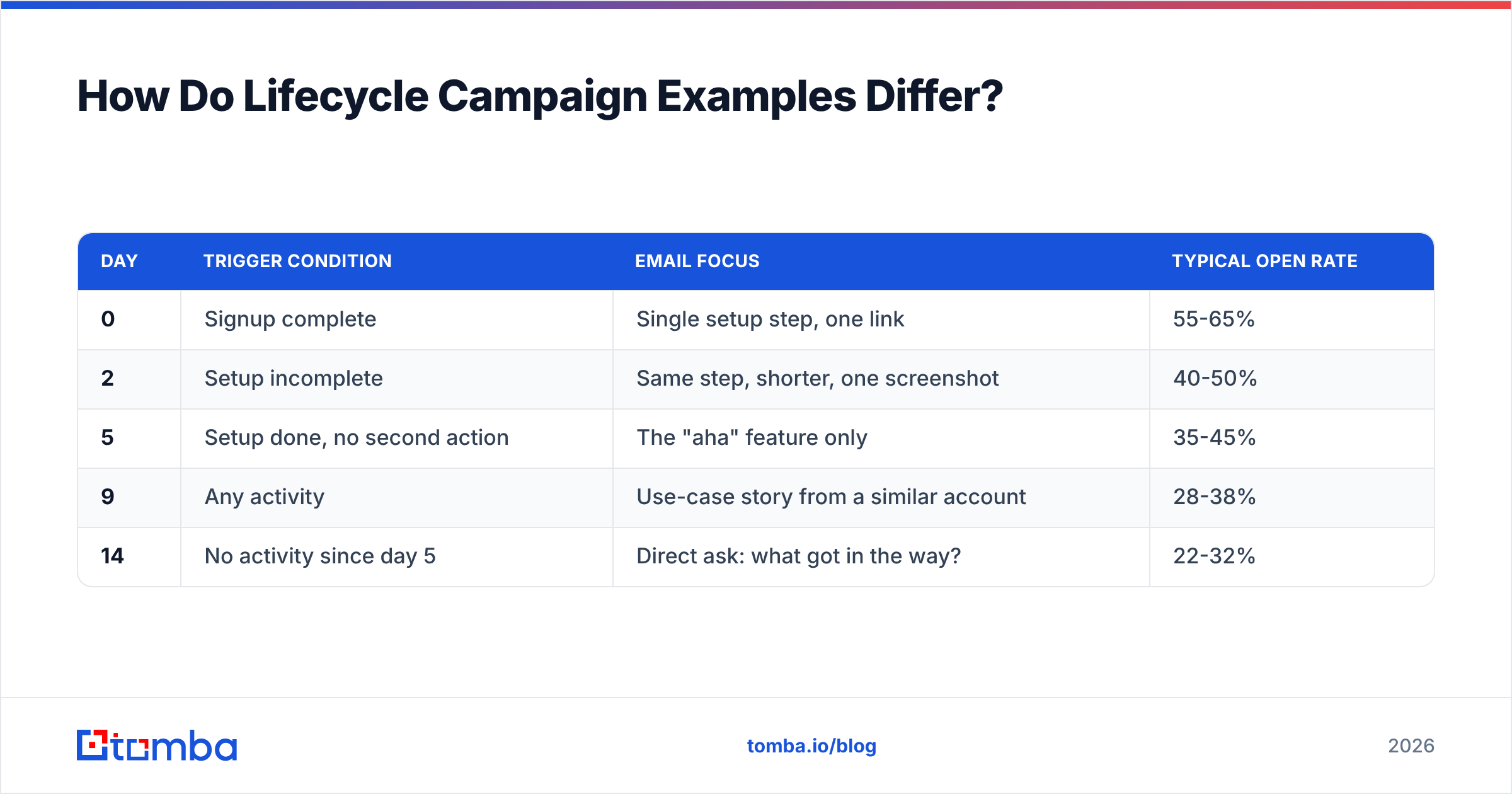
Five emails over 14 days, but each one is conditional. If the user completes the action, the email doesn't send.
| Day | Trigger condition | Email focus | Typical open rate |
|---|---|---|---|
| 0 | Signup complete | Single setup step, one link | 55-65% |
| 2 | Setup incomplete | Same step, shorter, one screenshot | 40-50% |
| 5 | Setup done, no second action | The "aha" feature only | 35-45% |
| 9 | Any activity | Use-case story from a similar account | 28-38% |
| 14 | No activity since day 5 | Direct ask: what got in the way? | 22-32% |
That last email — a plain-text question from a real person — routinely outperforms the polished HTML ones above it. Onboarding emails that read like a colleague wrote them beat designed templates in nearly every A/B test worth trusting.
Where it breaks: sending all five regardless of behavior. A user who finished setup on day 1 and receives "finish your setup" on day 2 learns to ignore your entire domain.
Example 5: The win-back campaign#
Three emails to churned or dormant accounts, spaced 10 days apart. The structure that works is: acknowledge the absence, offer something new since they left, then make an exit offer.
The third email should contain an unsubscribe-equivalent option — "want me to stop sending these?" — because dormant lists carry your worst deliverability risk. Before running any win-back, run the list through an email verifier. Addresses that were valid 18 months ago are frequently dead now, and hitting a pile of spam traps on a re-engagement send will damage your sender reputation for months.
Example 6: The expansion / upsell campaign#
Triggered by usage crossing a threshold — seats near the plan limit, API calls at 80% of quota, a feature used more than N times. The email is informational, not promotional: "you're at 84% of your monthly quota, here's what happens at 100%."
Conversion on these is high because the timing is dictated by the customer's own behavior. The mistake is sending them from marketing@ instead of from the account owner.
What Do the Best Newsletter and Nurture Campaigns Look Like?#
Example 7: The one-idea newsletter#
A single idea per issue, 400-700 words, sent on a fixed weekly cadence. No roundups, no "5 links we liked." Roundups are cheap to produce and cheap to ignore.
The version that builds an audience has a consistent format the reader can recognize in two seconds: one hook, one argument, one concrete takeaway they can apply that week. Consistency of format matters more than consistency of day.
Example 8: The 5-email educational nurture#
Runs after a content download. Each email teaches one thing and links to nothing but the next resource. The pitch appears only in email 5, and only as a one-line P.S.
The reason this works: you've already converted the reader once (they downloaded something). Asking for a second conversion immediately resets the relationship to zero. Five emails of usefulness buys you one ask.
Example 9: The event / webinar campaign#
Four emails: invite (day -14), reminder with agenda (day -3), day-of reminder (2 hours before), and replay + next step (day +1). The replay email consistently outperforms all three promotional ones in downstream pipeline, because the people who watch a recording are self-selecting for intent.
How Do These Campaign Types Compare?#
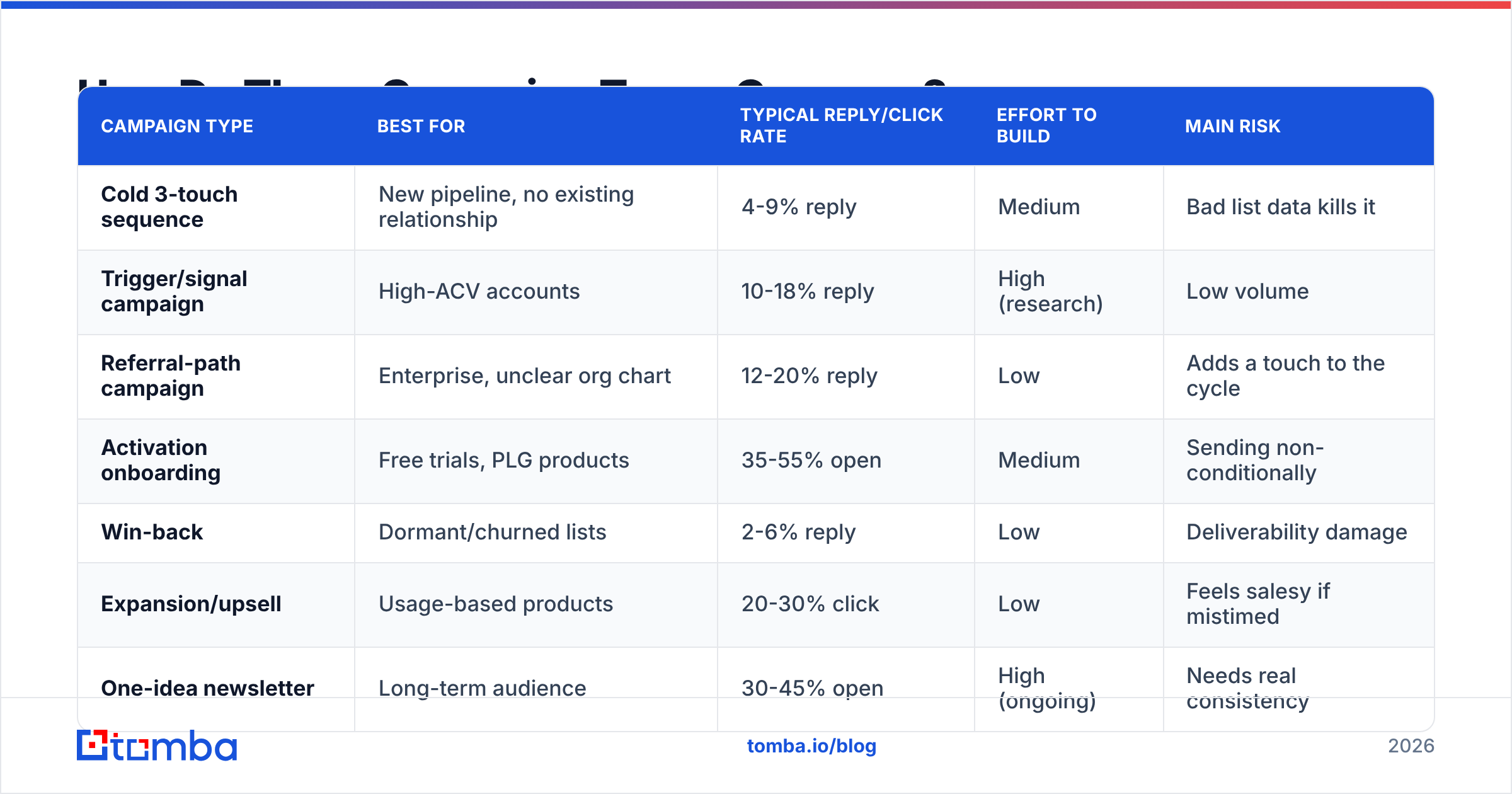
| Campaign type | Best for | Typical reply/click rate | Effort to build | Main risk |
|---|---|---|---|---|
| Cold 3-touch sequence | New pipeline, no existing relationship | 4-9% reply | Medium | Bad list data kills it |
| Trigger/signal campaign | High-ACV accounts | 10-18% reply | High (research) | Low volume |
| Referral-path campaign | Enterprise, unclear org chart | 12-20% reply | Low | Adds a touch to the cycle |
| Activation onboarding | Free trials, PLG products | 35-55% open | Medium | Sending non-conditionally |
| Win-back | Dormant/churned lists | 2-6% reply | Low | Deliverability damage |
| Expansion/upsell | Usage-based products | 20-30% click | Low | Feels salesy if mistimed |
| One-idea newsletter | Long-term audience | 30-45% open | High (ongoing) | Needs real consistency |
| Educational nurture | Post-download leads | 8-15% click | Medium | Pitching too early |
| Event campaign | Mid-funnel acceleration | 15-25% registration | Medium | Replay email skipped |
Read that table as relative, not absolute. Rates shift enormously by industry, list age, and seniority of the recipient. What holds across every dataset is the ordering: behavior-triggered campaigns beat time-triggered ones, and warm campaigns beat cold ones by roughly an order of magnitude.
Why Do Most Email Campaigns Fail Before the Copy Matters?#
Because the list is wrong. This is unglamorous and it's the single biggest lever.
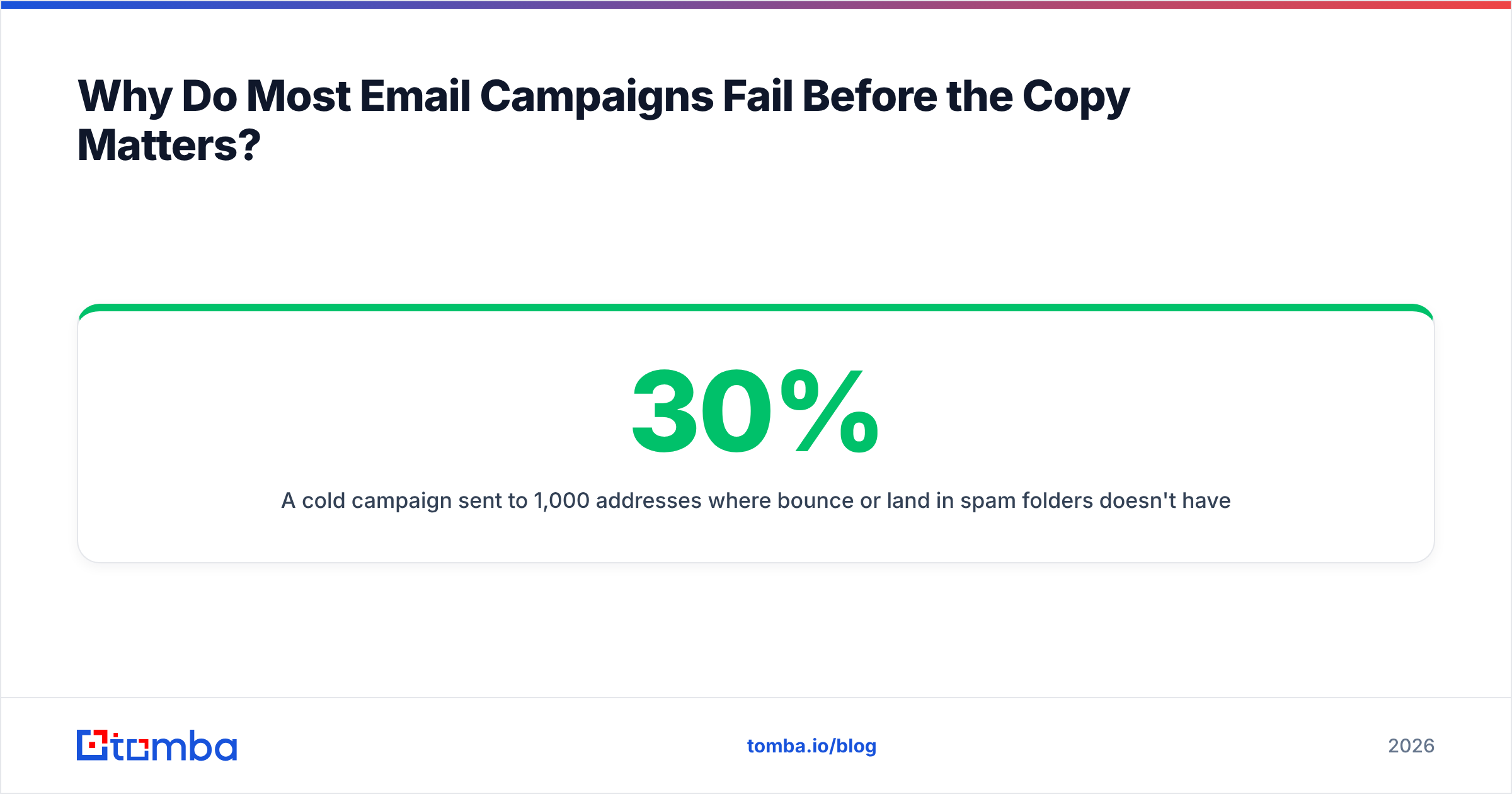
A cold campaign sent to 1,000 addresses where 30% bounce or land in spam folders doesn't have a 30% problem — it has a compounding one. High bounce rates trigger mailbox-provider filtering that suppresses the deliverable 70% too. Google and Microsoft both weight bounce and complaint rates heavily in inbox placement, and Google's bulk sender requirements put a hard 0.3% spam-complaint ceiling on senders. Cross it and your good emails stop arriving.
Practical order of operations before any campaign:
- Source contacts from a live lookup, not a static purchase. Roles change constantly; a list bought 12 months ago is substantially decayed. A live email finder queried at send time avoids most of this.
- Verify every address. SMTP-level verification catches the dead mailboxes a syntax check misses.
- Handle catch-all domains separately. They accept everything at the gateway and bounce later. A catch-all verifier tells you which ones are actually safe to send to instead of forcing you to guess.
- Warm the sending domain. New domains need weeks of ramp before campaign volume. Skipping this invalidates every other optimization.
- Authenticate properly. SPF, DKIM, and DMARC are table stakes now, not nice-to-haves.
Peers in this space handle sourcing differently and it's worth knowing the landscape. BookYourData sells pay-as-you-go verified B2B contact lists with a bounce guarantee, which suits teams that want a bulk file up front rather than API-driven lookups. Apollo bundles data with a sequencer. Tools like Tomba sit on the lookup-and-verify side — you query for the contact you need when you need it, via the Tomba API, a spreadsheet add-on, or bulk upload. Which model fits depends on whether your motion is broad-volume or account-selected; both are legitimate.
What Should You Steal From These Examples First?#
If you're building from zero, run these in order:
- The activation onboarding sequence (Example 4) — highest return per hour of work, and it runs forever once built.
- The three-touch cold sequence (Example 1) — the baseline every outbound team needs before experimenting.
- The referral-path campaign (Example 3) — cheapest way to fix a bad contact list without buying a new one.
- The replay email from Example 9 — if you already run events, this is free pipeline you're probably leaving on the table.
Skip the multi-branch, 12-email monsters until the simple versions are producing. Complexity in campaign design is almost always a substitute for having a specific enough segment.
One measurement note: track replies and meetings booked, not opens. Apple Mail Privacy Protection has made open rates directionally useful at best since 2021, and optimizing subject lines against a metric that inflates 30-40% on iOS traffic will lead you somewhere wrong. G2's email marketing category reviews are a reasonable place to compare which platforms report reply-level attribution honestly.
Getting the List Right Before You Send#
Every campaign structure above assumes the address is real and the person still works there. That assumption fails more often than most teams check.
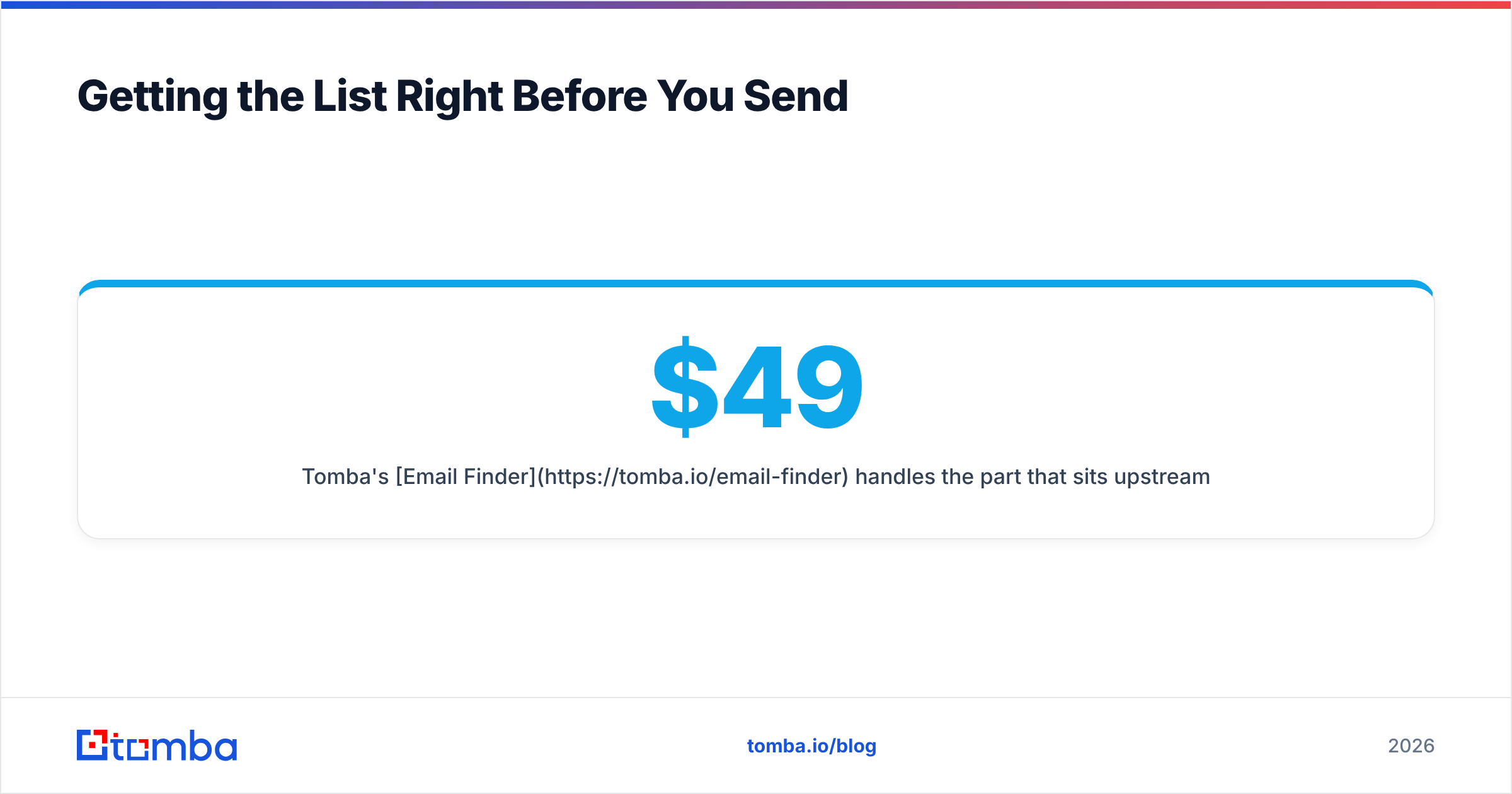
Tomba's Email Finder handles the part that sits upstream of all of this: given a name and a domain, it returns the verified professional address with a confidence score and the sources behind it. Pair it with the domain search when you need everyone at an account rather than one person. The free tier gives you 25 searches a month to test the accuracy against contacts you already know; paid plans start at $49/mo on Starter and scale through Growth at $99/mo and Pro at $249/mo — full Tomba pricing is public. Build the list properly, then run the campaigns above against it.
Related guides#
Ready to find emails that actually work?
Join 150,000+ professionals who stopped guessing and started sending. Free credits on signup — no credit card required.
Get the Tomba newsletter
Practical outbound tactics and product updates — once every two weeks.
About the author