Email Campaigns for Lead Generation: 2026 Playbook
Most lead gen email campaigns fail before send — bad lists, wrong offer, no segmentation. Here's the sequence structure, benchmarks, and tooling that actually convert cold contacts into pipeline.
TL;DR
- Email campaigns for lead generation fail at the list layer far more often than the copy layer. A 40% bounce rate kills your domain before anyone reads sentence two.
- The highest-converting structure in 2026 is a 4–6 touch sequence over 14–18 days, one idea per email, with the ask escalating only after value lands.
- Benchmark reality: 1–3% reply on unsegmented cold sends, 8–15% on tightly segmented sends with verified data and a researched trigger.
- Nurture campaigns (inbound leads) and cold campaigns (outbound prospecting) need different metrics. Judging a nurture flow on reply rate will make you delete a working campaign.
- Build the list with verified data first — a bulk email finder plus email verification does more for results than any subject-line hack.
What Are Email Campaigns for Lead Generation?#
An email campaign for lead generation is a planned sequence of messages designed to turn a contact into a qualified conversation. That's it. The messages can go to people who've never heard of you (cold outbound) or to people who downloaded something and went quiet (nurture). Both are lead generation. They just start from different levels of permission.
Think of it like knocking on doors versus following up with someone who already asked for a brochure. Same street, completely different opening line. Teams get into trouble when they run one playbook for both.
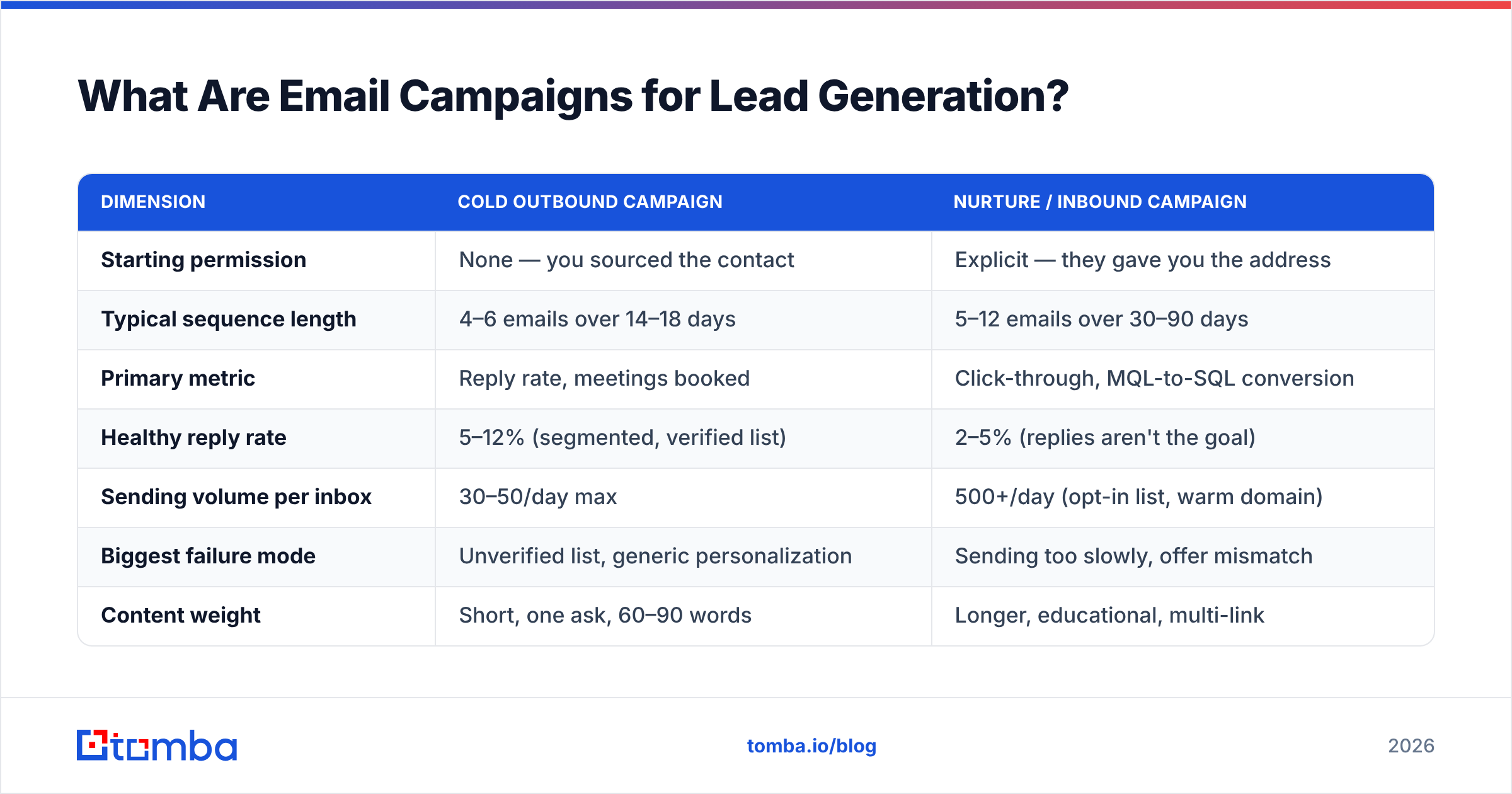
Here's how the two campaign types actually differ in practice:
| Dimension | Cold outbound campaign | Nurture / inbound campaign |
|---|---|---|
| Starting permission | None — you sourced the contact | Explicit — they gave you the address |
| Typical sequence length | 4–6 emails over 14–18 days | 5–12 emails over 30–90 days |
| Primary metric | Reply rate, meetings booked | Click-through, MQL-to-SQL conversion |
| Healthy reply rate | 5–12% (segmented, verified list) | 2–5% (replies aren't the goal) |
| Sending volume per inbox | 30–50/day max | 500+/day (opt-in list, warm domain) |
| Biggest failure mode | Unverified list, generic personalization | Sending too slowly, offer mismatch |
| Content weight | Short, one ask, 60–90 words | Longer, educational, multi-link |
Most teams that "tried cold email and it didn't work" ran a nurture-length campaign at cold-outbound volume with a purchased list. Three mistakes stacked.
Why Do Most Lead Generation Email Campaigns Fail?#
They fail before the first send. The order of failure, ranked by how often it's the real culprit:
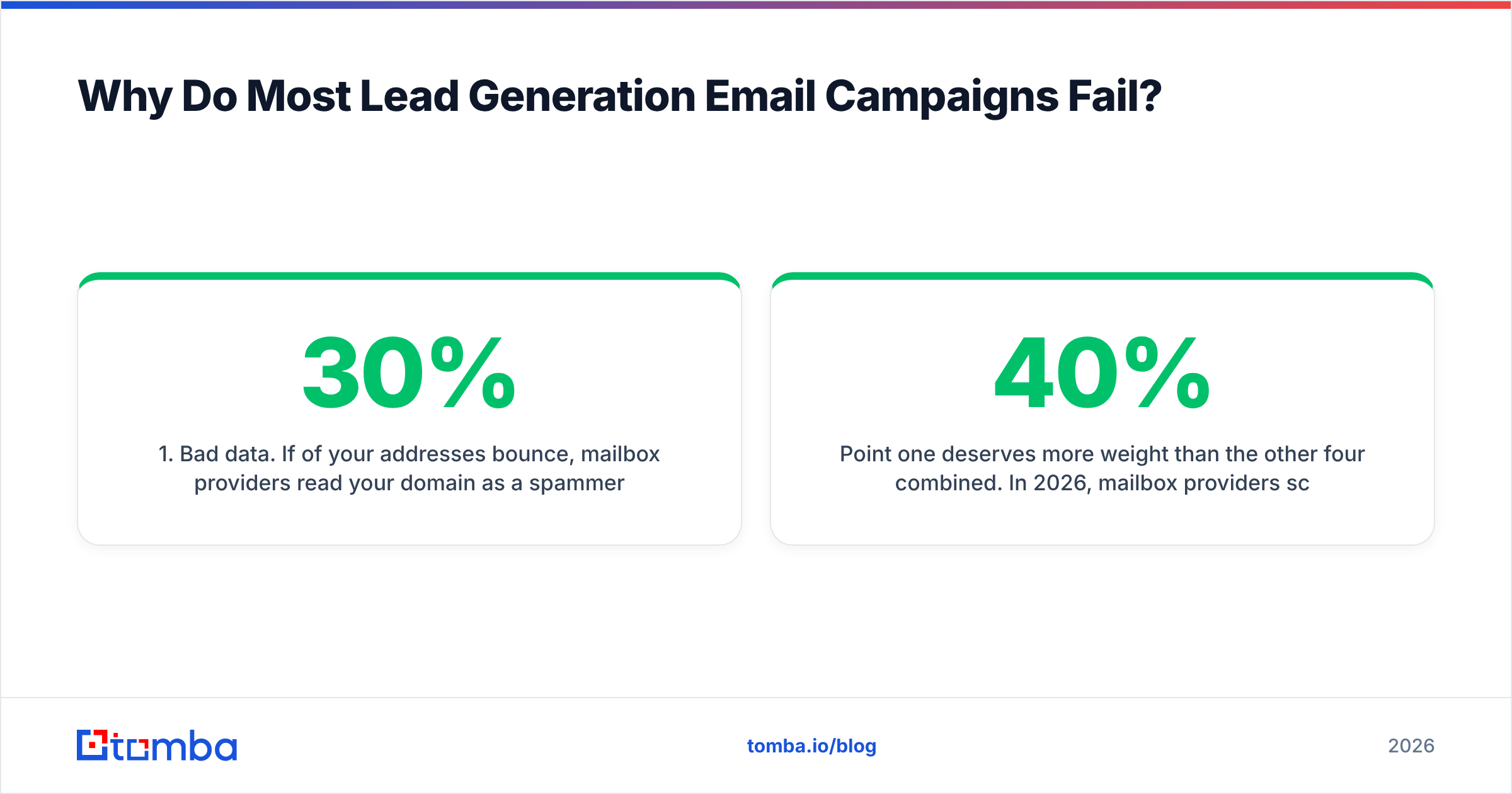
- Bad data. If 30% of your addresses bounce, mailbox providers read your domain as a spammer inside two sends. Nothing downstream matters. Google's Postmaster Tools will show your reputation collapsing in real time.
- No segmentation. One message to 5,000 people converts worse than five messages to 1,000 each. The math on personalization only works when the segment is narrow enough to say something true about all of them.
- The offer is a meeting. Asking a stranger for 30 minutes on email one is the highest-friction ask you can make. Lower it — a resource, a specific question, a two-line answer.
- Volume ahead of infrastructure. New domain, no warmup, 400 sends on day one. That's an automatic spam classification.
- Follow-ups that add nothing. "Just bumping this to the top of your inbox" is a tax on the reader. Every follow-up needs a new reason to exist.
Point one deserves more weight than the other four combined. In 2026, mailbox providers score sender reputation on bounce rate, spam complaints, and engagement — and bounce rate is the fastest-moving of the three. A list built from scraped websites and old CRM exports typically bounces at 20–40%. A list run through email verification before send lands under 3%.
How Do You Build a List Worth Emailing?#
Start from the account, not the contact. Decide which 200–500 companies match your best customers, then find the right person inside each one. The reverse order — pulling 10,000 contacts and hoping some fit — is what produces the unsegmented lists that fail.
A workable build process:
- Define the account criteria. Industry, employee count, tech stack, funding stage, hiring signals. Be specific enough that a stranger could apply the filter.
- Find the decision-maker per account. Use domain search to pull the email patterns and named contacts for each company domain, then pick by role rather than taking everyone.
- Verify every address. Run the whole list through verification and drop anything that isn't valid or catch-all-confirmed. Use a catch-all verifier for domains that accept everything — those need separate handling, not blind sending.
- Enrich with a trigger. Job change, funding round, new tool in the stack, a published article. The trigger is what makes email one non-generic.
- Split into segments of 100–300. Each segment gets its own angle. This is where reply rate actually moves.
- Suppress your CRM. Existing customers, open opportunities, and past unsubscribes should never see a cold sequence.
Step 2 is where most tooling decisions get made. A Tomba Email Finder run against your account list returns verified addresses with a confidence score, which means the verification step in point 3 becomes a check rather than a rescue operation. If you're pulling from LinkedIn-sourced account lists, the LinkedIn finder does the same job from profile URLs.

Accuracy differences between providers look small on a spec sheet — 92% versus 97% — and enormous in a campaign. On a 3,000-contact send, that gap is 150 extra bounces, which is roughly the difference between a healthy domain and a throttled one.
What Does a High-Converting Sequence Look Like?#
Four to six emails, one idea each, spread over roughly two and a half weeks. The escalation is the point: you earn the right to ask for time.
Email 1 — Day 1. The trigger. Sixty to ninety words. Reference the specific thing you noticed. One question at the end that's answerable in a sentence. No calendar link, no attachment, no pitch deck.
Email 2 — Day 3. The proof. A one-line result from a comparable company. Not a case study PDF — one sentence with a number in it. Then repeat a softer version of the question.
Email 3 — Day 7. The resource. Give something without asking for anything. A benchmark, a teardown, a short checklist relevant to the trigger from email one. This is the email that generates most of the "actually, tell me more" replies.
Email 4 — Day 12. The direct ask. Now you ask for the meeting. You've earned it. Be specific about length and agenda: "15 minutes, I'll show you the three things we'd change about your current setup."
Email 5 — Day 18. The close-out. Short, no guilt, easy exit. "Sounds like this isn't a priority right now — I'll stop here. If that changes, reply and I'll pick it back up." This email reliably produces 15–25% of total sequence replies, and it's the one most teams skip.
Reply to the same thread for emails 2 through 5. New threads read as new campaigns and burn goodwill.
What Metrics Should You Actually Track?#
Open rate is nearly dead as a signal. Apple Mail Privacy Protection and similar features inflate it with machine opens, and by 2026 a reported 60% open rate might mean 25% of humans looked. Track what survives:
| Metric | What it tells you | Healthy range (cold, segmented) | Fix when it's low |
|---|---|---|---|
| Bounce rate | List quality | Under 3% | Verify before send; drop stale contacts |
| Reply rate | Offer + targeting fit | 5–12% | Narrow the segment; change the ask |
| Positive reply rate | Message quality | 30–50% of replies | Rewrite email 1; check trigger relevance |
| Meetings booked | Everything working | 1–3% of contacts | Move the ask later in the sequence |
| Spam complaint rate | Permission mismatch | Under 0.1% | Reduce volume; tighten targeting |
| Unsubscribe rate | Relevance | Under 1% | Wrong segment, not wrong copy |
The relationship between these matters more than any single number. High opens plus low replies means your subject lines write checks the body can't cash. Low bounce plus low reply means the data is clean but the targeting is off. High positive-reply percentage on a low absolute reply rate means the message works and you need more volume, not a rewrite.
For nurture campaigns, swap reply rate for click-through and track MQL-to-SQL conversion instead — a nurture email that gets zero replies but drives a pricing-page visit did its job. Tracking a marketing qualified lead through to a closed deal is the only way to know whether a nurture sequence pays for itself.
What Tools Do You Need to Run These Campaigns?#
Three layers, and most teams over-invest in the third while ignoring the first.
Layer 1 — Data. Where contacts come from and how they're verified. Tomba, BookYourData, Apollo, and Clearbit all live here, with different strengths: Tomba and BookYourData for verified B2B contact data at accessible price points, Apollo for its combined database-plus-sequencer bundle, Clearbit for enrichment depth on existing records.
Layer 2 — Sending infrastructure. Domains, mailboxes, warmup, SPF/DKIM/DMARC. Instantly, Smartlead, and Mailreach compete here. Get your SPF record and DMARC policy correct before you spend a dollar on layer 3.
Layer 3 — Sequencing and CRM. Outreach, Salesloft, HubSpot, Reply.io. Necessary at scale, but a great sequencer sending to an unverified list still produces nothing.
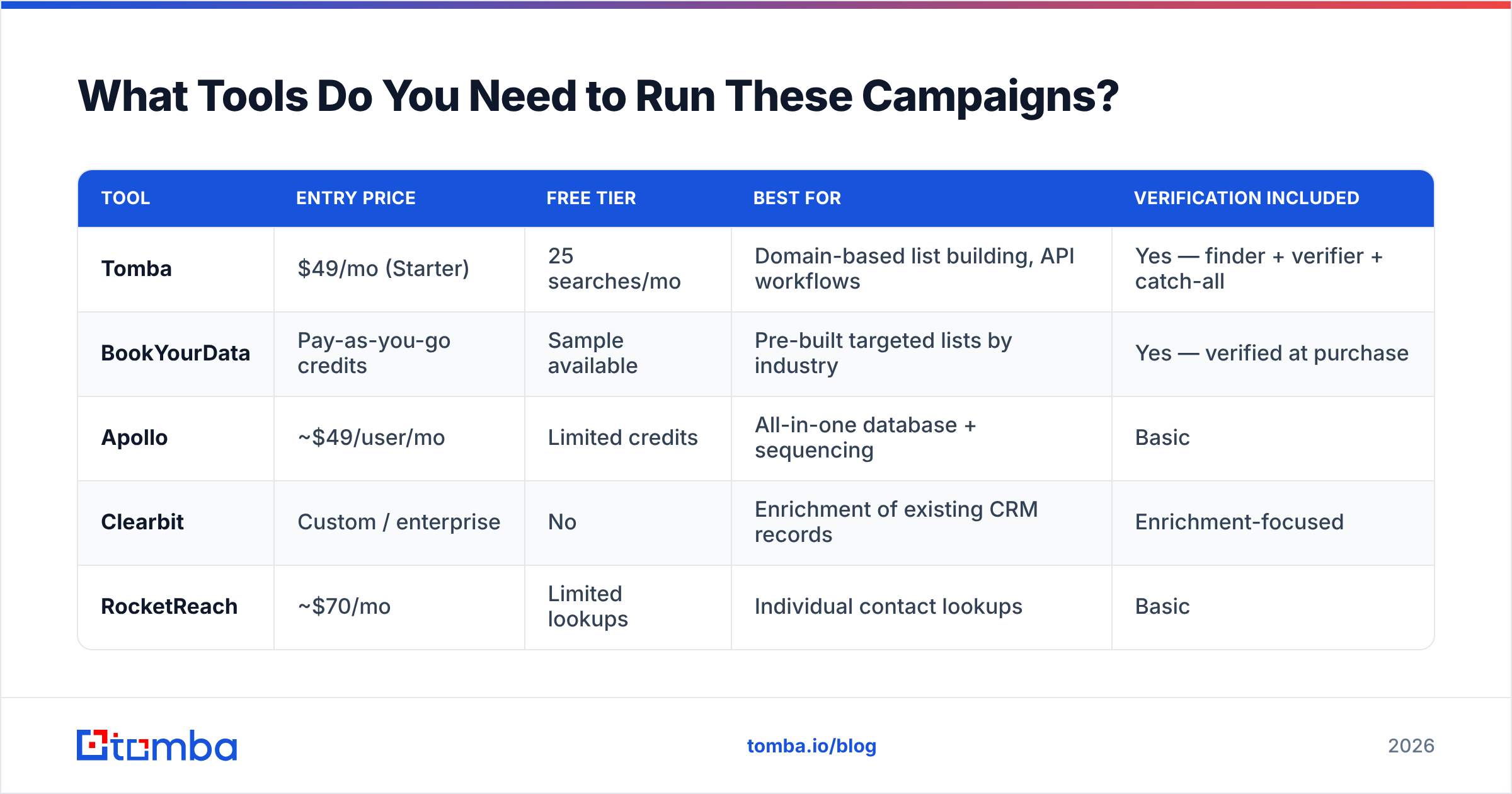
Here's how a few common data-layer options compare for lead generation campaigns specifically:
| Tool | Entry price | Free tier | Best for | Verification included |
|---|---|---|---|---|
| Tomba | $49/mo (Starter) | 25 searches/mo | Domain-based list building, API workflows | Yes — finder + verifier + catch-all |
| BookYourData | Pay-as-you-go credits | Sample available | Pre-built targeted lists by industry | Yes — verified at purchase |
| Apollo | ~$49/user/mo | Limited credits | All-in-one database + sequencing | Basic |
| Clearbit | Custom / enterprise | No | Enrichment of existing CRM records | Enrichment-focused |
| RocketReach | ~$70/mo | Limited lookups | Individual contact lookups | Basic |

The honest read: if you already have a defined account list and need addresses for it, a domain-first finder is the efficient path. If you need the account list itself built for you by industry and title, a curated list provider like BookYourData saves the research step. Many teams run both — a purchased base list, then a finder for the specific people the list missed. Compare the full Tomba pricing tiers against your monthly contact volume before committing; the Growth plan at $99/mo covers most teams sending 2,000–5,000 contacts a month.
Independent review data on G2 is worth checking before you buy anything in this category — vendor-claimed accuracy numbers and user-reported accuracy numbers rarely match.
How Do You Keep Campaigns Out of Spam?#
Deliverability is a prerequisite, not an optimization. The rules that matter in 2026:
- Authenticate everything. SPF, DKIM, and DMARC on every sending domain. Google and Yahoo both enforce this for bulk senders — Google's sender guidelines spell out the thresholds.
- Use subdomains for outbound. Never send cold campaigns from your primary domain. A burned
mail.yourcompany.comdoesn't takeyourcompany.comdown with it. - Warm up for 3–4 weeks. Start at 5–10 sends per day per mailbox and ramp gradually. Skipping this is the single most common reason a technically perfect campaign lands in spam.
- Cap at 30–50 cold sends per mailbox per day. More mailboxes, not more volume per mailbox.
- Keep spam complaints under 0.1%. One complaint per thousand sends is the ceiling. Above that, providers start filtering aggressively.
- Plain text, minimal links. One link maximum in a cold email. No tracking pixels if you can avoid them — pixel-heavy cold email is a well-known filter trigger, and open data is unreliable anyway.
Monitoring matters as much as setup. Watch your sender reputation weekly rather than discovering a problem when reply rate hits zero. Understanding email deliverability as an ongoing metric — not a one-time configuration — is what separates campaigns that scale from campaigns that work for six weeks and die.
What Should You Fix First?#
If you're running campaigns now and results are flat, work in this order:
- Measure your bounce rate. If it's above 5%, stop everything and fix the data. Nothing else you change will show a signal through that noise.
- Check your segment size. If any segment exceeds 500 contacts, split it and write a different email one for each half.
- Move your ask later. If email one asks for a meeting, move that ask to email four and see what happens to reply rate.
- Add the close-out email. Free replies from a sequence you already built.
- Then, and only then, test copy. Subject lines and opening sentences are real levers — they're just the smallest ones, and testing them on a broken foundation produces noise.
Most teams do this list backwards, starting with copy tests because copy is the visible part. The data layer is invisible and accounts for more of the variance.
Where to Start#
Build the list right and the rest of the campaign gets easier. Run your target accounts through Tomba Email Finder to get verified, pattern-matched addresses per domain, then verify the full set before your first send. The free tier gives you 25 searches a month to test accuracy against a sample of accounts you already know the answers for — which is exactly how you should evaluate any data vendor before paying for one. Paid plans start at $49/mo, and the API and bulk tools handle list building at whatever volume your campaigns need.
Related guides#
Ready to find emails that actually work?
Join 150,000+ professionals who stopped guessing and started sending. Free credits on signup — no credit card required.
Get the Tomba newsletter
Practical outbound tactics and product updates — once every two weeks.
About the author