Email Capture Tools in 2026: A Complete No-Fluff Guide
Popups, forms, visitor reveal, and finders all promise more emails. Here's what each category actually captures, what it costs, and how to stop 30% of your list from bouncing.
TL;DR
- "Email capture tools" is four different product categories wearing one label: on-site opt-in tools, form builders, visitor identification, and email finders. Buying the wrong one is the most common mistake.
- On-site popups convert roughly 1–4% of traffic on average. If you get 5,000 visitors a month, that ceiling is about 50–200 emails — not a pipeline.
- Visitor reveal and email finders address the other 96–99%: the people who read your pricing page and left without typing anything.
- Every captured address decays. Un-verified lists routinely carry 15–30% invalid or role-based addresses, which is enough to sink your sender reputation on its own.
- The practical 2026 stack is one capture layer (popup/form), one identification layer (reveal or finder), and one verification layer — not five overlapping subscriptions.
What are email capture tools?#
Email capture tools are software that turns anonymous attention into a contactable email address. That is the whole job. Where products differ is whose attention they convert and how they get the address.
Think of it like a storefront. A popup is the sign-up clipboard at the counter — it only works on people who already walked in and are willing to write. Visitor identification is the security camera that tells you which companies came in and browsed. An email finder is the phone book you use to call back the company you know was interested. Same goal, completely different mechanics.
Four categories sit under the umbrella:
- On-site opt-in tools — exit-intent popups, slide-ins, sticky bars, spin-to-win, gated content. Examples: OptinMonster, Sumo, Klaviyo forms. Converts existing traffic that is willing to self-identify.
- Form builders and landing-page capture — HubSpot Forms, Typeform, Webflow forms. Lower friction to build, no behavioral triggering, usually free at low volume.
- Visitor identification / reveal — matches anonymous website traffic to companies (and sometimes people) using IP and device intelligence, then supplies contact data. Converts the traffic that never fills anything in.
- Email finders and enrichment APIs — you supply a name plus a domain, or just a domain, and get back a verified business email. This is the outbound side of capture: you decide who you want, then find them.
Most teams buy category 1, get a 1.5% opt-in rate, conclude "email capture doesn't work," and never test 3 or 4. That is a sequencing error, not a channel problem.
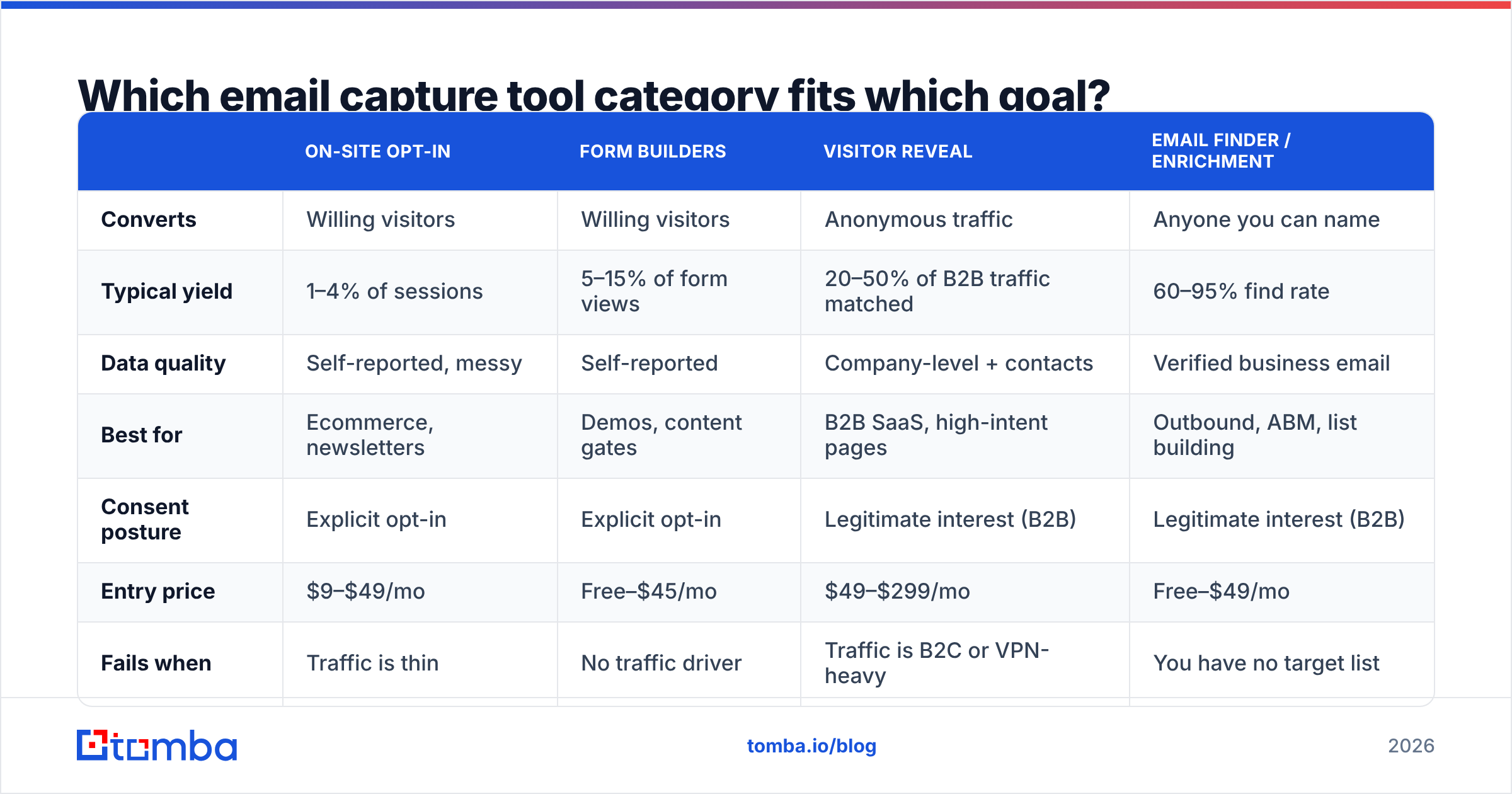
Which email capture tool category fits which goal?#
| On-site opt-in | Form builders | Visitor reveal | Email finder / enrichment | |
|---|---|---|---|---|
| Converts | Willing visitors | Willing visitors | Anonymous traffic | Anyone you can name |
| Typical yield | 1–4% of sessions | 5–15% of form views | 20–50% of B2B traffic matched | 60–95% find rate |
| Data quality | Self-reported, messy | Self-reported | Company-level + contacts | Verified business email |
| Best for | Ecommerce, newsletters | Demos, content gates | B2B SaaS, high-intent pages | Outbound, ABM, list building |
| Consent posture | Explicit opt-in | Explicit opt-in | Legitimate interest (B2B) | Legitimate interest (B2B) |
| Entry price | $9–$49/mo | Free–$45/mo | $49–$299/mo | Free–$49/mo |
| Fails when | Traffic is thin | No traffic driver | Traffic is B2C or VPN-heavy | You have no target list |
The honest read: if you have under 10,000 monthly visitors, popups alone will never fill a pipeline. Math beats optimism. At a 2% opt-in rate and 8,000 sessions, you capture 160 addresses a month, of which maybe 60% are business addresses worth emailing. A single outbound researcher using an email finder can build that in an afternoon.
Which email capture tools are worth paying for in 2026?#
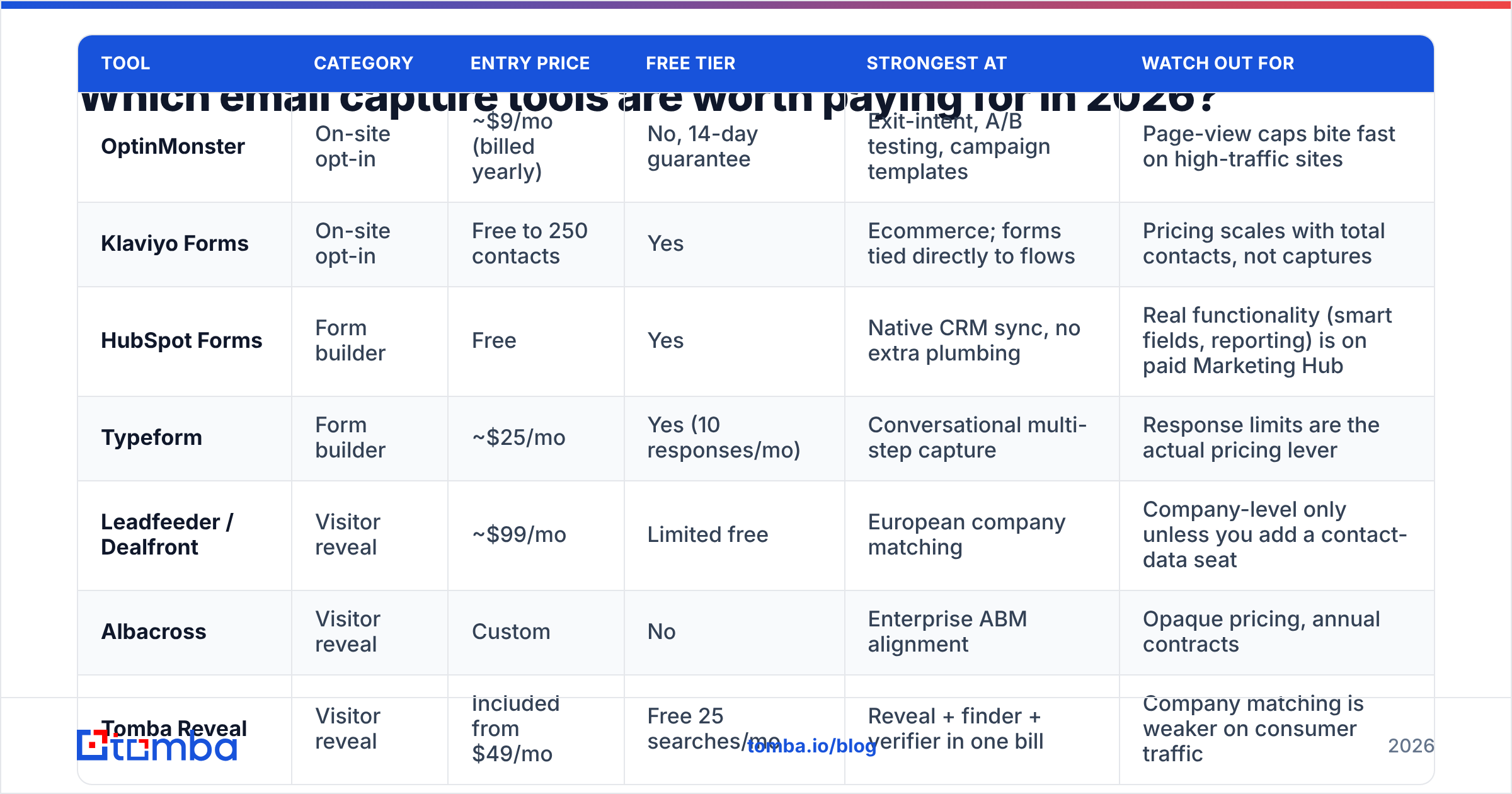
Prices below are entry tiers as advertised at time of writing; every vendor reprices, so confirm before you buy.
| Tool | Category | Entry price | Free tier | Strongest at | Watch out for |
|---|---|---|---|---|---|
| OptinMonster | On-site opt-in | ~$9/mo (billed yearly) | No, 14-day guarantee | Exit-intent, A/B testing, campaign templates | Page-view caps bite fast on high-traffic sites |
| Klaviyo Forms | On-site opt-in | Free to 250 contacts | Yes | Ecommerce; forms tied directly to flows | Pricing scales with total contacts, not captures |
| HubSpot Forms | Form builder | Free | Yes | Native CRM sync, no extra plumbing | Real functionality (smart fields, reporting) is on paid Marketing Hub |
| Typeform | Form builder | ~$25/mo | Yes (10 responses/mo) | Conversational multi-step capture | Response limits are the actual pricing lever |
| Leadfeeder / Dealfront | Visitor reveal | ~$99/mo | Limited free | European company matching | Company-level only unless you add a contact-data seat |
| Albacross | Visitor reveal | Custom | No | Enterprise ABM alignment | Opaque pricing, annual contracts |
| Tomba Reveal | Visitor reveal | Included from $49/mo | Free 25 searches/mo | Reveal + finder + verifier in one bill | Company matching is weaker on consumer traffic |
| Tomba Email Finder | Finder / enrichment | $49/mo Starter | Yes, 25 searches/mo | Domain search, bulk, API, verification bundled | Not a sending tool — you still need a sequencer |
| BookYourData | Prebuilt B2B data | Pay-as-you-go | Sample credits | Buying a targeted list outright when you have no traffic yet | Best paired with your own verification pass |
| ZeroBounce | Verification only | ~$16 for 2k credits | 100 free credits | Deep validation reports | You still need a capture source |
Two things stand out when you line these up.
First, the on-site tools are cheap because they are commoditized. Exit-intent, scroll triggers, and A/B testing are table stakes now; you are mostly paying for templates and page-view allowance. Do not spend a week evaluating them. Pick one, ship five variants, and move on.
Second, the meaningful cost difference lives in the data layer. A visitor identification tool that only returns "Acme Corp visited your pricing page twice" is half a product. You still need a name and an address to act on it. Vendors that stop at company level force you to buy a second subscription — which is why bundled stacks tend to win on total cost even when the sticker price looks similar.
How do you know if your captured emails are actually usable?#
Capture rate is a vanity metric. Deliverable capture rate is the real one.
Every capture channel introduces its own garbage:
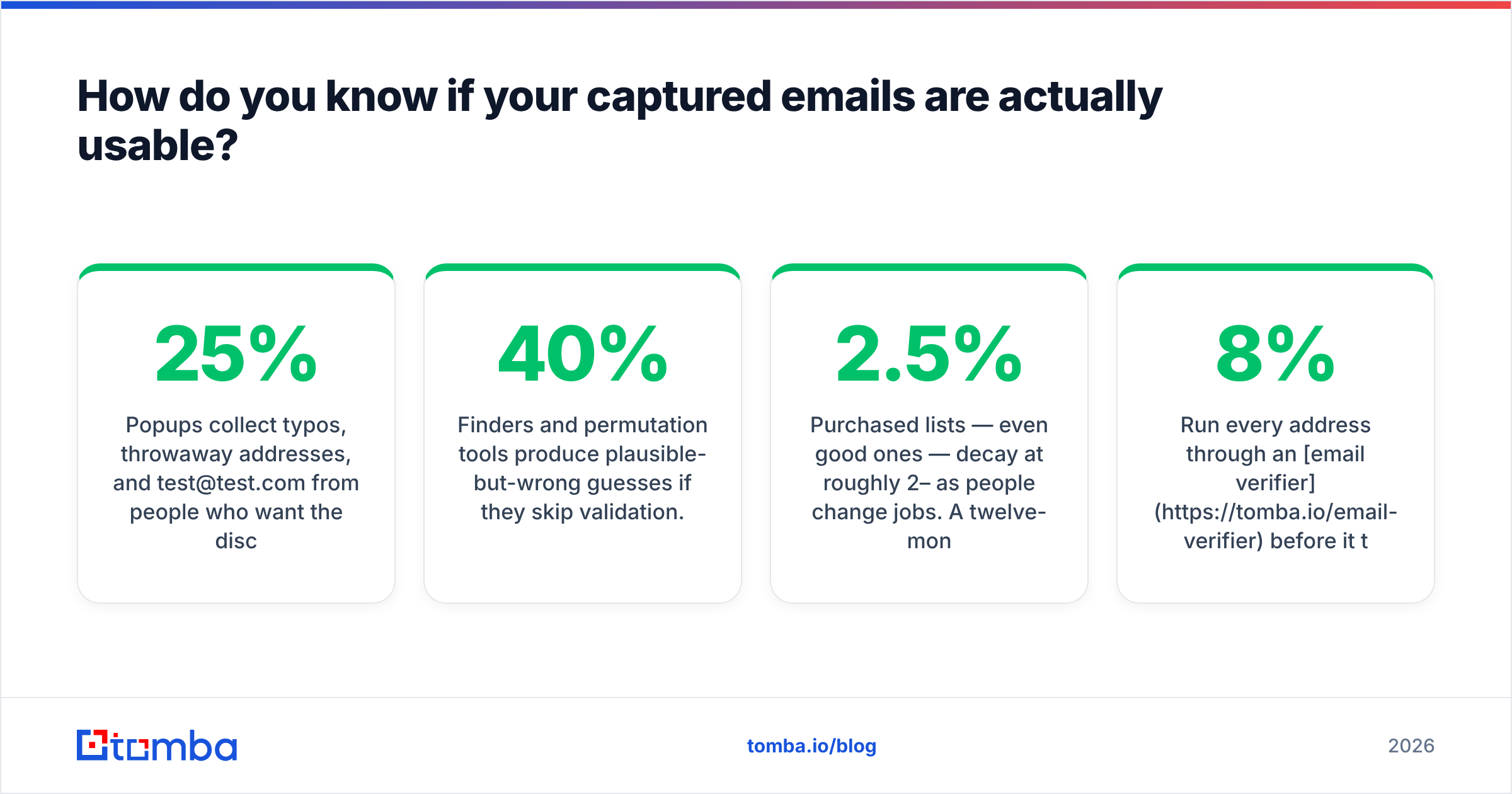
- Popups collect typos, throwaway addresses, and
test@test.comfrom people who want the discount code. Expect 10–25% junk on consumer forms. - Gated content forms collect
info@,admin@, and personal Gmail from people who will not reply to a business email. Role addresses have near-zero reply rates and elevated complaint rates. - Finders and permutation tools produce plausible-but-wrong guesses if they skip validation.
firstname.lastname@is right about 40% of the time across the web, and wrong the rest. - Purchased lists — even good ones — decay at roughly 2–2.5% per month as people change jobs. A twelve-month-old file is meaningfully worse than a fresh one.
Run every address through an email verifier before it touches a sending tool. Non-negotiable. Google and Microsoft both treat bounce rate as a reputation signal, and a single 8% bounce campaign can knock your inbox placement down for weeks. Google's own bulk sender guidelines put the spam complaint threshold at 0.3% — you do not have room to be sloppy.
The practical rule: keep hard bounces under 2%. If you cannot, your capture source is the problem, not your copy.
What conversion rates should you expect from email capture?#
Benchmarks vary wildly by traffic quality, so treat these as sanity checks rather than targets:
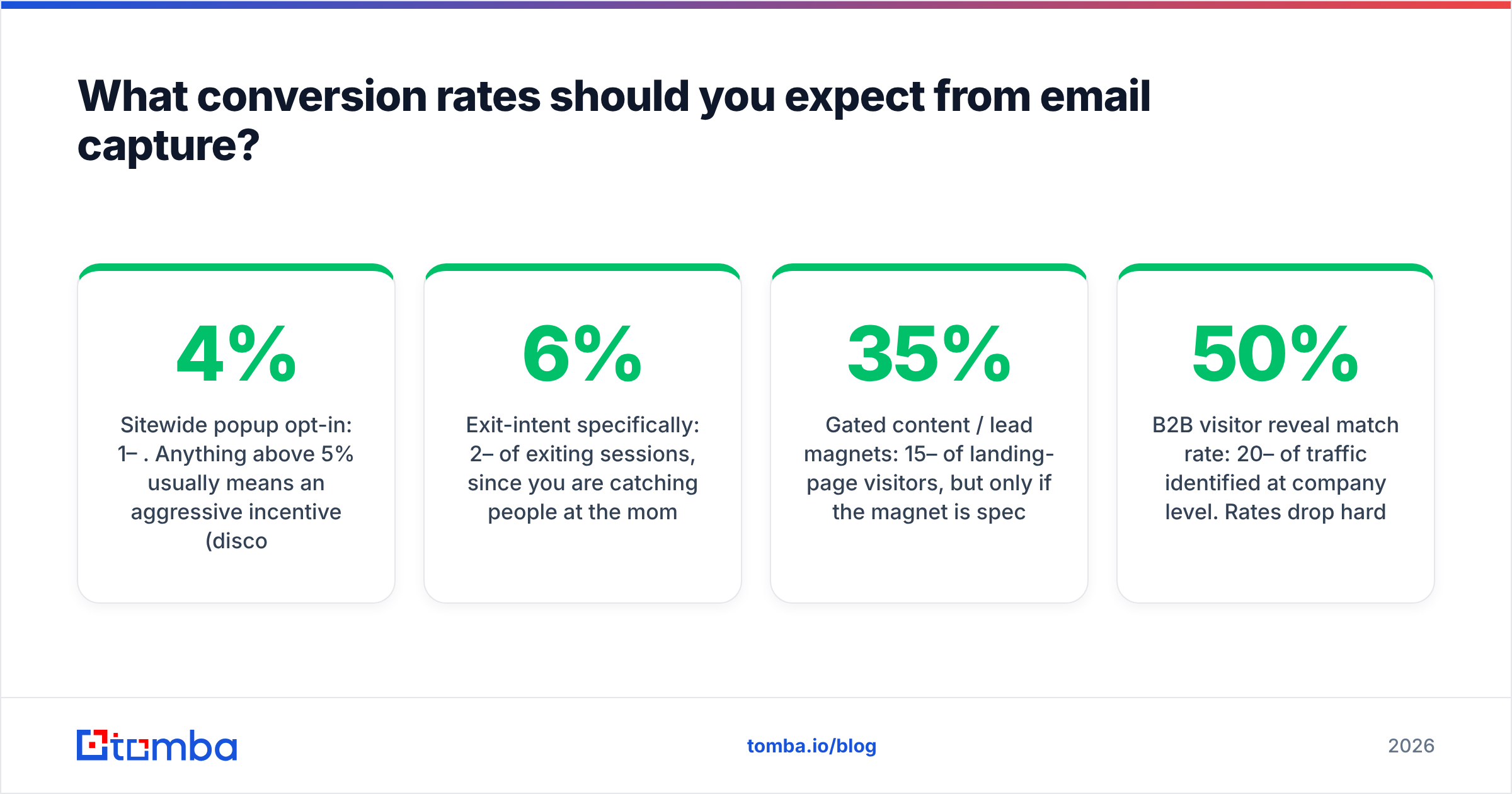
- Sitewide popup opt-in: 1–4%. Anything above 5% usually means an aggressive incentive (discount, giveaway) and a correspondingly low-quality list.
- Exit-intent specifically: 2–6% of exiting sessions, since you are catching people at the moment of departure with nothing to lose.
- Gated content / lead magnets: 15–35% of landing-page visitors, but only if the magnet is specific. "Subscribe to our newsletter" is not a magnet.
- B2B visitor reveal match rate: 20–50% of traffic identified at company level. Rates drop hard on mobile, VPN, and consumer ISPs.
- Email finder success rate: 60–95% depending on company size. Large enterprises with published patterns are easy; five-person agencies on custom domains are not.
Notice the asymmetry. A popup on a page with 1,000 monthly visits yields ~20 emails. Reveal on the same page identifies 200–500 companies, and a finder converts the good ones into named contacts. For B2B, the identification path is usually an order of magnitude more productive than the opt-in path — which is exactly backwards from where most budget goes.
How should you build an email capture stack by team size?#
Solo founder or one-person marketing team. One free form builder plus a free-tier finder. Do not buy a reveal tool until you have enough traffic for matching to produce more than a handful of accounts per week. Use domain search to build target lists manually; it is slower but costs nothing to test the motion.
Small team, 5,000–50,000 monthly visitors. Add an opt-in tool with exit-intent and one paid data tool. This is where Tomba pricing at $49/mo Starter or $99/mo Growth usually lands — enough credits to enrich reveal output and verify everything you capture without a second vendor.
Scaling team with an SDR function. You need an API, not a dashboard. Capture events should hit your CRM, trigger enrichment automatically, and route by fit score. At this stage the differentiator is whether your data provider has a real API with predictable rate limits and whether it can run bulk jobs overnight.
Enterprise. Governance becomes the constraint: consent records, suppression lists, regional routing for GDPR, and audit trails on where each address came from. Buy for compliance documentation and SLAs, not for feature count. G2's lead capture category is a reasonable starting shortlist, but read the reviews filtered to your company size — a tool that delights 10-person startups often collapses under enterprise data governance requirements.
What mistakes kill email capture programs?#
Stacking three popups on one page. Exit-intent plus a sticky bar plus a scroll modal does not triple your capture rate. It triples your bounce rate. One primary offer per page.
Capturing without a next step. An address with no follow-up sequence is a liability, not an asset. If you cannot email them within 48 hours of capture, do not capture yet.
Treating B2C and B2B capture identically. Consumer capture is consent-first: they opt in, you send. B2B capture often runs on legitimate interest, which changes what you must disclose and what suppression obligations you carry. The ICO's guidance on electronic marketing is the clearest free reference on where that line sits in the UK/EU.
Skipping enrichment. An email alone tells you nothing about fit. Adding company size, industry, and role via data enrichment at the point of capture is what lets you route hot leads to sales instead of dumping everyone into the same drip.
Never re-verifying. Verify at capture, then re-verify anything older than 90 days before a big send. Lists rot quietly; you only find out when the bounce report lands.
Optimizing the popup instead of the offer. Button color tests move opt-in rate by fractions of a percent. Changing "Join our newsletter" to "Get the 2026 outbound benchmark report (14 pages, no email course)" moves it by multiples. Fix the offer first.
Is one bundled tool better than several specialists?#
It depends on how much volume you actually push.
Specialists win when a single function is your bottleneck. If you are running seven-figure ecommerce traffic, a dedicated on-site optimization platform with heavy A/B infrastructure will beat a bundled form builder. If you are shipping millions of verifications a month, a pure-play verification vendor may price better at that ceiling.
Bundles win everywhere else, for an unglamorous reason: reconciliation. Three vendors means three credit systems, three deduplication rules, and three definitions of "valid." When your popup tool says you captured 400 emails, your CRM shows 361, and your sender reports 317 delivered, you spend your week on spreadsheets rather than campaigns. A single provider handling find, verify, and enrich keeps one definition of truth. Tools like bulk processing and a shared credit pool matter more in practice than any individual feature comparison suggests.
The realistic 2026 default for a B2B team: one opt-in tool (cheap, interchangeable), one identification-plus-data provider (where the money should go), and one sending platform. Three vendors. Not eight.
Where should you start this week?#
Pick your weakest layer and fix only that.
If you have traffic but no addresses, install one exit-intent offer and a reveal script, and give it 30 days. If you have addresses but bad reply rates, stop capturing and verify what you already have — the fix is usually list hygiene, not copy. If you have neither traffic nor a list, skip on-site capture entirely for now and build target accounts by domain.
For that last case, start with the Tomba Email Finder. The free tier gives you 25 searches a month to test find rates against your own target accounts before spending anything, and Starter at $49/mo covers a typical solo outbound motion with verification included rather than billed separately. Run 50 of your ideal-fit companies through it, check how many verified addresses come back, and you will know within an hour whether the outbound side of email capture is worth building out for your market.
Related guides#
Ready to find emails that actually work?
Join 150,000+ professionals who stopped guessing and started sending. Free credits on signup — no credit card required.
Get the Tomba newsletter
Practical outbound tactics and product updates — once every two weeks.
About the author