Email Chcker: How to Verify Any Email Address in 2026
Searching "email chcker" gets you a hundred lookalike tools and no idea which ones actually work. Here's how email verification really functions, what the checks catch, and which tools earn the click.
TL;DR
- "Email chcker" is one of the most common misspellings of "email checker" — the intent behind it is always the same: is this address real before I send to it?
- A real email chcker runs four layers of validation: syntax, domain/MX records, mailbox existence via SMTP handshake, and risk classification (role accounts, disposables, catch-alls).
- Free single-lookup tools handle the first two layers well and the third badly. That's where most of the accuracy gap lives.
- Catch-all domains — which accept every address at the SMTP layer — break naive checkers entirely. About 15-20% of B2B domains are catch-all, so this is not an edge case.
- Cleaning a list before you send is the cheapest deliverability insurance available. A bounce rate above 3-5% starts damaging sender reputation at Google and Microsoft.
What Does an Email Chcker Actually Do?#
An email chcker is a tool that tells you whether an email address will accept mail before you send anything to it. Think of it like calling a hotel to confirm a reservation exists before driving four hours to check in. You're not sending the guest — you're confirming the room is there.
Technically, verification runs as a sequence of increasingly expensive checks, and a good tool stops as soon as it has an answer:
- Syntax validation — does the string conform to RFC 5322? Catches
john@@acme, trailing dots, illegal characters, missing TLDs. Free, instant, catches maybe 2% of bad records in a typical list. - Domain and MX record lookup — does
acme.comexist, and does it publish mail-exchange records? A domain with no MX record cannot receive mail, period. This catches dead companies, typo domains (gmial.com), and parked domains. - SMTP mailbox probe — the checker opens a connection to the receiving mail server, issues
MAIL FROMandRCPT TO, and reads the response code before disconnecting without sending. A250means the mailbox is accepted. A550means it doesn't exist. - Risk classification — is this a role account (
info@,sales@,support@)? A disposable address from a burner service? A catch-all domain where step 3 returns250for literally anything? These aren't invalid, but they carry different risk.
The gap between a free lookup widget and a production-grade verifier is almost entirely in steps 3 and 4. Anyone can do a DNS query. Running a well-behaved SMTP probe across thousands of domains without getting your probing IPs blacklisted is infrastructure work.
Why Do So Many People Search "Email Chcker" Instead of "Email Checker"?#
Because it's typed fast, mid-task, by someone with a spreadsheet open. The typo tells you something useful about intent: this is an urgent, practical search. Nobody researching email infrastructure theory misspells the query. They want a box, a paste, an answer.
That urgency is also why the search results are so noisy. Dozens of thin tools rank for the misspelling with a form field and a paywall two clicks deep. The useful distinction isn't "which tool has the prettiest UI" — it's which tools tell you the truth when the answer is uncertain.

What Are the Verification Result Statuses, and What Do They Mean?#
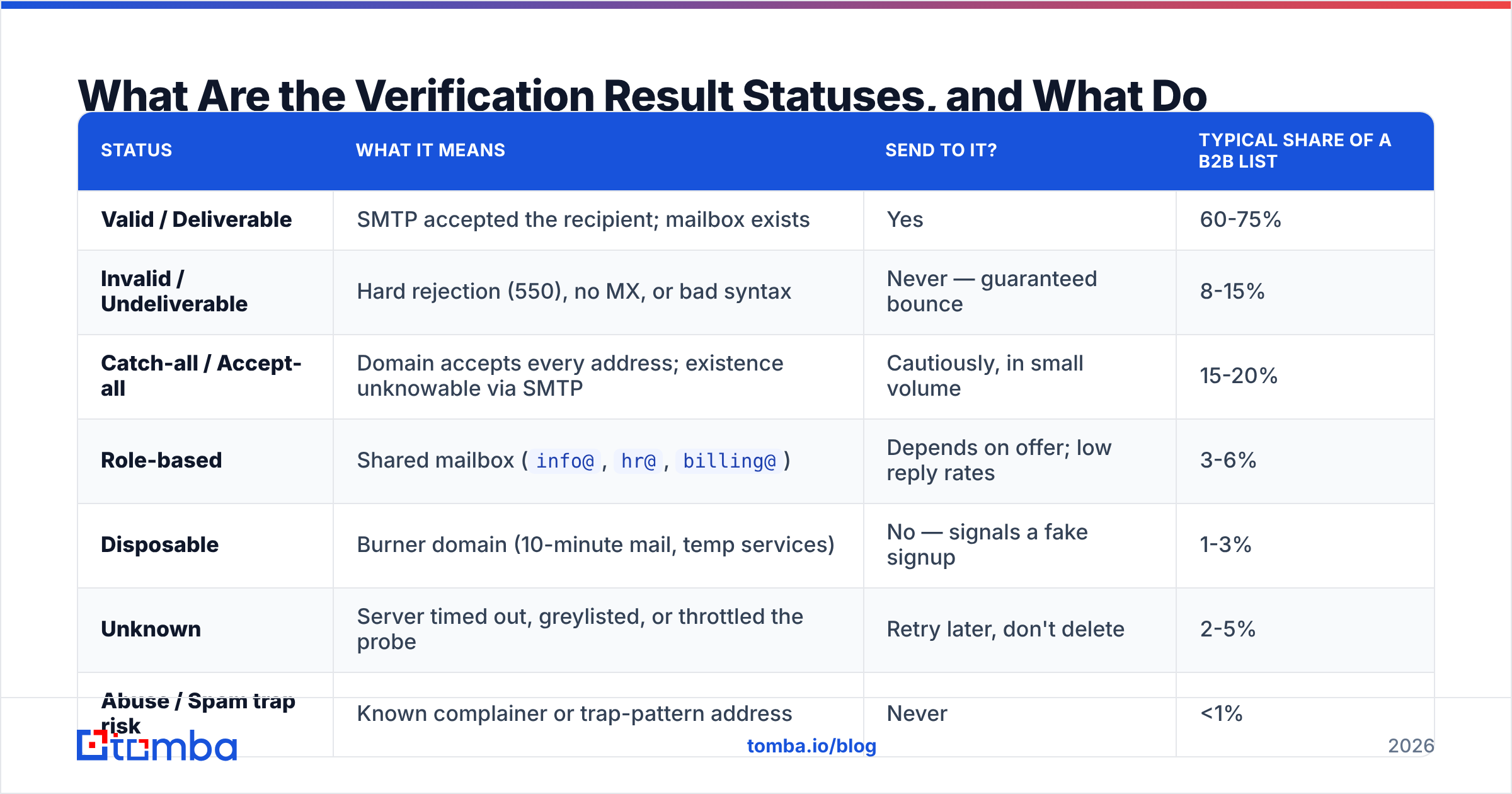
Every serious verifier returns a status, not a boolean. Treating "not valid" as "invalid" is the single most expensive mistake in list hygiene — you'll delete good contacts.
| Status | What it means | Send to it? | Typical share of a B2B list |
|---|---|---|---|
| Valid / Deliverable | SMTP accepted the recipient; mailbox exists | Yes | 60-75% |
| Invalid / Undeliverable | Hard rejection (550), no MX, or bad syntax | Never — guaranteed bounce | 8-15% |
| Catch-all / Accept-all | Domain accepts every address; existence unknowable via SMTP | Cautiously, in small volume | 15-20% |
| Role-based | Shared mailbox (info@, hr@, billing@) |
Depends on offer; low reply rates | 3-6% |
| Disposable | Burner domain (10-minute mail, temp services) | No — signals a fake signup | 1-3% |
| Unknown | Server timed out, greylisted, or throttled the probe | Retry later, don't delete | 2-5% |
| Abuse / Spam trap risk | Known complainer or trap-pattern address | Never | <1% |
The two rows that separate good tools from bad ones are catch-all and unknown. A weak email chcker collapses both into "valid" to inflate its own accuracy number, and you find out the truth from your bounce report a week later. A tool that honestly reports 18% catch-all is more useful than one that claims 99% valid.
How Do Catch-All Domains Break Most Email Checkers?#
A catch-all domain is configured to accept mail addressed to any local part. Send to asdfjkl@theircompany.com and the server says 250 OK — the message lands in a wildcard mailbox or gets silently discarded. The SMTP probe, which is the whole basis of step 3, returns a meaningless positive.
This is common at mid-market and enterprise companies that don't want to leak their org chart through bounce responses, and it's growing. If your verifier marks catch-alls as "valid," your reported deliverability looks great and your actual reply rate craters.
Serious tools solve this a different way — by inference rather than probe. They cross-reference the address against observed pattern data (does this company use first.last@ or flast@?), against sightings of the exact address in public sources, and against historical send outcomes. That's why a dedicated catch-all verifier exists as a separate capability from ordinary verification, and why some vendors charge differently for it.
Practical rule: treat catch-all addresses as a separate segment. Send to them in low volume from a secondary domain, watch reply and complaint signals, and promote the ones that engage. Don't blend them into your main list.
How Do the Main Email Chcker Tools Compare in 2026?#
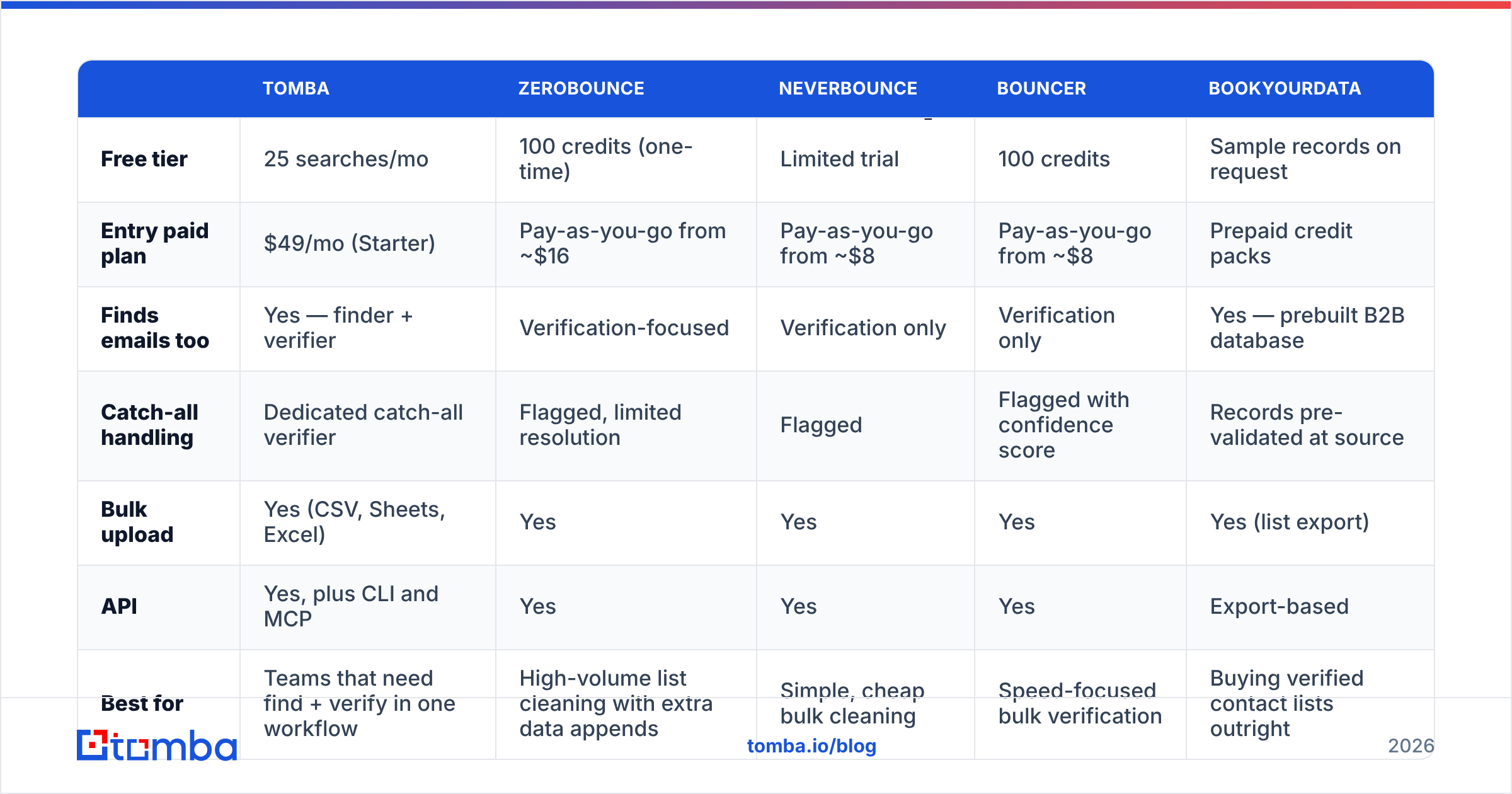
Pricing and positioning differ more than accuracy claims do — nearly every vendor advertises 95-99%, and those numbers are self-reported on self-selected test lists. Compare on architecture, catch-all handling, and cost per verified record instead.

| Tomba | ZeroBounce | NeverBounce | Bouncer | BookYourData | |
|---|---|---|---|---|---|
| Free tier | 25 searches/mo | 100 credits (one-time) | Limited trial | 100 credits | Sample records on request |
| Entry paid plan | $49/mo (Starter) | Pay-as-you-go from ~$16 | Pay-as-you-go from ~$8 | Pay-as-you-go from ~$8 | Prepaid credit packs |
| Finds emails too | Yes — finder + verifier | Verification-focused | Verification only | Verification only | Yes — prebuilt B2B database |
| Catch-all handling | Dedicated catch-all verifier | Flagged, limited resolution | Flagged | Flagged with confidence score | Records pre-validated at source |
| Bulk upload | Yes (CSV, Sheets, Excel) | Yes | Yes | Yes | Yes (list export) |
| API | Yes, plus CLI and MCP | Yes | Yes | Yes | Export-based |
| Best for | Teams that need find + verify in one workflow | High-volume list cleaning with extra data appends | Simple, cheap bulk cleaning | Speed-focused bulk verification | Buying verified contact lists outright |

Three honest observations about this table:
If you already have the list, pay-as-you-go verification is cheaper. NeverBounce and Bouncer exist precisely for the "I have 40,000 records from a trade show, clean them once" job. A subscription is bad value for one-off cleanup.
If you're building the list, a combined tool wins on workflow. Verifying an address you don't have yet is a non-problem. Tools that pair an email finder with an email verifier let you find and validate in a single pass, which matters when you're enriching a CRM continuously rather than in batches.
If you don't want to build the list at all, a curated provider like BookYourData sells pre-verified records directly. Different job, legitimate answer — it trades control over targeting for speed, and for some teams that trade is correct.
What Does Bad Verification Actually Cost You?#
Bounces aren't just wasted sends. Mailbox providers read them as a signal about you.
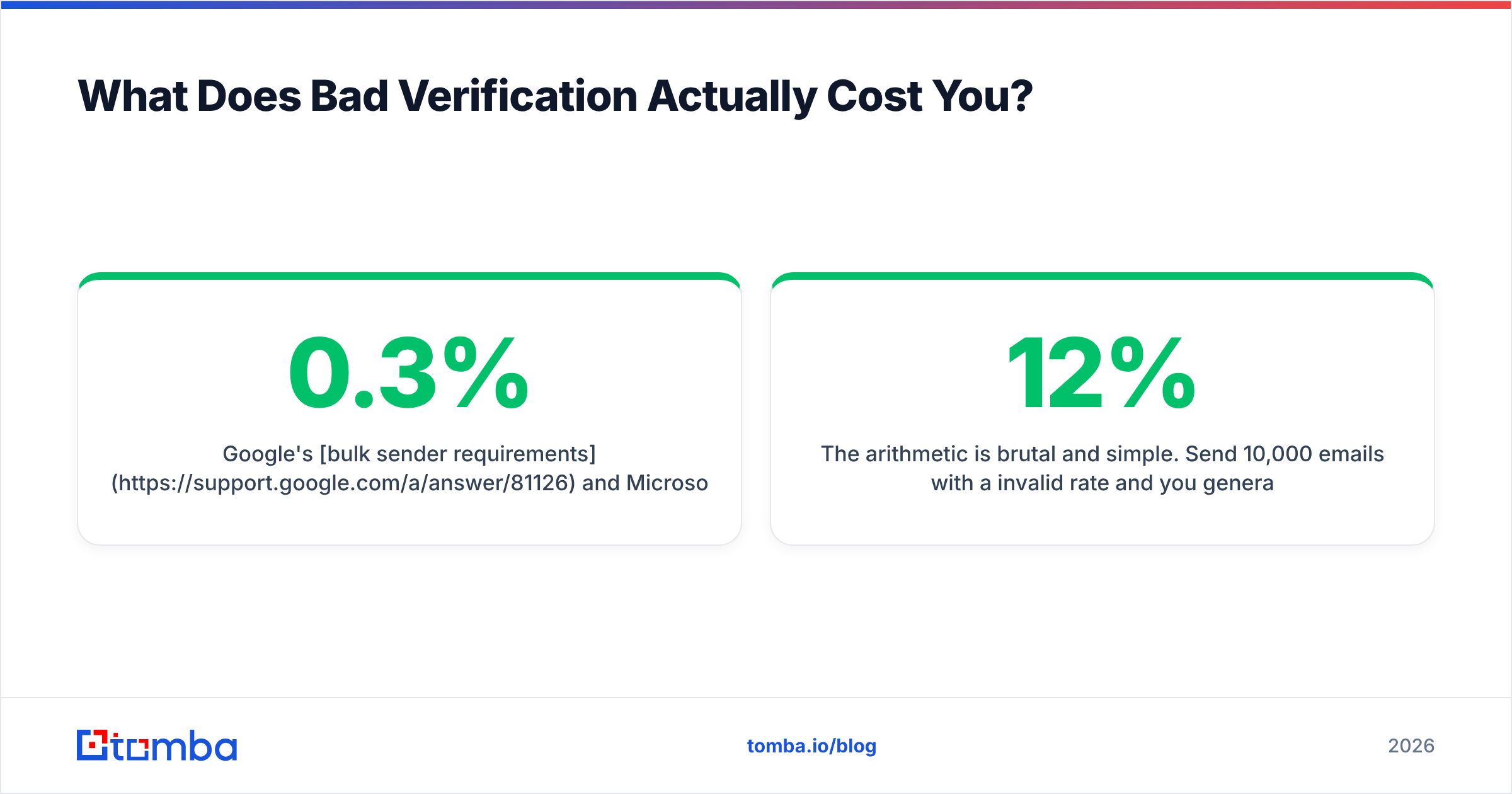
Google's bulk sender requirements and Microsoft's equivalent policies both treat elevated bounce rates as evidence of poor list acquisition. The commonly cited threshold is a spam complaint rate under 0.3%, but hard bounces feed the same reputation model. Once your sender reputation degrades, the damage isn't limited to the bad addresses — your good recipients start seeing you in spam.
The arithmetic is brutal and simple. Send 10,000 emails with a 12% invalid rate and you generate 1,200 hard bounces. That's usually enough to get a new sending domain throttled within two campaigns. Verification on the same list might cost $10-40. There is no version of this math where skipping the check wins.
How Should You Actually Use an Email Chcker in a Workflow?#
Single-address lookups are for spot checks. The real value shows up when verification is a step in a pipeline, not a manual task.
- Verify at capture. Put a validation call on your signup and demo-request forms. Catching a typo at the moment of entry — before it enters the CRM — is worth ten cleanups later. This also blocks disposable addresses from polluting your MQL counts.
- Verify at import. Any list from an event, a partner, a scrape, or a purchase gets cleaned before it touches your sending tool. Use bulk verification rather than pasting addresses one at a time.
- Re-verify on a schedule. B2B data decays around 25-30% per year through job changes alone. A list verified in January is meaningfully stale by July. Quarterly re-verification of your active outreach segment is a reasonable cadence.
- Segment by status, don't just delete. Valid goes to the main sequence. Catch-all goes to a low-volume test segment. Role accounts get a different message (they're often gatekeepers, not decision makers). Unknown gets retried, not discarded.
- Verify inside the tools you already use. Verification that requires an export-import round trip won't get done. Check whether your verifier plugs into Google Sheets, your CRM, or your automation layer directly.
Is a Free Email Chcker Good Enough?#
For a handful of addresses, yes. For anything at volume, no — and the reason is structural, not stingy.
Free tools are rate-limited because SMTP probing is expensive and reputationally risky for the provider. They also tend to be honest about only the cheap checks. If a free widget returns "valid" instantly for every address you paste, it's doing syntax and MX only, and you're getting a confident answer to a question it never asked.
Use free single-lookup tools like a free email checker for exactly what they're good at: confirming one address before you send a high-stakes email to a prospect you researched manually. Use a paid verifier with real infrastructure when you're cleaning thousands of records, when catch-all resolution matters, or when verification needs to run automatically inside a workflow.
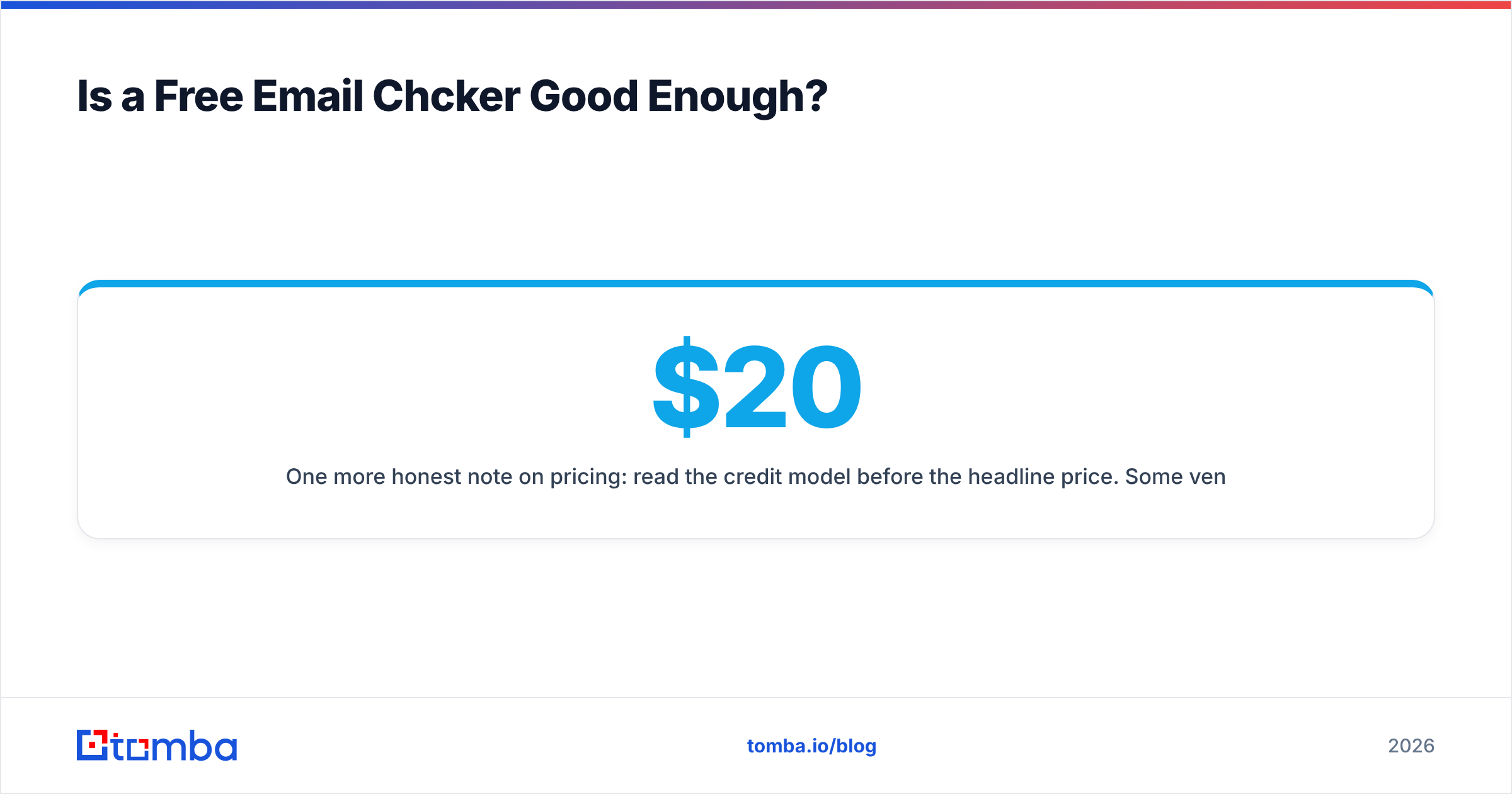
One more honest note on pricing: read the credit model before the headline price. Some vendors charge a credit for every check including "unknown" results; others don't charge for inconclusive checks. Across a 50,000-record list, that difference outweighs a $20/month gap in list price. Tomba's pricing runs Free (25 searches/mo), Starter at $49/mo, Growth at $99/mo, and Pro at $249/mo, with Enterprise quoted per volume — compare that structure against per-credit vendors using your actual list size, not the sticker price.
What Should You Look for When Choosing One?#
Skip the accuracy claims on the homepage. Ask these instead:
- Does it distinguish catch-all from valid? If the status list has no catch-all category, the tool is hiding its weakest result.
- Does it charge for "unknown" results? Inconclusive checks are the vendor's infrastructure problem, not yours.
- Is there an API? Manual verification is verification that eventually stops happening. Check for a real email verification API with documented rate limits.
- What's the data provenance? Ask where the underlying pattern and contact data comes from, and whether the vendor documents it. GDPR and CCPA obligations don't disappear because a vendor sold you the record.
- Can you test it on your own list? Run 100 known-good and 20 known-dead addresses through the free tier. A tool that flags your own colleagues as invalid — or your dead test addresses as valid — has told you everything you need to know in five minutes.
- What do independent reviews say? Vendor case studies are marketing. Check G2's email verification category for volume-weighted patterns in the complaints, not just the star ratings.
Ready to Stop Guessing?#
Verification only pays off when it's part of how you build lists, not a rescue operation afterward. If you're finding contacts and validating them as two separate chores in two separate tools, you're paying twice and losing records in the handoff.
Start with the Tomba Email Finder — find verified professional addresses by name, domain, or company, with verification built into the same lookup and a free tier of 25 searches per month to test it against your own data before you spend anything. Run your known contacts through it first. If the results match reality, scale it into your workflow; if they don't, you've lost nothing but five minutes.
Related guides#
Ready to find emails that actually work?
Join 150,000+ professionals who stopped guessing and started sending. Free credits on signup — no credit card required.
Get the Tomba newsletter
Practical outbound tactics and product updates — once every two weeks.
About the author