Email to Check Availability for a Meeting: 9 Templates (2026)
Most availability emails fail because they ask an open question. Here are 9 tested templates, a proposed-times vs scheduling-link breakdown, and the follow-up cadence that gets a slot on the calendar.
TL;DR
- An email to check availability for a meeting fails when it asks an open question ("when works for you?"). Replace the open question with two concrete slots and a stated duration.
- Proposed times beat scheduling links for cold and senior recipients. Links win for warm inbound and internal scheduling.
- Put the ask in the first two sentences. Anything below the fold on mobile is decoration.
- Three follow-ups spaced 3, 5, and 8 business days recover most non-responses without burning the relationship.
- Verify the address before you send. A bounced availability request looks identical to being ignored, and you will chase a contact who never received anything.
What Is an Email to Check Availability for a Meeting?#
It is a short message with exactly one job: convert an intention to meet into a specific date and time on two calendars. Nothing else. Not a pitch, not a recap, not a status update.
Think of it like ordering at a busy counter. If you say "I'd like some food, what do you have?" the line stalls. If you say "One flat white, medium," you are served in ten seconds. Availability emails work the same way — the more decisions you hand the recipient, the longer the queue.
The distinction matters because most people write two different emails and call both "checking availability":
- The permission email — "Would you be open to a conversation about X?" This is a persuasion email. Its job is to earn interest.
- The scheduling email — "Are you free Tuesday at 2pm ET or Thursday at 10am ET?" This is a logistics email. Its job is to lock a slot.
Blending them is the single most common failure. When you bury a time proposal inside a paragraph of value props, the recipient reads a pitch, files it under "later," and you never hear back. When interest already exists — an inbound demo request, a referral, a hallway conversation at a conference — go straight to logistics.
What Are the Five Parts of a Meeting Availability Email?#
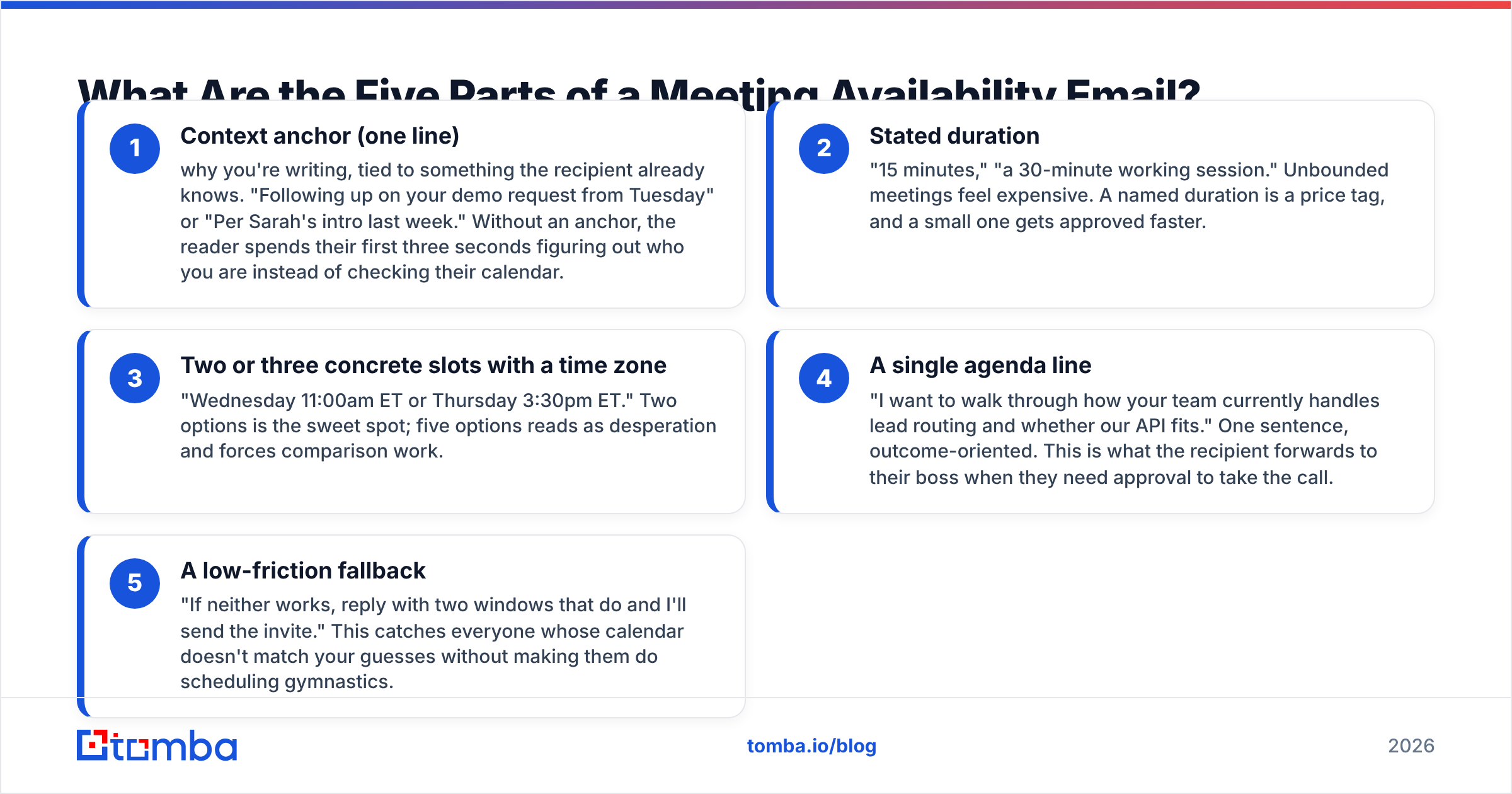
Every high-performing version of this email contains the same five components, in roughly this order:
- Context anchor (one line) — why you're writing, tied to something the recipient already knows. "Following up on your demo request from Tuesday" or "Per Sarah's intro last week." Without an anchor, the reader spends their first three seconds figuring out who you are instead of checking their calendar.
- Stated duration — "15 minutes," "a 30-minute working session." Unbounded meetings feel expensive. A named duration is a price tag, and a small one gets approved faster.
- Two or three concrete slots with a time zone — "Wednesday 11:00am ET or Thursday 3:30pm ET." Two options is the sweet spot; five options reads as desperation and forces comparison work.
- A single agenda line — "I want to walk through how your team currently handles lead routing and whether our API fits." One sentence, outcome-oriented. This is what the recipient forwards to their boss when they need approval to take the call.
- A low-friction fallback — "If neither works, reply with two windows that do and I'll send the invite." This catches everyone whose calendar doesn't match your guesses without making them do scheduling gymnastics.
Drop any one of these and reply rates dip. Drop the time zone and you will spend two extra emails resolving a misunderstanding.
Should You Propose Times or Send a Scheduling Link?#
This is the real argument in scheduling etiquette, and the answer depends entirely on who owes whom something.
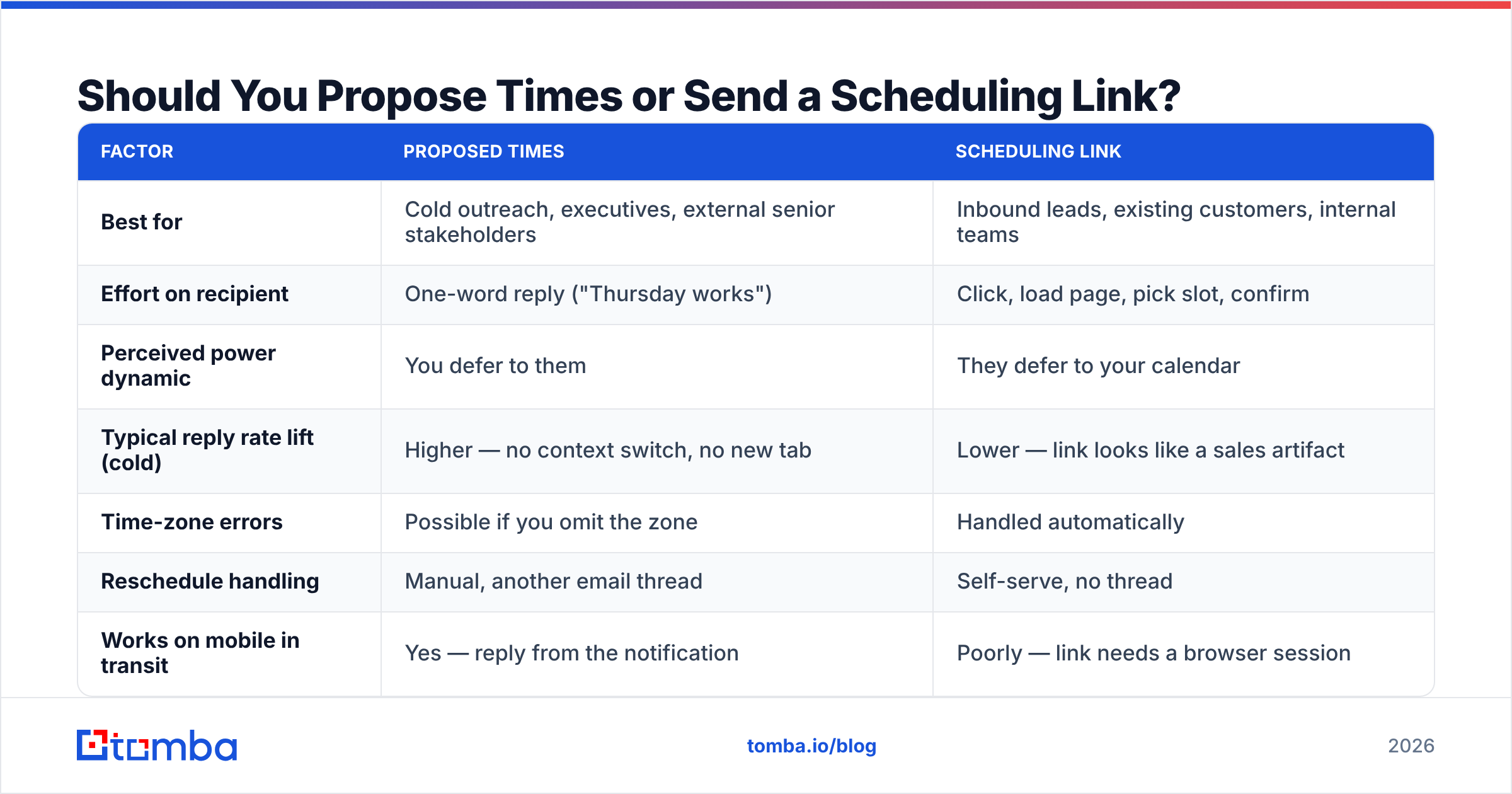
| Factor | Proposed times | Scheduling link |
|---|---|---|
| Best for | Cold outreach, executives, external senior stakeholders | Inbound leads, existing customers, internal teams |
| Effort on recipient | One-word reply ("Thursday works") | Click, load page, pick slot, confirm |
| Perceived power dynamic | You defer to them | They defer to your calendar |
| Typical reply rate lift (cold) | Higher — no context switch, no new tab | Lower — link looks like a sales artifact |
| Time-zone errors | Possible if you omit the zone | Handled automatically |
| Reschedule handling | Manual, another email thread | Self-serve, no thread |
| Works on mobile in transit | Yes — reply from the notification | Poorly — link needs a browser session |
| Risk | You guess wrong twice and add a round trip | Reads as "book time with me," which VPs ignore |
The practical rule: whoever wants the meeting more absorbs the scheduling work. If you're the seller, propose times. If a prospect raised their hand and asked for a demo, a link is fine and often preferred, because they want to self-serve at 11pm without waiting on you.
The hybrid version outperforms both in most tests: propose two slots in the body, and add the link on a separate line as an escape hatch. "Wednesday 11am ET or Thursday 3:30pm ET work on my end — or grab any open slot here if that's easier." You get the one-word reply from executives and the self-serve path from everyone else. Tools like Calendly and HubSpot Meetings both support the embedded-plus-proposed pattern, and Google Calendar appointment schedules cover it natively if you don't want another subscription.
What Do High-Reply Availability Emails Look Like?#
Nine templates covering the situations that actually come up. Swap the brackets; don't lengthen them.
1. Cold prospect, first ask
Subject: 15 min on [specific problem]?
Hi [Name] — I saw [trigger: funding round, job posting, product launch]. Teams at that stage usually hit [specific problem] within a quarter.
Worth 15 minutes to compare notes? Wednesday 11:00am ET or Thursday 3:30pm ET on my side. If neither works, send me two windows and I'll send the invite.
[Your name]
2. Warm inbound, demo requested
Subject: Your demo request — two times this week
Hi [Name], thanks for requesting a demo yesterday. I'll keep it to 25 minutes and focus on [use case they selected].
Tuesday 9:30am PT or Wednesday 2:00pm PT? Or pick any open slot here: [link].
3. Referral intro
Subject: [Referrer] suggested we talk
Hi [Name] — [Referrer] mentioned you're rebuilding [process] this quarter and thought a short call would be useful.
Free for 20 minutes Thursday after 1pm ET, or Friday morning? Happy to work around your calendar.
4. Executive / short-fuse
Subject: 12 minutes, [Company] + [Their company]
[Name] — one question about [specific initiative]. Twelve minutes, no deck.
Tue 8:15am or Thu 4:45pm, your time zone. Yes/no is fine either way.
5. Through a gatekeeper or EA
Subject: Scheduling 20 min with [Exec name]
Hi [EA name] — I'm coordinating a 20-minute call with [Exec] about [topic]; [context: they replied to my note on Oct 3 / we met at SaaStr].
Any two windows between [date range] work on our side. Let me know what's open and I'll send the invite with the agenda attached.
6. Reschedule (you caused it)
Subject: Moving our Thursday call — my fault
[Name], a customer escalation landed on Thursday's slot. Apologies for the churn.
Same length, same agenda: Monday 10:00am ET or Tuesday 1:00pm ET? I'll take whichever is less annoying.
7. Reschedule (they no-showed)
Subject: Missed you this morning
Hi [Name] — looks like this morning got away from us. No problem at all.
Still useful to cover [agenda item]? Thursday 11:00am ET or next Monday 2:00pm ET if so. If timing is wrong entirely, say the word and I'll circle back in Q4.
8. Internal cross-team
Subject: 30 min on [project] handoff — who owns what
Hi all — we need one working session to settle ownership on [project] before the [date] launch.
Holding Wednesday 1–1:30pm ET. Decline if that's wrong for you and I'll move it. Agenda in the invite.
9. Multi-stakeholder / group scheduling
Subject: Finding 45 min for [Company] + [Their company]
Hi [Name] — for the technical review we'd want you, [Person 2], and ideally someone from security.
Three windows that work for our side: [A], [B], [C]. Which is least painful for your group? I'll send the invite and the pre-read once you pick.
Notice what none of them do: none say "just wanted to check in," none open with "I hope this email finds you well," and none ask "what does your calendar look like?" That last phrase transfers the entire scheduling job to a person who has no incentive to do it.
How Do You Write the Subject Line?#
Subject lines for availability emails are logistics labels, not headlines. The reader is scanning for whether this is a task. Make it obviously a task.
What works:
- Duration + topic: "15 min on your [X] rollout"
- Named day: "Thursday 3:30 work?"
- Thread continuity: "Re: your demo request" (only if genuinely a reply)
- Name-drop: "[Referrer] suggested we connect"
What consistently underperforms: "Quick question," "Touching base," "Checking in," and anything with "opportunity" in it. Those are pattern-matched as sales noise inside half a second. If you're testing variants, a subject line generator is a faster way to produce ten options than staring at a blank field, and a subject line tester will flag length and spam-trigger issues before you send.
Keep it under 45 characters. Mobile clients truncate past that, and roughly half of B2B email is opened on a phone according to HubSpot's email marketing research.
When Should You Send It and How Often Should You Follow Up?#
Send Tuesday through Thursday, between 7:00–9:00am or 1:00–2:00pm in the recipient's local time. Monday morning is triage; Friday afternoon is a graveyard. Neither is a hard rule, but both are cheap to respect.
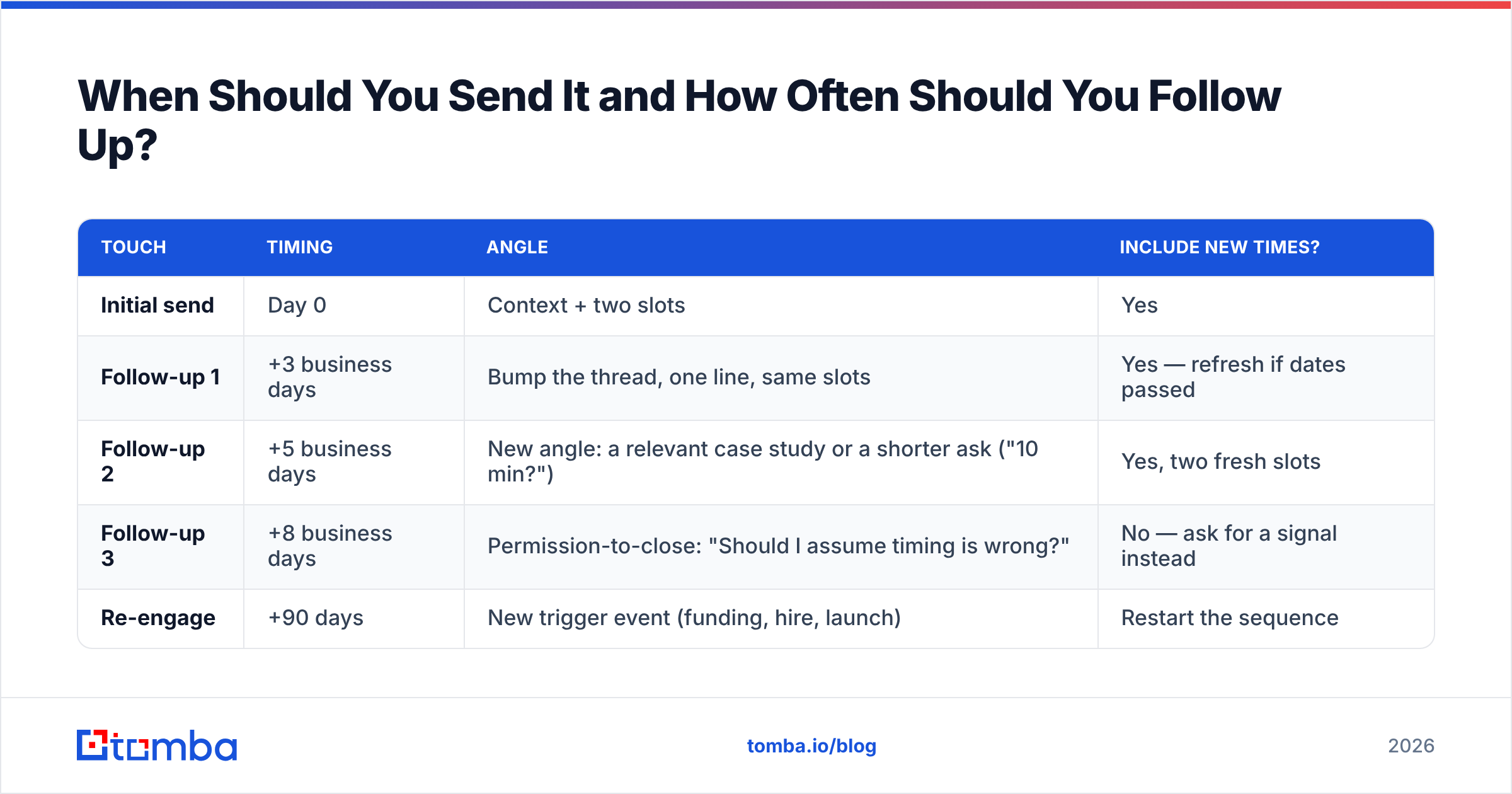
Follow-up cadence matters more than send time. Most people give up after one nudge, which is roughly where the majority of replies start appearing.
| Touch | Timing | Angle | Include new times? |
|---|---|---|---|
| Initial send | Day 0 | Context + two slots | Yes |
| Follow-up 1 | +3 business days | Bump the thread, one line, same slots | Yes — refresh if dates passed |
| Follow-up 2 | +5 business days | New angle: a relevant case study or a shorter ask ("10 min?") | Yes, two fresh slots |
| Follow-up 3 | +8 business days | Permission-to-close: "Should I assume timing is wrong?" | No — ask for a signal instead |
| Re-engage | +90 days | New trigger event (funding, hire, launch) | Restart the sequence |
Each follow-up should be shorter than the last. By touch three you're writing two sentences. And when you write the close-the-loop email, mean it — reply-or-I'll-stop is only effective if you actually stop.

What Mistakes Kill Reply Rates?#
- Open-ended asking. "Let me know what works" is not a question a busy person can answer in one line. It's a project.
- Missing time zone. "2pm" means four different things in a distributed company. Always append ET/PT/CET.
- Too many options. Five slots forces a comparison task. Two forces a binary. Binaries get answered.
- Burying the ask. If the time proposal is in paragraph three, mobile readers never see it.
- Meeting-length inflation. "30 minutes" is fine internally. For a first external call, 15 gets more yeses and usually runs long anyway.
- No agenda. People decline what they can't justify. One sentence solves it.
- Sending to an unverified address. This one is invisible and expensive. A hard bounce, a stale address after a job change, or a catch-all domain that silently discards mail all produce the same result you get from being ignored — nothing. Before a multi-touch sequence, run addresses through an email verifier, and use a catch-all verifier for domains that accept everything at the SMTP layer. Repeated bounces also erode your sender reputation, which quietly degrades every future send.
- Chasing the wrong person. If you're emailing a manager who left the company nine months ago, no template saves you.
Which Tools Actually Help?#
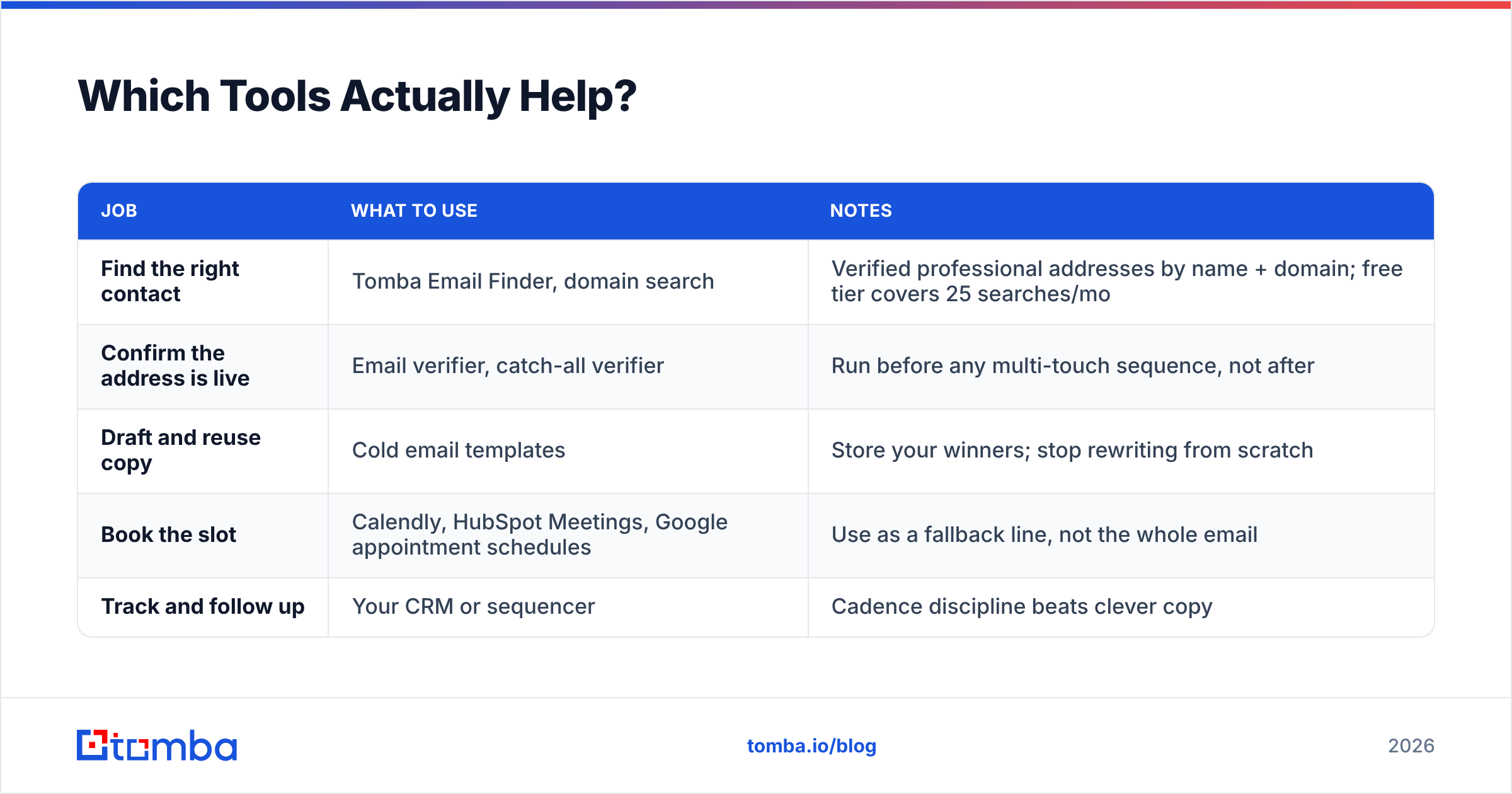
You need three things: a correct address, a message that gets read, and a calendar that doesn't fight you.
| Job | What to use | Notes |
|---|---|---|
| Find the right contact | Tomba Email Finder, domain search | Verified professional addresses by name + domain; free tier covers 25 searches/mo |
| Confirm the address is live | Email verifier, catch-all verifier | Run before any multi-touch sequence, not after |
| Draft and reuse copy | Cold email templates | Store your winners; stop rewriting from scratch |
| Book the slot | Calendly, HubSpot Meetings, Google appointment schedules | Use as a fallback line, not the whole email |
| Track and follow up | Your CRM or sequencer | Cadence discipline beats clever copy |
Pricing sanity check on the data side: Tomba's free tier runs 25 searches per month, Starter is $49/mo, Growth $99/mo, and Pro $249/mo, with Enterprise quoted per volume — see Tomba pricing for the current credit breakdowns. Most people running a modest outbound motion never leave Starter.
Frequently Asked Questions#
How many time slots should I offer? Two, in different parts of the week. Three at most for multi-stakeholder scheduling. More than that and you've turned a yes/no into homework.
Is it rude to send a scheduling link cold? Not rude, just less effective. To a VP who has never heard of you, a link says "book time with me," which inverts the ask. Propose times first; offer the link as an alternative.
How long should the email be? Under 100 words for cold, under 60 for follow-ups. If it doesn't fit on one mobile screen without scrolling, cut it.
What if they say "next week is better" without giving a time? Reply within an hour with two specific slots next week. Never respond to a soft yes with another open question.
Should I send a calendar invite before they confirm? No. An unconfirmed invite on someone's calendar reads as presumptuous. Send it the moment they say yes, with the agenda in the description.
Get the Address Right Before You Get the Timing Right#
Every template above assumes your message reaches a real inbox belonging to a person who still works there. That assumption breaks more often than most teams measure — contacts change jobs, aliases get retired, and catch-all domains swallow mail without a bounce notice.
Start with the Tomba Email Finder. Give it a name and a company domain and you get a verified professional address with a confidence score, so your carefully written availability email lands in front of the person who can actually say "Thursday works." The free tier covers 25 searches a month if you want to test it against contacts you already know.
Related guides#
Ready to find emails that actually work?
Join 150,000+ professionals who stopped guessing and started sending. Free credits on signup — no credit card required.
Get the Tomba newsletter
Practical outbound tactics and product updates — once every two weeks.
About the author