Email Check Pricing, Reviews, Pros and Cons (2026 Guide)
Email check tools all claim 98% accuracy and cheap credits. Here is what seven of them actually cost per verified email, where the hidden fees hide, and which pricing model fits your list size.
TL;DR
- Email check pricing splits into three models: pay-as-you-go credits, monthly subscriptions, and bundled credits inside a finder/enrichment platform. The sticker price per 1,000 emails tells you almost nothing until you factor in expiry, unknowns, and catch-all handling.
- Real-world list prices in 2026 land between roughly $0.0035 and $0.012 per verified email. Bulk tiers of 100k+ push the low end; small one-off cleans push the high end.
- The two costs nobody advertises: credits burned on "unknown" results and re-verification of the same contact three months later. Both can double your effective rate.
- Standalone verifiers are cheaper per email. Bundled platforms like Tomba are cheaper per usable contact because finding and checking share one credit pool.
- If you verify under 5,000 emails a month, pay-as-you-go wins. Above 25,000 a month, a subscription or a bundled plan almost always wins.
What is an email check tool, and what are you paying for?#
An email check tool — email verifier, email validator, email checker, same thing — takes an address and tells you whether sending to it will bounce. Think of it as a pre-flight check on a plane. It doesn't make the flight better; it stops you taking off with a hole in the wing.
Under the hood you're paying for four escalating layers of work:
- Syntax and formatting — is
john.smith@@acme..comeven a valid string? Free, instant, and any tool that charges you for this alone is not worth paying. - Domain and MX checks — does
acme.comresolve, and does it have mail exchange records that can receive anything at all? Still cheap, still fast. - SMTP handshake — the verifier opens a conversation with the receiving mail server and asks, without sending, whether that mailbox exists. This is where infrastructure cost lives: you need a rotating pool of IPs with clean reputation, or the big providers stop answering you honestly.
- Risk classification — disposable domains, role accounts (
info@,sales@), spam traps, and catch-all domains that accept everything and reveal nothing.
Layers 1 and 2 cost the vendor fractions of a cent. Layer 3 is the real expense. Layer 4 is where vendors differentiate and where accuracy claims get slippery — which is exactly why per-email prices vary by 3x for what looks like the same product.
How does email check pricing actually work in 2026?#
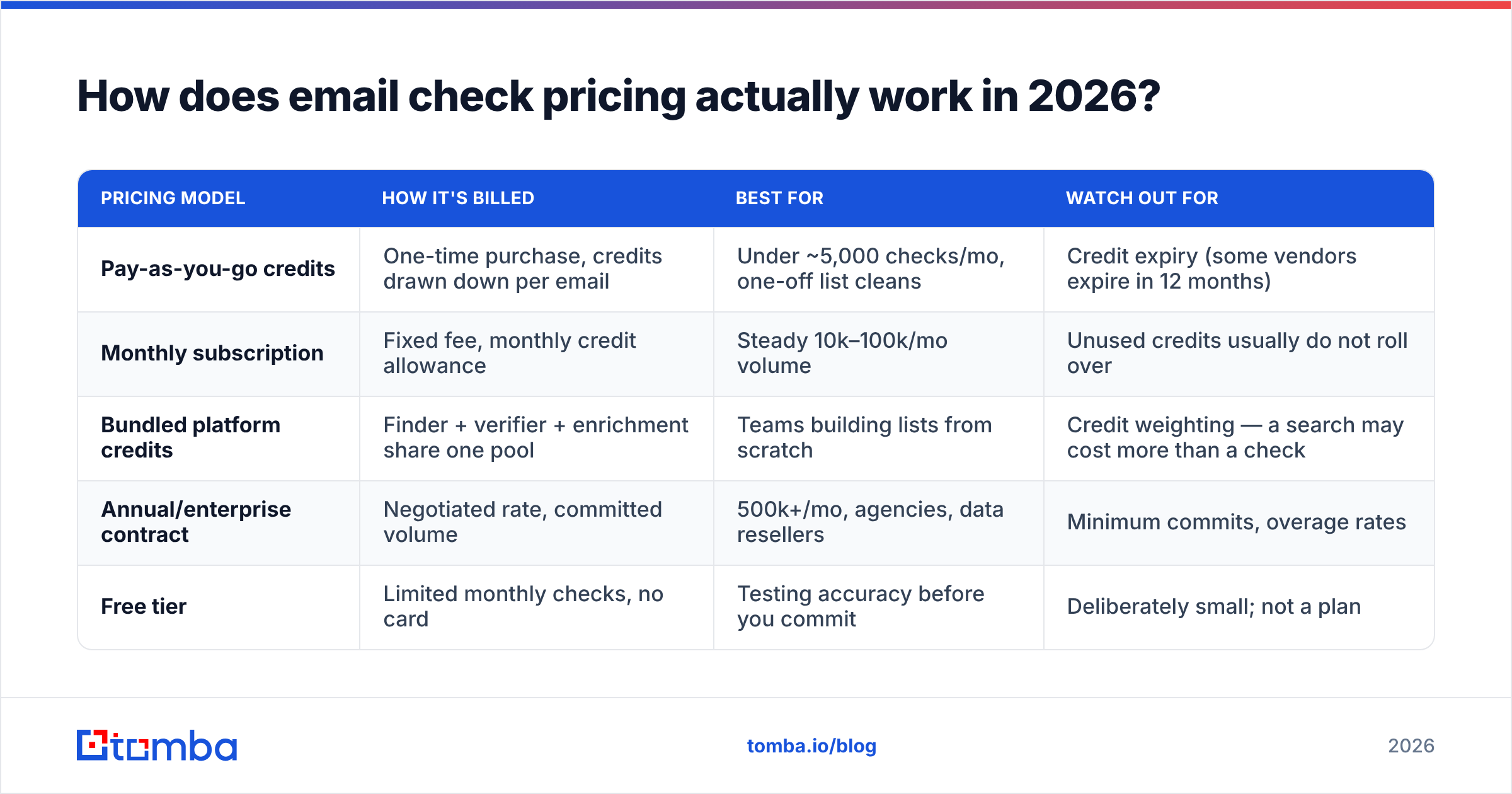
Three models dominate. Each has a shape of buyer it suits, and picking the wrong one is the single most common way teams overspend.
| Pricing model | How it's billed | Best for | Watch out for |
|---|---|---|---|
| Pay-as-you-go credits | One-time purchase, credits drawn down per email | Under ~5,000 checks/mo, one-off list cleans | Credit expiry (some vendors expire in 12 months) |
| Monthly subscription | Fixed fee, monthly credit allowance | Steady 10k–100k/mo volume | Unused credits usually do not roll over |
| Bundled platform credits | Finder + verifier + enrichment share one pool | Teams building lists from scratch | Credit weighting — a search may cost more than a check |
| Annual/enterprise contract | Negotiated rate, committed volume | 500k+/mo, agencies, data resellers | Minimum commits, overage rates |
| Free tier | Limited monthly checks, no card | Testing accuracy before you commit | Deliberately small; not a plan |
The important nuance: credits are not standardized. One vendor's credit equals one email checked. Another charges a credit for a check and another credit for a catch-all deep-check. A third refunds credits for "unknown" results. Before you compare two prices, read the credit definition — it changes effective cost more than the headline rate does.
What do the leading email check tools cost side by side?#
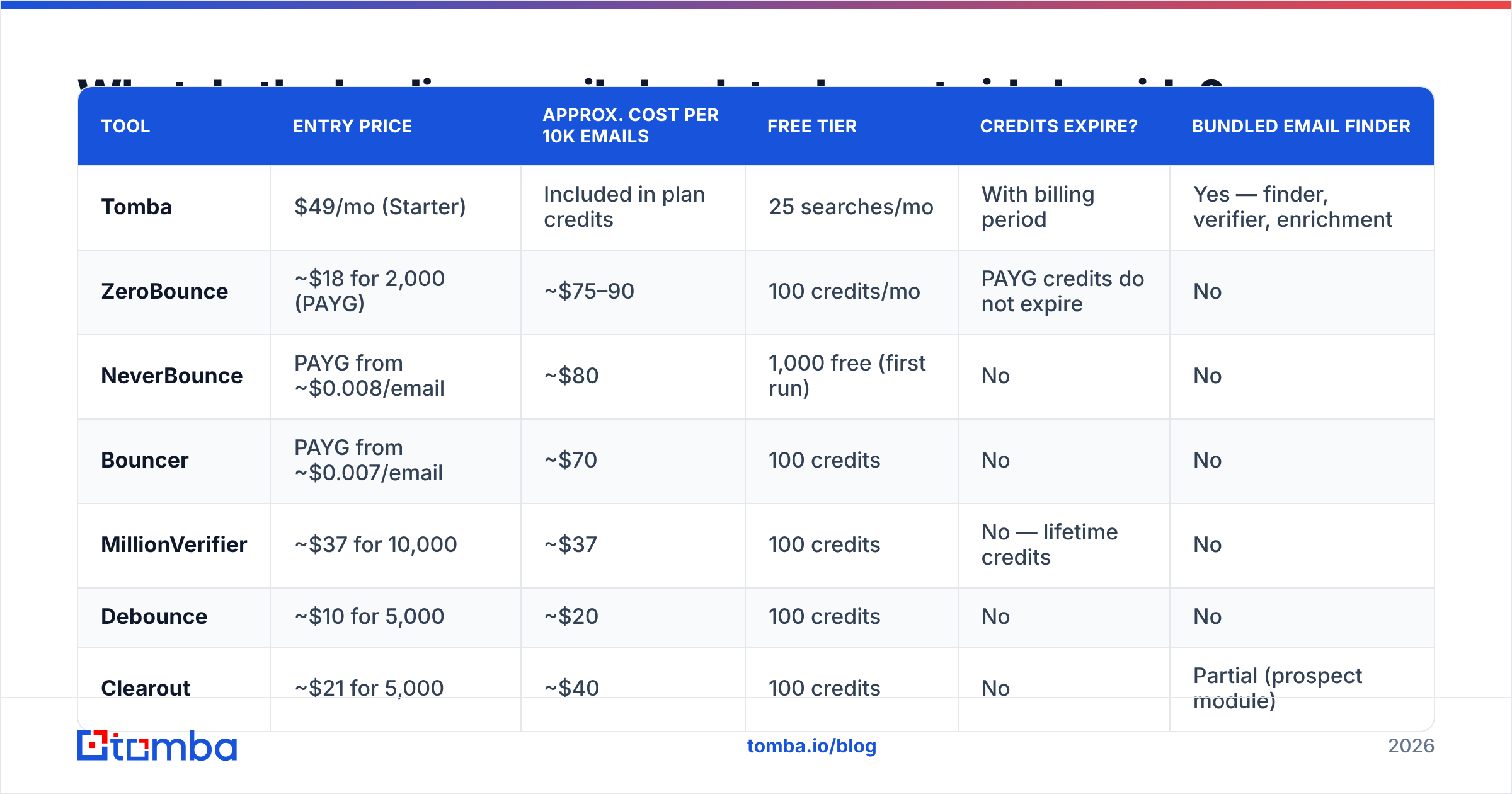
Below are approximate list prices as published at the time of writing. Vendors change tiers frequently, so treat this as a shape-of-market snapshot, not a quote. Always confirm on the vendor's own pricing page.
| Tool | Entry price | Approx. cost per 10k emails | Free tier | Credits expire? | Bundled email finder |
|---|---|---|---|---|---|
| Tomba | $49/mo (Starter) | Included in plan credits | 25 searches/mo | With billing period | Yes — finder, verifier, enrichment |
| ZeroBounce | ~$18 for 2,000 (PAYG) | ~$75–90 | 100 credits/mo | PAYG credits do not expire | No |
| NeverBounce | PAYG from ~$0.008/email | ~$80 | 1,000 free (first run) | No | No |
| Bouncer | PAYG from ~$0.007/email | ~$70 | 100 credits | No | No |
| MillionVerifier | ~$37 for 10,000 | ~$37 | 100 credits | No — lifetime credits | No |
| Debounce | ~$10 for 5,000 | ~$20 | 100 credits | No | No |
| Clearout | ~$21 for 5,000 | ~$40 | 100 credits | No | Partial (prospect module) |
| BookYourData | Pay-as-you-go per contact | Varies by filter depth | Sample credits | No | Yes — verified B2B contacts with a 97% accuracy guarantee |
Two readings of that table matter more than the raw numbers.
First: standalone verifiers are genuinely cheap. MillionVerifier and Debounce sit at the budget end and do one job competently. If you already have a clean source of addresses and only need bounce protection before a send, you do not need to pay platform pricing.
Second: the comparison changes completely when you don't have the list yet. If you're starting from a company domain and a name, you need a finder first. Paying $49/mo for a platform that finds and verifies is cheaper than paying a finder plus a verifier plus the glue code between them. That's the case Tomba's email verifier is built around — the same credit pool covers discovery and validation, so you're not reconciling two invoices and two accuracy claims.
Which email check tool fits your use case?#
Pick by workflow, not by per-credit rate.
- One-off list clean before a big send — Choose pay-as-you-go with non-expiring credits. MillionVerifier and Debounce are the obvious value picks. You buy once, clean once, and nothing renews.
- Recurring outbound at 10k–50k emails/month — A subscription or a bundled plan. The admin overhead of topping up credits weekly is a real cost, and per-email rates drop at volume.
- Building lists from scratch (no CSV yet) — A bundled platform. Find, verify, and enrich in one pass. Splitting the workflow across vendors means you pay to verify addresses your finder already guessed wrong.
- API-first / product integration — Compare on latency and rate limits, not price. A verifier that takes 8 seconds per address breaks a real-time signup form. Check the email verification API docs for concurrency limits before you commit.
- Compliance-sensitive industries — Ask where the data is processed and whether the vendor retains your uploaded list. Some cheap verifiers monetize the lists you upload. That is the most expensive "discount" in the category.
- Buying ready-verified contacts instead of verifying your own — A pre-verified B2B database can beat DIY on total cost. BookYourData, for example, sells contacts that are already validated with an accuracy guarantee, which removes the verification step entirely for teams that would rather buy than build.
What are the pros and cons of each pricing model?#
| Model | Pros | Cons |
|---|---|---|
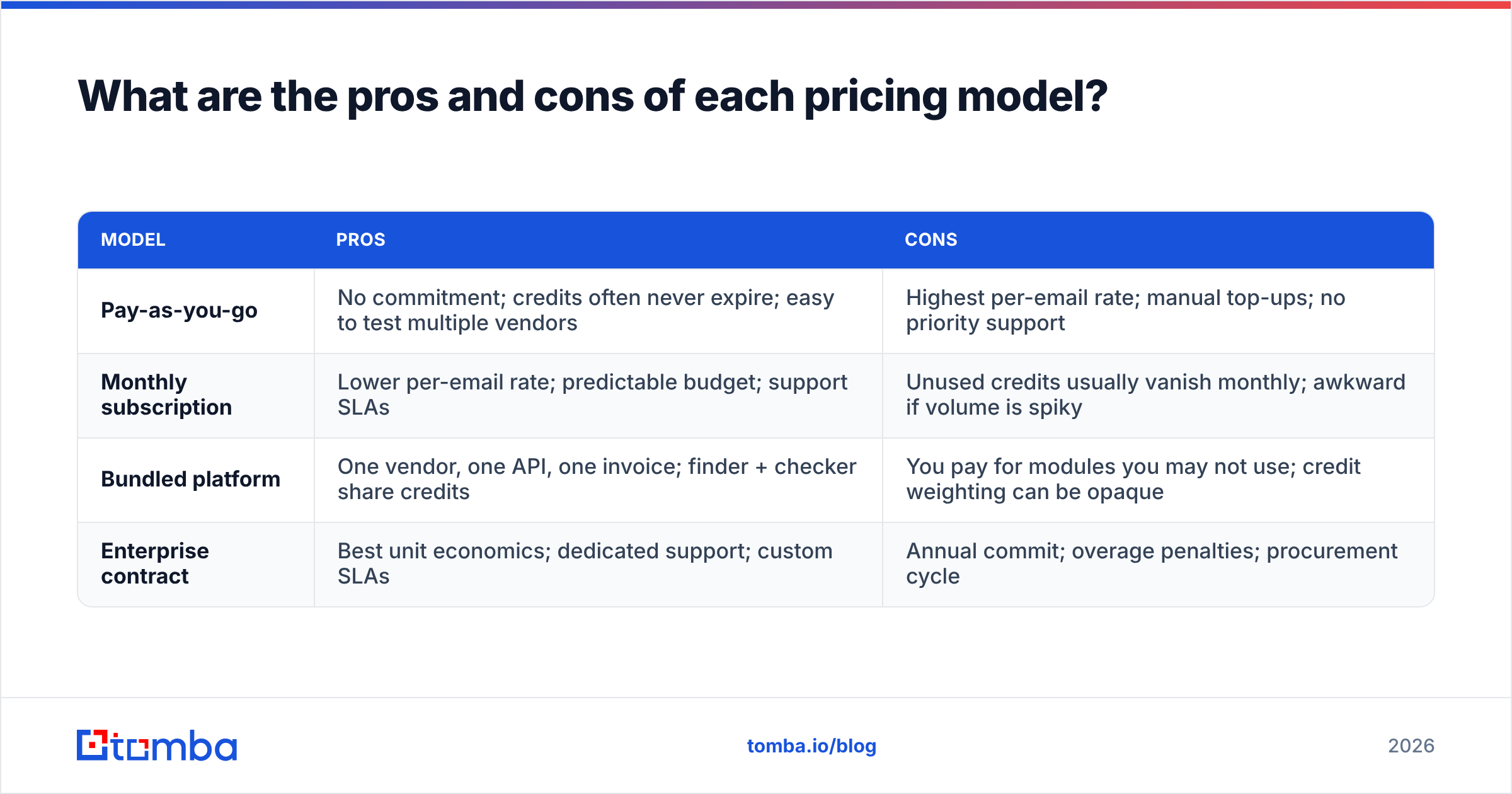
| Pay-as-you-go | No commitment; credits often never expire; easy to test multiple vendors | Highest per-email rate; manual top-ups; no priority support |
| Monthly subscription | Lower per-email rate; predictable budget; support SLAs | Unused credits usually vanish monthly; awkward if volume is spiky |
| Bundled platform | One vendor, one API, one invoice; finder + checker share credits | You pay for modules you may not use; credit weighting can be opaque |
| Enterprise contract | Best unit economics; dedicated support; custom SLAs | Annual commit; overage penalties; procurement cycle |
The honest summary: pay-as-you-go is more expensive per email and cheaper per mistake. Subscriptions are the reverse. If your volume is unpredictable — most seed-stage and agency teams — the flexibility premium is usually worth paying for the first six months, then you switch.
What do the reviews actually say?#
Read past the star ratings. Across G2's email verification category and Capterra, the same four complaints recur regardless of vendor:
- "Accuracy was lower than advertised on our list." Almost always a catch-all problem. A domain configured to accept all mail cannot be verified by SMTP handshake alone. Vendors that report catch-alls as "valid" post better accuracy numbers and cause more bounces. Vendors that report them as "unknown" look worse on paper and protect you better.
- "Credits disappeared." Subscription credits that don't roll over, discovered at renewal. Read the rollover clause.
- "Support was slow on the low tier." Predictable, and usually fair — a $10 purchase cannot fund a same-day support SLA.
- "The API timed out on large batches." Bulk endpoints and real-time endpoints are different products. If you push 50,000 addresses through a per-address endpoint, you will hit rate limits.
Positive reviews cluster just as tightly: teams report bounce rates dropping from 8–12% to under 2% after their first proper clean. That delta is the entire ROI argument, and it holds across nearly every vendor in the table. The differentiator is rarely whether verification works — it's how the tool handles the ambiguous 10–15% of any list.
What hidden costs should you watch for?#
Four line items that never appear on a pricing page:
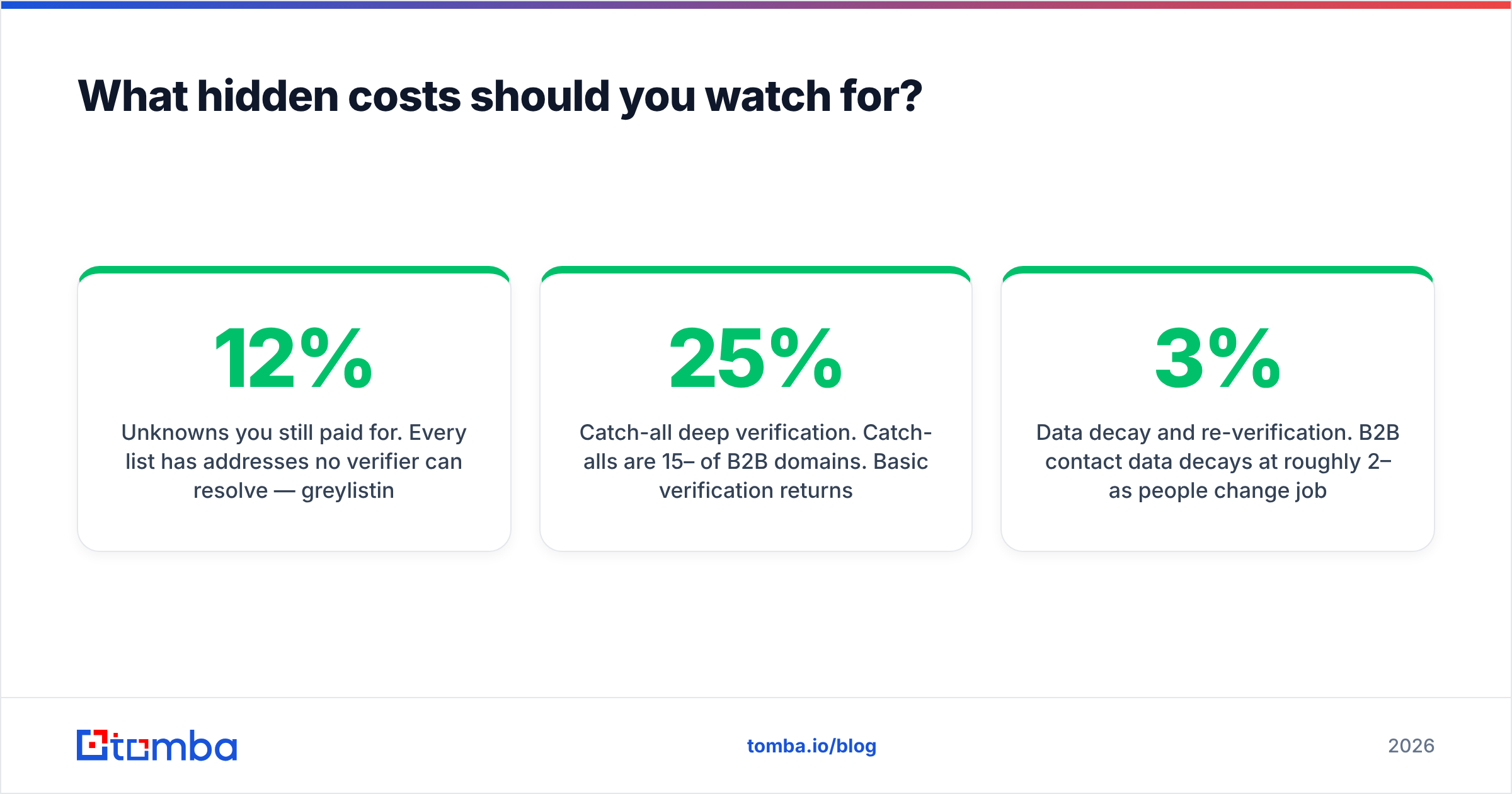
Unknowns you still paid for. Every list has addresses no verifier can resolve — greylisting servers, aggressive firewalls, catch-all domains. Some vendors charge a credit anyway. Some refund. On a 100,000-address list with a 12% unknown rate, that's 12,000 credits — roughly $90 at typical rates — for zero information. Ask about the refund policy explicitly.
Catch-all deep verification. Catch-alls are 15–25% of B2B domains. Basic verification returns "accept-all" and stops. Deeper resolution costs extra at most vendors, or requires a separate product. If you sell to companies using Microsoft 365 with catch-all enabled, this is not an edge case — it's a quarter of your pipeline. A dedicated catch-all verifier is worth pricing out separately rather than assuming it's included.
Data decay and re-verification. B2B contact data decays at roughly 2–3% per month as people change jobs. An address verified in January is meaningfully less reliable in July. Budget for re-verifying your active list quarterly — that's 4x your one-time cost per year, not 1x. This is the single biggest gap between quoted price and annual spend.
Engineering time. Two vendors means two API integrations, two error-handling paths, two sets of credentials, and two dashboards someone checks. At a loaded engineering rate, three days of integration work costs more than most annual verification budgets. It's the strongest argument for consolidation, and it rarely makes it into the spreadsheet.
How should you test accuracy before you pay?#
Every vendor claims 98%+ accuracy. The claim is unfalsifiable without your own data, so run a controlled test — it takes an afternoon.
- Build a 200-address control list from your own inbox: 100 addresses you know are live (people who replied to you last month), 50 you know are dead (bounces from your last send), and 50 catch-all domains.
- Run the same list through two or three vendors' free tiers. Most give you 100 free credits, which is enough for a meaningful sample.
- Score three things: false valids (dead addresses marked valid — the expensive error), false invalids (live addresses marked invalid — the silent revenue killer), and unknown rate.
- Weight false valids heaviest. One bad address that bounces damages your sender reputation; one false invalid just costs you a lead you never knew you had. Both matter, but only one compounds.
If you want a zero-commitment starting point, a free email checker will validate single addresses without an account so you can spot-check a vendor's verdict against a second opinion. For the bulk stage, bulk verify endpoints handle the full list without the per-address rate limits.
Is a bundled platform worth it over a standalone verifier?#
Yes, if you're generating contacts. No, if you're only cleaning them.
Run the math on a realistic month. Say you need 2,000 new verified contacts:
- Split stack: finder tool at ~$50/mo for 2,000 lookups, plus a verifier at ~$20 for 2,000 checks, plus the reality that finders return 25–35% guessed addresses you'll pay to verify and then discard. Effective cost per usable contact: roughly $0.05.
- Bundled: one plan, one credit pool, verification applied at discovery so guessed addresses are filtered before they reach your CRM. Tomba's pricing starts at $49/mo for Starter, $99/mo for Growth, and $249/mo for Pro, with a free tier at 25 searches/mo to test the accuracy claim before you spend anything.
The gap isn't dramatic at 2,000 contacts. It becomes dramatic at 20,000, and it becomes structural the moment you add a second workflow — enrichment, domain search, or CRM sync — because each addition multiplies integration work in a split stack and costs nothing extra in a bundled one.
The counter-argument is real: if your addresses come from inbound signups, event lists, or a purchased database, you don't need a finder at all. Pay $37 to MillionVerifier, clean the list, move on. Paying platform pricing for a module you never open is the classic overspend in this category.
The verdict on email check pricing#
Cheapest per email is rarely cheapest per outcome. Rank your options in this order:
- What's my unknown and catch-all handling? — biggest hidden multiplier on cost.
- Where do my addresses come from? — decides bundled vs standalone before price enters the conversation.
- How often will I re-verify? — turns a one-time number into an annual one.
- What's the per-email rate? — genuinely the last question, not the first.
A team cleaning a 50,000-address list once a year should buy pay-as-you-go credits and never think about it again. A team building outbound lists weekly should consolidate, because the integration tax and the discard rate on guessed addresses dwarf the per-credit difference.
If you're in the second group, start with the Tomba Email Finder. Discovery and verification run against the same credit pool, so the addresses landing in your CRM have already passed the check — no second vendor, no second invoice, no reconciling two accuracy claims. The free tier gives you 25 searches a month to run the control-list test above before you spend a dollar.
Sources worth reading directly before you buy: G2's email verification category for volume-weighted user reviews, and each vendor's own pricing page — ZeroBounce and BookYourData both publish theirs in full, which makes them useful benchmarks even if you buy elsewhere.
Related guides#
Ready to find emails that actually work?
Join 150,000+ professionals who stopped guessing and started sending. Free credits on signup — no credit card required.
Get the Tomba newsletter
Practical outbound tactics and product updates — once every two weeks.
About the author