Email Check vs FindThatLead: Which Tool Wins in 2026?
Email Check verifies. FindThatLead prospects. We tested both on pricing, accuracy, bounce rates, and workflow fit to show which one actually belongs in your stack — and when you need neither.
TL;DR
- These two tools are not actually competitors. An email check tool validates addresses you already have; FindThatLead finds new addresses and runs cold campaigns on top of them.
- FindThatLead starts around $49/mo for its Growth plan and bundles prospecting, a Chrome extension, and a basic sender. Standalone email check tools run $0–$20 per 10,000 verifications.
- If you buy FindThatLead expecting verification-grade accuracy, you will be disappointed — its built-in validation is a pass/fail signal, not a full SMTP-plus-catch-all analysis.
- If you buy a pure email checker expecting leads, you will have a very clean spreadsheet with nothing in it.
- The honest answer for most teams: one tool that does discovery and verification in the same credit pool, so you never pay twice for the same contact.
What is the real difference between an email check and FindThatLead?#
An email check answers one question: will this address accept mail? FindThatLead answers a different one: who should I email at this company, and can I send to them from here?
Think of it like a nightclub. An email checker is the bouncer with the guest list — it tells you whether a name is valid and whether the door will open. FindThatLead is the promoter who builds the guest list in the first place, then hands you a microphone. Useful people, different jobs.
That distinction matters because the search query "email check vs FindThatLead" almost always comes from someone who bought one, got burned, and is now shopping for the other. Let's break down what each one actually does before we compare them.
Email check (verification) tools do four things:
- Syntax and MX validation — is the address structurally valid, and does the domain actually accept mail?
- SMTP handshake — a mail server ping that asks "does this mailbox exist?" without sending anything.
- Risk classification — flagging disposable domains, role accounts (info@, sales@), spam traps, and known complainers.
- Catch-all detection — identifying domains that accept everything, where a simple SMTP check returns a false positive.
FindThatLead (prospecting) tools do four different things:
- Domain search — enter a company URL, get back the email addresses associated with it.
- Name-plus-domain lookup — you know the person, the tool guesses and confirms the pattern.
- Lead Search / prospector — filter by role, geography, and industry to build a list from scratch.
- Cold email sending — a lightweight sequencer so you can email the list without exporting it.
Only step 2 of the prospecting stack overlaps with verification, and it's the shallow version.

How do FindThatLead and standalone email checkers compare on paper?#
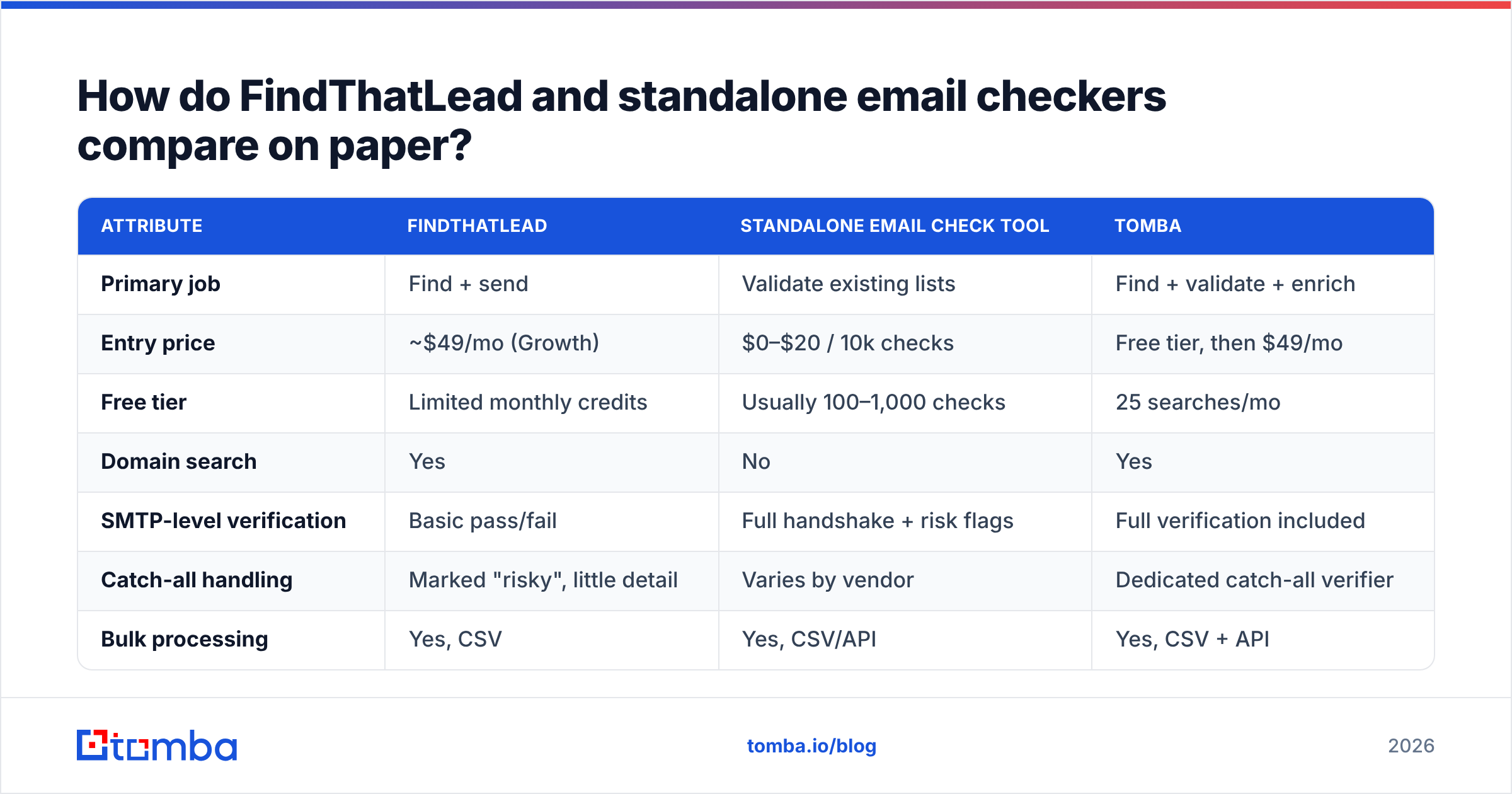
Here's the head-to-head. Prices reflect publicly listed 2026 tiers; verification pricing is normalized to cost per 10,000 checks since that's how the category is sold.
| Attribute | FindThatLead | Standalone email check tool | Tomba |
|---|---|---|---|
| Primary job | Find + send | Validate existing lists | Find + validate + enrich |
| Entry price | ~$49/mo (Growth) | $0–$20 / 10k checks | Free tier, then $49/mo |
| Free tier | Limited monthly credits | Usually 100–1,000 checks | 25 searches/mo |
| Domain search | Yes | No | Yes |
| SMTP-level verification | Basic pass/fail | Full handshake + risk flags | Full verification included |
| Catch-all handling | Marked "risky", little detail | Varies by vendor | Dedicated catch-all verifier |
| Bulk processing | Yes, CSV | Yes, CSV/API | Yes, CSV + API |
| Built-in sender | Yes | No | No (integrates instead) |
| API access | Yes, on higher tiers | Yes | Yes, all paid tiers |
| Phone / mobile data | No | No | Yes |
| Best for | Solo founders wanting one bill | Cleaning purchased or aging lists | Teams who need both, once |
Two things jump out of that table.
First, FindThatLead's value is bundling, not depth. You get discovery, a browser extension, and a sender in one subscription. For a solo founder sending 200 emails a week, that's genuinely convenient. For a team running 5,000 sends a month, each of those three modules is weaker than the dedicated tool you'd otherwise buy.
Second, standalone email checkers are commodity infrastructure. ZeroBounce, NeverBounce, Bouncer, and a dozen others all run roughly the same SMTP logic. Price and catch-all handling are the only meaningful differentiators, which is why the category races to the bottom on cost per check.
Is FindThatLead's built-in verification good enough?#
Short answer: good enough to avoid catastrophe, not good enough to protect a sender reputation you care about.
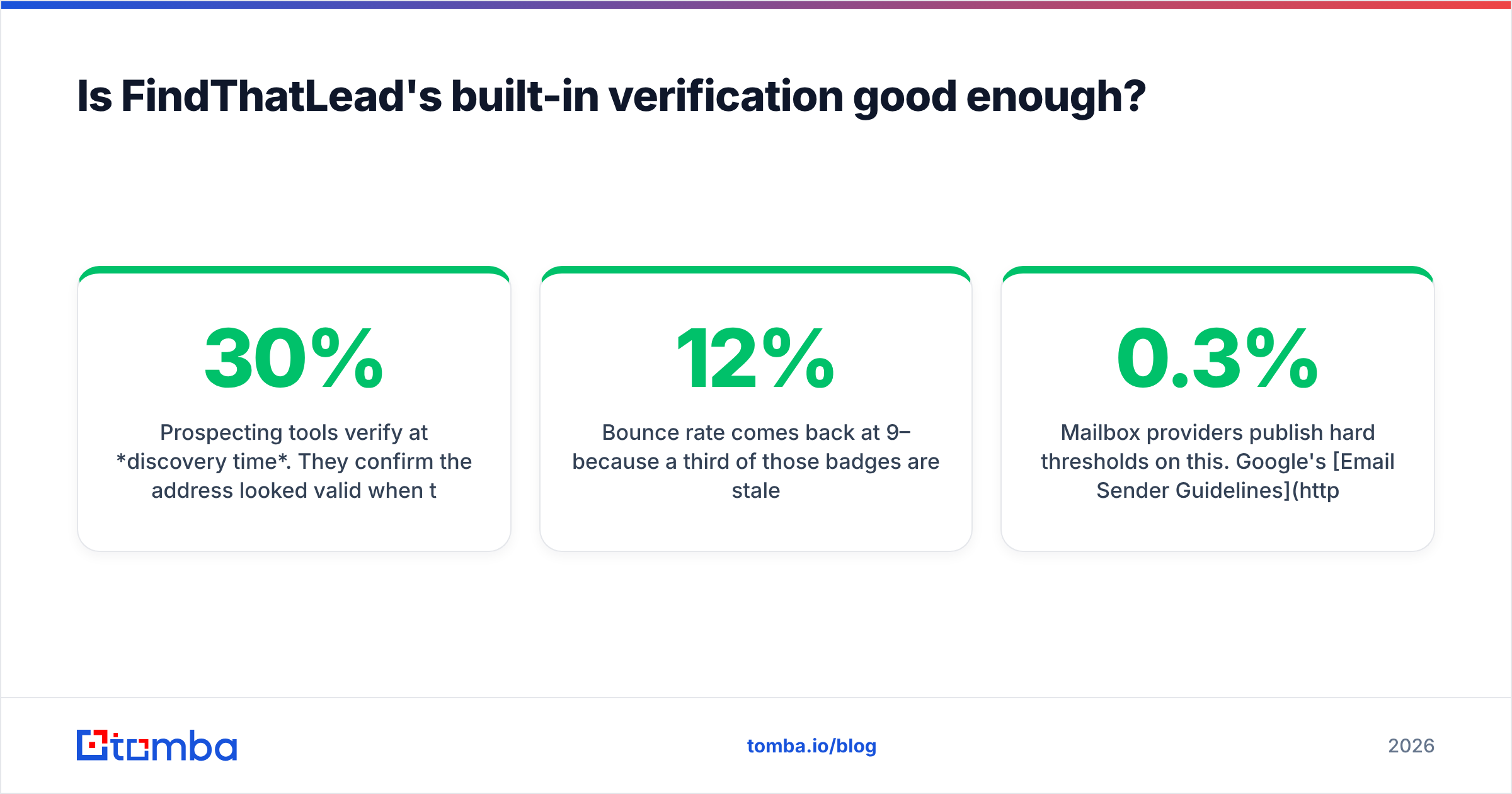
Prospecting tools verify at discovery time. They confirm the address looked valid when they found it — sometimes weeks or months before you export it. B2B email data decays at roughly 22–30% per year according to widely cited HubSpot database-decay research, which means a list you pulled in January is measurably worse by June. A confidence score generated at discovery says nothing about today.
Here's the failure mode I see constantly:
- You pull 2,000 contacts from a prospecting tool over six weeks.
- Every contact shows a green "verified" badge from discovery day.
- You launch a campaign to all 2,000 at once.
- Bounce rate comes back at 9–12% because a third of those badges are stale.
- Google and Microsoft throttle your domain, and now your good emails land in spam too.
Mailbox providers publish hard thresholds on this. Google's Email Sender Guidelines require bulk senders to keep spam complaint rates under 0.3% and warn explicitly about sending to non-existent addresses. Once you trip that, recovery takes weeks of throttled volume.
The fix is boring and it works: re-verify immediately before send, not at discovery. Whether you use a standalone checker, a dedicated email verifier, or a platform that bundles both, the timing matters more than the vendor.
What about catch-all domains — the part everyone gets wrong?#
Catch-all domains are where cheap verification quietly fails, and it's the single biggest accuracy gap between tools.
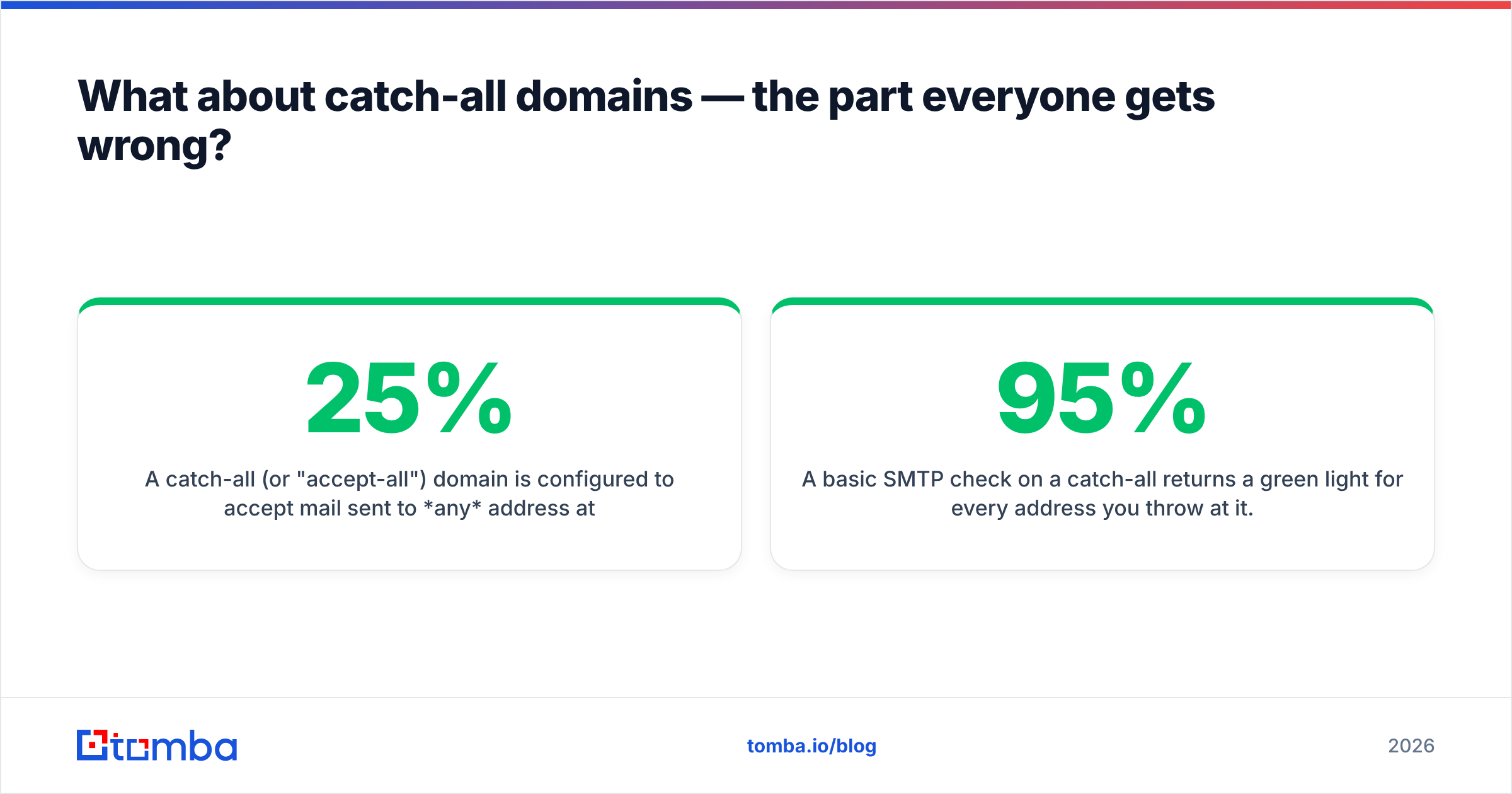
A catch-all (or "accept-all") domain is configured to accept mail sent to any address at that domain — ceo@, banana@, asdfgh@, all return the same "OK" from the mail server. Roughly 20–25% of B2B domains are configured this way, and the number climbs in enterprise and European markets.
A basic SMTP check on a catch-all returns a green light for every address you throw at it. That's why some tools report 95%+ "valid" rates on lists that bounce at 8%. The green light was real; it just wasn't meaningful.
What separates tools here:
- Weak handling — mark the whole domain "risky" or "unknown" and push the decision to you. This is what most bundled prospecting verification does, FindThatLead included.
- Medium handling — exclude catch-alls from the valid count entirely. Safe, but you discard a fifth of your reachable market.
- Strong handling — run pattern inference, cross-reference alternate data sources, and score individual mailboxes within a catch-all domain. This is what a dedicated catch-all verifier does.
If a meaningful share of your ICP sits behind Microsoft 365 tenants with catch-all enabled — and in enterprise SaaS, it does — this one capability is worth more than every other line in the comparison table.

What does each tool actually cost when you run the numbers?#
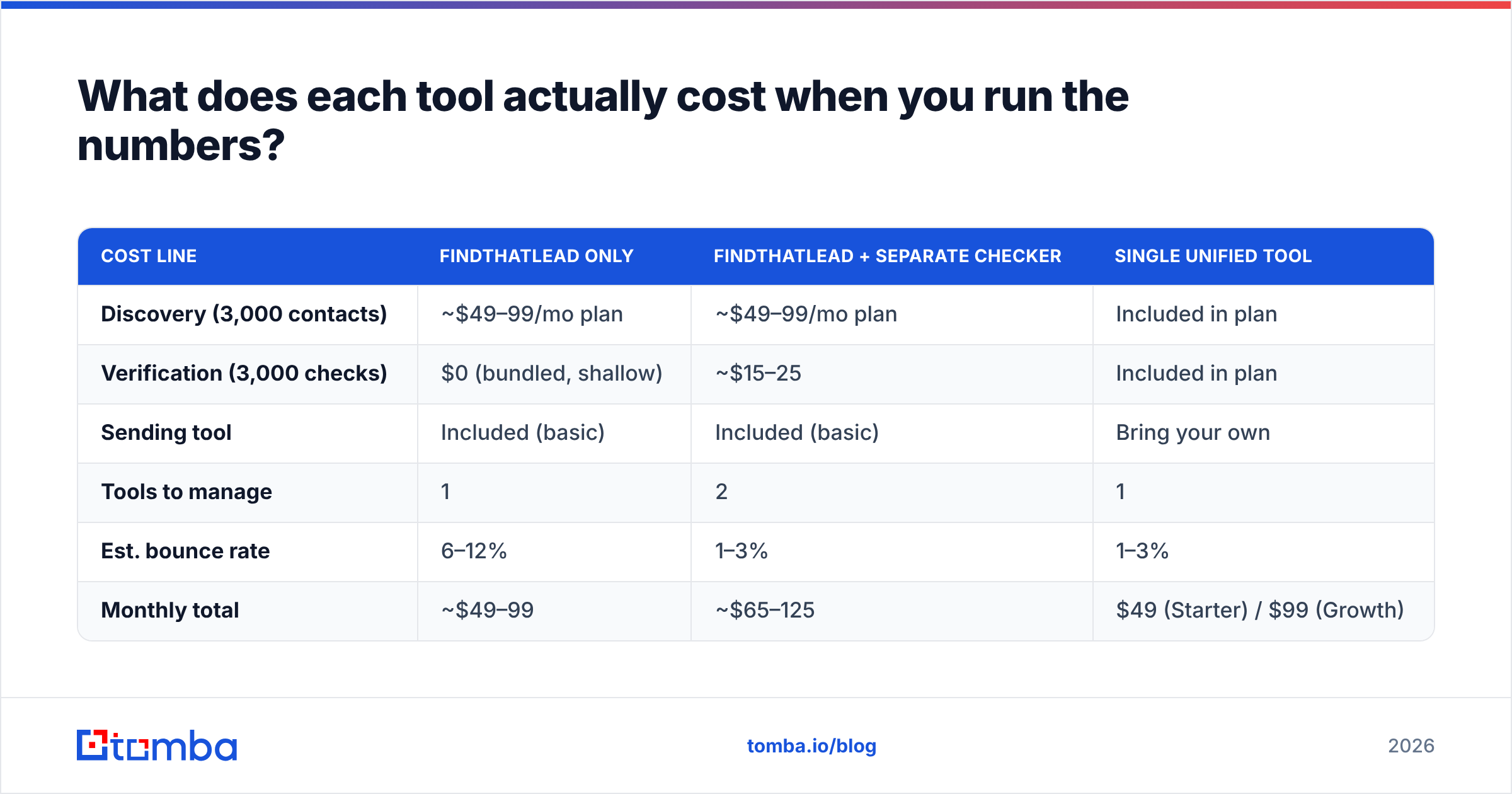
Sticker price lies in this category, because the two tools bill on different units. FindThatLead sells credits where one credit ≈ one lead found. Verification sells checks, where one check ≈ one address validated. If you run both, you pay for the same contact twice.
Let's model a realistic month: a two-person outbound team targeting 3,000 new contacts.
| Cost line | FindThatLead only | FindThatLead + separate checker | Single unified tool |
|---|---|---|---|
| Discovery (3,000 contacts) | ~$49–99/mo plan | ~$49–99/mo plan | Included in plan |
| Verification (3,000 checks) | $0 (bundled, shallow) | ~$15–25 | Included in plan |
| Sending tool | Included (basic) | Included (basic) | Bring your own |
| Tools to manage | 1 | 2 | 1 |
| Est. bounce rate | 6–12% | 1–3% | 1–3% |
| Monthly total | ~$49–99 | ~$65–125 | $49 (Starter) / $99 (Growth) |
The two-tool stack isn't expensive — it's about $20/mo more. The real cost is operational: two dashboards, two credit balances, two CSV exports, and a manual step between them that someone forgets during a busy week. That forgotten step is where the 12% bounce months come from.
This is the argument for consolidation, and it's why Tomba pricing puts finding and verification in the same credit pool — Free (25 searches/mo), Starter $49/mo, Growth $99/mo, Pro $249/mo. You don't decide whether a contact is "worth verifying" because verification isn't a separate purchase decision.
Worth noting the honest counterpoint: if you specifically want a bundled sender, FindThatLead gives you that and Tomba doesn't. Tomba integrates with sending platforms rather than replacing them. For a solo founder who wants exactly one invoice, that's a real argument in FindThatLead's favor.
Which tool should you pick for your situation?#
Match the tool to the actual problem, not the category name.
You have a purchased or inherited list and don't know what's in it. Buy verification, not prospecting. A standalone checker or a dedicated email verification run costs $15–30 and tells you exactly how bad the damage is. Don't buy FindThatLead for this.
You have zero contacts and need to build a pipeline from scratch. You need discovery. FindThatLead works, as does any competent email finder. Compare on database coverage in your specific vertical and geography, not on total contact count — a 500M-record database is useless if it's thin on German mid-market manufacturers.
You're a solo founder who wants one login and one bill. FindThatLead's bundle is legitimately the path of least resistance. Accept that each module is a B+ and move on. Re-verify before big sends anyway.
You're a team of 3+ running consistent outbound volume. Split discovery+verification from sending. Use a data platform for the first two and a purpose-built sequencer (Instantly, Smartlead, Lemlist) for the third. Bundled senders in prospecting tools lack the deliverability tooling — inbox rotation, warmup, per-mailbox throttling — that volume sending demands.
Your ICP is enterprise or heavily catch-all. Catch-all handling becomes the deciding factor. Test tools on 100 known-good addresses inside catch-all domains before you commit to anything.
You need phone numbers alongside email. Neither a pure email checker nor FindThatLead covers this. You'll want a platform with a phone finder or a separate mobile-data vendor layered in.

How do you actually test these tools before buying?#
Never trust a vendor's published accuracy number. Every tool in this space claims 95%+, and the claims are constructed differently — some exclude catch-alls from the denominator, some count "risky" as valid, some report on their easiest dataset.
Run this test instead. It takes an hour and costs nothing.
Build a 100-address ground-truth list:
- 40 addresses you have confirmed replies from (known valid)
- 20 addresses of people who have definitely left their company (known invalid)
- 20 addresses at domains you know are catch-all (test the hard case)
- 10 role accounts — info@, support@, hello@ (test risk classification)
- 10 deliberately fake addresses at real domains (test false positives)
Run the same 100 through every tool's free tier. Then score:
- False positives — invalid addresses marked valid. This is the only metric that costs you money, because these are the ones that bounce. Weight it heaviest.
- False negatives — valid addresses marked invalid. Costs you opportunity, not reputation. Annoying but survivable.
- Catch-all resolution — how many of the 20 catch-all addresses got a real answer versus a shrug?
- Cost per usable contact — total spend ÷ addresses you'd actually send to. Not cost per credit.
Cross-reference your results against real user reviews on G2's email verification category before you commit — but weight your own test higher. Review-site averages flatten the vertical-specific coverage differences that will actually determine your hit rate.
If you'd rather not build the list by hand, running a domain you know well through a domain search gives you a fast read on coverage depth for a company whose org chart you can verify yourself.
What's the verdict?#
"Email check vs FindThatLead" is the wrong comparison. It's like asking whether you need a lock or a door. You need discovery and verification, and the only real question is whether you buy them separately or together.
Buy them separately if you already own a sending platform you love, have a specific verification vendor your deliverability consultant swears by, or need FindThatLead's bundled sender for a low-volume solo operation.
Buy them together if you're running consistent volume, care about catch-all domains, or have ever discovered mid-campaign that someone skipped the verification step. One credit pool means the step can't be skipped, because it isn't a step.
Either way, the rule that survives every tool comparison: verify immediately before you send, never at discovery. Data decays, mailboxes close, people change jobs. A green badge from six weeks ago is a guess wearing a costume.
Ready to stop paying for the same contact twice? Tomba Email Finder finds professional email addresses by domain, name, or company — and runs verification, catch-all analysis, and enrichment out of the same credit pool, so nothing ships unverified. Start on the free tier with 25 searches a month, test it against your own ground-truth list, and upgrade only when the numbers justify it.
Related guides#
Ready to find emails that actually work?
Join 150,000+ professionals who stopped guessing and started sending. Free credits on signup — no credit card required.
Get the Tomba newsletter
Practical outbound tactics and product updates — once every two weeks.
About the author