Email Check vs Saleshandy: Which Tool Wins in 2026?
Email Check is a free single-address validator. Saleshandy is a paid outreach suite with verification bundled in. Here's which one actually fits your workflow — and where both fall short.
TL;DR
- Email Check (free single-address validators like Tomba's email checker) answers one question: is this specific address deliverable right now? No sequences, no CRM, no list management.
- Saleshandy is a cold-email sending platform — sequences, inbox rotation, unified inbox, deliverability tooling — with email verification bundled as a feature, not the product.
- They are not really competitors. The honest comparison is when you need each, and most teams end up needing both a verification layer and a sending layer.
- Saleshandy's verification credits are consumed inside its plans; a standalone verifier is usually cheaper per address and works on lists you're not sending from Saleshandy.
- Our pick: use a dedicated finder + verifier for data quality upstream, then push clean addresses into whatever sender you already pay for.
What Are We Actually Comparing Here?#
Short answer: a magnifying glass versus a factory line.
An email check tool is a magnifying glass. You hand it one address — sarah.chen@acme.com — and it tells you whether the domain exists, whether the MX records resolve, whether the mailbox accepts mail, whether it's a role account (info@, sales@), whether it's disposable, and whether the domain is catch-all. That's the whole job. Tools in this bucket include Tomba's free email checker, NeverBounce's single lookup, ZeroBounce's free tier, and the verification widget baked into most data vendors.
Saleshandy is the factory line. It's a cold outreach platform built around sending at volume: multi-step sequences, A/Z testing, sender rotation across dozens of mailboxes, a unified inbox for replies, warmup, and a lead-finder database. Email verification exists inside it — you can validate a list on import — but nobody buys Saleshandy for verification. They buy it to send 5,000 emails a week without torching their domain.
So when people search "email check vs Saleshandy," they're usually asking one of three real questions:
- Do I need a separate verifier if Saleshandy already verifies?
- Is Saleshandy's bundled verification good enough to skip a dedicated tool?
- What's the cheapest stack that keeps my bounce rate under 2%?
This post answers all three.
How Does Email Verification Actually Work?#
A verifier runs a cascade of checks, each cheaper and faster than the one after it. Understanding the cascade tells you why two tools disagree on the same address.
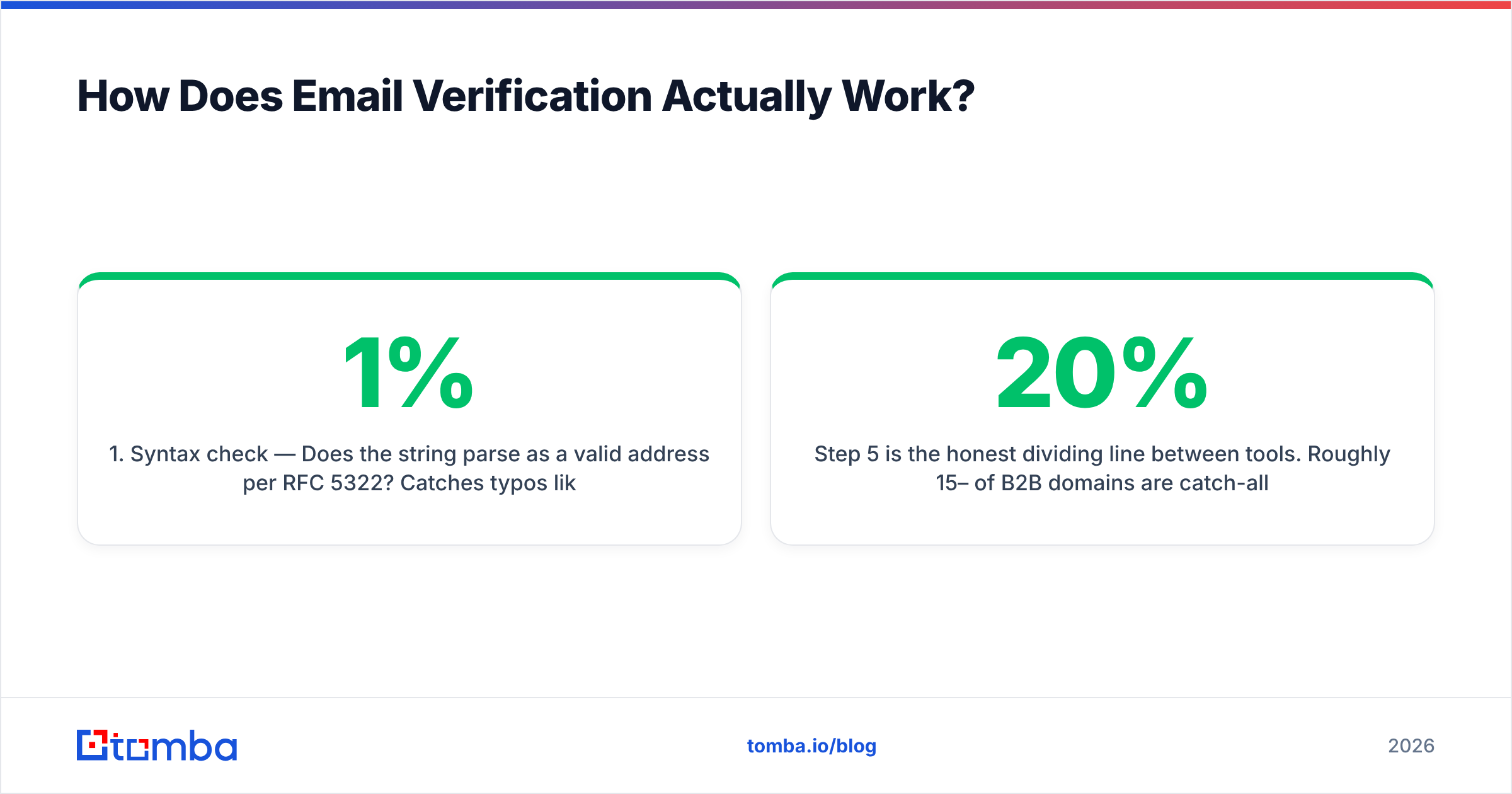
- Syntax check — Does the string parse as a valid address per RFC 5322? Catches typos like
john@@acme.com. Free, instant, ~1% of real-world failures. - Domain and MX lookup — Does
acme.comresolve, and does it publish mail exchange records? Catches dead companies and typo'd domains (gmial.com). Still free, still instant. - Disposable and role detection — Is this
mailinator.com? Is thissupport@? Both correlate with zero reply rate and elevated complaint risk. - SMTP handshake — Open a connection to the receiving server, issue
RCPT TO, and read the response code without sending anything. This is where the real signal lives, and where providers differ wildly. - Catch-all resolution — Many corporate domains accept every address at the SMTP layer, then bounce internally. A naive verifier marks these "valid." A good one flags them separately, and a catch-all verifier attempts a deeper probe.
Step 5 is the honest dividing line between tools. Roughly 15–20% of B2B domains are catch-all. If a vendor claims 99% accuracy but returns "valid" on every catch-all address, that number is marketing, not measurement.

Wait — that path is wrong. Here it is correctly:
Email Check vs Saleshandy: Head-to-Head Comparison#
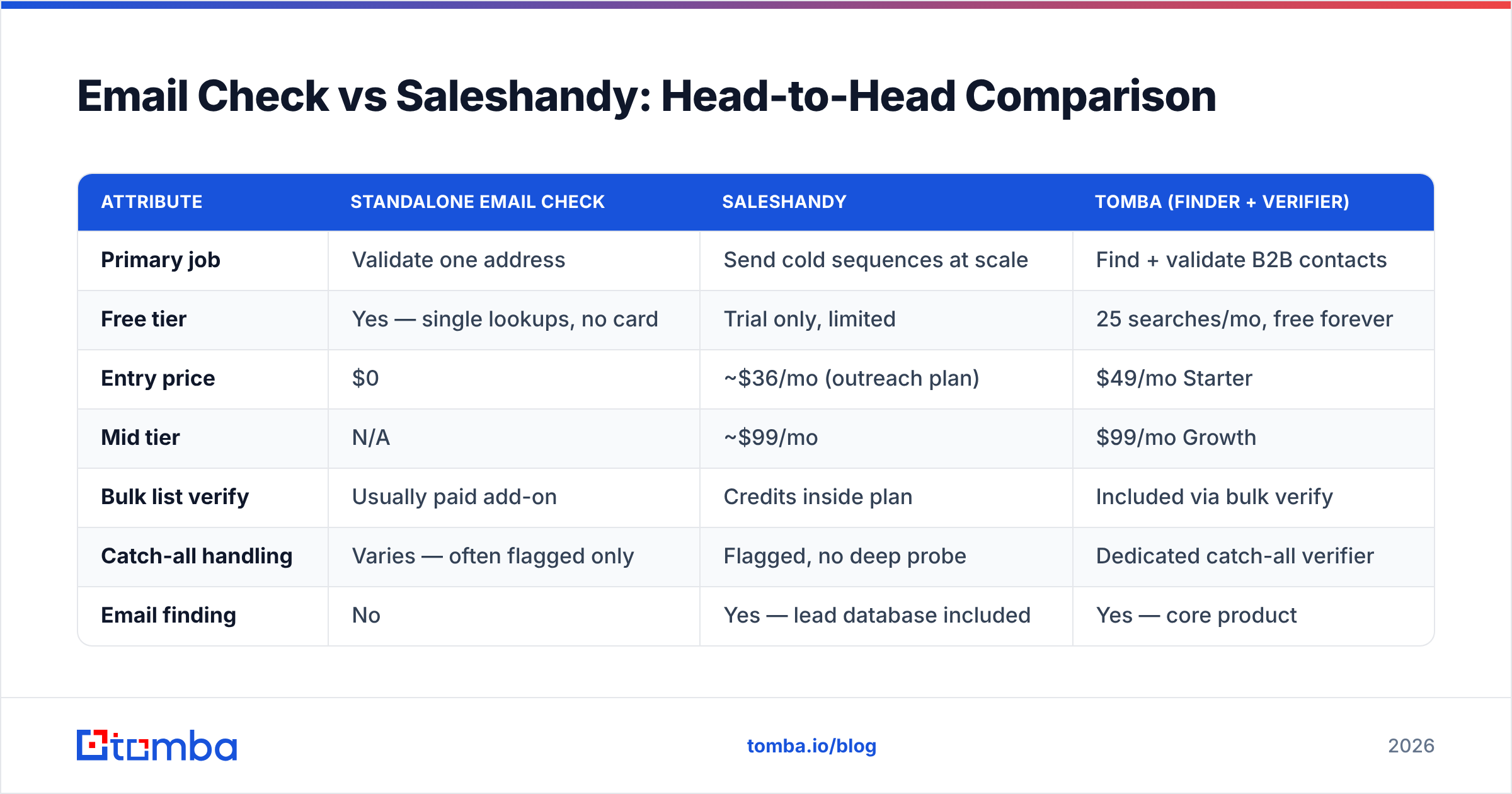
Here's the concrete breakdown. Note that "Email Check" here refers to a standalone verification tool (using Tomba as the reference implementation since its pricing is public and its free tier is real).
| Attribute | Standalone Email Check | Saleshandy | Tomba (finder + verifier) |
|---|---|---|---|
| Primary job | Validate one address | Send cold sequences at scale | Find + validate B2B contacts |
| Free tier | Yes — single lookups, no card | Trial only, limited | 25 searches/mo, free forever |
| Entry price | $0 | ~$36/mo (outreach plan) | $49/mo Starter |
| Mid tier | N/A | ~$99/mo | $99/mo Growth |
| Bulk list verify | Usually paid add-on | Credits inside plan | Included via bulk verify |
| Catch-all handling | Varies — often flagged only | Flagged, no deep probe | Dedicated catch-all verifier |
| Email finding | No | Yes — lead database included | Yes — core product |
| Sequences / sending | No | Yes — the main feature | No (integrates with senders) |
| Unified reply inbox | No | Yes | No |
| API access | Sometimes | Yes | Yes — full REST API |
| Best for | Spot-checking one lead | Running the send motion | Building the list you send to |
The table makes the real relationship obvious: Saleshandy and a verifier occupy different rows in your stack, not competing columns. Saleshandy sits at the bottom of the funnel (delivery). A verifier sits at the top (data hygiene). A finder sits above both (sourcing).

Is Saleshandy's Built-In Verification Good Enough?#
For a lot of teams, yes — with two caveats that bite at scale.
Caveat one: credit economics. Verification credits inside an outreach plan are priced as a bundled convenience, not as a commodity. When you're validating 2,000 addresses a month alongside your sending, that's fine. When you inherit a 50,000-row list from a conference sponsorship or a scraped export, burning outreach credits on hygiene is expensive relative to a dedicated bulk verify run. Do the arithmetic on your actual volume before assuming the bundle is cheaper.
Caveat two: it only sees what you import. Saleshandy verifies addresses you've already got. It doesn't help when the address doesn't exist yet — when you have a name and a company and need the address itself. That's a finder's job, and it's the single biggest quality lever in the whole chain. A pattern-guessed address that passes SMTP is still the wrong person if you guessed j.smith@ and the company uses john.smith@.
The sequencing that actually works:
- Source — Pull the target account list from your ICP definition, not from whatever's in the CRM.
- Find — Resolve name + domain into a real address with a domain search or an email finder, which returns a confidence score plus the source signals behind it.
- Verify — Run the SMTP cascade. Drop anything below your accept threshold. Flag catch-alls into their own bucket rather than deleting or trusting them.
- Enrich — Add title, seniority, company size, tech stack so personalization has something to work with.
- Send — Import into Saleshandy (or Instantly, or Smartlead) and let the sending platform do what it's good at.
Skip step 2 and step 5 gets ugly no matter how good your copy is. Google and Yahoo's bulk-sender requirements now enforce a spam complaint rate under 0.3%, and bounce rate feeds directly into the reputation signals that gate inbox placement. You can read the current thresholds in Google's own sender guidelines.
What Does Each Tool Cost in Practice?#
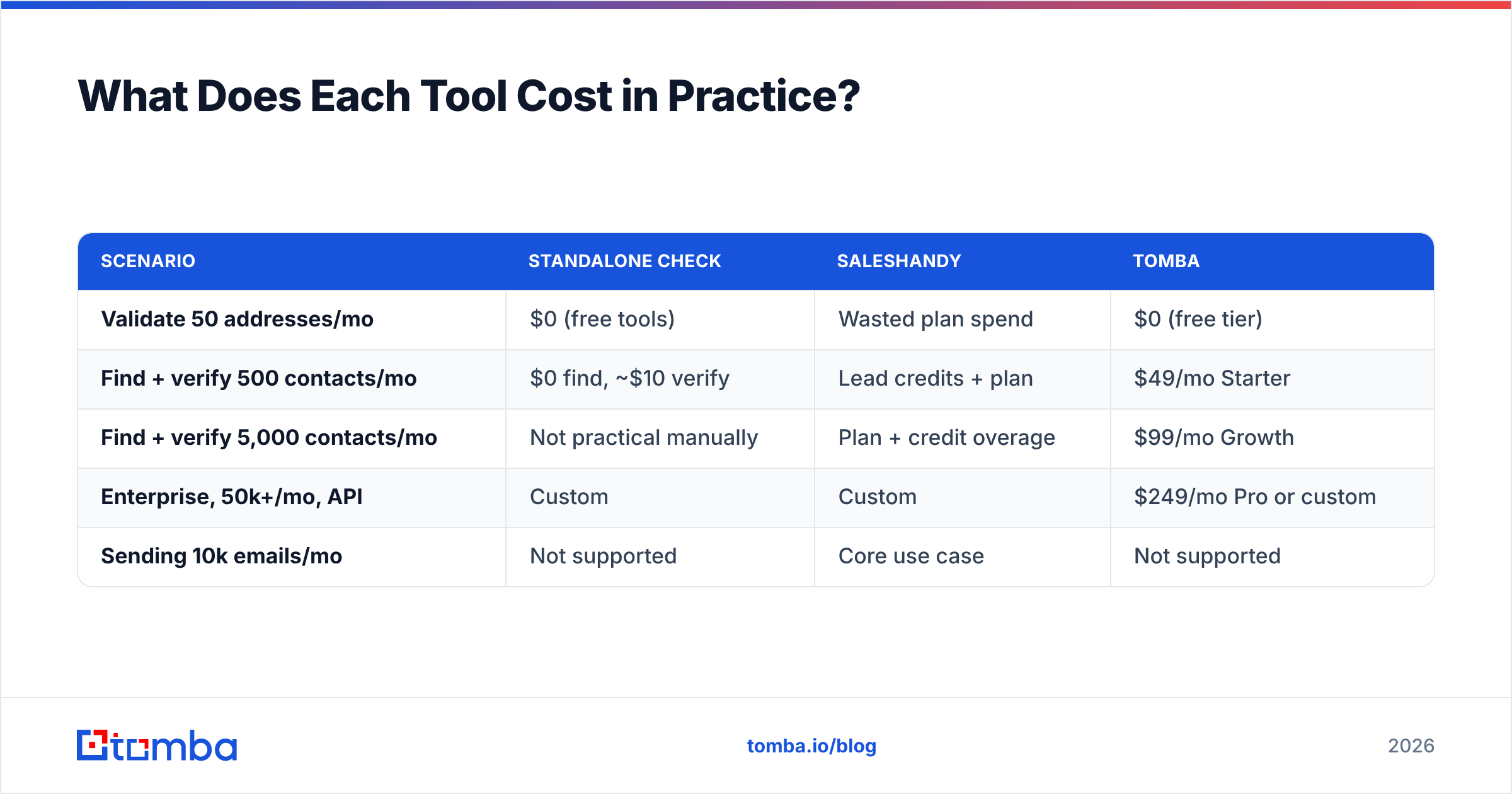
Pricing is where the "vs" framing finally has teeth, because you're paying for different units.
| Scenario | Standalone check | Saleshandy | Tomba |
|---|---|---|---|
| Validate 50 addresses/mo | $0 (free tools) | Wasted plan spend | $0 (free tier) |
| Find + verify 500 contacts/mo | $0 find, ~$10 verify | Lead credits + plan | $49/mo Starter |
| Find + verify 5,000 contacts/mo | Not practical manually | Plan + credit overage | $99/mo Growth |
| Enterprise, 50k+/mo, API | Custom | Custom | $249/mo Pro or custom |
| Sending 10k emails/mo | Not supported | Core use case | Not supported |
Tomba's pricing runs Free (25 searches/mo), Starter at $49/mo, Growth at $99/mo, Pro at $249/mo, and custom Enterprise. Saleshandy's outreach tiers start lower because they're selling sending seats, not data — but data credits are metered separately and that's where the real bill accumulates on a prospecting-heavy team.
The honest read: if you send a lot and prospect a little, Saleshandy's bundle wins on simplicity. If you prospect a lot and send through a tool you already own, a dedicated data layer wins on unit economics. If you're doing both at volume, you'll pay for both, and that's normal — most mature outbound teams run a finder, a verifier, and a sender as three line items.

What About the Other Options in This Category?#
Worth naming the neighbors, because "email check vs Saleshandy" is a narrow slice of a crowded market.
- Instantly and Smartlead — Direct Saleshandy competitors on the sending side. Similar inbox rotation, similar warmup, different UI opinions. If you're evaluating Saleshandy, evaluate these two in the same session. See the Saleshandy alternative breakdown for a feature-by-feature view.
- ZeroBounce, NeverBounce, Bouncer — Pure verification vendors. Excellent at the SMTP cascade, priced per address, no finding and no sending. Good choice if you already have lists and only need hygiene.
- BookYourData — A prepaid B2B contact database with a strong accuracy guarantee and pay-as-you-go pricing rather than subscriptions. Genuinely useful when you want a bounded list purchase instead of an ongoing seat, and their verification standards hold up well.
- Apollo and ZoomInfo — All-in-one data plus sequencing. Broadest coverage, highest price, and data freshness varies a lot by region and company size.
None of these make the others redundant. The category is layered, and vendors describe themselves as "all-in-one" mostly to widen their addressable market.

How Do You Know If Your Verification Is Actually Working?#
Measure four things after every campaign. If any of them drift, your data layer is the first suspect.
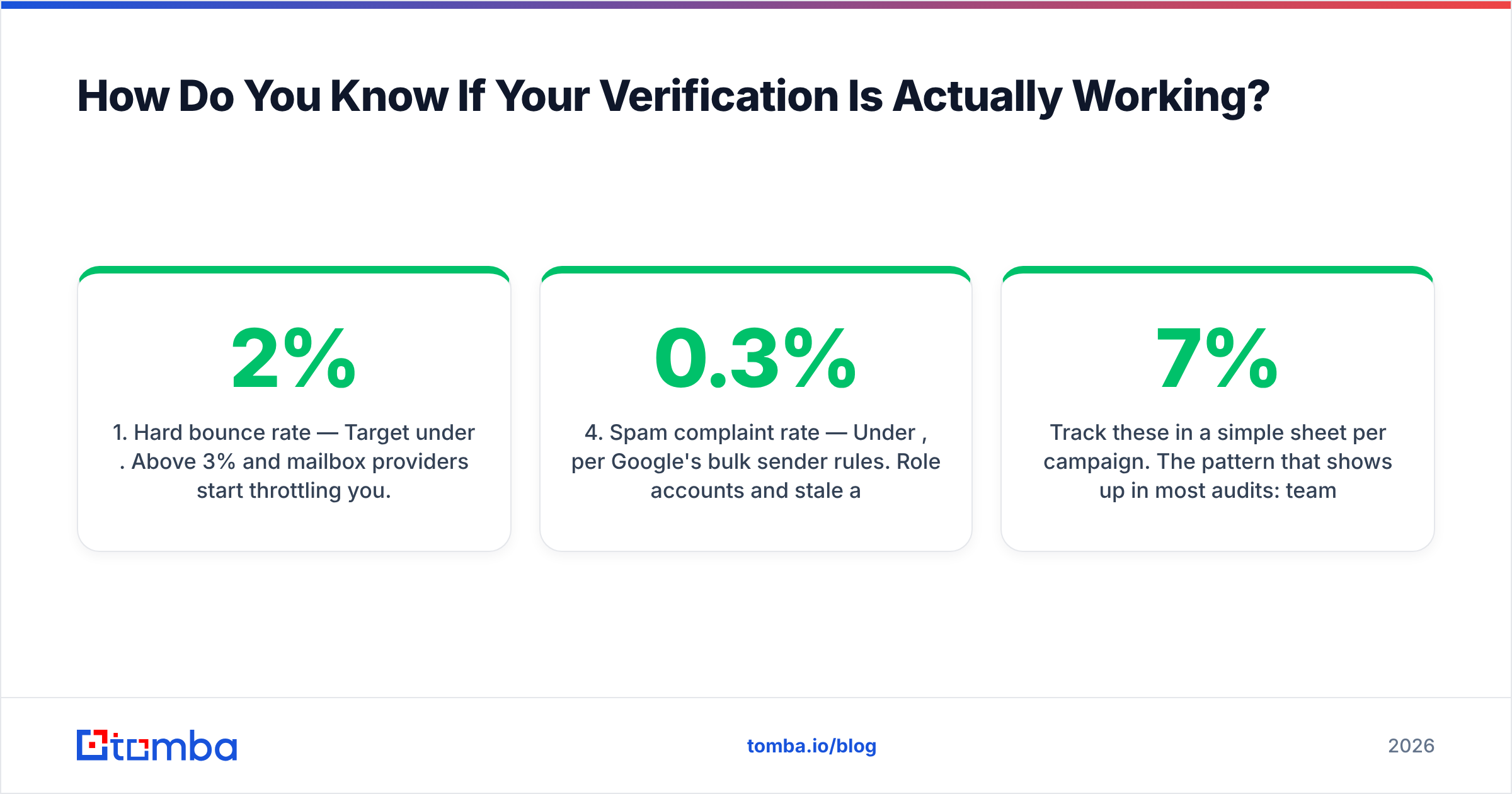
- Hard bounce rate — Target under 2%. Above 3% and mailbox providers start throttling you. This is the direct scorecard for verification quality.
- Catch-all share of your list — If more than a quarter of your accepted addresses are catch-all, you're flying blind on a big chunk of the send. Segment them and send to that bucket separately so their performance doesn't contaminate your reads.
- Reply rate on verified vs unverified cohorts — Run a holdout. If verified addresses don't outperform, your verifier isn't earning its cost.
- Spam complaint rate — Under 0.3%, per Google's bulk sender rules. Role accounts and stale addresses are the usual culprits, and both are catchable at verification time.
- Time-to-list — How long from "here's the ICP" to "here's a clean, enriched CSV"? If it's days, the bottleneck is usually manual pattern-guessing, which an email verifier plus a finder API collapses into minutes.
Track these in a simple sheet per campaign. The pattern that shows up in most audits: teams obsess over subject lines while a 7% bounce rate quietly suppresses everything downstream. Copy matters, but it matters after the message reaches a real inbox. If you want the deeper background on the reputation mechanics, email deliverability covers the underlying signals.
Which Should You Choose?#
Decide by what's actually broken right now.
Choose a standalone email check when: you need to validate a handful of addresses before a high-stakes send, you're spot-checking a purchased list before you commit budget, or you want a zero-cost sanity check on data someone handed you. Free tools handle this fine.
Choose Saleshandy when: your problem is sending — you have the list, you need sequences, rotation across multiple mailboxes, and a unified inbox to manage replies. Its verification will cover routine hygiene without a separate subscription.
Choose a dedicated finder + verifier when: your problem is the list itself. You know the accounts, you know the titles, you don't have the addresses. This is the most common gap, and it's the one neither a free checker nor a sending platform solves.
Choose all three when: you're running outbound as a real motion. Finder for sourcing, verifier for hygiene, sender for delivery. Three tools, three jobs, and each one is better at its job than any all-in-one's version of it.
Ready to Fix the Data Layer First?#
Bounce rates don't get fixed inside the sending platform — they get fixed before the list ever reaches it. If your addresses are guessed, stale, or unverified, no amount of inbox rotation or warmup will save the campaign.
Start with Tomba Email Finder. Give it a name and a domain, or a domain on its own, and get verified professional addresses with a confidence score and the source signals behind each one. The free tier covers 25 searches a month with no card required, so you can benchmark it against whatever you're using now on your own accounts before deciding anything. Then push the clean list into Saleshandy, Instantly, or whatever sender you already pay for — and let each tool do the one thing it's genuinely good at.
Related guides#
Ready to find emails that actually work?
Join 150,000+ professionals who stopped guessing and started sending. Free credits on signup — no credit card required.
Get the Tomba newsletter
Practical outbound tactics and product updates — once every two weeks.
About the author