Email Check vs Tomba: Which Email Tool Wins in 2026?
A standalone email check tool cleans the list you already have. Tomba builds the list and then cleans it. Here is the honest breakdown of accuracy, pricing, catch-all handling, and which one belongs in your stack.
TL;DR
- An email check tool answers one question: is this address deliverable right now? Tomba answers two: where do I get the address, and is it deliverable?
- If you already buy or scrape lists elsewhere, a standalone checker is cheaper per record and perfectly adequate.
- If you build lists yourself from domains, LinkedIn profiles, or CRM gaps, paying twice — once to find, once to verify — is the expensive path.
- Catch-all domains are where the two categories genuinely separate. Most checkers return "unknown" and bill you anyway.
- Tomba's Starter plan is $49/mo and includes finding, verification, enrichment, and API access in the same credit pool. Verification-only vendors are cheaper per check but do less.
What does an "email check" tool actually do?#
An email check tool takes an address you already have and grades it. Nothing more. The typical pipeline runs four stages, in this order:
- Syntax validation — does the string parse as a valid address under RFC 5322? This catches
john@@acmeand trailing spaces. It costs nothing and proves almost nothing. - Domain and MX lookup — does
acme.comresolve, and does it publish mail exchanger records? A domain with no MX record cannot receive mail, full stop. - SMTP handshake — the checker opens a conversation with the receiving server and asks whether the mailbox exists, without delivering a message. This is the step that produces real signal. You can read the underlying mechanics in the SMTP specification overview.
- Risk classification — is it a role address (
info@,sales@), a disposable domain, a known spam trap, or a catch-all server that accepts everything?
Every serious vendor in the email verification category on G2 runs some version of that pipeline. The differences between them are narrower than the marketing suggests: how many IPs they rotate, how they handle greylisting, how aggressively they guess on catch-alls, and how they price.
The important structural fact: a checker is a filter, not a source. Feed it nothing, get nothing.
What is Tomba, and how is it different?#
Tomba starts one step earlier in the funnel. Its core product is the email finder — you give it a person's name and a company domain, or just a domain, and it returns addresses with a confidence score and the public sources it drew from. Verification sits next to it, not instead of it.
The practical product surface:
- Domain search — pull every discoverable address at a company, with names, roles, and pattern detection.
- Email finder — first name + last name + domain, returns the specific address.
- Email verifier — the same SMTP-plus-heuristics pipeline a standalone checker runs.
- Catch-all verifier — a dedicated path for domains that accept all mail.
- Bulk email finder and API — for lists rather than one-offs.
So "email check vs Tomba" is not really a like-for-like feature fight. It is a question about where your data comes from before it reaches a validator.
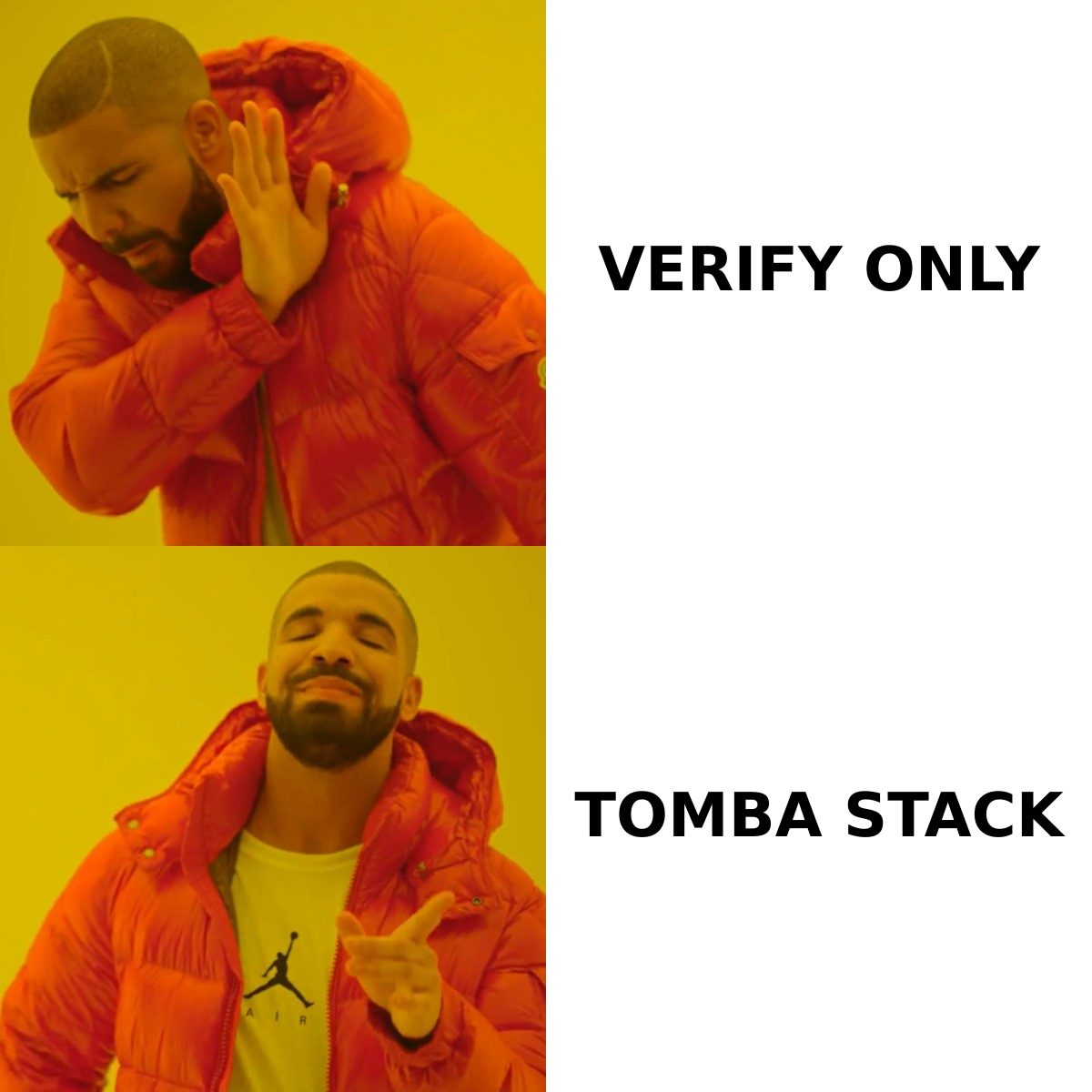
Email check vs Tomba: how do the two compare feature by feature?#
Here is the head-to-head. "Standalone email check" reflects what the category broadly ships — individual vendors vary, so check the specific tool you are evaluating before you commit.
| Capability | Standalone email check tool | Tomba |
|---|---|---|
| Syntax + MX validation | Yes | Yes |
| SMTP mailbox probe | Yes | Yes |
| Finds new addresses | No | Yes (name + domain, or domain-wide) |
| Domain-wide discovery | No | Yes |
| Catch-all handling | Usually returns "unknown" | Dedicated catch-all verifier |
| Confidence score with sources | Rarely | Yes, with public source citations |
| Phone numbers | No | Yes, via phone finder |
| Contact enrichment | Occasionally as an add-on | Yes, built in |
| Chrome extension | Sometimes | Yes |
| Sheets / Excel / Airtable add-ons | Varies | Yes |
| API + CLI | API usually; CLI rarely | Both, plus an MCP server |
| Free tier | Often 100–250 one-time credits | 25 searches per month, recurring |
| Entry paid plan | Typically $15–$30/mo | $49/mo |

Read the table honestly: on pure verification, the standalone tool is competitive and cheaper. The gap opens on everything to the left of verification.
How accurate is each one in practice?#
Accuracy claims in this category are close to meaningless without a definition, so define it first. There are three separate numbers that vendors blur into one:
- Bounce accuracy — of the addresses marked valid, what percentage actually delivered? Good checkers land in the high 90s here. So does Tomba's verifier. This is a solved problem for standard mailbox providers.
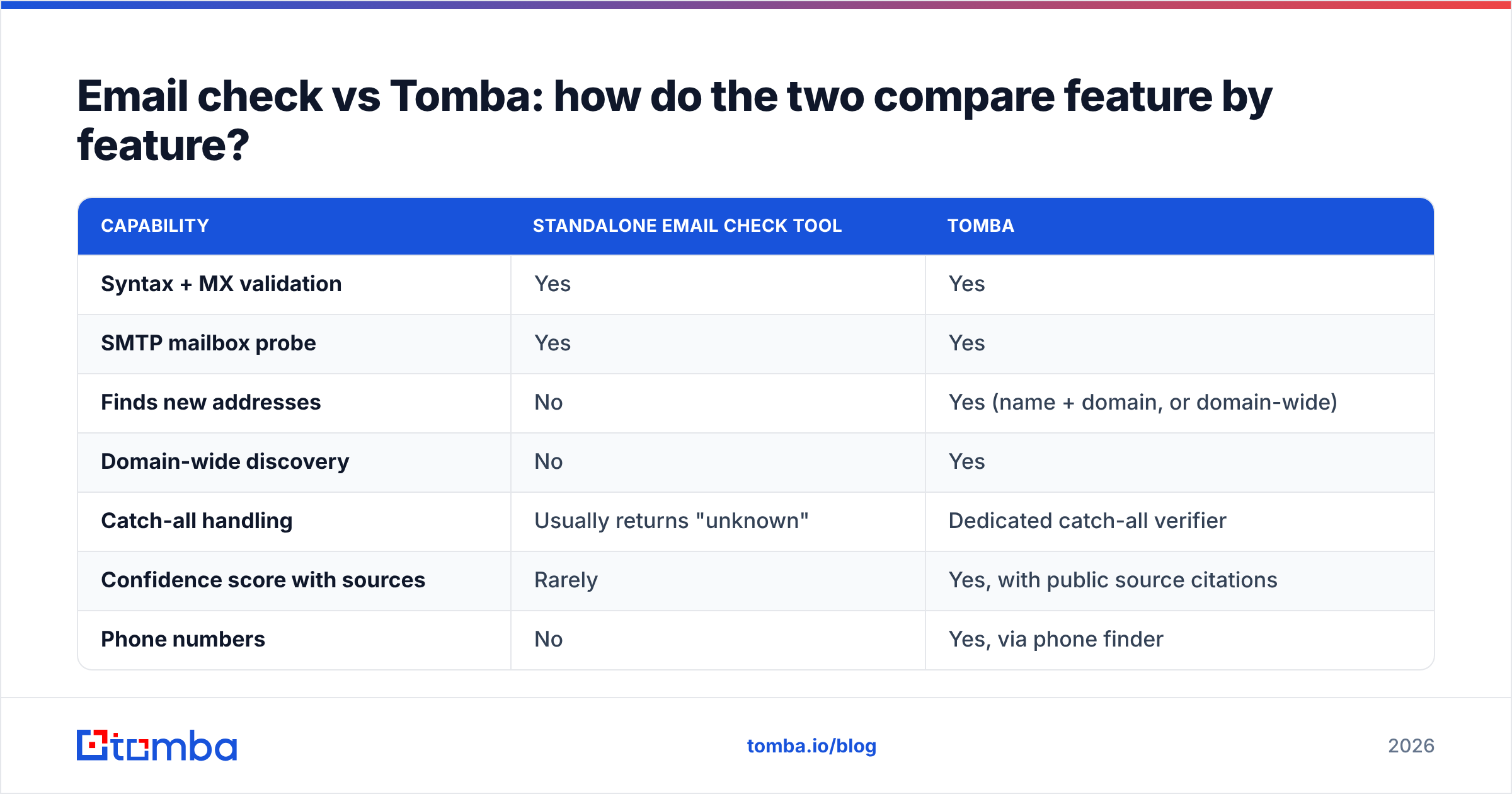
- Coverage / hit rate — of the contacts you needed, how many did the tool produce a deliverable address for? A checker's hit rate is structurally 0%, because it never produces addresses. This is where finders differ wildly from one another.
- Unknown rate — what percentage came back inconclusive? This is the number vendors hide, and it is almost entirely a catch-all problem.

A checker that returns 8% "unknown" and a finder that returns 8% "unknown" are not equivalent failures. With a checker, you paid for a verdict and got a shrug on a contact you already owned. With a finder, you at least got a candidate address plus a pattern you can reason about.
The single most useful habit: run a 200-address control set through any tool before you buy annual. Send to the "valid" bucket through a warmed domain, count hard bounces, and compute the real number yourself. Vendor benchmarks are marketing; your bounce log is evidence.
What does each option cost per usable contact?#
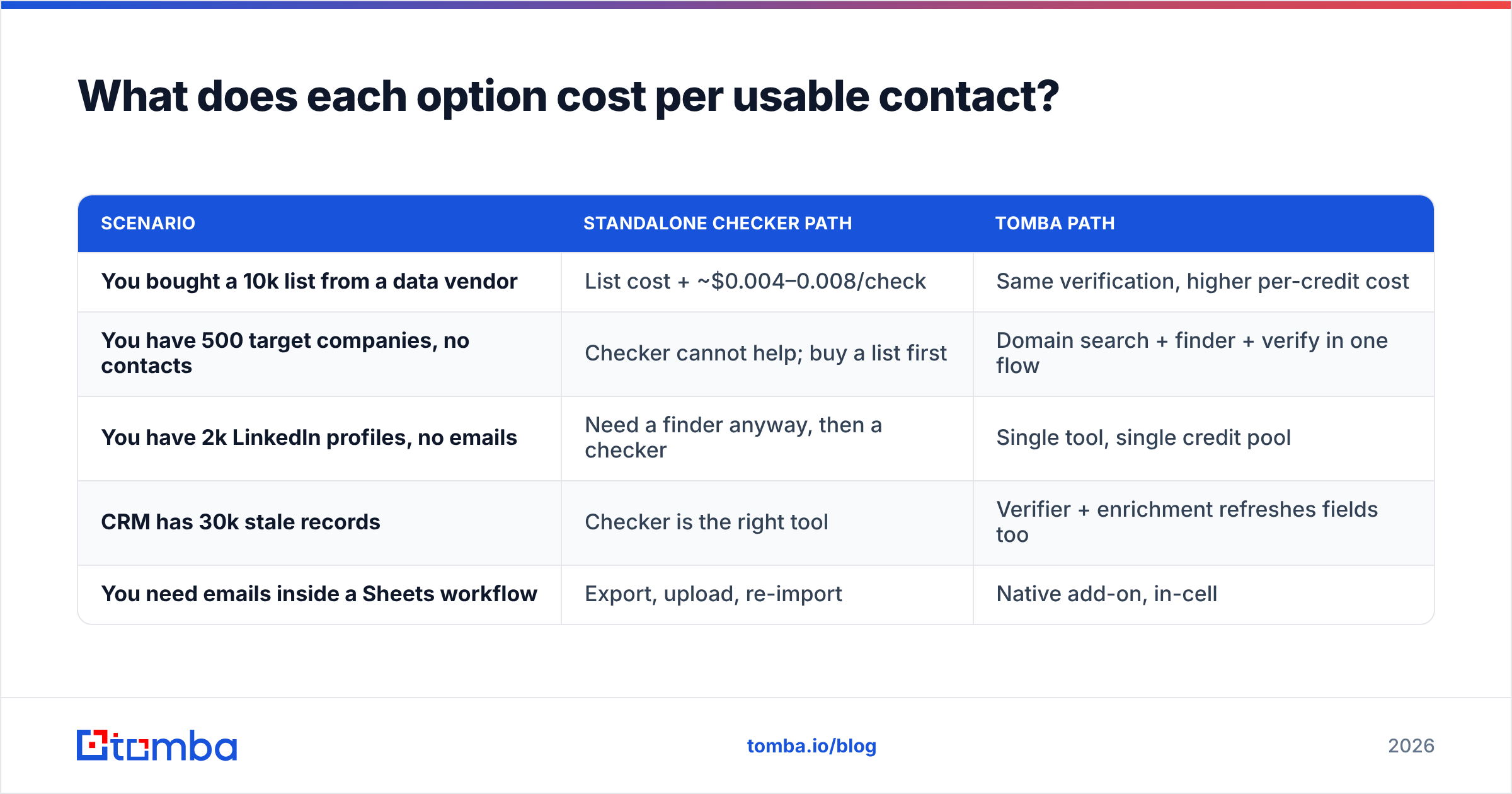
Per-check pricing favors standalone tools. Cost-per-usable-contact is a different calculation, because it includes the step where you acquired the address.
| Scenario | Standalone checker path | Tomba path |
|---|---|---|
| You bought a 10k list from a data vendor | List cost + ~$0.004–0.008/check | Same verification, higher per-credit cost |
| You have 500 target companies, no contacts | Checker cannot help; buy a list first | Domain search + finder + verify in one flow |
| You have 2k LinkedIn profiles, no emails | Need a finder anyway, then a checker | Single tool, single credit pool |
| CRM has 30k stale records | Checker is the right tool | Verifier + enrichment refreshes fields too |
| You need emails inside a Sheets workflow | Export, upload, re-import | Native add-on, in-cell |
Tomba's published plans: Free at 25 searches/month, Starter $49/mo, Growth $99/mo, Pro $249/mo, Enterprise custom — the full breakdown is on the Tomba pricing page. Credits are shared across finding, verification, and enrichment, so you are not budgeting three separate line items.
Where the standalone checker genuinely wins on cost: large, one-time list hygiene. Cleaning a 250,000-record legacy database is a verification job, not a discovery job. Buy the cheap per-check pricing and move on.
Which one fits your workflow?#
Pick by where your bottleneck actually is. Four common profiles:
- You are a founder doing outbound to 50 target accounts a week. You need discovery far more than hygiene. A find-and-verify platform wins; a checker leaves you with an empty spreadsheet.
- You run a marketing database and fight email deliverability problems. Your addresses already exist and are decaying at roughly 2% a month. A standalone checker on a quarterly cadence is the efficient answer.
- You are an agency onboarding new clients monthly. You need both, repeatedly, on unfamiliar domains. One vendor with one API is less operational overhead than stitching two together.
- You are an engineer embedding validation in a signup form. You want a fast, cheap, single-purpose verification endpoint with predictable latency. Either works, but you should benchmark real p95 response times, not marketing claims.
- You are cleaning a list before a Google Workspace or Outlook send. Follow the receiving side's rules too — Google's bulk sender guidelines cap complaint rates at 0.3%, and no verifier saves you from bad targeting.
If you just want a quick one-off sanity check on a single address without signing up for anything, Tomba's free email checker handles that in the browser.
What happens with catch-all domains?#
This is the honest dividing line, and it deserves more than a table row.
A catch-all (or "accept-all") server is configured to accept mail for every address at the domain, whether or not the mailbox exists. nonsense-string@acme.com gets a 250 OK exactly like ceo@acme.com does. The SMTP probe — the step that gives verification its power — returns no information.
Large enterprises and most Microsoft 365 tenants with directory-based edge blocking disabled behave this way. Depending on your ICP, catch-alls can be 15–30% of your list.
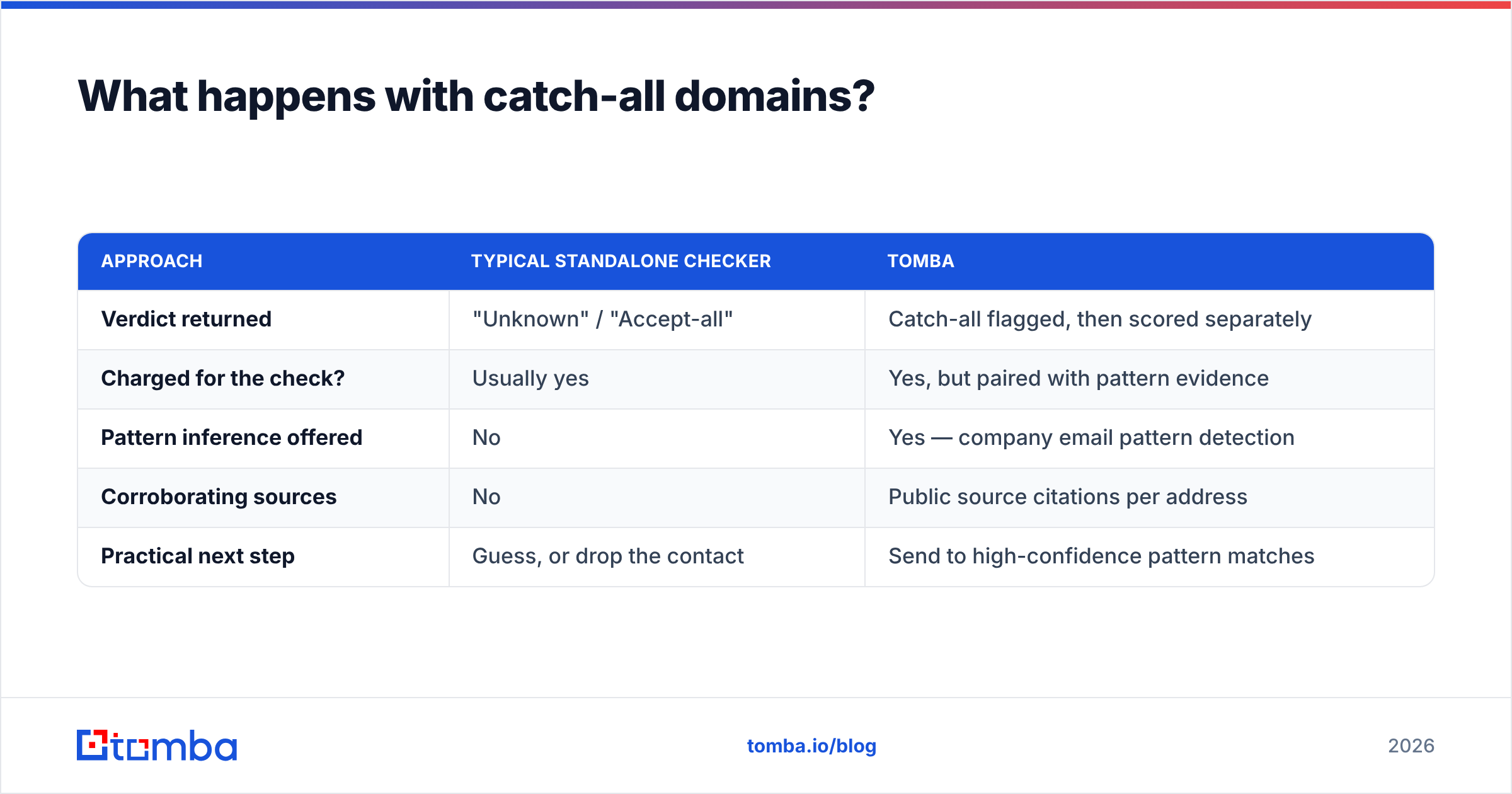
What each side does about it:
| Approach | Typical standalone checker | Tomba |
|---|---|---|
| Verdict returned | "Unknown" / "Accept-all" | Catch-all flagged, then scored separately |
| Charged for the check? | Usually yes | Yes, but paired with pattern evidence |
| Pattern inference offered | No | Yes — company email pattern detection |
| Corroborating sources | No | Public source citations per address |
| Practical next step | Guess, or drop the contact | Send to high-confidence pattern matches |
Neither tool can give you certainty on a catch-all — anyone claiming otherwise is overselling. What you can get is a defensible probability: if 40 other addresses at acme.com follow first.last@, and the person's name is verified from a public source, the address is very likely real. That is inference from a corpus, and a verification-only tool has no corpus. Tomba's catch-all finder exists specifically for this gap.
When is a standalone email check the better buy?#
Being fair to the category — there are four situations where a dedicated checker beats a platform:
- Volume hygiene. Six-figure list cleaning where per-check price dominates every other consideration.
- Real-time form validation. A narrow, latency-sensitive API call at signup. You want the smallest, fastest dependency.
- You already have a data source you trust. If your CRM, partner feed, or existing vendor supplies addresses, the discovery layer is redundant spend.
- Compliance-constrained environments. Some teams are contractually barred from sourcing new contact data and may only validate what they legally hold. A finder is not just unnecessary there; it is off-limits.
In those cases, buy the checker. Do not let a platform pitch talk you into paying for discovery you will never use.
What should you actually do next?#
Run the decision in this order:
- Count how many contacts you are missing versus how many you hold but distrust. Whichever number is bigger names your primary tool.
- Test both on the same 200-row sample. Compare valid rate, unknown rate, and — most importantly — real bounce rate after sending.
- Price it per usable contact, not per API call.
- Check whether the tool lives where you work. An email verification API, a Sheets add-on, and a Chrome extension all beat a CSV round-trip.
For most B2B teams building lists rather than inheriting them, the verification-only tool ends up as a secondary utility inside a broader stack, not the center of it. If you are already sourcing prospects yourself and paying separately to clean them, consolidating is usually both cheaper and less brittle.
Start with the Tomba Email Finder — the free tier gives you 25 searches a month with no card, which is enough to run a real side-by-side against whatever checker you use today. Verify the results, send to them, and let your bounce log settle the argument.
Related guides#
Ready to find emails that actually work?
Join 150,000+ professionals who stopped guessing and started sending. Free credits on signup — no credit card required.
Get the Tomba newsletter
Practical outbound tactics and product updates — once every two weeks.
About the author