Email Checker: How to Verify Any Email Address in 2026
An email checker tells you whether an address will accept mail before you send. Here is how the checks actually work, what "99% accuracy" really means, and how the main tools compare on price, catch-all handling, and API access.
TL;DR
- An email checker answers one question: will this address accept mail right now? It does that with syntax parsing, DNS/MX lookups, and an SMTP handshake — not magic.
- "99% accuracy" is a marketing number. What matters is the unknown rate — how many addresses a tool refuses to classify — because those are the ones that quietly bounce.
- Catch-all domains break most checkers. Roughly 15–20% of B2B domains accept everything at the SMTP layer, so a plain "valid" verdict there is meaningless without a dedicated catch-all method.
- Free email checkers are fine for one-off lookups. Paid ones earn their keep on volume, API access, and catch-all resolution.
- Keep bounce rate under 2%. Above 3%, Gmail and Microsoft start throttling your domain regardless of how good your copy is.
What is an email checker?#
An email checker is a tool that tests whether an email address exists and can receive mail, without sending anything the recipient sees. You paste in sarah.chen@acme.com, and it returns a verdict: valid, invalid, risky, or unknown — usually in under two seconds.
That's the whole product. The differences between vendors come down to how many checks they run, how they classify ambiguity, and what they do when a mail server refuses to answer.
People use the term loosely, so it's worth separating three things that get bundled together:
- Email checker / verifier — you already have the address, you want to know if it's deliverable. This is validation.
- Email finder — you have a name and a company, you want the address. This is discovery. Tools like the Tomba Email Finder do this, then verify the result before returning it.
- Email enrichment — you have an address and want the job title, company size, and LinkedIn profile attached to it.
This post is about the first one, with a nod to the second where the two overlap — because a finder that returns unverified addresses is just a guessing machine with a nice UI.
How does an email checker actually verify an address?#
Think of it like checking whether a house exists before mailing a letter. First you confirm the address is written in a legal format, then you confirm the street exists, then you knock on the door and see if anyone answers.
Every serious verifier runs some version of these six steps:
- Syntax validation — Does the string conform to RFC 5322? This catches
john@@acme.com, trailing spaces, and the surprisingly commonjohn.smith@acme(no TLD). Cheap, instant, and it kills 2–5% of a typical scraped list. - Domain and MX record lookup — Does
acme.comresolve, and does it publish mail exchange records? A domain with no MX record cannot receive email, period. Parked domains and expired startups die here. - Disposable and role-based detection — Is this
mailinator.com? Is itinfo@,support@,sales@? Role accounts are technically valid but usually route to a shared inbox or a ticketing queue, which is why most tools flag them separately rather than calling them invalid. - SMTP handshake — The checker opens a connection to the mail server and issues
RCPT TOwithout ever sendingDATA. The server replies with a 250 (accepted) or 550 (no such user). This is the core test, and it's built directly on the SMTP protocol that every mail server speaks. - Catch-all detection — The checker sends
RCPT TOfor a deliberately fake address likezzq7x@acme.com. If the server accepts that, the domain is catch-all and the SMTP test proves nothing. - Reputation and history signals — Better tools cross-reference known spam traps, hard-bounce histories, and whether the address has appeared in verified data before. This is where vendors with a large B2B database have a structural advantage over pure-SMTP tools.
The first three steps are commodity work — any developer can build them in an afternoon. Steps 4 through 6 are where tools separate, because mail servers actively resist being probed.
What does "99% accuracy" actually mean?#
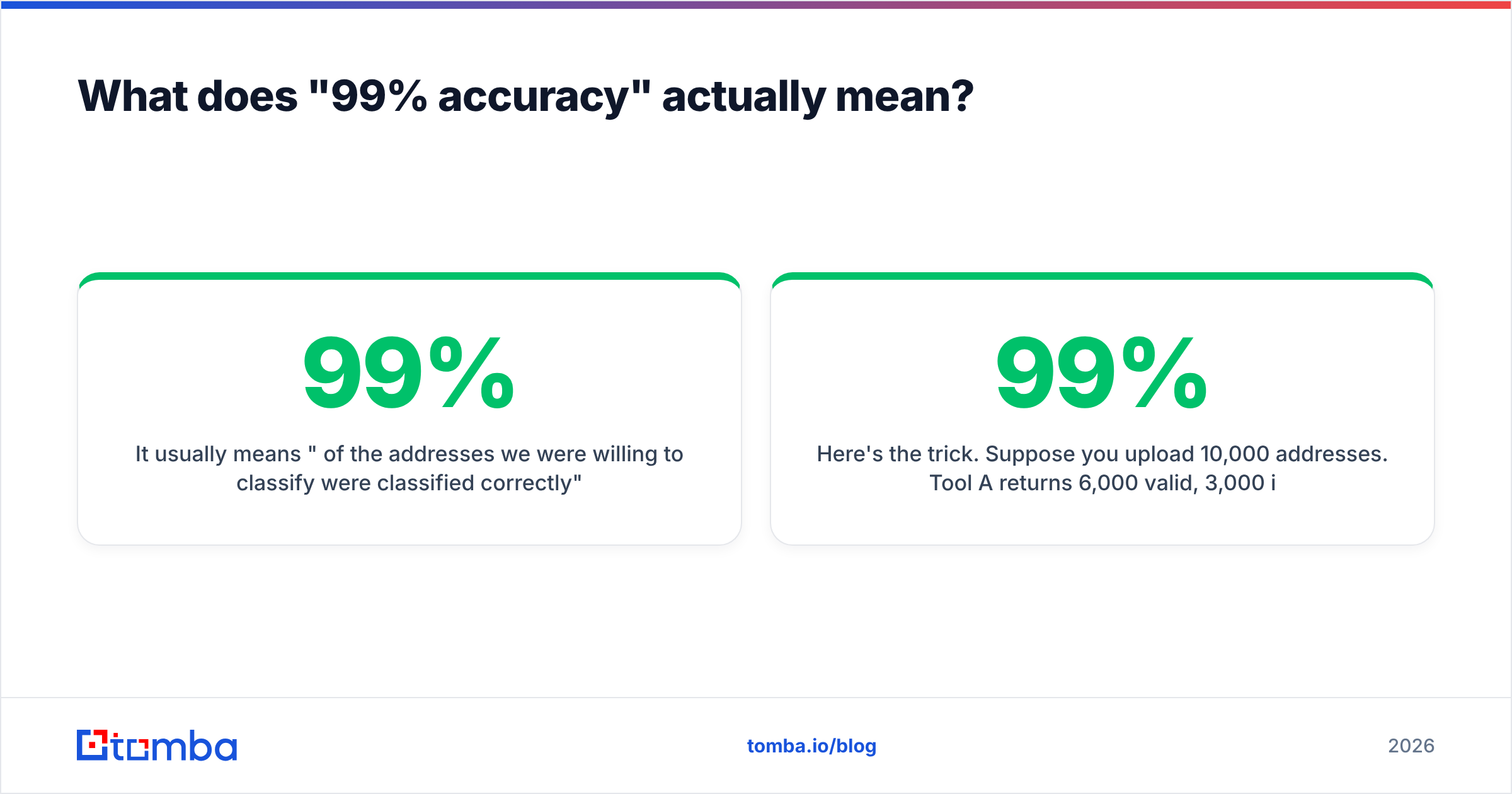
It usually means "99% of the addresses we were willing to classify were classified correctly" — which is not the same as "99% of your list came back with a useful answer."
Here's the trick. Suppose you upload 10,000 addresses. Tool A returns 6,000 valid, 3,000 invalid, and 1,000 unknown. Tool B returns 8,200 valid, 1,300 invalid, and 500 unknown. Both claim 99% accuracy on the classified set. But Tool A handed back 1,000 addresses you still have to decide about, and if you send to them blind, they bounce and count against you.
The three numbers that actually matter:
- Coverage rate — the share of your list that got a definitive verdict. Higher is better, as long as the definitive verdicts hold up.
- Real-world bounce rate — what happened after you sent. This is the only number that isn't self-reported.
- False-valid rate — addresses marked deliverable that bounced anyway. This is the expensive failure. A false invalid costs you one lead; a false valid costs you sender reputation.

When you're evaluating a vendor, run 200–500 addresses you already know the answer to — recent replies, known-dead contacts, a few deliberately fabricated ones — through the free tier before you commit. Every credible tool offers enough free credits to do this. If a vendor won't let you test, that tells you something.
Which email checker should you use in 2026?#
There's no universal winner. The right pick depends on whether you're verifying 500 addresses a month or 500,000, and whether you need an API or a spreadsheet upload.

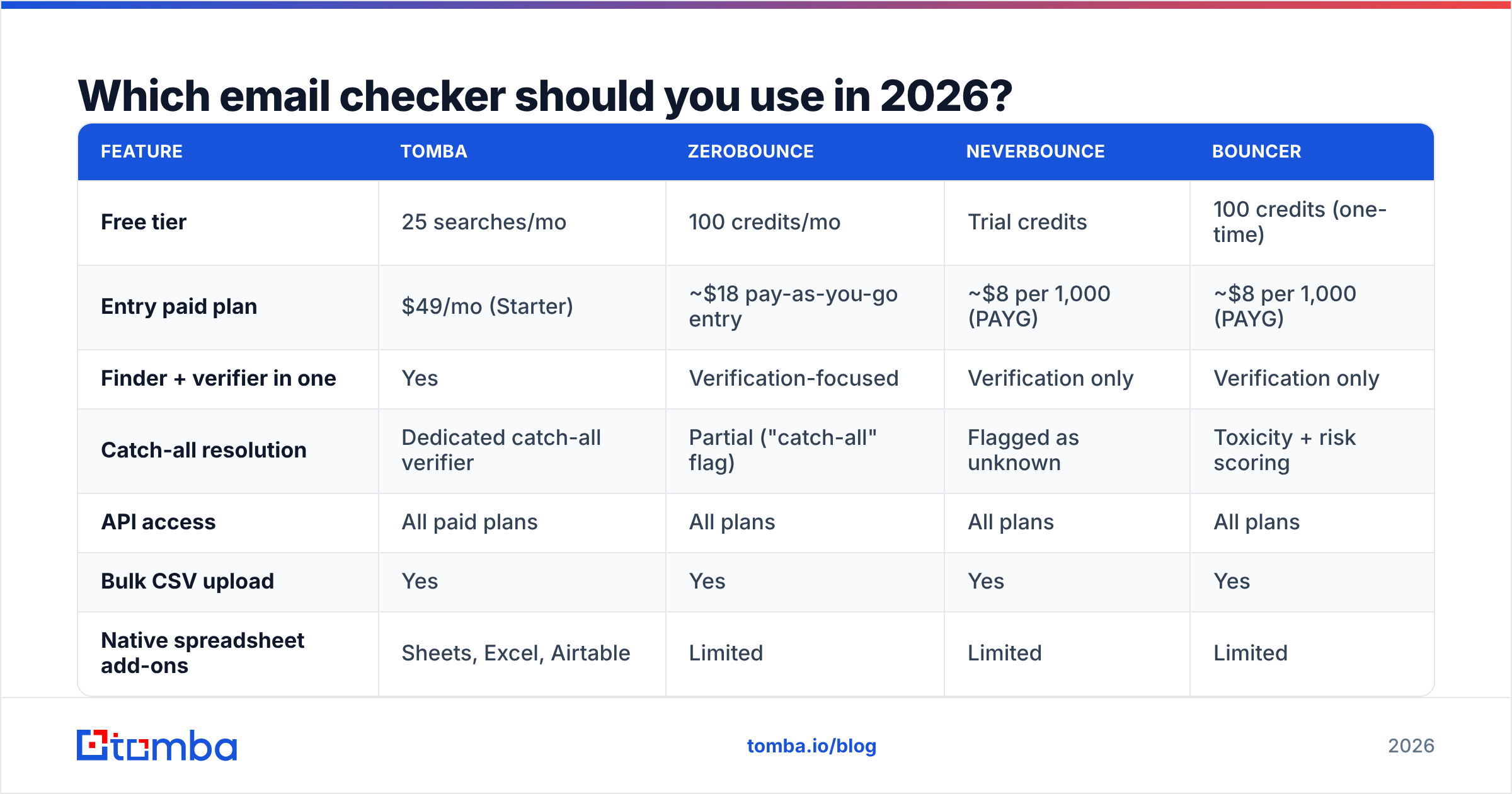
| Feature | Tomba | ZeroBounce | NeverBounce | Bouncer |
|---|---|---|---|---|
| Free tier | 25 searches/mo | 100 credits/mo | Trial credits | 100 credits (one-time) |
| Entry paid plan | $49/mo (Starter) | ~$18 pay-as-you-go entry | ~$8 per 1,000 (PAYG) | ~$8 per 1,000 (PAYG) |
| Finder + verifier in one | Yes | Verification-focused | Verification only | Verification only |
| Catch-all resolution | Dedicated catch-all verifier | Partial ("catch-all" flag) | Flagged as unknown | Toxicity + risk scoring |
| API access | All paid plans | All plans | All plans | All plans |
| Bulk CSV upload | Yes | Yes | Yes | Yes |
| Native spreadsheet add-ons | Sheets, Excel, Airtable | Limited | Limited | Limited |
| Best for | Find + verify in one workflow | Large list hygiene | One-time list cleaning | Deliverability-led teams |
Pricing above reflects publicly listed entry points and moves often — check each vendor's page before you buy, and compare current user sentiment on G2's email verification category rather than trusting any single review roundup, including this one.
A few honest distinctions:
- If you're cleaning an existing list once, a pay-as-you-go verifier is cheaper than a subscription. Don't pay monthly for a one-time job.
- If you're building lists continuously, a combined finder-and-verifier saves a full step. You're not exporting from one tool to import into another, and you're not paying twice per contact. That's the case for Tomba pricing at $49/mo Starter or $99/mo Growth — it bundles discovery, verification, and enrichment rather than charging separately.
- If you'd rather buy pre-verified contacts than verify your own, BookYourData sells B2B lists with a bounce guarantee attached, which is a legitimate alternative to running verification in-house — different model, same end goal.
- If you're a developer, judge on the API. Rate limits, webhook support for bulk jobs, and a sane error taxonomy matter more than the dashboard. The Tomba API and the major verifiers all expose REST endpoints; test the response shape before you build against it.
What happens with catch-all domains?#
Catch-all is where most email checkers quietly fail, and it's the single biggest reason "verified" lists still bounce.
A catch-all (or accept-all) domain is configured to accept mail for every address at that domain at the SMTP layer, then sort it out internally — or drop it. anything@acme.com returns a 250. So does ceo@acme.com. So does asdfgh@acme.com. The handshake test, which is the backbone of verification, returns the same answer for a real employee and a random string.
Roughly 15–20% of B2B domains are configured this way, and it skews toward larger enterprises running Microsoft 365 with aggressive anti-harvesting settings. In other words: exactly the accounts you most want to reach.
Tools handle this three ways:
- Mark everything as "unknown" or "risky" and push the decision to you. Safe, but you lose a fifth of your list.
- Mark everything as "valid" because the server said 250. This is the dangerous one — it inflates the vendor's coverage number and your bounce rate at the same time.
- Resolve it with secondary signals — pattern confidence for the domain, whether the address appears in other verified sources, historical engagement data. This is what a dedicated catch-all verifier does, and it's the only approach that recovers usable contacts instead of discarding them.
Ask any vendor directly: "What percentage of catch-all addresses do you return a definitive verdict on?" The answer separates the serious tools from the SMTP wrappers.

How do you use an email checker without wrecking deliverability?#
Verification protects your sender reputation, but only if you actually act on the output. A clean report sitting in a CSV does nothing.
The workflow that holds up:
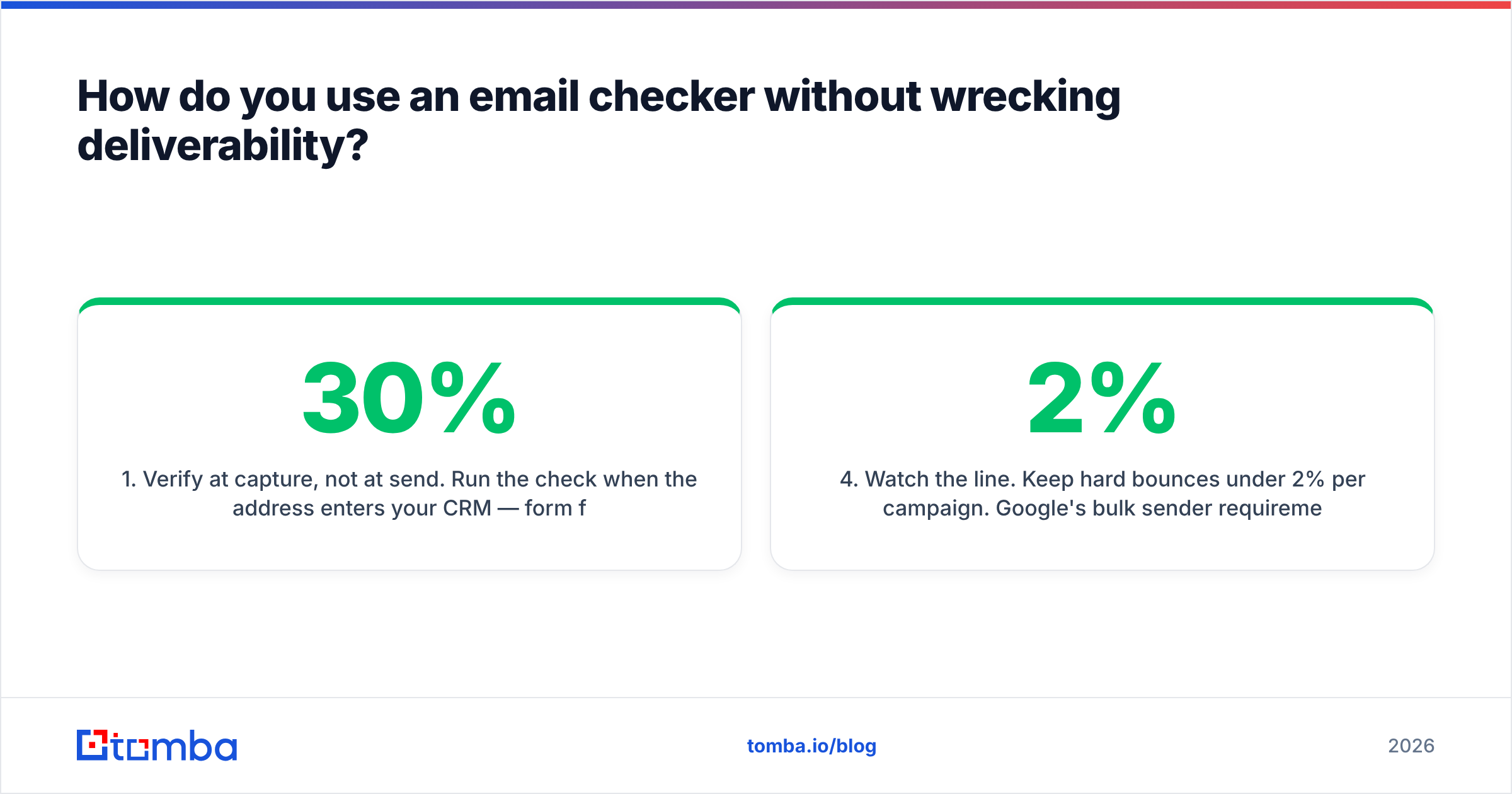
- Verify at capture, not at send. Run the check when the address enters your CRM — form fill, list purchase, scrape, whatever. Addresses decay at roughly 22–30% per year as people change jobs, so a list verified six months ago is not a verified list.
- Re-verify before every campaign if the list is older than 60 days. This is cheap relative to the cost of a throttled domain.
- Suppress invalid, quarantine risky. Hard invalids get deleted. Risky and catch-all addresses go into a separate, smaller send with a warmed secondary domain — not your main sending identity.
- Watch the 2% line. Keep hard bounces under 2% per campaign. Google's bulk sender requirements and Microsoft's filtering both treat elevated bounce rates as a spam signal, and recovery from a damaged sender reputation takes weeks, not days.
- Cap role accounts.
info@,hello@, andcontact@are valid but rarely convert in outbound, and they're disproportionately likely to sit on spam-trap lists. Verify them, then decide separately whether to send.
For ad-hoc checks — a single address before an important send — a free email checker handles it without touching your credit balance. For anything above a few hundred addresses, use bulk verify so you get a downloadable report with per-address status codes instead of clicking through a UI.
When is a free email checker enough?#
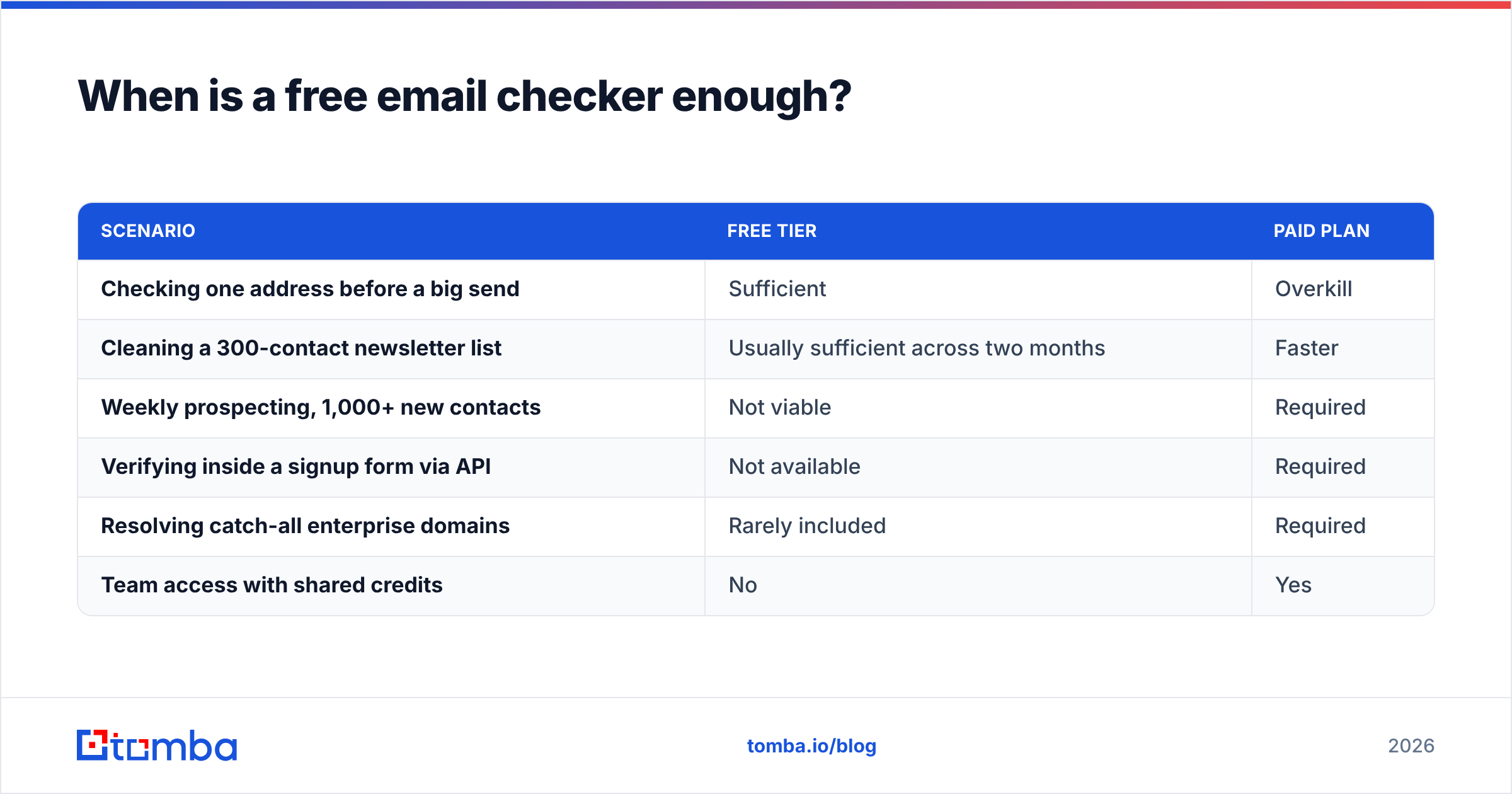
More often than vendors want you to believe. Free tiers work when three things are true: your volume is low, your addresses come from a single trusted source, and you don't need programmatic access.
| Scenario | Free tier | Paid plan |
|---|---|---|
| Checking one address before a big send | Sufficient | Overkill |
| Cleaning a 300-contact newsletter list | Usually sufficient across two months | Faster |
| Weekly prospecting, 1,000+ new contacts | Not viable | Required |
| Verifying inside a signup form via API | Not available | Required |
| Resolving catch-all enterprise domains | Rarely included | Required |
| Team access with shared credits | No | Yes |
The honest rule: if verification is a task you do occasionally, stay free. If it's a step in a repeating process, the manual overhead of free tools will cost you more in time than the subscription costs in money — usually within the first month.
What mistakes do people make with email verification?#
- Treating "valid" as a guarantee. It means the server accepted a connection attempt at that moment. Servers change, employees leave, greylisting happens. Verification reduces risk; it doesn't eliminate it.
- Verifying once and never again. See the decay rate above. Annual re-verification of your active database is a baseline, quarterly is better.
- Ignoring the risky bucket entirely. Deleting every risky address is the lazy move and it throws away real contacts. Segment them instead.
- Blaming the verifier for spam-folder placement. Verification affects bounces, not inbox placement. If your mail is delivered but landing in spam, the problem is your authentication records, content, or sending pattern — start with an SPF record check, not a new verifier.
- Buying on accuracy claims alone. Test with your own known-answer sample. Every vendor's benchmark was run on a list that flattered the vendor.
The bottom line#
An email checker is infrastructure, not a growth hack. It doesn't make your outreach better — it stops your outreach from being penalized for things that have nothing to do with your message. Pick a tool that gives definitive verdicts on the widest share of your list, tells you honestly when it doesn't know, and handles catch-all domains with something more sophisticated than a shrug.
If you're finding addresses as well as checking them, running both in one place removes an entire export-import cycle from your week. The Tomba Email Finder returns addresses with verification already applied, backed by a free tier of 25 searches per month so you can benchmark it against your own known-answer list before spending anything. Test it on 200 contacts you already know the truth about — that's the only benchmark worth trusting.
Related guides#
Ready to find emails that actually work?
Join 150,000+ professionals who stopped guessing and started sending. Free credits on signup — no credit card required.
Get the Tomba newsletter
Practical outbound tactics and product updates — once every two weeks.
About the author