Email Checker Chrome Extension: 7 Tools Tested for 2026
Most email checker Chrome extensions show a green checkmark on addresses that bounce. Here is how the verification actually works, which extensions hold up in 2026, and what each one really costs per confirmed address.
TL;DR
- An email checker Chrome extension does two different jobs — finding an address on the page you're looking at, and verifying that the address can actually receive mail. Most extensions are much better at the first than the second.
- The green checkmark lies more often than you think. A large share of extensions return "valid" for any address on a catch-all domain, which is roughly 20-25% of B2B domains.
- Real verification means MX lookup plus SMTP handshake plus disposable/role filtering. If an extension responds in under 200ms on a fresh domain, it's pattern-matching, not verifying.
- Price per confirmed address matters more than price per credit. A $29/mo tool that burns credits on unverifiable guesses is more expensive than a $49/mo tool that returns a confidence score you can act on.
- Use the extension for one-off, in-context lookups. Use bulk verification or an API for anything over ~50 addresses — extensions rate-limit hard and you'll lose an afternoon.
What is an email checker Chrome extension?#
An email checker Chrome extension is a browser add-on that sits in your toolbar and answers one question about the page you're on: what's the email address here, and is it real?
Think of it like a bouncer with a guest list. The finder half reads the name off the ID — it scrapes a LinkedIn profile, a company team page, or a CRM record and produces a likely address. The verifier half checks the list — it asks the receiving mail server whether that mailbox exists. A lot of extensions only do the first part and hand you a confident-looking result with no one checking the list at all.
That distinction is the whole ballgame. Two extensions can show the same jane.doe@acme.com with the same green badge, and one of them derived it from an SMTP response while the other derived it from "most companies use first.last." The second one is a coin flip dressed as a fact.
There are three broad shapes on the Chrome Web Store:
- Profile scrapers — built for LinkedIn and similar. Strong at pulling names, titles, and company domains. Verification is usually an afterthought or a paid add-on.
- Domain-first finders — you land on a company site, click the icon, and get every address the tool knows for that domain. Good for account-based prospecting, weaker for a specific named person.
- Verification-first checkers — you paste or highlight an address and get a deliverability verdict with a reason code. Fewer of these exist because verification costs the vendor real money on every call.
The best tools do all three from one icon. Tomba's browser extension is in that category — it finds by domain or by name on the page, then runs the address through the same verification stack as the standalone email verifier before showing you a score.
How does an email checker actually verify an address?#
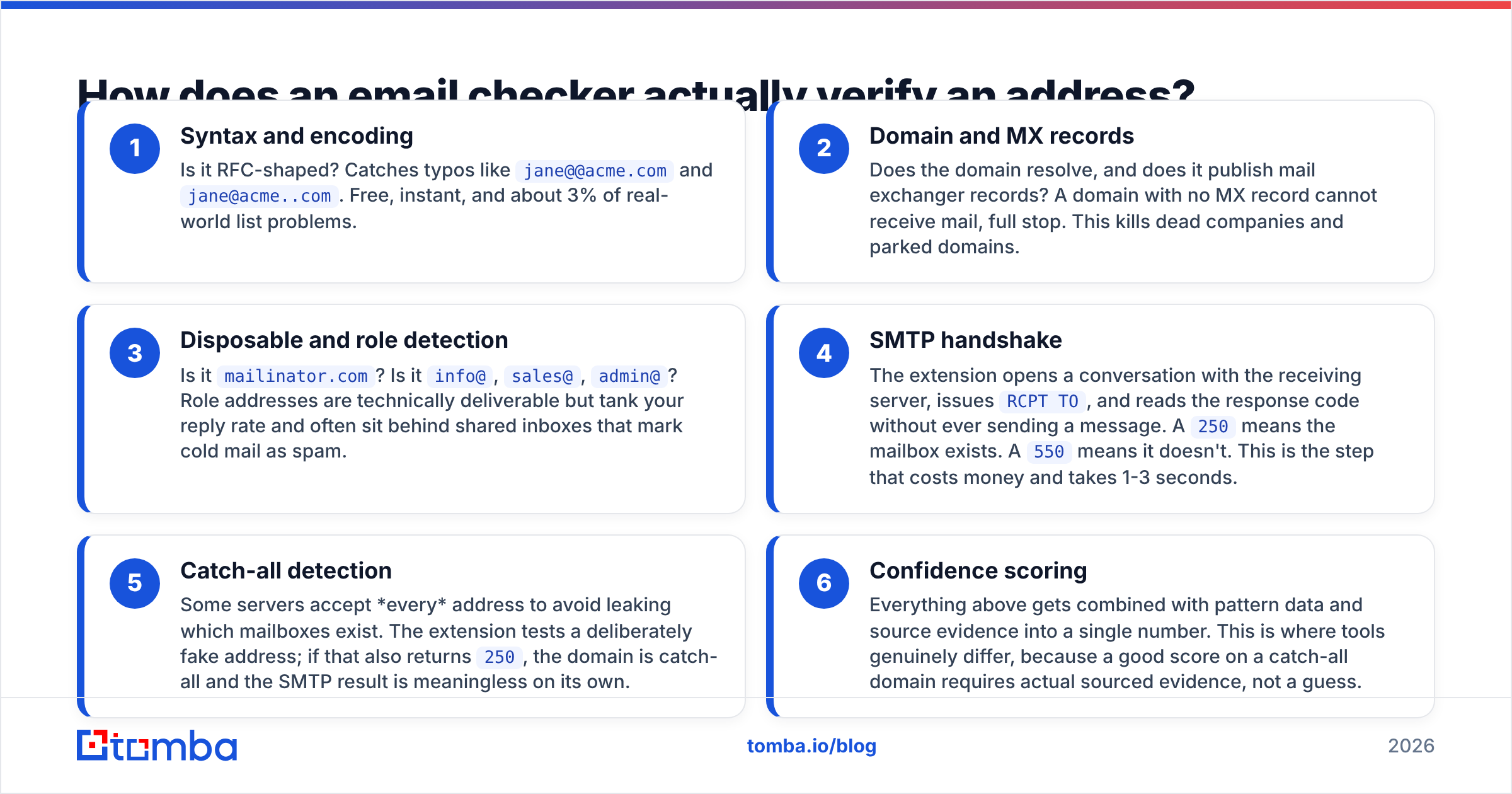
Verification is a sequence of increasingly expensive checks. A serious extension runs all of them; a cheap one stops after step two and calls it a day.
- Syntax and encoding — Is it RFC-shaped? Catches typos like
jane@@acme.comandjane@acme..com. Free, instant, and about 3% of real-world list problems. - Domain and MX records — Does the domain resolve, and does it publish mail exchanger records? A domain with no MX record cannot receive mail, full stop. This kills dead companies and parked domains.
- Disposable and role detection — Is it
mailinator.com? Is itinfo@,sales@,admin@? Role addresses are technically deliverable but tank your reply rate and often sit behind shared inboxes that mark cold mail as spam. - SMTP handshake — The extension opens a conversation with the receiving server, issues
RCPT TO, and reads the response code without ever sending a message. A250means the mailbox exists. A550means it doesn't. This is the step that costs money and takes 1-3 seconds. - Catch-all detection — Some servers accept every address to avoid leaking which mailboxes exist. The extension tests a deliberately fake address; if that also returns
250, the domain is catch-all and the SMTP result is meaningless on its own. - Confidence scoring — Everything above gets combined with pattern data and source evidence into a single number. This is where tools genuinely differ, because a good score on a catch-all domain requires actual sourced evidence, not a guess.
Step 5 is where most extensions quietly fail. If a tool doesn't tell you a domain is catch-all, it is not distinguishing between "we confirmed this mailbox" and "this server says yes to everything." For those domains you need a dedicated catch-all verifier that cross-references pattern evidence and sourced sightings instead of trusting the handshake.

Which email checker Chrome extensions are worth installing in 2026?#
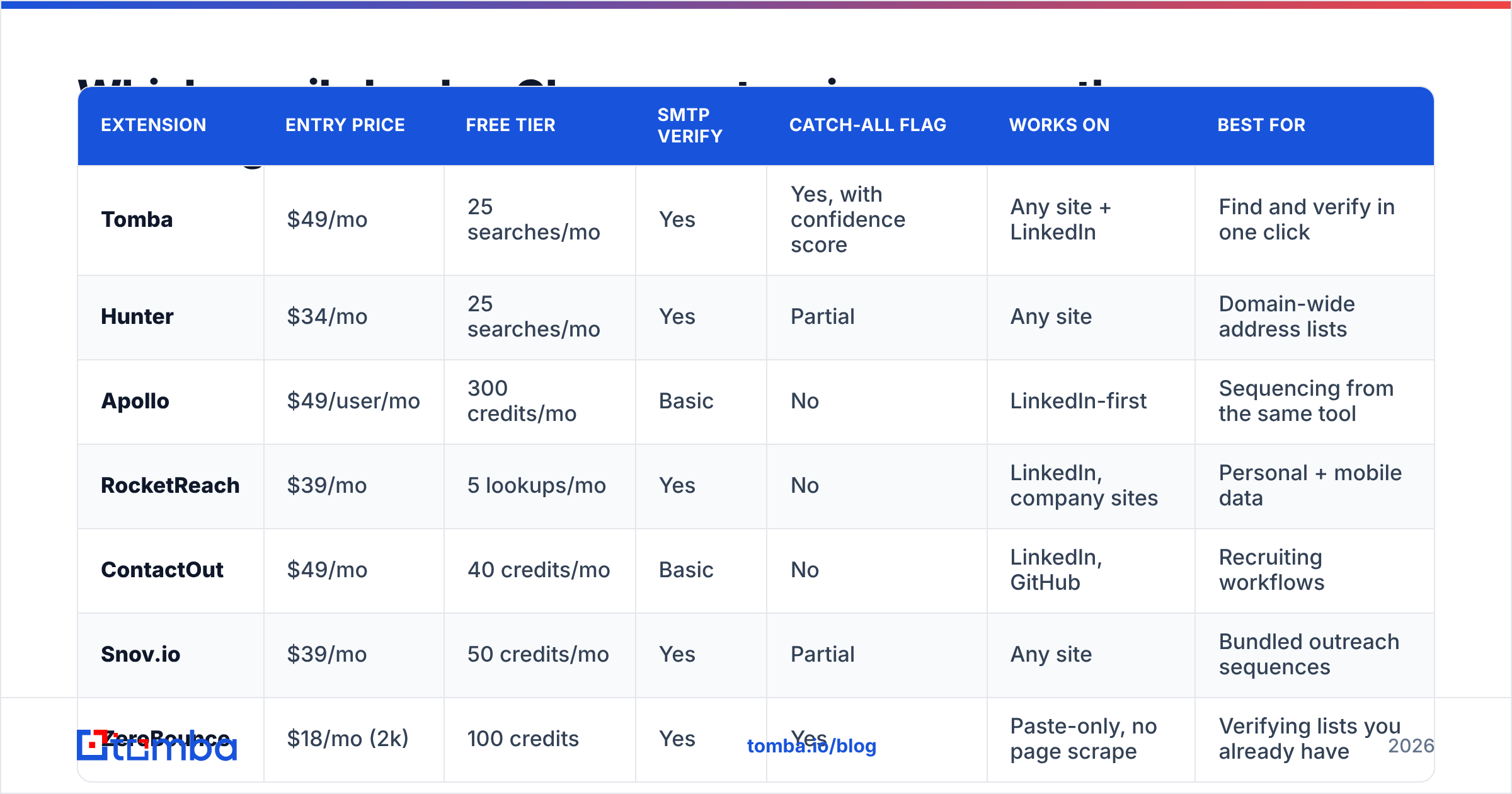
Here's the field as it stands. Pricing reflects published entry-level paid plans; credit definitions vary by vendor, which is exactly why per-credit price is a bad comparison metric on its own.
| Extension | Entry price | Free tier | SMTP verify | Catch-all flag | Works on | Best for |
|---|---|---|---|---|---|---|
| Tomba | $49/mo | 25 searches/mo | Yes | Yes, with confidence score | Any site + LinkedIn | Find and verify in one click |
| Hunter | $34/mo | 25 searches/mo | Yes | Partial | Any site | Domain-wide address lists |
| Apollo | $49/user/mo | 300 credits/mo | Basic | No | LinkedIn-first | Sequencing from the same tool |
| RocketReach | $39/mo | 5 lookups/mo | Yes | No | LinkedIn, company sites | Personal + mobile data |
| ContactOut | $49/mo | 40 credits/mo | Basic | No | LinkedIn, GitHub | Recruiting workflows |
| Snov.io | $39/mo | 50 credits/mo | Yes | Partial | Any site | Bundled outreach sequences |
| ZeroBounce | $18/mo (2k) | 100 credits | Yes | Yes | Paste-only, no page scrape | Verifying lists you already have |

Three things jump out of that table.
Verification-only tools don't find anything. ZeroBounce and its peers are excellent at telling you whether an address you already have is deliverable. They will not read a LinkedIn profile and produce one. If your workflow is "I'm looking at a person and I need to reach them," a verifier-only extension is the wrong shape. (If your workflow is "I inherited a 40,000-row list," it's exactly right — and a ZeroBounce alternative comparison is a better starting point than this article.)
Sales-engagement suites verify last. Apollo, ContactOut, and similar platforms optimize for volume and workflow, not for the SMTP layer. That's a legitimate product decision — they'd rather you send 500 emails than agonize over 50. But it means you carry more bounce risk into your sequences, and in 2026 bounce risk is reputation risk.
Catch-all handling is the real differentiator. Roughly one in four B2B domains is catch-all, and it skews toward larger enterprises — exactly the accounts you care about. An extension that doesn't flag catch-all is silently applying its worst accuracy to your best prospects.
How accurate are these extensions, really?#
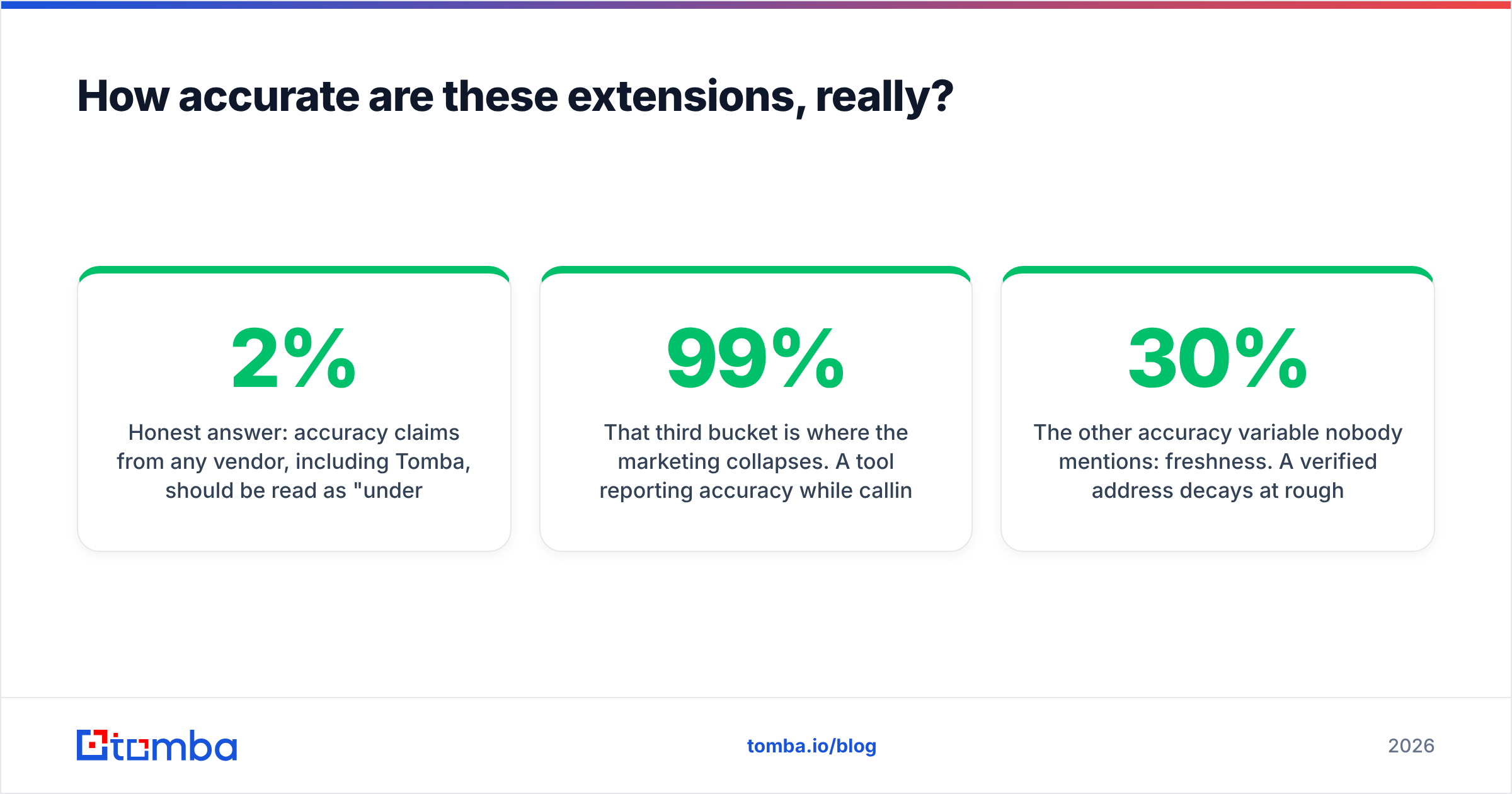
Honest answer: accuracy claims from any vendor, including Tomba, should be read as "under our test conditions." Nobody publishes their test set. Independent reviews on G2 show real users reporting bounce rates between 2% and 12% across tools that all advertise "98% accuracy."
What you can do is measure it yourself in about twenty minutes:
- Pull 50 addresses you already know are good (your own CRM's replied-to contacts). A decent checker should return valid on 48+.
- Pull 20 addresses you know are dead (bounced last quarter). A decent checker should flag at least 17.
- Pull 20 addresses on known catch-all domains. Count how many the tool honestly labels as uncertain versus confidently valid. Confident-on-catch-all is the tell.
That third bucket is where the marketing collapses. A tool reporting 99% accuracy while calling every catch-all address "valid" has simply moved the failure from its dashboard to your bounce report.
The other accuracy variable nobody mentions: freshness. A verified address decays at roughly 22-30% per year through job changes alone. An extension checking against a cached database from eight months ago is reporting history, not status. Ask any vendor when the record was last confirmed — Tomba exposes this in the result payload and documents its data sources publicly, which is a reasonable minimum bar.

What does an email checker Chrome extension actually cost?#
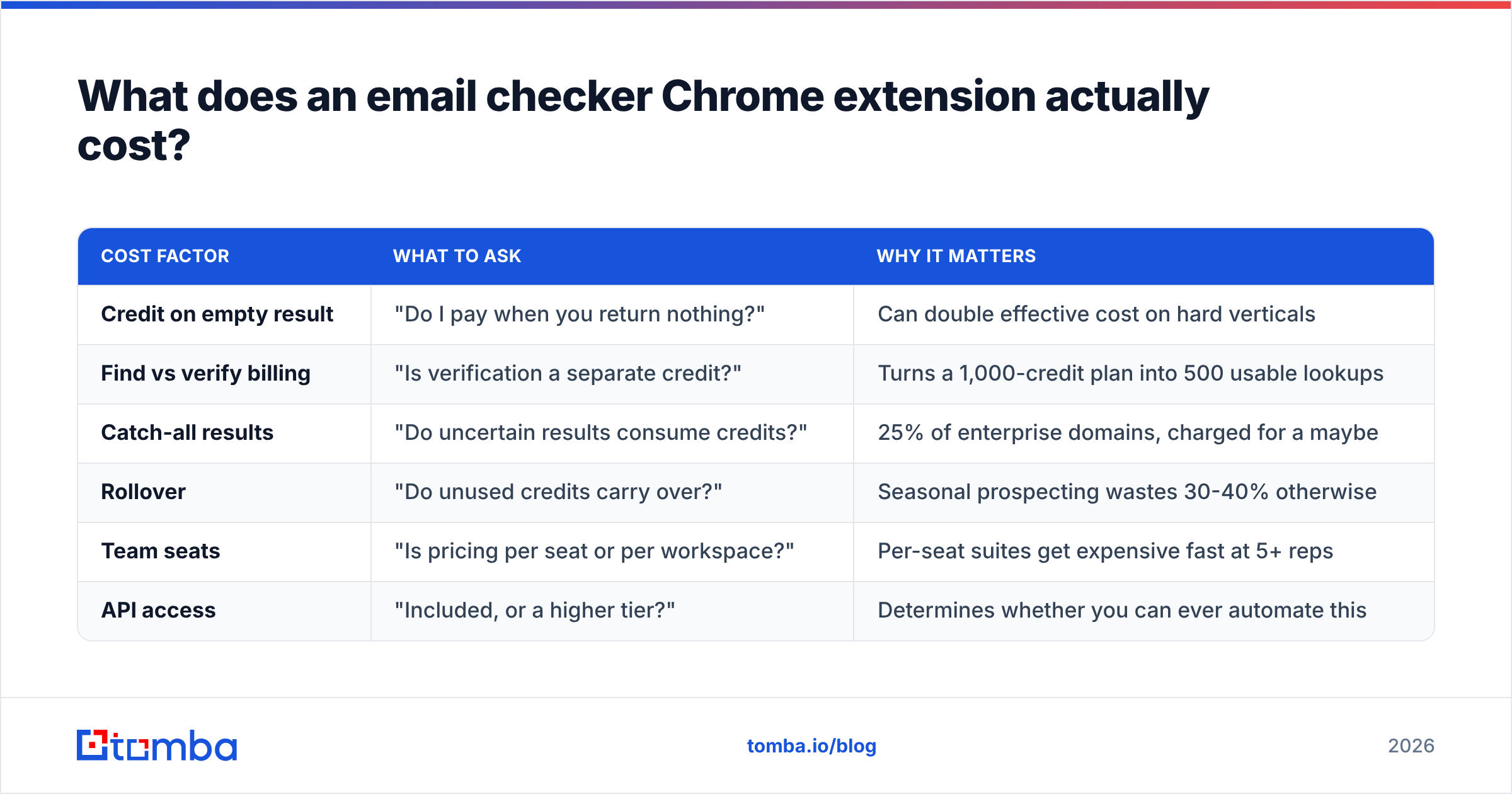
Credit math is where vendors hide the real price. Some charge a credit for a search whether or not it returns anything. Some charge separately for finding and for verifying the same address. Some charge per row of a bulk upload, including the rows that fail syntax check.
| Cost factor | What to ask | Why it matters |
|---|---|---|
| Credit on empty result | "Do I pay when you return nothing?" | Can double effective cost on hard verticals |
| Find vs verify billing | "Is verification a separate credit?" | Turns a 1,000-credit plan into 500 usable lookups |
| Catch-all results | "Do uncertain results consume credits?" | 25% of enterprise domains, charged for a maybe |
| Rollover | "Do unused credits carry over?" | Seasonal prospecting wastes 30-40% otherwise |
| Team seats | "Is pricing per seat or per workspace?" | Per-seat suites get expensive fast at 5+ reps |
| API access | "Included, or a higher tier?" | Determines whether you can ever automate this |
For reference, Tomba pricing runs a free tier at 25 searches/month, Starter at $49/mo, Growth at $99/mo, Pro at $249/mo, and custom Enterprise — with the extension, bulk tools, and API available rather than gated into a top tier. The point isn't that this is the cheapest sticker price; it isn't. The point is that per-confirmed-address cost is the only number that survives contact with a real campaign, and you can only compute it once you know how a vendor charges for failure.
Run the calculation this way: (monthly cost) ÷ (addresses you actually sent to and didn't bounce). A $29/mo tool that yields 180 usable addresses costs $0.16 each. A $49/mo tool yielding 620 usable addresses costs $0.08. The cheaper plan is the more expensive tool.
When should you skip the extension entirely?#
Extensions are a scalpel. They're wrong for three jobs:
Anything over 50 addresses. Browser extensions run in a tab, subject to rate limits, session timeouts, and the small matter of your laptop going to sleep. A bulk upload or the Tomba API does the same work in a fraction of the time with no babysitting.
Recurring enrichment. If you need every new CRM record checked on creation, that's a workflow job, not a click job. Wire it through your CRM integration or an automation platform and stop thinking about it.
List hygiene before a big send. Pre-send cleaning of an existing list is a verification-only task on thousands of rows. Use a bulk verifier, then feed the clean file to your sending platform. Chrome extensions have no business in that path.
Where the extension genuinely wins is the in-context moment: you're reading a case study, a job posting, or a LinkedIn profile, you want that one person, and you want to know before you write 200 words of personalization whether the address even exists. That's a real workflow and it's worth a toolbar icon.
How do you use one without wrecking your sender reputation?#
Verification protects email deliverability, but only if you act on what it tells you.
- Set a confidence floor and hold it. Send to 95+ confidence only on a cold domain under 90 days old. You can loosen to 80+ once your domain has a track record.
- Route catch-all separately. Don't drop them and don't blast them. Put them in a lower-volume, higher-personalization track where a bounce or two won't move your aggregate rate.
- Never bulk-send to role addresses, even verified ones.
info@deliverability is fine;info@reputation impact is not. - Re-verify anything older than 90 days. Especially in tech, where reorgs are constant. A verified address from January is an unverified address in May.
- Watch the aggregate, not the individual. Mailbox providers judge you on bounce rate over a rolling window. Keep it under 2% and nothing else about this article matters much. Cross 5% and you're rebuilding a domain.
If you're not ready to install anything, the free browser-based email checker runs the same syntax, MX, and disposable checks on a single address with no account. It's a fine way to sanity-check a vendor's extension against a neutral second opinion before you pay for a year.
Which one should you install?#
Match the tool to the job, not to the review score:
- Prospecting on LinkedIn all day — a profile-first extension with sequencing attached (Apollo, ContactOut) saves you tab-switching, at the cost of verification depth. Pair it with a separate verifier.
- Account-based research across company sites — a domain-first finder with real SMTP verification. This is where a combined find-and-verify extension pays for itself.
- Cleaning lists you already own — skip extensions, use bulk verification.
- Building an automated pipeline — skip extensions, use an API.
For the middle two — the majority of B2B sellers — the honest recommendation is a tool that does discovery and verification in the same call, flags catch-all domains instead of hiding them, and doesn't make you buy the enterprise tier to get an API key.
That's the case for the Tomba Email Finder and its Chrome extension: one click on any page returns the address, the confidence score, the catch-all status, and the source evidence behind it. Start on the free tier at 25 searches a month, run the 90-address accuracy test described above against whatever you're using now, and let the bounce numbers decide.
Related guides#
Ready to find emails that actually work?
Join 150,000+ professionals who stopped guessing and started sending. Free credits on signup — no credit card required.
Get the Tomba newsletter
Practical outbound tactics and product updates — once every two weeks.
About the author