Email Click Through Rate: 2026 Benchmarks, Formula, Fixes
Open rates went unreliable. Click through rate is the metric left standing — here's the formula that counts, real benchmarks by industry and send type, and the six levers that actually move clicks.
TL;DR
- Email click through rate (CTR) = unique clicks ÷ emails delivered. Most tools quietly use sent instead of delivered, which flatters your numbers by 3–15%.
- Median CTR across B2B marketing email in 2026 sits around 2.0–3.0%. Cold outbound is a different animal — 1–2% is normal, and reply rate matters more than clicks.
- Click-to-open rate (CTOR) is the better creative diagnostic, but Apple Mail Privacy Protection has made the "open" denominator junk since 2021. Treat CTOR as directional, not absolute.
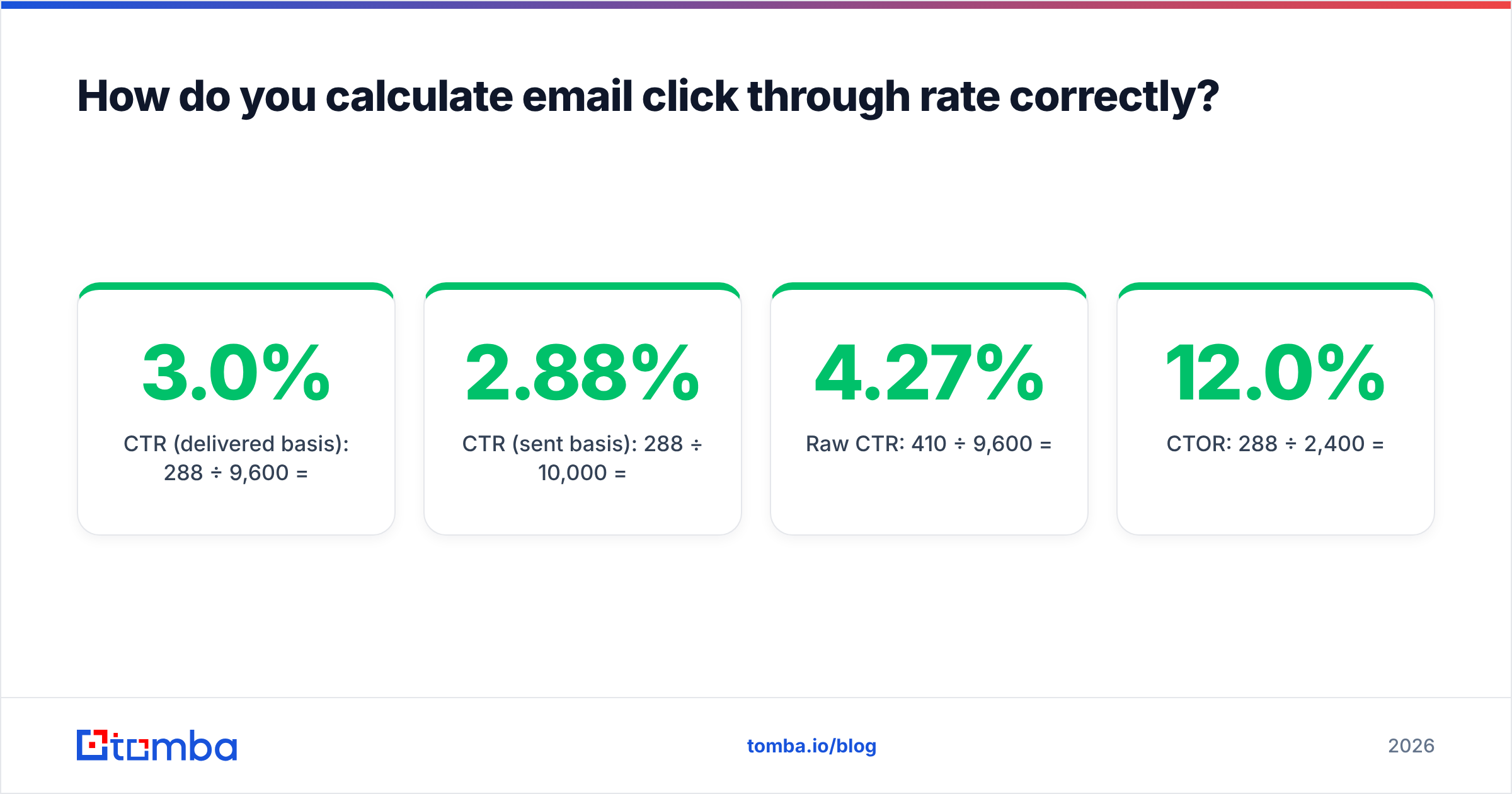
- The biggest CTR lever is not copy. It's list quality: a list with 20% invalid addresses caps your ceiling before you write a word.
- Six things move clicks reliably — segmentation, a single CTA, plain-text-leaning design, link placement, send-time fit, and offer relevance. Everything else is noise.
What is email click through rate?#
Email click through rate is the percentage of delivered emails that produced at least one click on a link inside the message.
Think of it like a shop window. Deliverability decides whether your window faces the street at all. Open rate is how many people glance at it. Click through rate is how many actually push the door open. Only that last number has a price tag attached — nobody buys from the sidewalk.
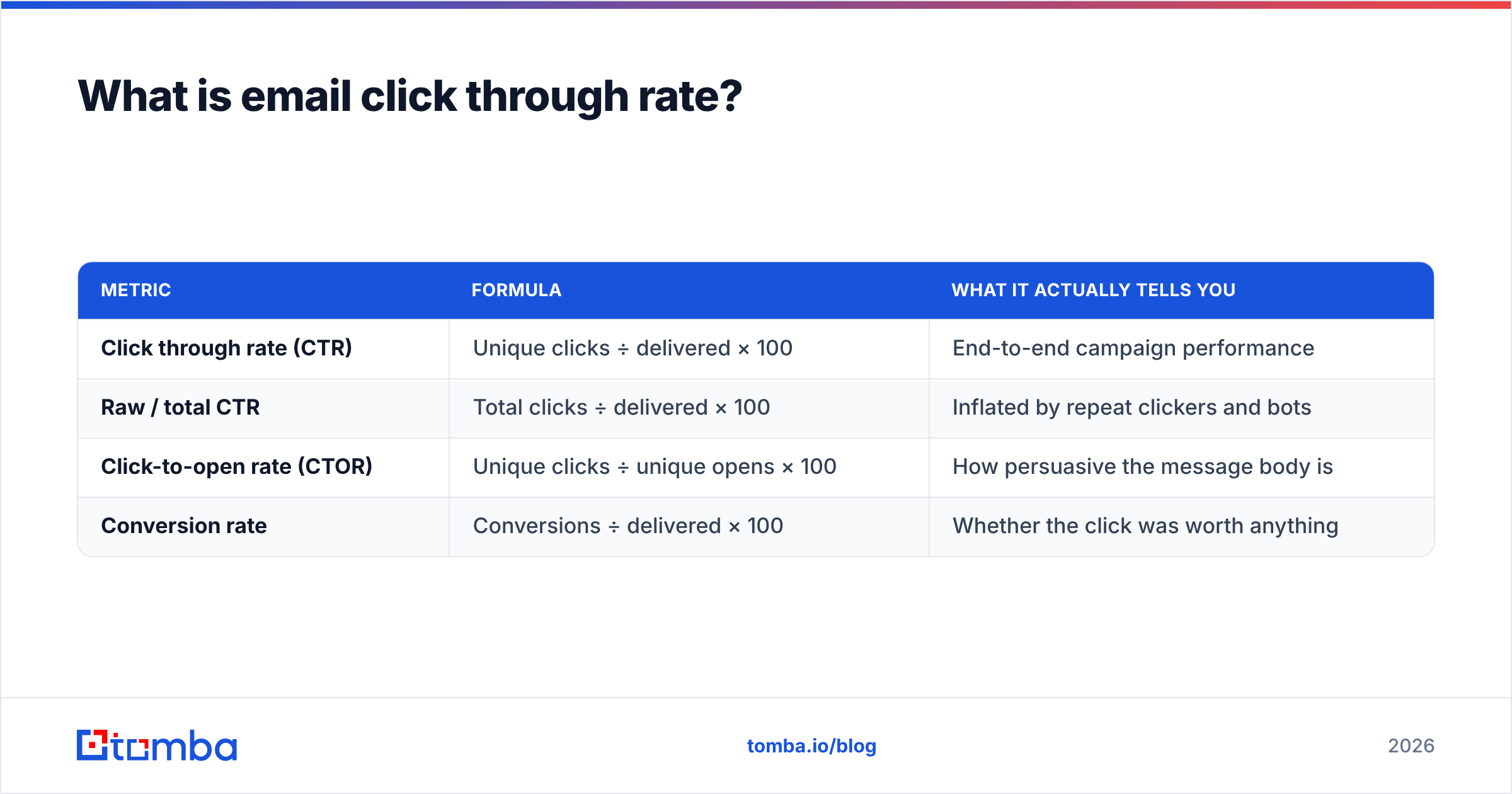
Formally, click-through rate is a ratio borrowed from display advertising, and email marketers inherited both the term and its ambiguity. Three different numbers get called "CTR" in three different tools, and comparing them across platforms is where most reporting goes wrong.
| Metric | Formula | What it actually tells you |
|---|---|---|
| Click through rate (CTR) | Unique clicks ÷ delivered × 100 | End-to-end campaign performance |
| Raw / total CTR | Total clicks ÷ delivered × 100 | Inflated by repeat clickers and bots |
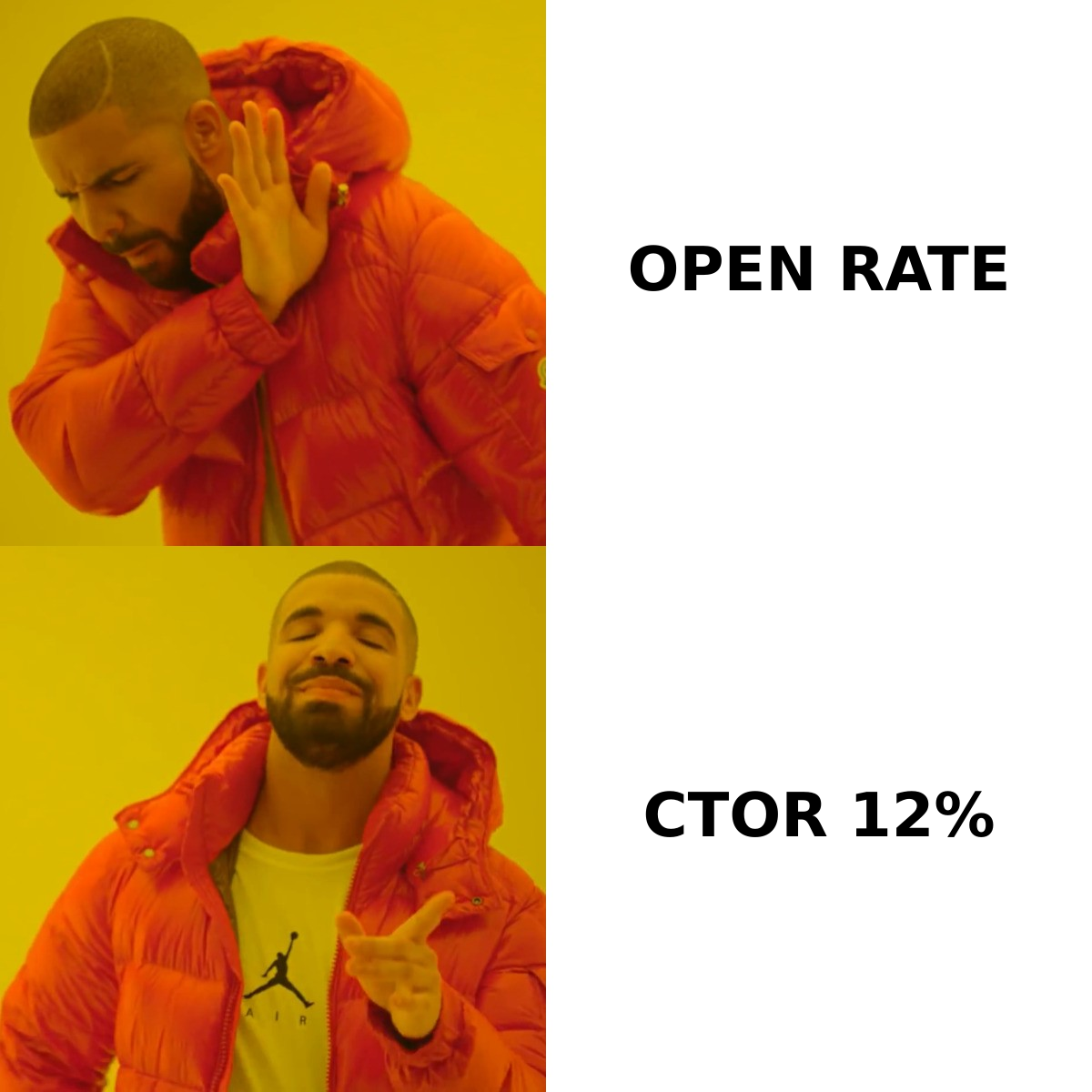
| Click-to-open rate (CTOR) | Unique clicks ÷ unique opens × 100 | How persuasive the message body is |
| Conversion rate | Conversions ÷ delivered × 100 | Whether the click was worth anything |
Use unique clicks over delivered as your headline number. Report CTOR alongside it as a creative signal, never as the KPI you're graded on.
How do you calculate email click through rate correctly?#
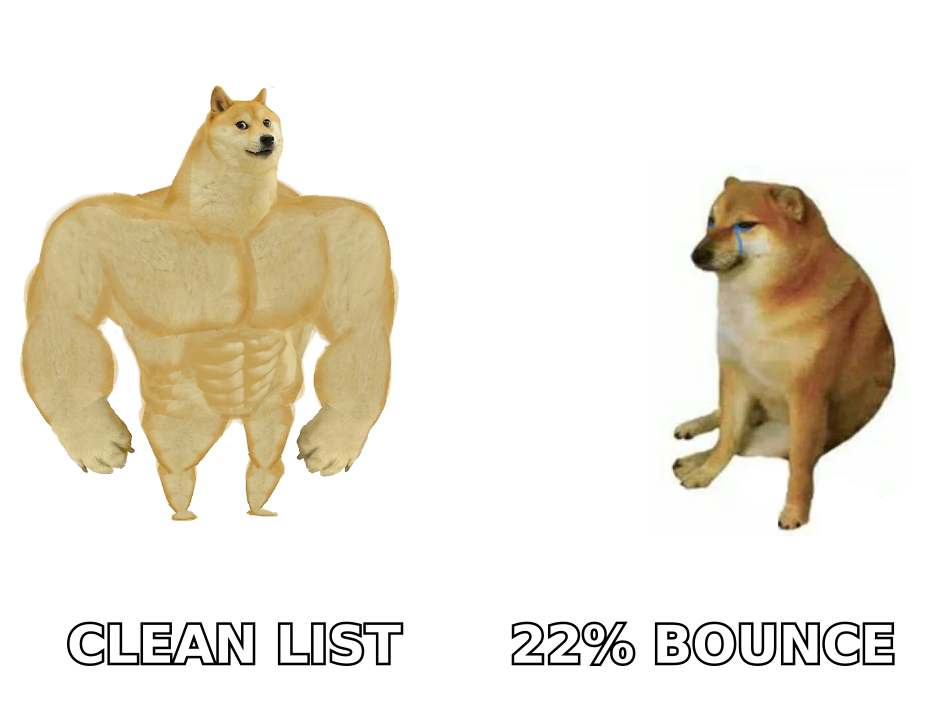
Take a campaign: 10,000 sent, 400 hard bounces, 9,600 delivered, 2,400 unique opens, 288 unique clickers, 410 total clicks.
- CTR (delivered basis): 288 ÷ 9,600 = 3.0%
- CTR (sent basis): 288 ÷ 10,000 = 2.88%
- Raw CTR: 410 ÷ 9,600 = 4.27%
- CTOR: 288 ÷ 2,400 = 12.0%
Same campaign, four defensible numbers, a 48% spread between the highest and lowest. That's why "our CTR is 4%" is a meaningless sentence without a stated denominator.
Two more corrections most teams skip:
- Strip unsubscribe and preference-center clicks. They are clicks. They are not interest. Leaving them in inflates CTR on your worst-performing sends, which is exactly backwards.
- Filter security-scanner clicks. Corporate link scanners (Proofpoint, Mimecast, Microsoft Defender Safe Links) fire GET requests on every URL in an inbound message. On enterprise B2B lists these can account for 15–40% of recorded clicks. Look for clicks that hit every link within two seconds of delivery, from datacenter IPs, and exclude them.
If you have never done step 2, your real CTR is lower than your dashboard says. That's uncomfortable, but a wrong baseline makes every A/B test you run unfalsifiable.
What is a good email click through rate in 2026?#
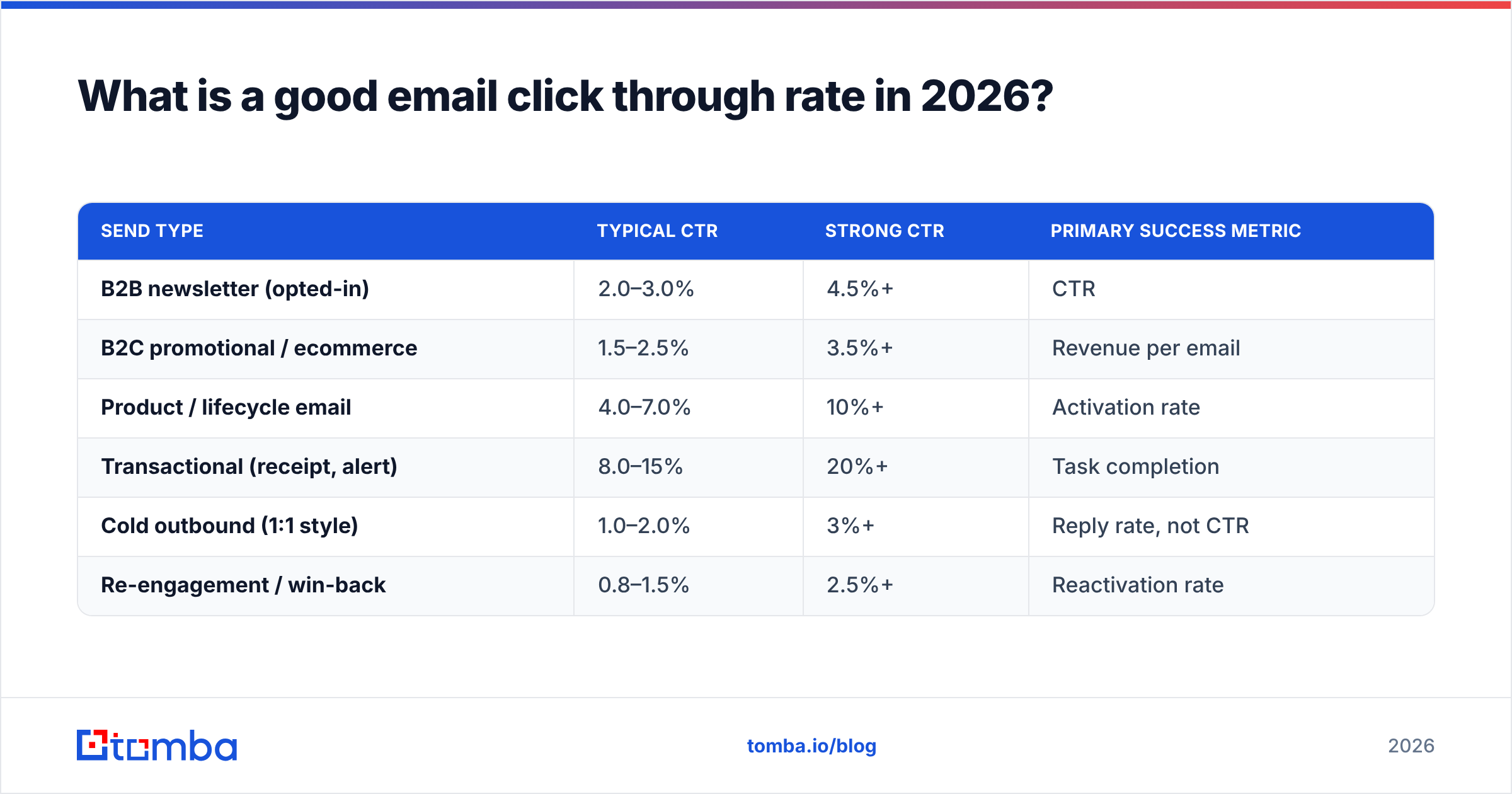
There is no universal good number — there's a good number for your list type, industry, and send purpose. Here's where the credible aggregate benchmarks land. Mailchimp's benchmark data and HubSpot's marketing statistics remain the two most-cited public sources, and both broadly agree on the ranges below.
| Send type | Typical CTR | Strong CTR | Primary success metric |
|---|---|---|---|
| B2B newsletter (opted-in) | 2.0–3.0% | 4.5%+ | CTR |
| B2C promotional / ecommerce | 1.5–2.5% | 3.5%+ | Revenue per email |
| Product / lifecycle email | 4.0–7.0% | 10%+ | Activation rate |
| Transactional (receipt, alert) | 8.0–15% | 20%+ | Task completion |
| Cold outbound (1:1 style) | 1.0–2.0% | 3%+ | Reply rate, not CTR |
| Re-engagement / win-back | 0.8–1.5% | 2.5%+ | Reactivation rate |
Two things jump out of that table.
Transactional beats marketing by 5x, and that's not a copywriting achievement. The recipient asked for the email and needs something from it. Intent, not craft, does the work. Never benchmark a newsletter against a password reset.
Cold outbound belongs in a separate ledger. A cold email with a link in it is often a worse cold email. The best-performing cold sequences frequently have a CTR near zero by design — they ask a question and want a reply, not a click. If you're running outbound, track response rate as the north star and treat clicks as a secondary interest signal.
Why has click through rate replaced open rate as the metric that matters?#
Because open rate stopped being a measurement in September 2021.
Apple Mail Privacy Protection pre-fetches tracking pixels for every message delivered to Apple Mail, regardless of whether a human ever looks at it. Depending on your audience, 35–60% of your list now registers an "open" automatically. Gmail and Yahoo have layered on their own image proxying and caching behavior since.
The practical fallout:
- Open rate is now a proxy for "what share of my list uses Apple Mail." It moves when device mix moves, not when your subject line improves.
- CTOR is contaminated on the denominator side. A campaign can show declining CTOR purely because more Apple users joined the list. Compare CTOR across segments with similar client mixes, or don't compare it at all.
- Open-rate-triggered automations misfire. "Send follow-up if opened" now fires on machines. If your sequence branches on opens, it is branching on noise.
- CTR survived because a click requires a deliberate human action against a unique tracked URL. It is not immune to bots — see the scanner problem above — but it is filterable in a way that pixel loads are not.
What actually moves email click through rate?#
Six levers, ordered by how much lift they produce per hour of effort.
- List quality and address validity. Every invalid address is a delivered-count deduction and a reputation tax. Lists with >5% bounce rates get throttled by mailbox providers, which suppresses inbox placement for the valid addresses too. Running an email verifier before every large send is the single highest-ROI hour in email marketing. Nothing in the copy department competes with it.
- Segmentation depth. Sending one message to 40,000 people produces a CTR that is the weighted average of a great campaign for 3,000 and an irrelevant one for 37,000. Split by role, lifecycle stage, or last-action recency, and expect 1.5–3x CTR on the tight segments. Smaller sends, bigger numbers.
- One call to action, repeated. Multi-CTA emails split attention and dilute the click. Pick one action. Place it three times — an early text link, a mid-body button, a closing text link. Same destination, same URL, three chances.
- Design weight. Heavy HTML templates with hero images and four-column footers underperform lightweight, mostly-text emails in B2B by a wide margin, and they trip more spam filters. If your email looks like a newsletter, it gets read like an ad. Test a plain-text-styled version against your template before you invest in a redesign.
- Link placement above the fold. In mobile preview panes you have roughly 90 words before a scroll. If your first link lives below that, you are asking for effort before you have earned it. Put a low-commitment link in the first two sentences.
- Offer relevance over subject-line cleverness. A great subject line borrows clicks from the next campaign — a "curiosity gap" that pays off badly trains people to ignore you. Test the offer first, the subject second. You can pressure-test the wording with a subject line tester once the offer itself is right.
Notice what isn't on that list: send-day superstitions, emoji in subject lines, first-name personalization tokens. All three test as noise in most B2B datasets, and personalization tokens actively hurt when the underlying data is wrong. "Hi {FirstName}," rendering literally is a worse outcome than "Hi there."
How do list quality and deliverability cap your CTR?#
Your click through rate has a hard ceiling set upstream, and no amount of copywriting punches through it.
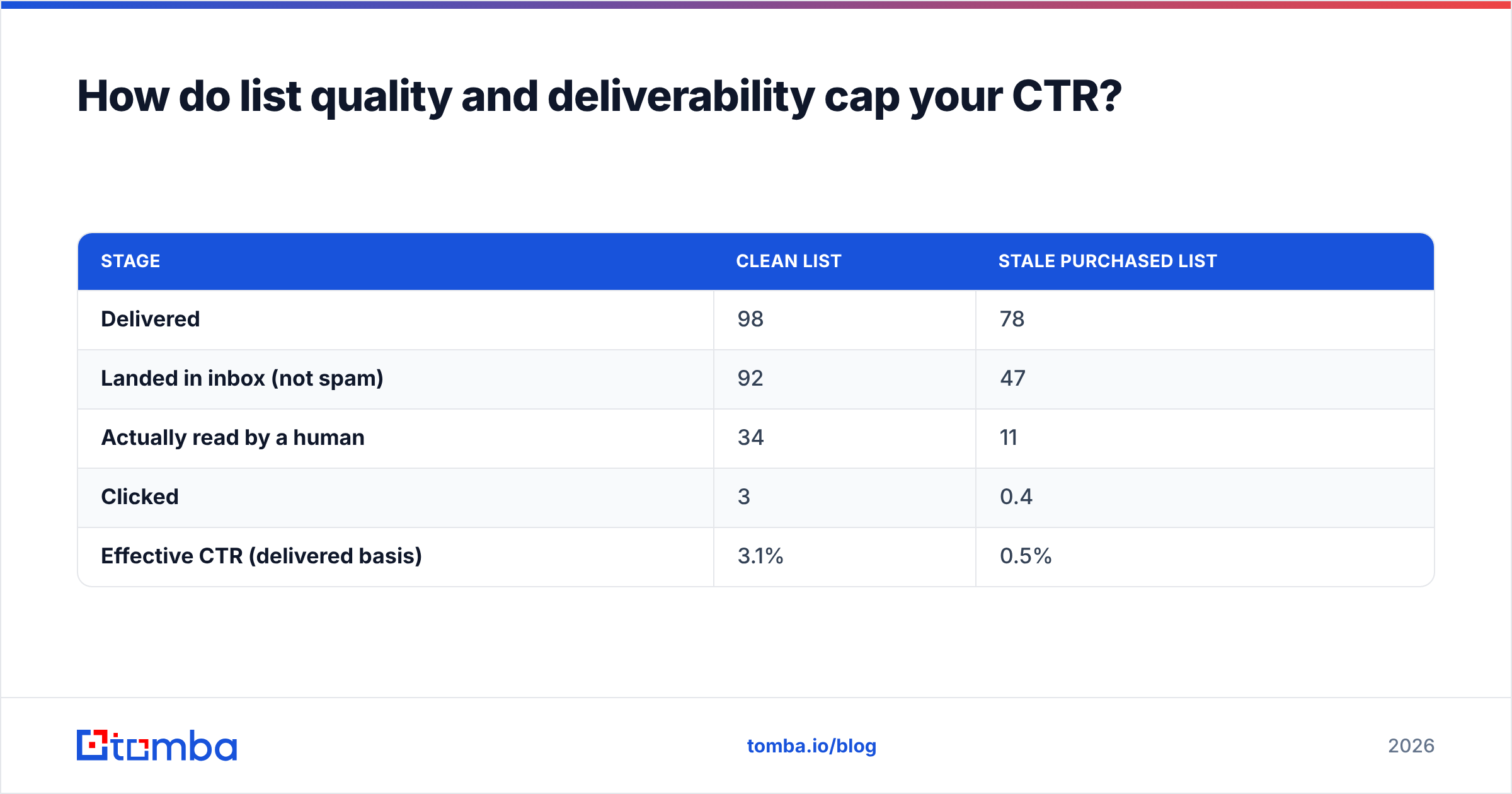
Walk the funnel backwards. If 100 addresses go into a send:
| Stage | Clean list | Stale purchased list |
|---|---|---|
| Delivered | 98 | 78 |
| Landed in inbox (not spam) | 92 | 47 |
| Actually read by a human | 34 | 11 |
| Clicked | 3 | 0.4 |
| Effective CTR (delivered basis) | 3.1% | 0.5% |
Same email. Same offer. A 6x difference produced entirely before the message was written.
Three fixes, in order:
- Verify before you send, not after you bounce. Bounce data is a lagging indicator that costs you reputation to collect. Verification is a leading one. For large lists, a bulk verify pass handles the whole file in one operation instead of address by address.
- Handle catch-all domains explicitly. A large share of B2B domains accept all mail at the server and reject silently later. Standard verification returns "unknown" on these, and most teams either send blind or discard them — both wrong. A dedicated catch-all verifier resolves a meaningful chunk of that unknown bucket into usable yes/no answers.
- Authenticate properly. SPF, DKIM, and DMARC are table stakes since the Google and Yahoo bulk-sender requirements took effect. Without them, a share of your list never reaches an inbox at all, and your CTR denominator quietly includes messages nobody could have clicked.
How do you diagnose a falling click through rate?#
Work top-down through the funnel. The mistake is starting with the copy, because copy is the fun part.
- Did delivered volume change? A drop in delivery means a list or reputation problem, not a creative one. Check bounce rate and complaint rate first.
- Did the segment change? Adding 10,000 cold names to a warm list halves CTR arithmetically. Compare like-for-like segments across periods.
- Did CTOR hold while CTR fell? That isolates the problem to reach — deliverability or subject line — not the body.
- Did CTOR fall while CTR held? Usually a client-mix shift inflating the open denominator. Often not a real decline.
- Did one link absorb all the clicks? If your footer link outperforms your CTA, your CTA isn't visible on mobile.
- Is the drop concentrated in one domain? Microsoft 365 and Gmail behave differently. A single-provider collapse is a filtering event with a date attached — find it in your logs.
Run those six checks before rewriting anything. In practice, four out of five "our CTR is dying" investigations end at the second bullet: the list grew, and the new names were worse than the old ones.
Should you optimize for clicks at all?#
Sometimes no, and it's worth being honest about it.
Clicks are an intermediate metric. A campaign can double CTR and halve revenue if the extra clicks come from a mismatched audience or a bait-y subject line. Three situations where CTR is the wrong target:
- Cold outbound. Links reduce deliverability and add friction. A reply is worth 50 clicks.
- Executive audiences. Senior B2B buyers forward, screenshot, and search rather than click. Attribution misses them entirely.
- Announcement or trust-building sends. If the goal is that people know a thing, a click is a bonus, not the point.
The rule: optimize CTR when the click is the desired action or the reliable precursor to it. Otherwise, measure the thing you actually want and let CTR be a diagnostic.
Where should you start this week?#
Pick the cheapest lever with the highest ceiling — the list.
Re-verify your active sending list, quarantine anything that fails, and segment the survivors by last engagement date. Then send the same email you were going to send anyway. Most teams see the CTR move before they've changed a single word of copy, because they stopped dividing real clicks by a denominator stuffed with addresses that never existed.
If the deeper problem is that your list is thin rather than dirty — not enough of the right people, rather than too many wrong ones — start upstream. Tomba's Email Finder builds verified contact lists from a domain, a name, or a company, with verification running inline so what lands in your CSV is already send-ready. The free tier covers 25 searches a month if you want to test the accuracy against a list you already trust; paid plans start at $49/mo, with full Tomba pricing laid out per credit so you can model the cost before you commit. Better inputs, better denominator, better click through rate — in that order.
Related guides#
Ready to find emails that actually work?
Join 150,000+ professionals who stopped guessing and started sending. Free credits on signup — no credit card required.
Get the Tomba newsletter
Practical outbound tactics and product updates — once every two weeks.
About the author