Email Contact Finder: How to Find Any Work Email in 2026
An email contact finder is only as good as its bounce rate. Here's how the major tools actually source, match, and verify B2B addresses — plus which one fits your workflow and budget in 2026.
TL;DR
- An email contact finder maps a person + company to a work email address, then scores how likely that address is to accept mail. The second half is where most tools quietly fail.
- Coverage and accuracy are different metrics. A tool that returns an address for 92% of your list but bounces on 14% of them is worse than one that returns 71% at a 2% bounce rate.
- Pricing is per credit, but credit definitions differ wildly — some vendors charge for "not found," some don't. Read that line before you compare price tags.
- Catch-all domains break every finder equally. What separates tools is whether they tell you a result is catch-all or silently mark it "valid."
- For most B2B teams, the practical setup is a finder with a native verifier and an API, so enrichment happens at record creation instead of in a monthly CSV panic.
What is an email contact finder?#
An email contact finder is a lookup service that takes what you already know — a full name and a company domain, a LinkedIn profile URL, or just the domain itself — and returns the professional email address associated with it.
Think of it like a phone book that was never printed. The information exists, scattered across company websites, press releases, GitHub commits, conference speaker lists, job boards, and public documents. A finder crawls those sources, extracts email patterns, and reassembles them on demand. When it can't find a documented address, it infers one from the company's dominant pattern (first.last@, flast@, first@) and then tests whether that inferred address actually exists.
That two-step process — discover, then validate — is the whole product. Vendors that only do step one sell you a list of guesses with a confidence score attached.
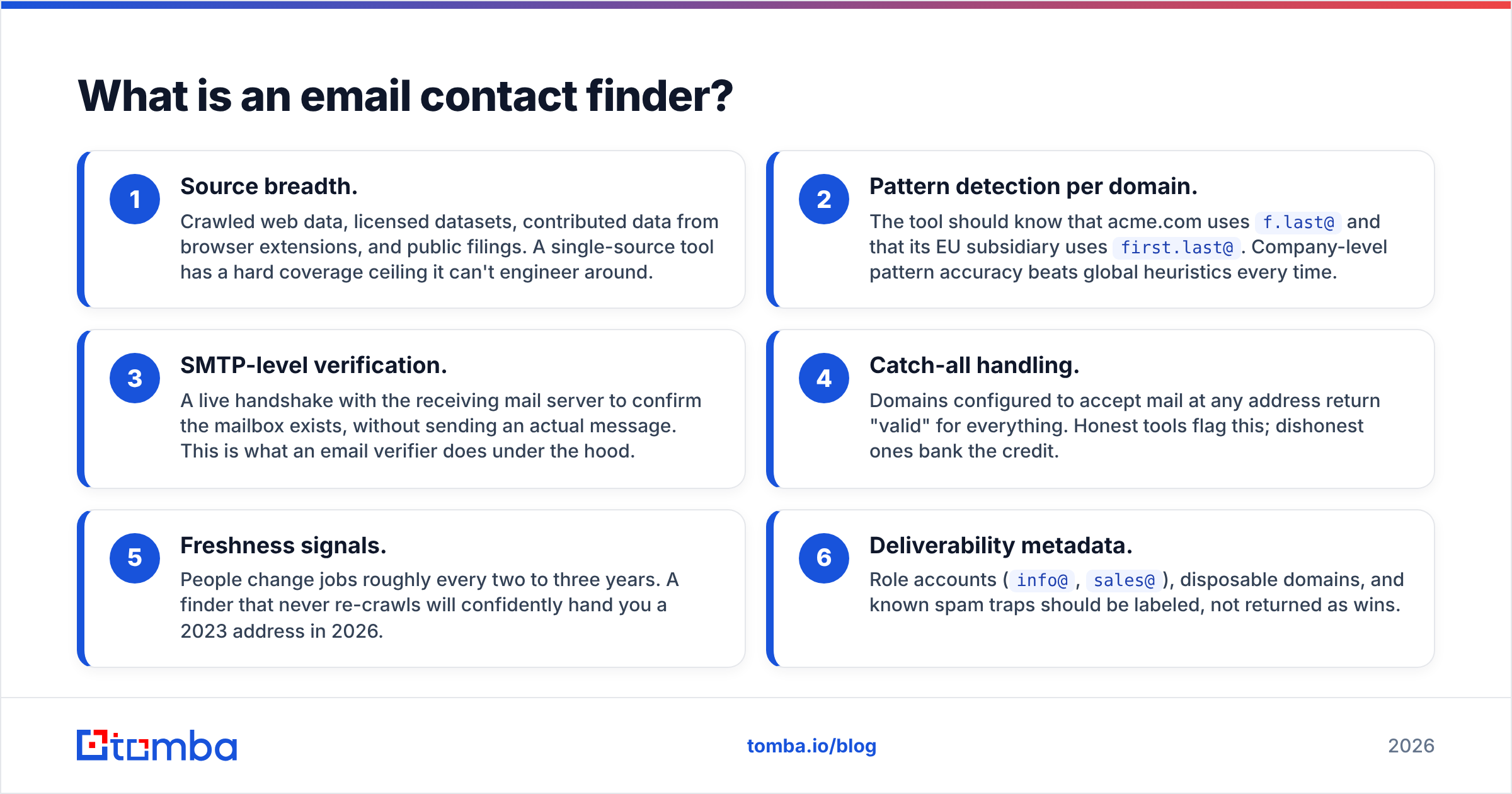
Here's what separates a real finder from a permutation generator:
- Source breadth. Crawled web data, licensed datasets, contributed data from browser extensions, and public filings. A single-source tool has a hard coverage ceiling it can't engineer around.
- Pattern detection per domain. The tool should know that acme.com uses
f.last@and that its EU subsidiary usesfirst.last@. Company-level pattern accuracy beats global heuristics every time. - SMTP-level verification. A live handshake with the receiving mail server to confirm the mailbox exists, without sending an actual message. This is what an email verifier does under the hood.
- Catch-all handling. Domains configured to accept mail at any address return "valid" for everything. Honest tools flag this; dishonest ones bank the credit.
- Freshness signals. People change jobs roughly every two to three years. A finder that never re-crawls will confidently hand you a 2023 address in 2026.
- Deliverability metadata. Role accounts (
info@,sales@), disposable domains, and known spam traps should be labeled, not returned as wins.
Why do email contact finders return different results for the same person?#
Because they're not querying one shared database — they're each querying their own crawl of the public internet, plus whatever licensed or contributed data they've layered on top.
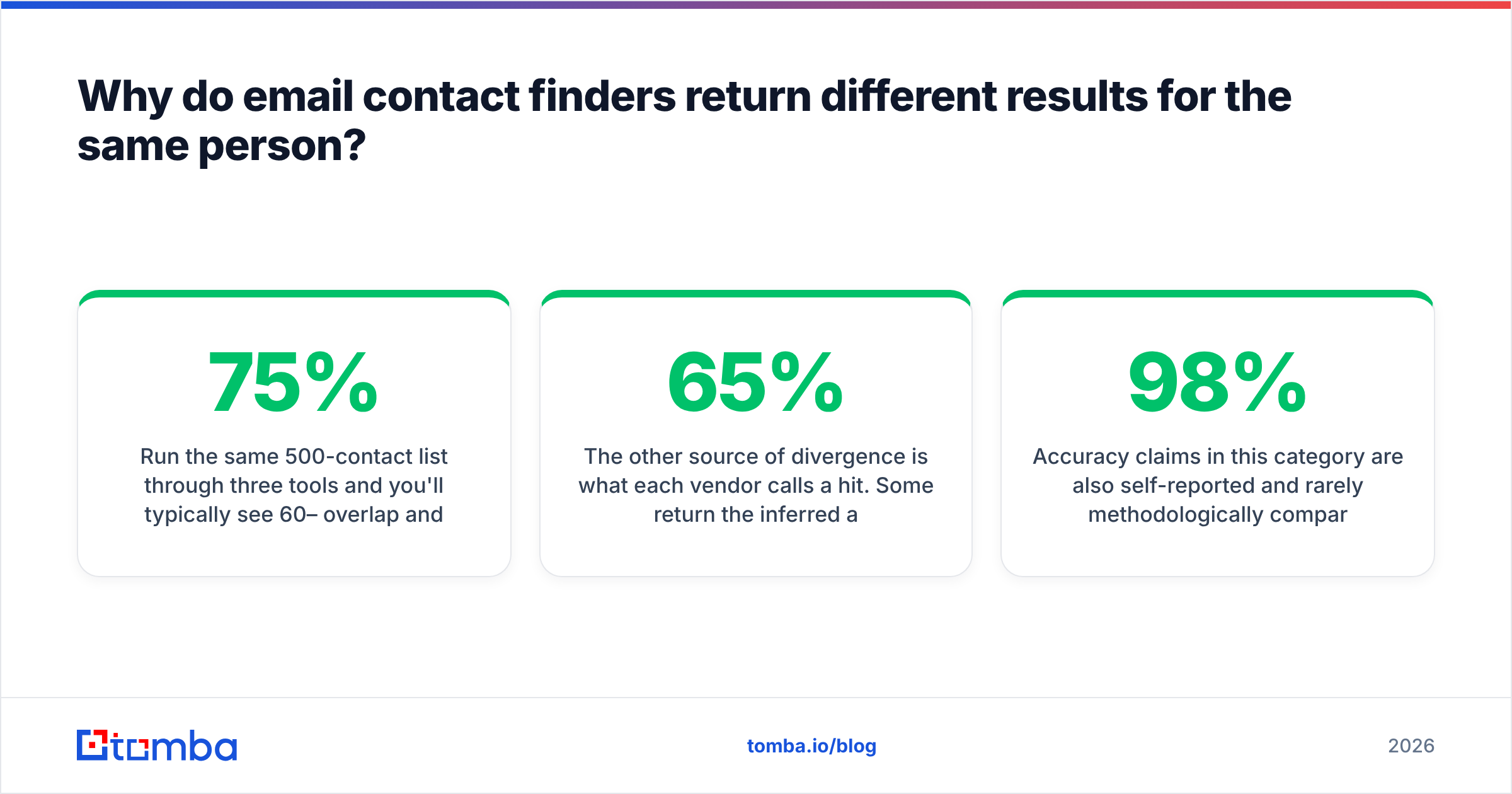
Run the same 500-contact list through three tools and you'll typically see 60–75% overlap and a long tail of contacts that only one vendor found. That tail is the actual differentiator, and it's why sophisticated teams run a waterfall: primary provider first, secondary only on misses.
The other source of divergence is what each vendor calls a hit. Some return the inferred address with a 65% confidence score and charge you a credit. Others suppress anything below a validation threshold and charge nothing. The first vendor looks like it has better coverage in a head-to-head spreadsheet. Your bounce rate will tell you a different story three weeks later.

Accuracy claims in this category are also self-reported and rarely methodologically comparable. When a vendor says "98% accuracy," ask: accuracy on what denominator? Addresses returned, or addresses requested? Those are very different numbers, and the gap between them is usually 20–30 points.
How do you actually measure a finder's accuracy?#
Run your own benchmark. It takes an afternoon and it's the only number that reflects your ICP.
- Build a 200-contact control set from your existing CRM where you already have confirmed-good addresses (people who have replied to you). Strip the emails, keep name + domain.
- Run the set through each tool and record: found / not found, returned address, confidence label.
- Score match rate = correct addresses ÷ 200. Not ÷ addresses returned.
- Score precision = correct ÷ returned. This is the number that predicts your bounce rate.
- Weight by segment. If you sell to 20-person agencies, a tool that crushes it on Fortune 500 data is irrelevant to you. Enterprise domains are heavily documented; SMB domains are not.
One caveat that trips people up: a bounce is not always the finder's fault. Greylisting, aggressive spam filters, and mailbox-full errors all produce hard-ish failures on addresses that are technically valid. Check your sender reputation before you blame the data.
Which email contact finder should you use in 2026?#
Depends on the shape of your workflow more than on any single accuracy figure. Here's how the main options actually differ.
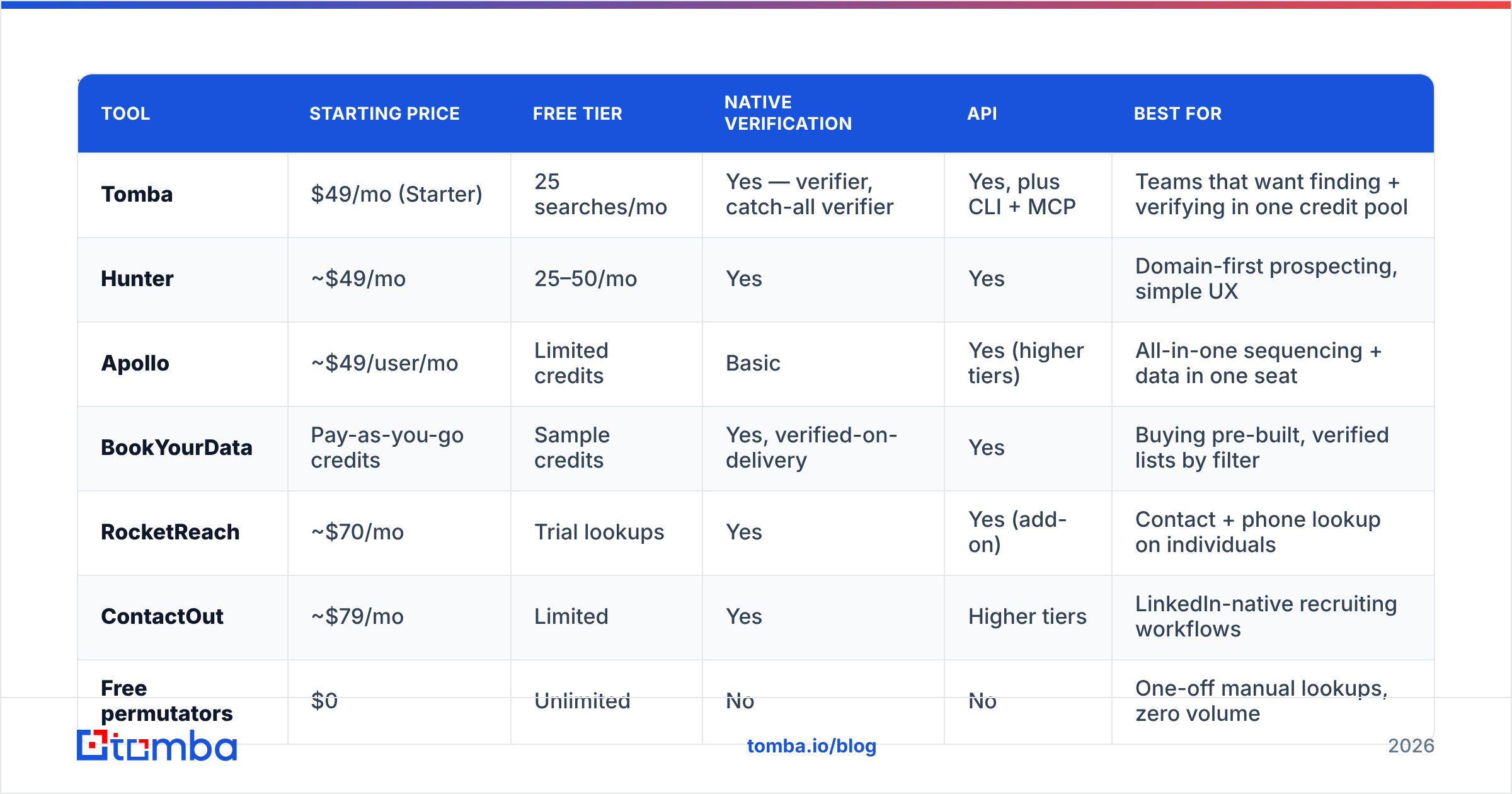
| Tool | Starting price | Free tier | Native verification | API | Best for |
|---|---|---|---|---|---|
| Tomba | $49/mo (Starter) | 25 searches/mo | Yes — verifier, catch-all verifier | Yes, plus CLI + MCP | Teams that want finding + verifying in one credit pool |
| Hunter | ~$49/mo | 25–50/mo | Yes | Yes | Domain-first prospecting, simple UX |
| Apollo | ~$49/user/mo | Limited credits | Basic | Yes (higher tiers) | All-in-one sequencing + data in one seat |
| BookYourData | Pay-as-you-go credits | Sample credits | Yes, verified-on-delivery | Yes | Buying pre-built, verified lists by filter |
| RocketReach | ~$70/mo | Trial lookups | Yes | Yes (add-on) | Contact + phone lookup on individuals |
| ContactOut | ~$79/mo | Limited | Yes | Higher tiers | LinkedIn-native recruiting workflows |
| Free permutators | $0 | Unlimited | No | No | One-off manual lookups, zero volume |

A few honest notes on that table.
Tomba is strongest when your bottleneck is credit efficiency. Finding and verifying draw from the same pool, and the plan ladder is transparent — Free (25 searches), Starter $49/mo, Growth $99/mo, Pro $249/mo, Enterprise custom. See full Tomba pricing for credit allocations. The catch-all verifier is the piece most competitors either don't ship or bury in an enterprise tier, and it's the difference between "we don't know" and a usable send/skip decision.
Hunter built the category and its domain-first UX is still the cleanest for someone who thinks in terms of "show me everyone at this company." Coverage skews toward well-indexed Western B2B domains. Their public documentation is genuinely good if you want to understand pattern-based finding.
Apollo isn't really competing on data alone — it's competing on being the whole outbound stack. If you want sequences, dialer, and data in one seat, the bundled math can work. If you only want data, you're paying for a lot of surface area you won't touch. Teams that outgrow the bundle often look for an Apollo alternative that keeps the data quality and drops the seat pricing.
BookYourData solves a different problem well: you're not looking up known people, you're buying a filtered list you don't have yet. Credits don't expire and records are verified at delivery, which makes it a reasonable complement to a lookup tool rather than a replacement for one.
RocketReach and ContactOut are person-first. If your motion starts on a LinkedIn profile rather than a company domain, that orientation matters more than a two-point accuracy difference.
What does an email contact finder cost per usable contact?#
Sticker price per credit is the wrong unit. Cost per usable contact is the right one.
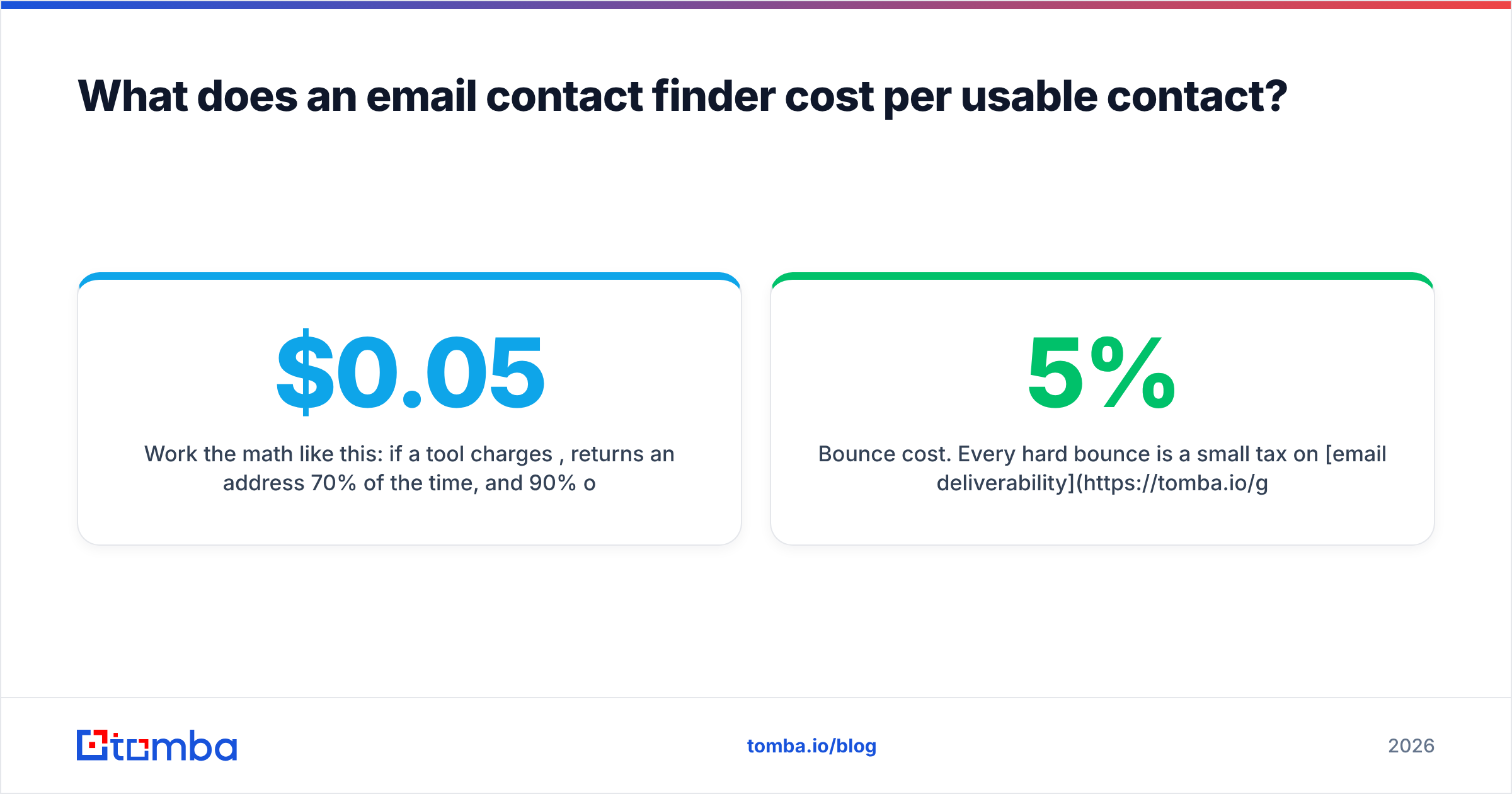
Work the math like this: if a tool charges $0.05 per credit, returns an address 70% of the time, and 90% of those are valid, your real cost is $0.05 ÷ (0.70 × 0.90) = $0.079 per usable contact. A "cheaper" tool at $0.03/credit with a 55% return rate and 78% precision costs $0.07 — barely better, and you burned twice the operational time on it.
Then add the costs nobody quotes:
- Bounce cost. Every hard bounce is a small tax on email deliverability. At 5%+ bounce rates, mailbox providers start throttling you, and the downstream revenue cost dwarfs the credit cost.
- Rework cost. An SDR manually verifying addresses at 30 seconds each on a 1,000-row list is roughly a full workday.
- Credit expiry. Monthly-reset credits that don't roll over are a real cost if your volume is lumpy.
- Seat inflation. Per-seat pricing on an all-in-one platform means your data cost scales with headcount, not with usage.

How do you stop catch-all domains from wrecking your list?#
You can't eliminate them — roughly a fifth of B2B domains are configured as catch-all — but you can stop treating them as binary.
A catch-all domain accepts mail at any address, so an SMTP check returns "OK" for ceo@acme.com and asdfgh@acme.com alike. There is no server-side way to distinguish them. What good tooling does instead is combine signals: does the address match the domain's dominant pattern, does the person appear in crawled sources, has the address been observed in the wild, does the domain's engagement history suggest real mailboxes.
Practical playbook:
- Segment catch-all results into their own list. Don't merge them with confirmed-valid addresses.
- Send them from a secondary domain so any bounce damage stays contained.
- Cap catch-all volume at 10–15% of any send. Enough to test, small enough not to poison your primary sender reputation.
- Score by pattern confidence. A catch-all address that matches the company's known format is a far better bet than a permuted guess.
- Re-verify quarterly. Domains flip configurations more often than you'd expect.
If you handle volume, do this at ingestion rather than at send time — a bulk email finder run with catch-all flagging turned on gives you the segmentation for free instead of forcing a manual pass.
When should you use an API instead of a UI?#
The moment your lookups become predictable, which for most teams is around 500 contacts a month.
UI-driven finding is fine for research: you're exploring an account, you want to see who's on the marketing team, you export a CSV. But manual export/import cycles create stale data by design — you enrich on Monday and the record sits untouched until someone opens it in March.
An email finder API flips the trigger. A new lead hits your CRM from a form fill or a scraped list, a webhook fires, the record comes back enriched with a verified address and a confidence score before a rep ever sees it. No batch, no CSV, no drift. If you're a small team without engineering bandwidth, the same effect is achievable through a Zapier or Make step, or a Google Sheets add-on for lightweight workflows.
Two implementation notes that save pain later:
- Store the confidence score and the verification timestamp, not just the address. Six months from now you'll want to know which records are due for re-verification.
- Handle "not found" as a first-class state. Don't write a null and move on — flag it for a secondary-source waterfall or manual research.
What are the red flags in an email contact finder?#
- No verification status on results. If everything comes back as just an address with no label, the vendor is offloading validation onto your mail server.
- Credits charged for not-found lookups. Reasonable vendors don't charge for misses. Check the fine print, not the pricing page headline.
- Accuracy claims without a stated denominator. As covered above, this number is meaningless without knowing what it's divided by.
- No GDPR/CCPA posture. If you're prospecting into the EU, "where did this data come from" is a question you may have to answer in writing. Vendors should publish their data sources.
- Contact-count marketing. "700 million contacts" tells you nothing about how many are current, or how many are in your segment. Cross-check independent reviews on G2 rather than trusting the homepage.
- No bulk or API path. A tool that only works one lookup at a time will not survive contact with a real pipeline.
How does an email contact finder fit the rest of your stack?#
At the top of it. Finding is the first step in a chain that runs: identify account → identify person → find address → verify address → enrich with context → sequence.
Skip verification and you've built a fast path to a damaged domain. Skip enrichment and your reps write generic openers. The finder is load-bearing precisely because everything downstream inherits its error rate — a 12% bad-address rate doesn't stay at 12%, it compounds into wasted sequence slots, skewed reply-rate metrics, and a CRM nobody trusts.
The teams that get this right treat contact data as infrastructure with an SLA, not as a monthly purchase. They re-verify on a schedule, they track bounce rate as a data-quality metric rather than a deliverability one, and they decide their waterfall order from their own benchmark instead of a vendor's chart. For a deeper look at the technical layer underneath all of this, the SMTP protocol overview on Wikipedia explains exactly what a verification handshake is and isn't able to prove.
Where to start#
If you're evaluating an email contact finder right now, do the 200-contact benchmark before you commit to an annual plan. It costs a few hours and it will tell you more than every comparison post on the internet combined — this one included.
When you're ready to test, the Tomba Email Finder gives you 25 free searches a month with no card, and verification built into the same credit pool so you can measure precision, not just coverage. Run your control set through it, check the numbers against whatever you're using today, and let the bounce rate decide.
Related guides#
Ready to find emails that actually work?
Join 150,000+ professionals who stopped guessing and started sending. Free credits on signup — no credit card required.
Get the Tomba newsletter
Practical outbound tactics and product updates — once every two weeks.
About the author