Email Contact Management: The Complete 2026 Playbook
Your CRM is full of contacts that bounce, duplicate, and quietly rot at 22.5% per year. Here's how to build an email contact management system that stays clean, enriched, and actually usable.
TL;DR
- Email contact management is the operational discipline of collecting, deduping, verifying, enriching, segmenting, and retiring contact records — not just "storing emails in a CRM."
- B2B contact data decays roughly 22.5–30% per year. A database you built in January is measurably worse by July if nobody maintains it.
- The three failure modes that kill most databases: duplicate records from multiple import sources, unverified addresses that torch sender reputation, and missing fields that make segmentation impossible.
- A working system needs four layers: a single source of truth, an ingestion standard, a verification gate before send, and a quarterly re-verification cycle.
- Tooling matters less than the gate. A $49/mo verification step in front of your CRM prevents more damage than a $2,000/mo data platform bolted on after the mess exists.
What is email contact management?#
Email contact management is the set of rules and workflows that govern how a contact record enters your database, how it stays accurate, and when it leaves.
Think of it like a commercial kitchen's inventory. Nobody praises a chef for having a walk-in fridge full of food — they praise them for knowing exactly what's in there, what's fresh, what expires Thursday, and what needs to be thrown out tonight. A CRM with 80,000 contacts and no expiry logic is a fridge nobody has opened in two years.
Technically, the discipline covers six operations that run in a loop:
- Capture — how records enter (form fills, list imports, enrichment APIs, manual entry, scraped sources)
- Normalize — standardizing field formats so
Acme Inc.,Acme, Inc, andACME INCcollapse into one company - Deduplicate — matching records across email, domain, and person identity
- Verify — confirming an address can actually receive mail before you send to it
- Enrich — filling gaps (job title, company size, phone, LinkedIn) so segmentation is possible
- Retire — suppressing or archiving records that hard-bounced, unsubscribed, or went stale
Most teams do steps 1 and 6 and skip the middle four. That's why the middle four are where all the damage lives.
Why does contact data decay so fast?#
Because people move. Roughly 22.5% of B2B email addresses go stale each year through job changes alone, and in high-churn segments (SaaS sales, agencies, startups) the practical figure runs closer to 30%. Layer in company rebrands, domain migrations, and acquisitions, and a two-year-old list can be more than half dead.
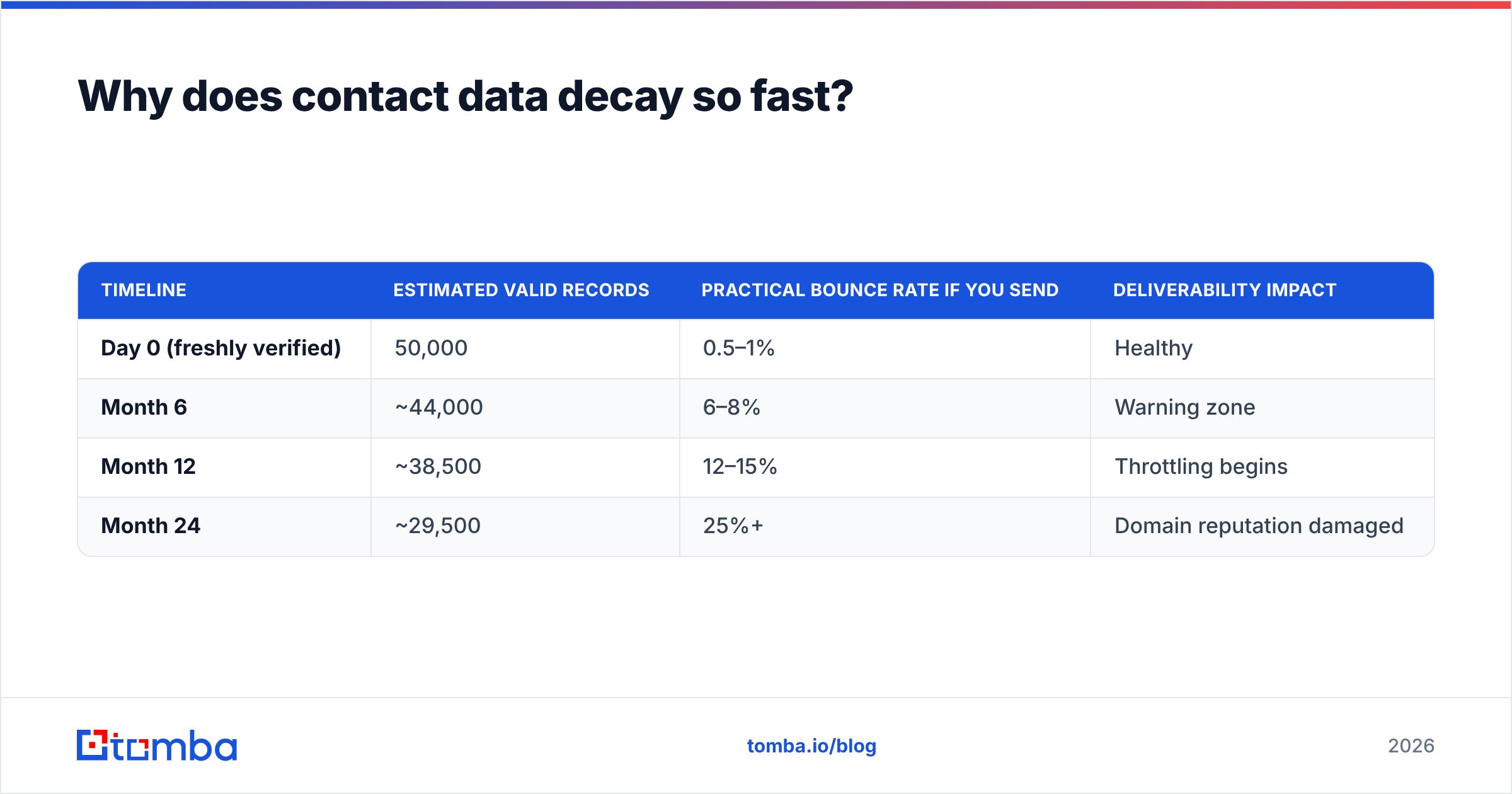
Here's what that actually looks like on a 50,000-contact database that nobody maintains:
| Timeline | Estimated valid records | Practical bounce rate if you send | Deliverability impact |
|---|---|---|---|
| Day 0 (freshly verified) | 50,000 | 0.5–1% | Healthy |
| Month 6 | ~44,000 | 6–8% | Warning zone |
| Month 12 | ~38,500 | 12–15% | Throttling begins |
| Month 24 | ~29,500 | 25%+ | Domain reputation damaged |
Mailbox providers treat bounce rate as a proxy for whether you have permission and hygiene. Google's own sender guidelines set a spam-complaint threshold of 0.3% and expect senders to maintain valid recipient lists. Cross that line consistently and your legitimate mail — including replies to warm prospects — starts landing in spam.

The uncomfortable part: decay is invisible until you send. There's no dashboard warning that 8,000 of your contacts changed jobs last quarter. You find out from a bounce report, after the damage is done.
What breaks first in a messy contact database?#
Duplicates. Always duplicates.
Duplicates arrive because contact records enter from four or five channels that don't talk to each other: a webinar list uploaded as CSV, a Chrome extension pushing prospects one at a time, an enrichment API writing back to the CRM, and a rep manually typing names into a mobile app at a conference.
Each channel has a different idea of what "the same person" means. The CSV has j.smith@acme.com. The extension found john.smith@acme.com. The API returned jsmith@acme.io after the domain migration. Your CRM now believes there are three John Smiths, and all three are on the sequence.
The downstream costs compound:
- Prospect experience — the same person gets three copies of your cold email in one week. That is a complaint, not a touchpoint.
- Reporting — pipeline counts inflate, conversion rates deflate, and forecasting stops matching reality.
- Rep trust — once a rep gets burned by calling a contact a colleague already called, they stop trusting the CRM and start keeping a private spreadsheet. Now you have two systems of record and neither is complete.
- Cost — you're paying per-record for enrichment, verification, and seat licenses on data you counted three times.
Deduplication is not a one-time cleanup project. It's a rule that runs at ingestion. If it only runs quarterly, you're always cleaning up a mess instead of preventing one.
How do you build an email contact management system?#
Four layers, in order. Skipping a layer doesn't save time — it moves the work downstream where it costs more.
Layer 1 — Single source of truth. Pick one system that holds the canonical record. Everything else is a satellite that reads from it or writes into it through a defined path. In practice this is your CRM (HubSpot, Salesforce, Pipedrive). Marketing automation, sequencing tools, and spreadsheets are downstream consumers, never authorities. If two systems can both claim to be right about a contact's email, you don't have a source of truth — you have a debate.
Layer 2 — Ingestion standard. Define the minimum viable record before anything is allowed in: email, first name, last name, company domain, source, and date acquired. Reject or quarantine anything missing the required fields. Normalize on write — lowercase all emails, strip whitespace, resolve company names to root domains. A record with a domain is a record you can dedupe, enrich, and pattern-match later. A record with only a name and a personal Gmail is a dead end.
Layer 3 — Verification gate. Nothing reaches a send queue without passing verification. This is the single highest-ROI control in the entire system. An email verifier checks syntax, domain MX records, and mailbox existence via SMTP handshake, then returns a status: valid, invalid, catch-all, or unknown. You send to valid. You suppress invalid. You decide a policy for catch-all (more on that below).
Layer 4 — Refresh cycle. Re-verify on a schedule tied to how fast your segment moves. Quarterly is the default for most B2B lists. Monthly if you sell into startups or agencies. Also re-verify any record before it re-enters a sequence after 90+ days of dormancy — the cost of a verification credit is trivially smaller than the cost of a bounce.
What tools do you actually need?#
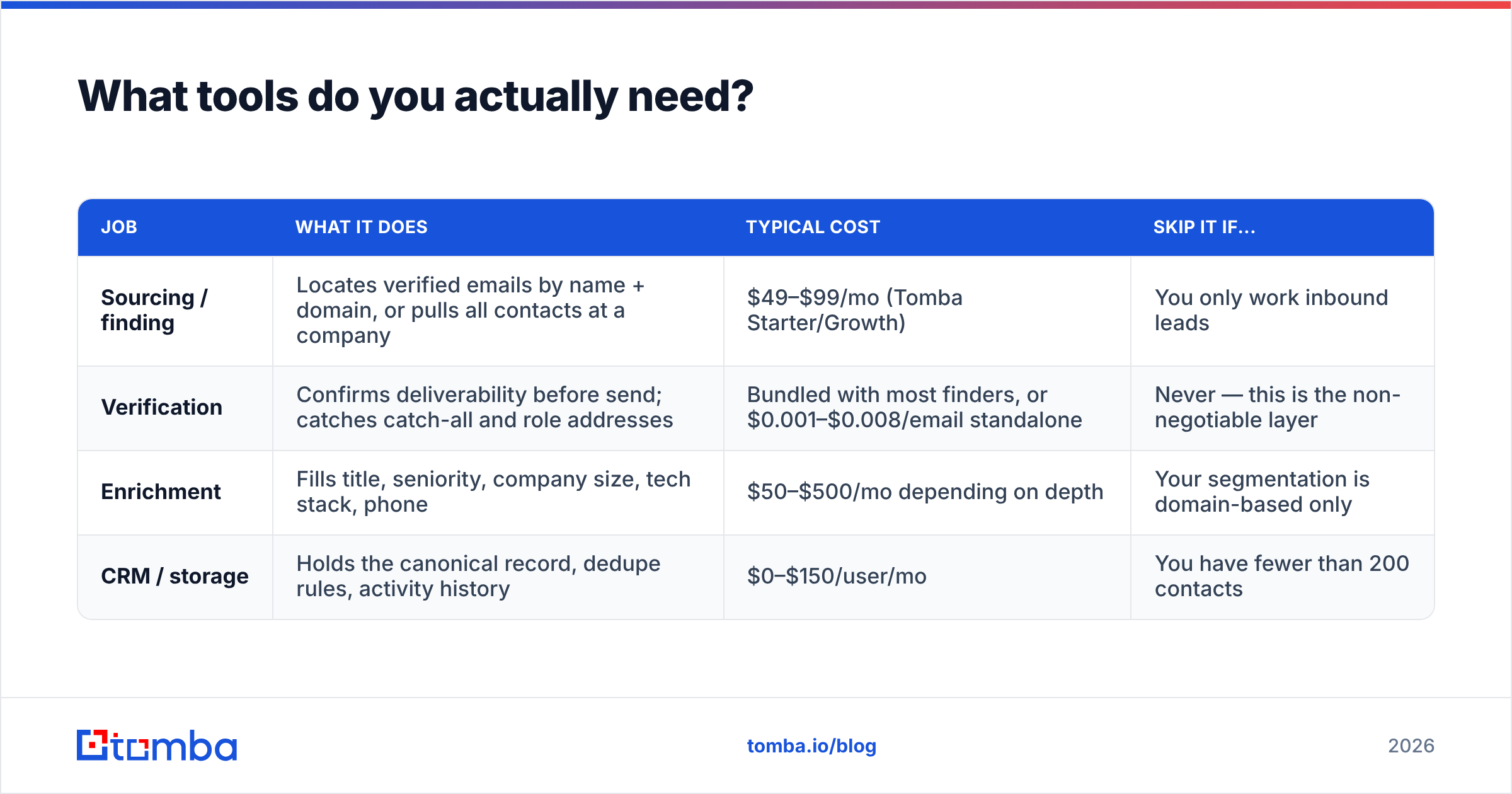
Fewer than vendors would like you to believe. The stack decomposes into four jobs, and one tool can often cover two or three.
| Job | What it does | Typical cost | Skip it if... |
|---|---|---|---|
| Sourcing / finding | Locates verified emails by name + domain, or pulls all contacts at a company | $49–$99/mo (Tomba Starter/Growth) | You only work inbound leads |
| Verification | Confirms deliverability before send; catches catch-all and role addresses | Bundled with most finders, or $0.001–$0.008/email standalone | Never — this is the non-negotiable layer |
| Enrichment | Fills title, seniority, company size, tech stack, phone | $50–$500/mo depending on depth | Your segmentation is domain-based only |
| CRM / storage | Holds the canonical record, dedupe rules, activity history | $0–$150/user/mo | You have fewer than 200 contacts |
A practical setup for a team under 20 people: CRM (HubSpot free or Pipedrive) + one combined finder/verifier + native integrations. That covers all four jobs for well under $200/mo. Tomba pricing starts with a free tier at 25 searches/month, then Starter at $49/mo and Growth at $99/mo — the finder, verifier, and enrichment all draw from the same credit pool, which removes the awkward "which tool do I charge this to" problem.
For teams that need volume, bulk verify handles list-level cleanup, and the Tomba API lets you put verification directly inside the ingestion path rather than running it as a manual batch job. That distinction matters: manual cleanup is a task someone forgets; an API call in the form handler is a rule that never forgets.
How should you handle catch-all and role-based addresses?#
These two categories cause more arguments between sales and ops than anything else in contact management, so it's worth being precise.
Catch-all domains accept mail to any address at the domain, including addresses that don't exist. A verifier can confirm the domain accepts mail but can't confirm the specific mailbox exists. Result: status "catch-all" or "accept-all," not "valid."
Your options:
- Exclude entirely — safest for reputation, but catch-all configuration is common at mid-market and enterprise companies, so you may be excluding a meaningful chunk of your ICP.
- Send from a separate subdomain — isolate the risk. If catch-all sends generate bounces, the damage stays off your primary domain.
- Use a dedicated catch-all verifier — deeper checks (pattern confidence, historical engagement signals, secondary source confirmation) can promote a subset of catch-alls to high-confidence. A catch-all verifier narrows the gray zone rather than eliminating it.
The wrong answer is treating catch-all as "probably fine" and dumping it into the main sequence. That's how a 2% bounce rate becomes 9% overnight.
Role-based addresses (info@, sales@, support@, admin@) are technically valid but behaviorally hostile to cold outreach. They're monitored by shared teams, they're a common source of spam complaints, and they rarely convert. Segment them out of prospecting and into a separate track — partner outreach, vendor inquiries, or support-driven motions where a shared inbox is actually the right recipient.

How do you audit an existing contact database?#
Run this before you buy any new tool. Most teams discover their problem isn't a missing capability — it's an unenforced rule.
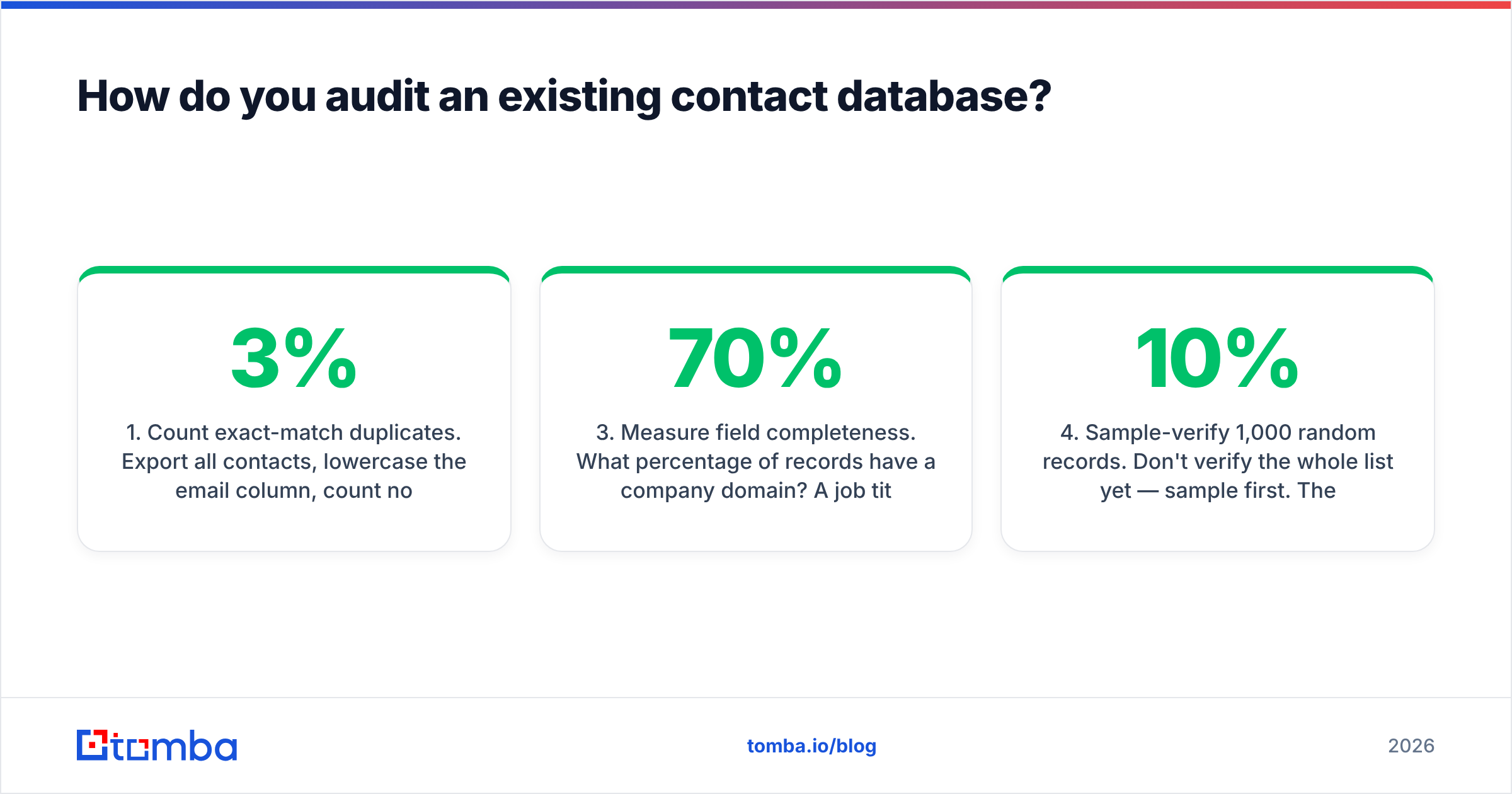
- Count exact-match duplicates. Export all contacts, lowercase the email column, count non-unique values. Anything above 3% means your ingestion has no dedupe rule at all.
- Count fuzzy duplicates. Same person, different address (
j.smith@vsjohn.smith@). Match on last name + company domain. This is usually 2–4× the exact-match count and it's the one nobody sees. - Measure field completeness. What percentage of records have a company domain? A job title? Anything below 70% domain coverage means enrichment is your bottleneck, not sourcing.
- Sample-verify 1,000 random records. Don't verify the whole list yet — sample first. The invalid rate on the sample tells you whether you're looking at a hygiene issue (5–10% invalid) or a structural one (20%+ invalid, meaning your sources are bad).
- Check source attribution. What percentage of records have a recorded source? If you can't tell where a contact came from, you can't tell which channel is poisoning the well.
- Age the list. Bucket records by date acquired. Anything older than 18 months that has never engaged is a suppression candidate, not a re-engagement candidate.
The output is a one-page picture: how bad, where it came from, and what fixing it costs. Teams that skip the audit tend to buy an enrichment platform to solve a deduplication problem, which is expensive and doesn't work.
Should contact management live in the CRM or outside it?#
In the CRM — with one carve-out.
The CRM should own identity, activity history, ownership, and lifecycle stage. That's what it's built for, and pulling those out into a separate system creates sync problems that outlast whatever efficiency you gained. Both Salesforce and HubSpot have native dedupe and field-validation capabilities that most teams never turn on.
The carve-out is verification and enrichment, which should sit in front of the CRM as a gate rather than inside it as a periodic job. The reason is timing. Verification inside the CRM runs on records that are already in the CRM — meaning bad records already occupy a row, already count toward your seat-based pricing, and are already visible to a rep who might sequence them before the cleanup job runs. Verification in front of the CRM means the bad record never gets a row.
Practically, that looks like: form fill or list upload → verification API call → valid records written to CRM, invalid records logged to a rejection table with a reason code. The rejection table matters more than people expect. After three months, it tells you exactly which lead source produces junk, and you can cut it.
For enrichment, contact enrichment at the point of entry is similarly cheaper than enrichment as a monthly batch — you enrich each record once instead of repeatedly re-scanning the same rows.
What does good look like six months in?#
Concrete benchmarks, not vibes:
| Metric | Unmanaged database | Well-managed database |
|---|---|---|
| Hard bounce rate | 8–20% | Under 2% |
| Duplicate rate | 5–15% | Under 1% |
| Domain field completeness | 40–60% | Above 95% |
| Records with recorded source | Under 50% | 100% |
| Average record age at send | 14+ months | Under 6 months, or re-verified |
| Time from lead capture to sequenceable | Days (manual cleanup) | Under 60 seconds (automated gate) |
That last row is the one that shows up in revenue. Speed-to-lead research from HubSpot and others consistently finds that response time within the first hour dramatically outperforms same-day follow-up. A manual cleanup step between capture and outreach isn't just a hygiene cost — it's a conversion cost.
Also worth tracking: what percentage of your reps still keep a personal spreadsheet. That number is the most honest measure of whether your CRM is trusted. If it's above zero, something in the four layers is broken and the reps have already routed around it.
Where do most teams go wrong?#
Three patterns, in order of frequency.
They treat it as a project, not a rule. A quarterly "database cleanup sprint" removes symptoms while the cause keeps producing. Every rule you enforce at ingestion is a cleanup sprint you never run again.
They buy depth before they enforce basics. Intent data, technographics, and buying-committee mapping are genuinely useful — on a clean base. Layered on a database with 12% duplicates and no verification gate, they produce confident targeting of contacts who don't exist. Get bounce rate under 2% first, then buy signal.
They over-collect. More fields feel like more capability, but every field you collect is a field that decays and a field someone has to maintain. Collect what you segment on and nothing else. If you've never once filtered by "number of office locations," stop enriching it.
One more, less common but more expensive: ignoring consent and provenance. Under GDPR and similar regimes, "where did this contact come from and on what basis are we processing it" is a question you need a stored answer to, not a reconstruction. The source field you added in Layer 2 does double duty here — it's a data-quality signal and a compliance record. Vendors publishing their data sources make that easier to document than opaque list brokers do.
Getting started#
Pick the smallest version that closes the loop: one canonical CRM, a required-fields rule on ingestion, a verification API call in front of the write, and a calendar reminder to re-verify quarterly. That's a week of setup, not a quarter, and it prevents the compounding problem rather than periodically excavating it.
If you're building that gate now, the Tomba Email Finder is the piece that sits at the front of it — find the address by name and domain, get a confidence score and verification status in the same call, and write only the records that pass. The free tier covers 25 searches a month if you want to test the workflow against a real segment before committing, and Starter at $49/mo covers most teams running a few thousand new contacts a quarter. Clean input beats clever cleanup every time.
Related guides#
Ready to find emails that actually work?
Join 150,000+ professionals who stopped guessing and started sending. Free credits on signup — no credit card required.
Get the Tomba newsletter
Practical outbound tactics and product updates — once every two weeks.
About the author