Email Crawler in 2026: How They Work and When to Use One
An email crawler scrapes addresses from websites at scale — but most of what it collects is unusable. Here's how crawlers actually work, where they break, and when an API beats a scraper.
TL;DR
- An email crawler is a bot that walks a website's pages, extracts anything matching an email pattern, and dumps the results into a list. It's a text-matching problem, not a data problem.
- Raw crawler output is dominated by role addresses (info@, support@, privacy@), image-obfuscated addresses it can't see, and stale addresses from pages last updated in 2019.
- Typical unfiltered crawl lists bounce at 30-60%. Anything over 3% puts your sending domain at risk under Google and Yahoo's bulk sender rules.
- Crawling is genuinely useful for one thing: discovering the pattern a company uses (first.last@, f.last@) — then you generate and verify from there instead of hoping the address is on the page.
- For most B2B teams, an email-finding API returns a verified, named contact in one call for less than the cost of maintaining a crawler fleet.
What is an email crawler?#
An email crawler is a program that fetches web pages, follows links, and pulls out every string that looks like an email address using a regular expression. Think of it as a metal detector on a beach: it beeps at anything metallic, and you don't know if you found a gold ring or a bottle cap until you dig it up and look.
The mechanics are simple. The crawler starts from a seed URL, downloads the HTML, runs a pattern like [\w.+-]+@[\w-]+\.[\w.]+ over the raw text, stores every hit, then queues every internal link it found and repeats. Add a depth limit so it doesn't crawl forever, add politeness delays so you don't hammer the server, and you have the core of every email crawler ever written — from a 40-line Python script to a commercial scraping suite.
What the crawler does not do is understand anything. It doesn't know whether info@acme.com reaches a human, whether j.smith@acme.com belongs to a person who left in 2023, or whether the address in the footer is a honeypot planted specifically to catch scrapers. That gap between "found a string" and "found a person you can email" is where most crawler projects fall apart.
How does an email crawler actually work, step by step?#
Every crawler, regardless of language or vendor, does roughly the same six things:
- Seed and queue. You give it a starting domain or list of domains. It maintains a frontier queue of URLs to visit and a visited set so it doesn't loop.
- Fetch and respect robots. It issues HTTP requests, ideally reading
robots.txtfirst and honoringCrawl-delay. Skipping this is how you get IP-banned within an hour. - Extract with regex. It runs an email pattern over the response body. Better crawlers also parse
mailto:hrefs, which are far more reliable than raw-text matches. - Normalize and dedupe. Lowercase everything, strip trailing punctuation the regex grabbed, and drop duplicates — the same footer address appears on every page of the site.
- Follow links. It extracts
<a href>values, filters to the same domain, and pushes new URLs onto the queue up to a depth limit (usually 2-3 for contact discovery). - Store and (maybe) verify. Output goes to CSV or a database. Verification is almost always a separate step — and it's the step people skip.
The trap is step 3. Regex extraction is where you inherit every bad address on the internet. Web pages are full of example@example.com in form placeholders, noreply@ in transactional footers, wordpress@ in generated markup, and encoded entities like name@domain.com that a naive pattern misses entirely.
Why does raw crawler output bounce so hard?#
Because the web is a graveyard of dead contact pages. A crawl gives you a snapshot of what someone published, not what's currently routable.
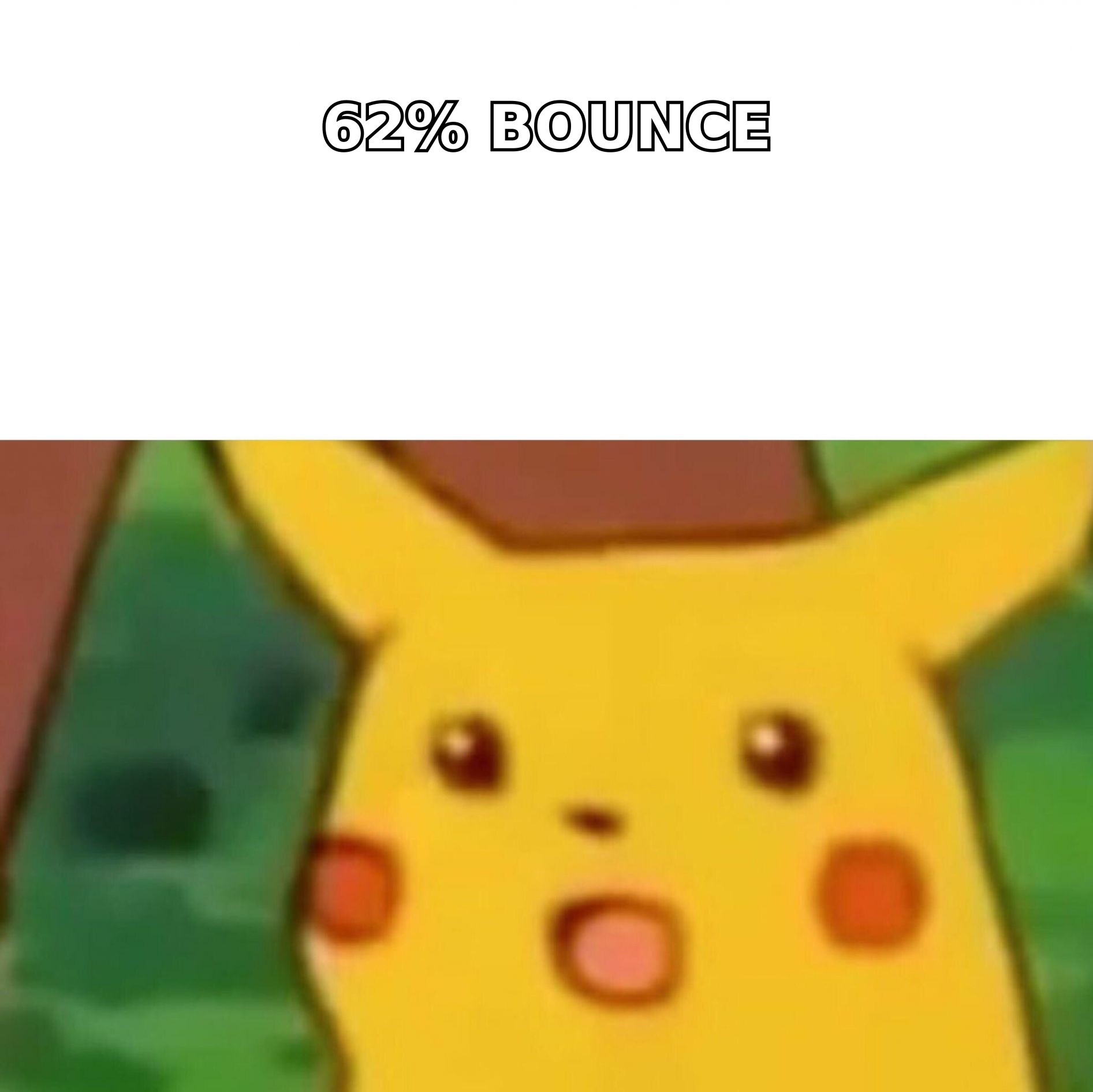
Here's what a typical 10,000-address crawl of small-business sites actually contains once you sort it:
| Bucket | Share of raw crawl | Usable for outbound? |
|---|---|---|
| Role addresses (info@, sales@, hello@) | 35-45% | Rarely — low reply rates, often unmonitored |
| Noreply / system addresses | 8-12% | Never |
| Placeholder / example addresses | 3-6% | Never |
| Stale personal addresses (person departed) | 15-25% | No — hard bounce |
| Duplicates across pages | 10-20% | Already counted |
| Live, named, deliverable contacts | 8-15% | Yes |
That last row is the whole game. You crawled 10,000 addresses and you have roughly 1,000 you'd actually want to email — and you don't know which 1,000 until you run verification.
The bounce math matters more than it used to. Since Google and Yahoo tightened bulk sender requirements, a spam complaint rate above 0.3% and sloppy list hygiene get you throttled or blocked outright. You can read the current thresholds in Google's own sender guidelines. Sending an unverified crawl list is one of the fastest ways to torch a domain you spent months warming.
If you're going to crawl anyway, route everything through an email verifier before it touches your sequencer. SMTP-level verification catches the dead mailboxes; a catch-all verifier handles the domains that accept everything and tell you nothing.
Is scraping emails from websites legal?#
Short answer: it depends on jurisdiction, what you collect, and what you do with it — and "publicly available" is not a legal defense on its own.
Under GDPR, a business email that identifies a person (jane.doe@acme.com) is personal data regardless of where you found it. You need a lawful basis to process it — legitimate interest is the usual one for B2B outreach, but it requires a documented balancing test, a clear privacy notice, and a working opt-out. Generic role addresses (info@acme.com) sit in a softer zone since they don't identify an individual. The ICO's guidance on direct marketing is the clearest plain-language source on where the lines sit.
In the US, CAN-SPAM doesn't prohibit scraping outright, but it explicitly calls out "harvesting" — automated collection of addresses from websites — as an aggravating factor that can triple statutory damages when combined with other violations. Add site terms of service, which frequently prohibit automated collection, and you're stacking contract risk on top of privacy risk.
None of this makes crawling automatically illegal. It does mean a homegrown crawler shifts compliance work onto you: consent records, suppression lists, deletion requests, data-source provenance. Commercial data providers absorb that work as part of the product — check any vendor's data sources documentation before you assume they have.
Email crawler vs. email finder API: which should you use?#
These solve different problems and people conflate them constantly. A crawler answers "what addresses appear on this website?" An email finder answers "what is this specific person's work email?"
| Dimension | DIY email crawler | Commercial scraping suite | Email finder API |
|---|---|---|---|
| Input | Domain or URL list | Domain or URL list | Name + domain, or domain alone |
| Output | Every string matching a pattern | Same, plus some filtering | Named contact with confidence score |
| Named contacts | No — whatever's published | Partial | Yes, by design |
| Verification | You build it | Usually an upsell | Built in |
| Pattern detection | Manual | Sometimes | Automatic per domain |
| Typical usable rate | 8-15% of raw | 20-35% | 85-95% deliverable |
| Setup time | Days to weeks | Hours | Minutes |
| Ongoing maintenance | High — proxies, blocks, JS rendering | Medium | None |
| Entry cost | "Free" + proxy + dev time | $99-$500/mo | Free tier, then $49/mo |
| Legal/compliance burden | Entirely yours | Shared | Vendor-documented |
The DIY column's "free" is the expensive lie. A crawler that works on 50 sites breaks on 500. Cloudflare challenges, JavaScript-rendered contact pages that need a headless browser, rate limits, rotating proxies, address obfuscation — each is a week of engineering, and none of it produces a single additional customer.
Where a crawler still earns its keep: pattern discovery. Crawl a company's team page or press releases, find two or three real addresses, and you've learned the format — first.last@, flast@, first@. Once you know the pattern, you can generate the address for anyone whose name you have. That's the honest use case, and you can shortcut the whole crawl with a company email pattern lookup.
What are the practical alternatives to building a crawler?#
Ranked by effort-to-result, from lowest lift to highest:
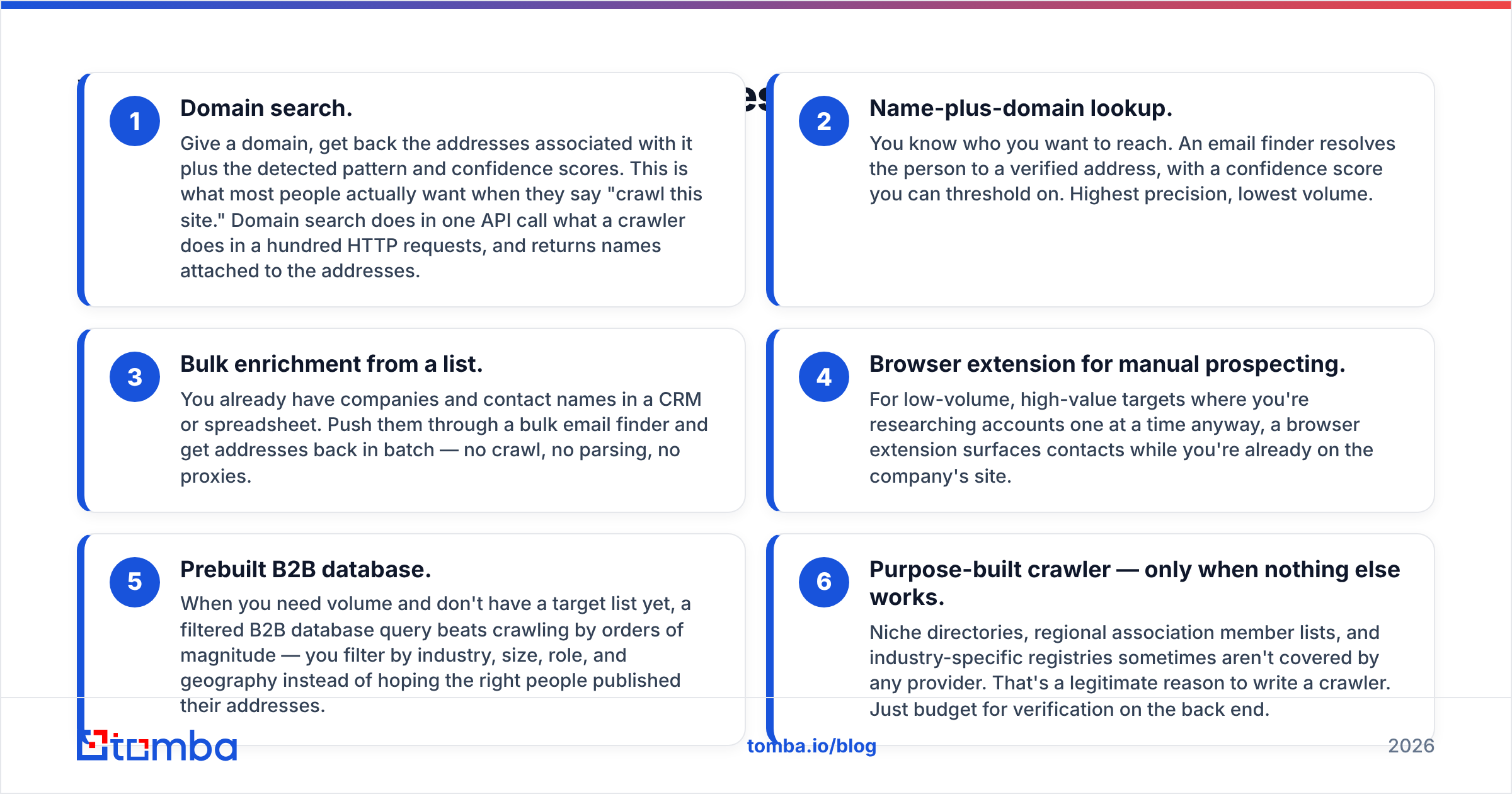
- Domain search. Give a domain, get back the addresses associated with it plus the detected pattern and confidence scores. This is what most people actually want when they say "crawl this site." Domain search does in one API call what a crawler does in a hundred HTTP requests, and returns names attached to the addresses.
- Name-plus-domain lookup. You know who you want to reach. An email finder resolves the person to a verified address, with a confidence score you can threshold on. Highest precision, lowest volume.
- Bulk enrichment from a list. You already have companies and contact names in a CRM or spreadsheet. Push them through a bulk email finder and get addresses back in batch — no crawl, no parsing, no proxies.
- Browser extension for manual prospecting. For low-volume, high-value targets where you're researching accounts one at a time anyway, a browser extension surfaces contacts while you're already on the company's site.
- Prebuilt B2B database. When you need volume and don't have a target list yet, a filtered B2B database query beats crawling by orders of magnitude — you filter by industry, size, role, and geography instead of hoping the right people published their addresses.
- Purpose-built crawler — only when nothing else works. Niche directories, regional association member lists, and industry-specific registries sometimes aren't covered by any provider. That's a legitimate reason to write a crawler. Just budget for verification on the back end.
For teams comparing providers across this space, G2's lead intelligence category is a reasonable neutral starting point — coverage and accuracy vary a lot by region and company size, and no single vendor wins everywhere. BookYourData, for instance, is strong on prebuilt, pre-verified list purchase when you want volume without running any lookup infrastructure at all; that's a different shape of solution from a per-query API, and which fits depends on whether your motion is list-based or account-based.
How do you build a responsible crawler if you must?#
If your use case genuinely requires crawling, these are the non-negotiables:
- Read and honor robots.txt. Including
Crawl-delay. Use a descriptive User-Agent with a contact URL so site owners can reach you instead of just blocking you. - Rate-limit hard. One request per 2-5 seconds per domain. Parallelize across domains, never within one.
- Parse
mailto:links first, regex second. Amailto:href is an explicit publication of an address. Raw-text regex hits are far noisier. - Handle obfuscation deliberately.
name [at] domain [dot] comand HTML-entity encoding are signals the owner does not want automated collection. Decoding those is a choice with legal and ethical weight — think about it before you write the decoder. - Filter role addresses at ingest. Maintain a blocklist: info, support, sales, admin, noreply, webmaster, privacy, legal, careers, abuse. Tag them rather than deleting — role addresses have their own (limited) uses.
- Verify before you send. Always. Non-negotiable. Run every address through SMTP verification and drop anything not marked deliverable. Watch your sender reputation after the first send to a new list segment.
- Log provenance. Store the source URL and crawl timestamp for every address. When someone asks where you got their email — and under GDPR they can — you need an answer.
What does this cost, honestly?#
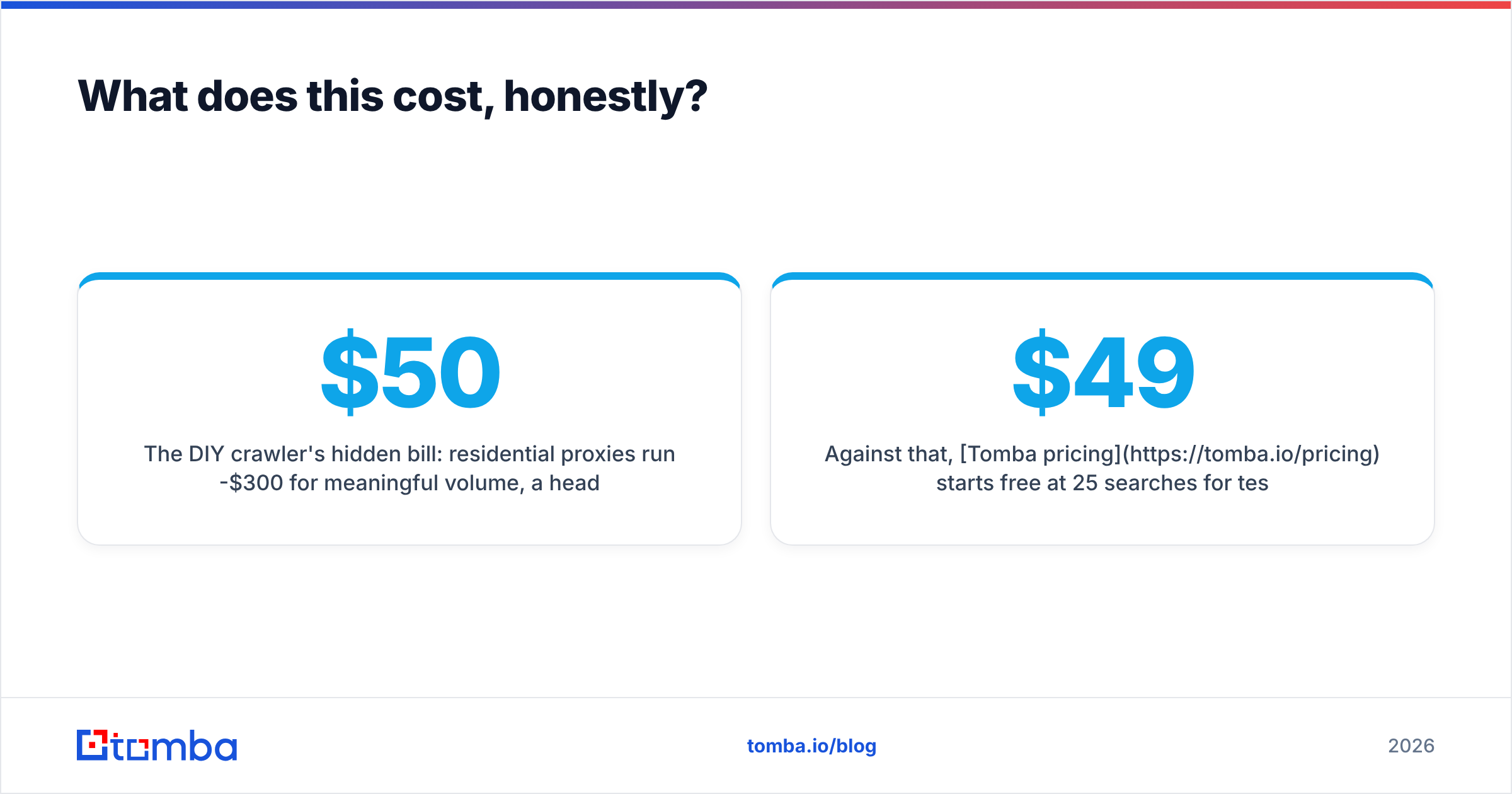
The DIY crawler's hidden bill: residential proxies run $50-$300/mo for meaningful volume, a headless browser fleet needs compute, and someone has to fix the parser every time a target site redesigns. Then you still pay for verification, at roughly $0.001-$0.007 per address depending on volume. Crawl 50,000 addresses, keep 6,000, and you've spent proxy money plus engineering weeks to get fewer usable contacts than a mid-tier API plan delivers in an afternoon.
Against that, Tomba pricing starts free at 25 searches/month for testing, $49/mo on Starter, $99/mo on Growth, and $249/mo on Pro — with verification included rather than billed separately. The comparison isn't "free crawler vs. paid tool." It's "engineering salary plus infrastructure plus verification" vs. a line item.
The one scenario where building wins: you need to crawl a genuinely obscure source at high volume, repeatedly, and the data has strategic value beyond outreach. That's a data-engineering project with a business case. Scraping 200 contact pages for a Q3 campaign is not.
The bottom line#
An email crawler is the right tool for a narrow job — discovering what a company publishes and inferring its email pattern. It is the wrong tool for building an outbound list, because the thing you need (a verified address for a named decision-maker) is precisely the thing companies stopped publishing years ago.
Start from the person, not the page. If you know who you want to reach and where they work, skip the crawl entirely: Tomba Email Finder takes a name and a domain and returns a verified, scored address in a single call — with domain search, catch-all handling, and bulk processing on the same credit pool. The free tier gives you 25 searches to compare the output against whatever your crawler produced. Run both on the same 25 companies and the decision makes itself.
Related guides#
Ready to find emails that actually work?
Join 150,000+ professionals who stopped guessing and started sending. Free credits on signup — no credit card required.
Get the Tomba newsletter
Practical outbound tactics and product updates — once every two weeks.
About the author