Email CRM in 2026: How to Sync Inbox and Pipeline
An email CRM only pays off when the inbox writes to the pipeline automatically. Here's how the main options compare, what breaks, and how to fix the data layer underneath.
TL;DR
- An email CRM is a customer relationship system where the inbox is a first-class object: every send, reply, and thread is logged against a contact and deal automatically, not pasted in by hand.
- The three real architectures are CRM-native email (HubSpot, Pipedrive), inbox-native CRM (Streak, Copper), and sequencer-plus-CRM stacks (Instantly or Salesloft feeding Salesforce). Pick by where your reps actually live all day.
- Most rollouts fail on data hygiene, not features. Bounced and stale contacts create duplicate records, break sync rules, and quietly poison reporting.
- Two-way sync, BCC-dropbox logging, and API-level enrichment are the three features that separate a real email CRM from a contact list with a mail merge bolted on.
- Fix the input first: verified addresses and enriched records make every downstream automation behave. Everything else is configuration.
What is an email CRM?#
An email CRM is a CRM whose primary data source is email activity. Think of it like a restaurant reservation book that fills itself in — instead of the host writing down every phone call, the phone system logs each one against the right table, with notes, timestamps, and who called back.
Technically, an email CRM does three things a plain CRM doesn't do on its own:
- Bidirectional message capture — outbound sends and inbound replies both attach to the contact record without a human clicking "log activity."
- Thread-to-deal association — a reply on a thread moves or flags the associated opportunity, so the pipeline reflects reality within minutes rather than at the end of the week.
- Sequencing inside the record — multi-step follow-up runs from the same object that holds the deal, so a rep never has to reconcile two systems.
- Contact-level enrichment — new addresses that appear on a thread (a CC'd procurement lead, a forwarded stakeholder) get created and enriched instead of vanishing into the archive.
That fourth point is where most teams under-invest. The system is only as accurate as the addresses feeding it.
Why do email CRM rollouts fail?#
Because the CRM inherits whatever mess is in the inbox. Three failure modes account for most of it.
Duplicate contacts from format drift. A rep emails j.smith@acme.com, marketing has john.smith@acme.com from a webinar form, and the sync creates two records. Now you have two deal histories, two owners, and reporting that double-counts the account. Running addresses through a company email pattern check before import prevents the split at the source.
Bounce-driven record rot. Roughly 22–30% of B2B contact data goes stale each year through job changes alone. When those addresses sit in an email CRM, automation keeps firing at them, the bounce rate climbs, and your sender reputation drops for every legitimate thread too. The CRM didn't cause this — but it amplifies it at machine speed.
Sync rules that fight each other. Two-way sync between a sequencer and a CRM sounds harmless until both systems claim ownership of the "last contacted" field. One overwrites the other, activity timestamps go backward, and lead scoring gets confused. Decide which system is authoritative for each field before you turn sync on, not after.
What are the main email CRM architectures?#
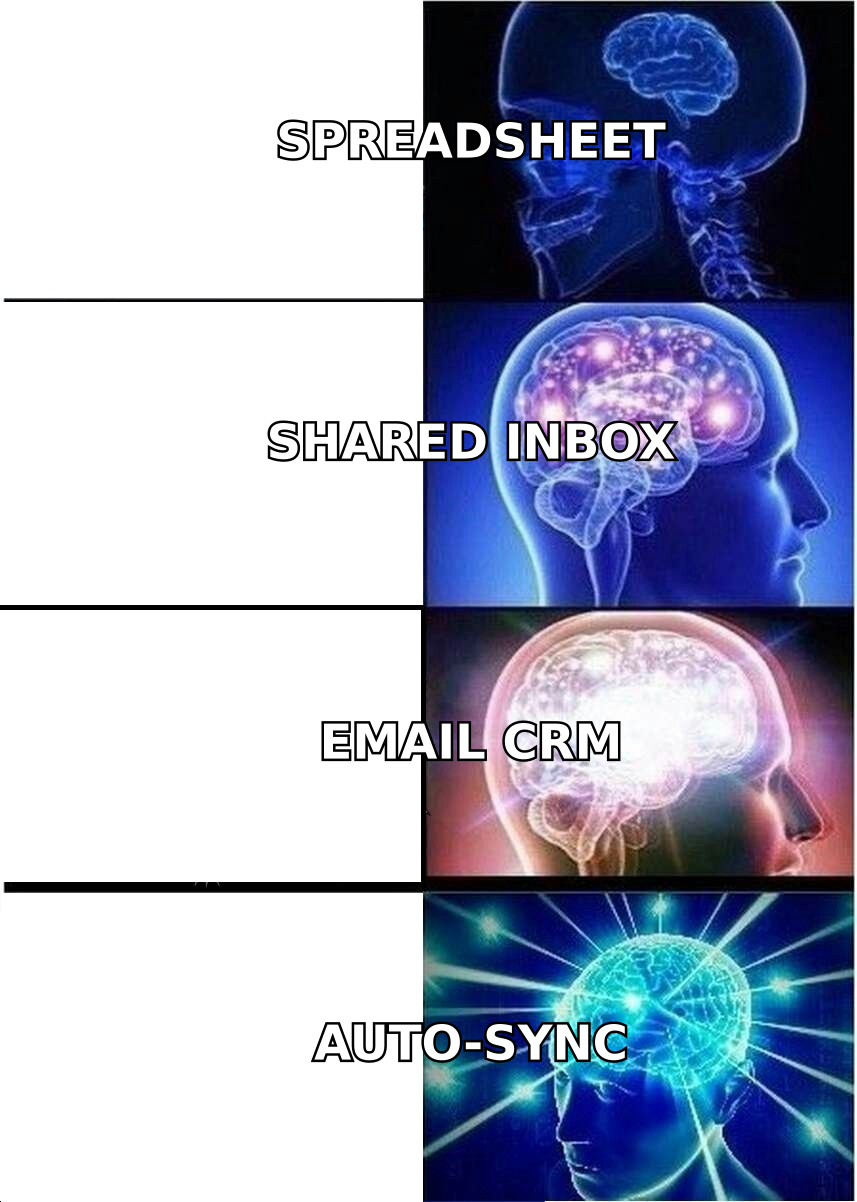
There are three, and the choice matters more than any individual feature.
CRM-native email. HubSpot, Pipedrive, Zoho. The CRM is home base; email is a module inside it. Best when you have a defined pipeline, multiple people touching each deal, and reporting requirements. Weakness: reps who live in Gmail feel like they're commuting to the CRM.
Inbox-native CRM. Streak, Copper, Nimble. The CRM lives inside Gmail or Outlook as an overlay. Best for founder-led sales, agencies, and small teams where the inbox genuinely is the system of record. Weakness: reporting and forecasting hit a ceiling fast, and the model gets brittle past 15–20 seats.
Sequencer plus CRM. Instantly, Salesloft, Reply.io, or Outreach handling volume outbound, syncing into Salesforce or HubSpot. Best for dedicated SDR motions where send volume is high and the CRM is the system of record for closed-won. Weakness: two systems, two bills, and a sync layer you now own.
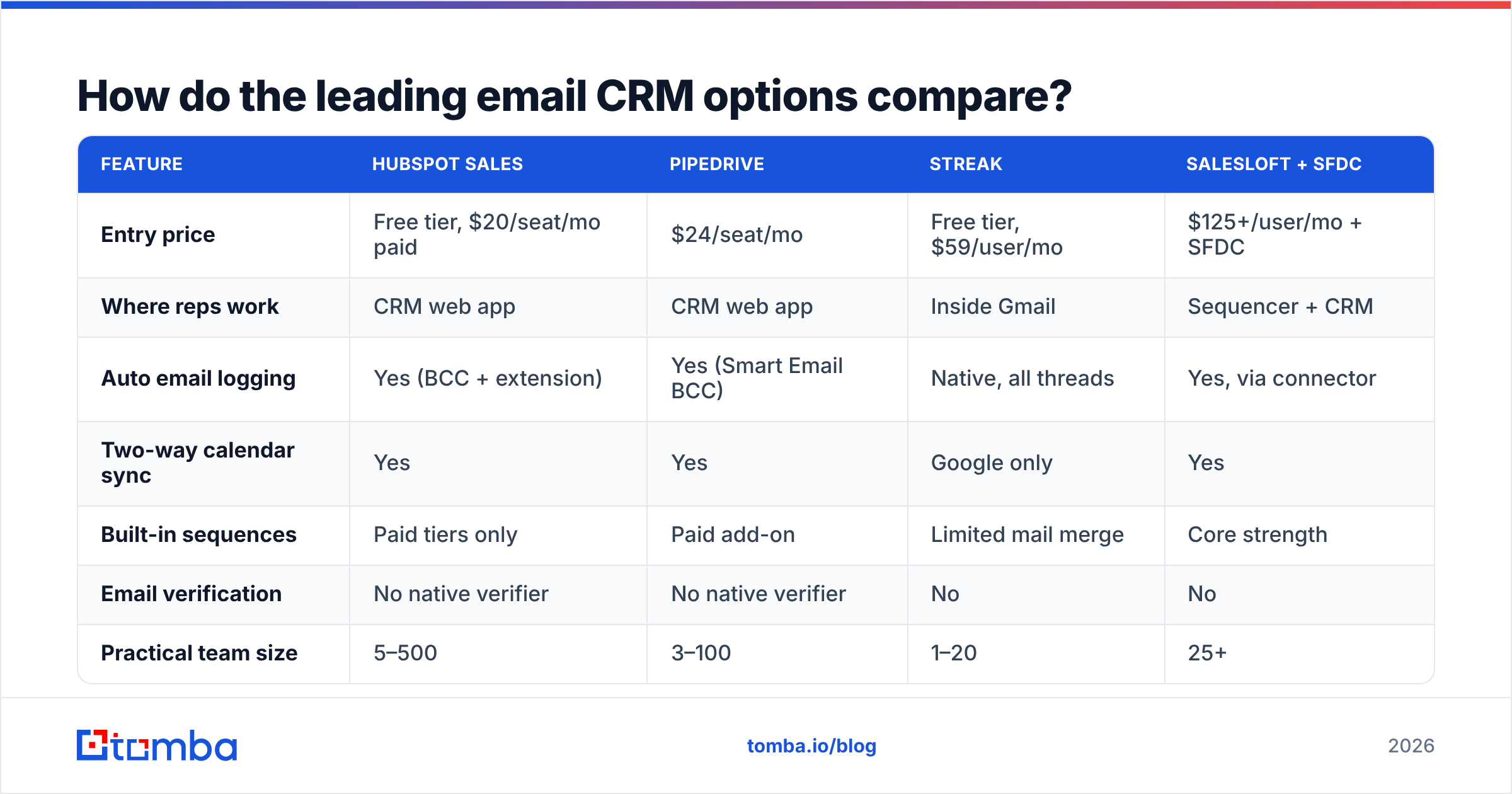
How do the leading email CRM options compare?#
| Feature | HubSpot Sales | Pipedrive | Streak | Salesloft + SFDC |
|---|---|---|---|---|
| Entry price | Free tier, $20/seat/mo paid | $24/seat/mo | Free tier, $59/user/mo | $125+/user/mo + SFDC |
| Where reps work | CRM web app | CRM web app | Inside Gmail | Sequencer + CRM |
| Auto email logging | Yes (BCC + extension) | Yes (Smart Email BCC) | Native, all threads | Yes, via connector |
| Two-way calendar sync | Yes | Yes | Google only | Yes |
| Built-in sequences | Paid tiers only | Paid add-on | Limited mail merge | Core strength |
| Email verification | No native verifier | No native verifier | No | No |
| Practical team size | 5–500 | 3–100 | 1–20 | 25+ |
| Best fit | Marketing + sales overlap | Deal-focused SMB sales | Founder / agency sales | High-volume SDR teams |
Two things stand out. First, price scales with reporting depth, not with email capability — Streak logs threads as well as anything on this list. Second, and more important: none of them verify email addresses. Every one of these platforms assumes the address you give it is real. That gap is why the data layer is a separate decision.
For a broader vendor landscape, G2's CRM category is the least biased public comparison set, and HubSpot's own sales email documentation is a good reference for how connected-inbox logging actually works under the hood.
What should you look for in email logging?#
Logging is where email CRMs quietly differ. Ask four questions of any vendor.
- BCC dropbox vs. native connector. A BCC address is universal but only captures what the rep remembers to BCC. A native connector (OAuth into Gmail/Microsoft 365) captures everything, including replies the rep never forwards. Prefer the connector; keep BCC as a fallback for mobile.
- Does it log inbound replies, or only sends? Surprisingly many tools log outbound perfectly and miss inbound unless the thread already exists. Test this on day one with a fresh external address.
- Thread-level or message-level attachment? Message-level creates dozens of activity rows per deal and buries the signal. Thread-level rolls up, which is what you want for a pipeline view.
- What happens with an unknown sender? The best systems create a contact and enrich it. The worst discard the message. This is the single biggest source of "we lost that lead" complaints.
- Is logging reversible? You will eventually need to purge a mislogged thread for privacy or compliance. Confirm the delete path exists before you need it.
How does data quality change email CRM outcomes?#
More than the software choice does. Here's the arithmetic.
Take a 2,000-contact database with a 12% invalid rate — normal for a list assembled from webinar forms, scraped exports, and rep-entered records. That's 240 addresses that will bounce. Your CRM dutifully sends to them, and:
- Bounce rate lands near 12%, well above the 2% threshold where Google and Microsoft start throttling.
- 240 contact records accumulate failed-activity noise that skews every engagement report.
- Reps burn follow-up tasks on people who never received the first email.
Now run the same list through an email verifier before import. Bounce rate drops under 2%, the failed-activity noise disappears, and follow-up tasks map to humans who actually got the message. Nothing about the CRM changed — only the input.
The same logic applies to acquisition. When a rep identifies a target account but has no contact address, domain search returns the verified addresses on that domain with role and confidence attached, so the record enters the CRM clean rather than as a placeholder someone will "fix later." Tomba's data enrichment then fills job title, company size, and social profiles on the way in, which is what makes segmentation and lead routing work without manual cleanup.
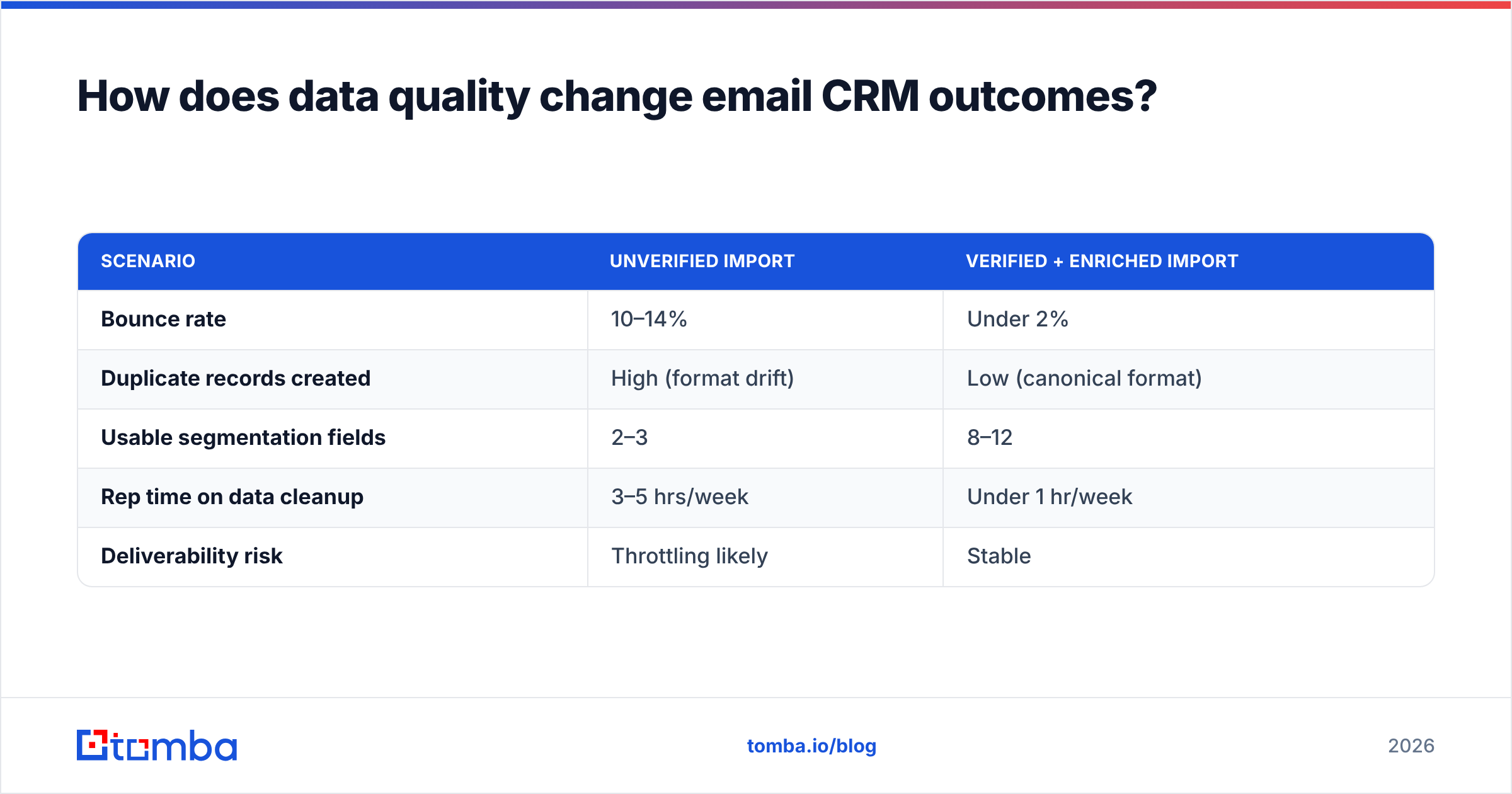
| Scenario | Unverified import | Verified + enriched import |
|---|---|---|
| Bounce rate | 10–14% | Under 2% |
| Duplicate records created | High (format drift) | Low (canonical format) |
| Usable segmentation fields | 2–3 | 8–12 |
| Rep time on data cleanup | 3–5 hrs/week | Under 1 hr/week |
| Deliverability risk | Throttling likely | Stable |
How do you set up an email CRM without breaking deliverability?#
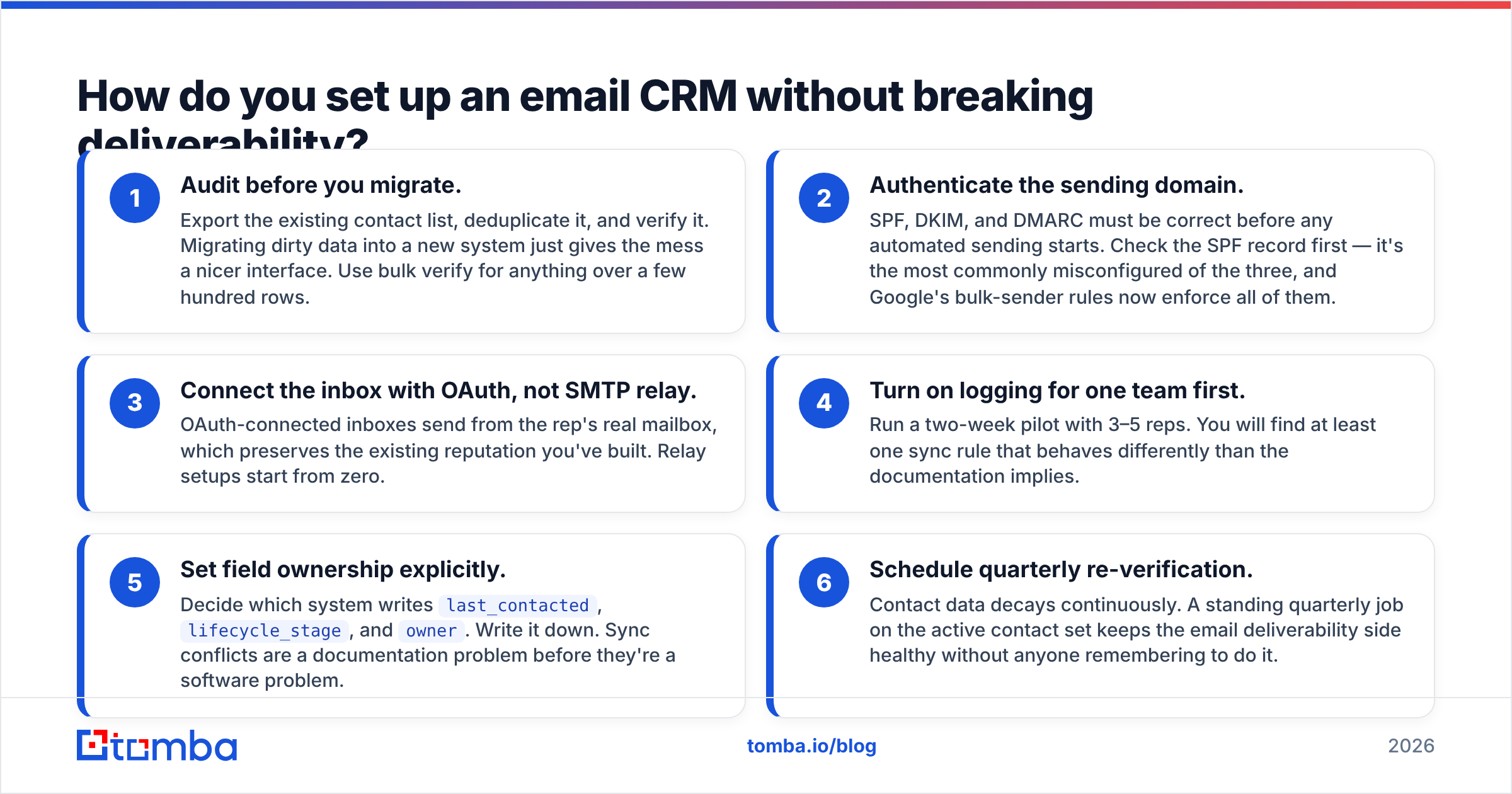
Sequence matters. Do it in this order.
- Audit before you migrate. Export the existing contact list, deduplicate it, and verify it. Migrating dirty data into a new system just gives the mess a nicer interface. Use bulk verify for anything over a few hundred rows.
- Authenticate the sending domain. SPF, DKIM, and DMARC must be correct before any automated sending starts. Check the SPF record first — it's the most commonly misconfigured of the three, and Google's bulk-sender rules now enforce all of them.
- Connect the inbox with OAuth, not SMTP relay. OAuth-connected inboxes send from the rep's real mailbox, which preserves the existing reputation you've built. Relay setups start from zero.
- Turn on logging for one team first. Run a two-week pilot with 3–5 reps. You will find at least one sync rule that behaves differently than the documentation implies.
- Set field ownership explicitly. Decide which system writes
last_contacted,lifecycle_stage, andowner. Write it down. Sync conflicts are a documentation problem before they're a software problem. - Schedule quarterly re-verification. Contact data decays continuously. A standing quarterly job on the active contact set keeps the email deliverability side healthy without anyone remembering to do it.
Is an email CRM worth it for a small team?#
Yes, but the threshold is lower than vendors suggest. The honest test: if more than one person needs visibility into a thread, or if a deal touches more than three emails over more than two weeks, you have outgrown a shared inbox.
Under that threshold, a well-organized Gmail with labels plus a spreadsheet genuinely works, and adding a CRM adds overhead without adding information. Teams that adopt too early end up with a system nobody updates — which is worse than no system, because the stale data now looks authoritative.
Above the threshold, the payback shows up in three places: fewer dropped follow-ups, a forecast built from activity rather than rep optimism, and onboarding time for a new hire measured in days instead of months. Salesforce's research on CRM adoption puts the effect on pipeline visibility consistently at the top of reported benefits, and that tracks with what most teams report anecdotally.
For teams evaluating specific vendors, it's worth noting that B2B data providers and CRMs solve adjacent problems. A provider like BookYourData sells pre-built contact lists; a CRM stores and works the relationships. You generally need both a source of accurate contacts and a system to manage them — treating either as a substitute for the other is where budgets get wasted.
What does a clean email CRM stack look like?#
The minimum viable version has four layers, and each should be a deliberate choice.
- Source layer — where net-new contacts come from. Verified finding rather than scraped exports. This is where a LinkedIn finder or domain search earns its keep.
- Validation layer — verification and catch-all handling before anything reaches the CRM. A catch-all verifier matters here because catch-all domains pass a naive syntax check and still bounce.
- CRM layer — the system of record for deals, owners, and stages. Pick from the comparison table above based on where reps work.
- Automation layer — sequences, tasks, and routing, connected via native integrations or the Tomba API when you need enrichment at the moment a record is created rather than in a nightly batch.
Teams that skip the validation layer end up rebuilding it eighteen months later, usually after a deliverability incident. Teams that skip the source layer end up with a beautifully configured CRM containing 400 contacts.
Where should you start?#
Start with the data, because it's the layer that makes every other layer behave. Before you migrate a single record into a new email CRM, run your existing list through verification, deduplicate on canonical address format, and enrich what survives.
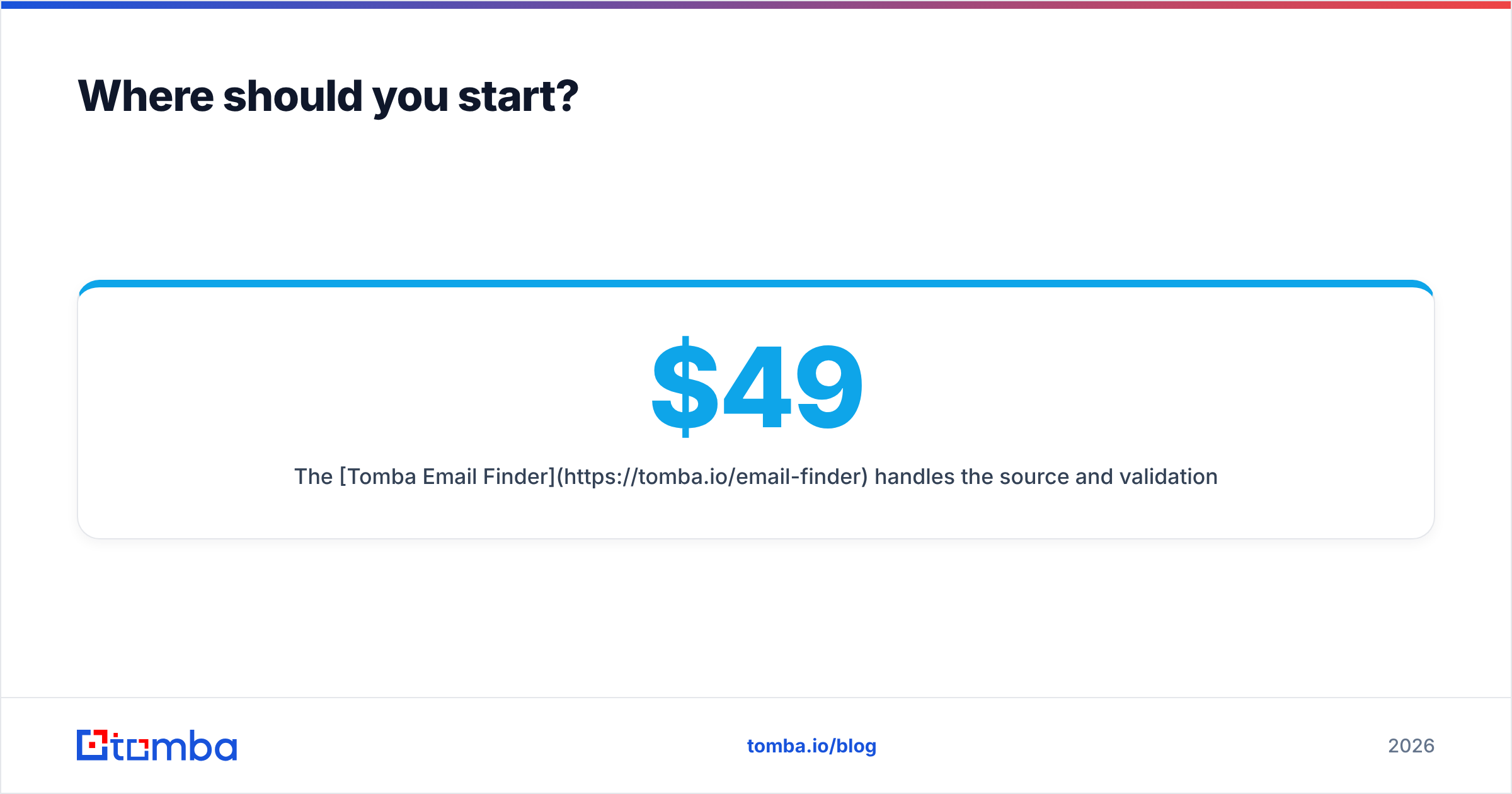
The Tomba Email Finder handles the source and validation layers in one pass — find verified professional addresses by domain, name, or company, with confidence scoring and catch-all detection built in, then push them into HubSpot, Pipedrive, Salesforce, or your sequencer through native integrations or the API. The free tier gives you 25 searches a month to test the workflow against your own target accounts; paid plans start at $49/mo on Starter, with Growth at $99/mo and Pro at $249/mo. Full Tomba pricing is public, and no plan requires an annual commitment to try.
Clean input, then configuration. In that order, an email CRM stops being a data-entry tax and starts being the forecast.
Related guides#
Ready to find emails that actually work?
Join 150,000+ professionals who stopped guessing and started sending. Free credits on signup — no credit card required.
Get the Tomba newsletter
Practical outbound tactics and product updates — once every two weeks.
About the author