Email Database Lookup: How It Works, Costs, and Accuracy
Most email database lookup tools sell you the same three things under different names: a static file, a live search, or a verification pass. Here's how to tell which one you're actually buying — and what it should cost.
TL;DR
- An email database lookup is any process that turns an identifier you already have — a name, a domain, a LinkedIn URL, a company — into a business email address, using a stored index plus live checks.
- There are three products sold under this label: static list downloads, live pattern-based lookup, and verification-only APIs. They price differently, fail differently, and most buyers don't know which one they bought.
- Accuracy claims are close to meaningless unless the vendor tells you the denominator: 98% of delivered results is not 98% of requested results. Coverage and accuracy are separate numbers.
- Expect to pay $0.01–$0.10 per successfully found and verified contact. Anything much cheaper is usually a recycled list; anything much more expensive is usually bundled with a sequencer you may not need.
- The safest workflow: lookup → verify → segment catch-alls → send. Skipping the middle step is what kills domains.
What Is an Email Database Lookup?#
An email database lookup is the process of resolving a person or company identifier into a valid business email address by querying an index of known addresses, patterns, and domain records.
Think of it like a phone book that rebuilds itself every night. A traditional directory is a snapshot — printed once, wrong the moment someone moves. A modern lookup system keeps the snapshot and re-dials the number before handing it to you. The snapshot gives you speed and coverage. The re-dial gives you confidence. Vendors that only do one of the two will always disappoint you in one direction.
In practice, "email database lookup" gets used for four distinct jobs:
- Person lookup — you have a first name, last name, and company domain, and you want that person's work email. This is the core email finder use case.
- Domain lookup — you have a company and want every publicly discoverable address on it, plus the dominant pattern. This is domain search.
- Reverse lookup — you have an email and want the person and company behind it, usually to enrich a form fill or a signup.
- List enrichment — you have 5,000 rows of names and companies and want emails appended in bulk, ideally without hitting a per-row API limit.
Those four jobs have different failure modes. A tool that's excellent at #2 can be mediocre at #1, because listing what's already public is easier than inferring what isn't.
How Does an Email Database Lookup Actually Work?#
Under the hood, almost every serious provider runs the same five-stage pipeline. Knowing the stages tells you exactly where a given vendor is cutting corners.
- Identifier normalization — the input gets cleaned. "Bob Smith @ Acme Corp." becomes
robert|bob smith+acme.com. Bad normalization is why lookups fail on hyphenated names, accented characters, and companies whose brand name differs from their domain. - Index query — the system checks its stored corpus for an exact match. If the address was crawled, submitted, or previously verified, you get an instant hit. This is the "database" half of the term.
- Pattern inference — no exact match? The system pulls the dominant pattern for that domain (
{first}.{last}@,{f}{last}@, etc.), derived from addresses already confirmed on it, and generates candidates. A domain with 40 confirmed addresses gives a far more reliable pattern than one with two. - SMTP and MX validation — candidates get tested against the receiving mail server without sending anything. The server either accepts the recipient, rejects it, or refuses to say (a catch-all).
- Confidence scoring — the surviving candidate gets a score based on pattern strength, source count, recency, and validation result. This is the number you should filter on, not the raw result.

Stage 3 is where cheap tools quietly break. Generating permutations is trivial — you can do it yourself with a free email permutator. Knowing which permutation a specific company actually uses requires a corpus of confirmed addresses on that domain, and that corpus is the real asset. When a vendor won't discuss where their data comes from, assume stage 3 is a guess with a confidence score painted on it.
Static Database vs Live Lookup: Which Should You Buy?#
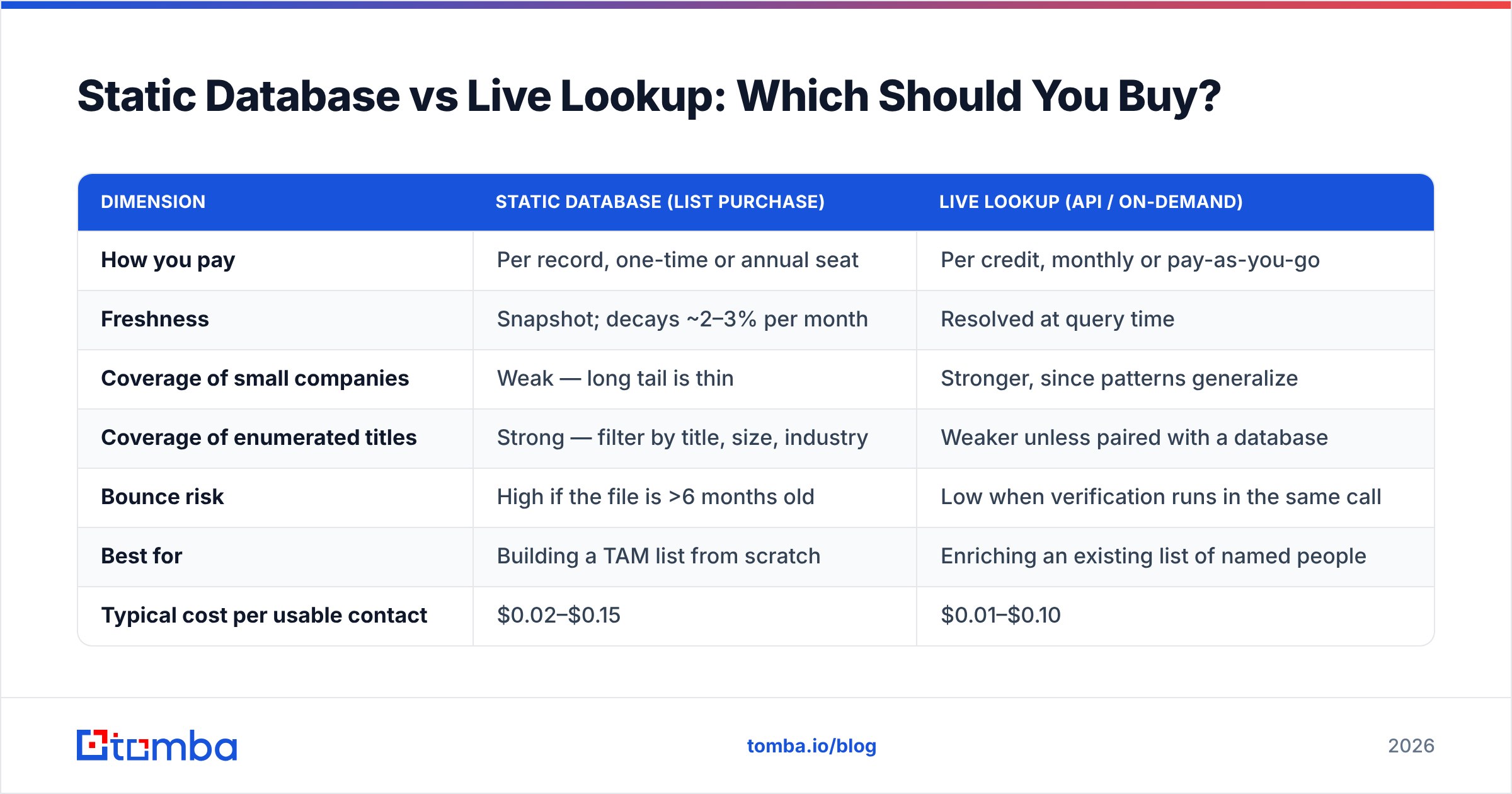
This is the decision that matters most, and vendor marketing deliberately blurs it. A static database is a file you buy access to. A live lookup is a query you run per contact, resolved at request time.
| Dimension | Static database (list purchase) | Live lookup (API / on-demand) |
|---|---|---|
| How you pay | Per record, one-time or annual seat | Per credit, monthly or pay-as-you-go |
| Freshness | Snapshot; decays ~2–3% per month | Resolved at query time |
| Coverage of small companies | Weak — long tail is thin | Stronger, since patterns generalize |
| Coverage of enumerated titles | Strong — filter by title, size, industry | Weaker unless paired with a database |
| Bounce risk | High if the file is >6 months old | Low when verification runs in the same call |
| Best for | Building a TAM list from scratch | Enriching an existing list of named people |
| Typical cost per usable contact | $0.02–$0.15 | $0.01–$0.10 |
| Worst failure mode | You pay for 10k rows, 3k are dead | You burn credits on domains with no data |
Neither is wrong. If you're an SDR team that needs "every VP of Ops at 200–1,000 person logistics companies in Texas," a curated database like BookYourData is the faster path — you're buying the filtering, not just the addresses. If you already have named prospects from LinkedIn, a webinar list, or a CRM export, live lookup is cheaper and fresher, because you're only paying for the specific people you care about.
The expensive mistake is buying a static file to solve a live-lookup problem. You end up paying for 40,000 records to use 900 of them, and the 900 are 14 months stale.
What Does "95% Accuracy" Actually Mean?#
Almost nothing, until you ask for the denominator.
There are two numbers, and vendors report whichever flatters them:
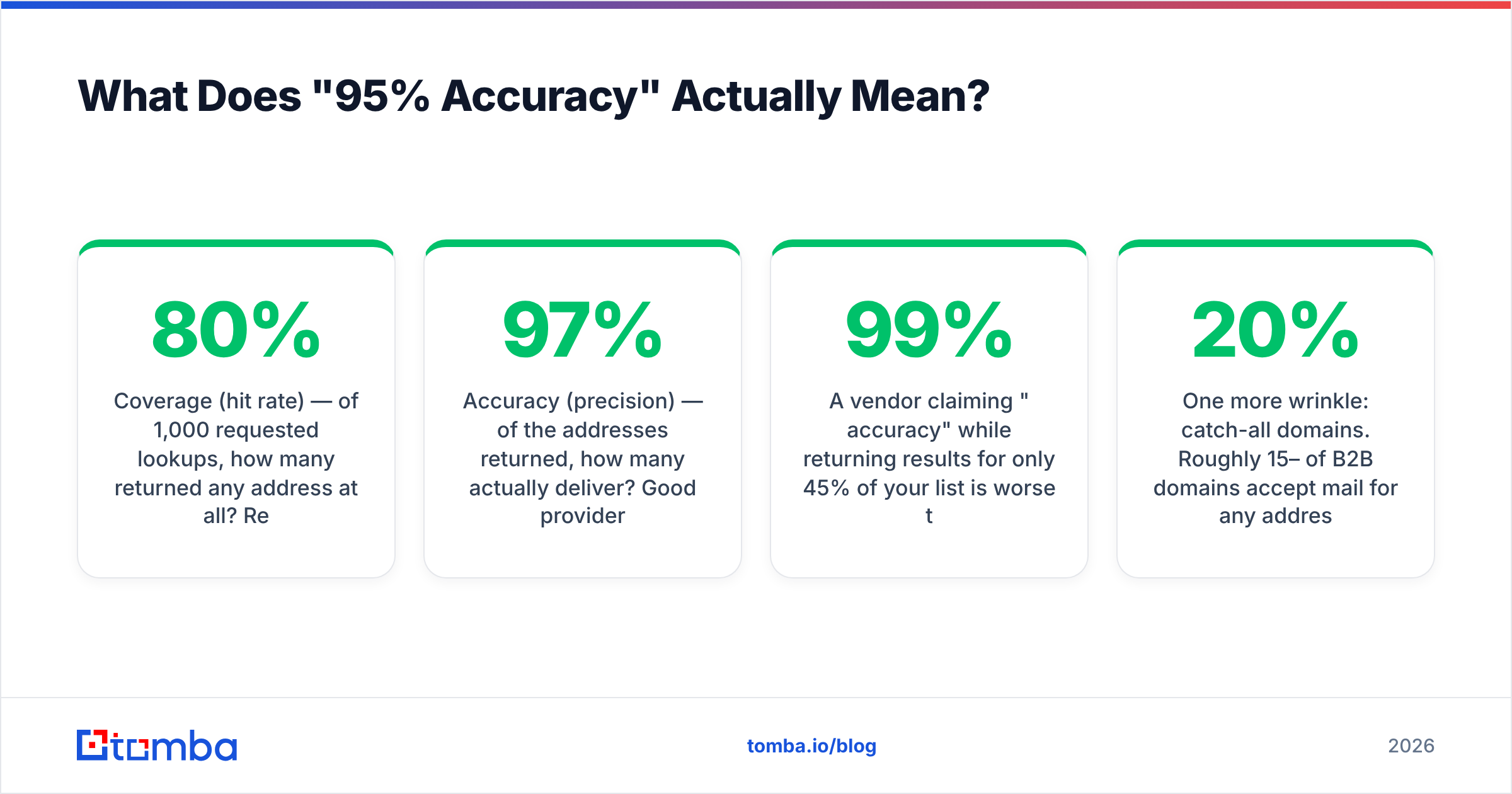
- Coverage (hit rate) — of 1,000 requested lookups, how many returned any address at all? Realistic range for B2B: 55–80%, heavily dependent on your list. SaaS and tech companies index well. Regional manufacturers, healthcare practices, and government bodies do not.
- Accuracy (precision) — of the addresses returned, how many actually deliver? Good providers land 92–97% on verified results.
A vendor claiming "99% accuracy" while returning results for only 45% of your list is worse than one claiming 94% accuracy on 75% coverage. Run the math on 1,000 rows: the first gives you 445 usable contacts, the second gives you 705.

The only test that means anything is your own. Take 100 rows from your real ICP — not a sample list of Fortune 500 CTOs, which every tool nails — and run them through two or three free tiers. Count hits. Then run every hit through an independent email verifier and count how many come back valid. That two-number result is your actual accuracy, and it will differ from the marketing page by 10–25 points in either direction.
One more wrinkle: catch-all domains. Roughly 15–20% of B2B domains accept mail for any address, so SMTP validation can't confirm or deny. Some vendors count these as "valid" (inflating accuracy), some drop them (deflating coverage). Neither is dishonest, but they're not comparable. A dedicated catch-all verifier resolves a meaningful share of these using secondary signals — otherwise, segment them into a separate, lower-volume send and watch the bounce rate before scaling.
Which Email Database Lookup Tools Are Worth It in 2026?#
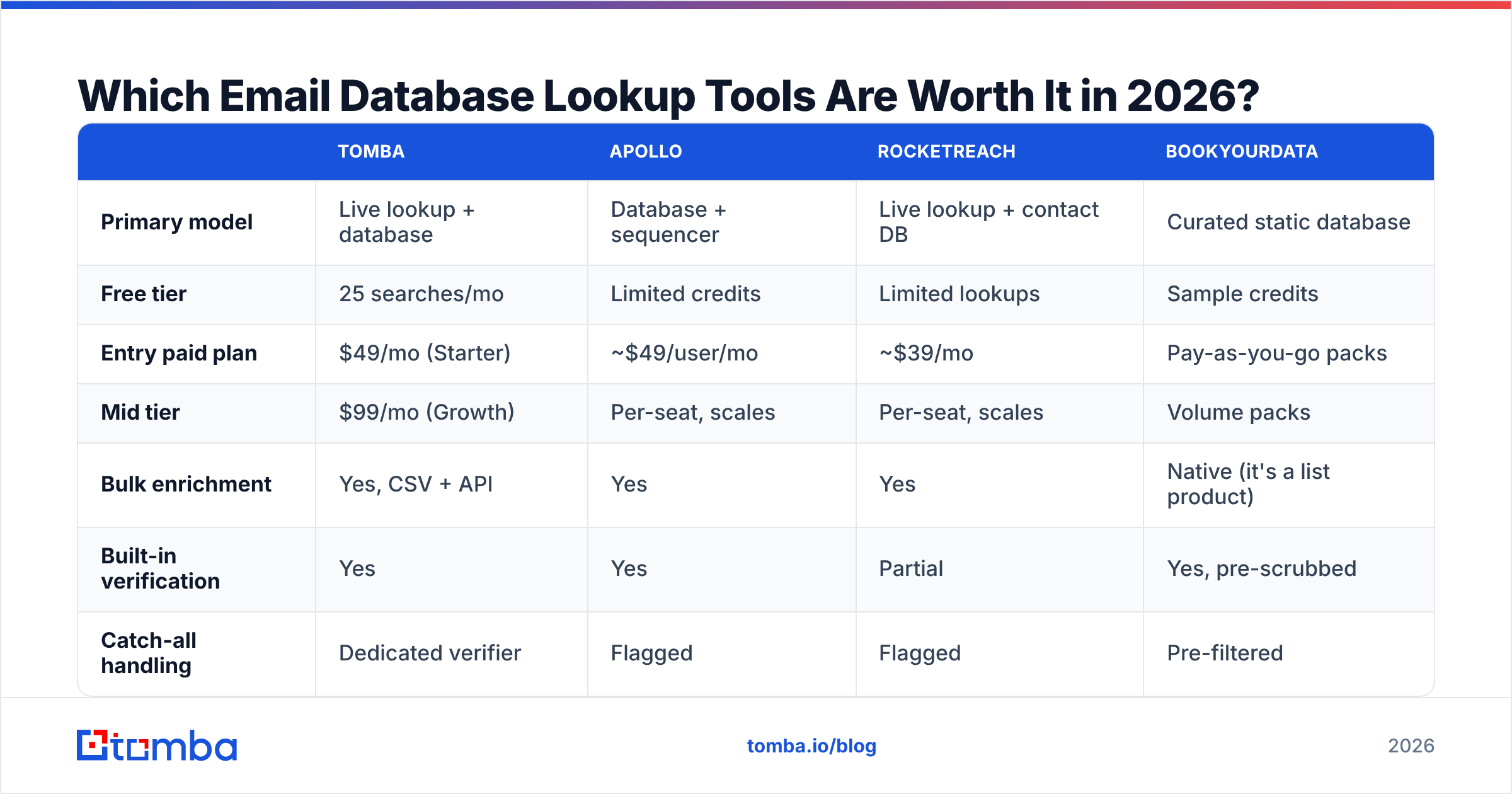
Here's how the main categories compare on the attributes that actually change your cost per meeting.
| Tomba | Apollo | RocketReach | BookYourData | |
|---|---|---|---|---|
| Primary model | Live lookup + database | Database + sequencer | Live lookup + contact DB | Curated static database |
| Free tier | 25 searches/mo | Limited credits | Limited lookups | Sample credits |
| Entry paid plan | $49/mo (Starter) | ~$49/user/mo | ~$39/mo | Pay-as-you-go packs |
| Mid tier | $99/mo (Growth) | Per-seat, scales | Per-seat, scales | Volume packs |
| Bulk enrichment | Yes, CSV + API | Yes | Yes | Native (it's a list product) |
| Built-in verification | Yes | Yes | Partial | Yes, pre-scrubbed |
| Catch-all handling | Dedicated verifier | Flagged | Flagged | Pre-filtered |
| Phone numbers | Yes | Yes | Yes | Yes |
| Seat-based pricing | No | Yes | Yes | No |
| Best fit | Enrichment + API workflows | All-in-one outbound stack | Recruiter / individual research | Filtered list building |

Three honest observations from this table:
Seat-based pricing is the hidden cost multiplier. A $49/user/month tool across a six-person SDR team is $294/month before you've enriched a single record. Credit-based pricing decouples cost from headcount — relevant if ops runs enrichment centrally and reps just consume the output. Check Tomba pricing against your seat count before assuming the cheaper sticker price wins.
All-in-one platforms bundle a sequencer you may already own. If you're running Instantly, Smartlead, or HubSpot sequences, you're paying twice for sending infrastructure inside an Apollo-style plan. Compare the data layer on its own merits.
Curated databases win on filtering, not on freshness. BookYourData and similar providers earn their price when your bottleneck is "who should I even contact" — the firmographic filters do work that no per-name lookup can. When your bottleneck is "I have the names, I need the addresses," per-name lookup is the cheaper tool.

How Much Should an Email Database Lookup Cost?#
Price everything in cost per usable contact, not cost per credit. Usable means: found, verified, not a role address, not a catch-all you can't send to.
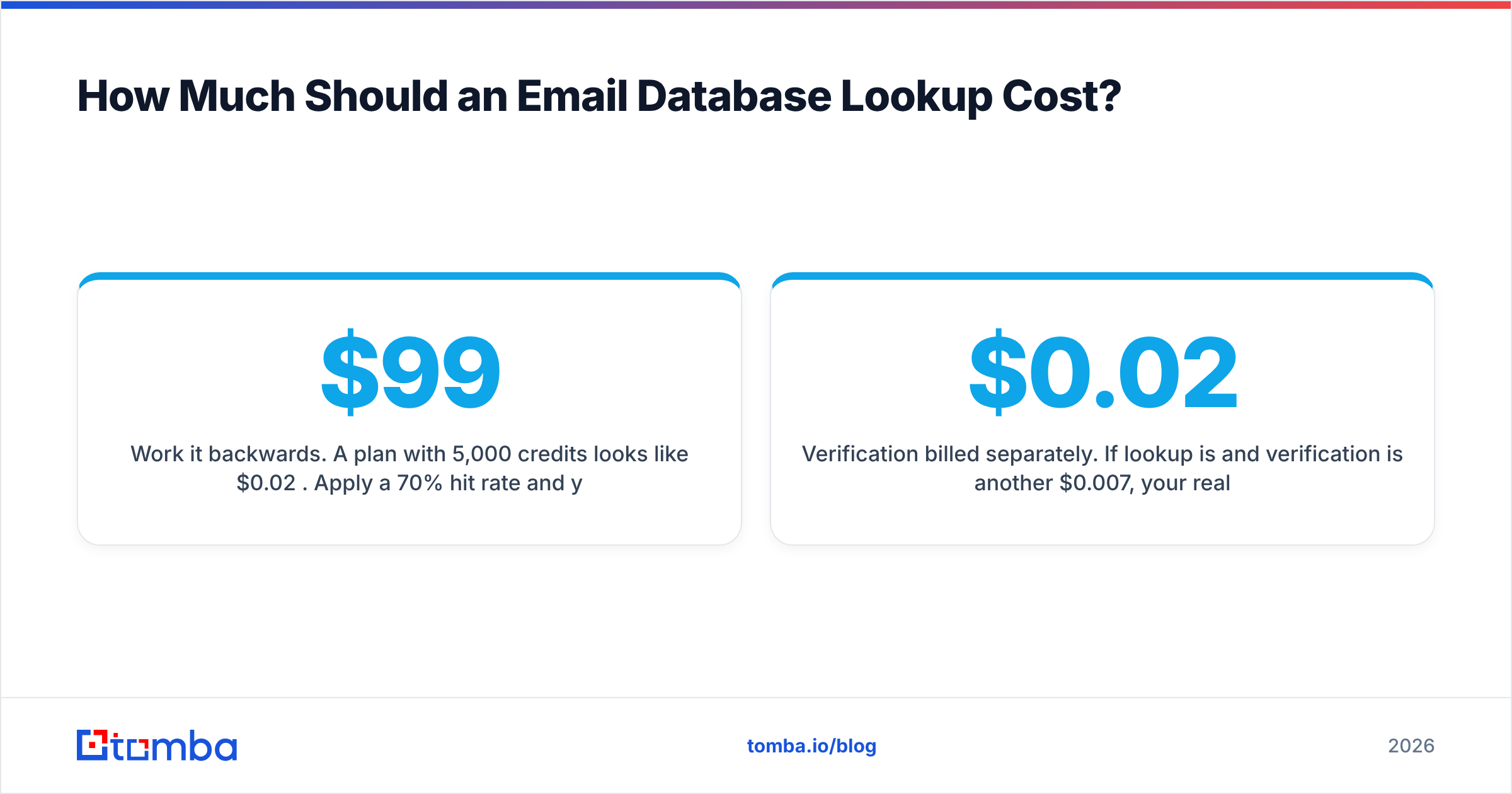
Work it backwards. A $99/month plan with 5,000 credits looks like $0.02 per credit. Apply a 70% hit rate and you're at $0.028. Strip 8% for invalids and role accounts (info@, sales@) and you're near $0.031 per usable contact. That's the number to compare across vendors.
A few pricing traps worth naming:
- Failed lookups that consume credits. Ask explicitly. Some providers charge for a query that returns nothing; most reputable ones don't.
- Verification billed separately. If lookup is $0.02 and verification is another $0.007, your real rate is $0.027. Bundled verification is usually the better deal at volume.
- Annual-only discounts on plans you'll outgrow. Outbound volume is spiky. Month-to-month at a slightly worse rate often costs less over a year than an annual commit sized for your best quarter.
- Enrichment fields you don't use. Paying for firmographics, tech stack, and funding data when you only need an address is common and avoidable.
For teams processing thousands of rows at a time, bulk email finder workflows almost always beat per-seat UI usage — you upload once, get a scored file back, and reps never touch the tool.
Is Email Database Lookup Legal?#
Broadly yes for B2B in most jurisdictions, with real conditions attached.
Under GDPR, a business email address is personal data. Processing it for outreach generally relies on legitimate interest (Article 6(1)(f)), which requires that your outreach be relevant to the recipient's professional role, that you document a balancing test, that you disclose your source on request, and that you honor deletion requests immediately. Blast-emailing a purchased list of 50,000 EU consumers does not survive that test. Contacting 200 named operations directors about an operations product plausibly does. The official GDPR text is worth ten minutes of your time before your first EU campaign.
Under CAN-SPAM (US), purchased and inferred lists are legal for commercial email, provided you use accurate headers and subject lines, disclose your physical address, and process opt-outs within 10 business days.
CASL (Canada) is the strictest of the three and generally requires consent, with narrow business-relationship exemptions.
Practical rule: your vendor should be able to state where a record came from, and your CRM should store that provenance. If neither is true, you're carrying compliance risk you can't document.
How Do You Run Lookups Without Burning Your Domain?#
Deliverability failures usually trace back to data quality, not copy. The sequence that keeps sending domains healthy:
- Lookup — resolve addresses, keep the confidence score attached to every row.
- Verify independently — even if the finder verified, re-check anything older than 30 days. Contacts decay; people change jobs constantly.
- Segment by risk — high-confidence valids go into your main sequence. Catch-alls go into a separate, throttled sequence. Anything below your confidence threshold gets dropped, not "tested."
- Suppress role accounts —
info@,support@,careers@inflate your list and tank engagement metrics. - Ramp volume — new domains start at 20–30 sends/day and climb over 3–4 weeks. A clean list on a cold domain still lands in spam.
- Watch bounce rate as a circuit breaker — above 3%, stop the campaign and re-verify. Above 5%, your sender reputation is already taking damage.
Step 2 is the one teams skip when they're behind on quota, and it's the one that costs the most. A single campaign to a stale list can undo two months of sender reputation work. Verification costs a fraction of a cent per row; domain rehabilitation costs weeks.
Start With Your Own List, Not a Vendor Demo#
The fastest way to settle an email database lookup decision is to stop reading comparison pages — including this one — and run 100 rows of your real ICP through two or three tools. Count hits, verify independently, and calculate cost per usable contact. The winner is rarely the tool with the loudest accuracy claim.
If you want a starting point that doesn't require a sales call, the Tomba Email Finder gives you 25 free searches a month — enough to benchmark a real sample. Lookup, verification, catch-all handling, and bulk processing sit in the same workflow, and pricing is credit-based rather than per-seat, so an ops-led enrichment process doesn't get taxed by headcount. Run your 100 rows, check the numbers against whatever you're using now, and let the hit rate decide.
Related guides#
Ready to find emails that actually work?
Join 150,000+ professionals who stopped guessing and started sending. Free credits on signup — no credit card required.
Get the Tomba newsletter
Practical outbound tactics and product updates — once every two weeks.
About the author