Email Deliverability Bad Data: The 2026 Root-Cause Guide
Most deliverability problems are not copy problems or DNS problems. They are data problems. Here is exactly how bad records create bounces, spam traps, and blocklistings — and the workflow that fixes it.
Email deliverability bad data is the quiet killer of cold outbound. Your copy can be great. Your DNS can be perfect. But if the list is full of dead, guessed, or stale records, the mail still fails. This guide shows what breaks, why it breaks, and how to fix it.
TL;DR
Bad data is the top root cause of deliverability collapse. It beats copy, DNS, and send volume. Hard bounces and spam traps are data problems, not content problems.
Mailbox providers score you on signals your data controls: bounce rate, complaint rate, unknown-user rate, and engagement. Miss the limits and the whole domain loses inbox placement, not just one campaign.
B2B contact data decays about 22-30% per year. A list you cleaned in January is worse by July. Hygiene is a schedule, not a one-off.
Verification before send catches the cheap problems: bad syntax, dead MX, dead mailboxes. Catch-all domains, role accounts, and recycled traps need their own handling.
Recovery from a data-caused reputation hit takes 3-6 weeks of slow, careful sending. Prevention costs a fraction of that.
What counts as email deliverability bad data?#
Bad data is any record that makes a mailbox provider trust you less after you send to it. That is wider than "the email bounced."
Think of your list as a delivery route. One wrong address costs you a few minutes. Twenty wrong addresses on the same route, and the dispatcher starts to wonder if you know the neighborhood at all. Mailbox providers run the same logic at scale. Repeated sends to addresses that do not exist tell Gmail and Microsoft one thing: you did not earn this list, you assembled it.
Email deliverability bad data falls into six categories, and they cause almost all of the damage:
Dead mailboxes — the person left, IT deleted the account, or the domain stopped hosting mail. These cause hard bounces (SMTP 550 unknown user). It is the most damaging signal you can send at volume.
Guessed patterns —
first.last@domain.comfrom a permutator, sent with no SMTP check. Guessing is right about 40-60% of the time on new domains. So roughly half your sends bounce.Spam traps — addresses built to catch senders with sloppy sourcing. Pristine traps never belonged to a person. Recycled traps are old real addresses that a provider turned into traps after 6-12 months of silence. Wikipedia has a fair primer on how spamtraps work.
Role and shared accounts —
info@,sales@,careers@,abuse@. They rarely bounce, so tools mark them valid. But they draw complaints at many times the rate of a personal mailbox.Catch-all domains — the server accepts every address. An SMTP probe cannot tell you if the mailbox is real. Send blind and the bounce tells you later.
Stale but valid records — the address works, but the person changed jobs. The mail lands and nobody reads it. Your engagement rate drops. This is the quiet one that almost nobody tracks.

How does bad data actually damage deliverability?#
Through four mechanisms, in rising order of pain.
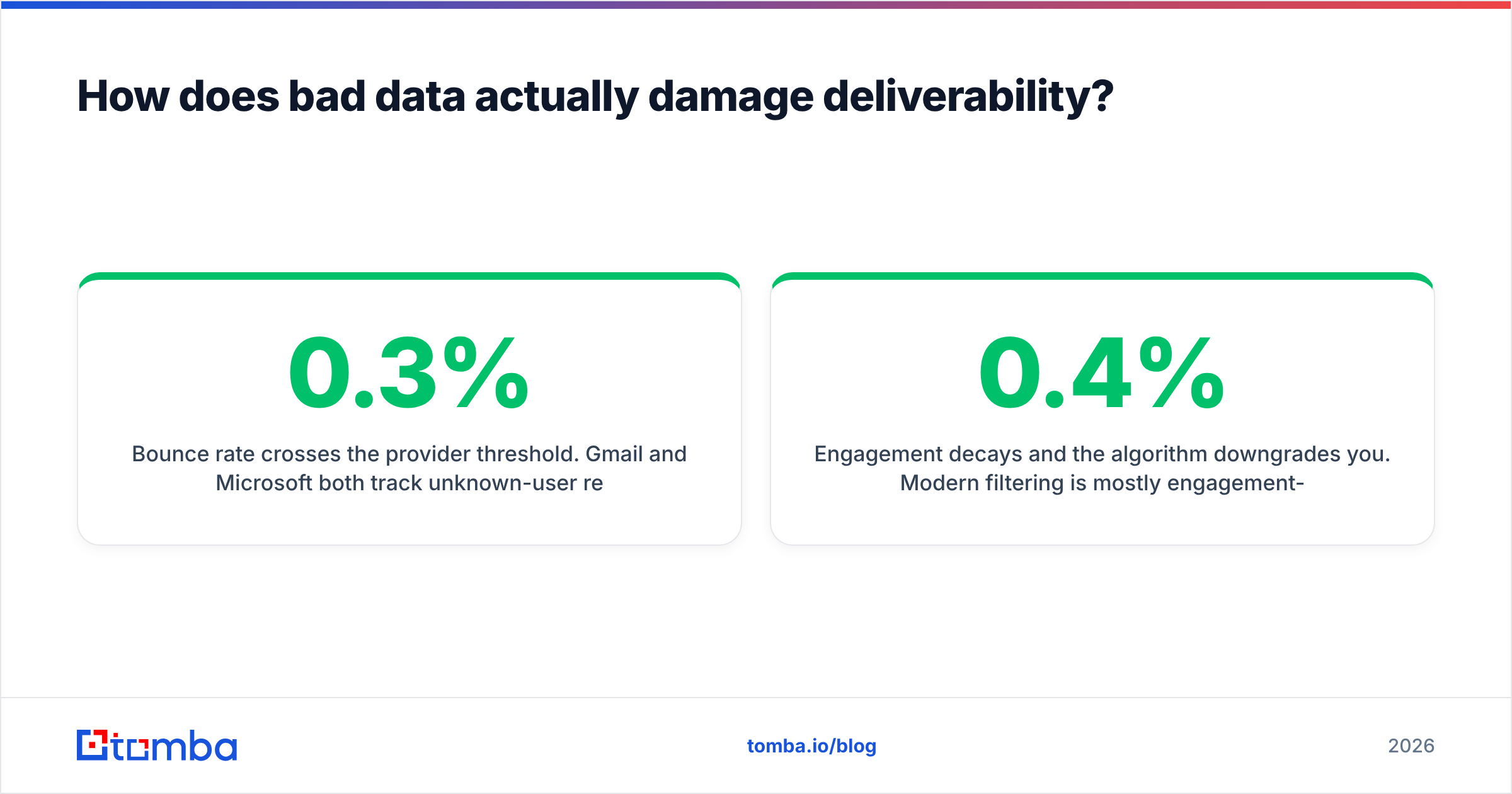
Bounce rate crosses the provider limit. Gmail and Microsoft both track unknown-user replies per sending domain. Google's bulk sender guidelines say to keep spam complaints under 0.3%. They also name invalid recipients as an abuse signal. Most ESPs throttle or suspend an account that stays above 5% hard bounces. Some act at 2%.
Spam traps trigger blocklisting. One pristine trap hit can get your sending IP or domain listed by Spamhaus or a similar operator. Spamhaus does not warn you first. You find out when delivery falls off a cliff on a Tuesday morning.
Complaint rate rises because the targeting was wrong. Bad data is not only invalid data. It is also mismatched data. Records with the wrong job title, company size, or department produce irrelevant email. Irrelevant email gets marked as spam, and that signal carries a lot of weight.
Engagement drops and the filter downgrades you. Modern filtering runs mostly on engagement. Opens, replies, folder moves, and "not spam" clicks feed a per-sender score. A list padded with stale but valid addresses drags that score down even when nothing bounces. That is how a campaign with a 0.4% bounce rate still lands in Promotions.
What do mailbox providers actually measure?#
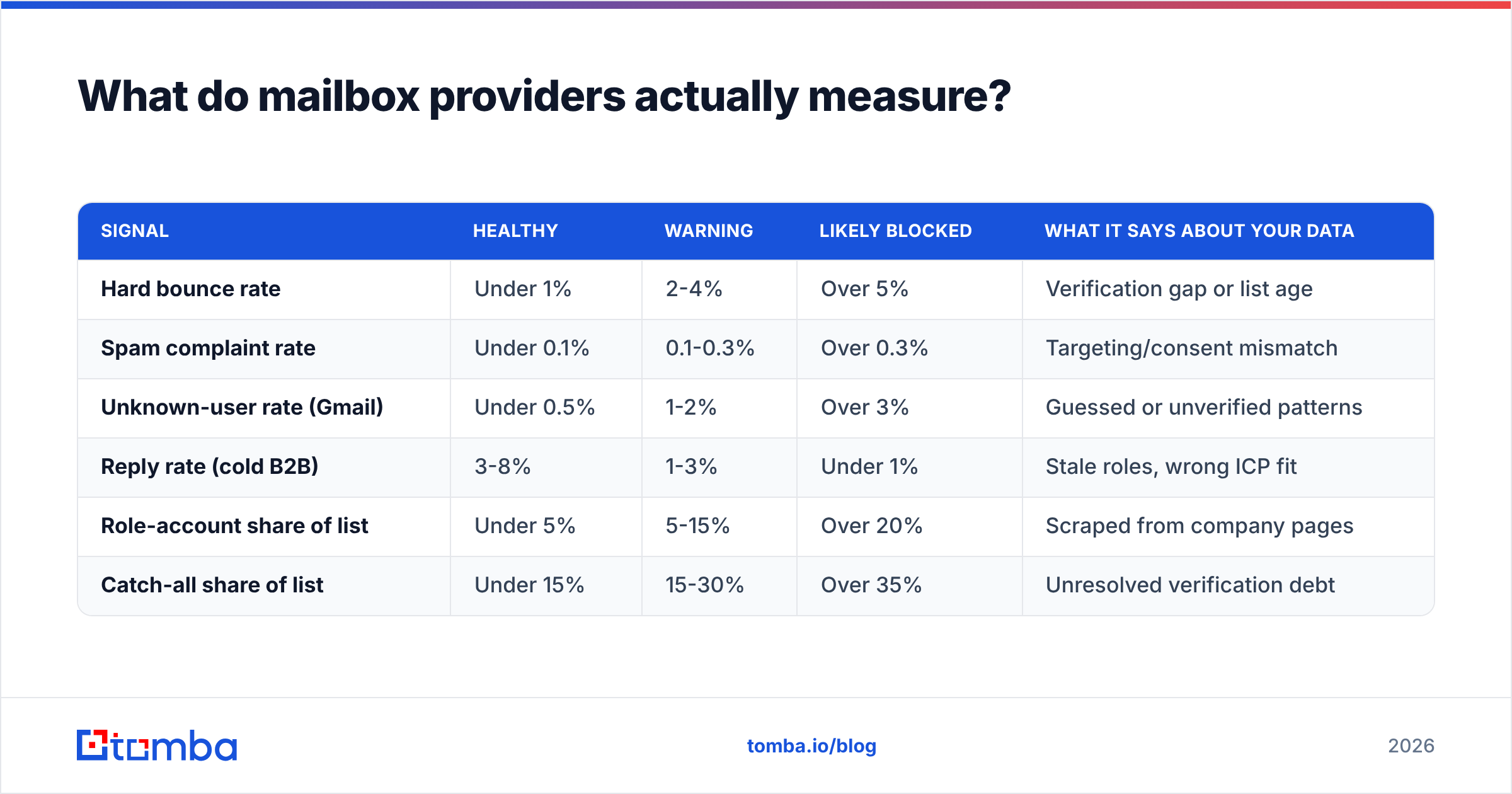
Here are the numbers worth tracking. The thresholds below are the ones most senders work against in 2026.
| Signal | Healthy | Warning | Likely blocked | What it says about your data |
|---|---|---|---|---|
| Hard bounce rate | Under 1% | 2-4% | Over 5% | Verification gap or list age |
| Spam complaint rate | Under 0.1% | 0.1-0.3% | Over 0.3% | Targeting/consent mismatch |
| Unknown-user rate (Gmail) | Under 0.5% | 1-2% | Over 3% | Guessed or unverified patterns |
| Reply rate (cold B2B) | 3-8% | 1-3% | Under 1% | Stale roles, wrong ICP fit |
| Role-account share of list | Under 5% | 5-15% | Over 20% | Scraped from company pages |
| Catch-all share of list | Under 15% | 15-30% | Over 35% | Unresolved verification debt |
Two things to note. First, these are per sending domain, not per campaign. One bad list poisons every sequence on that domain. Second, the thresholds add up over a rolling window of 7-30 days. So a single bad blast can sit in your reputation for a month.
For plain definitions of the underlying terms, Tomba's glossary entries on email deliverability and sender reputation are a good starting point.
Which data problems hurt the most per dollar to fix?#
Not all bad records cost the same. Not all fixes cost the same either. Here they are, ranked by damage per unit of effort:
Syntax errors and dead MX — easy to catch, so there is no excuse. Any email verifier strips these in seconds. If they are still on your list, nothing downstream matters yet.
Dead mailboxes — an SMTP handshake catches these with 95-98% confidence on non-catch-all domains. Highest damage, cheapest fix. Do this first.
Recycled spam traps — verification cannot see them, because they accept mail. Your only defence is recency. Never mail a record older than six months without re-verifying it first.
Catch-all domains — genuinely hard. The server accepts every address, so you need pattern confidence, a second source, or a catch-all verifier that scores likelihood instead of returning yes or no.
Role accounts — easy to spot by prefix. The call is strategic. For enterprise prospecting, drop them. For small business, where
info@is often the owner's real inbox, put them in a separate low-volume sequence.Wrong-person enrichment — the hardest to catch automatically. You need spot checks against LinkedIn or company pages, or a source that timestamps every record.
How does verification-before-send compare to the alternatives?#
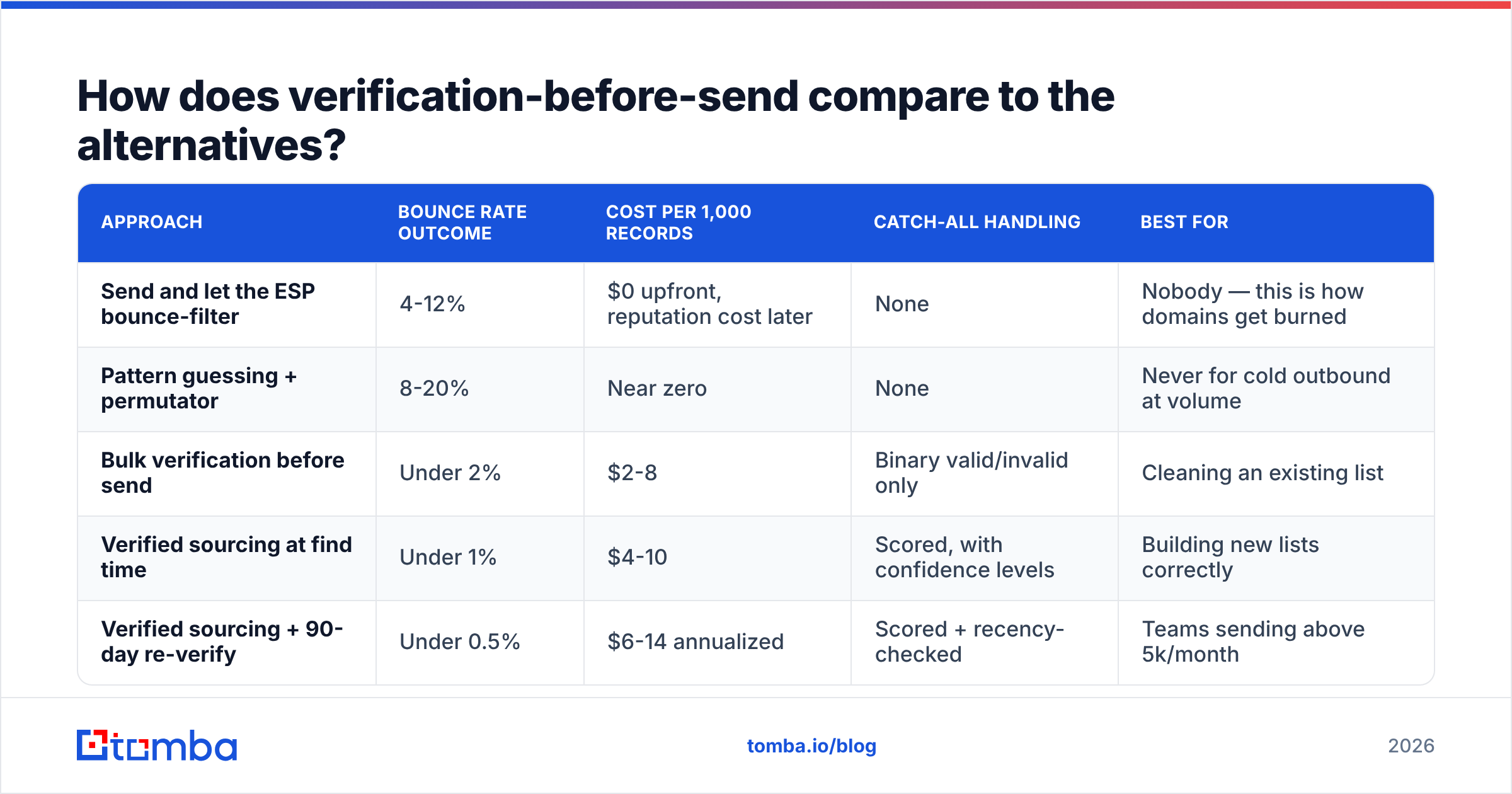
Three strategies compete in practice. Here is how they hold up.
| Approach | Bounce rate outcome | Cost per 1,000 records | Catch-all handling | Best for |
|---|---|---|---|---|
| Send and let the ESP bounce-filter | 4-12% | $0 upfront, reputation cost later | None | Nobody — this is how domains get burned |
| Pattern guessing + permutator | 8-20% | Near zero | None | Never for cold outbound at volume |
| Bulk verification before send | Under 2% | $2-8 | Binary valid/invalid only | Cleaning an existing list |
| Verified sourcing at find time | Under 1% | $4-10 | Scored, with confidence levels | Building new lists correctly |
| Verified sourcing + 90-day re-verify | Under 0.5% | $6-14 annualized | Scored + recency-checked | Teams sending above 5k/month |
The pattern is simple. Paying for accuracy when you source data is cheaper than paying at cleanup time. Both are far cheaper than paying in reputation recovery. A blocklisted domain costs you 3-6 weeks of pipeline. Against one lost sales cycle, a $99 monthly tool is not a close call.
Cleaning a large list instead of sourcing fresh? Bulk verify in batches. Then segment the output rather than deleting every record marked risky — see the workflow below.

Is buying a list ever safe?#
Sometimes. It depends on whether the vendor treats data quality as the product or as a marketing line.
What matters is how the vendor sources and refreshes records. A vendor that scrapes once and resells the same snapshot for three years is selling you spam traps. A vendor that keeps verified, timestamped records with an accuracy guarantee is selling something else. BookYourData is a reasonable example of that second category, with per-record verification and replacement terms. Both get called "list buying," but they are not the same product.
Ask any data vendor these questions before you send a single email to their records:
When was this record last verified? Not "our database updates continuously" — the timestamp on the row you bought.
What is the accuracy guarantee, and what is the remedy? Credit back on bounces above a stated threshold is the version that means something. A number on a landing page is not.
Where did the record come from? Public web, opt-in, contributory network, or partner data? Contributory networks in particular can carry consent problems in the EU.
Do you screen against known trap lists? Most reputable vendors do. Ask anyway.
Can I re-verify independently before sending? If a vendor discourages this, that is your answer.
Even with a good vendor, verify again at send time. Records go stale in transit. Weeks can pass between the vendor's check and your first send. No guarantee survives your delay.
What does a clean data workflow look like end to end?#
Five stages. None are optional above 2,000 sends a month.
1. Source with verification built in. Find contacts by company domain, by name, or from a profile. Either way, the record should arrive with a confidence score attached, not a raw pattern guess. Domain search pulls a whole company's verified addresses at once. That is faster and cleaner than permuting name patterns.
2. Segment by confidence instead of just filtering. Split the output into three buckets. High confidence: send as normal. Catch-all or unknown: send at low volume from a second domain, or skip. Invalid: suppress for good. Suppression lists must carry across tools. A bounced address that reappears in next quarter's export is how teams re-burn a domain they just fixed.
3. Strip role accounts and generic prefixes. Or segment them. Do not blend them into the main sequence.
4. Warm up and pace yourself. Even clean data gets filtered on a cold domain. Ramp volume over 3-4 weeks. Keep daily volume per provider modest. Watch inbox placement, not just delivery rate. Check your sender reputation and blocklist status before a large send, not after.
5. Re-verify on a schedule. Every 90 days for lists you mail often. Every 30 days for high-volume sequences. Treat anything older than six months as unverified, whatever it was when you got it.
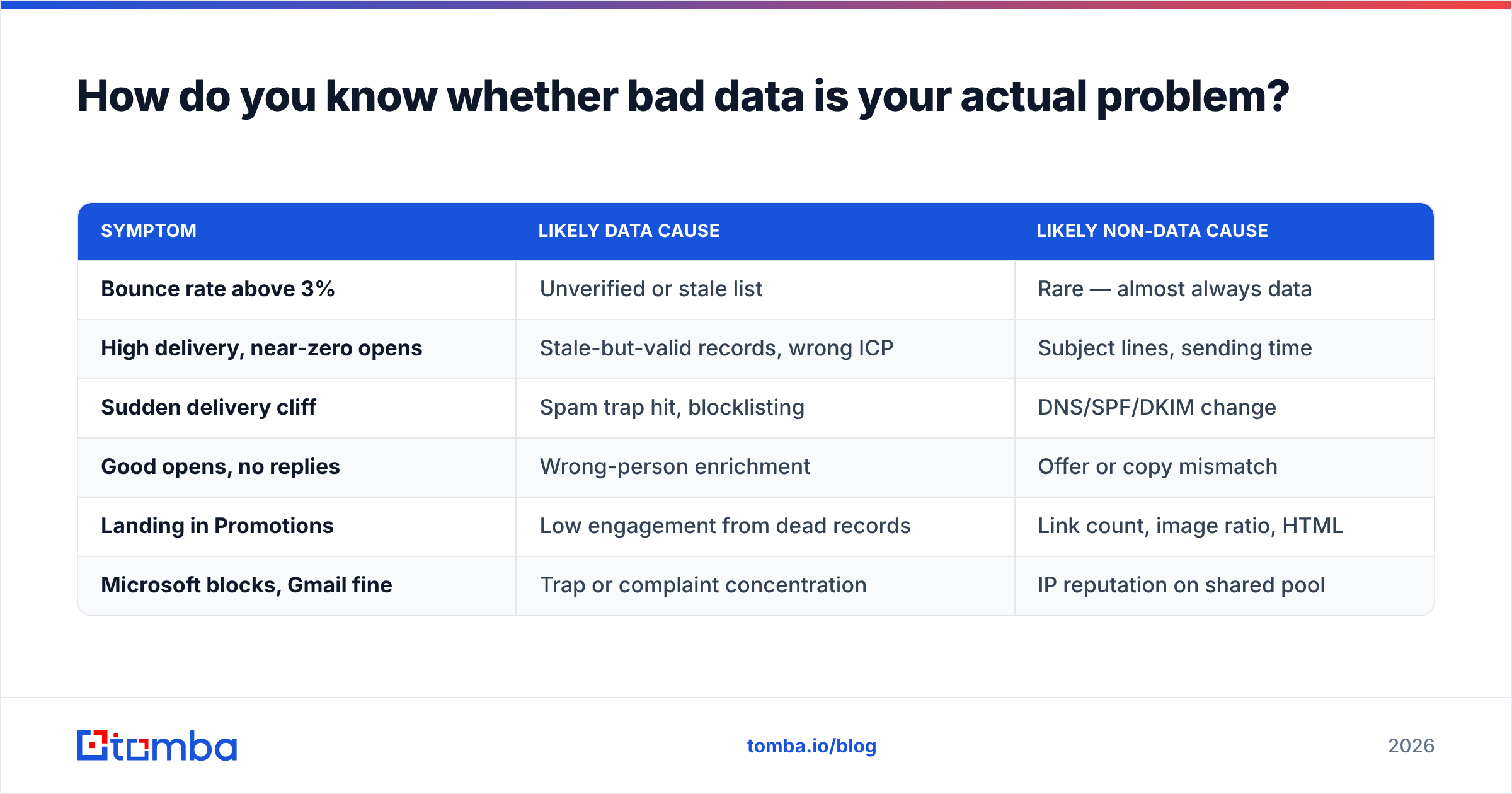
How do you know if email deliverability bad data is your real problem?#
Run this diagnostic before you rewrite your copy again.
| Symptom | Likely data cause | Likely non-data cause |
|---|---|---|
| Bounce rate above 3% | Unverified or stale list | Rare — almost always data |
| High delivery, near-zero opens | Stale-but-valid records, wrong ICP | Subject lines, sending time |
| Sudden delivery cliff | Spam trap hit, blocklisting | DNS/SPF/DKIM change |
| Good opens, no replies | Wrong-person enrichment | Offer or copy mismatch |
| Landing in Promotions | Low engagement from dead records | Link count, image ratio, HTML |
| Microsoft blocks, Gmail fine | Trap or complaint concentration | IP reputation on shared pool |
The rule of thumb is simple. If the problem shows up in delivery metrics, it is data. If delivery is clean and only replies suffer, it is probably positioning or copy. Teams spend months rewriting sequences when a verification pass was the fix.
What does recovery look like after a data-caused hit?#
Slower than you would like. If you have already hit the wall:
Stop sending from the affected domain for 5-7 days. Sending while blocklisted only deepens the signal.
Delist where you can. Spamhaus and most major operators offer self-service removal for a first offence. They will relist you at once if the behaviour continues.
Verify the whole list again from scratch. Not just the segment you think caused it. All of it.
Resume at 10-20% of your prior volume. Target only your most engaged segment, then ramp over 3-4 weeks.
Consider a second domain for cold outbound. That way your primary domain's transactional and reply traffic is never at risk again. This is standard practice now, not paranoia.
Expect 3-6 weeks to recover from a first incident. Repeat hits on the same domain take much longer. Some domains never get their old placement back.
Fix the input, not the output#
Deliverability work has an order of operations, and data comes first. You cannot warm your way out of a list that is 30% dead. No subject line saves an email that never reaches a mailbox. Every hour spent on templates before the list is clean is an hour spent tuning a number the next bounce report will erase.
Start where the damage begins. Source addresses that are verified the moment you collect them. Keep a permanent suppression list. Re-verify on a calendar, not in a crisis. Tomba's Email Finder returns confidence-scored business addresses by domain, name, or company. Verification and catch-all handling sit in the same workflow, so the list you build is the list you can actually send to. The free tier covers 25 searches a month if you want to test accuracy on a domain you already know. Paid plans start at $49/mo, and full Tomba pricing is public. Clean the input, and most of your deliverability problems stop being problems.
Related guides#
Ready to find emails that actually work?
Join 150,000+ professionals who stopped guessing and started sending. Free credits on signup — no credit card required.
Get the Tomba newsletter
Practical outbound tactics and product updates — once every two weeks.
About the author