Email Drip Campaign Software: The 2026 Buyer's Guide
Most drip tools sell you triggers and templates. The thing that actually decides whether your sequence works is the contact data feeding it. Here's how to pick in 2026.
TL;DR
- Email drip campaign software sends pre-built sequences triggered by time or behavior. The category splits into three very different products: marketing automation, sales engagement, and product/lifecycle messaging. Picking the wrong branch costs more than picking the wrong vendor.
- Real 2026 price range: roughly $15–$40/month for small lists, $100–$300/month once you cross a few thousand contacts, and $800+/month for full marketing-automation suites.
- Feature checklists barely differentiate anymore. Every serious tool has branching logic, A/B testing, and a visual builder. Deliverability controls and data quality are where campaigns actually break.
- A 10% bounce rate will sink a domain faster than a mediocre subject line. Verify before you import, not after the first send.
- Shortlist by trigger type (time, behavior, or CRM stage), then by how the tool handles suppression, sending limits, and list hygiene.
What is email drip campaign software?#
Email drip campaign software automates a pre-written series of emails that go out on a schedule or in response to something a contact did. You build the sequence once; the tool decides who enters it, when each message fires, and when someone exits.
Think of it like a sprinkler system versus standing there with a hose. A broadcast email is the hose — you point it at everyone at once, then you're done. A drip runs on a timer and a moisture sensor: new plant goes in the ground, the system starts watering on its own schedule, and it shuts off when the plant is established.
The moving parts are consistent across every vendor in the category:
- Triggers — what puts someone into the sequence. A form submit, a tag, a CRM stage change, a page view, a trial signup, or a manual import.
- Steps and delays — the messages themselves plus the waiting periods between them. Most sequences run 3–7 emails over 2–6 weeks.
- Branching logic — if/then rules that route contacts down different paths based on opens, clicks, replies, or field values.
- Exit conditions — the rules that pull someone out. Replied, booked a meeting, converted, unsubscribed, or bounced. Weak exit conditions are the single most common cause of an embarrassing "you're still getting this?" email.
- Sending infrastructure — shared IPs, dedicated IPs, or your own mailbox via OAuth. This decides whether your mail lands in the inbox or the promotions tab.
- Reporting — per-step open, click, reply, and conversion data, ideally attributable back to revenue.
Everything else vendors put on their feature page is a variation on those six things.
How is a drip different from a nurture sequence or a sales cadence?#
The words get used interchangeably in marketing copy, but the products behind them are built differently, and buying the wrong one is the most expensive mistake in this category.
Drip / nurture is marketing-owned, high-volume, and sent from a marketing domain through a shared or dedicated IP pool. Think onboarding series, re-engagement, post-webinar follow-up. Volume is thousands to millions.
Sales cadence / sequence is rep-owned, low-volume, and sent from an individual's actual mailbox so it reads like a one-to-one email. Think outbound prospecting and post-demo follow-up. Volume is 30–200 per rep per day, and deliverability rules are stricter because you're sending cold.
Lifecycle / product messaging is triggered by in-app events and usually needs an engineer to instrument. Think "user created a project but never invited a teammate."
If you buy a marketing automation platform and use it for cold outbound, you'll burn your marketing domain's sender reputation and take your invoices and receipts down with it. If you buy a sales engagement tool and try to run a 50,000-contact newsletter through it, you'll hit sending caps on day one.

Which email drip campaign software should you shortlist in 2026?#
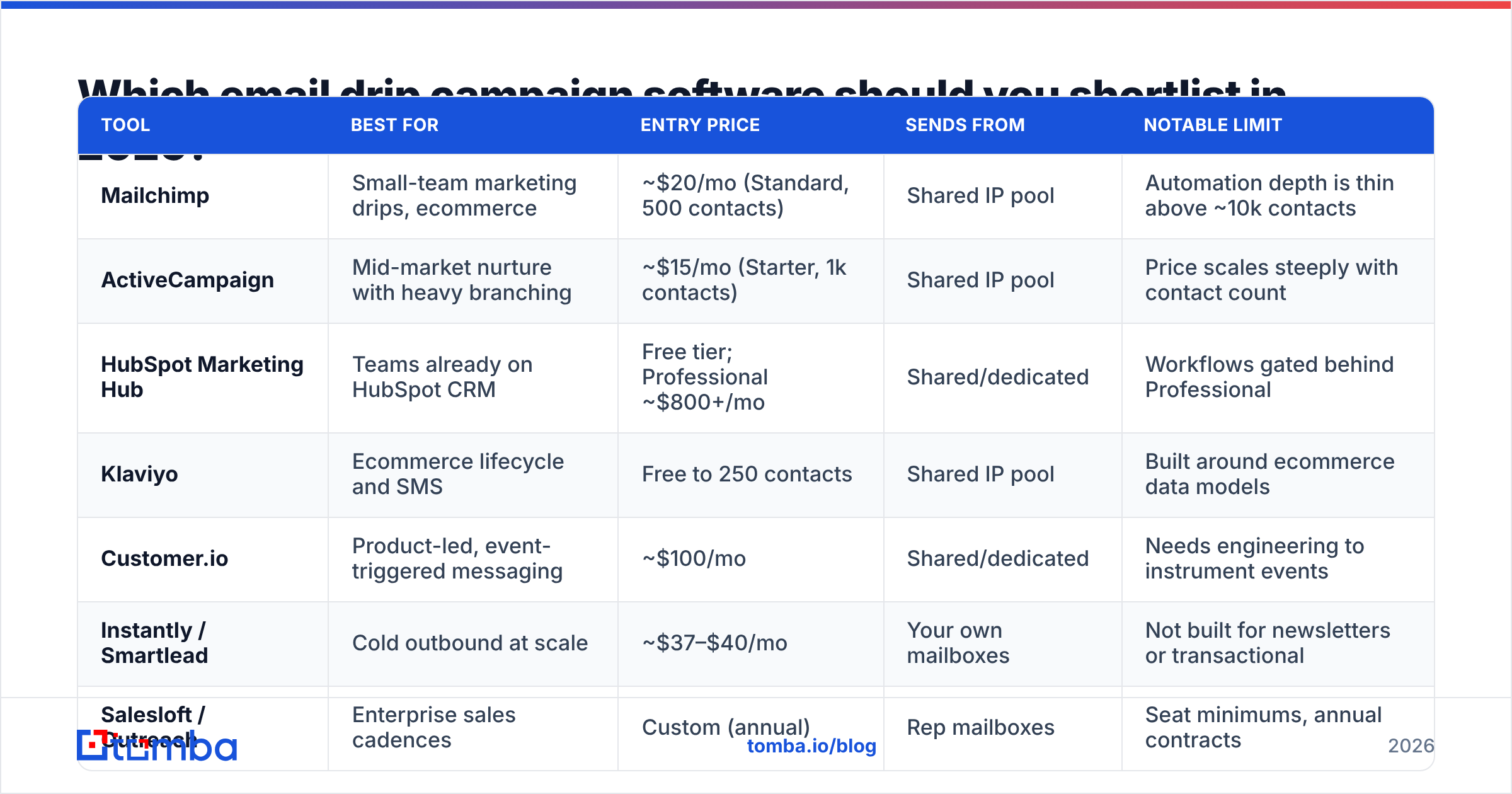
Below is the honest shape of the market. Pricing reflects published list prices at the time of writing and moves constantly — always confirm on the vendor's own page, and assume the contact-count tiers matter more than the headline number.
| Tool | Best for | Entry price | Sends from | Notable limit |
|---|---|---|---|---|
| Mailchimp | Small-team marketing drips, ecommerce | ~$20/mo (Standard, 500 contacts) | Shared IP pool | Automation depth is thin above ~10k contacts |
| ActiveCampaign | Mid-market nurture with heavy branching | ~$15/mo (Starter, 1k contacts) | Shared IP pool | Price scales steeply with contact count |
| HubSpot Marketing Hub | Teams already on HubSpot CRM | Free tier; Professional ~$800+/mo | Shared/dedicated | Workflows gated behind Professional |
| Klaviyo | Ecommerce lifecycle and SMS | Free to 250 contacts | Shared IP pool | Built around ecommerce data models |
| Customer.io | Product-led, event-triggered messaging | ~$100/mo | Shared/dedicated | Needs engineering to instrument events |
| Instantly / Smartlead | Cold outbound at scale | ~$37–$40/mo | Your own mailboxes | Not built for newsletters or transactional |
| Salesloft / Outreach | Enterprise sales cadences | Custom (annual) | Rep mailboxes | Seat minimums, annual contracts |
A few patterns worth naming:
- The cheap tier is a trap for growing lists. Nearly every marketing platform prices on contact count, not sends. A tool at $15/month for 1,000 contacts is often $250+/month at 25,000 — and you don't find out until you're migrated in.
- Mailbox-based senders scale differently. Cold outbound tools charge per mailbox or per seat rather than per contact, which is cheaper at high contact volume but requires you to buy and warm domains.
- CRM-native beats best-of-breed when adoption is the risk. If your reps live in one CRM, a slightly worse drip tool inside it will out-perform a better one they have to remember to open.
For a broader vendor list with verified user reviews rather than vendor claims, G2's marketing automation category is the least biased public snapshot available. Mailchimp's pricing page and HubSpot are worth checking directly for current tiers, since both re-priced in the last two years.
What features actually matter, and which are noise?#
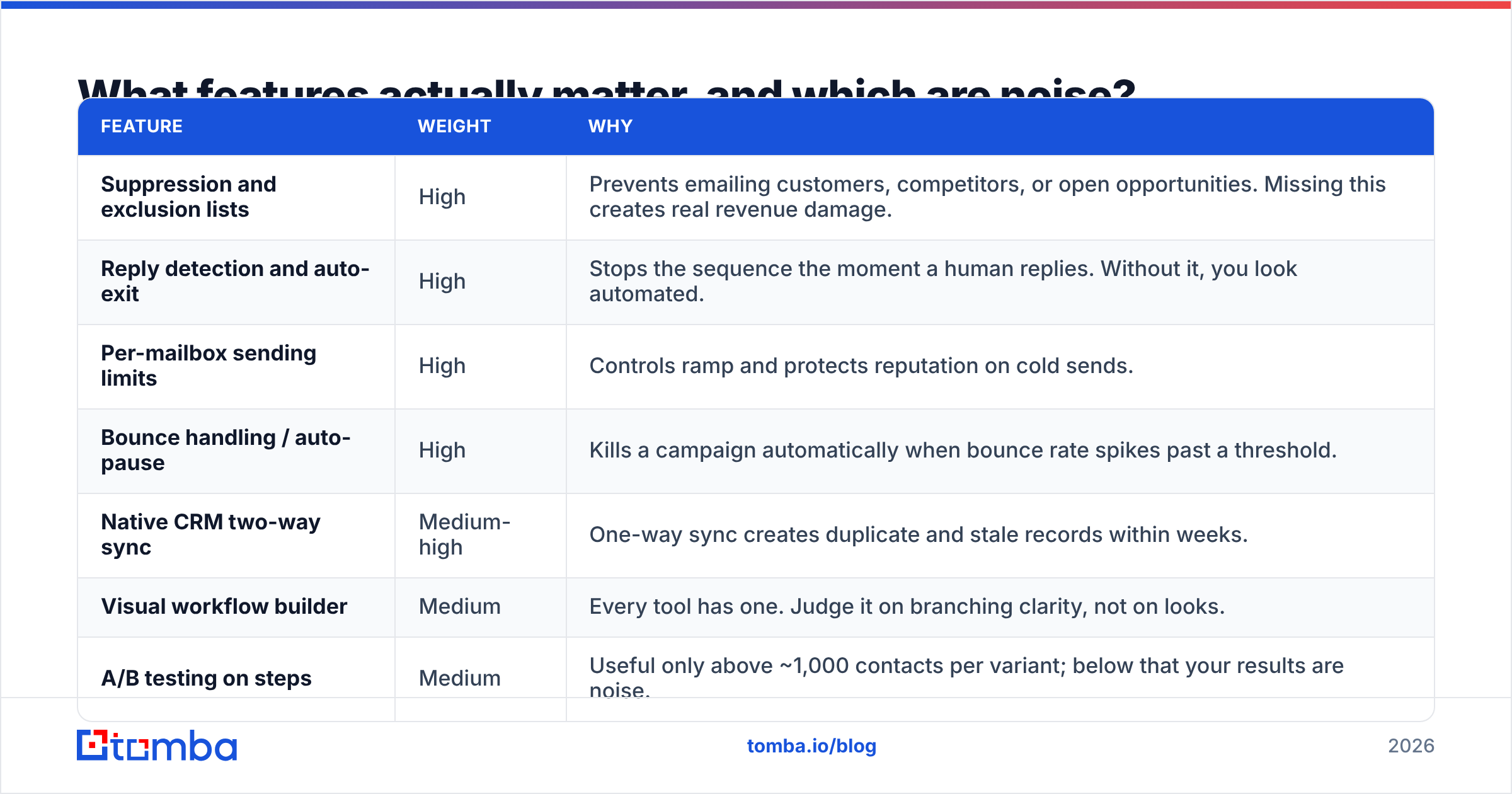
After a decade of feature parity, the differentiators have moved. Here's what to weight heavily and what to ignore.
| Feature | Weight | Why |
|---|---|---|
| Suppression and exclusion lists | High | Prevents emailing customers, competitors, or open opportunities. Missing this creates real revenue damage. |
| Reply detection and auto-exit | High | Stops the sequence the moment a human replies. Without it, you look automated. |
| Per-mailbox sending limits | High | Controls ramp and protects reputation on cold sends. |
| Bounce handling / auto-pause | High | Kills a campaign automatically when bounce rate spikes past a threshold. |
| Native CRM two-way sync | Medium-high | One-way sync creates duplicate and stale records within weeks. |
| Visual workflow builder | Medium | Every tool has one. Judge it on branching clarity, not on looks. |
| A/B testing on steps | Medium | Useful only above ~1,000 contacts per variant; below that your results are noise. |
| AI copy generation | Low | Generic output. Useful as a first draft, never as a send. |
| Template gallery size | Low | You'll use two templates and edit them forever. |
| "AI-powered send-time optimization" | Low | Marginal lift compared with fixing your list quality. |
Two of those deserve expansion.
Suppression lists are the boring feature that quietly saves accounts. You need to exclude current customers, active opportunities, unsubscribed contacts across all campaigns (not just this one), and any domain your legal team flags. If suppression is per-campaign rather than account-wide, treat that as a serious deficiency.
Bounce auto-pause matters because a drip campaign is unattended by design. If a bad import pushes bounce rate to 15%, you want the platform to stop sending at 3% — not to happily deliver the remaining 40,000 messages while you're asleep. Mailbox providers treat sustained high bounce rates as a strong spam signal, and recovery takes weeks.
Why do drip campaigns fail even with good software?#
Because the software isn't usually the problem. The list is.
Every drip platform assumes the addresses you feed it are real, current, and belong to someone who might plausibly care. Break any of those three assumptions and no amount of branching logic saves the campaign.

The failure chain is predictable:
Stale data → bounces → reputation damage → inbox placement collapse → your good campaigns stop working too. B2B contact data decays fast — people change roles constantly, and companies rebrand domains. A list exported eight months ago and never touched is meaningfully worse than one built last week, even if it was accurate on export day.
Three fixes, in order of impact:
- Verify every address before import. Run the full list through an email verifier and drop anything that comes back invalid or risky. This is a five-minute step that prevents the most common cause of campaign failure. Catch-all domains need their own handling — a catch-all verifier tells you whether the server accepts everything blindly or actually validates mailboxes.
- Re-verify on a schedule. Quarterly for active lists, monthly if you're sending high volume. Treat contact data as perishable inventory, not as an asset.
- Fix sourcing, not just cleaning. If your list comes from a scraped export or a five-year-old trade show badge scan, verification only tells you how bad it is. Build lists from live sources — a domain search against target companies, or bulk email finder runs against a fresh account list — so the data starts current instead of getting rescued.
Deliverability is the other half. Before a single drip goes out, confirm SPF, DKIM, and DMARC are configured on your sending domain, and give new domains a warmup ramp rather than sending 500 on day one. If you're unsure how long to ramp, the fundamentals of email deliverability haven't changed much: slow, consistent volume increases beat aggressive ones every time.
How do you build a drip sequence that actually converts?#
The structure matters more than the copy. A well-structured sequence with average copy beats brilliant copy in a badly structured one.
- Define the exit before the entry. What action ends this sequence? Reply, demo booked, plan upgraded? If you can't name it in one sentence, the sequence has no job.
- Cap it at five to seven emails. Reply rates flatten hard after the fifth touch in most B2B contexts. Longer sequences mostly generate unsubscribes.
- Space unevenly. Day 1, day 3, day 7, day 14, day 25 works better than a flat every-four-days rhythm. Tightening early and loosening later matches how people actually process inbound mail.
- Make each email standalone. Don't write "following up on my last email" as the entire premise. Assume email three is the first one they read.
- Vary the ask. Not every message should request a meeting. Alternate between a resource, a relevant observation, and a soft ask.
- Segment before you personalize. Three tightly segmented sequences with light personalization outperform one generic sequence with heavy merge-tag personalization. Merge tags on a bad segment just make the irrelevance more specific.
Then instrument it. Track reply rate and meetings booked per step, not opens. Open tracking has been unreliable since Apple Mail Privacy Protection began pre-fetching images, and treating inflated open rates as a success metric will lead you to optimize the wrong things for months.
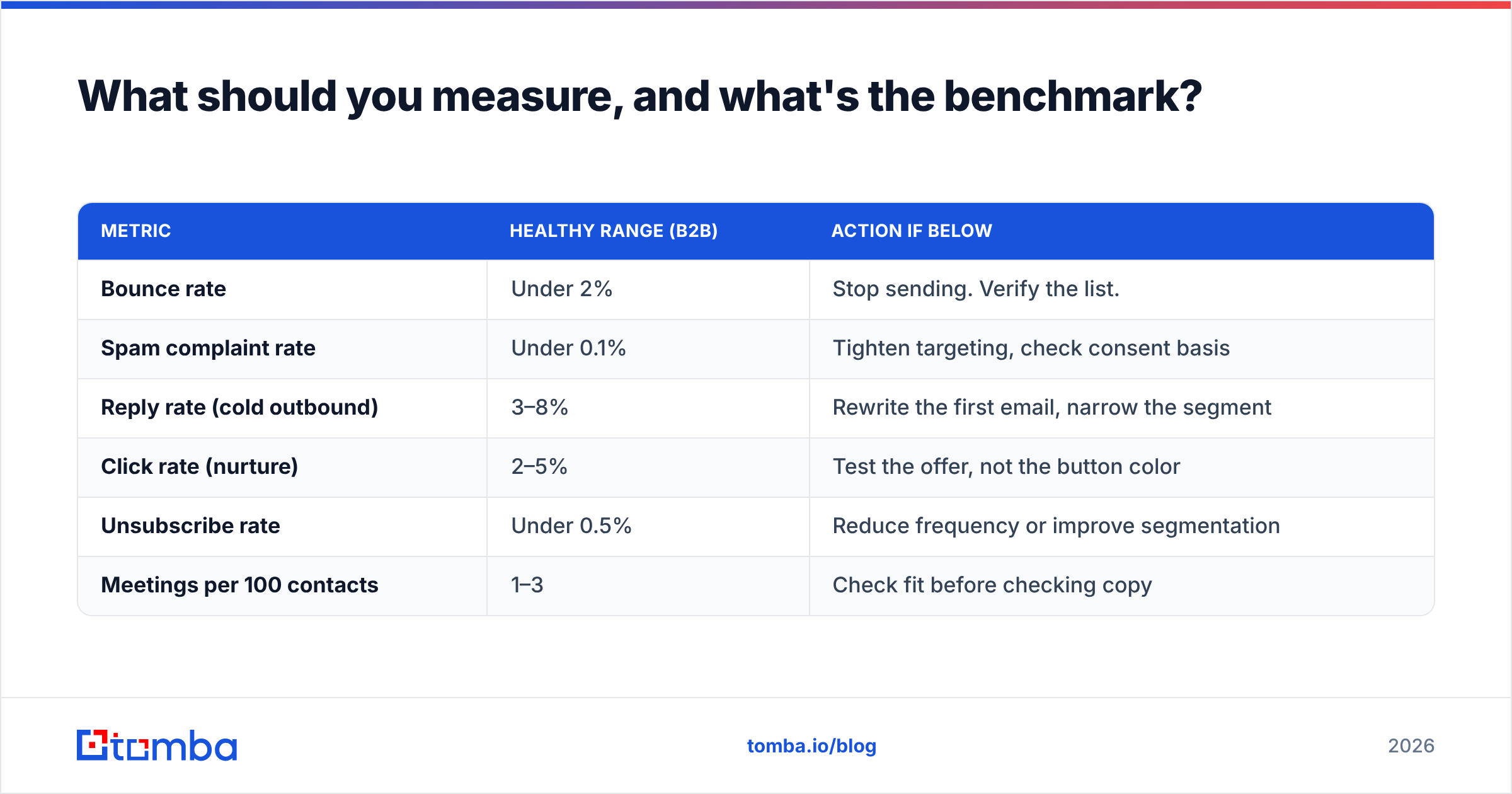
What should you measure, and what's the benchmark?#
| Metric | Healthy range (B2B) | Action if below |
|---|---|---|
| Bounce rate | Under 2% | Stop sending. Verify the list. |
| Spam complaint rate | Under 0.1% | Tighten targeting, check consent basis |
| Reply rate (cold outbound) | 3–8% | Rewrite the first email, narrow the segment |
| Click rate (nurture) | 2–5% | Test the offer, not the button color |
| Unsubscribe rate | Under 0.5% | Reduce frequency or improve segmentation |
| Meetings per 100 contacts | 1–3 | Check fit before checking copy |
Bounce rate and complaint rate are the two that should trigger an immediate stop. The others are optimization signals you can work on across a quarter.
Which tool should you actually pick?#
Short answer, by situation:
- Marketing nurture, list under 10,000, small team: ActiveCampaign or Mailchimp. Both are adequate; pick on which UI your team tolerates.
- Already on HubSpot CRM: use HubSpot workflows. The integration tax of anything else exceeds the feature gap.
- Cold outbound prospecting: a mailbox-based tool like Instantly or Smartlead, paired with a real verification step before every import.
- Product-led SaaS with event data: Customer.io, and budget for engineering time to instrument events properly.
- Enterprise sales org, 20+ reps: Salesloft or Outreach, and accept the annual contract.
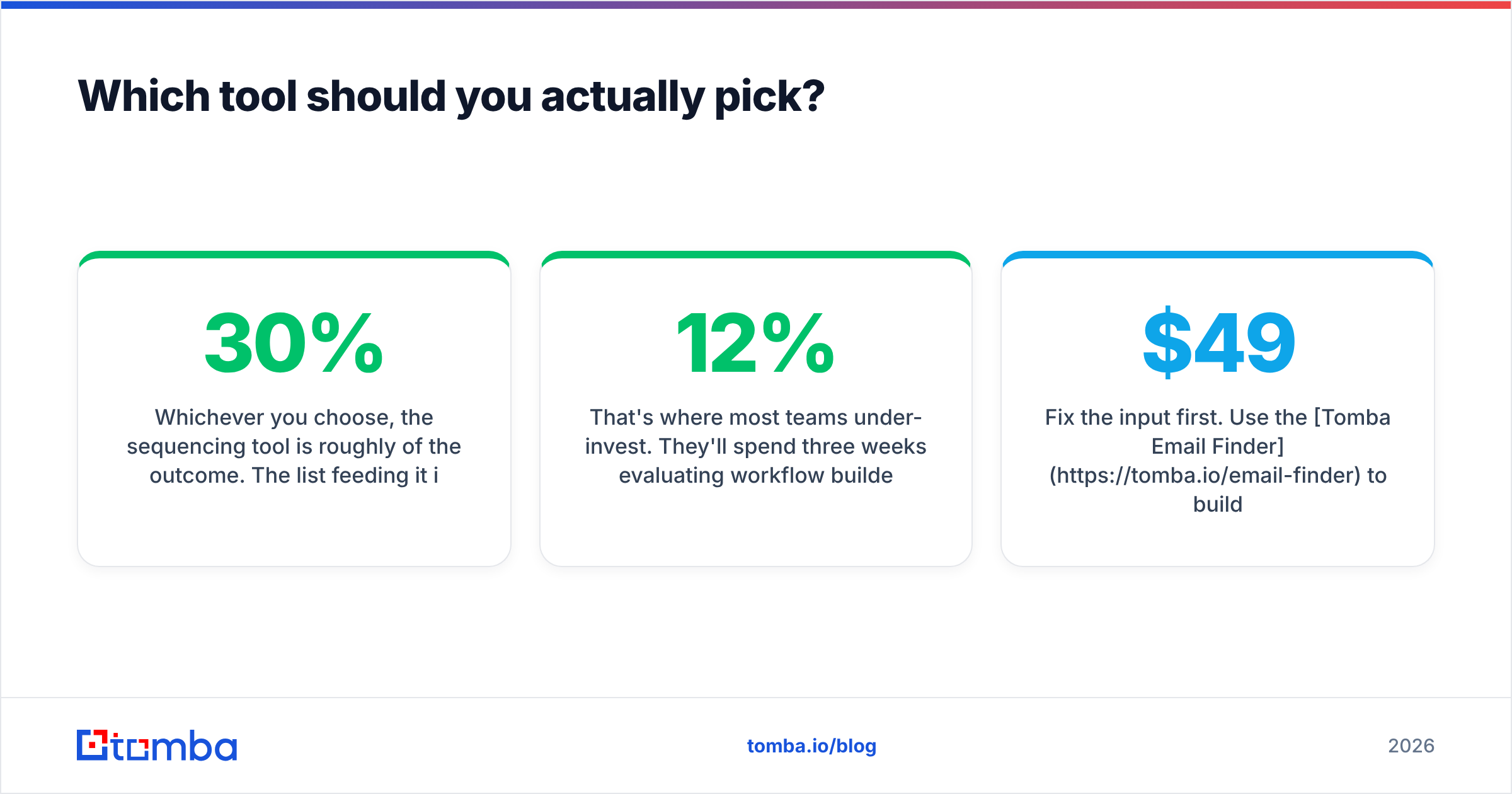
Whichever you choose, the sequencing tool is roughly 30% of the outcome. The list feeding it is the other 70%.
That's where most teams under-invest. They'll spend three weeks evaluating workflow builders and thirty seconds deciding where the contacts come from — then wonder why a well-built five-step sequence produced a 12% bounce rate and two replies.
Fix the input first. Use the Tomba Email Finder to build lists from live company data instead of stale exports, verify every address before it enters a sequence, and re-check the list on a schedule. Tomba's free tier covers 25 searches a month so you can test the accuracy on your own target accounts before committing; paid plans start at $49/month with bulk processing and API access if you want verification wired directly into your drip tool's import step. See Tomba pricing for the full breakdown.
Good drip software with clean data beats great drip software with dirty data. Every time.
Related guides#
Ready to find emails that actually work?
Join 150,000+ professionals who stopped guessing and started sending. Free credits on signup — no credit card required.
Get the Tomba newsletter
Practical outbound tactics and product updates — once every two weeks.
About the author