Email Enrichment: How It Works and What It Costs in 2026
Email enrichment turns a bare address or domain into a usable B2B record. Here's what the data actually contains, what providers charge per match in 2026, and how to stop paying for records that decay.
TL;DR
- Email enrichment takes a thin record (an email, a domain, a LinkedIn URL, or a first/last/company triplet) and appends the fields you need to route, score, and personalize it.
- Match rate matters more than field count. A provider that returns 40 fields on 35% of your list is worse than one returning 12 fields on 78%.
- Real 2026 cost sits between $0.01 and $0.30 per enriched record depending on waterfall depth, contract size, and whether phone numbers are included.
- B2B contact data decays roughly 2-2.5% per month. Enrichment is a subscription to freshness, not a one-time cleanup.
- Enrich at the point of capture (form submit, CRM create, list import) via API, then re-enrich on a 90-day cycle. Batch-once-a-year is how CRMs rot.
What is email enrichment?#
Email enrichment is the process of taking an email address (or a fragment of contact data) and appending verified attributes to it: full name, job title, seniority, department, company domain, headcount, industry, tech stack, location, social profiles, and sometimes a direct phone line.
Two directions exist, and people conflate them constantly:
- Forward enrichment — you start with a person or company identifier and find the email. This is what an email finder does: name + domain in, deliverable address out.
- Reverse enrichment — you start with the email and append everything else. This is what happens when a
gmail-free address hits your signup form and you want to know whether it's a 12-person agency or a Fortune 500 procurement lead.
Most enrichment stacks run both. A form capture gives you an email, so you reverse-enrich. An exported list of target accounts gives you domains, so you forward-enrich to get the contacts.
The output is only worth something if it drives a decision. If a field doesn't change routing, scoring, segmentation, or the first line of your email, don't pay for it.
What data fields does email enrichment actually return?#
Providers advertise "100+ data points." In practice, a handful carry almost all the weight. Here's the honest tiering based on what B2B teams use daily:
- Tier 1 — routing and qualification. Company domain, employee count, industry, country, job title, seniority. These decide who owns the lead and whether you touch it at all.
- Tier 2 — personalization. Department, tenure in role, LinkedIn profile, recent job change, company funding stage. These change the opening line and the timing.
- Tier 3 — technographics. CRM in use, marketing automation platform, payment processor, hosting stack. Extremely useful if you sell an integration or a replacement, near-useless otherwise.
- Tier 4 — vanity fields. Company logo, founding year, Twitter follower count, generic "revenue estimate." Fills dashboards, rarely changes behavior.
- Tier 5 — phone data. Direct dials and mobile numbers. Genuinely valuable, priced separately by almost every vendor, and the field with the widest quality gap across providers.
Buy on Tier 1 and Tier 2 coverage. Treat everything else as a bonus you shouldn't be paying a premium for.

How does email enrichment work under the hood?#
Enrichment is not one lookup. It's a cascade, and understanding the cascade tells you why match rates and prices vary so wildly.
- Identity resolution. The provider normalizes your input — lowercases the email, strips plus-addressing, resolves the domain to a canonical company entity, and merges known aliases (
acme.com,acme.io,acmecorp.commay all be one company). - Database lookup. The vendor checks its own index first. This is the cheapest path and the one with the best margins, which is why vendors push you toward broad plans rather than pay-per-match.
- Pattern inference. If the record is partial, the system infers the company's email format (
first.last@,flast@,first@) from known-good addresses at that domain. A company email pattern check is the manual version of this step. - Live source crawl. Public web sources, press pages, author bylines, job boards, and public profiles get parsed in real time when the index comes up empty.
- Verification. The candidate address is SMTP-checked, MX-checked, and screened against role-account and disposable-domain lists. Skipping this step is how a 90% "match rate" becomes a 25% bounce rate.
- Confidence scoring. Each field ships with a score. Anything below your threshold should be treated as a guess, not a fact.
Steps 5 and 6 are where cheap providers cut corners. A vendor that returns a result for everything and never says "unknown" is not more accurate; it's just guessing with confidence. Run every enriched address through an email verifier before it enters a sequence, regardless of what the enrichment API claimed.
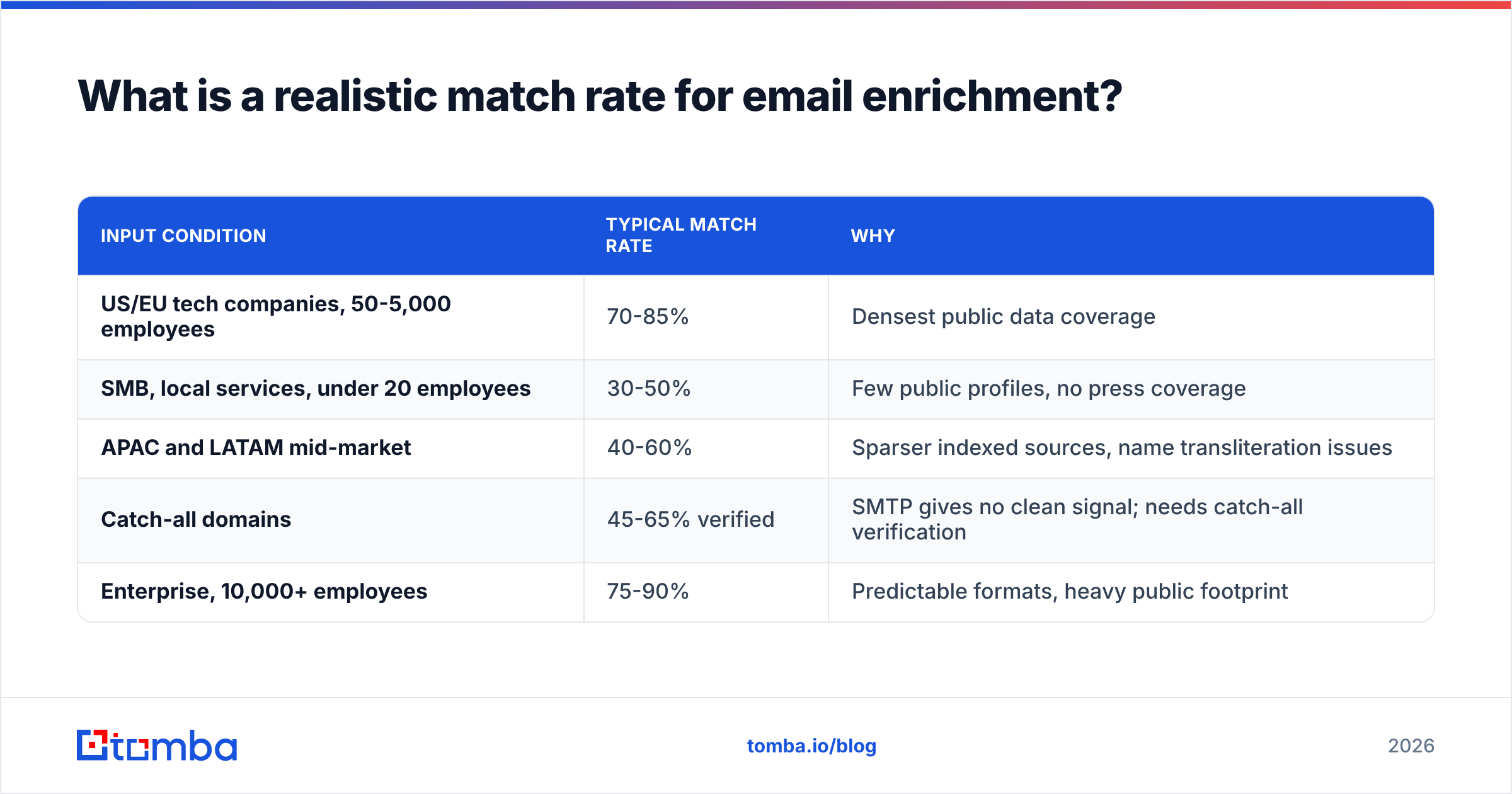
What is a realistic match rate for email enrichment?#
Between 55% and 80% on a clean, well-targeted B2B list. Anything above 85% claimed on a general list deserves scrutiny.
Match rate depends on variables that have nothing to do with the vendor:
| Input condition | Typical match rate | Why |
|---|---|---|
| US/EU tech companies, 50-5,000 employees | 70-85% | Densest public data coverage |
| SMB, local services, under 20 employees | 30-50% | Few public profiles, no press coverage |
| APAC and LATAM mid-market | 40-60% | Sparser indexed sources, name transliteration issues |
| Catch-all domains | 45-65% verified | SMTP gives no clean signal; needs catch-all verification |
| Enterprise, 10,000+ employees | 75-90% | Predictable formats, heavy public footprint |
If a vendor quotes you one match-rate number without asking about your ICP, geography, or company-size band, that number is marketing.
What does email enrichment cost in 2026?#
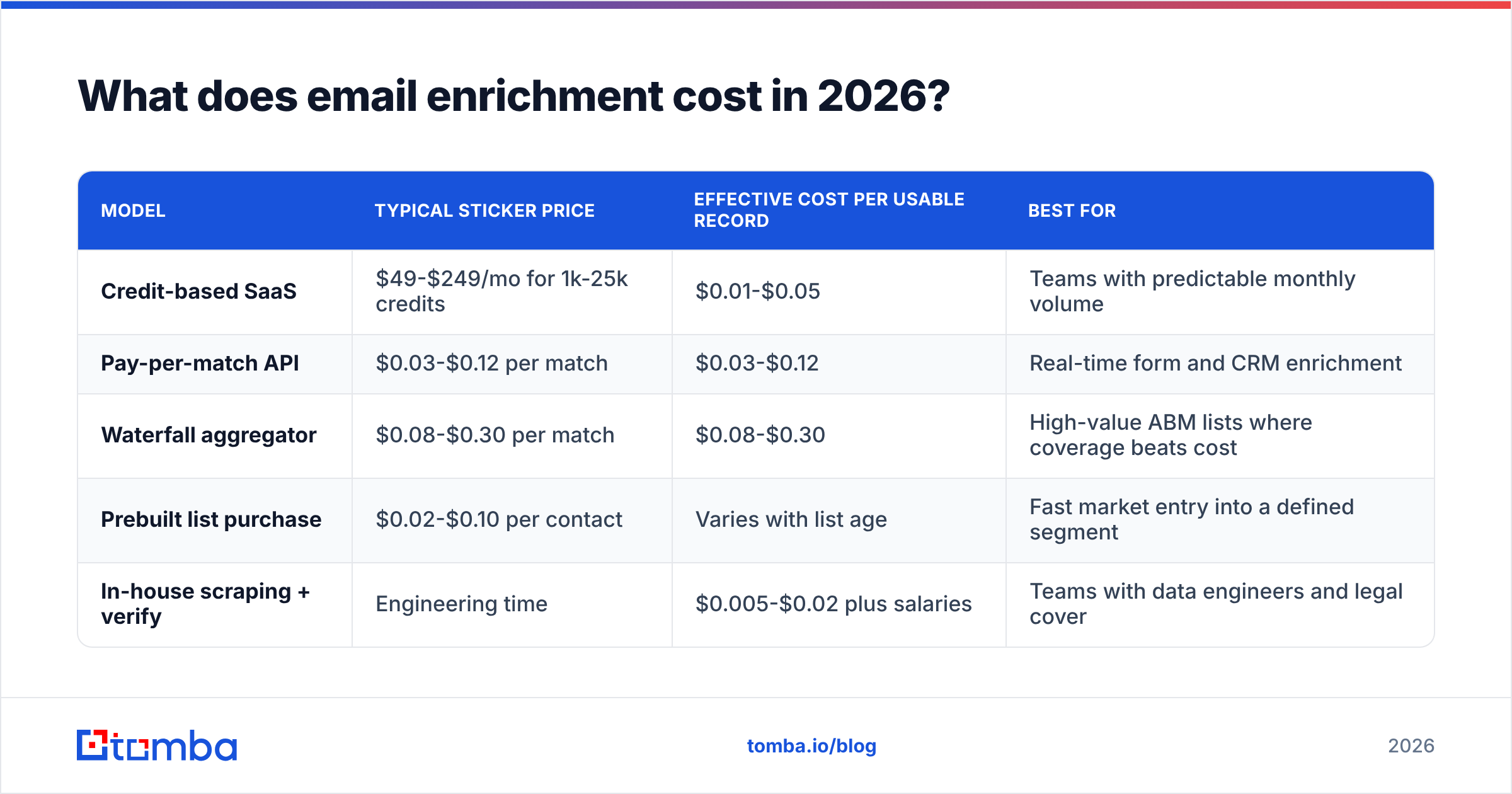
Pricing splits into three models, and the effective cost per usable record differs from the sticker price by a factor of three or more.
| Model | Typical sticker price | Effective cost per usable record | Best for |
|---|---|---|---|
| Credit-based SaaS | $49-$249/mo for 1k-25k credits | $0.01-$0.05 | Teams with predictable monthly volume |
| Pay-per-match API | $0.03-$0.12 per match | $0.03-$0.12 | Real-time form and CRM enrichment |
| Waterfall aggregator | $0.08-$0.30 per match | $0.08-$0.30 | High-value ABM lists where coverage beats cost |
| Prebuilt list purchase | $0.02-$0.10 per contact | Varies with list age | Fast market entry into a defined segment |
| In-house scraping + verify | Engineering time | $0.005-$0.02 plus salaries | Teams with data engineers and legal cover |
Two cost traps show up repeatedly:
Charging for non-matches. Some vendors deduct a credit whether or not they return data. On a list with a 50% match rate that silently doubles your cost per record. Ask the question before you sign.
Rollover and expiry. Credits that expire monthly punish seasonal outbound. If your prospecting is quarterly, a plan with rollover is worth paying more for.
For reference on the SaaS side, Tomba pricing runs a free tier at 25 searches/month, Starter at $49/mo, Growth at $99/mo, and Pro at $249/mo, with enrichment, verification, and domain search sharing one credit pool rather than being billed as separate products. Providers like BookYourData take a different and equally valid route — prebuilt, filterable contact lists with pay-as-you-go pricing, which suits teams that want a defined segment delivered in one shot rather than an API to wire into an app.
Should you buy enrichment, build it, or use a waterfall?#
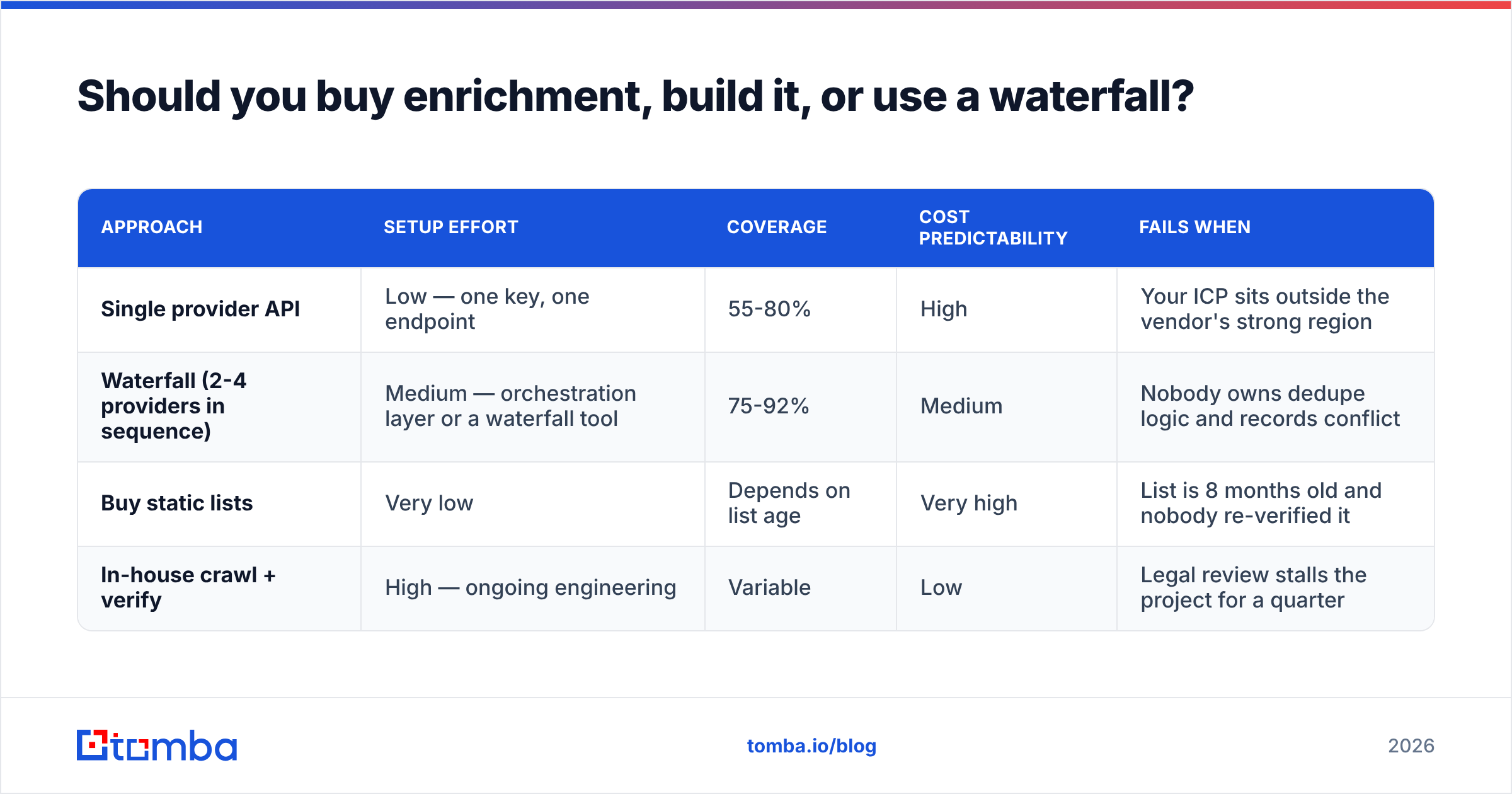
There are three defensible architectures. Pick based on volume and engineering capacity, not on vendor pitch decks.
| Approach | Setup effort | Coverage | Cost predictability | Fails when |
|---|---|---|---|---|
| Single provider API | Low — one key, one endpoint | 55-80% | High | Your ICP sits outside the vendor's strong region |
| Waterfall (2-4 providers in sequence) | Medium — orchestration layer or a waterfall tool | 75-92% | Medium | Nobody owns dedupe logic and records conflict |
| Buy static lists | Very low | Depends on list age | Very high | List is 8 months old and nobody re-verified it |
| In-house crawl + verify | High — ongoing engineering | Variable | Low | Legal review stalls the project for a quarter |
For most teams under 50,000 enrichments a year, a single strong provider plus a separate verification step beats a waterfall. Waterfalls earn their complexity when each additional match is worth more than $50 in pipeline — enterprise ABM, mostly.
If you do build a waterfall, enforce one rule: a single system of record decides which value wins when providers disagree. Two providers returning "VP Marketing" and "Director of Demand Gen" for the same person is normal. Storing both and letting downstream tools pick at random is how personalization goes wrong in public.

How do you stop enriched data from decaying?#
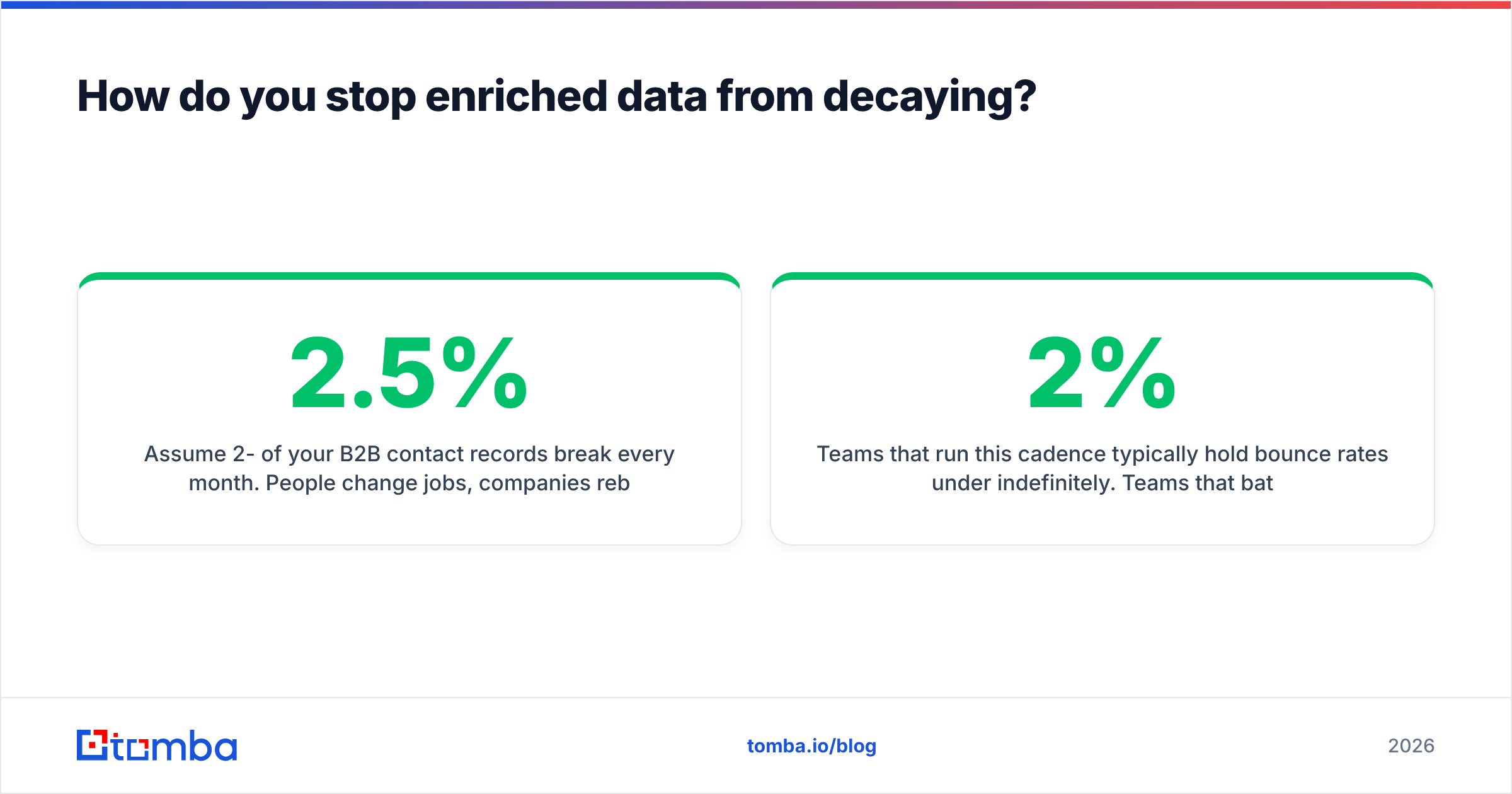
Assume 2-2.5% of your B2B contact records break every month. People change jobs, companies rebrand, domains migrate, and mailbox policies tighten. Over a year that's roughly a quarter of your database.
A maintenance cadence that actually holds up:
- Enrich at capture, not in batches. Wire enrichment into the form handler or the CRM create-trigger so records are complete the moment they exist. The Tomba API and native HubSpot integration both handle this without a middleware layer.
- Re-verify before every send. Verification is cheap. A blocked domain is not. Never trust an address that was verified more than 60 days ago.
- Re-enrich on a 90-day rolling window. Split your database into three cohorts and refresh one per month. This spreads cost and avoids a giant annual bill.
- Track job changes as a trigger, not a cleanup task. A contact leaving a customer account is a churn signal. The same contact landing at a target account is your warmest inbound of the quarter.
- Delete instead of hoarding. Records that have failed enrichment twice and bounced once are a liability under GDPR and a drag on your sender reputation. Remove them.
- Measure the field, not the vendor. Log which appended fields actually appear in sent copy or routing rules. Fields with zero downstream usage after a quarter should be dropped from the enrichment call.
Teams that run this cadence typically hold bounce rates under 2% indefinitely. Teams that batch-enrich once a year see bounce rates climb past 8% by month ten and then blame their sequencer.
What are the compliance rules for email enrichment?#
Short version: enrichment of business contact data is legal in most markets, but the basis and the obligations differ.
- EU/UK (GDPR). Legitimate interest is the usual lawful basis for B2B prospecting, but it requires a documented balancing test, a working opt-out in every message, and a source record for each field. You must be able to answer "where did this come from" within 30 days of a subject access request.
- US (CAN-SPAM). No opt-in requirement for commercial email, but you need accurate headers, a physical address, and a working unsubscribe honored within 10 business days.
- Canada (CASL). Stricter. Implied consent from a published business address exists but is narrow and time-limited. Assume you need a stronger basis.
- California (CCPA/CPRA). Enriched personal data on California residents triggers disclosure and deletion rights, including for data you bought rather than collected.
Ask any vendor for their data sourcing documentation before you sign. Tomba publishes its data sources, and any provider that can't tell you where a record originated is handing you the compliance risk along with the CSV. Vendor comparison sites like G2's sales intelligence category are useful for surfacing which providers have been audited by real buyers, and CRM vendors publish their own data-quality guidance — HubSpot's knowledge base covers dedupe and property-management practices worth copying even if you're not on HubSpot.
What are the most common email enrichment mistakes?#
Enriching before you've defined the ICP. Enrichment on a bad list produces detailed records of people who will never buy. Segment first.
Treating match rate as accuracy. They're different metrics. A provider can match 90% and be wrong on a third of the titles. Sample 100 records manually and check them against public profiles before rolling out.
Ignoring role accounts. info@, sales@, and support@ addresses enrich cleanly and convert terribly. Filter them out at ingest.
Enriching catch-all domains without a separate check. Catch-all servers accept everything, so a naive SMTP check returns "valid" for addresses that don't exist. Use a dedicated catch-all finder rather than trusting the base verification result.
Running enrichment and outreach on the same schedule. If you enrich 10,000 records on Monday and send to all of them on Tuesday, you've built a volume spike that mailbox providers read as a spam signal. Stagger it.
Paying for phone data you never dial. Phone fields typically double the per-record price. If your SDR team isn't calling, drop them. If it is, a dedicated phone finder usually beats bundled numbers on quality.
Where should you start?#
Start narrow. Take 500 records from your current CRM, enrich them, verify the output, and manually spot-check 50 against public sources. You'll learn more about a provider in that hour than in any comparison chart, including this one.
Then decide whether your bottleneck is coverage (you need a waterfall), freshness (you need a cadence, not a new vendor), or cost (you need to cut fields nobody uses).
When you're ready to wire it in, Tomba's data enrichment sits on the same credit pool as the email finder, verifier, and domain search, so you're not stitching four subscriptions together to complete one record — start on the free tier at 25 searches/month, sample your own list, and upgrade only once the match quality holds against your ICP.
Related guides#
Ready to find emails that actually work?
Join 150,000+ professionals who stopped guessing and started sending. Free credits on signup — no credit card required.
Get the Tomba newsletter
Practical outbound tactics and product updates — once every two weeks.
About the author