Email Enrichment Chrome Extension: 2026 Buyer's Guide
Browser-based enrichment saves reps hours a week — or burns credits and pollutes your CRM. Here's how email enrichment Chrome extensions actually work, what to test before you buy, and which trade-offs matter.
TL;DR
- An email enrichment Chrome extension pulls contact data — work email, job title, company, sometimes phone — into whatever tab you're already in (LinkedIn, a company site, your CRM), instead of making you tab-switch into a separate database.
- The speed gain is real: reps typically save 3–6 minutes per prospect versus manual research. The risk is equally real — one-click enrichment makes it trivially easy to push unverified addresses into your CRM at scale.
- Coverage and accuracy vary far more by region and company size than vendors admit. Test on your actual ICP, not on a Fortune 500 sample.
- Credit models are where extensions quietly get expensive. Watch for charges on failed lookups, per-field billing, and whether verification costs a second credit.
- The right setup is extension for discovery, verification as a hard gate, CRM sync last. Skip the middle step and you'll be paying for deliverability damage six weeks later.
What is an email enrichment Chrome extension?#
It's a browser plugin that reads the page you're on, identifies a person or company, and returns their business contact data inline — without you leaving the tab.
Think of it like a translator sitting next to you at a conference. You could go back to your hotel, look up every name in a directory, and come back tomorrow. Or someone whispers the answer while the conversation is still happening. The value isn't new information; it's information arriving before the moment passes.
Technically, the extension does three things:
- Detect context. It parses the DOM of the current page for identity signals — a LinkedIn profile URL, a company domain, a name in an about page byline, a record in your CRM.
- Query a data source. It sends those signals to the vendor's API, which searches an indexed contact database, runs pattern inference against known company email formats, or both.
- Return and route. It renders the result in a side panel or popup, and usually offers a one-click push to CRM, CSV, or a sequencing tool.
The category name is slightly misleading. Most tools marketed as "enrichment" extensions actually do two distinct jobs that buyers should evaluate separately:
- Discovery — finding an email that you don't have, starting from a name plus domain.
- Enrichment — appending fields (title, seniority, company size, tech stack, phone) to a record you already have.
A tool can be excellent at one and mediocre at the other. If your bottleneck is "I have 4,000 CRM rows with no job titles," a discovery-first extension won't help much. If your bottleneck is "I'm on LinkedIn and need an address right now," a bulk enrichment API is the wrong shape.
How does browser-based enrichment actually find an email?#
Two mechanisms, and every vendor uses some blend of them.
Database lookup. The vendor has crawled public web sources — company sites, press releases, GitHub commits, conference speaker pages, published papers, regulatory filings — and built an index keyed by person and domain. When you query, it returns a stored record. Fast, but stale if the index isn't refreshed. Someone who changed jobs in March may still show their 2024 address.
Pattern inference plus verification. The vendor knows that acme.com uses first.last@acme.com because it has seen 200 confirmed examples. You supply "Dana Whitfield," it generates dana.whitfield@acme.com, then it validates that guess with an SMTP handshake before returning it. Slower, but it works on companies that were never indexed — which matters enormously if your ICP is 20-person startups rather than enterprises.
The best extensions run both and reconcile. When the database hit and the pattern guess agree, confidence is high. When they disagree, a good tool tells you; a lazy one picks one silently.
Here's the part vendors gloss over: a returned email is not a verified email. Pattern inference can produce a syntactically perfect, format-correct address for a person who left the company. Catch-all domains — which accept every address at the SMTP layer regardless of whether the mailbox exists — defeat naive verification entirely. If your extension returns a confident-looking green checkmark on a catch-all domain, that checkmark is decorative. You need a dedicated catch-all verifier to resolve those, and even then some will remain genuinely unknowable.

What should you compare before choosing one?#
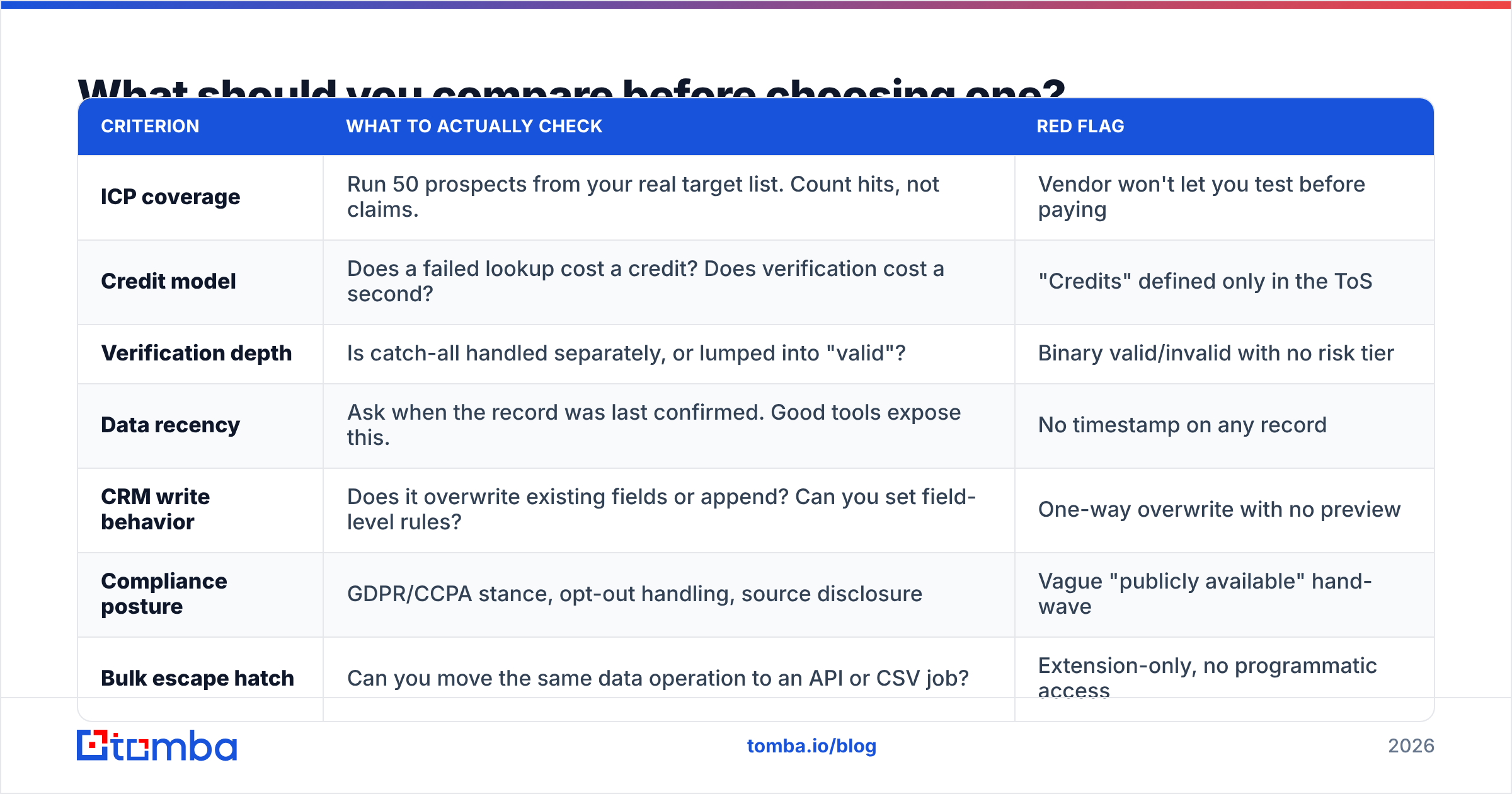
Ignore the marketing accuracy number on the homepage. Every vendor claims 95%+ and every vendor is measuring something different — usually deliverability on a sample skewed toward large US tech companies where everyone's email format is public.
Compare these instead:
| Criterion | What to actually check | Red flag |
|---|---|---|
| ICP coverage | Run 50 prospects from your real target list. Count hits, not claims. | Vendor won't let you test before paying |
| Credit model | Does a failed lookup cost a credit? Does verification cost a second? | "Credits" defined only in the ToS |
| Verification depth | Is catch-all handled separately, or lumped into "valid"? | Binary valid/invalid with no risk tier |
| Data recency | Ask when the record was last confirmed. Good tools expose this. | No timestamp on any record |
| CRM write behavior | Does it overwrite existing fields or append? Can you set field-level rules? | One-way overwrite with no preview |
| Compliance posture | GDPR/CCPA stance, opt-out handling, source disclosure | Vague "publicly available" hand-wave |
| Bulk escape hatch | Can you move the same data operation to an API or CSV job? | Extension-only, no programmatic access |
That last row matters more than people expect. Extensions are for one-at-a-time work. The moment you need 500 contacts, clicking 500 times is a bad use of a salaried human. A vendor that offers the same data through a bulk email finder and an email finder API lets you graduate the workflow without re-buying your data stack.
How do the main options compare in 2026?#
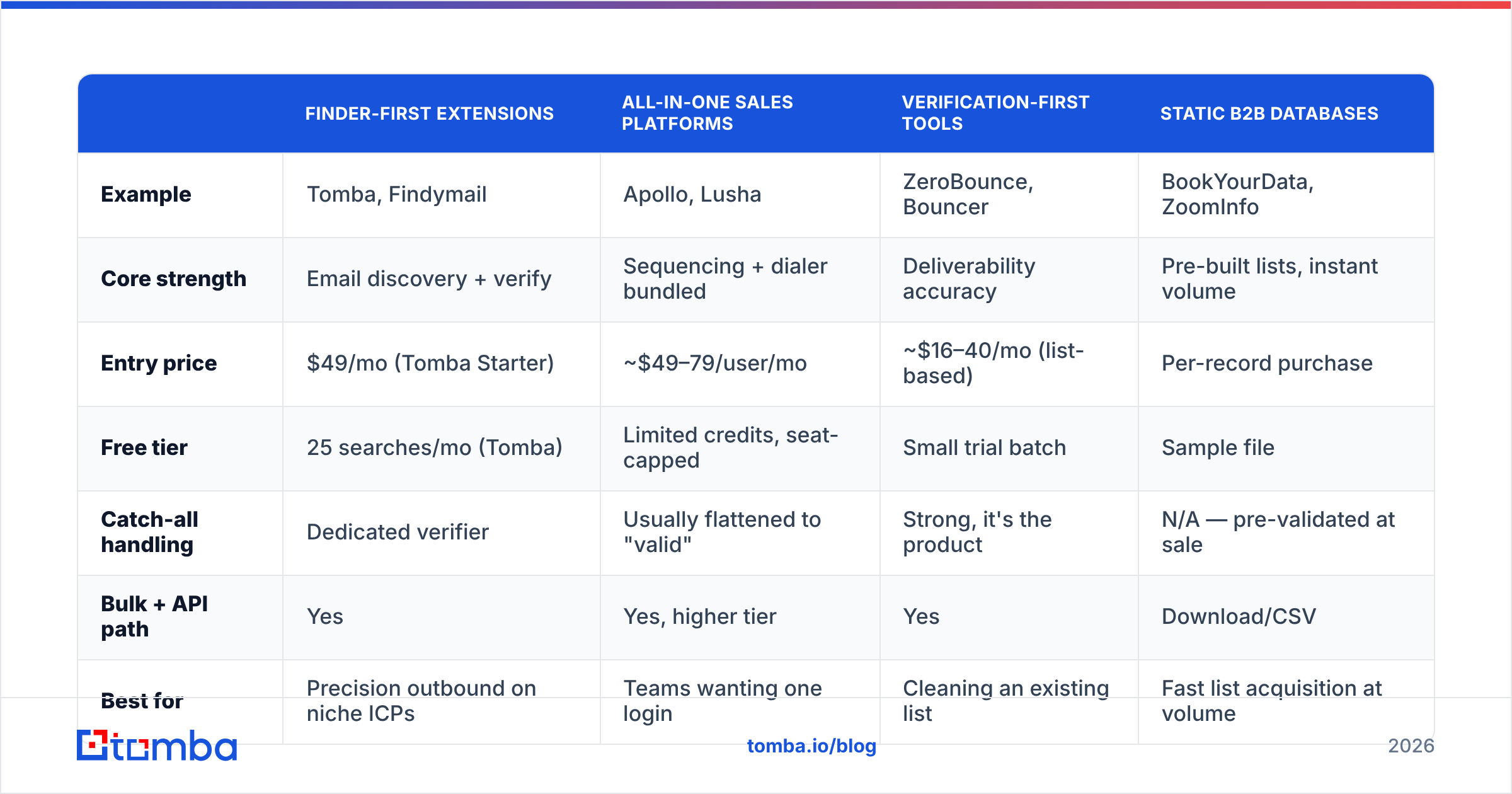
The extension market has consolidated into roughly four shapes. Prices below reflect published entry tiers as of mid-2026 — always confirm on the vendor's own pricing page, since credit definitions shift more often than headline prices.
| Finder-first extensions | All-in-one sales platforms | Verification-first tools | Static B2B databases | |
|---|---|---|---|---|
| Example | Tomba, Findymail | Apollo, Lusha | ZeroBounce, Bouncer | BookYourData, ZoomInfo |
| Core strength | Email discovery + verify | Sequencing + dialer bundled | Deliverability accuracy | Pre-built lists, instant volume |
| Entry price | $49/mo (Tomba Starter) | ~$49–79/user/mo | ~$16–40/mo (list-based) | Per-record purchase |
| Free tier | 25 searches/mo (Tomba) | Limited credits, seat-capped | Small trial batch | Sample file |
| Catch-all handling | Dedicated verifier | Usually flattened to "valid" | Strong, it's the product | N/A — pre-validated at sale |
| Bulk + API path | Yes | Yes, higher tier | Yes | Download/CSV |
| Best for | Precision outbound on niche ICPs | Teams wanting one login | Cleaning an existing list | Fast list acquisition at volume |
Read that table as four jobs, not four rankings.
If you're an SDR working named accounts and the failure mode you fear is emailing the wrong person, a finder-first extension with real verification is the fit. Tomba sits here — the email finder and Chrome extension run against the same index, and Tomba pricing starts at $49/mo for Starter, $99/mo for Growth, $249/mo for Pro, with a genuinely usable free tier at 25 searches.
If you need 10,000 verified records in the US healthcare vertical by Friday and you don't want to build the list yourself, a curated database like BookYourData is a legitimately better instrument than any extension — you're buying finished inventory rather than a search tool, and paying per record instead of per seat. Different problem, different tool.
If your list already exists and bounces are the crisis, buy verification, not discovery.
If you want sequencing, dialing, and enrichment behind one login and you accept some accuracy trade-off for that convenience, the all-in-one platforms earn their price. Just know that bundled enrichment is rarely best-in-class — it's a feature defending a suite, not a product defending its own margin.
Where do enrichment extensions quietly go wrong?#
Four failure modes account for most of the disappointment.
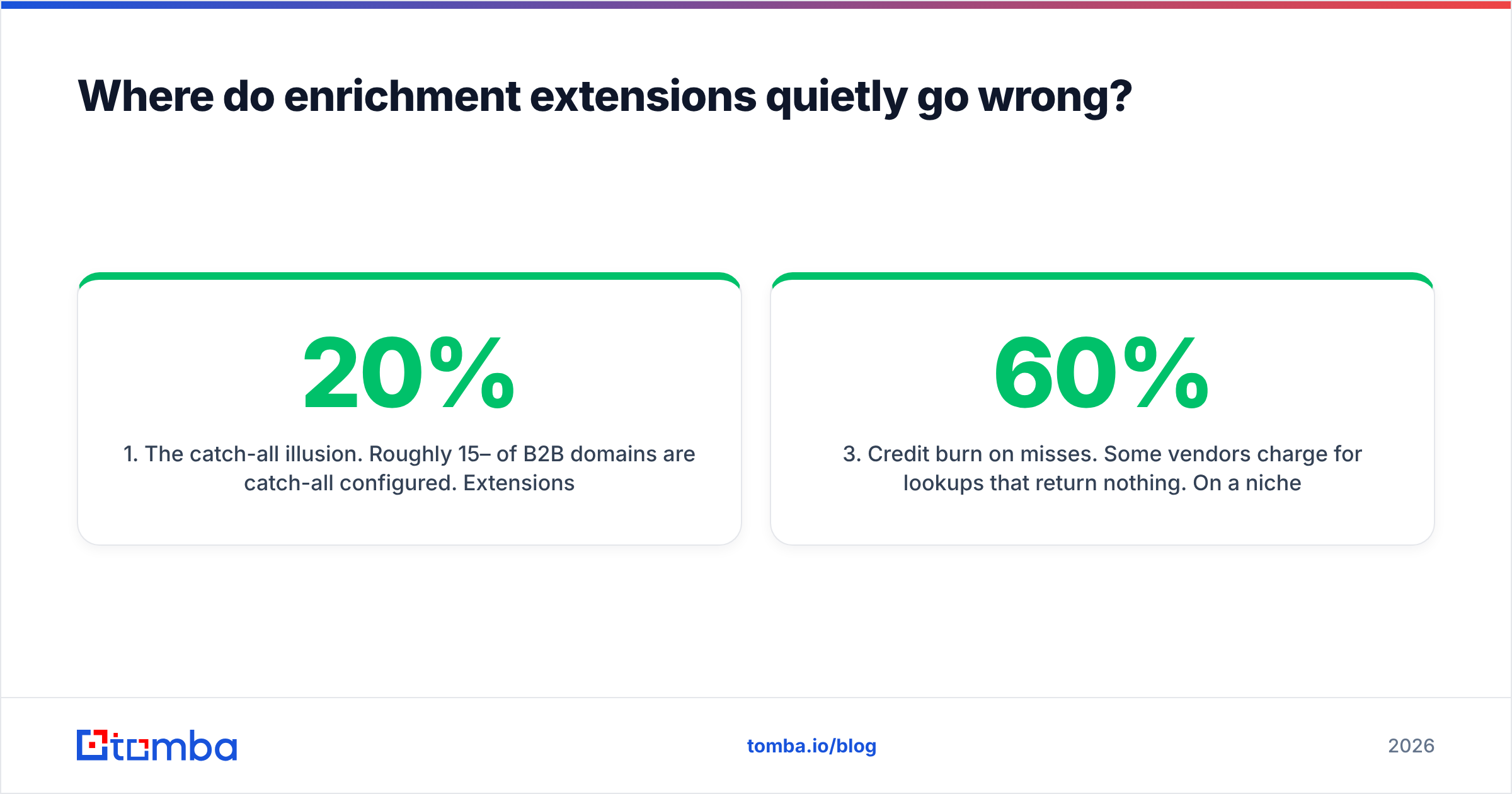
The catch-all illusion. Roughly 15–20% of B2B domains are catch-all configured. Extensions that report these as "valid" inflate their apparent accuracy while handing you addresses that may route nowhere. Your bounce rate finds out eight days later. Segment catch-alls into their own list and treat them as lower-confidence sends.
Silent CRM pollution. One-click "push to CRM" is the whole appeal — and the whole risk. Without field-level rules, an extension can overwrite a verified address that a rep confirmed by phone with an inferred one from a pattern guess. Configure append-not-overwrite before you roll it out to a team, not after.
Credit burn on misses. Some vendors charge for lookups that return nothing. On a niche ICP with 60% coverage, that's a 40% tax you didn't model. Read the credit terms specifically for the phrase "successful search" — its absence is meaningful.
Volume without judgment. The fastest way to torch sender reputation is to make prospecting frictionless while leaving targeting unchanged. An extension that triples the contacts a rep can gather in an hour will triple the bad-fit sends unless someone tightens the filter upstream. Speed amplifies whatever process you already have — including a bad one.
What does a good enrichment workflow look like?#
Discovery, verification, then sync. In that order, always.
Step 1 — Discover in-context. Rep is on a LinkedIn profile or a company team page. Extension surfaces the address. This is where the extension earns its keep: no tab switch, no copy-paste, no transcription typo.
Step 2 — Verify as a hard gate. Before anything reaches a sequencer, run it through an email verifier. Not as a nice-to-have — as a blocking step. Anything returning "risky" or "catch-all" goes to a separate track with a lower send cadence and a plain-text first touch, not into the main sequence.
Step 3 — Enrich the record, then sync. Append title, company size, and any firmographics you actually use for segmentation. Resist the urge to append everything available; unused fields are maintenance debt. Push to CRM with append-only rules via a HubSpot integration or equivalent.
Step 4 — Escalate to bulk when the pattern repeats. The second time a rep manually enriches 40 contacts from the same company, that's an API job. Extensions are for exploration; scripts are for repetition. Confusing the two is how teams end up paying a rep's hourly rate to do a $0.02 API call.
Step 5 — Audit monthly. Sample 30 enriched records. Check bounce outcome, title accuracy, and whether the company field survived. If accuracy has slipped below your threshold, the index went stale — that's a vendor conversation, not a rep-coaching conversation.
For teams standardizing on this, it's worth reading how vendors source and refresh their records. Tomba publishes its approach on where Tomba gets data, and comparing that against how G2 reviewers describe real-world accuracy for each tool is a faster reality check than any vendor demo.
Is a Chrome extension enough, or do you need an API?#
Neither alone. The honest answer is that they solve adjacent problems and mature teams run both.
An extension is a manual, high-context tool. Its advantage is that a human is already looking at the page and can apply judgment — this is the right Dana Whitfield, this company was acquired, this title is stale. That judgment is exactly what an API call can't supply.
An API is a repeatable, zero-context tool. Its advantage is that it handles 10,000 records overnight and never gets bored on record 3,000. Its weakness is that it will confidently enrich 200 wrong-fit companies if your input list is wrong.
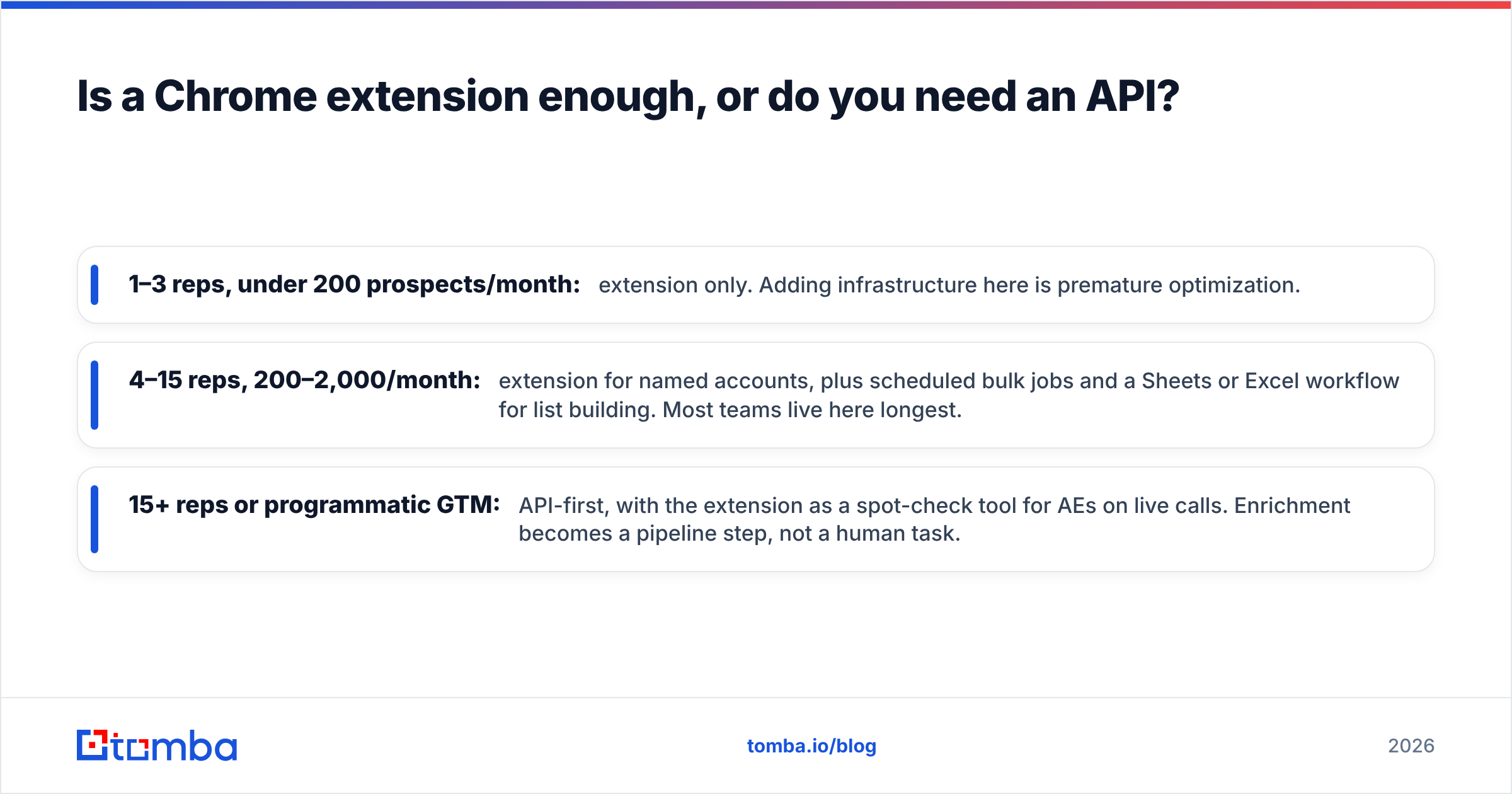
A reasonable split by team stage:
- 1–3 reps, under 200 prospects/month: extension only. Adding infrastructure here is premature optimization.
- 4–15 reps, 200–2,000/month: extension for named accounts, plus scheduled bulk jobs and a Sheets or Excel workflow for list building. Most teams live here longest.
- 15+ reps or programmatic GTM: API-first, with the extension as a spot-check tool for AEs on live calls. Enrichment becomes a pipeline step, not a human task.
The practical test for whether you've outgrown extension-only work: if any rep spends more than 90 minutes a week clicking an enrichment button, you're paying salary for something a scheduled job does for pennies. Move it.
One more consideration that's easy to miss — browser extension permissions. An enrichment extension by definition reads the pages you visit. Before a company-wide rollout, check what the manifest requests, whether the vendor states that page content isn't retained, and whether your security team has a policy on extensions with broad host permissions. Chrome's own extension security documentation is a reasonable baseline for what to ask. This is a five-minute question that occasionally saves a six-week procurement rewind.
What's changing in 2026?#
Three shifts worth planning around.
Verification is becoming the differentiator, not discovery. Finding an address is close to commoditized. Knowing whether it will bounce — especially on catch-all and role-based domains — is where vendors now separate. Weight your evaluation accordingly.
Mailbox provider enforcement keeps tightening. Google and Yahoo's bulk-sender requirements moved the floor on authentication and complaint rates, and enforcement has only firmed since. A tool that hands you volume without a verification gate is handing you risk. Check your SPF record and complaint thresholds before you scale sends, not after your domain gets throttled.
Data provenance is becoming a buying question. Buyers increasingly ask where records come from, how consent is handled in EU markets, and how opt-outs propagate. Vendors that answer specifically will win enterprise deals; vendors that say "publicly available sources" and stop will lose them.
Getting started#
If you want a browser extension that finds the address in-context and then actually proves it before you send, start with the Tomba Email Finder. The free tier gives you 25 searches a month — enough to run the 50-prospect ICP test described above on your real target list and see coverage on your accounts rather than someone's demo sample. Pair it with the verifier as a blocking step, keep bulk work on the API, and your CRM stays clean while your reps stop tab-switching.
Run the test on your own list. That's the only accuracy number that matters.
Related guides#
Ready to find emails that actually work?
Join 150,000+ professionals who stopped guessing and started sending. Free credits on signup — no credit card required.
Get the Tomba newsletter
Practical outbound tactics and product updates — once every two weeks.
About the author