Email Example for Meeting Invitation: 9 Templates for 2026
Nine copy-ready meeting invitation emails for cold prospects, warm leads, internal teams, and reschedules — plus the structure, timing, and send-side checks that decide whether they get accepted or ignored.
TL;DR
- A meeting invitation email has exactly one job: make saying yes cheaper than saying no. Every extra sentence raises the cost.
- The structure that works is five parts — specific subject, one-line reason, named value, one proposed slot, one-click confirm.
- Cold invites, warm invites, internal invites, and reschedules need different lengths and different asks. Using the same template for all four is the most common mistake.
- Tuesday–Thursday, 8–10am in the recipient's timezone still outperforms every other window for B2B invites in most published send-time studies.
- A perfect invite sent to a bounced address converts at zero percent. Verify the address before you optimize the copy.
What is a meeting invitation email, and what makes one work?#
A meeting invitation email is a short message whose only purpose is to get a specific block of time on someone's calendar. It is not a pitch, not a newsletter, and not a relationship-building note. If your reader has to figure out what you want, you have already lost.
Think of it like handing someone a form to sign. If the form has one line and a pen attached, they sign it. If it has twelve fields and no pen, it goes in a drawer. Most meeting invitations fail because they are twelve fields with no pen.
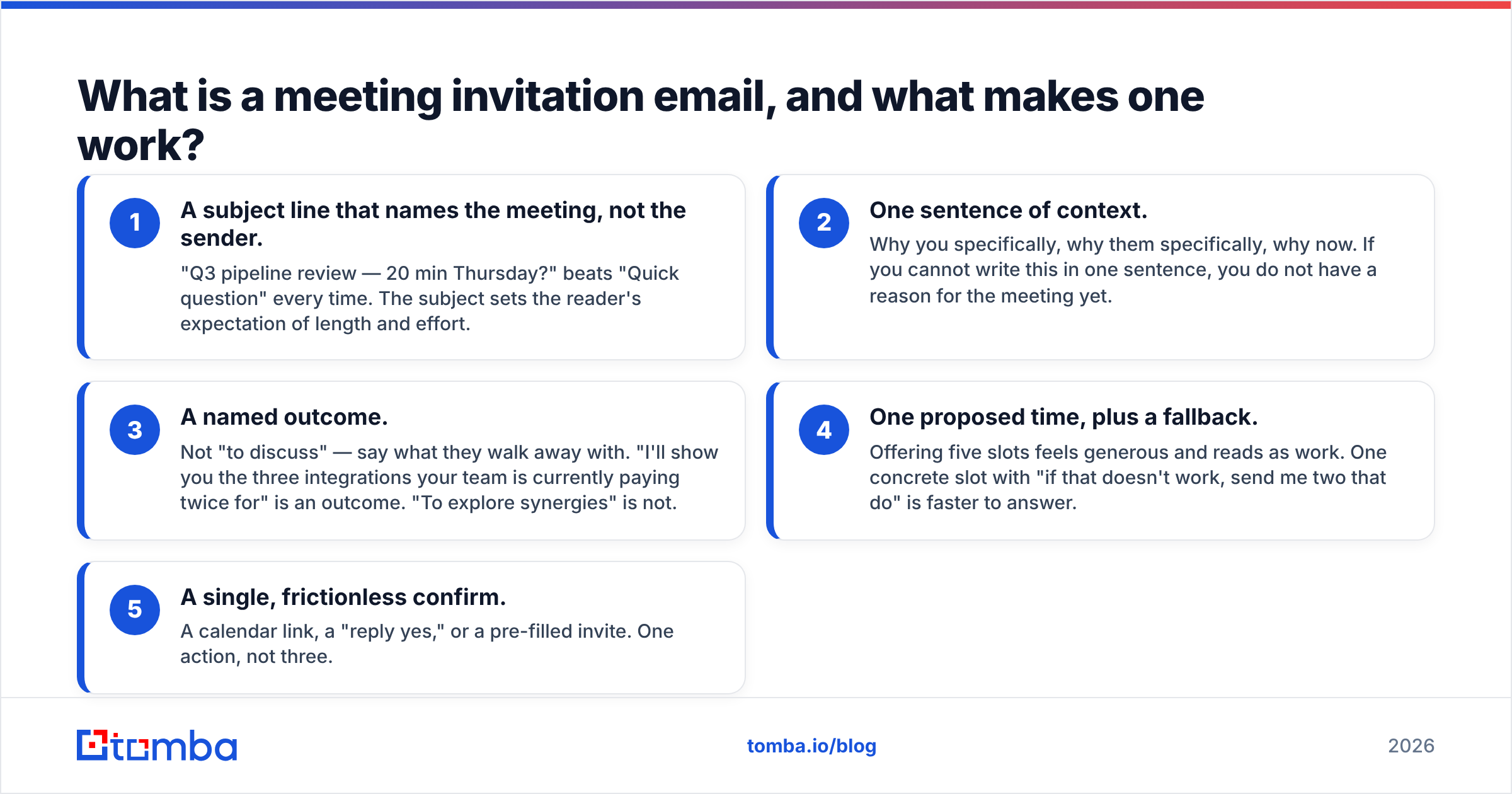
Every effective invite carries the same five components:
- A subject line that names the meeting, not the sender. "Q3 pipeline review — 20 min Thursday?" beats "Quick question" every time. The subject sets the reader's expectation of length and effort.
- One sentence of context. Why you specifically, why them specifically, why now. If you cannot write this in one sentence, you do not have a reason for the meeting yet.
- A named outcome. Not "to discuss" — say what they walk away with. "I'll show you the three integrations your team is currently paying twice for" is an outcome. "To explore synergies" is not.
- One proposed time, plus a fallback. Offering five slots feels generous and reads as work. One concrete slot with "if that doesn't work, send me two that do" is faster to answer.
- A single, frictionless confirm. A calendar link, a "reply yes," or a pre-filled invite. One action, not three.
That is the whole anatomy. Everything else in this post is variation on those five parts.
Which type of meeting invitation email do you actually need?#
The word "invitation" covers four very different situations, and the copy rules diverge sharply between them. Sending a cold-prospect invite to an internal colleague reads as robotic; sending an internal-style invite to a cold prospect reads as presumptuous.
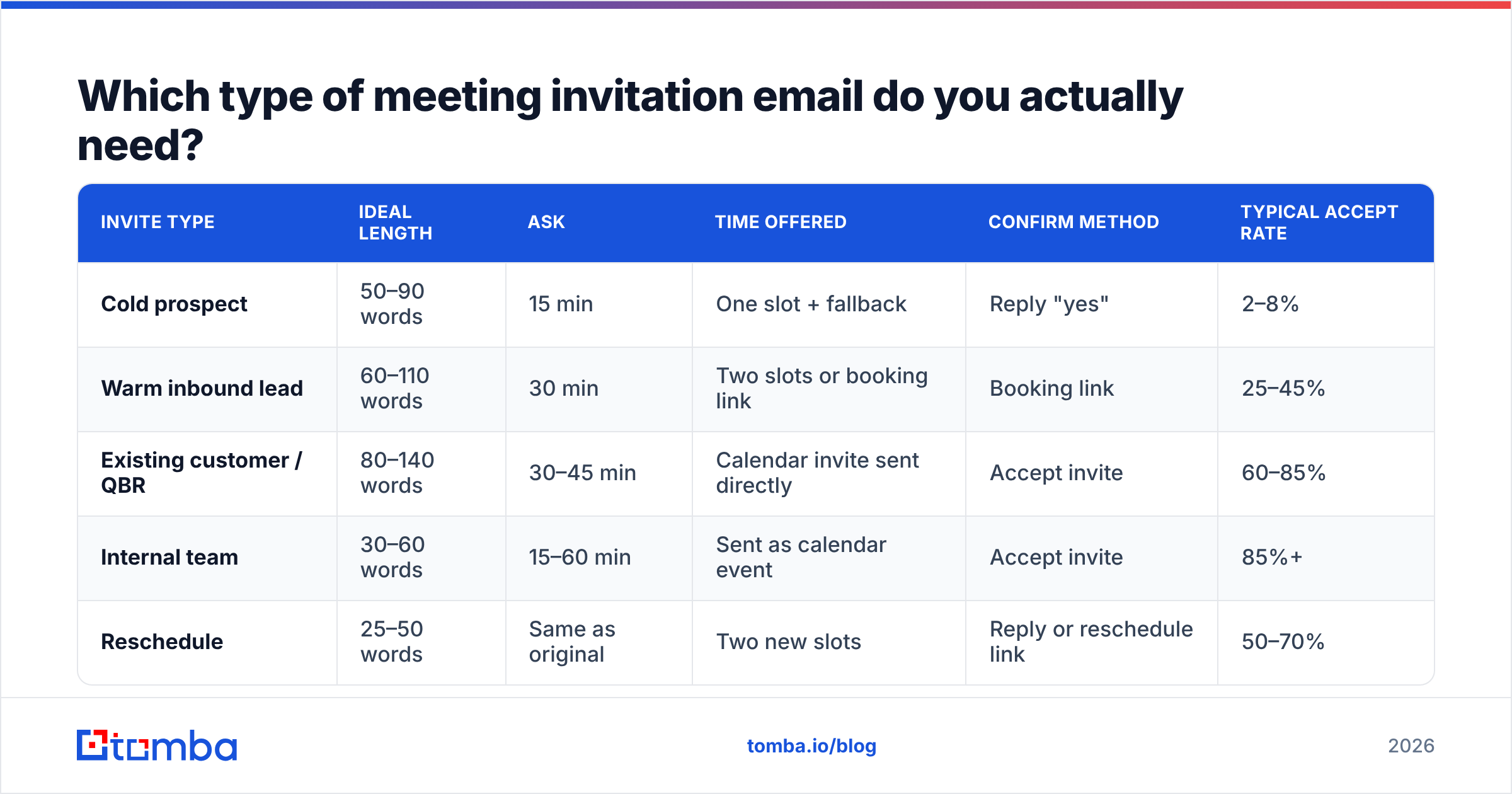
| Invite type | Ideal length | Ask | Time offered | Confirm method | Typical accept rate |
|---|---|---|---|---|---|
| Cold prospect | 50–90 words | 15 min | One slot + fallback | Reply "yes" | 2–8% |
| Warm inbound lead | 60–110 words | 30 min | Two slots or booking link | Booking link | 25–45% |
| Existing customer / QBR | 80–140 words | 30–45 min | Calendar invite sent directly | Accept invite | 60–85% |
| Internal team | 30–60 words | 15–60 min | Sent as calendar event | Accept invite | 85%+ |
| Reschedule | 25–50 words | Same as original | Two new slots | Reply or reschedule link | 50–70% |
Read the pattern in that table: the warmer the relationship, the more you can presume. With a cold prospect you ask permission. With a customer you send the invite and let them decline. Getting that backwards — sending an unsolicited calendar hold to a stranger — is the fastest way to get marked as spam.
What is a good email example for meeting invitation to a cold prospect?#
Cold is the hardest case, so start here. The reader owes you nothing, has never heard of you, and is deciding in about three seconds.
Template 1 — the trigger-based cold invite
Subject: Your new SDR hires + territory coverage
Hi Dana,
Saw you added four SDRs in EMEA last month. Teams that scale that fast usually hit a data-coverage wall around month two — contacts exist, but half the direct dials are stale.
I work with three companies in your space who solved this without swapping their CRM. Worth 15 minutes on Thursday at 10:00 CET to show you what they changed?
If Thursday is bad, send me two windows that work.
— Marc
Why it works: the trigger is real and public, the problem is named in the prospect's language, the ask is 15 minutes, and the fallback removes the need to negotiate.
Template 2 — the referral-anchored invite
Subject: Priya suggested I reach out re: onboarding drop-off
Hi Tom,
Priya Raman mentioned your team is rebuilding activation flows this quarter. We did the same migration at Northwind and cut day-7 drop-off by a third.
Happy to walk you through what broke and what we'd do differently — 20 minutes, Tuesday 9:00 or Wednesday 14:00?
— Ellen
Template 3 — the ultra-short one-liner
Subject: 15 min Tuesday?
Hi Sam — you handle demand gen at Vector. We built the attribution model your competitor uses. Tuesday 11:00 for 15 minutes, or tell me a better time?
— Kai
That third one violates half the "best practice" advice you will read elsewhere, and it consistently pulls replies from senior operators who hate padding. Test it against your longer version rather than assuming.
One rule applies to all three: never attach a calendar hold to a first cold email. A hold on a stranger's calendar reads as entitlement, and it is one of the fastest routes to a spam complaint — which damages your email deliverability far beyond this one recipient.
How should you word a warm or inbound meeting invitation?#
Warm leads have already raised a hand — downloaded something, replied to a sequence, or visited pricing three times. Here you can be longer, more specific, and more generous with the ask.
Template 4 — post-download follow-up
Subject: The benchmark data behind that report
Hi Rae,
You pulled our 2026 outbound benchmark report on Tuesday. The version we publish is the sanitized one — the underlying dataset breaks results out by team size and vertical.
If you want your segment's numbers, I can walk you through them live. It takes about 25 minutes and you keep the slides either way.
Grab whichever slot suits: [booking link]
— Ana
Template 5 — reply-to-inbound
Subject: Re: pricing question
Hi Jules,
Short answer: yes, the API supports per-seat provisioning, and no, it does not require a rebuild.
The longer answer depends on how your SSO is configured — easier to show than write. 30 minutes Wednesday at 15:00, or pick a time here: [booking link]
— Devon
Notice that Template 5 answers the question first. A meeting request that withholds the answer to extract a call is transparent and irritating. Answer, then offer depth.
What internal, follow-up, and reschedule invitations look like#
Internal invites are the easiest to write and the most commonly bloated. Your colleagues do not need persuasion; they need scope.
Template 6 — internal working session
Subject: 45 min Thu — lock Q3 pricing tiers
Agenda:
- Review the three tier models (10 min)
- Pick one (20 min)
- Assign rollout owners (15 min)
Pre-read attached. If you haven't read it, please decline — we'll catch you after.
Calendar invite sent for Thursday 13:00.
Template 7 — the post-event follow-up invite
Subject: Following up from booth 412 — the migration question
Hi Noor,
You asked at SaaStr whether we support staged migrations off legacy CRMs. We do, and there's a rollback path most vendors skip.
20 minutes next week to walk through it? Tuesday 10:00 or Thursday 16:00 both work on my side.
— Priyanka
Template 8 — the reschedule
Subject: Rescheduling our Thursday call
Hi Lena — something urgent landed on my side and I need to move our 14:00. Apologies for the short notice.
Tuesday 14:00 or Wednesday 11:00, same agenda, same length. Either works, or send an alternative.
— Ben
Template 9 — the final nudge
Subject: Closing the loop on the pipeline review
Hi Marco — I've sent two notes about a 15-minute pipeline review and haven't heard back, which usually means the timing is wrong rather than the topic.
I'll stop here. If Q4 is a better window, reply "Q4" and I'll follow up then.
— Sofia
That last one is the most underrated invite in B2B. It gives the reader a one-word exit that is also a soft yes, and it reliably surfaces deals that were never dead — just badly timed.
Does send timing actually change acceptance rates?#
Yes, though less than copy quality and far less than list quality. Across published send-time analyses from vendors like HubSpot and scheduling data from Calendly, the consistent pattern is:
- Tuesday through Thursday outperform Monday and Friday for B2B invites.
- 8:00–10:00 local time catches the inbox triage window before meetings start.
- A second window at 13:00–15:00 works for follow-ups and reschedules.
- Avoid month-end and quarter-end for anything requiring a decision from a sales or finance leader — they are closing, not exploring.
Two caveats. First, "local time" means the recipient's timezone, not yours; an 8am invite from London landing at 3am in San Francisco is a deleted email. Second, timing effects are small compared with relevance. A perfectly timed generic invite loses to a badly timed specific one every single time.
Before you optimize the hour, optimize the subject. Run your candidates through a subject line tester and cut anything over roughly 45 characters — mobile clients truncate past that, and truncation kills the specificity that made the subject work.
What kills a meeting invitation before anyone reads it?#
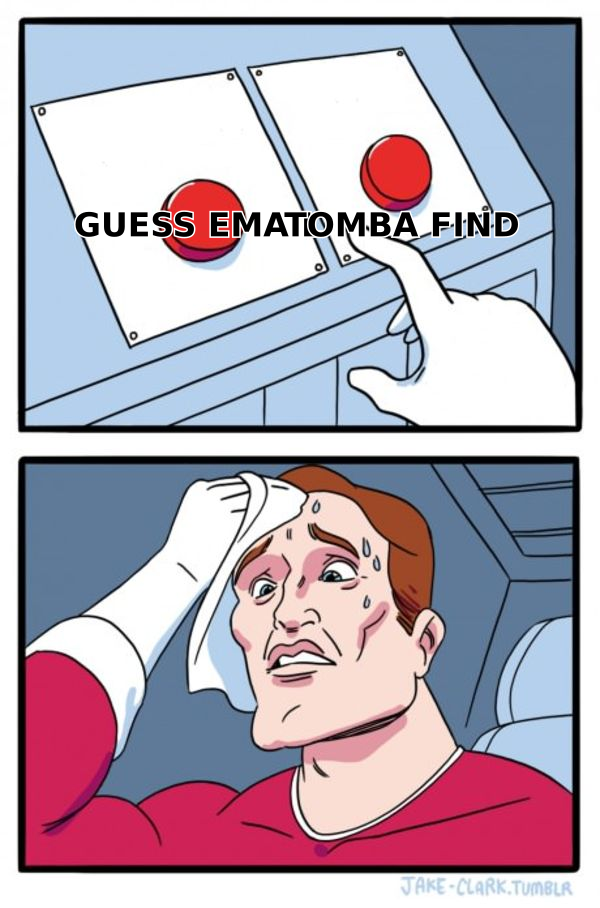
Copy problems are visible. Delivery problems are not, and they are usually the bigger leak.
- Bad addresses. A guessed pattern like
first.last@company.comis right maybe 60% of the time across a mixed list. Every bounce degrades your sender reputation and pushes the next invite closer to spam. - Catch-all domains. Servers that accept everything tell you nothing. They need a dedicated catch-all verifier rather than a standard SMTP check, or you will treat a garbage address as valid.
- Role accounts.
info@,sales@, andcontact@rarely reach a decision-maker and often sit behind shared inboxes with aggressive filtering. - Attachment-heavy invites. A first-touch invite with a 4MB deck attached trips filters and reads as a pitch.
- Three CTAs. Booking link plus "reply yes" plus a phone number is three decisions. Pick one.
- No signature or a broken one. Missing sender identity is a spam signal to both filters and humans.
The order of operations matters here. Build the list, verify it, then write. Teams that write first and verify never end up blaming their copy for a data problem. If you are working from a company domain rather than a name list, a domain search will surface the actual pattern in use instead of leaving you to guess, and an email verifier pass before send keeps bounce rates in the range mailbox providers tolerate.
How do you measure whether your invites are working?#
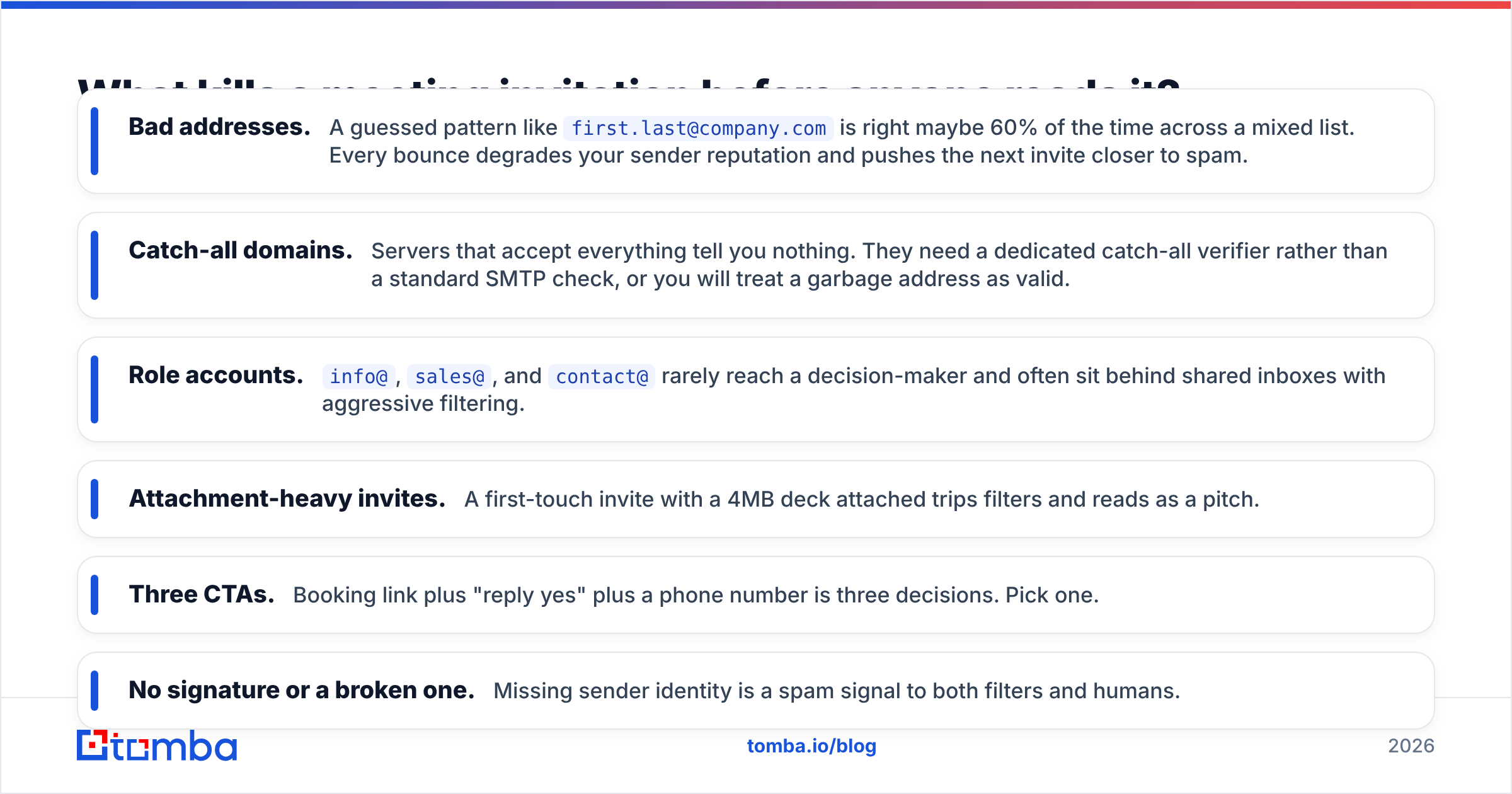
Track four numbers, in this order:
| Metric | Healthy range (cold B2B) | What a low number usually means |
|---|---|---|
| Bounce rate | Under 2% | List quality — verify before send |
| Open rate | 40–60% | Subject line or sender reputation |
| Reply rate | 5–12% | Relevance of the reason, not the ask |
| Meeting-booked rate | 2–8% | Friction in the confirm step |
| Show rate | 70%+ | Weak reminder or unclear agenda |
Diagnose top-down. If bounces are high, nothing below the first row is interpretable. If opens are healthy but replies are flat, your reason is generic — the reader understood the ask and declined it. If replies are strong but bookings lag, your confirm step is broken: a dead link, a booking page with too many fields, or timezone confusion.
For a deeper breakdown of what a realistic response rate looks like by segment, benchmark against your own historical data before trusting any vendor's published average — they are almost always drawn from their best-performing accounts.
Which parts should you personalize, and which should you standardize?#
Personalize the trigger and the outcome. Standardize everything else.
The trigger is the observed fact that explains why you are writing today — a hire, a funding round, a product launch, a job posting, a conference talk. The outcome is what changes for them after the meeting. Those two lines carry the entire persuasive weight of the email.
The greeting, the ask, the time offer, the fallback, and the signature should be identical across your entire sequence. Standardizing them is not laziness; it is how you isolate variables when you test. If every element changes between sends, you learn nothing from the results.
A practical workflow: pull your target list, enrich it so you have role and company context, verify the addresses, write one standardized shell, then hand-write two lines per contact. Twenty invites with two hand-written lines will beat two hundred fully templated ones — and it takes less total time once the shell exists. If you need a starting shell, the cold email templates library is a reasonable place to begin before you customize.
Start with the address, not the copy#
Every template above assumes the message lands in a real inbox owned by a real decision-maker. That assumption is where most outbound programs quietly break.
Tomba's Email Finder returns verified professional addresses by name and domain, with a confidence score and the sources behind each result, so you know whether you are sending to a person or to a pattern-generated guess. The free tier covers 25 searches a month, Starter is $49/mo, and Growth is $99/mo — see Tomba pricing for full limits. Get the address right first; the nine templates above will do the rest of the work.
Related guides#
Ready to find emails that actually work?
Join 150,000+ professionals who stopped guessing and started sending. Free credits on signup — no credit card required.
Get the Tomba newsletter
Practical outbound tactics and product updates — once every two weeks.
About the author