Email Finder AI in 2026: How AI Email Lookup Really Works
AI email finders promise instant, 98%-accurate contact data. Here's what the models actually do, where the guessing starts, and how to tell a real email finder AI from a wrapper around a pattern generator.
TL;DR
- "Email finder AI" covers two very different things: real ML-assisted retrieval from a crawled index, and a language model guessing
first.last@domainand calling it a find. - The AI layer that actually matters is pattern inference, entity resolution, and confidence scoring — not the chat interface bolted on top.
- Accuracy claims of "98%" are meaningless unless the vendor tells you what they do with catch-all domains and how they count a "not found."
- Expect to pay $49–$99/month for usable volume. Free tiers exist (Tomba gives 25 searches/month) but they're for testing, not pipeline.
- The workflow that survives 2026 inboxes: find → verify → segment catch-alls → enrich → send. Skip the verify step and your AI-found list will burn your domain.
What does "email finder AI" actually mean?#
Strip the marketing and there are three distinct products sold under the same phrase.
1. Index-backed finders with ML scoring. These crawl the public web, parse contact data from company sites, press releases, staff pages, and public profiles, then use models to resolve which human maps to which address. The AI does entity resolution ("is J. Smith on the about page the same Jonathan Smith on LinkedIn?") and confidence scoring. Tomba, Hunter, and Findymail sit here.
2. Pattern generators wearing an AI hat. These take a name and a domain, infer the company's email format from a handful of known addresses, generate the permutation, and ping the mail server. That's genuinely useful — it's what an email permutator does — but it isn't intelligence. It's arithmetic with an SMTP check.
3. LLM wrappers. A GPT-class model is asked "what's the email for Jane Doe at Acme?" and returns something plausible. Plausible is the problem. A language model has no index and no SMTP handshake; it produces the statistically likely string. Sometimes that's right. When it's wrong, it's wrong with total confidence and no signal to tell you.
The distinction matters because the failure modes are opposite. An index-backed finder tells you "not found" and costs you nothing. An LLM wrapper hands you a bounce.

How does an AI email finder actually find an address?#
Here's the pipeline that runs behind a single lookup, in order:
- Domain resolution. The tool maps the company name you typed to a canonical domain. "Stripe" →
stripe.com, notstripe.devor a regional reseller. This is where a lot of bad data enters — ambiguous company names resolved to the wrong entity produce technically valid emails for the wrong human. - Pattern inference. The index is queried for every known address at that domain. If 40 of 47 known addresses are
first.last@, the pattern confidence is high. If the domain shows three competing formats (common after acquisitions), confidence drops and the tool should say so. - Candidate generation. Name variants are expanded — nicknames, hyphenated surnames, accented characters normalized, middle initials. "José Martínez-López" produces a dozen realistic candidates, and picking wrong is a bounce.
- Existence checking. An SMTP conversation with the receiving mail server asks whether the mailbox accepts mail, without sending anything. This is the step that separates a find from a guess.
- Confidence scoring. The model weighs pattern strength, source recency, number of corroborating sources, and SMTP response into a single score. A 95+ score means multiple independent sources agree. A 60 means it's a well-formed guess.
Step 4 is where the whole category splits. Roughly 25–30% of B2B domains are configured as catch-all — they accept mail to any address, so SMTP verification returns "yes" for asdfgh@domain.com too. Any tool that reports a confident find on a catch-all domain without labeling it is quietly transferring risk to you. A dedicated catch-all verifier treats those domains as their own bucket instead of pretending they resolved.
Is AI email finding accurate enough to trust?#
Accuracy numbers in this category are close to unfalsifiable, because vendors control the denominator.
Three tricks inflate them:
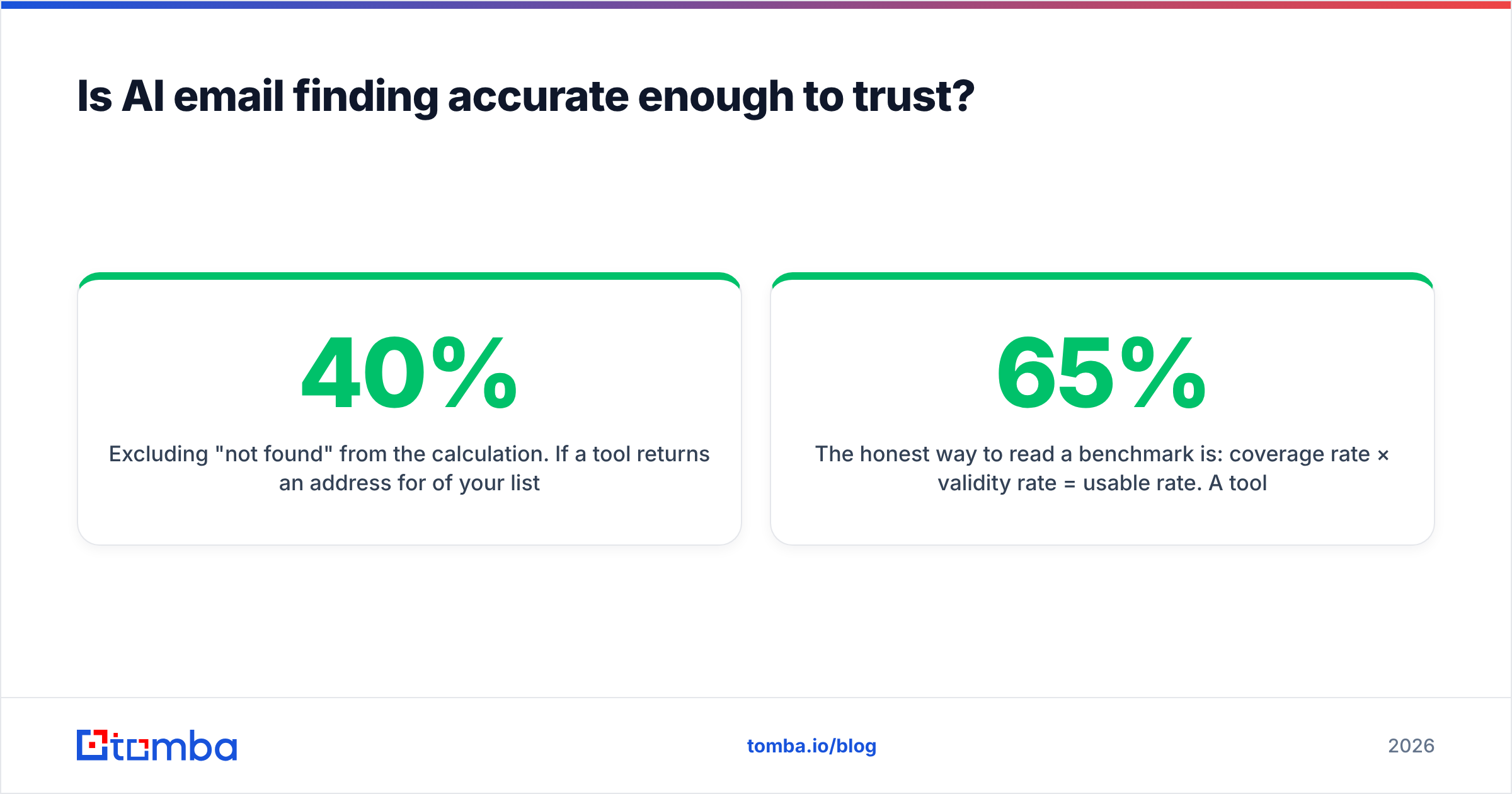
- Excluding "not found" from the calculation. If a tool returns an address for 40% of your list and 95% of those are valid, the headline is "95% accurate" — but your usable coverage is 38%.
- Counting catch-all acceptance as validity. SMTP said yes. The mailbox may not exist. The bounce lands three weeks later when the receiving server finally rejects at the application layer.
- Testing on easy domains. Tech companies with clean
first@patterns are trivial. Try the same benchmark on European manufacturers, healthcare groups, or anything with a regional subdomain and coverage collapses.
The honest way to read a benchmark is: coverage rate × validity rate = usable rate. A tool that finds 65% of a list at 92% validity beats one that finds 35% at 99%.

Run your own test before committing. Take 100 contacts you can independently confirm — customers, past employers, people who've replied to you — strip the emails, and feed the names and domains through each candidate tool. Compare on usable rate, not headline accuracy. It takes an hour and it's the only benchmark that reflects your actual ICP.
Which email finder AI tools are worth paying for in 2026?#
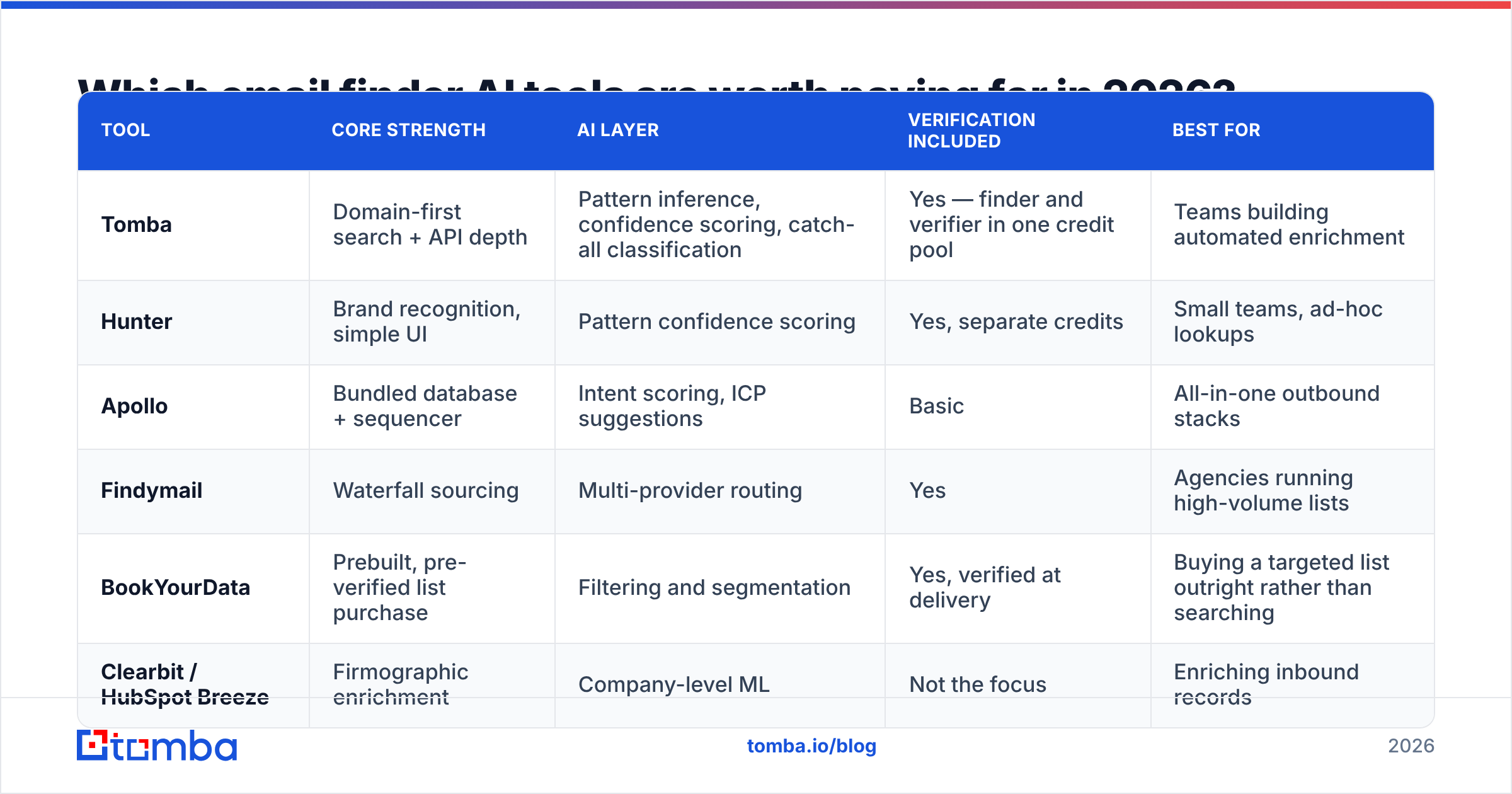
The field has consolidated into a few clear jobs-to-be-done. Nobody wins every category.
| Tool | Core strength | AI layer | Verification included | Best for |
|---|---|---|---|---|
| Tomba | Domain-first search + API depth | Pattern inference, confidence scoring, catch-all classification | Yes — finder and verifier in one credit pool | Teams building automated enrichment |
| Hunter | Brand recognition, simple UI | Pattern confidence scoring | Yes, separate credits | Small teams, ad-hoc lookups |
| Apollo | Bundled database + sequencer | Intent scoring, ICP suggestions | Basic | All-in-one outbound stacks |
| Findymail | Waterfall sourcing | Multi-provider routing | Yes | Agencies running high-volume lists |
| BookYourData | Prebuilt, pre-verified list purchase | Filtering and segmentation | Yes, verified at delivery | Buying a targeted list outright rather than searching |
| Clearbit / HubSpot Breeze | Firmographic enrichment | Company-level ML | Not the focus | Enriching inbound records |

Two selection notes that matter more than feature checklists:
API quality is the real differentiator for AI workflows. If you're wiring an email finder into an agent, a Clay table, or a nightly enrichment job, you care about rate limits, response latency, and whether the confidence score comes back as a number you can branch on. A documented email finder API with predictable JSON beats a prettier dashboard every time.
Credit models decide your real cost. Some tools charge for every lookup including misses. Some charge only on a returned result. Some make verification a separate purchase. Read that page before the pricing page.

What does email finder AI cost?#
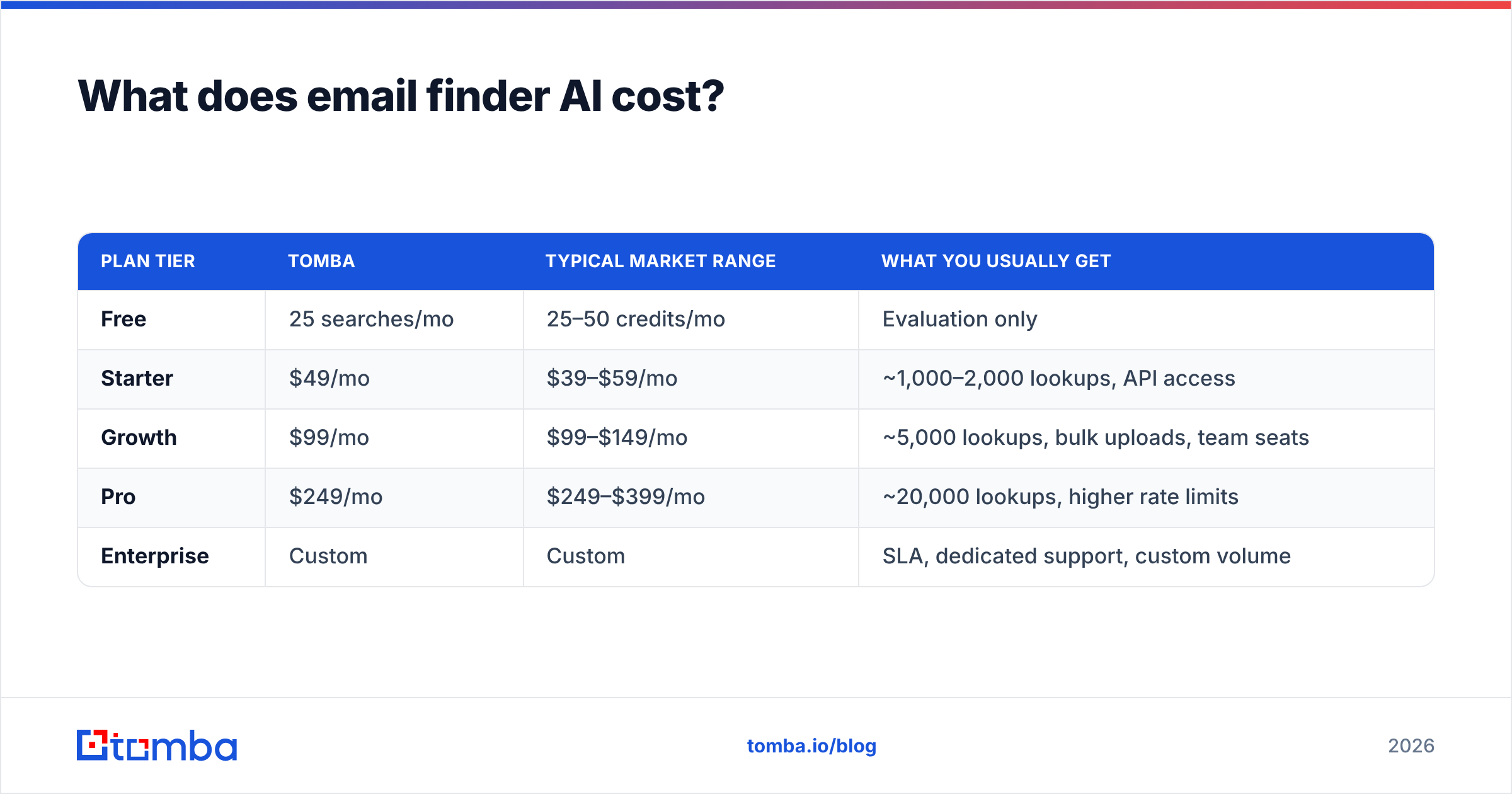
Entry pricing clusters tightly. The spread shows up at volume and in what a credit buys.
| Plan tier | Tomba | Typical market range | What you usually get |
|---|---|---|---|
| Free | 25 searches/mo | 25–50 credits/mo | Evaluation only |
| Starter | $49/mo | $39–$59/mo | ~1,000–2,000 lookups, API access |
| Growth | $99/mo | $99–$149/mo | ~5,000 lookups, bulk uploads, team seats |
| Pro | $249/mo | $249–$399/mo | ~20,000 lookups, higher rate limits |
| Enterprise | Custom | Custom | SLA, dedicated support, custom volume |
Full Tomba pricing is public, which is itself a useful filter — vendors that hide pricing behind a demo call are usually optimizing for annual contracts, not for the 3-person team testing a workflow this week.
The cost trap isn't the subscription. It's wasted credits. If 40% of your lookups return nothing and you're billed for all of them, your effective cost per usable contact is 1.7× the sticker. Ask the question directly during evaluation.
Where does email finder AI still fail?#
Be realistic about the ceiling. These are structural limits, not bugs a vendor will patch next quarter.
- Small and private companies. A 12-person consultancy with no staff page and no press coverage has almost no public surface for an index to crawl. Coverage on sub-50-employee firms outside tech routinely drops below 40%.
- Recent job changes. Someone who moved companies six weeks ago is still indexed at the old domain. Every provider has this lag; the good ones surface a
last_seendate so you can discount it. - Catch-all domains. Roughly a quarter to a third of B2B domains. No amount of AI resolves whether the mailbox exists — the server refuses to say. The only correct handling is to label them and let you decide the risk.
- Role accounts.
info@,sales@,support@are valid, deliverable, and almost never worth emailing. A tool that pads coverage with role accounts is inflating its numbers. - Privacy-regulated regions. GDPR and similar frameworks constrain what can be indexed and retained. Coverage on EU contacts is legitimately lower, and a vendor claiming otherwise is either wrong or careless. Check where a provider sources its data before you build a compliance story on it.
- Hallucination in LLM-first tools. If the product's core is a language model with no verification step, treat every output as unverified. This is not a small caveat — it's the whole product.
How do you build an AI email workflow that actually lands?#
The tooling is the easy part. Sequence is what separates a 3% bounce rate from a 12% one that gets your domain filtered.
- Start from a domain, not a name list. Run a domain search to pull every known contact at a target company, then filter to the roles you want. This gets better coverage than looking up names one at a time, because the pattern is inferred from a larger sample.
- Verify everything, including high-confidence results. A separate email verifier pass catches stale records that the finder's index hasn't refreshed. This is cheap insurance against reputation damage that takes months to undo.
- Segment catch-alls into their own track. Don't delete them and don't blast them. Send to catch-all contacts from a secondary domain, in small batches, and watch the reply-to-bounce ratio before scaling.
- Cap the send rate per domain. Even perfect data gets throttled if you hit one company's mail server with 40 messages in an hour. Google's bulk sender guidelines are the practical baseline — under a 0.3% spam complaint rate, authenticated with SPF/DKIM/DMARC.
- Re-verify anything older than 90 days. B2B contact data decays at roughly 2–3% per month through job changes alone. A list you verified in January is materially worse by April.
- Log outcomes back into your scoring. If a provider's 95-confidence results bounce at 8%, their score means something different than the label suggests. Measure it yourself.
For volume work, do this in batches rather than one call at a time — a bulk email finder run against a CSV costs the same credits and takes a fraction of the wall-clock time.
Is an AI email finder better than buying a list?#
They solve different problems, and the honest answer depends on how specific your ICP is.
Buying a prebuilt, pre-verified list makes sense when your targeting maps cleanly to standard firmographic filters — industry, headcount, geography, title — and you want 5,000 contacts on Tuesday without building anything. Providers like BookYourData are built for exactly that: filter, checkout, verified file. It's fast and the unit economics are predictable.
An email finder API makes sense when your targeting is idiosyncratic — companies using a specific technology, firms that just posted a certain job, accounts that visited your pricing page — because no prebuilt list has that segment. You bring the account list from your own signal source, and the finder resolves it to people.
Most serious teams end up doing both: purchased data for broad top-of-funnel coverage, on-demand lookup for the signal-driven segments where timing is the whole advantage. Reviews on G2 are a reasonable sanity check on both sides, with the usual caveat that review volume tracks marketing spend more than product quality.
What should you do next?#
Pick two tools, build a 100-contact ground-truth test, and compare on usable rate — coverage times validity — not on the accuracy number in the hero section. Then check whether the API returns a confidence score you can actually branch on, because that's what determines whether this becomes a workflow or stays a manual chore.
If you want a starting point that covers search, verification, and catch-all handling in one credit pool, the Tomba Email Finder is free to test with 25 searches a month — enough to run the ground-truth benchmark above before you spend anything. Run it against your own contacts, check the confidence scores against reality, and let the numbers decide.
Related guides#
Ready to find emails that actually work?
Join 150,000+ professionals who stopped guessing and started sending. Free credits on signup — no credit card required.
Get the Tomba newsletter
Practical outbound tactics and product updates — once every two weeks.
About the author