Email Finder App: How to Pick the Right One in 2026
Most email finder apps look identical on the pricing page and behave very differently on a real prospect list. Here's how to judge accuracy, credit math, verification depth, and API access before you commit.
TL;DR
- An email finder app turns a name plus a company domain into a deliverable business email address, then tells you how confident it is in that address.
- The differences between tools are not in the UI. They are in source freshness, SMTP verification depth, catch-all handling, and how credits get burned on failed lookups.
- Ask two questions before buying: do I pay for misses? and is verification included or billed separately? Those two answers change your real cost per valid contact more than the sticker price does.
- Bulk enrichment, a browser extension, and an API are the three delivery mechanisms that matter. Most teams need at least two of the three.
- Tomba starts free at 25 searches/month and $49/mo on Starter, with the email finder, verifier, domain search, and API on the same credit pool.
What is an email finder app?#
An email finder app is a lookup engine. You give it identity signals — usually a first name, last name, and company domain — and it returns the most likely professional email address for that person, along with a confidence score and the evidence behind it.
Think of it like a phone directory that rebuilds itself every night. A paper directory is a snapshot that rots the moment someone changes jobs. A good email finder is closer to a live index: it crawls public sources, learns each company's email pattern, cross-checks that pattern against addresses it has actually observed, and then tests the result against the receiving mail server before handing it to you.
The output is not just a string. A useful result includes:
- The address itself —
first.last@company.com,flast@company.com, and so on. - A confidence score — usually 0–100, derived from pattern strength plus verification signal.
- Sources — the URLs or records where that address (or the pattern) was observed.
- A verification status — valid, invalid, catch-all, or unknown.
- Metadata — job title, LinkedIn URL, department, seniority, sometimes a phone number.
Anything that returns only a string with no score and no sources is a permutator, not a finder. Permutators are free and useful for a single guess, but they will torch your sender reputation if you feed their output straight into a sequencer.
How does an email finder app actually find an address?#
Four mechanisms run in sequence. Understanding them explains why two tools quote wildly different numbers for the same prospect.
- Database lookup. The tool checks whether it has already seen and verified an address for this person. Fastest path, highest confidence, and the reason database size still matters — though freshness matters more than raw row count.
- Pattern inference. If the person is unknown but the company is known, the tool applies that company's dominant email pattern. A tool that has observed 400 addresses at
stripe.comknows the pattern with near-certainty. One that has observed three is guessing. - Live crawling and scraping. Public web pages, press releases, GitHub commits, conference speaker lists, and company team pages get parsed for exposed addresses. This is where an author finder style lookup earns its keep for content and PR outreach.
- SMTP verification. The candidate address gets tested against the receiving mail server without sending an email. The server either confirms the mailbox exists, rejects it, or — on catch-all domains — accepts everything and tells you nothing useful.

Step 4 is where most of the quality gap lives. Plenty of tools stop at step 2, dress the guess up in a 95% confidence badge, and let you discover the truth via bounce rate. That is the single most common reason a $29/mo tool costs more than a $99/mo one once you count burned domains.
Why does email finder accuracy vary so much between tools?#
Because "accuracy" is measured three different ways and no vendor tells you which one they used.
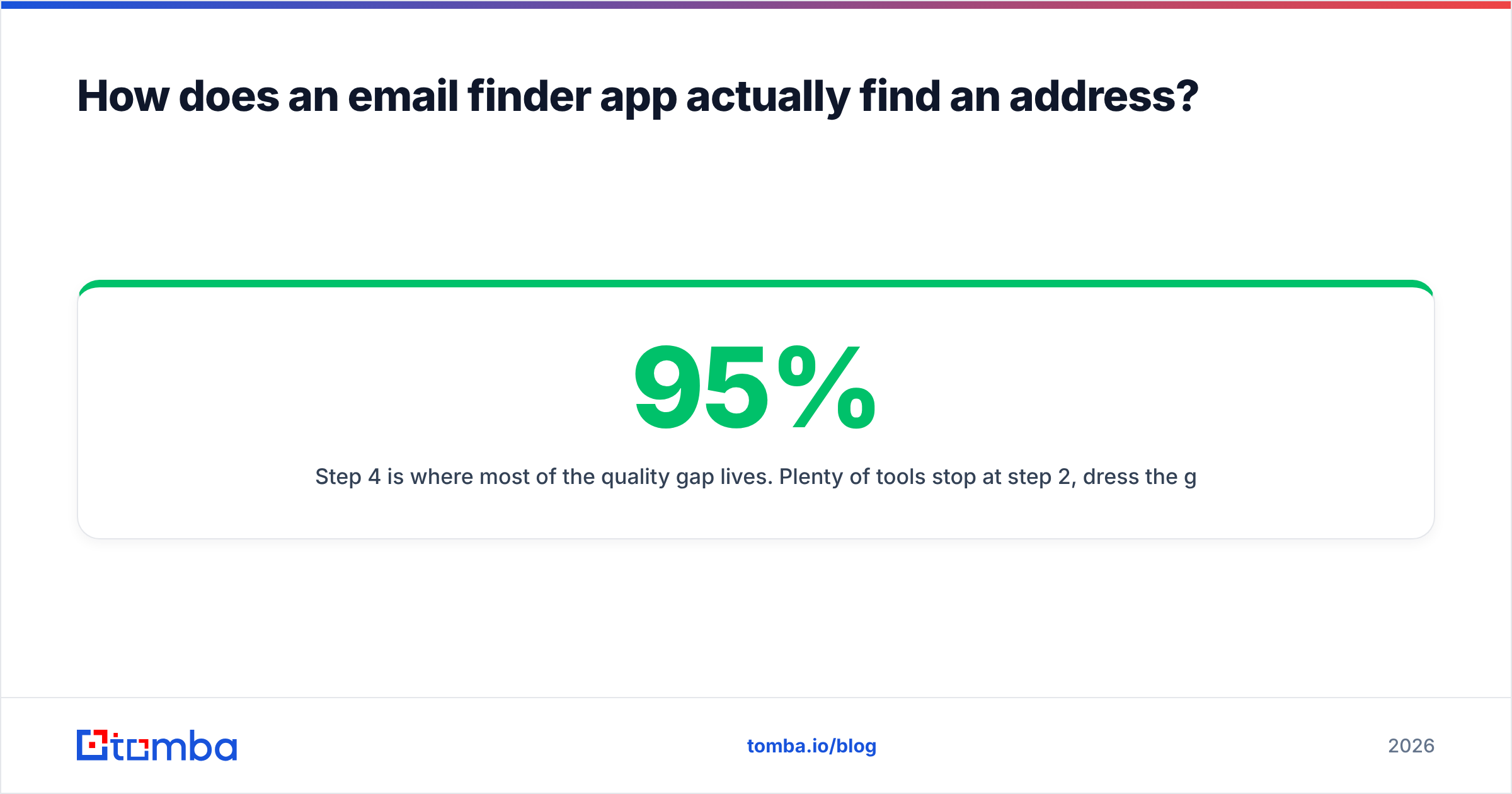
- Hit rate — of the rows you submitted, how many returned any address? A tool can hit 95% by guessing aggressively.
- Deliverability rate — of the addresses returned, how many actually accept mail? This is the number you care about.
- Bounce rate — the inverse, measured after you send. The only honest metric, and the only one you can verify yourself.
A tool with a 60% hit rate and a 3% bounce rate beats a tool with a 90% hit rate and a 22% bounce rate, every time. The second one hands you 30 extra rows and then costs you a domain.

Two things skew accuracy tests badly, and you should control for both when you run your own:
Catch-all domains. Roughly a third of mid-market and enterprise domains accept mail to any address, valid or not. SMTP verification returns "accepted" for asdfgh@company.com. Tools handle this differently: some mark catch-all results as valid (inflating their numbers), some mark them unknown (deflating), and some run additional heuristics. If you send to catch-all domains without extra checking, use a dedicated catch-all verifier rather than trusting the finder's default label.
Geography and industry mix. Accuracy on US SaaS companies is not accuracy on German manufacturing or Japanese logistics. Test with your actual ICP list, not a vendor-supplied sample.
Which email finder app fits which team?#
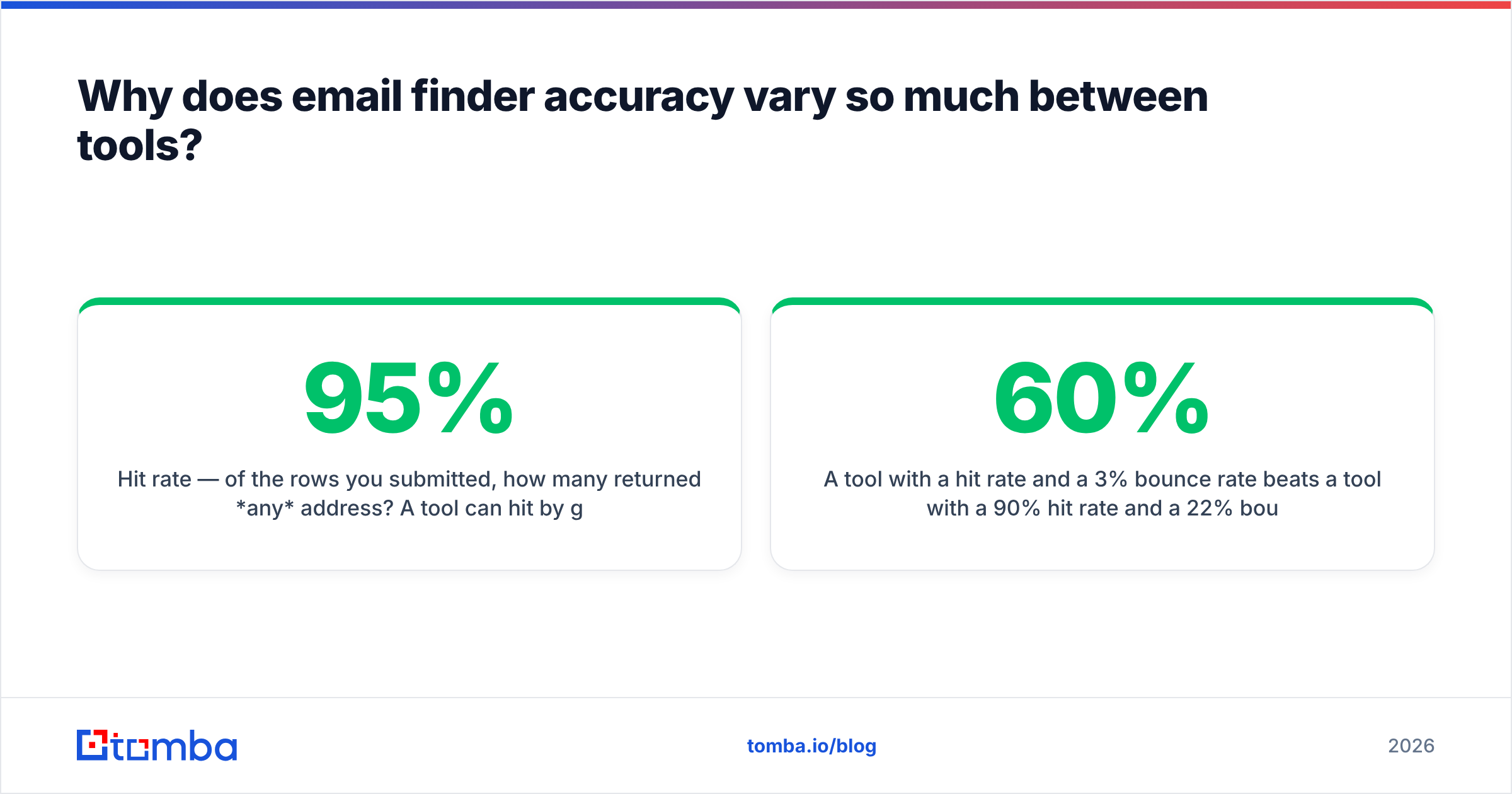
Here is how the main categories compare on the attributes that actually change your workflow. Prices reflect entry paid tiers at the time of writing — always confirm on the vendor's own pricing page, since credit definitions shift more often than prices do.
| Attribute | Tomba | Hunter | Apollo | RocketReach | BookYourData |
|---|---|---|---|---|---|
| Free tier | 25 searches/mo | Limited monthly credits | Free plan with credit caps | Trial lookups only | Free sample credits |
| Entry paid tier | $49/mo (Starter) | ~$49/mo | ~$49/user/mo | ~$70/mo | Pay-as-you-go available |
| Core strength | Finder + verifier on one credit pool | Domain-level pattern data | All-in-one prospecting + sequencing | Deep person-level coverage | Prebuilt, filterable B2B lists |
| Verification included | Yes, same credits | Yes, separate credit type | Yes, within plan | Limited | Verified at point of purchase |
| Catch-all handling | Dedicated catch-all verifier | Flagged as "accept all" | Flagged | Flagged | Handled pre-delivery |
| API access | All paid plans | Paid plans | Paid plans | Paid plans | Available |
| Best for | Precision outbound + dev workflows | Domain research, small teams | Teams wanting data + sending in one seat | Recruiters, exec search | Buying a clean list without lookups |

The honest read: these tools are not competing on the same axis. Apollo is a prospecting platform that includes a finder. Hunter is a domain-first research tool. BookYourData sells pre-verified lists, which is a genuinely different purchase — you're buying inventory, not running lookups, and for some teams that's a faster route to a first campaign. Tomba sits in the middle: a finder-and-verifier stack with an API, priced for teams who want the data layer without the sending layer.
If you already run Instantly, Smartlead, or Salesloft for sending, buying a second sending platform to get its database is expensive. If you don't, an all-in-one may be cheaper overall.
How should you evaluate credits and pricing?#
Sticker price is the least useful number on the page. Build a cost-per-valid-contact model instead.
The formula:
Cost per valid contact = (monthly price ÷ credits) ÷ (deliverability rate)A $49/mo plan with 1,000 credits at 85% deliverability costs $0.058 per usable contact. A $29/mo plan with 500 credits at 60% deliverability costs $0.097 — 67% more expensive, despite looking 40% cheaper.
Then check these four line items in the fine print:
- Do failed searches consume credits? Some tools charge for every attempt. Others only charge when they return a result. Over 5,000 lookups against a hard vertical, this is a 30–40% cost difference.
- Is verification a separate credit type? A finder credit and a verifier credit are often billed from different pools, which means your effective credit count is half what the plan advertises.
- Do credits roll over? Most don't. Seasonal outbound teams overpay badly on annual plans.
- Are seats charged separately? Per-user pricing changes the math the moment you add a second SDR.
Tomba publishes its tiers openly — free at 25 searches, Starter $49/mo, Growth $99/mo, Pro $249/mo, Enterprise custom — with the finder, verifier, and domain search drawing from the same pool. Compare that structure against whatever you're evaluating on the pricing details page and run the formula above on both.
Do you still need a separate email verifier?#
Usually yes, and for a reason most people get backwards: it isn't that the finder is unreliable. It's that time passes.
An address verified in March is a different risk profile in September. Roughly 2–3% of B2B contacts change jobs every month, which compounds to over a quarter of a list going stale in a year. Any list older than 60 days should get re-verified before it enters a sequence — regardless of which tool found it.
The workflow that keeps bounce rates under 2%:
- Find the addresses (finder app or database).
- Verify immediately at the point of import with an email verifier.
- Segment catch-all and unknown results into a separate, lower-volume track.
- Re-verify anything older than 60 days before it ships.
- Suppress hard bounces permanently, across every sending tool you use.
Google and Yahoo's bulk sender requirements formalized what deliverability engineers already knew: sustained spam complaint rates above 0.3% and sloppy list hygiene get you throttled or blocked. Their published sender guidelines are the baseline, not the ceiling. A finder app that skips verification is handing you a compliance problem, not a lead list.
What delivery method should you use — extension, bulk, or API?#
Match the mechanism to the volume.
- Browser extension — best for one-off, high-value lookups while you're already reading a LinkedIn profile or company site. Fast, but it doesn't scale past a few dozen a day, and manual copy-paste introduces errors.
- Bulk CSV upload — the workhorse for list-based outbound. Upload 2,000 rows, get enriched output back. Use this when your list already exists somewhere else. Tomba's bulk email finder covers this path.
- API — the only option once enrichment needs to happen automatically: on form submit, on CRM record creation, on webhook. If you have engineering resources, the API turns a manual step into infrastructure.
- Spreadsheet add-on — the underrated middle ground. Google Sheets or Excel integrations let ops people build enrichment workflows without touching code.
Most teams start with the extension, graduate to bulk within a month, and hit the API by the time they're running two or more channels. Buy a tool that has all four so the migration is a settings change, not a vendor switch.
What are the most common mistakes with email finder apps?#
Optimizing for hit rate. Discussed above, but worth repeating because it's the single most expensive error. Vendors market hit rate because it's the flattering number.
Skipping the trial on your own data. Every vendor demo uses a list the vendor performs well on. Take 200 rows from your actual ICP, run them through two or three finders, and send a small warmup batch. The bounce rate answers the question no G2 review can — though G2's category listings are a reasonable starting shortlist.
Treating catch-all as valid. It isn't. It's unknown. Sending to catch-alls at volume is how sender reputation degrades quietly over three weeks.
Buying the platform for the database. If you need 3,000 verified emails a month and nothing else, you don't need a sequencing suite with a per-seat license. Buy the data layer.
Ignoring the API on day one. Even if you won't use it for six months, check that it exists, that its rate limits are sane, and that it's on your price tier — not gated behind Enterprise.
Verdict: how do you choose?#
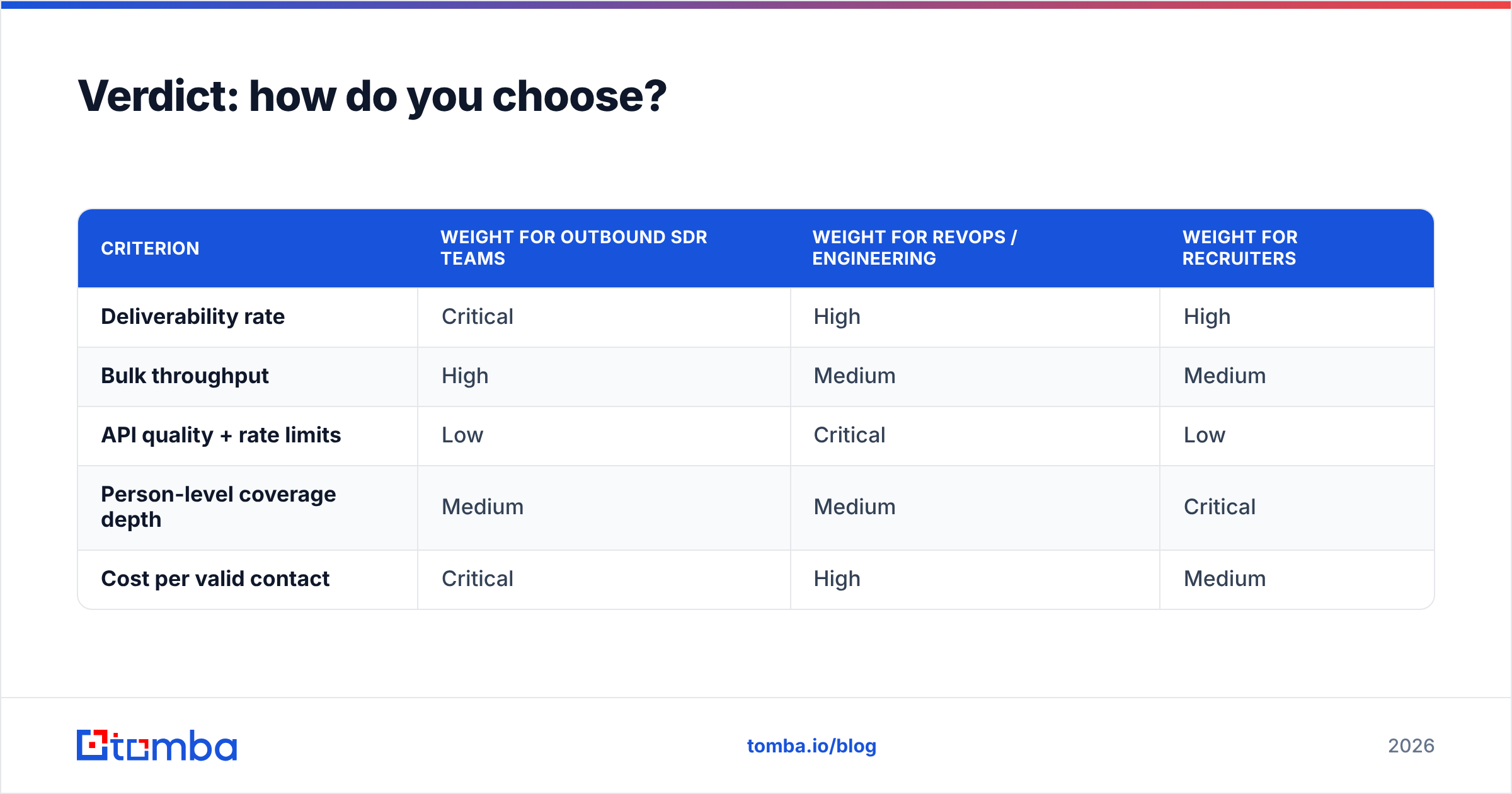
Score candidates on five axes, weighted for your situation:
| Criterion | Weight for outbound SDR teams | Weight for RevOps / engineering | Weight for recruiters |
|---|---|---|---|
| Deliverability rate | Critical | High | High |
| Bulk throughput | High | Medium | Medium |
| API quality + rate limits | Low | Critical | Low |
| Person-level coverage depth | Medium | Medium | Critical |
| Cost per valid contact | Critical | High | Medium |
Run a 200-row test against your top two. Measure bounce rate, not hit rate. Then commit to the cheaper one per valid contact, not per credit.
If you want a starting point that covers the finder, verifier, catch-all checking, and API on a single credit pool without a per-seat sending platform bolted on, try the Tomba Email Finder. The free tier gives you 25 searches a month — enough to run the 200-row test in a couple of batches, or upgrade to Starter at $49/mo and get through it in one afternoon. Either way, test with your own list before you sign anything annual.
Related guides#
Ready to find emails that actually work?
Join 150,000+ professionals who stopped guessing and started sending. Free credits on signup — no credit card required.
Get the Tomba newsletter
Practical outbound tactics and product updates — once every two weeks.
About the author