Email Finder by Domain: How to Find Any Company's Emails
Domain search turns one company URL into a working contact list — but only if you understand patterns, catch-alls, and verification. Here's how it actually works in 2026, and which tools hold up.
TL;DR
- An email finder by domain takes a company URL (
stripe.com) and returns the professional email addresses tied to it, usually with a role, a source, and a confidence score. - The good tools don't guess. They combine crawled public sources, a known email pattern for the domain, and a live SMTP check before they hand you an address.
- Expect 85-95% deliverable accuracy on mid-market SaaS domains, and materially worse on enterprise, catch-all, and privacy-heavy domains. Anyone promising 99% across the board is measuring something else.
- Catch-all domains are where most lists quietly rot. Accepting every address is not the same as delivering to a human.
- Pick your tool by what you actually do: single-domain research, bulk enrichment, or API-driven pipelines. The pricing gap between those three jobs is enormous.
What is an email finder by domain?#
An email finder by domain is a lookup tool that accepts a company domain and returns the email addresses associated with it. You type figma.com, you get back a list — names, job titles, departments, the address itself, and usually a confidence score telling you how sure the provider is that mail will land.
This is different from the two adjacent things people confuse it with:
- Person-to-email lookup: you already have "Maria Chen at Figma" and want her address. That's a name-based finder.
- Email verification: you already have an address and want to know if it bounces. That's a validator.
Domain search sits upstream of both. It's the discovery step — the one that turns "I want to sell to 200 Series B fintechs" into an actual list of humans. If you're new to the terminology, Tomba's glossary entry on what is domain search covers the vocabulary in a page.
The reason this workflow matters more in 2026 than it did five years ago is simple: contact databases decay. Roughly a quarter to a third of B2B contact data goes stale every year through job changes, rebrands, and domain migrations. A static purchased list ages badly. A domain search you run the week you send it doesn't.
How does domain search actually find emails?#
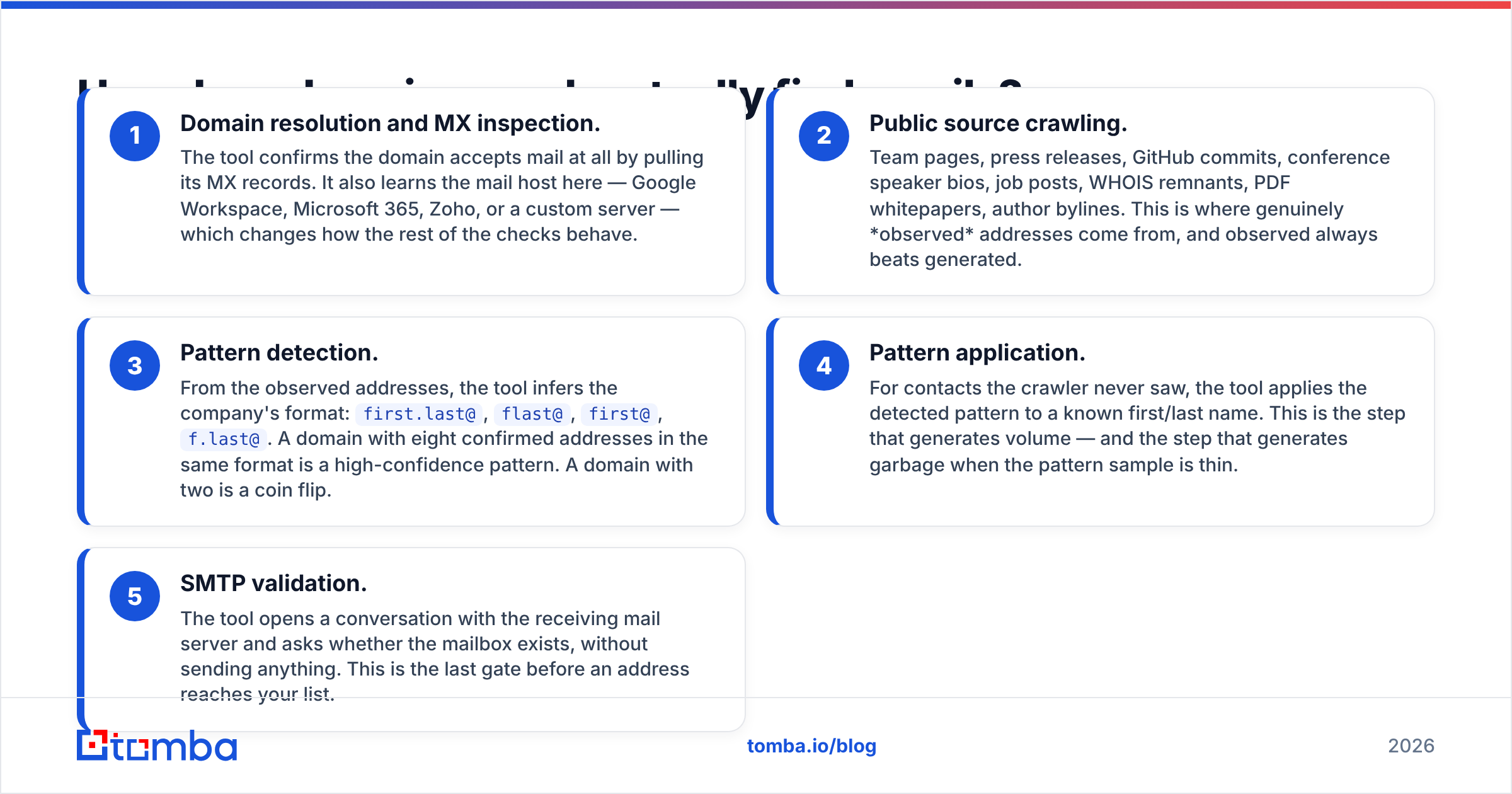
Every credible provider runs some version of the same five-step chain. Understanding it tells you exactly where accuracy comes from — and where it leaks.
- Domain resolution and MX inspection. The tool confirms the domain accepts mail at all by pulling its MX records. It also learns the mail host here — Google Workspace, Microsoft 365, Zoho, or a custom server — which changes how the rest of the checks behave.
- Public source crawling. Team pages, press releases, GitHub commits, conference speaker bios, job posts, WHOIS remnants, PDF whitepapers, author bylines. This is where genuinely observed addresses come from, and observed always beats generated.
- Pattern detection. From the observed addresses, the tool infers the company's format:
first.last@,flast@,first@,f.last@. A domain with eight confirmed addresses in the same format is a high-confidence pattern. A domain with two is a coin flip. - Pattern application. For contacts the crawler never saw, the tool applies the detected pattern to a known first/last name. This is the step that generates volume — and the step that generates garbage when the pattern sample is thin.
- SMTP validation. The tool opens a conversation with the receiving mail server and asks whether the mailbox exists, without sending anything. This is the last gate before an address reaches your list.
The quality difference between providers lives almost entirely in steps 3 and 5. Anyone can run a permutator. Knowing that a pattern is unreliable on a given domain — and saying so instead of shipping a guess with a fake 97% score — is the hard part.
What accuracy should you expect in 2026?#
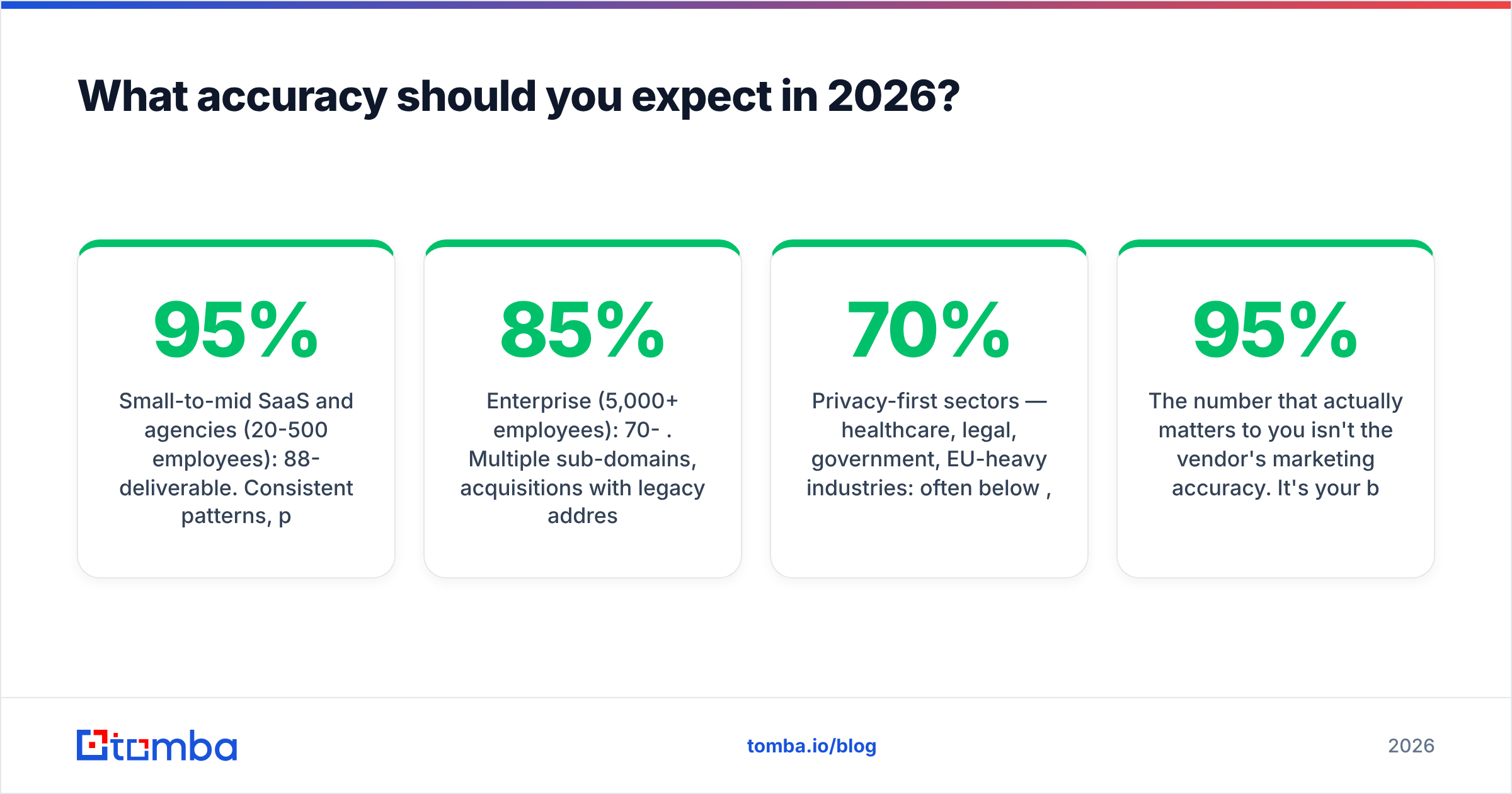
Here's the uncomfortable answer: it depends entirely on the domain, and honest vendors publish accuracy as a range, not a number.

Realistic bands, based on how these systems work:
- Small-to-mid SaaS and agencies (20-500 employees): 88-95% deliverable. Consistent patterns, public team pages, standard Google Workspace setups.
- Enterprise (5,000+ employees): 70-85%. Multiple sub-domains, acquisitions with legacy addresses, aliases that route to shared inboxes, and heavier gateway filtering.
- Catch-all domains: unverifiable by SMTP. Treat separately (more on that below).
- Privacy-first sectors — healthcare, legal, government, EU-heavy industries: often below 70%, and sometimes deliberately unreachable.

The number that actually matters to you isn't the vendor's marketing accuracy. It's your bounce rate on send, which is a function of accuracy and how long the address sat in your CRM before you used it. A 95%-accurate list that you email six months later is not a 95%-accurate list anymore. Find, verify, send — inside the same week if you can.
One more thing worth internalizing: a "not found" result is a feature. A tool that returns an address for every single query is a tool that's making things up. Coverage and accuracy trade off against each other, and you want the vendor that admits it.
Which email finder by domain tools compare best?#
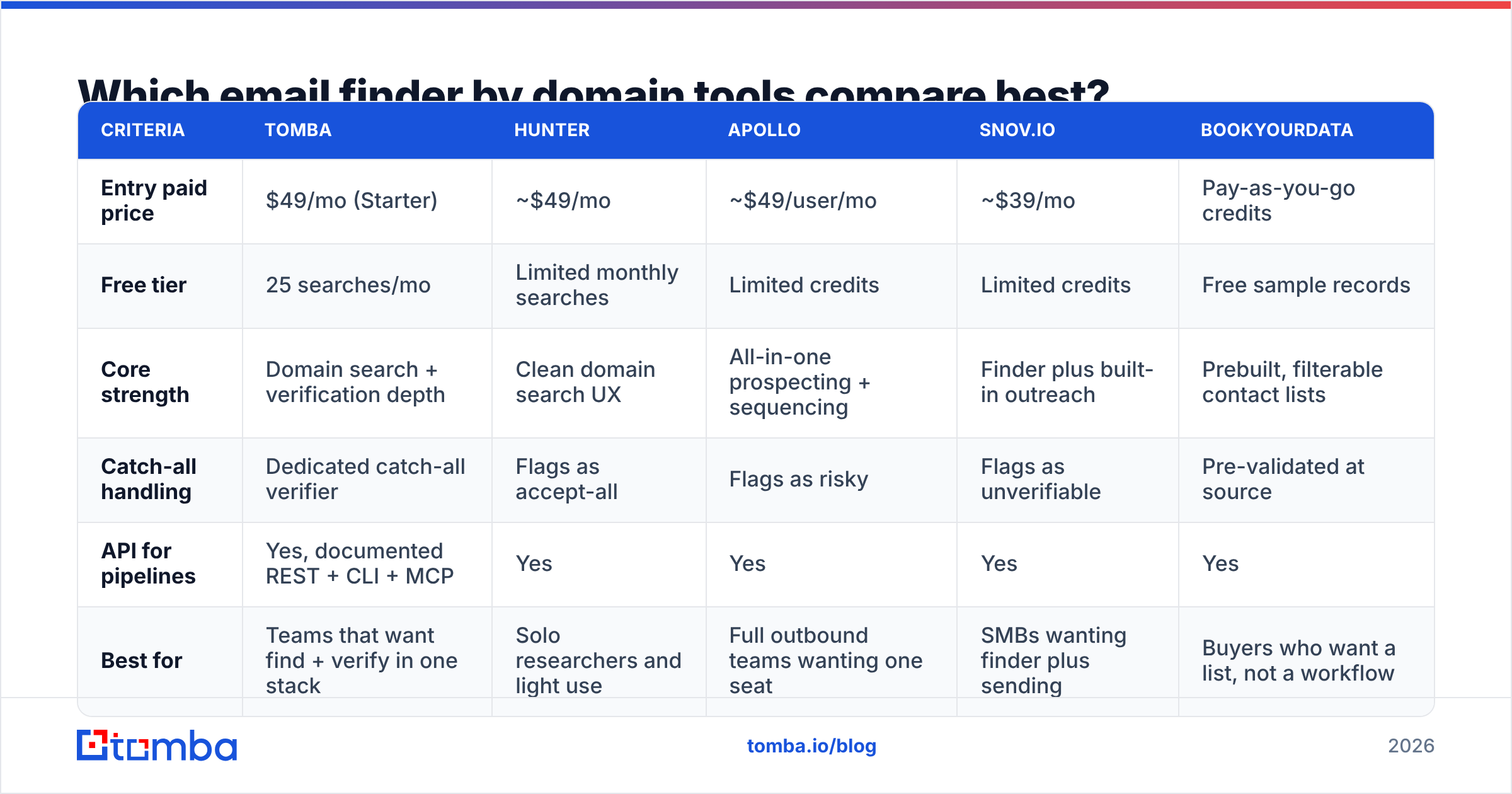
The honest way to compare these tools is by job-to-be-done, not by feature count. Below is how the main options in this category line up. Prices are entry-level published rates as of July 2026 — always confirm on the vendor's own page before you buy, since credit definitions shift.

| Criteria | Tomba | Hunter | Apollo | Snov.io | BookYourData |
|---|---|---|---|---|---|
| Entry paid price | $49/mo (Starter) | ~$49/mo | ~$49/user/mo | ~$39/mo | Pay-as-you-go credits |
| Free tier | 25 searches/mo | Limited monthly searches | Limited credits | Limited credits | Free sample records |
| Core strength | Domain search + verification depth | Clean domain search UX | All-in-one prospecting + sequencing | Finder plus built-in outreach | Prebuilt, filterable contact lists |
| Catch-all handling | Dedicated catch-all verifier | Flags as accept-all | Flags as risky | Flags as unverifiable | Pre-validated at source |
| API for pipelines | Yes, documented REST + CLI + MCP | Yes | Yes | Yes | Yes |
| Best for | Teams that want find + verify in one stack | Solo researchers and light use | Full outbound teams wanting one seat | SMBs wanting finder plus sending | Buyers who want a list, not a workflow |
A few reads on this table:
If you already own a sending tool, don't pay for another one. You want a finder that does discovery and verification well and exports cleanly. That's the Tomba and Hunter lane.
If you have no outbound stack at all, an all-in-one like Apollo saves you an integration project, at the cost of paying per seat rather than per credit — which gets expensive the moment a non-SDR needs access.
If you don't want to build lists at all, a curated database like BookYourData is a legitimately different product: you filter, you buy, you send. It solves the "I need 5,000 US HR directors by Friday" problem far faster than any per-domain search will. It's a worse fit when your ICP is defined by something a filter can't express — "companies that just posted a Rust job."
For third-party signal rather than vendor claims, the G2 sales intelligence category is the least-bad public source: filter reviews by company size, because a 10-person agency and a 2,000-person enterprise are grading completely different products.
What happens when the domain is catch-all?#
A catch-all (or accept-all) domain accepts mail sent to any address at that domain — ceo@, hello@, asdkjh@ — and sorts it out internally. That's usually a gateway configuration, and it's common at larger companies and anywhere behind a security appliance.
For an email finder, this is the hard case: the SMTP check comes back "accepted" no matter what you send. The server tells you nothing. Every address looks valid, and none of them are confirmed.

There are only three defensible ways to handle a catch-all domain, and knowing which one your tool uses matters more than any accuracy stat:
- Flag and exclude. Safest. You lose real contacts but protect your sender reputation. Fine when volume isn't the constraint.
- Flag and score. The tool marks the address catch-all but attaches a pattern-confidence score based on how consistent the domain's format is. You decide the risk. This is what a proper catch-all verifier is for.
- Send anyway, unflagged. What cheap tools do. Your bounce rate absorbs the cost about ten days later, and by then it's tangled up with your warmup schedule and you'll blame the wrong thing.
Practical rule: keep catch-all addresses in a separate segment, send to them from a secondary domain, and cap that segment at a small share of daily volume. Never mix unverifiable addresses into a cold campaign on your primary domain.
How do you use domain search without wrecking deliverability?#
Finding addresses is the easy half. Not getting filtered is the other half, and the two are more connected than most teams assume — mailbox providers read bounce rate as a proxy for "does this sender know who they're mailing."
A workflow that holds up:
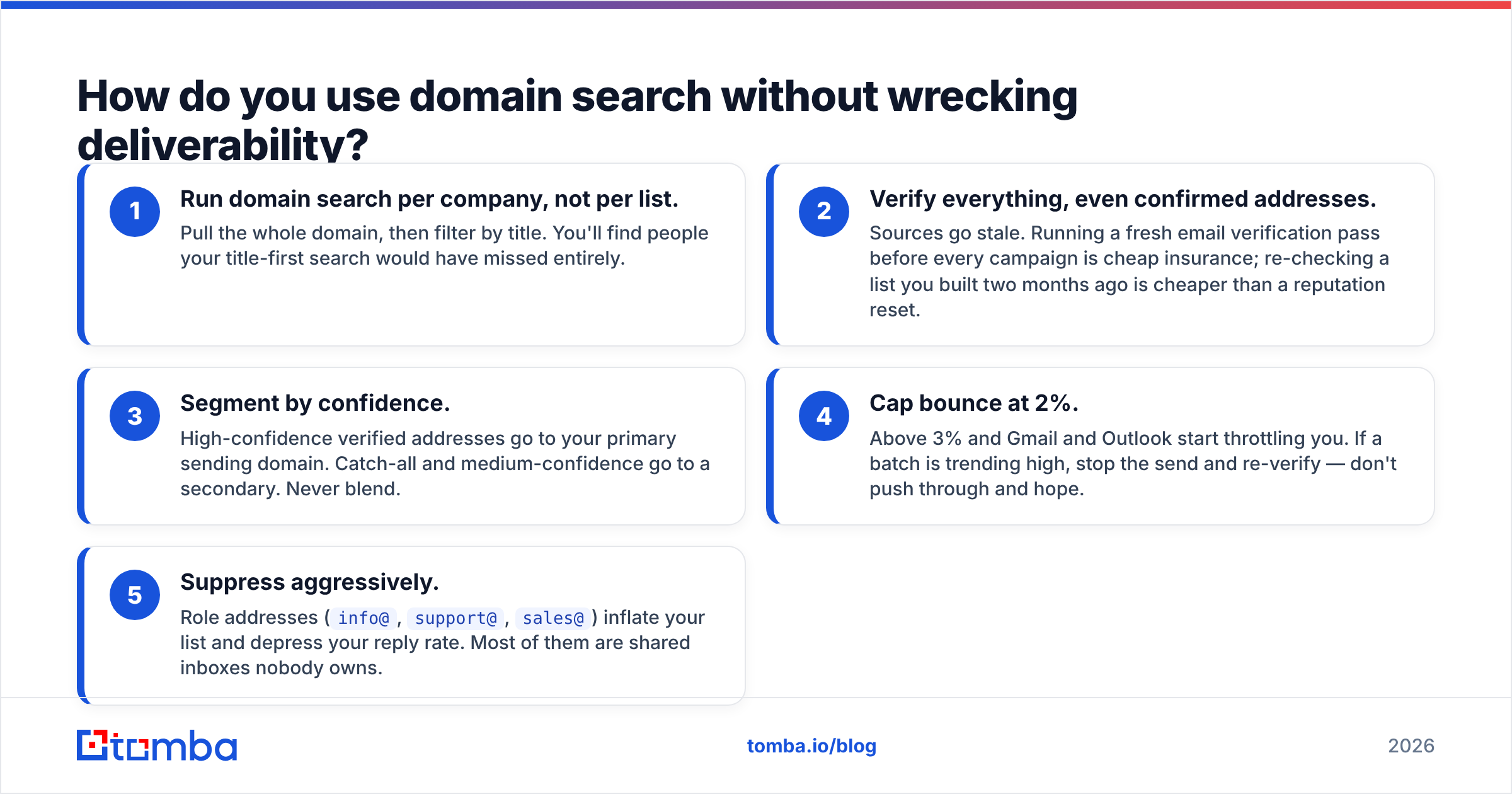
- Run domain search per company, not per list. Pull the whole domain, then filter by title. You'll find people your title-first search would have missed entirely.
- Verify everything, even confirmed addresses. Sources go stale. Running a fresh email verification pass before every campaign is cheap insurance; re-checking a list you built two months ago is cheaper than a reputation reset.
- Segment by confidence. High-confidence verified addresses go to your primary sending domain. Catch-all and medium-confidence go to a secondary. Never blend.
- Cap bounce at 2%. Above 3% and Gmail and Outlook start throttling you. If a batch is trending high, stop the send and re-verify — don't push through and hope.
- Suppress aggressively. Role addresses (
info@,support@,sales@) inflate your list and depress your reply rate. Most of them are shared inboxes nobody owns.
If you're doing this across hundreds of domains a week, do it programmatically. Point the Tomba API at your CRM's account list, run domain search plus verification as a single job, and write results back with a confidence field your sequencing tool can filter on. Manual CSV round-trips are where data goes to die.
What mistakes cost teams the most?#
Trusting a generated address because the score looked high. Confidence scores are model outputs, not facts. Scores derived from three observed addresses on a 900-person company deserve skepticism.
Building the list months before sending it. The single biggest source of bounces isn't bad finding — it's good finding gone stale. Find close to send.
Ignoring the sub-domain problem. Large companies route mail through @corp.example.com or keep an acquired brand's old domain alive. A search on the marketing domain misses those people completely. Check the MX record and the footer of the company's actual outbound email if you can get one.
Treating a first-name-only pattern as universal. first@ breaks the instant a company hires a second Sarah. Companies that started with first@ almost always migrated to something else, leaving both formats live.
Paying per seat for a job that's per credit. If two people need domain search once a week, a seat-based platform is a bad financial fit. Compare Tomba pricing tiers against per-seat platforms on your real monthly lookup volume, not the number the vendor's calculator suggests.
What's the fastest way to go from domain to verified list?#
Concretely, for one company:
- Run domain search on the company URL. Read the detected pattern and the number of observed addresses backing it — that number is your real confidence signal.
- Filter by department and seniority rather than exact title. Titles vary far more than functions do.
- Verify the shortlist. Drop hard fails, segment catch-alls.
- Export with the source field intact so you can audit later which addresses came from a crawl and which came from a pattern.
- Send within days, not weeks.
For a hundred companies, the same five steps run as a batch job — feed a domain list in, get a verified contact file out, and skip the interface entirely.
Ready to turn domains into verified contacts?#
If your bottleneck is going from a list of target companies to a list of people who actually exist, start with the Tomba Email Finder. Domain search, pattern detection, catch-all handling, and verification live in the same stack, so you're not exporting a CSV between three vendors and losing the confidence data on the way through. The free tier gives you 25 searches a month — enough to test it against a handful of domains you already know the answers for, which is the only benchmark that should convince you. If it holds up on those, scale it; if it doesn't, you've spent nothing finding out.
Related guides#
Ready to find emails that actually work?
Join 150,000+ professionals who stopped guessing and started sending. Free credits on signup — no credit card required.
Get the Tomba newsletter
Practical outbound tactics and product updates — once every two weeks.
About the author