Email Finder Chrome Extension: The 2026 Buyer's Guide
Browser extensions promise one-click email lookups, but accuracy, credit burn, and LinkedIn compliance vary wildly. Here's how the top email finder Chrome extensions actually perform in 2026.
TL;DR
- An email finder Chrome extension is only as good as the database behind it — the browser UI is a thin wrapper over the same API you could call from a spreadsheet.
- The metric that matters is verified hit rate, not raw "found" rate. Tools that return unverified guesses inflate coverage and quietly hand you bounces.
- Credit models differ more than prices do: some charge for every lookup, some only for verified results, some charge separately for verification.
- LinkedIn scraping extensions carry real account risk. Extensions that read the page you're already on are safer than ones that crawl in the background.
- If you enrich in bulk more than a few times a week, the extension should be the front door to an API — not the whole product.
What is an email finder Chrome extension?#
It's a browser add-on that reads the page you're viewing — a LinkedIn profile, a company site, a conference speaker list — pulls out the person and company identifiers, and queries an email database to return a work address. Think of it as a barcode scanner for people: the page is the label, the extension is the scanner, and the vendor's database is the price lookup behind the counter.
Under the hood, almost every one of these extensions does the same four things:
- Parse context from the DOM — name, company, job title, sometimes the company domain from a profile's website field.
- Resolve the company to a domain — "Acme Robotics" becomes
acmerobotics.com. This step fails more often than vendors admit, especially for holding companies and rebrands. - Query the email database — a lookup against known-good addresses harvested from public sources, plus pattern inference (
first.last@,f.last@) when no exact record exists. - Verify (or not) — an SMTP/MX check to confirm the mailbox accepts mail before returning it.
Step 4 is where tools diverge hardest. An extension that skips verification will show you a green checkmark for a pattern-generated guess. That's how a "95% accuracy" claim survives contact with a 30% bounce rate.

How do the main email finder Chrome extensions compare in 2026?#
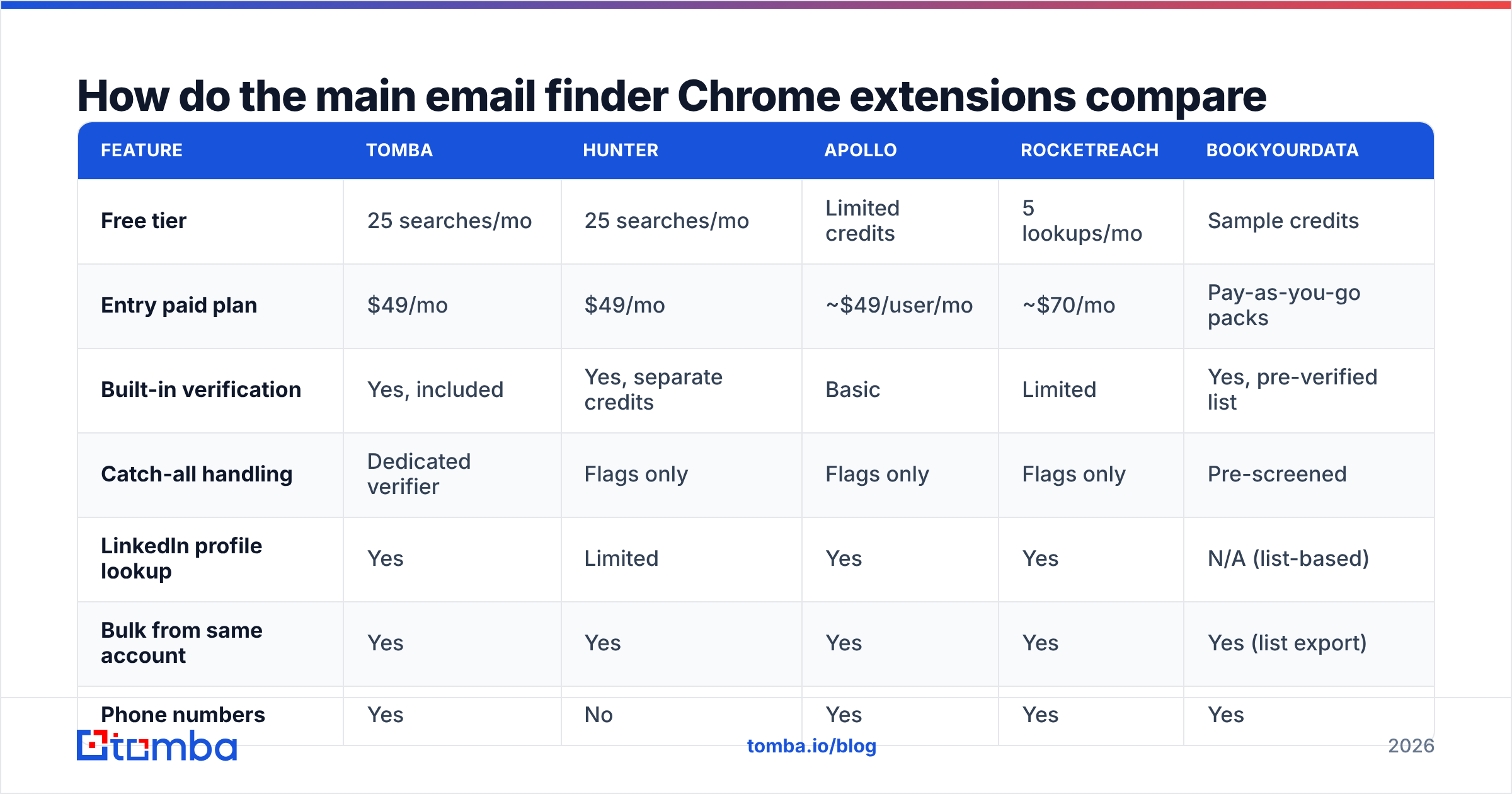
Here's the shape of the market as of mid-2026. Prices are entry paid tiers; free tiers vary in both credit count and whether verification is included.
| Feature | Tomba | Hunter | Apollo | RocketReach | BookYourData |
|---|---|---|---|---|---|
| Free tier | 25 searches/mo | 25 searches/mo | Limited credits | 5 lookups/mo | Sample credits |
| Entry paid plan | $49/mo | $49/mo | ~$49/user/mo | ~$70/mo | Pay-as-you-go packs |
| Built-in verification | Yes, included | Yes, separate credits | Basic | Limited | Yes, pre-verified list |
| Catch-all handling | Dedicated verifier | Flags only | Flags only | Flags only | Pre-screened |
| LinkedIn profile lookup | Yes | Limited | Yes | Yes | N/A (list-based) |
| Bulk from same account | Yes | Yes | Yes | Yes | Yes (list export) |
| Phone numbers | Yes | No | Yes | Yes | Yes |
| API on entry tier | Yes | Yes | Rate-limited | Add-on | Export-based |
Two honest notes on this table. First, Apollo's per-user pricing means a five-seat team pays roughly five times what a single-seat credit pool costs — that difference dwarfs any per-credit price gap. Second, BookYourData plays a genuinely different game: it sells pre-verified lists rather than live per-profile lookups, which suits teams that want a clean, ready-to-load dataset instead of enriching one prospect at a time. If your workflow is "build a segment, load it, send," a list vendor can beat any extension. If your workflow is "I'm on this profile right now," an extension wins.

Which accuracy claim should you actually believe?#
None of them, until you run your own test. Vendor accuracy figures are computed on the vendor's own sample, which is disproportionately made of large, well-indexed companies — exactly the segment where every tool performs well.
Run this instead. It takes about twenty minutes:
- Pick 100 real prospects from your actual ICP, not from the Fortune 500. Include at least 30 companies under 50 employees.
- Run all of them through each extension you're evaluating, recording found / not found.
- Push every returned address through a neutral verifier — not the one bundled with the tool that produced it. A free email checker is enough for a sample this size.
- Compute verified hit rate: verified-valid addresses ÷ 100. Not ÷ addresses-returned. The denominator is your prospect list.
- Compute cost per verified contact: monthly cost ÷ verified results at your real volume.
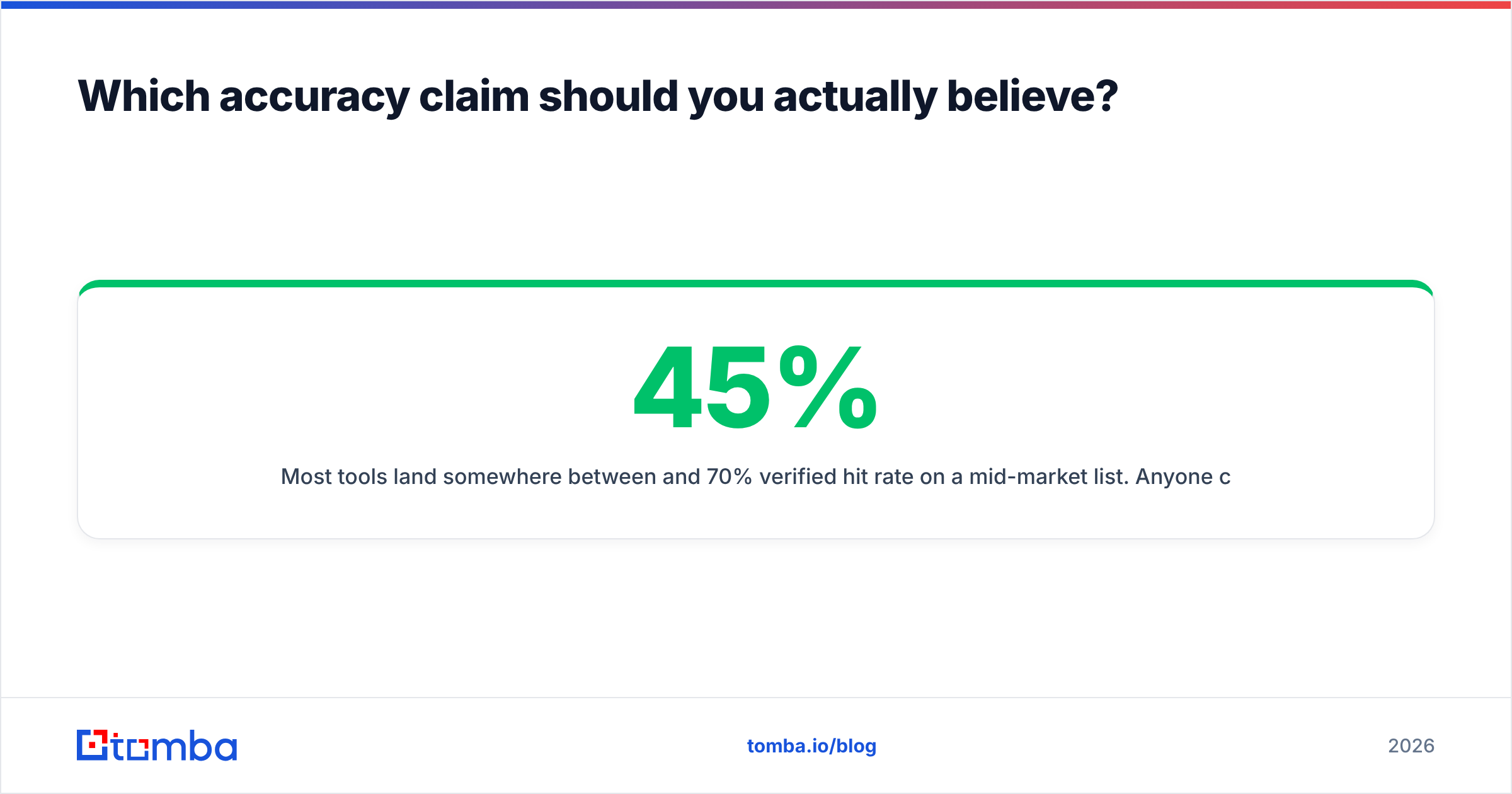
Most tools land somewhere between 45% and 70% verified hit rate on a mid-market list. Anyone claiming 95%+ on a list like that is measuring "returned a string" rather than "returned a deliverable mailbox."

What about catch-all domains?#
Catch-all domains are the single biggest source of disagreement between tools. A catch-all server accepts mail to any address at the domain, so a standard SMTP check can't distinguish sarah.chen@ from asdfgh@. Every tool has to decide what to do with that ambiguity:
- Return it as valid — inflates the accuracy number, quietly inflates your bounce rate too.
- Return it as "risky" — honest, but pushes the decision onto you with no extra information.
- Return it as invalid — safe, but throws away good contacts. Roughly 20–25% of B2B domains are catch-all, and a lot of them are companies you want.
- Run additional signal checks — cross-reference the address against observed sends, pattern confidence, and historical engagement before scoring.
That last approach is what a dedicated catch-all verifier does, and it's the difference between discarding a quarter of your addressable market and mailing it with reasonable confidence. When you compare tools, ask specifically how they score catch-alls. A vendor that can't answer is doing option one.

Is a Chrome extension enough, or do you need the API?#
Depends on volume, and the cutover is sharper than people expect.
Stick with the extension if:
- You enrich fewer than ~50 contacts a week
- Your prospecting is genuinely browse-driven — you find people by reading, not by querying
- You're a solo seller or a team of two or three
- You want zero setup and zero engineering time
Move to the API or bulk tools if:
- You're enriching lists exported from another system
- You need enrichment inside a CRM workflow, not a browser tab
- You want deduplication and re-verification on a schedule
- More than one person needs the same contact record
The practical middle ground: use the extension for discovery and one-off research, and a bulk email finder or the Tomba API for everything batchable. Clicking a browser button 400 times is not a workflow, it's an injury. Tools that offer both under the same credit pool — rather than charging you twice for the same data — save real money at scale.
What should you check before installing any extension?#
Chrome extensions run with broad page access by default. Before you install one on a machine that has your CRM open in another tab, check:
Permissions requested. An email finder needs to read the current tab. It does not need "read and change all your data on all websites" unless it's also doing background crawling — which is exactly the behavior that gets LinkedIn accounts restricted. Check the permission list on the Chrome Web Store listing before clicking Add.
Data handling. Does the vendor store the profiles you view? Some extensions feed everything you browse back into a shared database. That may be fine, or it may be a problem if you're researching an acquisition target.
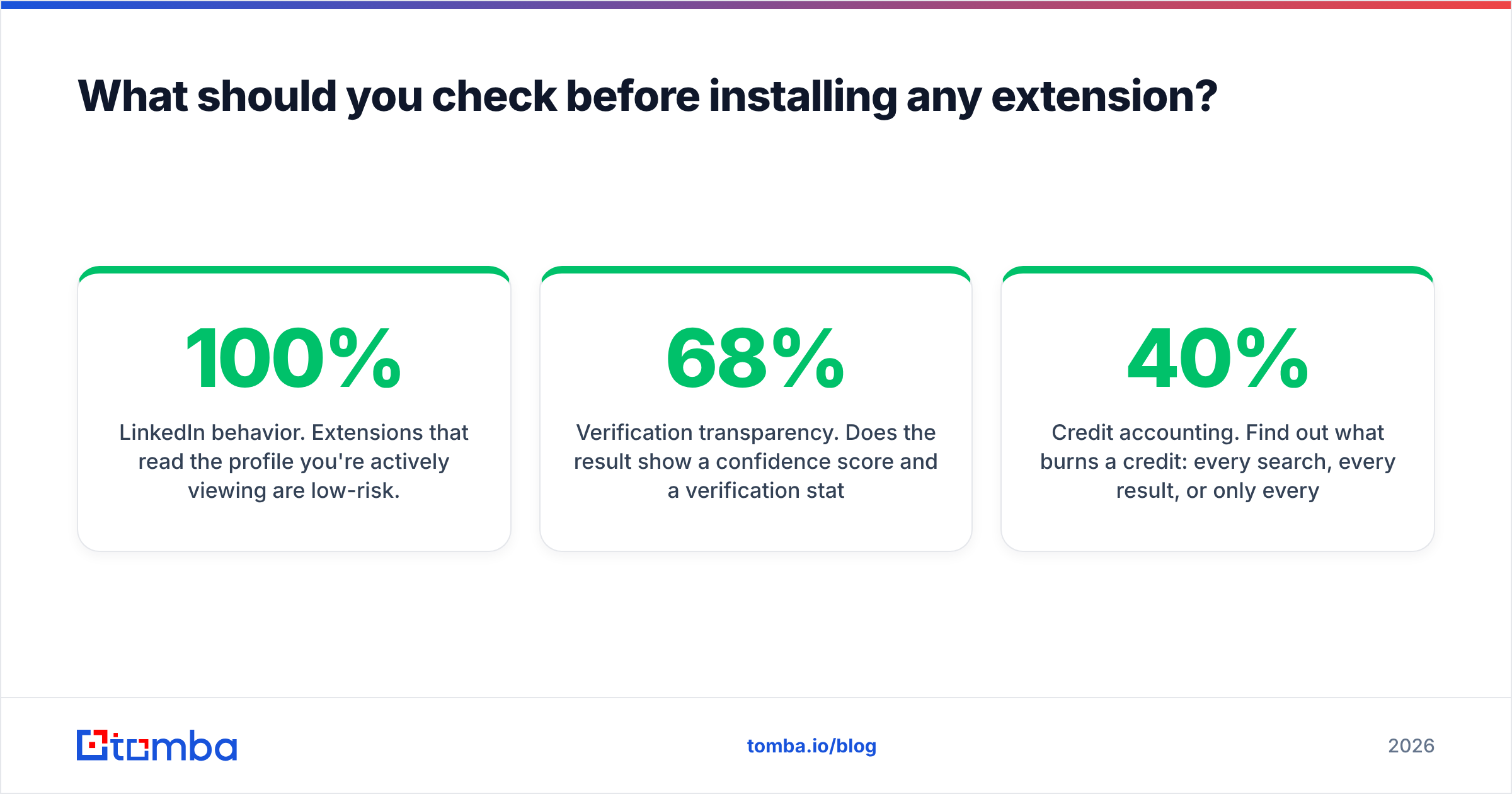
LinkedIn behavior. Extensions that read the profile you're actively viewing are low-risk. Extensions that auto-scroll search results, open profiles in background tabs, or batch-scrape connections violate LinkedIn's User Agreement and put your account at risk. Review LinkedIn's terms yourself rather than trusting a vendor's "100% safe" marketing.
Verification transparency. Does the result show a confidence score and a verification status, or just an address? An extension that shows sarah@acme.com — 68% confidence, catch-all domain is telling you something useful. One that shows only the address is hiding the same information.
Credit accounting. Find out what burns a credit: every search, every result, or only every verified result. On a mid-quality prospect list, that distinction changes effective cost by 40% or more. Compare Tomba pricing and competitors on cost-per-verified-contact, never on sticker price.
Independent reviews. Vendor case studies are marketing. Check G2's email finder category for unfiltered complaints — the one-star reviews tell you about billing surprises and support response times that no comparison table captures.
How do you actually use an extension well?#
The tools reward a disciplined workflow more than a clever one.
Start from the company, not the person. If you need six contacts at one account, a domain search returns the whole team plus the company's email pattern in one call. Six individual profile lookups cost six credits and give you less pattern information.
Verify before you import, not after you send. Push every extension result through an email verifier before it enters your sequencer. Bounces damage sender reputation far more than a missed contact damages your pipeline, and a bad sending domain takes weeks to recover.
Log the misses. Track which companies return nothing. If small European companies fail consistently for your tool, that's a data-coverage gap, and it's the strongest possible argument for a second tool or a switch.
Don't guess when you can pattern-match. When a lookup fails but you know the company format, a company email pattern check plus verification is often more reliable than a second tool's guess.
Keep one tool as the system of record. Running three extensions in parallel produces three conflicting records for the same person and triples your spend. Pick a primary, use a secondary only for the misses, and route both into the same CRM field.
Which one should you pick?#
Match the tool to the shape of your work, not to the highest number on a landing page.
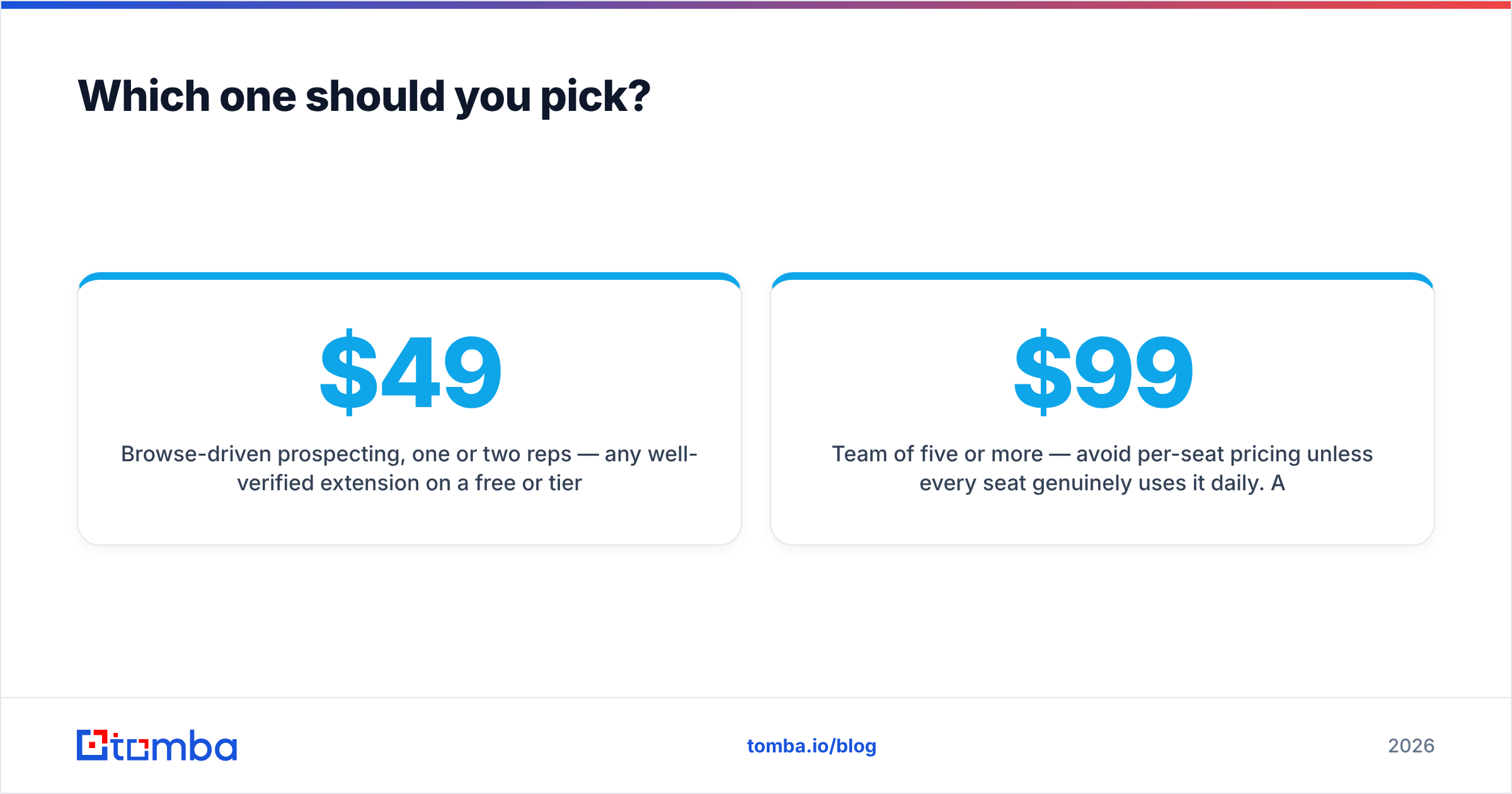
- Browse-driven prospecting, one or two reps — any well-verified extension on a free or $49 tier will do. Compare on catch-all handling and whether verification is bundled or billed separately.
- Team of five or more — avoid per-seat pricing unless every seat genuinely uses it daily. A shared credit pool at $99/mo typically beats five seats at $49.
- List-based campaigns with defined segments — a pre-verified list vendor like BookYourData often costs less per usable contact than per-profile lookups, because you're not paying for misses.
- Engineering-supported GTM — go straight to the API and treat the extension as a debugging tool for the data team.
- High-volume outbound — you need bundled verification and catch-all scoring, or your deliverability will erode faster than your list grows.
The uncomfortable truth is that the extension UI is nearly identical across vendors. One click, a card, a copy button. What you're actually buying is database coverage in your specific vertical and geography, and honest verification. Test both on your own list before committing to an annual plan — every serious vendor offers enough free credits to run the 100-prospect test above.
Ready to test it on your own list?#
Install the Tomba Chrome extension and run the 100-prospect benchmark against whatever you're using now. The free tier includes 25 searches a month with verification bundled — enough to see real verified hit rates on your ICP, not a vendor's curated sample. If the numbers hold up, the Tomba Email Finder starts at $49/mo with the same credits usable across the extension, the API, bulk uploads, and the Google Sheets add-on, so you never pay twice for the same contact.
Related guides#
Ready to find emails that actually work?
Join 150,000+ professionals who stopped guessing and started sending. Free credits on signup — no credit card required.
Get the Tomba newsletter
Practical outbound tactics and product updates — once every two weeks.
About the author