Email Finder CRM Integration: How to Sync Leads in 2026
Most email finder CRM integrations quietly break within a month: duplicate contacts, unverified addresses, and enrichment loops that burn credits. Here is how to wire it up so it survives contact with a real pipeline.
TL;DR
- An email finder CRM integration has three real jobs: find the address, verify it before it touches your CRM, and write it to the right field without creating a duplicate contact. Most setups skip step two.
- Native integrations (HubSpot, Pipedrive, Salesforce) are fastest to launch. API or middleware setups win the moment you need dedupe logic, conditional enrichment, or credit control.
- Budget for enrichment triggers, not bulk sweeps. Enriching every record in a 40,000-contact CRM is how teams burn a year of credits in a weekend.
- Write email status to a dedicated field (
email_status,email_confidence) so sequencing tools can filter on it. Never overwrite a rep-sourced email with an automated guess. - Test the loop end to end with 25 records before you trust it with 25,000. Duplicate contacts are far harder to unwind than they are to prevent.
What is an email finder CRM integration?#
An email finder CRM integration is the plumbing that takes a partial record — a name, a company domain, a LinkedIn URL — pushes it to an email discovery service, and writes the resulting verified address back into your CRM as a structured field.
Think of it like a hotel front desk that receives a package addressed only to "Sarah, room somewhere." The desk clerk cross-references the guest register, confirms the room, and re-labels the package before it moves. If the clerk skips the confirmation step, the package still gets delivered — to the wrong door. That is exactly what an unverified enrichment sync does to your pipeline.
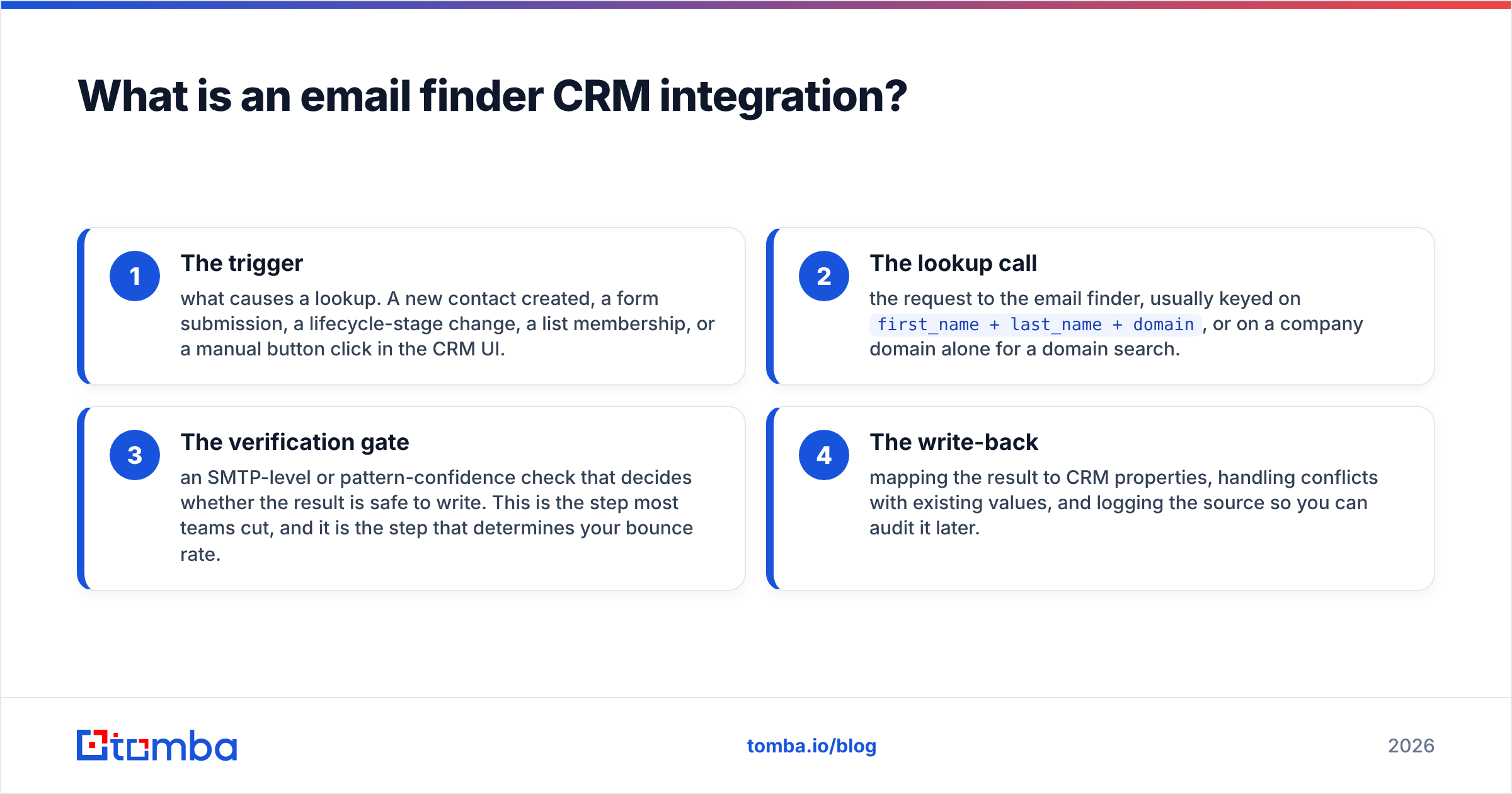
Technically, the integration has four moving parts:
- The trigger — what causes a lookup. A new contact created, a form submission, a lifecycle-stage change, a list membership, or a manual button click in the CRM UI.
- The lookup call — the request to the email finder, usually keyed on
first_name + last_name + domain, or on a company domain alone for a domain search. - The verification gate — an SMTP-level or pattern-confidence check that decides whether the result is safe to write. This is the step most teams cut, and it is the step that determines your bounce rate.
- The write-back — mapping the result to CRM properties, handling conflicts with existing values, and logging the source so you can audit it later.
Get those four right and the integration is boring in the best way. Get the trigger wrong and you will discover your CRM has quietly spent 12,000 credits enriching contacts who unsubscribed in 2023.

Which integration method should you actually use?#
There are four ways to connect an email finder to a CRM, and they are not interchangeable. The right pick depends on how much control you need over dedupe and credit spend.
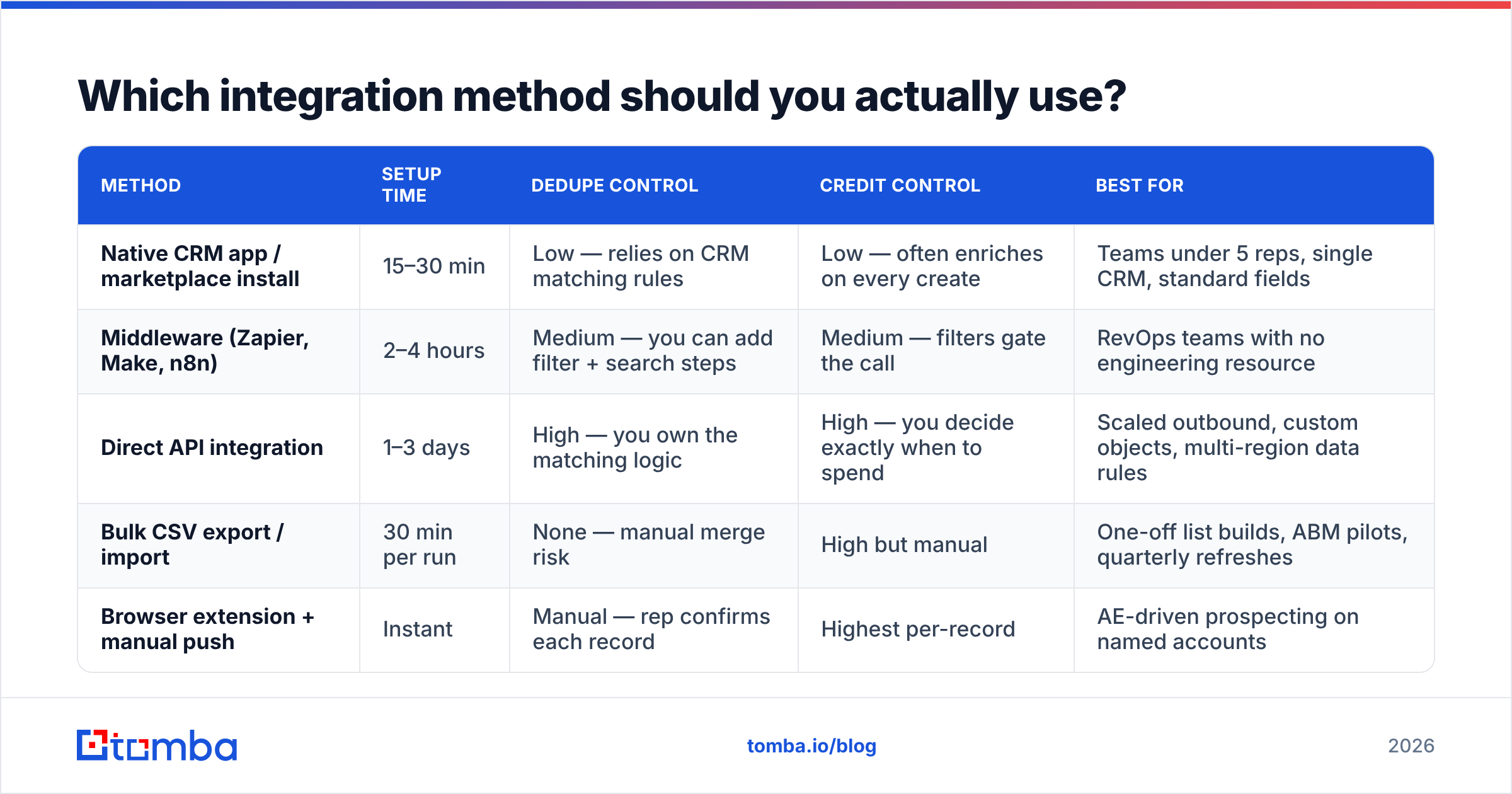
| Method | Setup time | Dedupe control | Credit control | Best for |
|---|---|---|---|---|
| Native CRM app / marketplace install | 15–30 min | Low — relies on CRM matching rules | Low — often enriches on every create | Teams under 5 reps, single CRM, standard fields |
| Middleware (Zapier, Make, n8n) | 2–4 hours | Medium — you can add filter + search steps | Medium — filters gate the call | RevOps teams with no engineering resource |
| Direct API integration | 1–3 days | High — you own the matching logic | High — you decide exactly when to spend | Scaled outbound, custom objects, multi-region data rules |
| Bulk CSV export / import | 30 min per run | None — manual merge risk | High but manual | One-off list builds, ABM pilots, quarterly refreshes |
| Browser extension + manual push | Instant | Manual — rep confirms each record | Highest per-record | AE-driven prospecting on named accounts |
The pattern most mid-market teams land on is a hybrid: a native or middleware sync for inbound leads, a direct email finder API call for programmatic list building, and a Tomba Chrome extension for reps working named accounts by hand. Three paths, one shared verification standard.
If you are wiring this through a marketplace app, read the vendor's object-permission scope before you install. HubSpot's CRM API documentation is explicit about which write scopes an app requests, and it is worth knowing whether a tool can edit contacts or only create them. Salesforce installs deserve the same scrutiny — a package with broad field-edit permissions can overwrite rep-entered data with no audit trail.
How do you stop the sync from creating duplicate contacts?#
Duplicates are the number one failure mode, and they almost always come from the same place: the integration matches on email address, but the whole point of the lookup is that you did not have an email address yet.
Here is the sequence that prevents it:
- Match on domain plus name before you call anything. Search your CRM for an existing contact with the same last name and company domain. If one exists, update it — do not create a new record.
- Use an idempotency key. Store a hash of
lowercase(first_name)|lowercase(last_name)|domainon the record. Check it before every lookup. This alone kills most repeat spend. - Never write to the primary email field if it is already populated. Write to a secondary property like
email_finder_resultand let a human or a rule promote it. - Log the source on every write. A
data_sourcefield with values likerep_manual,form_fill,enrichment_apimakes it possible to answer "where did this address come from?" six months later during a deliverability investigation. - Reconcile weekly, not never. Run a scheduled report for contacts sharing a domain and a last name. Merge on a cadence.
CRMs do offer native dedupe, but their matching rules generally key on email — which is useless for records that arrived without one. You have to layer your own logic on top. The Wikipedia entry on customer relationship management is a decent primer on why data integrity, not feature count, decides whether a CRM stays usable at scale.
Which fields should you map, and what should each one hold?#
Field mapping is where integrations become either an asset or a liability. Under-map and your sequencing tool cannot filter. Over-map and reps drown in properties nobody maintains.
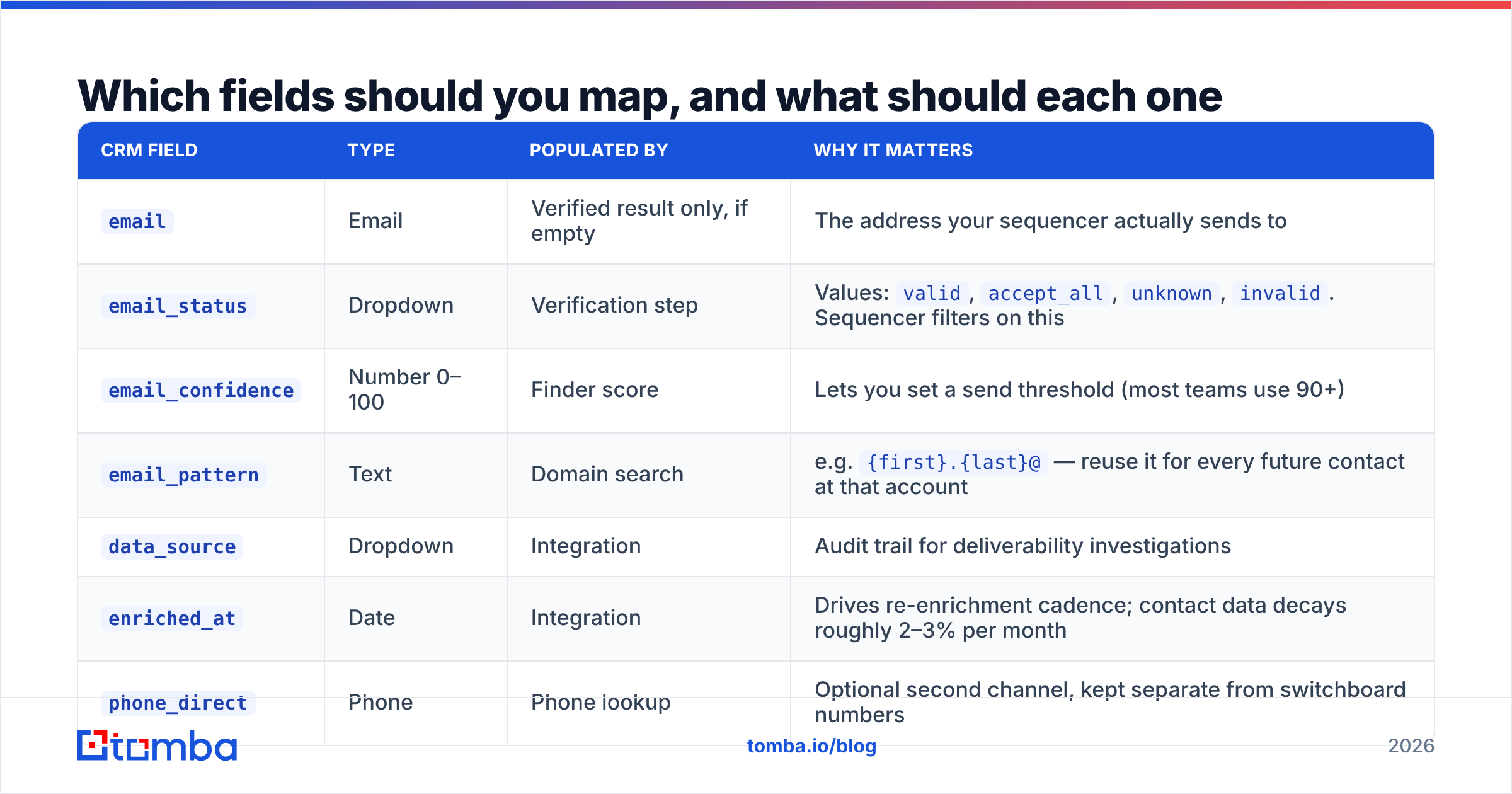
| CRM field | Type | Populated by | Why it matters |
|---|---|---|---|
email |
Verified result only, if empty | The address your sequencer actually sends to | |
email_status |
Dropdown | Verification step | Values: valid, accept_all, unknown, invalid. Sequencer filters on this |
email_confidence |
Number 0–100 | Finder score | Lets you set a send threshold (most teams use 90+) |
email_pattern |
Text | Domain search | e.g. {first}.{last}@ — reuse it for every future contact at that account |
data_source |
Dropdown | Integration | Audit trail for deliverability investigations |
enriched_at |
Date | Integration | Drives re-enrichment cadence; contact data decays roughly 2–3% per month |
phone_direct |
Phone | Phone lookup | Optional second channel, kept separate from switchboard numbers |
Two notes on that table. First, email_status matters more than email. A record with a valid address and no status field is functionally unusable to an automated sequence, because the sequence has no way to know whether sending is safe. Second, email_pattern is the most underused field in B2B CRMs. Once you know a company uses {first}.{last}@domain.com, every subsequent contact at that account costs you a verification instead of a full search — which is dramatically cheaper.
For catch-all domains, add one more field: catch_all_checked. Roughly one in five B2B domains accepts all mail, which means a standard SMTP check returns "accept_all" and tells you nothing. A dedicated catch-all verifier resolves a meaningful share of those, and the ones it cannot resolve should be flagged rather than silently sent to.
Is verification really necessary if the finder has a confidence score?#
Yes, and the distinction is worth being precise about, because vendors blur it.
A confidence score is a prediction. It says: based on observed patterns at this domain, this address is probably right. A verification is a check. It queries the receiving mail server and asks whether the mailbox exists.
Predictions are cheap and fast. Checks are slower and cost a credit. Skipping the check to save that credit is a false economy, because the downstream cost of a bounce is not one credit — it is a measurable hit to sender reputation that suppresses deliverability across your entire domain, including for the addresses that were correct.
The practical rule: gate your CRM write on verification status, not confidence score. A pattern-guessed address with 95% confidence and no SMTP check should land in email_finder_result, not email. Run it through an email verifier first, then promote.
Mailbox providers have tightened bulk-sender requirements considerably over the past two years, and the pattern is consistent: complaint rate and bounce rate are treated as reputational signals with real throttling consequences. If you are unsure how your setup compares to what buyers report elsewhere, the lead intelligence category on G2 is a reasonable place to read unfiltered accounts of what breaks in production.
What does a working setup look like end to end?#
Here is a concrete reference architecture that survives real volume. Adapt the tool names; the shape holds.
Inbound path. Form fill arrives with a work email already supplied. No finder call needed — just verify, write email_status, and enrich firmographics. Cost: one verification credit.
Outbound path. A target account list lands in the CRM as company records. A scheduled job runs a domain search per account to pull the email pattern and known contacts, filters to the two or three personas you actually sell to, verifies each address, and creates contacts only for verified results. Unverified results are written to a staging object a human reviews weekly.
Rep-initiated path. An AE finds a prospect on LinkedIn, uses the browser extension, and pushes the record with one click. The extension respects the same dedupe check — if the contact already exists, it updates rather than creates.
Re-enrichment path. A monthly job selects contacts where enriched_at is older than nine months and email_status is valid, then re-verifies. Job changes are the largest single source of data decay, and a stale-but-verified address is the most dangerous kind: it looks trustworthy right up until it hard-bounces.
Credit guardrails. Set a hard monthly ceiling in the integration itself, not just in the vendor dashboard. Add an alert at 70% consumption. Log every call with the record ID that triggered it so you can trace unexpected spend to its source in minutes rather than days.
If you are running this through Zapier or Make rather than code, the same architecture applies — you just express the filters as steps. A Zapier integration with a Search step, a Filter step, and a Path branch covers about 80% of what a custom build does, and non-engineers can maintain it.
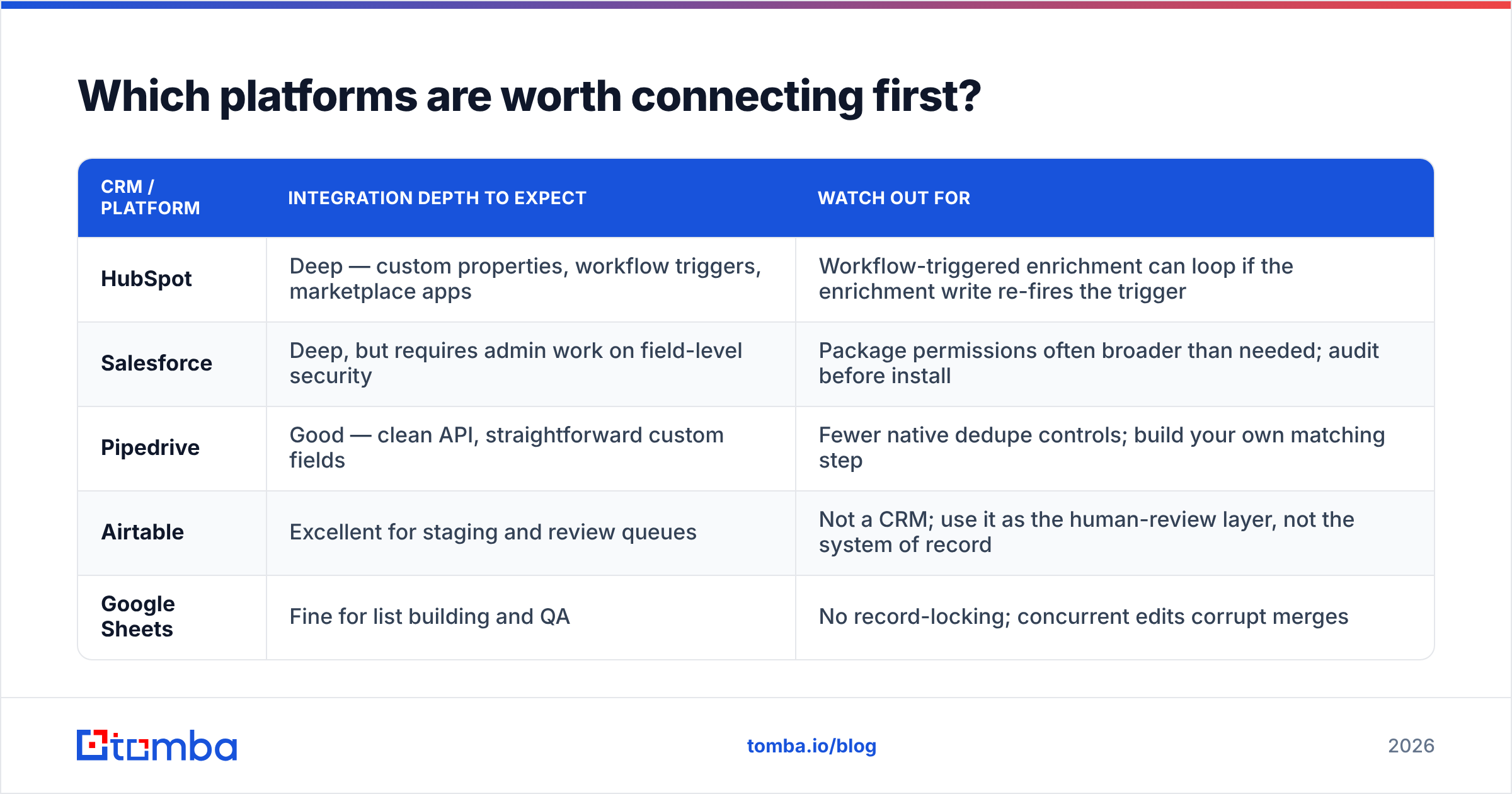
Which platforms are worth connecting first?#
Prioritize by where your reps actually work, not by which integration is easiest to install.
| CRM / platform | Integration depth to expect | Watch out for |
|---|---|---|
| HubSpot | Deep — custom properties, workflow triggers, marketplace apps | Workflow-triggered enrichment can loop if the enrichment write re-fires the trigger |
| Salesforce | Deep, but requires admin work on field-level security | Package permissions often broader than needed; audit before install |
| Pipedrive | Good — clean API, straightforward custom fields | Fewer native dedupe controls; build your own matching step |
| Airtable | Excellent for staging and review queues | Not a CRM; use it as the human-review layer, not the system of record |
| Google Sheets | Fine for list building and QA | No record-locking; concurrent edits corrupt merges |
A pattern worth stealing: use Airtable or Sheets as a staging area between the finder and the CRM. Unverified and low-confidence results land there, a human spends 15 minutes a week clearing the queue, and only clean records ever reach the CRM. It costs a little friction and saves an enormous amount of cleanup.
On data sources, it is also worth being honest that no single provider covers every geography and seniority band equally. Teams selling into specific verticals often pair a finder-first tool with a curated list provider — BookYourData, for instance, is a solid option when you need pre-built industry lists rather than on-demand lookups. Different jobs, and there is no prize for using only one vendor.
What should you check before you call it done?#
Run this checklist against 25 real records before you point the integration at your whole database.
- Does a second run on the same record spend a second credit? If yes, your idempotency check is broken.
- Does an existing contact get updated or duplicated? Duplicated means your matching step runs after the create, not before.
- Is
email_statuspopulated on every written record? Blank status means your sequencer will send blind. - Does a rep-entered email survive the sync? If the integration overwrote it, fix the conflict rule now.
- Can you trace one specific credit charge back to one specific record? If not, add call logging before you scale.
- What happens on a catch-all domain? The record should be flagged, not silently written as valid.
Ship when all six pass. Not before.
Ready to wire it up?#
The integration is only as good as the data flowing through it. Start with a finder that returns a confidence score, a verification status, and the underlying email pattern in the same response — because that is what makes clean field mapping possible in the first place. The Tomba Email Finder does exactly that, with a free tier of 25 searches a month to test your mapping logic before you commit, and transparent pricing from $49/mo on Starter once the sync is proven. Build the 25-record test first, confirm the six checks above, then let it run.
Related guides#
Ready to find emails that actually work?
Join 150,000+ professionals who stopped guessing and started sending. Free credits on signup — no credit card required.
Get the Tomba newsletter
Practical outbound tactics and product updates — once every two weeks.
About the author