Email Finder GetProspect Review 2026: Accuracy & Pricing
GetProspect built its reputation on LinkedIn email extraction. Here's how the email finder actually performs on accuracy, catch-all domains, and credit math in 2026 — plus where cheaper tools beat it.
The email finder GetProspect sells is built for one job: turning LinkedIn profiles into work emails. This review covers how well it does that job in 2026 — hit rates, catch-all handling, real cost per contact, and when another tool wins.
TL;DR
- The email finder GetProspect ships is LinkedIn-first. You browse Sales Navigator, click the extension, and contacts land in a built-in list manager. That workflow is the real moat, not database size.
- Accuracy on standard corporate domains matches the rest of the mid-market field. On catch-all domains, small businesses, and non-US markets, it drops sharply.
- Pricing starts near $49/mo for roughly 1,000 email credits. Per-seat fees stack on top, so team invoices run well past the sticker price.
- Need API-first enrichment, catch-all resolution, or bulk domain sweeps? A dedicated email finder costs less per usable contact.
- Verify before you send, whatever the vendor. A 95% accuracy claim on a 5,000-row export still means 250 bounces — enough to damage a young sending domain.
What is the email finder GetProspect built for?#
GetProspect is a B2B contact database and email-finding tool built around LinkedIn prospecting. You install its Chrome extension, run a search in LinkedIn or Sales Navigator, and pull profile-matched work emails into a list. From there you can filter, tag, add custom columns, and push contacts to a CRM or a sequencer.
The company sits somewhere between a lightweight sales-intelligence platform and a pure lookup utility. In practice, most teams use it for three jobs:
- LinkedIn list building — scrape a Sales Navigator search into a spreadsheet-like table with emails attached. This is the dominant use case and the reason most people sign up.
- Single-contact lookup — you know a name and a company, you need the address. The web app handles this without the extension.
- Domain-level discovery — enter a company domain, get the addresses GetProspect has on file, sorted by department.
- Light list management — custom fields, tags, and saved views inside the tool, so you can qualify before exporting.
- CSV enrichment — upload a file of names and companies, get emails appended.
That fourth item matters more than it sounds. Plenty of email finders hand back a CSV and leave you to organize it. GetProspect keeps the list inside the product with editable columns. For small teams without a real CRM, that cuts down on spreadsheet sprawl. You can review the current feature set on getprospect.com directly.
What it is not: an intent-data platform, a sequencer, or a deliverability suite. There is no warmup, no inbox rotation, no reply detection. You will pair it with something else.

How accurate is GetProspect compared to other email finders?#
Accuracy is where vendor marketing and buyer reality separate hardest. So be precise about what a number means.
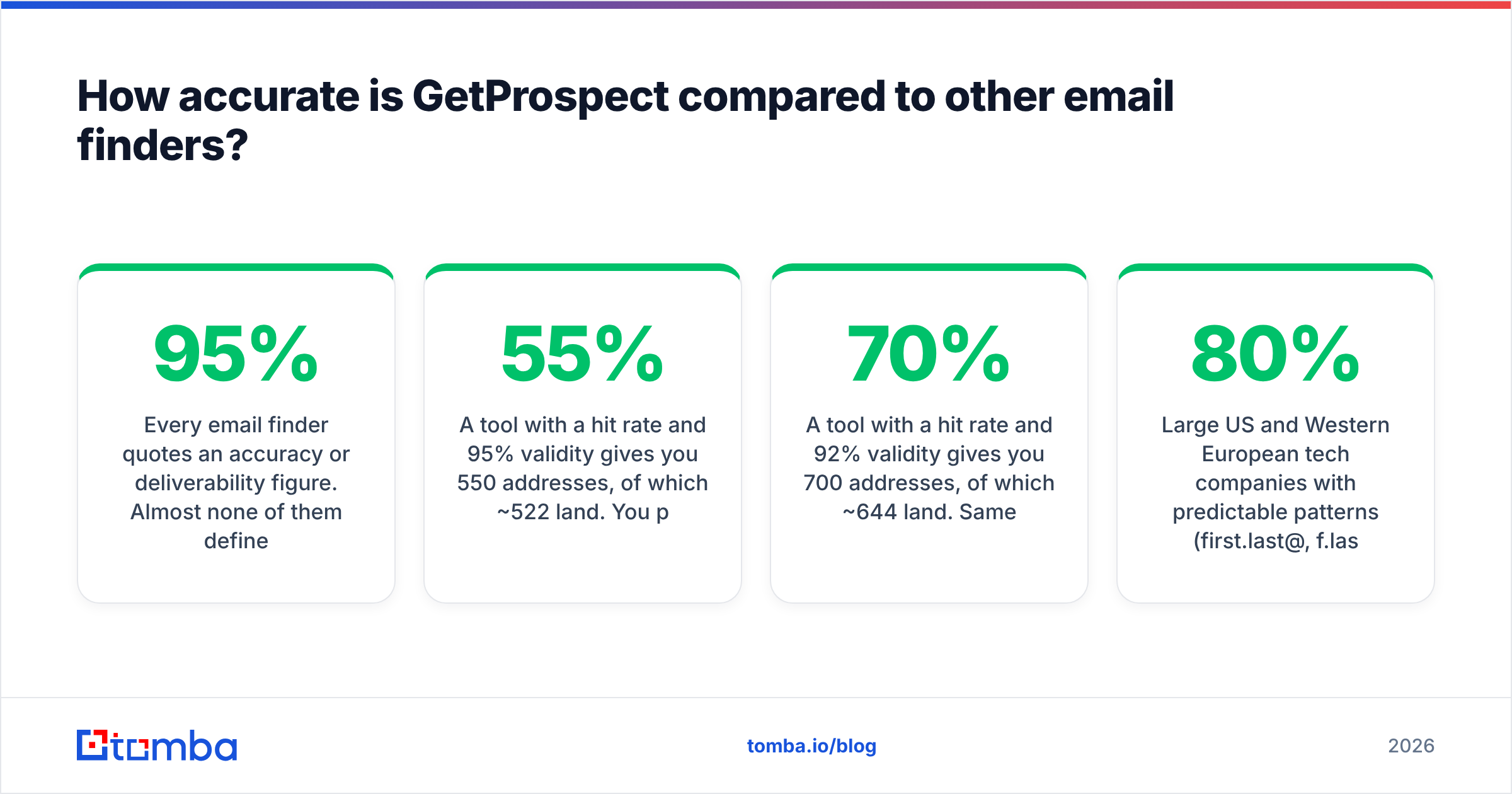
Every email finder quotes an accuracy or deliverability figure. Almost none of them define the denominator. "95% accurate" usually means one thing: of the addresses we returned and marked as valid, 95% did not hard bounce in our own test set. It does not mean the tool found emails for 95% of your list. Coverage — the hit rate — is what actually sets your cost per contact. It is almost never advertised.
Run the math on a realistic scenario. You upload 1,000 target contacts:
- A tool with a 55% hit rate and 95% validity gives you 550 addresses, of which ~522 land. You paid for 1,000 lookups.
- A tool with a 70% hit rate and 92% validity gives you 700 addresses, of which ~644 land. Same spend, 23% more reachable prospects.
The second tool is "less accurate" and clearly better. Ask any vendor for both numbers before you sign.

Where GetProspect performs well:
- Large US and Western European tech companies with predictable patterns (first.last@, f.last@). Nearly every mature tool clears 80%+ hit rates here.
- Profiles with a clear LinkedIn match. The extension anchors on a profile, so name disambiguation beats a raw name+domain guess.
Where it degrades — and this is not unique to GetProspect:
- Catch-all domains. A catch-all server accepts every address at the domain. SMTP verification then returns "accepted" for
asdkjh@company.com. Any tool that marks catch-all results as "valid" without a second signal is guessing. This is the biggest source of surprise bounces in B2B. If your ICP skews enterprise, run results through a dedicated catch-all verifier instead of trusting a green checkmark. - SMB and local businesses, where addresses are often
info@or a personal Gmail and no pattern exists to infer. - Non-English markets, especially Japan, Korea, and parts of LATAM where naming conventions break Western pattern logic.
- Recently hired staff. Database freshness lags job changes by weeks to months across the whole category.
The honest summary: on the segment it was built for — LinkedIn-visible B2B professionals at established companies — the email finder GetProspect offers holds its own. Outside that segment, the hit rate falls faster than the marketing page implies. Third-party reviews on G2 tell the same story across the whole category, not just this vendor. Coverage complaints outnumber bounce complaints roughly two to one.
What does GetProspect actually cost?#
List pricing and effective pricing are different animals.
The published structure follows the category norm. There is a free tier with a small monthly allowance of valid emails, then paid tiers that scale credits. At the time of writing, the entry paid plan sits around $49/mo for roughly 1,000 email credits. Higher tiers land near $99, $199, and $399/mo. Check current numbers on the vendor's own pricing page before you budget — every tool in this space repriced at least once in the last 18 months.
Three cost mechanics deserve attention:
Per-seat charges. GetProspect prices additional users on top of the plan. A three-person SDR team on a mid tier can pay well above the headline. Tools that bill purely on credits — unlimited seats, one shared pool — behave very differently at team scale.
Credit definition. Some vendors charge only for successful finds. Others charge per attempted lookup. That gap changes effective cost by 30–50% on hard lists. Read the terms, not the pricing table.
Verification bundled or separate. If the finder charges one credit to find and another to verify, your real cost per usable contact doubles. Check whether verification is included.
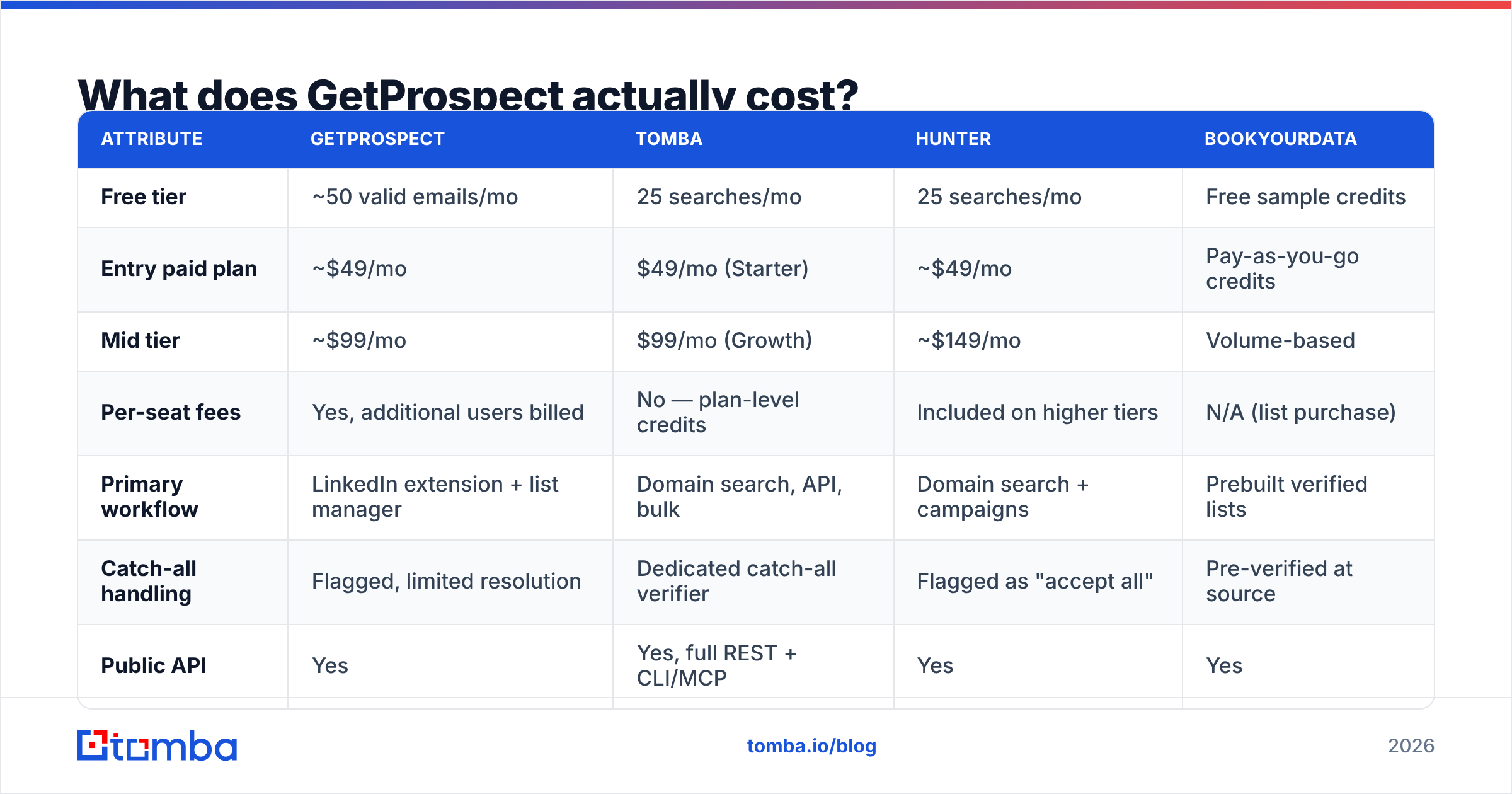
Here's how the mid-market field compares on the attributes that decide the invoice:
| Attribute | GetProspect | Tomba | Hunter | BookYourData |
|---|---|---|---|---|
| Free tier | ~50 valid emails/mo | 25 searches/mo | 25 searches/mo | Free sample credits |
| Entry paid plan | ~$49/mo | $49/mo (Starter) | ~$49/mo | Pay-as-you-go credits |
| Mid tier | ~$99/mo | $99/mo (Growth) | ~$149/mo | Volume-based |
| Per-seat fees | Yes, additional users billed | No — plan-level credits | Included on higher tiers | N/A (list purchase) |
| Primary workflow | LinkedIn extension + list manager | Domain search, API, bulk | Domain search + campaigns | Prebuilt verified lists |
| Catch-all handling | Flagged, limited resolution | Dedicated catch-all verifier | Flagged as "accept all" | Pre-verified at source |
| Public API | Yes | Yes, full REST + CLI/MCP | Yes | Yes |
| Bulk CSV enrichment | Yes | Yes, bulk email finder | Yes | Native |
| Phone numbers | Limited | Yes, phone finder + validator | No | Yes on select lists |

A note on that last column: BookYourData solves a different problem. Instead of finding contacts one search at a time, you buy a pre-verified list filtered by industry, title, and geography. Say your motion is "give me 5,000 verified HR directors in manufacturing" rather than "find this person's email." Then a curated list provider is the faster path, and the per-contact economics often win. Different tool, different job.

Who should use GetProspect, and who should not?#
GetProspect fits you if:
- Your prospecting starts in LinkedIn Sales Navigator and stays there. The extension-to-list workflow is smooth, and a domain-first tool would add steps.
- You are a one-to-three person team without a CRM, and the built-in list manager replaces a spreadsheet.
- Your ICP is mid-to-large companies in North America or Western Europe, where hit rates hold up.
- You want a visual product rather than an API.
Look elsewhere if:
- You need API-first enrichment. If emails should resolve inside your own app, warehouse, or workflow automation, pick a provider whose API is the product. A well-documented email finder API with predictable rate limits and a CLI beats a Chrome extension you cannot script.
- Your list is domain-driven, not person-driven. "Find every marketing contact at these 400 domains" is a domain search problem. Extension-based scraping is the wrong shape for it.
- You are scaling a team. Per-seat pricing punishes headcount growth. Shared credit pools do not.
- Catch-all domains dominate your ICP. Enterprise targets skew catch-all, so you will need dedicated resolution whichever finder you pick.
- You need phone numbers alongside emails. Multi-channel outbound needs both, and a second vendor erodes any pricing advantage.
How do you verify emails before sending, regardless of tool?#
This is the step teams skip, and it decides whether the campaign works.
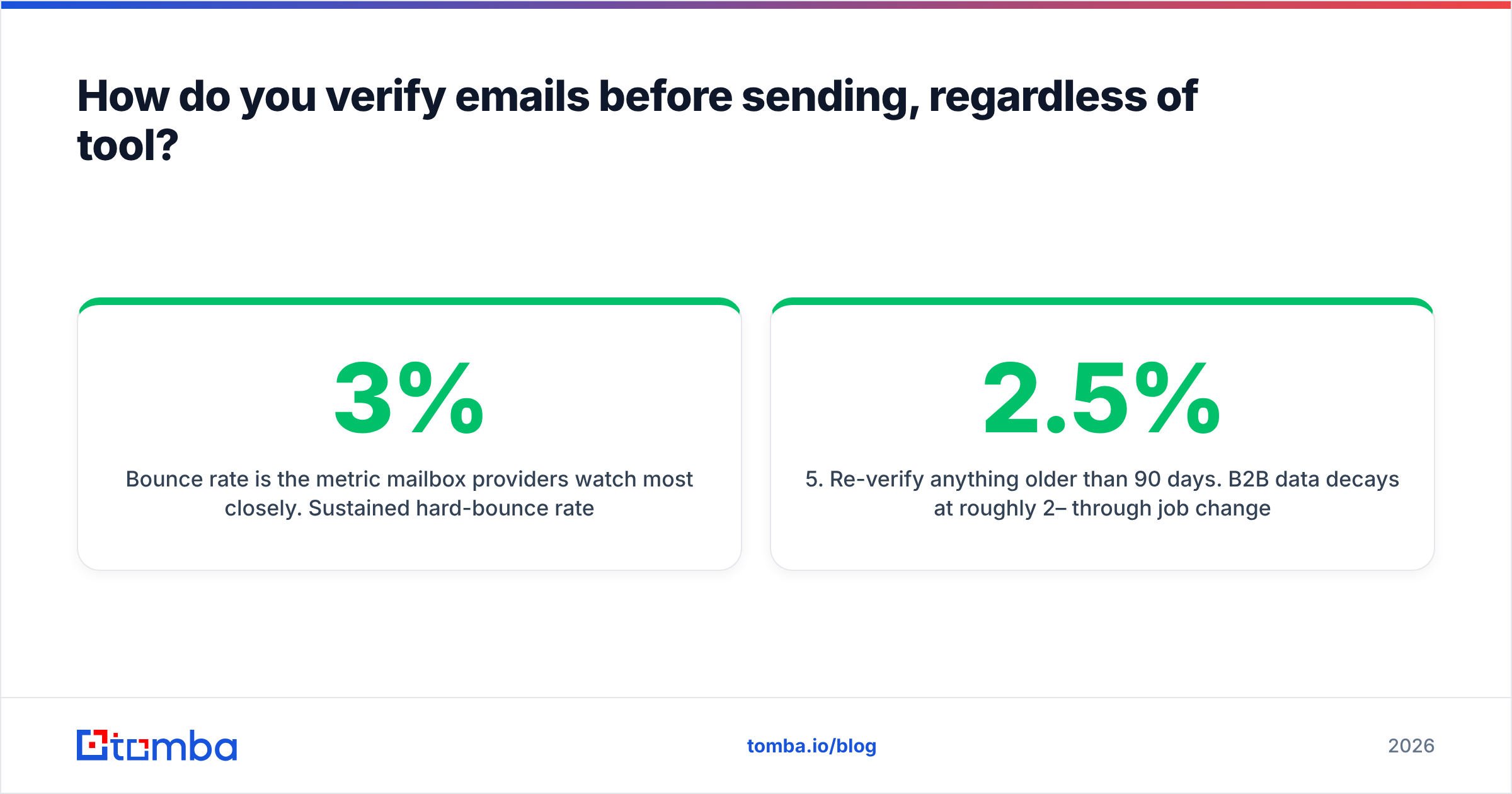
Bounce rate is the metric mailbox providers watch most closely. Sustained hard-bounce rates above roughly 2–3% signal list-quality problems. Both Google and Microsoft have tightened bulk-sender enforcement since 2024, and their published sender requirements make spam-rate and authentication thresholds explicit. A young domain that bounces 8% on its first send may never fully recover its sender reputation.
A workflow that survives contact with reality:
- Find, then verify separately. Treat the finder's confidence score as a hypothesis, not a verdict. Run every address through an independent email verifier before it enters a sequence.
- Segment catch-alls into their own bucket. Do not delete them, and do not send to them at volume. Send a small test batch, watch the bounce signal, then scale or discard.
- Drop role accounts by default.
info@,sales@, andsupport@inflate list size and depress reply rates. Exclude them unless you have a specific reason.
Then check the plumbing on your own side:
- Check the domain, not just the mailbox. Confirm SPF, DKIM, and DMARC are set up on your sending domain. A perfect list still bounces if authentication fails. A free SPF checker takes two minutes.
- Re-verify anything older than 90 days. B2B data decays at roughly 2–2.5% per month through job changes alone. A list you built in January is measurably worse in April.
- Track hit rate and bounce rate per source. Run two vendors and you will know within one quarter which one deserves the budget. Most teams never measure this and renew on habit.
That last point is the highest-leverage habit in this whole article. Vendor arguments end quickly once you have your own numbers.
What are the strongest GetProspect alternatives in 2026?#
Match the alternative to the constraint that pushed you off the email finder GetProspect built:
- Cost per usable contact is the problem. Look for plan-level credits with no seat fees, and confirm whether verification is bundled. Compare total spend at your actual volume, not at the tier boundary. Tomba pricing runs Free (25 searches/mo), Starter $49/mo, Growth $99/mo, and Pro $249/mo, with credits shared across the team rather than metered per user.
- You need engineering integration. Weigh REST API quality, SDK coverage, and rate-limit transparency. Check for a command-line or MCP interface if you run agent-driven workflows. This is where general-purpose sales platforms tend to be weakest.
- Coverage in your vertical is the problem. No feature comparison substitutes for a bake-off. Take 200 real target contacts, run them through two or three free tiers, and count. The results often contradict the review sites.
Two more cases worth naming:
- LinkedIn is still central but the extension is limiting. A dedicated LinkedIn finder resolves profile URLs to verified work emails in bulk, not one profile at a time. That removes the scraping bottleneck without abandoning the channel.
- You want prebuilt lists instead of lookups. Curated, pre-verified list providers like BookYourData skip the find-and-verify loop entirely. For broad, well-defined segments, that is often the right call.
Whatever you shortlist, run the bake-off before you sign an annual contract. Every vendor here performs best on the segment it was built around, and yours may not be that segment.
The bottom line#
GetProspect is a competent, LinkedIn-centric email finder with a genuinely useful list manager. If your prospecting lives in Sales Navigator and your team is small, it does the job. If you need API-first enrichment, domain sweeps, catch-all resolution, phone numbers, or pricing that ignores headcount, you are paying for a workflow you don't use.
Whichever direction you go, separate finding from verifying and measure your own hit rate. That discipline beats any vendor switch.
Ready to compare on your own data? Run 25 of your hardest target contacts through the Tomba Email Finder free tier — no card, no seat fees. Check the hit rate against whatever you use now. If the numbers favor your current tool, you've lost ten minutes. If they don't, you've found the cheapest upgrade in your outbound stack.
Related guides#
Ready to find emails that actually work?
Join 150,000+ professionals who stopped guessing and started sending. Free credits on signup — no credit card required.
Get the Tomba newsletter
Practical outbound tactics and product updates — once every two weeks.
About the author