Email Finder Gmail: How to Find Gmail Addresses in 2026
An email finder Gmail search is really two problems. One is finding personal @gmail.com inboxes. The other is finding work emails on Google Workspace domains. Only one is reliably solvable — here's which, and how.
An email finder Gmail search sounds like one job. It is really two. One of them scales. The other barely works at all. Here is how to tell them apart, and what to do with each.
TL;DR
"Email finder Gmail" hides two jobs. One is finding a personal
@gmail.comaddress. The other is finding a work address at a company that runs on Google Workspace. The second scales. The first does not.Roughly 60% of small businesses and startups route mail through Google. So a huge share of B2B "business emails" are Gmail. They just don't end in
@gmail.com.Personal Gmail accounts can't be pattern-guessed. There is no public directory. The MX signal tells you nothing. SMTP checks against Google are noisy by design.
Tool choice matters less than verification discipline. A finder that returns fewer addresses with a verified status beats one that returns more you can't trust.
The stack that works: domain search → email finder → verification → catch-all handling. Tomba's free tier (25 searches/mo) lets you test the accuracy claim before paying anyone.
What does "email finder Gmail" actually mean?#
Two searches, one keyword. Sorting them out first saves a lot of wasted credits.
Intent A — find a personal Gmail address. You have a name. Maybe a LinkedIn profile, a freelancer, a creator, a podcast host. You want their firstname.lastname@gmail.com. This is the intent most people type into Google. It also has the worst honest answer.
Intent B — find a business email at a Google Workspace company. Google hosts the mail, but the address is sarah@acmerobotics.com. That is a normal B2B email-finding problem, and it is very solvable. The "Gmail" part is a hosting detail, not an obstacle.
If you run outbound sales, Intent B is almost certainly your real job. Google Workspace powers a huge slice of SMB and startup email. So most of your prospect list is already "Gmail" under the hood. You never see it, because the MX records sit behind a custom domain.
Why are personal @gmail.com addresses so hard to find?#
Google built it that way. Three structural reasons:
There is no directory. Corporate domains leak patterns all day. Press releases, GitHub commits, support pages, job posts, PDF footers.
firstname@company.comshows up in public data thousands of times a day. Personal Gmail accounts have no such public surface.The address space is unguessable. Compare
johnsmith@gmail.com,john.smith@gmail.com,jsmith1987@gmail.com, andsmittyj@gmail.com. Gmail ignores dots on delivery, but the local part itself is arbitrary. Twenty-year-old accounts rarely follow a name pattern. A permutator makes hundreds of guesses and confirms none of them.SMTP checks against Google are noisy on purpose. Google will not give a clean per-mailbox
550answer to strangers probing its servers. That is an anti-harvesting design choice, not a bug. So any vendor promising 99% accuracy on@gmail.comis selling something it cannot deliver. The MX record mechanics explain why the handshake tells you so little.
Here is the honest answer. An email finder Gmail lookup works best when the address was published somewhere. A personal site, a GitHub profile, a WHOIS record, a conference bio, an article byline. Tools like an author finder or a reverse email lookup find those published addresses. Nothing finds the unpublished ones.
How does an email finder actually work under the hood?#
The mechanism tells you which claims to believe. Five layers fire in order:
Pattern inference. The tool has already seen dozens of confirmed addresses at
acmerobotics.com. It knows the dominant format isfirst.last@, so it applies that to your target name. Most business-email hits come from this step. It also fails flat on@gmail.com, which has no company-level pattern.Crawled and sourced data. Public web pages, filings, press coverage, code repos, and licensed partner data. A confirmed sighting beats a guess every time, and good tools tell you which one you got. Tomba publishes its data sources, which is worth a look before you buy anyone's database.
MX and domain resolution. The tool checks who really hosts the mail.
google.comMX records mean Google Workspace.outlook.comMX means Microsoft 365. This drives how verification behaves next.SMTP verification. A handshake asks the receiving server whether the mailbox exists, without sending mail. It is reliable on most domains, weaker on Google, and useless on catch-all domains that accept everything.
Catch-all detection. If a domain accepts mail for
zzqqxx@domain.com, it accepts anything. A "valid" result then means nothing. A catch-all verifier uses other signals instead of the SMTP answer.
So an email finder Gmail result is only as good as layers 1 and 2. How honestly the tool reports layers 4 and 5 does the rest.

Which email finder Gmail tools work best for Google-hosted prospects?#
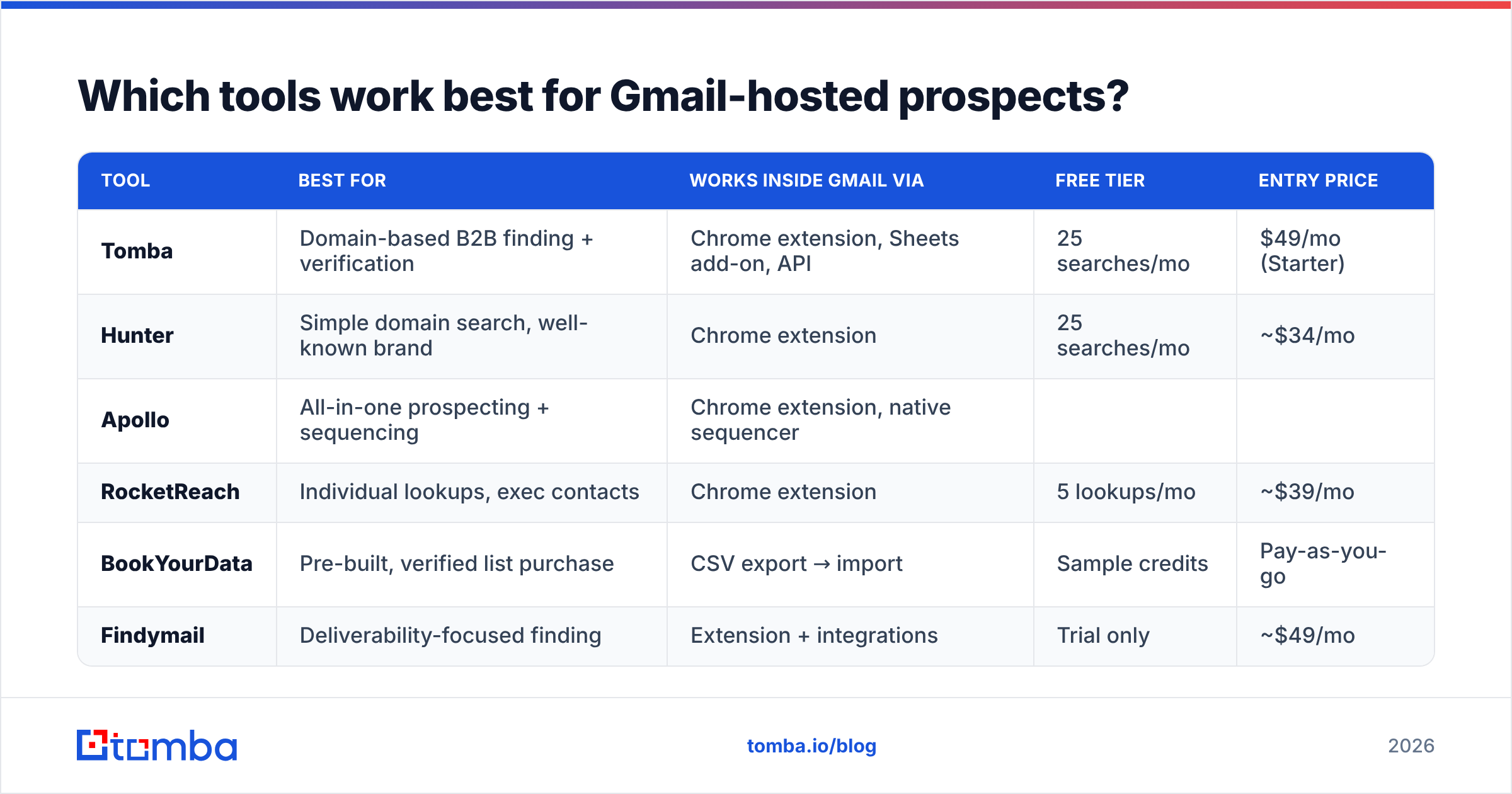
Here is the practical comparison. "Gmail workflow" means how you work while sitting in your Gmail tab: extension, sidebar, or export-and-import.
| Tool | Best for | Works inside Gmail via | Free tier | Entry price |
|---|---|---|---|---|
| Tomba | Domain-based B2B finding + verification | Chrome extension, Sheets add-on, API | 25 searches/mo | $49/mo (Starter) |
| Hunter | Simple domain search, well-known brand | Chrome extension | 25 searches/mo | ~$34/mo |
| Apollo | All-in-one prospecting + sequencing | Chrome extension, native sequencer | Limited credits | ~$49/user/mo |
| RocketReach | Individual lookups, exec contacts | Chrome extension | 5 lookups/mo | ~$39/mo |
| BookYourData | Pre-built, verified list purchase | CSV export → import | Sample credits | Pay-as-you-go |
| Findymail | Deliverability-focused finding | Extension + integrations | Trial only | ~$49/mo |
Notes that matter more than the grid:
Tomba is strongest when you already know the company. Domain search returns the org's addresses and detected pattern. The email finder resolves a specific person. The email verifier gates the result. Growth is $99/mo, Pro is $249/mo, and Enterprise is custom. Full Tomba pricing is public, with no "contact sales" wall on the mid tiers.
BookYourData solves a different problem well. If you want a verified list handed to you rather than built lookup-by-lookup, buying credits against a curated database is faster than running a finder over 5,000 names. Different shape of purchase, and genuinely good at it.
Apollo bundles sequencing. That is either a feature or a lock-in, depending on whether you already own an outbound platform.

No email finder Gmail tool will reliably produce a stranger's personal @gmail.com address. Any that claims to should be tested with 20 names you already know. Vendor-neutral review volume on G2 is a decent sanity check on whether a claimed hit rate matches real use.
Is verifying a Gmail address different from verifying a business domain?#
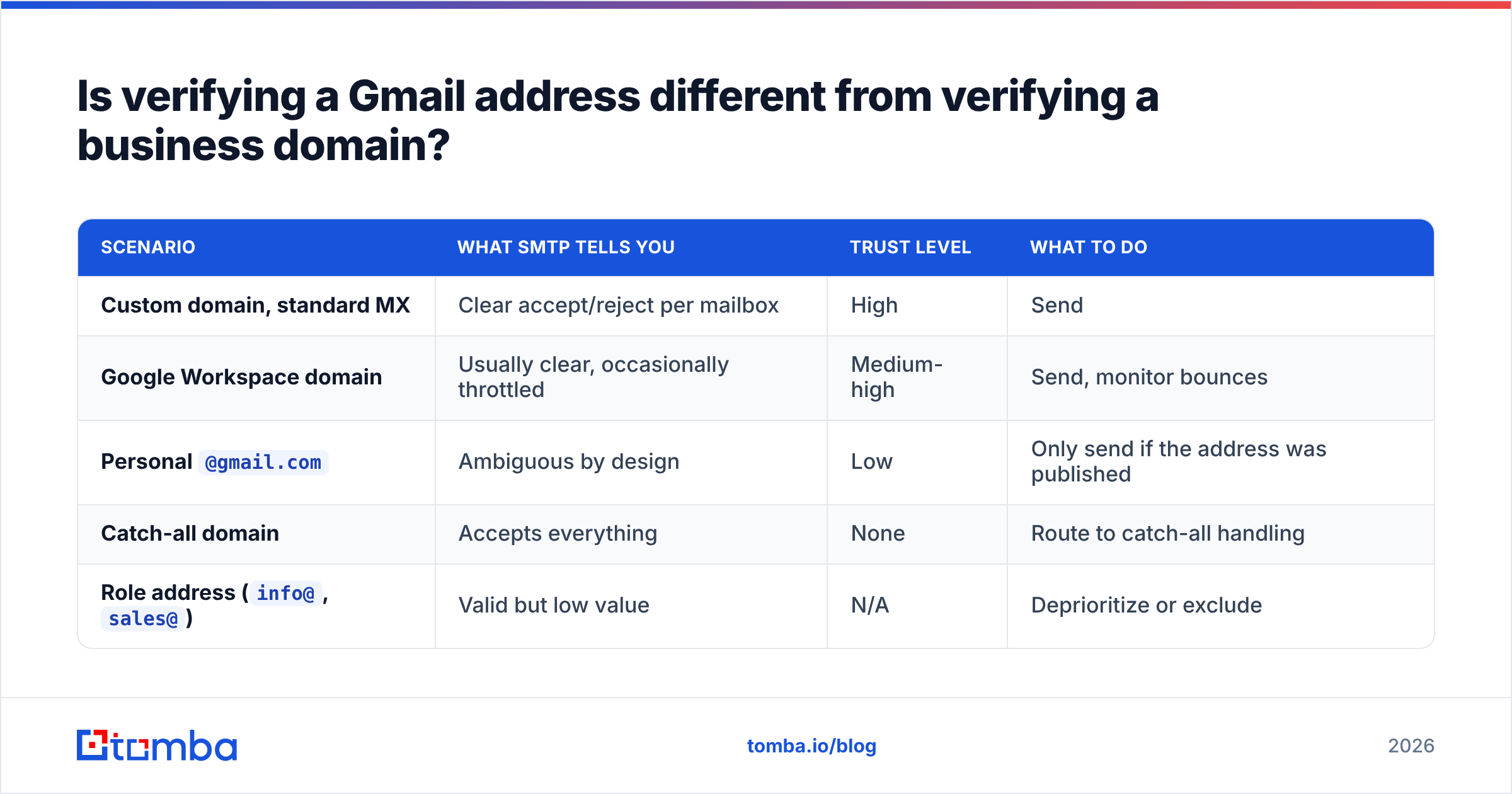
Yes. This is where most "why did my bounce rate spike?" stories start.
| Scenario | What SMTP tells you | Trust level | What to do |
|---|---|---|---|
| Custom domain, standard MX | Clear accept/reject per mailbox | High | Send |
| Google Workspace domain | Usually clear, occasionally throttled | Medium-high | Send, monitor bounces |
Personal @gmail.com |
Ambiguous by design | Low | Only send if the address was published |
| Catch-all domain | Accepts everything | None | Route to catch-all handling |
Role address (info@, sales@) |
Valid but low value | N/A | Deprioritize or exclude |
The catch-all row is the expensive one. On a Google Workspace domain with a catch-all, every guessed address returns "valid." Send to 500 of them and your sender reputation absorbs 300 bounces from addresses your tool swore were fine. Use a catch-all finder to flag those domains before they enter your sequence, not after.
Should you even email personal Gmail addresses?#
Usually no. Deliverability is the first reason, and the legal side is the second.
Consumer Gmail inboxes get the harshest filtering Google has. Tabbed sorting, aggressive spam scoring, and one-click reporting from people with zero business context for your message.
A cold pitch to dave.miller@gmail.com about enterprise procurement software gets marked as spam far more often than the same pitch to dave@company.com. Those complaints follow your sending domain everywhere.
Then the compliance layer. Under GDPR, a personal Gmail address is far more likely to count as personal data with no legitimate-interest cover, because there is no business-context argument. Business addresses at a business domain have a defensible B2B basis in most places. Google's own Workspace terms and bulk-sender rules also treat consumer and business accounts differently.
Rule of thumb: if the person published the Gmail address in a professional context, treat it as a business address. Think consulting site, GitHub profile, or speaker bio. If you had to hunt for it, don't send.
How do you build an email finder Gmail workflow?#
Five steps, in order. This is the version that survives contact with a real list.
Start from companies, not people. Feed domains into domain search to pull the org's known addresses and detected pattern. You learn the format before you spend a credit on a person.
Resolve individuals second. Name plus domain goes into the finder. If the tool returns a confidence score, keep the threshold high. Use 90%+ for cold outbound, and lower it only for warm or referral sends.
Verify everything, always. Even a 95%-confidence result gets verified. Bulk-run it through bulk verify rather than one at a time. Verification is cheap. A burned domain is not.
Segment catch-alls into their own bucket. Don't discard them, and don't mix them into your main sequence. Send from a secondary domain, in small volumes, and watch the bounce rate.
Enrich before you write. Title, headcount, tech stack, and funding stage from data enrichment decide whether the message is worth sending at all. A perfect address on the wrong persona is still a wasted send.
If you live in Gmail, run steps 1–3 without leaving the tab. The Tomba Chrome extension surfaces addresses while you browse a company site or a LinkedIn profile. The Google Sheets add-on handles list-sized batches. For anything programmatic, the Tomba API does finding, verification, and enrichment in one pipeline.
What should you actually expect from hit rates?#
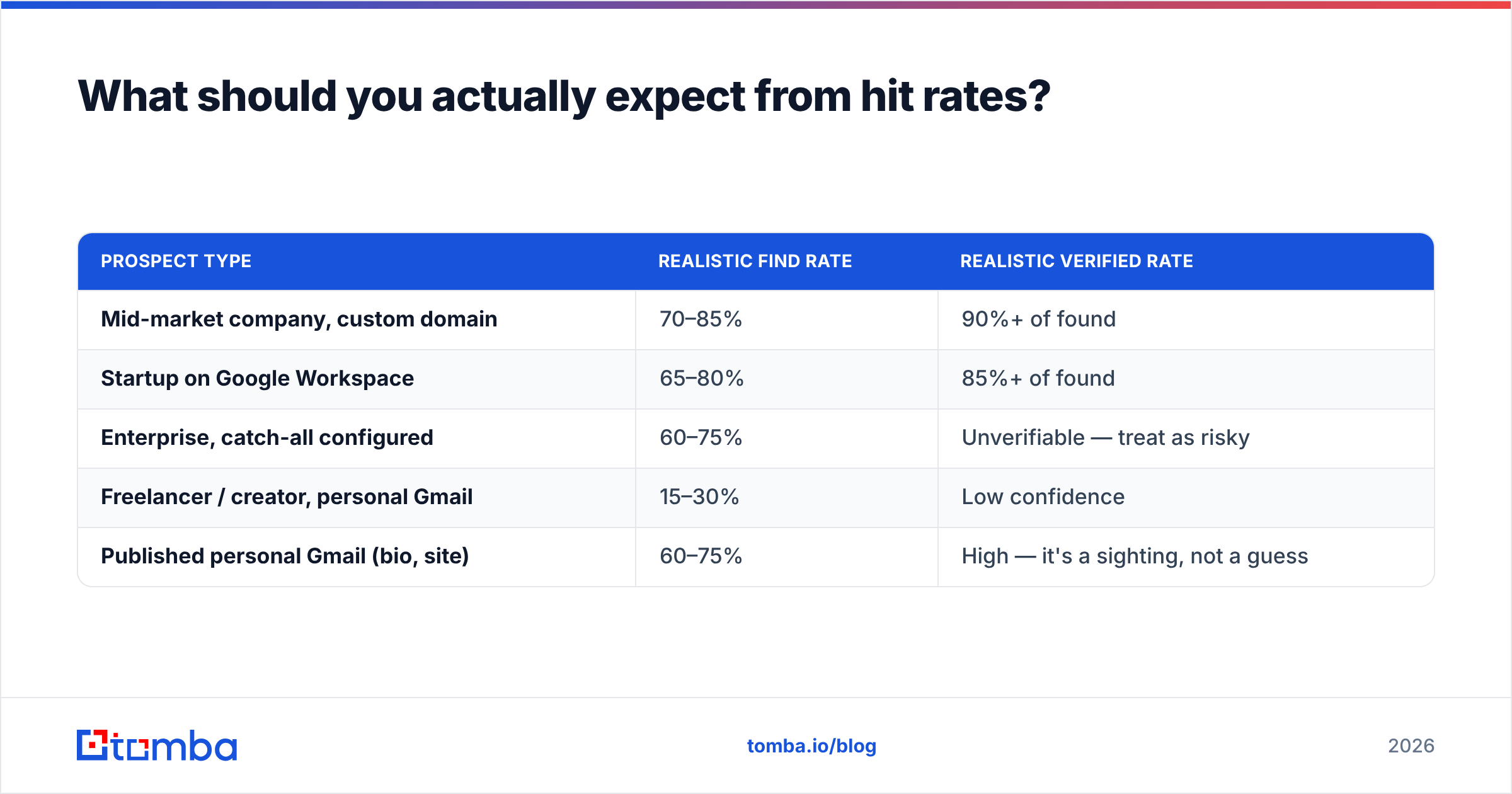
Set expectations by segment, not by vendor marketing.
| Prospect type | Realistic find rate | Realistic verified rate |
|---|---|---|
| Mid-market company, custom domain | 70–85% | 90%+ of found |
| Startup on Google Workspace | 65–80% | 85%+ of found |
| Enterprise, catch-all configured | 60–75% | Unverifiable — treat as risky |
| Freelancer / creator, personal Gmail | 15–30% | Low confidence |
| Published personal Gmail (bio, site) | 60–75% | High — it's a sighting, not a guess |
Any vendor quoting one global accuracy number is averaging across these segments. Ask which one your list looks like. Then test with 50 names you can confirm yourself. Every serious tool has a free tier or trial so you can do exactly that.
What's the fastest way to test this yourself?#
Take 30 companies you actually want to sell to. Run domain search on all 30. Pick one contact each, resolve the address, verify it, and count the wins. That takes under an hour. It gives you a number for your market instead of a vendor's blended average.
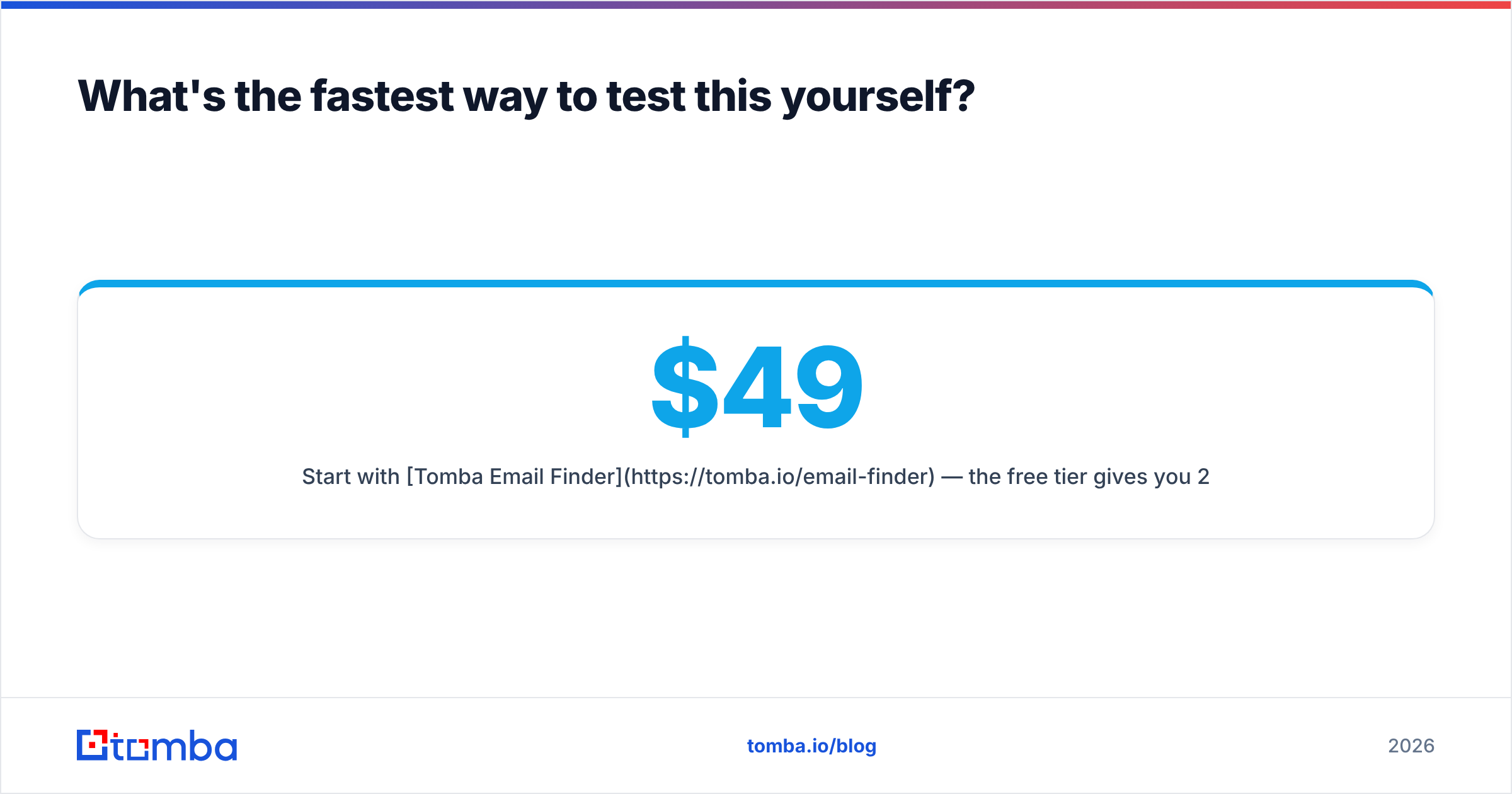
Start with Tomba Email Finder. The free tier gives you 25 searches a month with no card, which covers the test above at nearly full scale. If the hit rate holds up on your segment, Starter at $49/mo covers most solo reps and small teams. Growth at $99/mo and Pro at $249/mo scale from there. If it doesn't hold up, you lost an hour and learned more than any comparison post can tell you, including this one.
Related guides#
Ready to find emails that actually work?
Join 150,000+ professionals who stopped guessing and started sending. Free credits on signup — no credit card required.
Get the Tomba newsletter
Practical outbound tactics and product updates — once every two weeks.
About the author