Email Finder Tools for Recruiters: 7 Options Compared for 2026
Recruiters need personal and work emails for people who never filled out a form. Here's how seven email finder tools actually perform on candidate data, what they cost per hire, and where each one breaks.
TL;DR
- Recruiting is a different data problem than sales: you often need a personal address for someone who is not looking, at a company that is not your customer.
- Coverage matters more than raw database size. A tool with 400M contacts that misses mid-level engineers at 200-person startups is useless to you.
- The three real cost drivers are price per verified email, bounce rate, and how many seats you have to buy. Seat-based pricing punishes small talent teams hardest.
- Verify before you send. A 25–30% bounce rate on a sourcing sequence will damage your domain reputation within two weeks and quietly kill your InMail-alternative channel.
- Best fit by use case: Tomba for API/bulk work at a flat price, ContactOut and SignalHire for LinkedIn-native sourcing, BookYourData for pay-as-you-go list buying, Apollo if you also own outbound sales.
What makes email finder tools for recruiters different from sales tools?#
Almost every email finder on the market was built for B2B sales. That matters, because sales prospecting and recruiting look similar from the outside and diverge sharply in practice.
Sales teams target buyers: VPs, directors, and heads of department at companies with a website, a marketing team, and a predictable first.last@company.com pattern. Those people are over-indexed in every commercial database because they appear in webinars, press releases, and conference lists.
Recruiters target doers: a senior backend engineer three years into a role, a nurse practitioner, a plant supervisor, a data scientist at a stealth startup. Those people leave far fewer public footprints. They rarely publish, rarely speak, and often work at companies whose entire staff directory is one "info@" address.
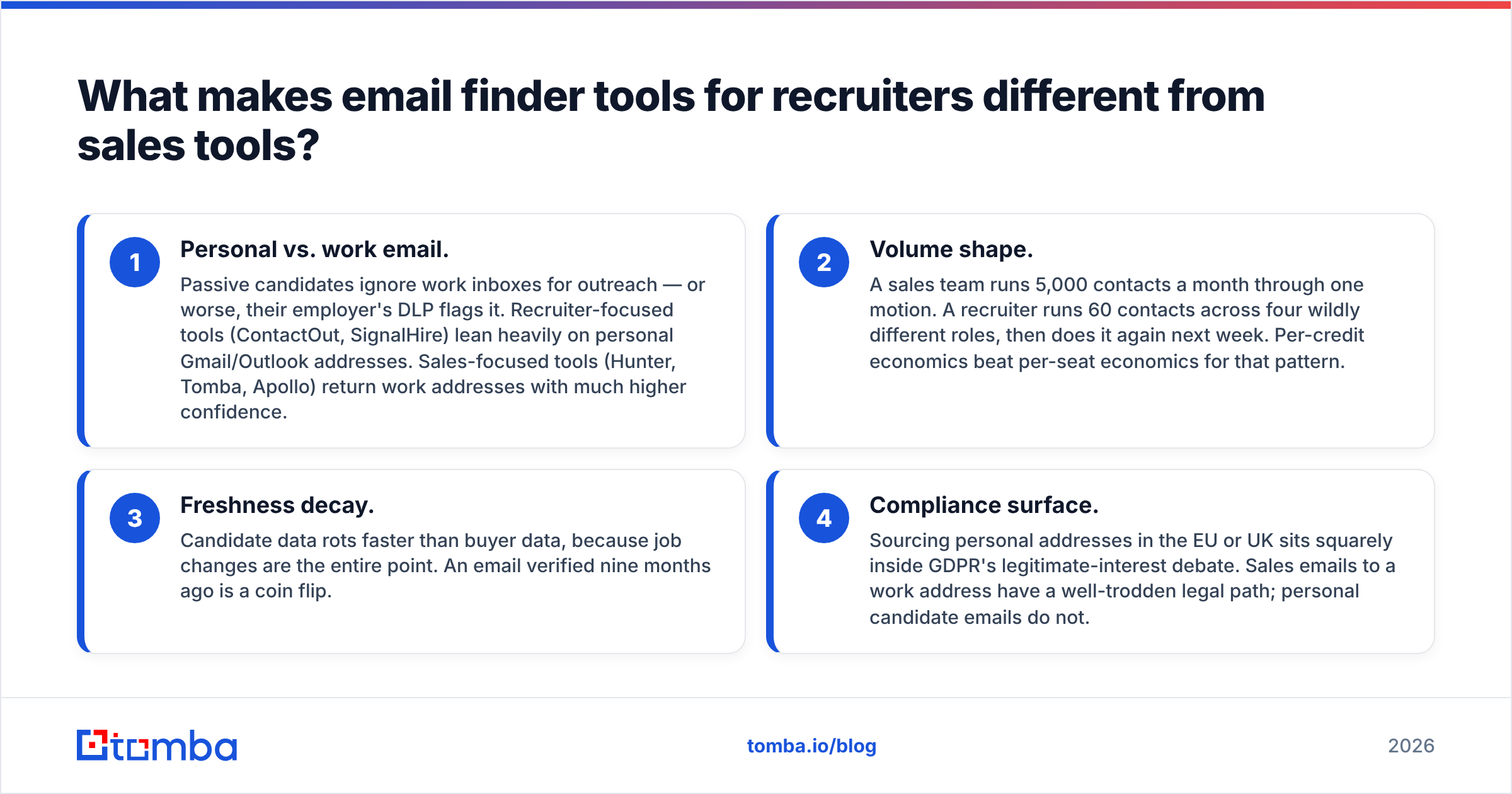
That gap produces four practical differences:
- Personal vs. work email. Passive candidates ignore work inboxes for outreach — or worse, their employer's DLP flags it. Recruiter-focused tools (ContactOut, SignalHire) lean heavily on personal Gmail/Outlook addresses. Sales-focused tools (Hunter, Tomba, Apollo) return work addresses with much higher confidence.
- Volume shape. A sales team runs 5,000 contacts a month through one motion. A recruiter runs 60 contacts across four wildly different roles, then does it again next week. Per-credit economics beat per-seat economics for that pattern.
- Freshness decay. Candidate data rots faster than buyer data, because job changes are the entire point. An email verified nine months ago is a coin flip.
- Compliance surface. Sourcing personal addresses in the EU or UK sits squarely inside GDPR's legitimate-interest debate. Sales emails to a work address have a well-trodden legal path; personal candidate emails do not.
Any comparison that ignores those four differences is a sales tool review wearing a recruiting headline.
How do email finder tools actually find a candidate's address?#
Every tool on this list uses some mix of five mechanisms. Knowing which mix a vendor leans on tells you exactly where it will fail you.
- Pattern inference. The tool learns that Stripe uses
first@stripe.com, then applies that pattern to a name you supply. Cheap, fast, and roughly 70–85% correct at companies with 50+ known contacts — near-worthless at a 12-person agency. - Crawled public sources. Company sites, GitHub commits, conference programs, academic papers, press releases, WHOIS records. This is where genuinely hard-to-find technical candidates surface. A git commit log is one of the highest-yield sources for engineering email addresses in existence.
- Contributed/extension data. A browser extension collects addresses visible in users' own inboxes and CRMs, then pools them. This is how personal Gmail addresses enter these databases at scale. Coverage is excellent; provenance is murkier, which matters for your GDPR posture.
- Licensed and purchased datasets. Bulk B2B files from data brokers. Broad, cheap per record, and typically the oldest data in the stack.
- SMTP and MX verification. The tool opens a conversation with the receiving mail server and asks whether the mailbox exists, without sending anything. This is the step that separates a guess from a deliverable address, and it's the one most teams skip.
The order matters. A tool that verifies after inferring gives you a confidence score you can act on. A tool that only infers gives you a plausible string. If you take one thing from this post: the finder and the verifier are two different products, and you need both.

Which email finder tools for recruiters are worth testing in 2026?#
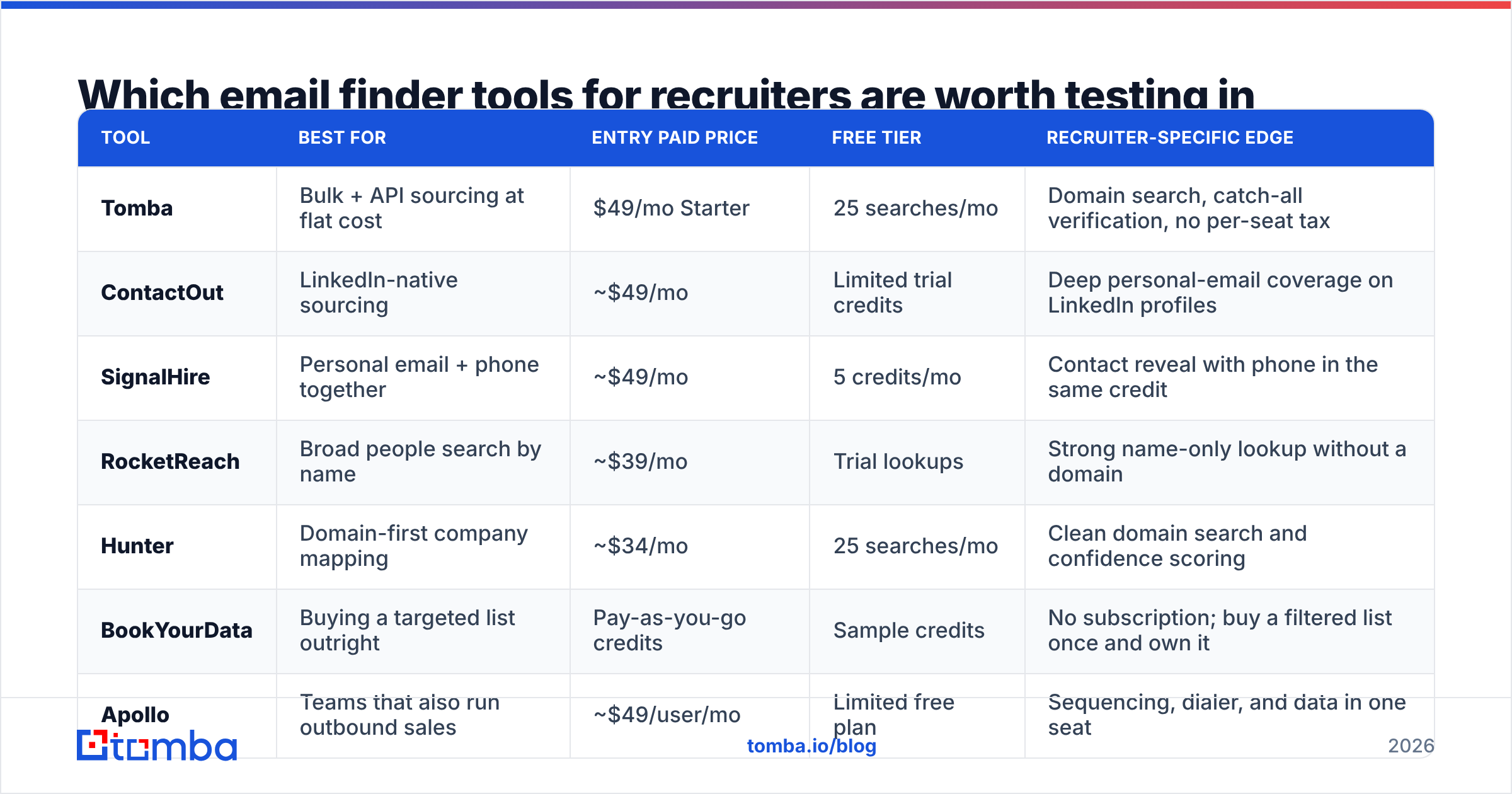
Below is the shortlist. Prices are entry paid tiers as published at the time of writing and change often — check the vendor page before you budget.
| Tool | Best for | Entry paid price | Free tier | Recruiter-specific edge |
|---|---|---|---|---|
| Tomba | Bulk + API sourcing at flat cost | $49/mo Starter | 25 searches/mo | Domain search, catch-all verification, no per-seat tax |
| ContactOut | LinkedIn-native sourcing | ~$49/mo | Limited trial credits | Deep personal-email coverage on LinkedIn profiles |
| SignalHire | Personal email + phone together | ~$49/mo | 5 credits/mo | Contact reveal with phone in the same credit |
| RocketReach | Broad people search by name | ~$39/mo | Trial lookups | Strong name-only lookup without a domain |
| Hunter | Domain-first company mapping | ~$34/mo | 25 searches/mo | Clean domain search and confidence scoring |
| BookYourData | Buying a targeted list outright | Pay-as-you-go credits | Sample credits | No subscription; buy a filtered list once and own it |
| Apollo | Teams that also run outbound sales | ~$49/user/mo | Limited free plan | Sequencing, dialer, and data in one seat |

Three notes on how to read that table.
Seat pricing is the hidden multiplier. Apollo and Lusha-style per-user models are fine for a 3-person sourcing pod and brutal for a 12-recruiter agency where everyone needs occasional access. Tomba, Hunter, and BookYourData price on volume rather than headcount, which usually wins for agencies with spiky demand.
"Credits" are not comparable across vendors. One vendor's credit is one revealed contact; another's is one search that may return five contacts; another charges separately for the verification step. Normalize to cost per verified, deliverable email before you compare anything.
Buying a list and finding emails are different purchases. BookYourData is worth calling out here because it solves a problem the finders don't: when you need 2,000 filtered contacts in a vertical right now and have no source list to enrich, a pay-as-you-go purchase is faster and often cheaper than burning finder credits one profile at a time. Plenty of talent teams run both — a purchased list for volume campaigns, a finder for named-target sourcing.
How accurate are email finder tools on candidate data?#
Accuracy claims in this category are close to meaningless as published. Every vendor quotes a number between 95% and 99%, and every number is measured on a different denominator.
Here is what the numbers usually mean:
- "Found rate" / hit rate — how often the tool returns any address for a given input. Higher is not better if the addresses bounce.
- "Accuracy" — how often a returned address is real. This is the number that should drive your decision.
- "Deliverability" — how often an accepted address actually lands in an inbox. Depends on your sending setup, not the vendor's.

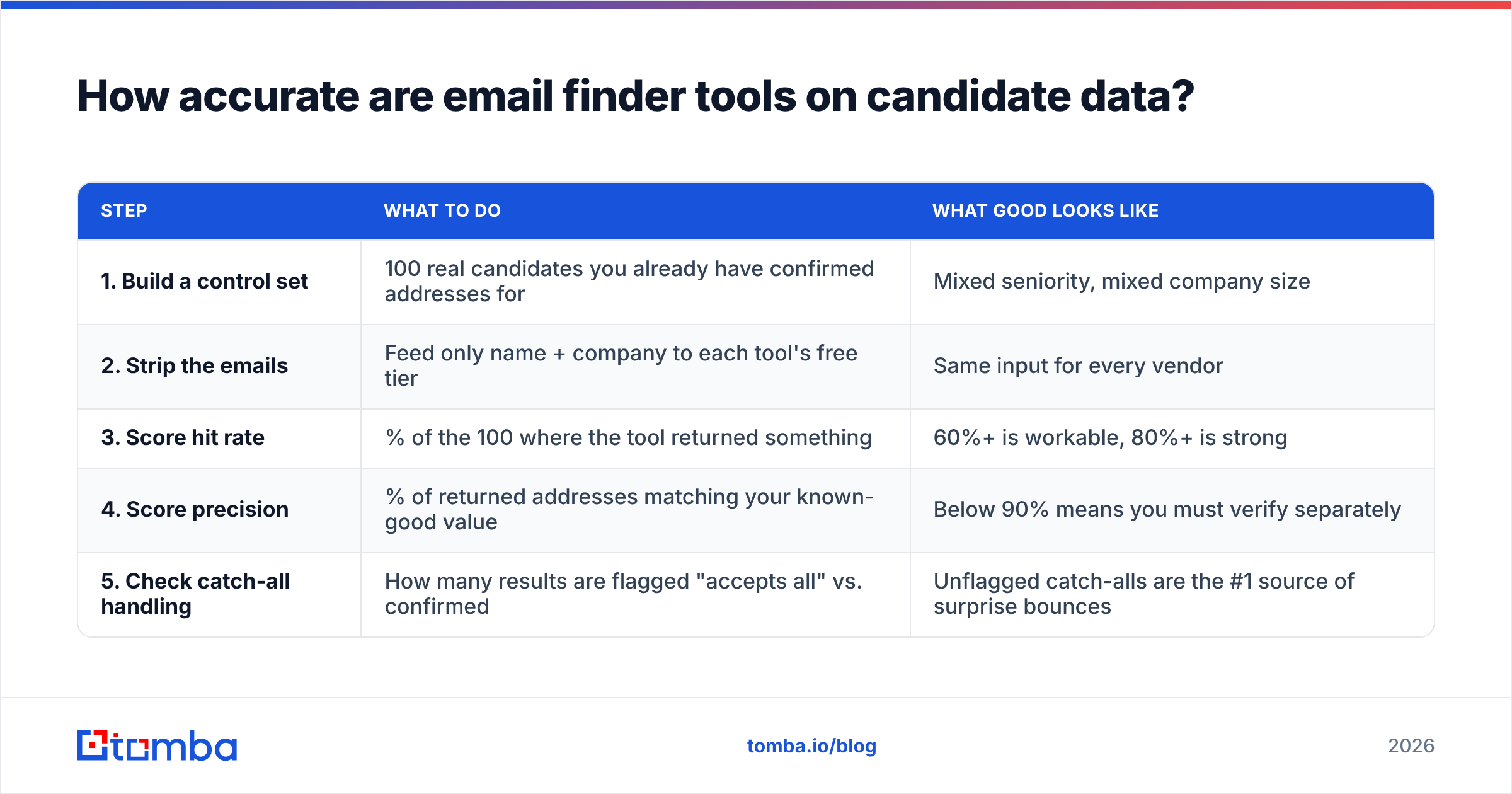
Run your own benchmark before you commit to an annual contract. It takes about ninety minutes:
| Step | What to do | What good looks like |
|---|---|---|
| 1. Build a control set | 100 real candidates you already have confirmed addresses for | Mixed seniority, mixed company size |
| 2. Strip the emails | Feed only name + company to each tool's free tier | Same input for every vendor |
| 3. Score hit rate | % of the 100 where the tool returned something | 60%+ is workable, 80%+ is strong |
| 4. Score precision | % of returned addresses matching your known-good value | Below 90% means you must verify separately |
| 5. Check catch-all handling | How many results are flagged "accepts all" vs. confirmed | Unflagged catch-alls are the #1 source of surprise bounces |
Step 5 is the one that catches people out. Roughly a fifth of business domains are configured as catch-all: the mail server accepts every address at the domain, so a naive verifier reports "valid" for asdfgh@company.com. If your tool doesn't distinguish a confirmed mailbox from a catch-all accept, your reported 98% accuracy is fiction. Tomba splits these out explicitly with a catch-all verifier, and Hunter flags them in its confidence score — several cheaper tools do not flag them at all.
What does a recruiting email finder actually cost per hire?#
Work backwards from placements, not from the monthly invoice.
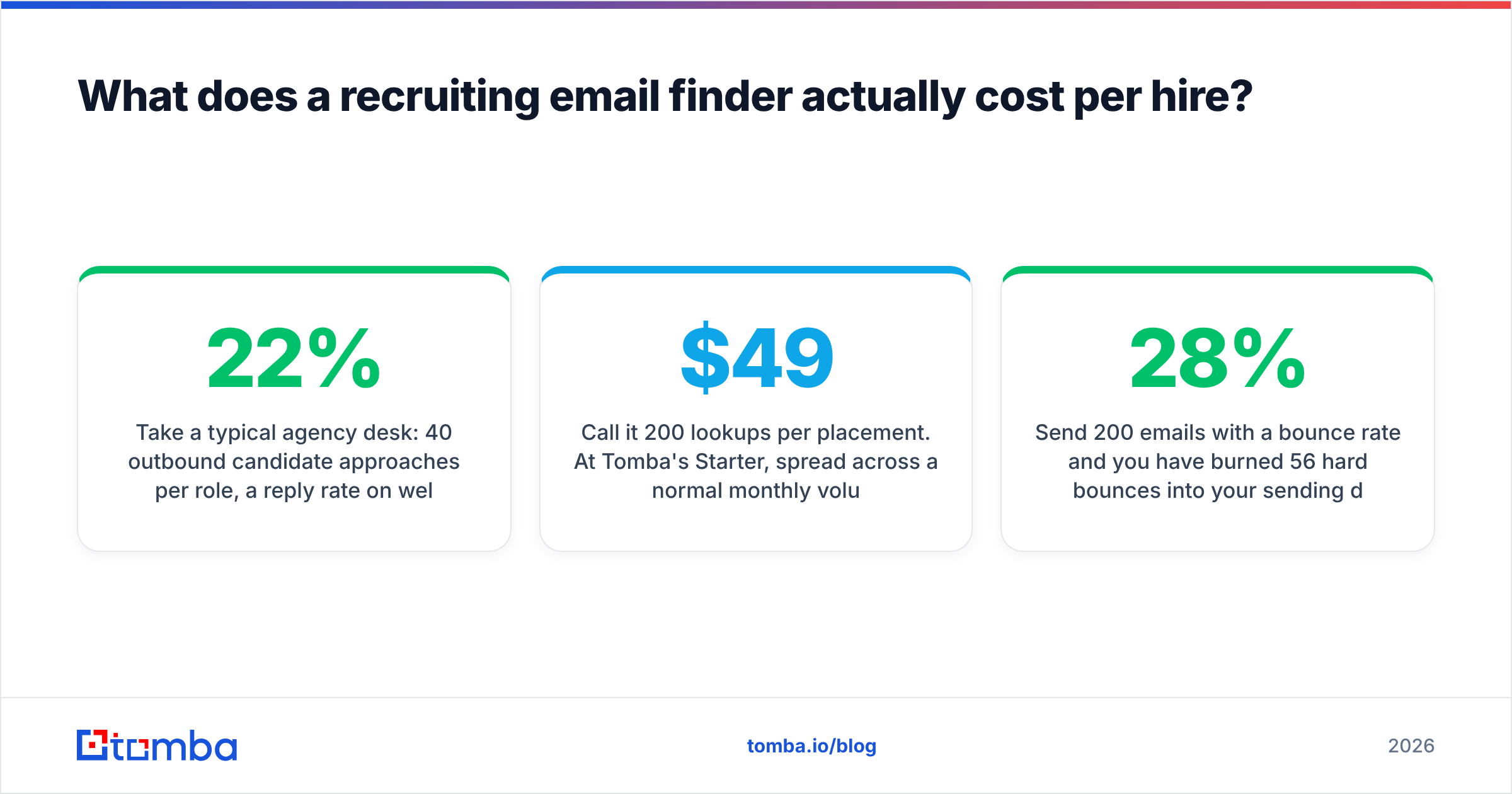
Take a typical agency desk: 40 outbound candidate approaches per role, a 22% reply rate on well-researched sourcing emails, a 40% conversion from reply to screen, and roughly 8 screens per placement. That's ~145 approaches per placement, plus the emails you find and discard because the candidate doesn't fit.
Call it 200 lookups per placement. At Tomba's $49/mo Starter, spread across a normal monthly volume, your data cost per placement lands in the tens of dollars — an accounting rounding error against a $18,000 fee. Even Apollo's per-seat model at $49/user/mo works out fine on that math.
Which is the real point: the price difference between these tools is almost never what should decide it. What should decide it is bounce rate, because bounces are not a data cost — they're a channel cost.
Send 200 emails with a 28% bounce rate and you have burned 56 hard bounces into your sending domain's reputation in one week. Google and Microsoft both tightened bulk sender requirements over the last two years, and a sustained bounce rate above ~2% is enough to start routing your mail to spam. At that point your entire outbound channel degrades — including the emails to candidates whose addresses were perfectly valid.
That's why the verification step is worth more than the finding step. Run every list through an email verifier before it touches your sequencer, and treat anything returned as "risky" or "catch-all unconfirmed" as a LinkedIn-only target.

How do you build a recruiter sourcing workflow that doesn't bounce?#
A workflow that survives contact with a real requisition looks like this:
- Source the profile list first. LinkedIn Recruiter, GitHub, a conference attendee list, an association directory. Names and current employers only — no emails yet.
- Enrich in bulk, not one profile at a time. Export to CSV, run it through a bulk email finder, and come back to a completed file. Manually clicking a browser extension 200 times is the single largest time sink in modern sourcing, and it produces worse data because you stop before you finish.
- Verify the output as a separate pass. Keep confirmed mailboxes. Quarantine catch-alls. Discard invalids. Track the ratio — if it degrades month over month, your source list quality is slipping.
- Split by address type. Work addresses get the professional, credible approach. Personal addresses get a shorter, more casual note and a clear "how I found you" line. Sending an identical template to both is why candidates report recruiter emails as spam.
- Re-verify anything older than 90 days. Candidate data decays at roughly 2–3% per month through job changes alone. A pipeline you built last quarter is not the pipeline you have.
- Log outcomes back to your ATS. Bounce, reply, no-reply — per source. After two months you'll know which tool actually earns its subscription on your verticals, which no third-party benchmark can tell you.
If your team lives in LinkedIn, a LinkedIn finder that turns a profile URL into a verified address closes the gap between step 1 and step 2 without a manual export. If your team lives in spreadsheets, the API and Sheets integrations matter more than the browser extension.
Is it legal to source candidate emails this way?#
Short answer: usually yes for work addresses, with real conditions for personal ones — and you should get this in writing from your own counsel rather than a blog.
In the US, the CAN-SPAM Act governs commercial email. Recruiting outreach is generally treated as commercial messaging, which means you need accurate headers, a non-deceptive subject line, a physical postal address, and a working opt-out that you honor within 10 business days. There is no opt-in requirement.
In the EU and UK, GDPR applies to any personal data including a work email tied to a named person. Most recruiters rely on legitimate interest as the lawful basis, which requires a documented balancing test, a privacy notice sent at or before first contact, and a clean deletion path. Personal Gmail addresses raise the bar meaningfully — the individual's reasonable expectation of privacy is higher there.
Practical guardrails that keep you out of trouble regardless of jurisdiction:
- Tell candidates where you found them, in one sentence, in the first email.
- Include a real unsubscribe or "don't contact me again" option, and actually suppress it.
- Delete data for candidates who go cold; don't hoard a 40,000-row file forever.
- Prefer work addresses when the candidate is in an EU/UK jurisdiction and you don't have a strong reason otherwise.
- Ask your vendor where the data came from. Any serious provider will publish data sourcing details; vague answers are a signal.
Which tool should you actually pick?#
- You source named targets from LinkedIn all day and want personal emails → ContactOut or SignalHire. Their extension-fed data is genuinely stronger on personal addresses than the domain-first tools.
- You run bulk enrichment, ATS syncs, or anything programmatic → Tomba. Flat pricing without per-seat charges, a documented API, catch-all handling, and bulk workflows that don't require a human clicking through profiles.
- You need a filtered list of 2,000 contacts in a vertical today → BookYourData's pay-as-you-go model gets you there without a subscription commitment.
- You want one seat that does data plus sequencing → Apollo, if you can live with per-user pricing.
- You're mapping companies rather than people → Hunter or Tomba's domain search. Both are built around "show me everyone at this domain."
Compare current pricing and read recent user reviews on G2 before you sign anything annual — this category churns fast, and the tool that won a 2024 benchmark is not automatically the one that wins yours.
Ready to test it on your own requisition?#
Pull the last 50 candidates you sourced, strip the emails, and run them through the Tomba Email Finder. The free tier gives you 25 searches a month with no card, which is enough to score hit rate and precision against data you already trust. If the numbers hold up, Starter at $49/mo covers most solo desks and small talent teams without a per-seat charge — see full Tomba pricing for volume tiers. Benchmark it against whatever you're using now, keep the winner, and stop paying for bounces.
Related guides#
Ready to find emails that actually work?
Join 150,000+ professionals who stopped guessing and started sending. Free credits on signup — no credit card required.
Get the Tomba newsletter
Practical outbound tactics and product updates — once every two weeks.
About the author