Email Follow Up Automation: The 2026 No-Fluff Playbook
Most replies come from follow-ups, not first emails. Here's how automated follow-up sequences actually work in 2026 — timing, tooling, deliverability limits, and the data problems that quietly kill them.
TL;DR
- Follow-ups produce the majority of replies in most outbound sequences — the first email is usually just the introduction, not the conversation.
- Three to five touches spread over 12–18 business days is the range most teams land on after testing. Nine-step sequences mostly generate unsubscribes.
- Automation software is the cheap part. Clean, verified contact data and sane sending volume are what decide whether the sequence lands in the inbox.
- Reply detection, timezone-aware scheduling, and per-mailbox sending caps are the three features worth paying for. Most other "AI" features are noise.
- Verify every address before it enters a sequence. A 6% bounce rate on step one poisons every step after it.
What is email follow up automation?#
Email follow up automation is software that sends a predefined series of emails to a contact on a schedule, then stops automatically the moment that contact replies, books a meeting, unsubscribes, or hits any other exit condition you define.
Think of it like a dishwasher rather than a robot chef. It does not decide what to cook. It handles the repetitive, tedious, easy-to-forget part of the job on a reliable cycle so you can spend your attention on the part that requires judgment. The sequence logic is dumb by design: wait N days, check for a reply, send the next message if there isn't one.
Three components make up any follow-up automation stack:
- A contact list — names, roles, companies, and verified email addresses. This is where most sequences fail before they send a single message.
- A sequencer — the tool that holds your steps, delays, conditions, and mailboxes. Instantly, Smartlead, Salesloft, Outreach, Reply.io, HubSpot Sequences, and dozens of others live here.
- A sending infrastructure — the mailboxes and domains that actually deliver. Usually secondary domains with SPF, DKIM, and DMARC configured, warmed for two to four weeks before real volume.
Get any one of the three wrong and the other two stop mattering.
Why do follow-ups decide whether outbound works at all?#
Because the first email arrives when your prospect is busy, and busy is the default state.
The pattern is consistent across teams and industries: reply volume does not collapse after email one. It stays meaningful through touch two, three, and four, then decays sharply. HubSpot's sales research has made this point for years — persistence within a reasonable window beats a single perfectly crafted cold email, and most reps stop before the point where responses actually cluster. You can read their sales resources for the underlying data on rep follow-up behavior.
The practical consequence: if your team is sending one email per prospect and moving on, you are leaving roughly two-thirds of your potential replies unclaimed. Automation exists to close that gap without adding headcount.
But there is a hard ceiling. Persistence works up to a point and then flips into irritation. The teams with the worst reply rates are almost never the ones sending too few follow-ups — they are the ones sending nine near-identical "just bumping this" messages to a list they never verified.

How many follow-ups should a sequence have, and when should they land?#
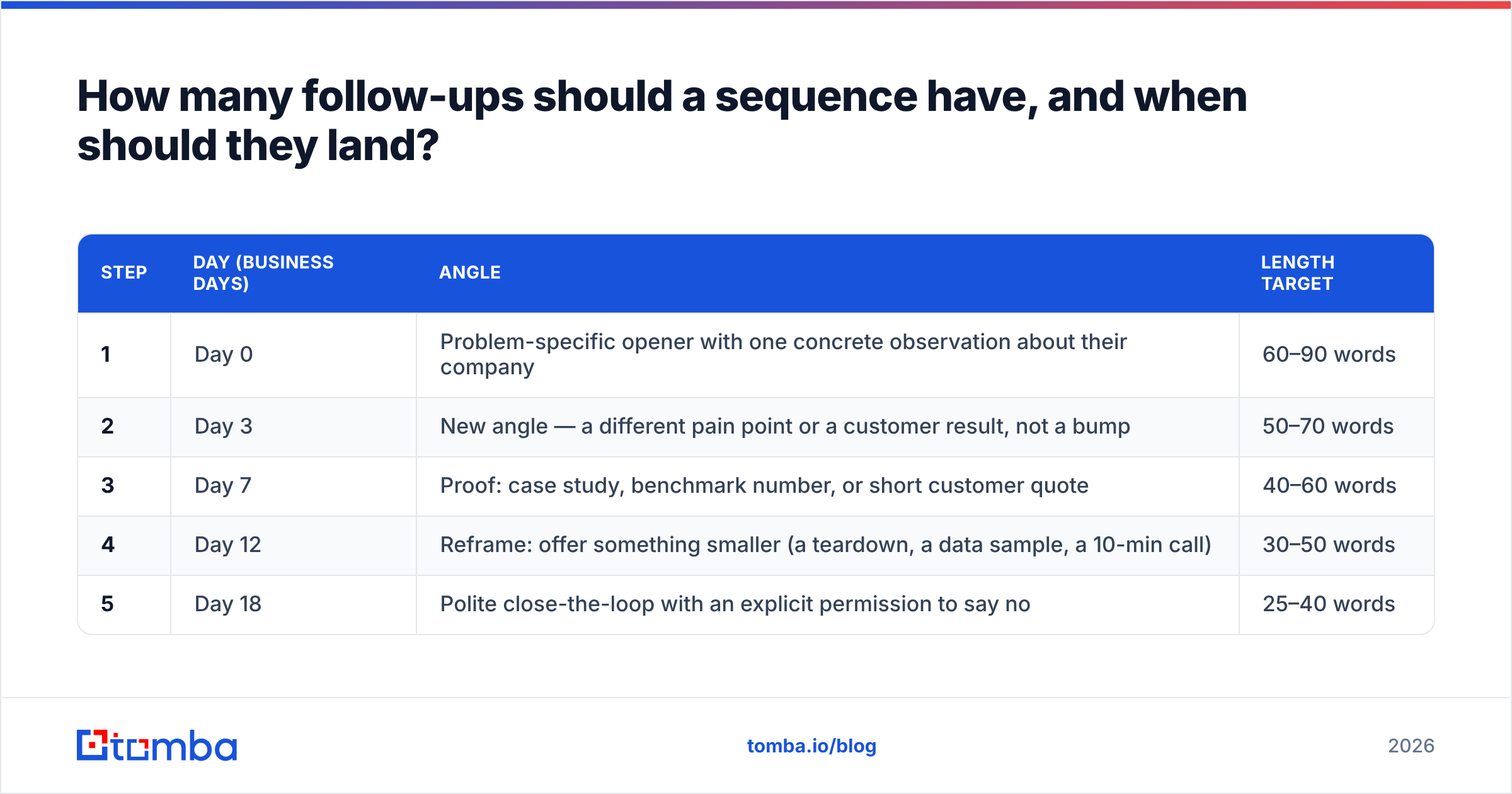
Four to five total touches over roughly three business weeks is the range that holds up under testing. Here is a cadence that works as a starting template rather than gospel:
| Step | Day (business days) | Angle | Length target |
|---|---|---|---|
| 1 | Day 0 | Problem-specific opener with one concrete observation about their company | 60–90 words |
| 2 | Day 3 | New angle — a different pain point or a customer result, not a bump | 50–70 words |
| 3 | Day 7 | Proof: case study, benchmark number, or short customer quote | 40–60 words |
| 4 | Day 12 | Reframe: offer something smaller (a teardown, a data sample, a 10-min call) | 30–50 words |
| 5 | Day 18 | Polite close-the-loop with an explicit permission to say no | 25–40 words |
Three rules that matter more than the exact days:
- Never send a pure bump. "Just following up" adds zero information and trains people to ignore your thread. Every step should carry one new idea.
- Get shorter as you go. Step five should be readable on a lock screen. Long fifth emails read as desperate.
- Send in the recipient's timezone, not yours. A message that arrives at 3 a.m. local time sits under 40 overnight emails by the time they open Gmail.
What separates a good automated follow-up from a bad one?#
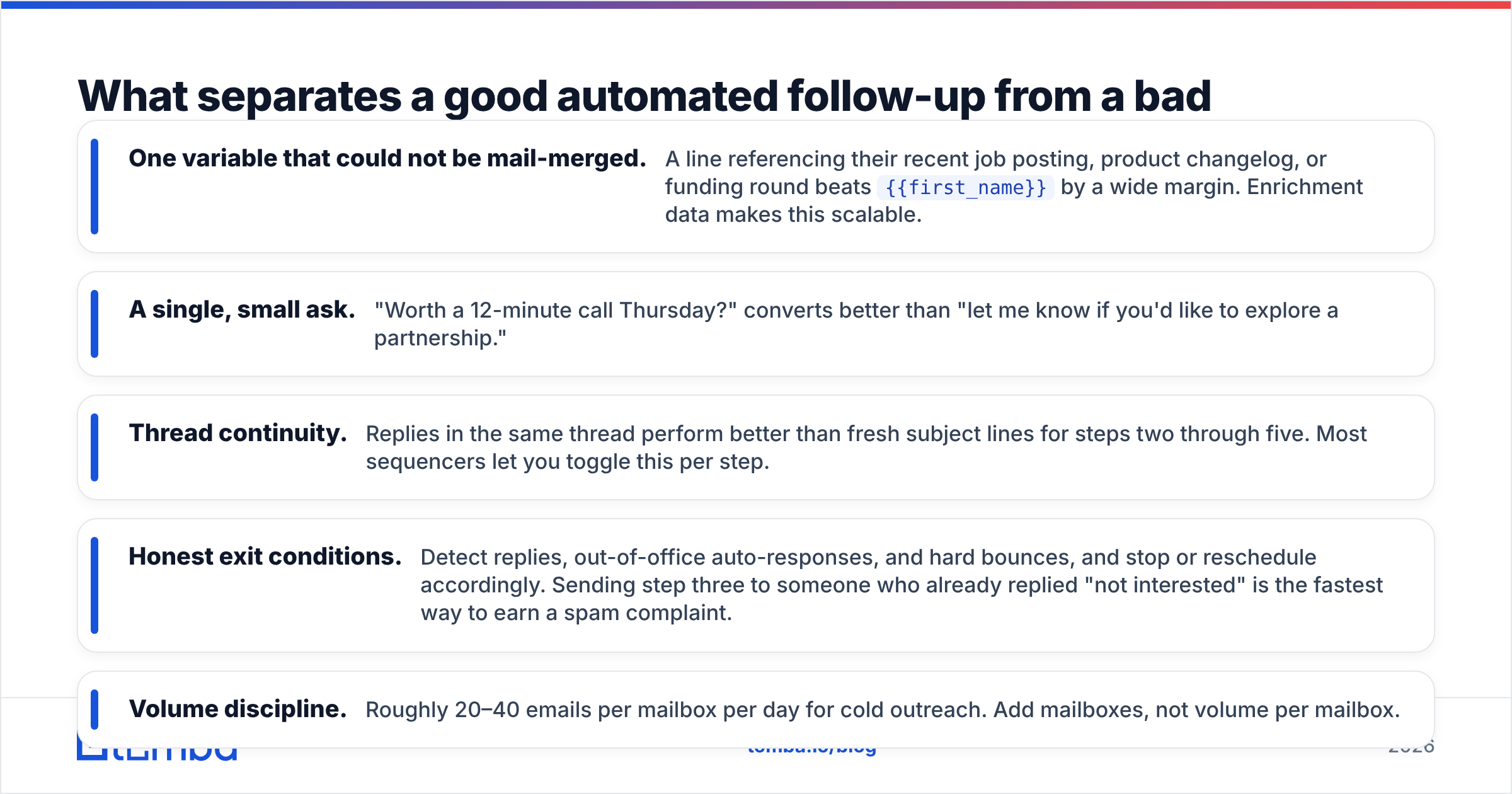
The mechanics are easy to automate. The judgment is not. Here is what actually differentiates sequences that book meetings:
- One variable that could not be mail-merged. A line referencing their recent job posting, product changelog, or funding round beats
{{first_name}}by a wide margin. Enrichment data makes this scalable. - A single, small ask. "Worth a 12-minute call Thursday?" converts better than "let me know if you'd like to explore a partnership."
- Thread continuity. Replies in the same thread perform better than fresh subject lines for steps two through five. Most sequencers let you toggle this per step.
- Honest exit conditions. Detect replies, out-of-office auto-responses, and hard bounces, and stop or reschedule accordingly. Sending step three to someone who already replied "not interested" is the fastest way to earn a spam complaint.
- Volume discipline. Roughly 20–40 emails per mailbox per day for cold outreach. Add mailboxes, not volume per mailbox.
Which email follow up automation tools should you compare in 2026?#
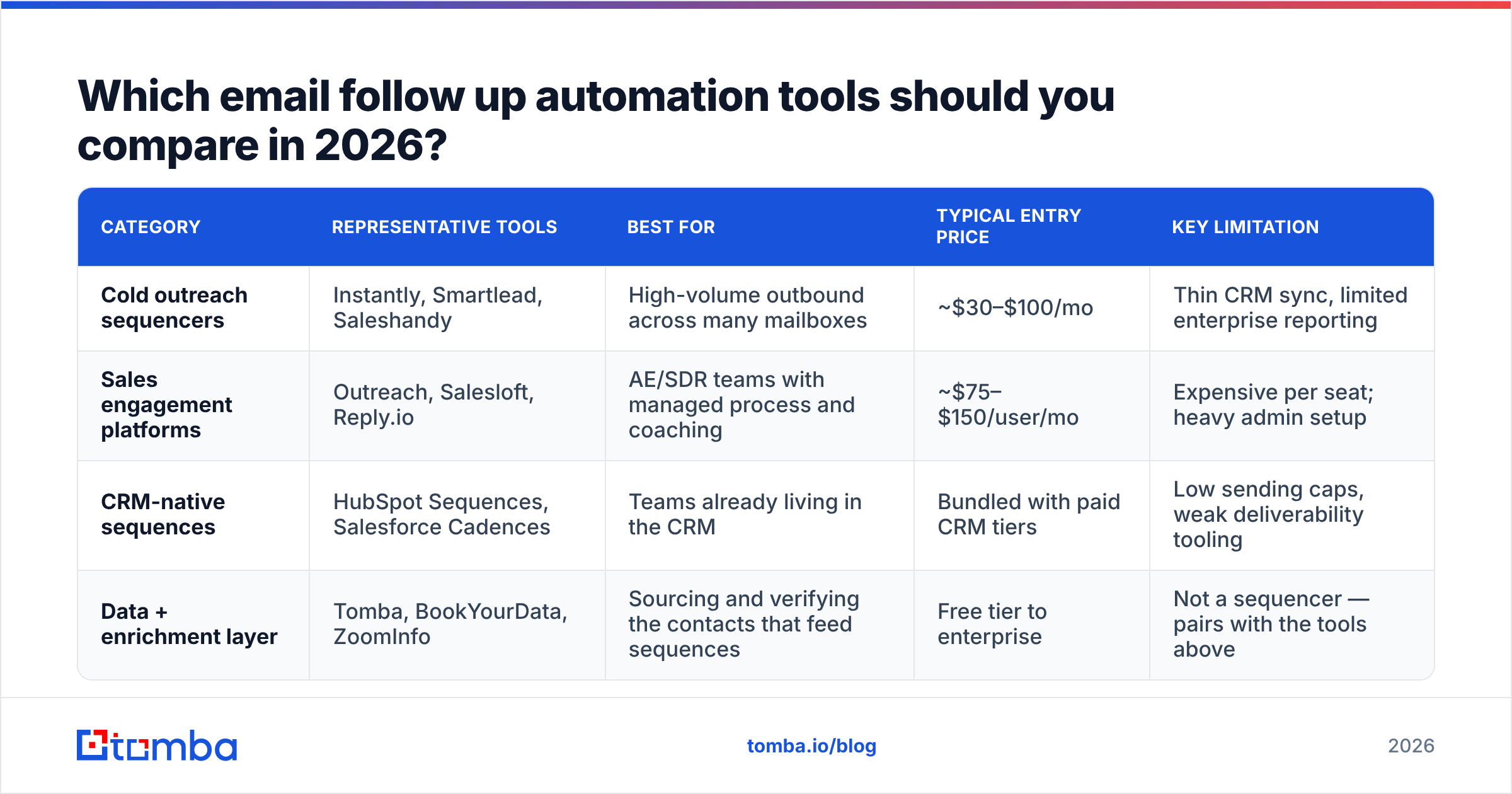
The market splits into three groups: cold-outreach sequencers built for volume, sales engagement platforms built for enterprise process control, and CRM-native sequences built for convenience. They are not interchangeable.
| Category | Representative tools | Best for | Typical entry price | Key limitation |
|---|---|---|---|---|
| Cold outreach sequencers | Instantly, Smartlead, Saleshandy | High-volume outbound across many mailboxes | ~$30–$100/mo | Thin CRM sync, limited enterprise reporting |
| Sales engagement platforms | Outreach, Salesloft, Reply.io | AE/SDR teams with managed process and coaching | ~$75–$150/user/mo | Expensive per seat; heavy admin setup |
| CRM-native sequences | HubSpot Sequences, Salesforce Cadences | Teams already living in the CRM | Bundled with paid CRM tiers | Low sending caps, weak deliverability tooling |
| Data + enrichment layer | Tomba, BookYourData, ZoomInfo | Sourcing and verifying the contacts that feed sequences | Free tier to enterprise | Not a sequencer — pairs with the tools above |
A few notes on reading that table honestly. Prices move constantly, so treat them as order-of-magnitude and check the vendor's page — Instantly and the others publish current tiers. Category reviews on G2's sales engagement listings are useful for filtering by company size, less useful for deliverability claims, which vendors rarely benchmark honestly.
The important structural point: your sequencer and your data source are different purchases. Buying an all-in-one that bundles mediocre data with a decent sequencer usually costs more in bounced sends than buying both separately.
What actually breaks automated follow-up sequences?#
Not the copy. Three things, in order of frequency.
Bad data. A sequence built on scraped, unverified addresses bounces at 8–15%. Google and Microsoft treat that as a spam signal within days. Every subsequent step in the sequence lands in Promotions or worse. This is the single most common failure and the easiest to prevent — run the list through an email verifier before it ever touches a sequencer, and route catch-all domains through a catch-all verifier instead of guessing.
Sending too fast, too soon. A brand-new domain sending 200 emails on day one is an obvious signal. Warm for two to four weeks, ramp gradually, and cap per-mailbox volume. Nothing about your copy will rescue a domain with a damaged sender reputation — see the fundamentals of email deliverability if you're setting this up for the first time.
No exit logic. Sequences that keep firing after a reply, or that email three people at the same company with identical copy on the same morning, generate complaints. Company-level suppression and reply detection are non-negotiable features.

How do you set up a follow-up sequence in one afternoon?#
A workable build order, assuming you already have a sequencer account:
- Define the exit conditions first. Reply, meeting booked, unsubscribe, hard bounce, company-level suppression. Write them down before you write a single email.
- Build the list narrow. 200 contacts in one clearly defined segment beats 2,000 mixed ones. One industry, one role band, one trigger. Use domain search to pull the right people at target companies rather than buying a generic list.
- Verify and dedupe. Drop invalids, dedupe by domain, and decide your catch-all policy in advance. Bulk processing through an email finder API keeps this step from becoming a manual spreadsheet afternoon.
- Write five emails as one argument. Draft them together, not one at a time. Read them in sequence and delete any sentence that repeats a previous step.
- Set delays in business days, timezone-aware. Weekend sends on B2B lists waste a touch.
- Launch at 20% volume for five days. Watch bounce rate and reply rate before you scale. If bounces exceed 3%, stop and fix the data — do not push through it.
- Review at 200 sends, not 20. Small samples produce confident wrong conclusions.
What should you measure, and what should you ignore?#
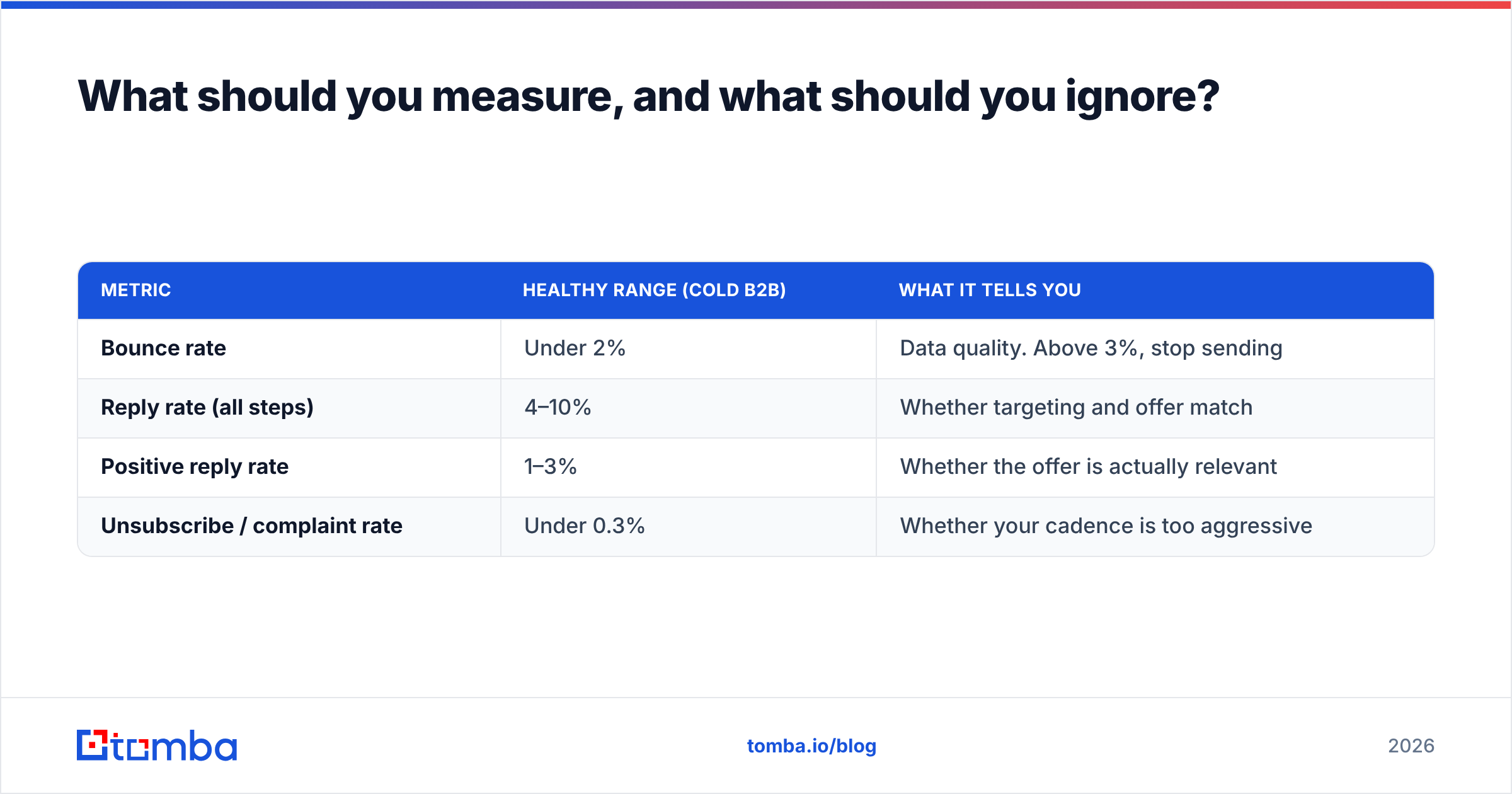
Track four numbers. Ignore the rest until these are healthy.
| Metric | Healthy range (cold B2B) | What it tells you |
|---|---|---|
| Bounce rate | Under 2% | Data quality. Above 3%, stop sending |
| Reply rate (all steps) | 4–10% | Whether targeting and offer match |
| Positive reply rate | 1–3% | Whether the offer is actually relevant |
| Unsubscribe / complaint rate | Under 0.3% | Whether your cadence is too aggressive |
Open rate deserves a specific warning. With Apple Mail Privacy Protection and similar features inflating opens across most consumer and many business clients, open rate is now a directional signal at best. Optimizing subject lines against it will lead you somewhere wrong. Judge by replies.
The other trap is judging step-level performance in isolation. Step four might show a 1% reply rate on its own and still be the step that produced your two largest deals this quarter, because it caught people who were traveling during steps one through three. Evaluate the sequence as a unit.
Is email follow up automation worth it for a small team?#
Yes, with one condition: only if you fix the data first.
For a two-person team sending 100 emails a week, manual follow-up is technically survivable — it just doesn't survive contact with a busy quarter. Steps get skipped, threads get forgotten, and the follow-ups that actually generate replies are the exact ones that fall off when things get hectic. Automation's real value at small scale isn't volume, it's consistency.
The condition matters more than the tool choice. A $30/month sequencer on a verified, well-targeted 300-contact list will out-earn a $150/user platform running on a bought list of 20,000 unverified addresses. The gap is not close. Tooling budget spent on data quality returns more than tooling budget spent on features.
If you are choosing where to spend first: verified contacts, then a basic sequencer, then infrastructure, then — much later — the AI copy assistant.
Start with contacts that actually deliver#
The fastest improvement available to most follow-up sequences has nothing to do with the sequence. It's replacing guessed and scraped addresses with verified ones before step one goes out.
Tomba's Email Finder finds professional email addresses by domain, name, or company, with verification built into the same workflow — so the list you push into Instantly, Smartlead, Outreach, or HubSpot arrives clean instead of arriving at 9% bounce. The free tier gives you 25 searches a month to test the accuracy on your own target accounts, and paid plans start at $49/mo; full Tomba pricing is public if you want to compare per-credit costs against your current provider.
Fix the input, then automate the follow-up. In that order.
Related guides#
Ready to find emails that actually work?
Join 150,000+ professionals who stopped guessing and started sending. Free credits on signup — no credit card required.
Get the Tomba newsletter
Practical outbound tactics and product updates — once every two weeks.
About the author