Email Follow Up Tools in 2026: 9 Picks Compared by Use Case
Most follow-up tools sell you sending volume, not replies. Here is an honest breakdown of nine email follow up tools, what each one actually limits, and how to pick one without wasting a quarter.
TL;DR
- Between 40% and 60% of replies to a cold sequence arrive after the first email, so the follow-up engine matters more than the opener you agonized over.
- Nearly every tool in this category does the same three things: schedule steps, stop on reply, rotate inboxes. The real differences are sending limits, inbox rotation caps, CRM depth, and whether verification is bundled or billed separately.
- Instantly and Smartlead win on volume-per-dollar; Lemlist and Reply.io win on personalization depth; HubSpot and Salesloft win when the sequence must live inside a CRM record.
- No sequencer fixes a bad list. Bounce rate above 3% will sink a domain regardless of which vendor's logo is on the dashboard.
- Budget for two line items, not one: a sending tool and a data layer that finds and verifies addresses before they enter a sequence.
What are email follow up tools, exactly?#
Email follow up tools are software that sends a pre-planned series of messages to a contact and stops the series automatically when that contact replies. Think of them as a kitchen timer wired to your inbox: you set the intervals once, and the tool keeps track of who is due for message two, who is due for message four, and who has already answered and should be left alone.
The category has three overlapping species, and vendors blur the lines on purpose:
- Cold email sequencers — built for outbound to people who never opted in. Multiple sending accounts, inbox rotation, warmup, spintax. Instantly, Smartlead, Saleshandy, Lemlist.
- Sales engagement platforms — sequences plus calls, LinkedIn tasks, dialers, and manager analytics. Outreach, Salesloft, Reply.io. Heavier, pricier, CRM-native.
- Inbox-side reminder tools — lightweight Gmail or Outlook add-ons that nudge you when a thread goes quiet. Mixmax, Streak, Boomerang. No inbox rotation, no cold-volume features.
Picking the wrong species is the most common and most expensive mistake. Buying Salesloft to send 2,000 cold emails a month is like renting a semi-truck to move a bookshelf. Buying a $37/month cold sequencer for a team of AEs who live in Salesforce means every touch has to be logged by hand.
Why do follow-ups decide your reply rate?#
Because the first email is a lottery ticket and the sequence is the actual campaign.
Vendor benchmark reports consistently show reply rates roughly doubling between a one-email campaign and a three-to-four-email campaign. The mechanism is boring: your prospect was in a meeting, on PTO, or triaging 180 unread messages the morning email one landed. Follow-up three arrives on a Tuesday when they have twelve minutes and a problem your subject line happens to name.
There is a ceiling. Past four or five touches, incremental replies fall off sharply while spam complaints keep climbing — and complaints are the metric that actually kills domains under the current Google and Yahoo bulk sender rules. Google's published threshold is a 0.3% complaint rate, with 0.1% as the target to stay under. A seven-step sequence to a cold list is a reliable way to blow past that.

Practical shape that holds up across most B2B campaigns: three to four touches, spread over 10–16 days, each one shorter than the last, with at least one that changes the ask entirely instead of repeating it.
What features actually matter when comparing email follow up tools?#
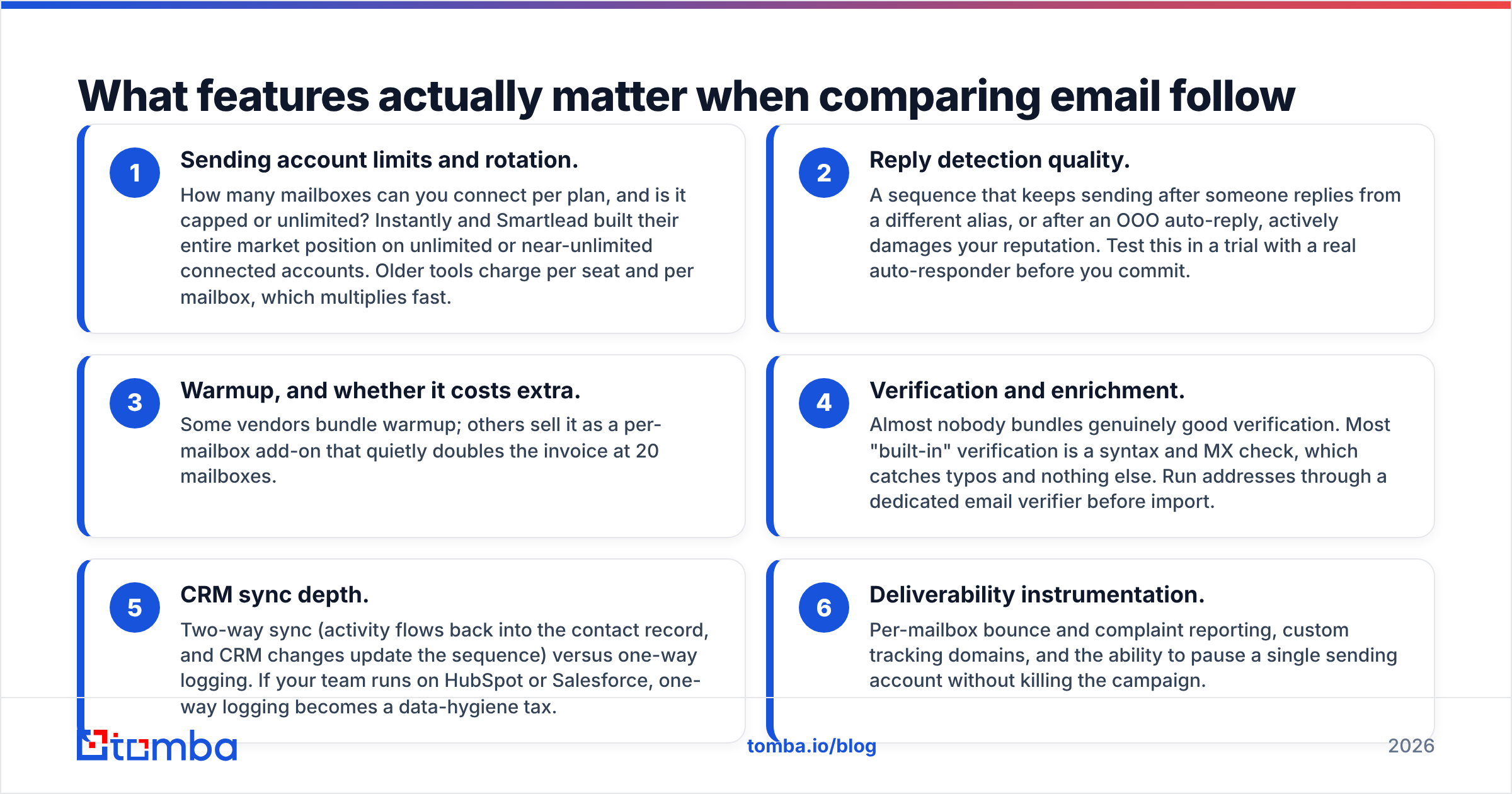
Ignore the feature matrix on the pricing page. These six decide whether the tool works in month three:
- Sending account limits and rotation. How many mailboxes can you connect per plan, and is it capped or unlimited? Instantly and Smartlead built their entire market position on unlimited or near-unlimited connected accounts. Older tools charge per seat and per mailbox, which multiplies fast.
- Reply detection quality. A sequence that keeps sending after someone replies from a different alias, or after an OOO auto-reply, actively damages your reputation. Test this in a trial with a real auto-responder before you commit.
- Warmup, and whether it costs extra. Some vendors bundle warmup; others sell it as a per-mailbox add-on that quietly doubles the invoice at 20 mailboxes.
- Verification and enrichment. Almost nobody bundles genuinely good verification. Most "built-in" verification is a syntax and MX check, which catches typos and nothing else. Run addresses through a dedicated email verifier before import.
- CRM sync depth. Two-way sync (activity flows back into the contact record, and CRM changes update the sequence) versus one-way logging. If your team runs on HubSpot or Salesforce, one-way logging becomes a data-hygiene tax.
- Deliverability instrumentation. Per-mailbox bounce and complaint reporting, custom tracking domains, and the ability to pause a single sending account without killing the campaign.
Which email follow up tools are worth comparing in 2026?#
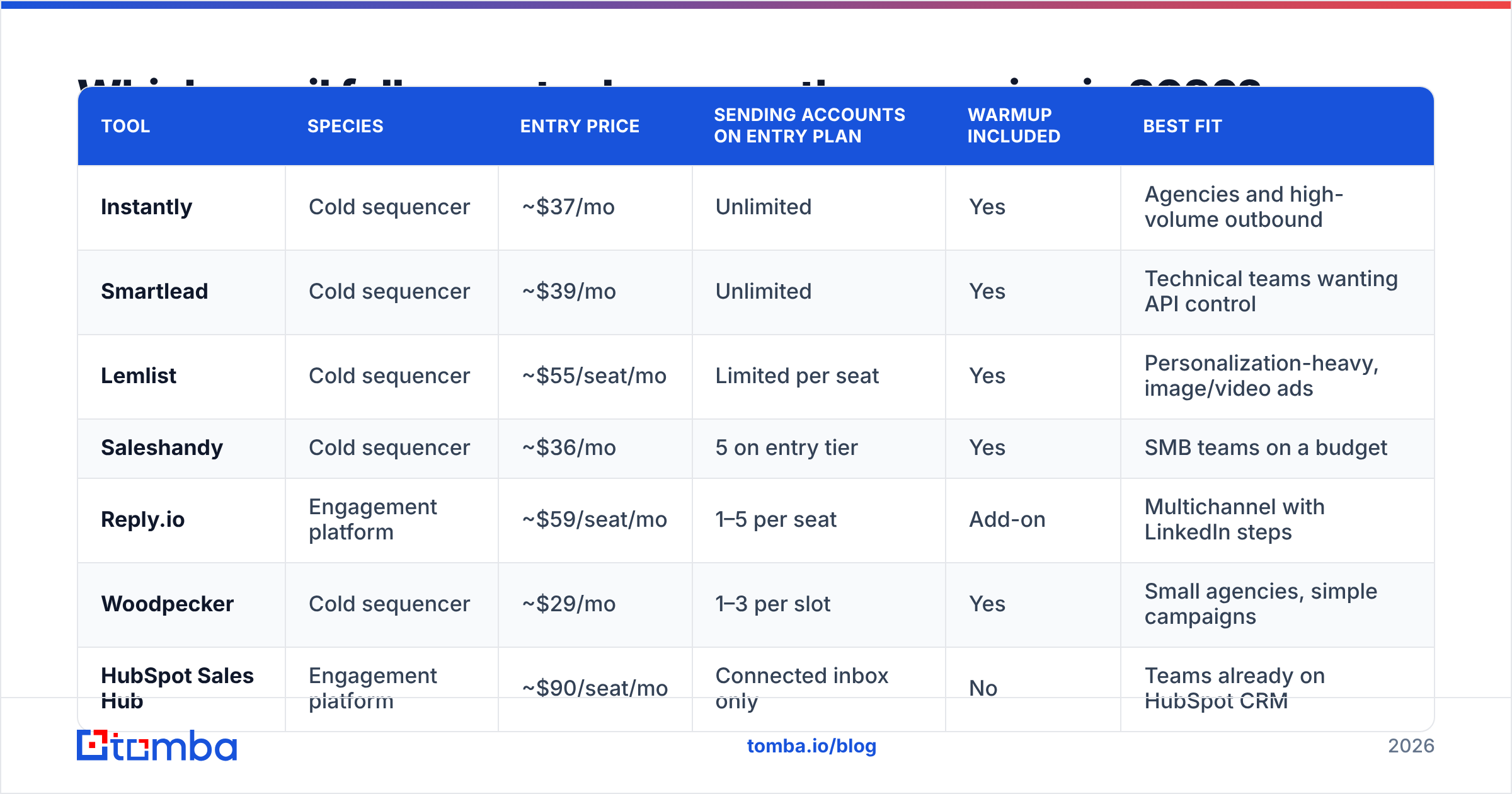
Here is the honest field. Prices are published list rates as of early 2026 and shift often — verify on the vendor page before you buy.
| Tool | Species | Entry price | Sending accounts on entry plan | Warmup included | Best fit |
|---|---|---|---|---|---|
| Instantly | Cold sequencer | ~$37/mo | Unlimited | Yes | Agencies and high-volume outbound |
| Smartlead | Cold sequencer | ~$39/mo | Unlimited | Yes | Technical teams wanting API control |
| Lemlist | Cold sequencer | ~$55/seat/mo | Limited per seat | Yes | Personalization-heavy, image/video ads |
| Saleshandy | Cold sequencer | ~$36/mo | 5 on entry tier | Yes | SMB teams on a budget |
| Reply.io | Engagement platform | ~$59/seat/mo | 1–5 per seat | Add-on | Multichannel with LinkedIn steps |
| Woodpecker | Cold sequencer | ~$29/mo | 1–3 per slot | Yes | Small agencies, simple campaigns |
| HubSpot Sales Hub | Engagement platform | ~$90/seat/mo | Connected inbox only | No | Teams already on HubSpot CRM |
| Salesloft | Engagement platform | Custom (annual) | Per seat | No | Enterprise SDR orgs with managers |
| Mixmax | Inbox add-on | ~$29/seat/mo | Your mailbox | No | AEs nudging warm threads |
Two patterns jump out. First, the price gap between cold sequencers and engagement platforms is roughly 2–3x per seat, and it buys CRM depth and manager reporting, not better sending. Second, "unlimited sending accounts" is the defining feature of the modern cold-email tier — but unlimited mailboxes means unlimited mailbox costs elsewhere (Google Workspace or a reseller), which is the line item most teams forget.
Is a sequencer enough without clean data?#
No, and this is where most follow-up programs die quietly.
A sequencer is a distribution mechanism. It has no opinion about whether j.smith@acme.com exists. Send 1,000 emails to a list scraped from a stale export and you will bounce 15–25% of them. Under current bulk-sender enforcement, that is enough to damage a sending domain within a single campaign — and no amount of warmup undoes it retroactively.
The order of operations that actually works:
- Find addresses from a company domain or a name, rather than guessing patterns. A domain search returns the known addresses and the dominant pattern for a company in one call.
- Verify every address before import. Catch-all domains need their own treatment — a plain SMTP check returns "accept" for everything, which is why a dedicated catch-all verifier exists as a separate step.
- Enrich with role, seniority, and company size so your follow-up copy can change per segment instead of running one generic thread.
- Deduplicate across campaigns. Two sequences hitting the same person in the same week is the fastest route to a complaint.
Only then does the sequencer earn its keep. If you are importing lists in the thousands, do the finding and verification in one pass with a bulk email finder rather than paying per-lookup inside a sequencer that marks up data.
How many follow-ups should a sequence actually have?#
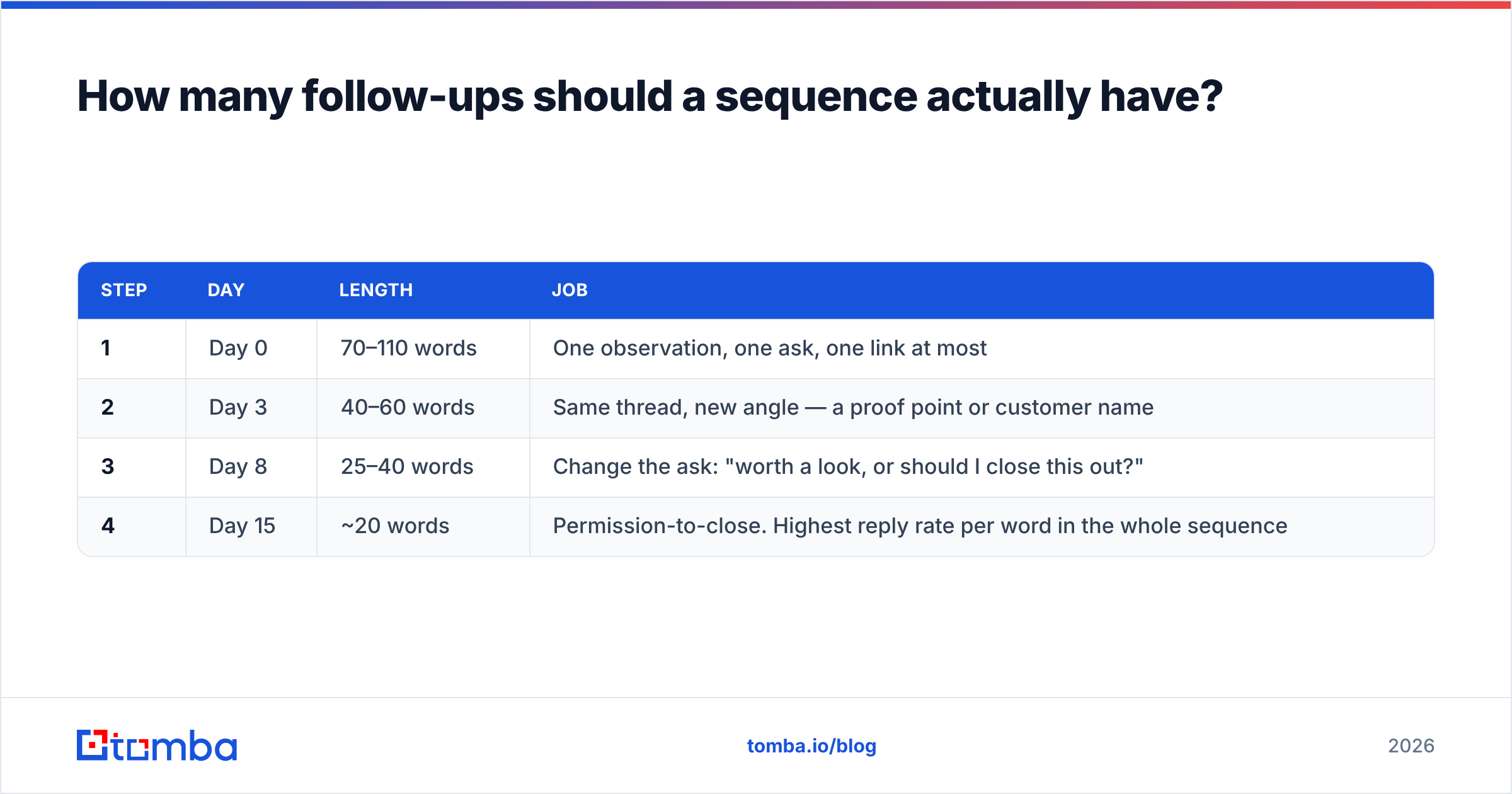
Three to four, in most B2B contexts. Here is a structure that survives contact with reality:
| Step | Day | Length | Job |
|---|---|---|---|
| 1 | Day 0 | 70–110 words | One observation, one ask, one link at most |
| 2 | Day 3 | 40–60 words | Same thread, new angle — a proof point or customer name |
| 3 | Day 8 | 25–40 words | Change the ask: "worth a look, or should I close this out?" |
| 4 | Day 15 | ~20 words | Permission-to-close. Highest reply rate per word in the whole sequence |
The fourth email consistently outperforms on a per-word basis because it costs the recipient nothing to answer. "Should I stop reaching out?" gets a yes or a no. Both are useful; only one costs you anything.
What does not work: repeating "just bumping this to the top of your inbox" four times. Your prospect can see the thread. The bump adds no information and reads as automated, which is the one signal you cannot afford to send.

How do the tools compare on deliverability controls?#
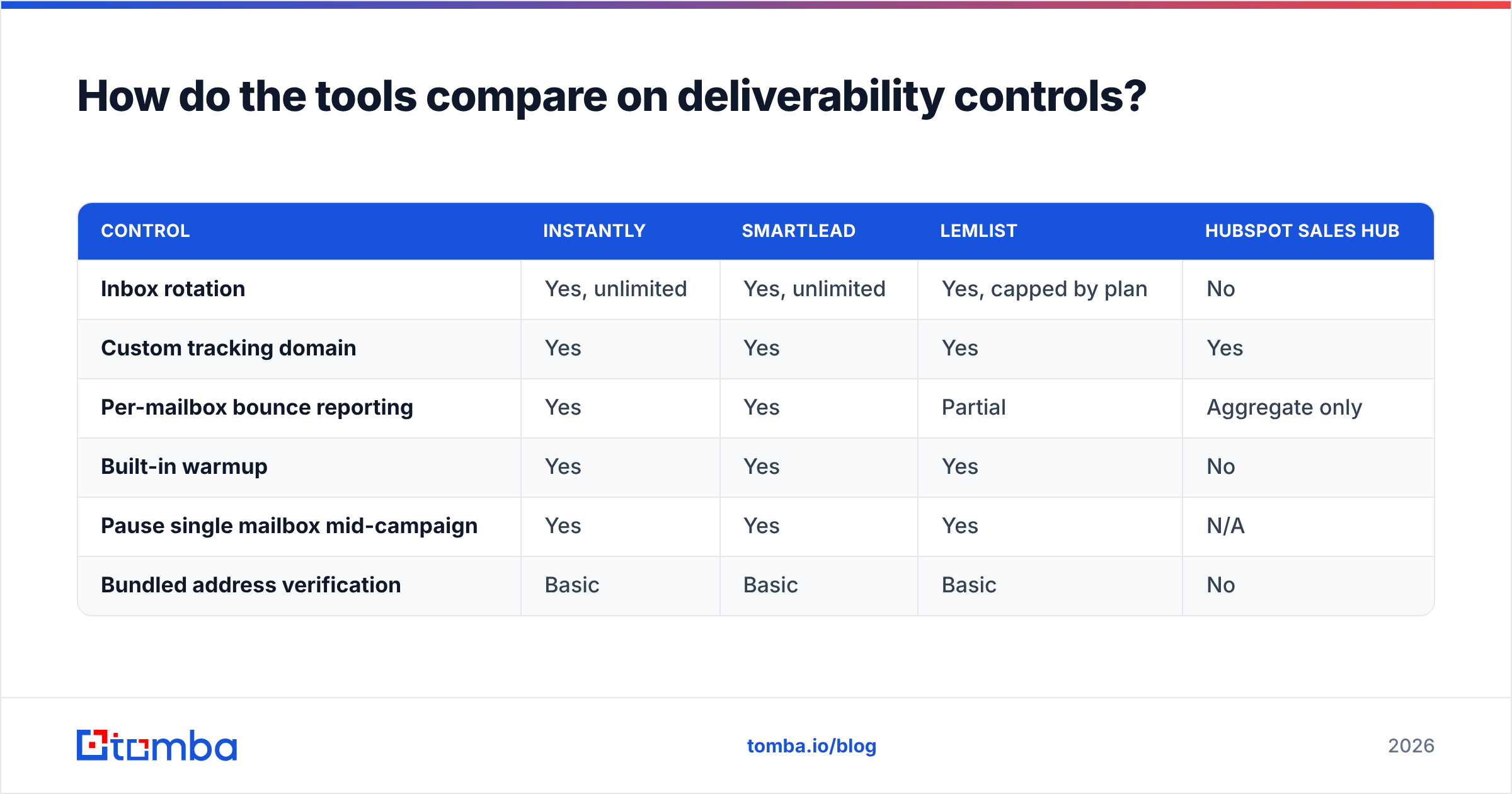
This is the section vendors would rather you skip, so compare it directly:
| Control | Instantly | Smartlead | Lemlist | HubSpot Sales Hub |
|---|---|---|---|---|
| Inbox rotation | Yes, unlimited | Yes, unlimited | Yes, capped by plan | No |
| Custom tracking domain | Yes | Yes | Yes | Yes |
| Per-mailbox bounce reporting | Yes | Yes | Partial | Aggregate only |
| Built-in warmup | Yes | Yes | Yes | No |
| Pause single mailbox mid-campaign | Yes | Yes | Yes | N/A |
| Bundled address verification | Basic | Basic | Basic | No |
Notice the last row. Every one of them says "verification" somewhere in the marketing, and every one of them means a syntax plus MX-record check. That catches jonh@gmial.com. It does not catch a valid-looking address for someone who left the company in 2024. Treat bundled verification as a spellchecker, not a data-quality layer, and keep a real email verification step upstream.
Also worth doing before your first send: confirm your authentication is actually correct. A missing or malformed SPF record is the single most common reason a technically fine sequence lands in spam, and it takes four minutes to check.
Which tool fits which team?#
- Agency sending across many client domains — Instantly or Smartlead. Unlimited mailboxes, per-client workspaces, and warmup bundled. Smartlead if you want to drive everything through an API; Instantly if you want the lighter UI and the lead marketplace.
- Founder-led outbound, under 1,000 sends a month — Saleshandy or Woodpecker. You do not need unlimited mailboxes; you need low fixed cost and clean reply detection.
- Personalization-heavy campaigns with images or landing pages — Lemlist. The per-seat price is real, but the dynamic image and custom-landing-page features are genuinely differentiated, not table stakes with a new name.
- Multichannel SDR motion with LinkedIn steps — Reply.io. Sequences that mix email, LinkedIn tasks, and calls in one cadence, without the enterprise contract.
- AEs and CSMs following up on warm threads — Mixmax or HubSpot sequences. These are not cold-email tools; they are reminder layers on a mailbox you already own, and that is the correct scope.
- Enterprise SDR org with managers and forecasting — Salesloft or Outreach. You are buying coaching analytics and CRM governance, not sending capacity. Check the sales engagement category on G2 for current mid-market versus enterprise satisfaction splits before signing an annual deal, and read HubSpot's own sequence documentation if your CRM is already there — native often beats best-of-breed once you count the integration tax.
What should you check before signing an annual contract?#
Run this list during the trial, not after:
- Send yourself an OOO auto-reply. Does the sequence stop, or does step two go out anyway?
- Import 200 real leads and check the bounce rate. Above 3% means your data source, not the tool, is the problem.
- Check the export path. Can you get your leads, replies, and campaign history out in CSV without a support ticket? Some tools make this deliberately awkward.
- Price it at 12 months and at 3x volume. Per-mailbox add-ons and credit overages are where the quoted price and the real price diverge.
- Confirm the CRM sync direction. One-way logging is fine for agencies and a slow bleed for sales teams.
The cheapest fix is upstream#
Most teams shopping for email follow up tools already have a sequencer that works fine. What they have is a data problem wearing a deliverability costume: bounces from stale addresses, catch-all domains counted as valid, and duplicate contacts across three campaigns.
Fix the input and the same sequencer starts producing replies. Start with the Tomba Email Finder to source verified professional addresses by domain, name, or company, then push a clean list into whichever tool you picked above. The free tier gives you 25 searches a month to test the accuracy on your own accounts before you spend anything; paid plans start at $49/month, and you can see the full breakdown on the Tomba pricing page. Verify first, sequence second — that order is the whole game.
Related guides#
Ready to find emails that actually work?
Join 150,000+ professionals who stopped guessing and started sending. Free credits on signup — no credit card required.
Get the Tomba newsletter
Practical outbound tactics and product updates — once every two weeks.
About the author