Free Email Generator Tools in 2026: What Actually Works
Free email generators promise instant addresses, but half of them produce guesses that bounce. Here's what each type actually does, when guessing is fine, and when you need verification.
TL;DR
- "Email generator free" covers three unrelated tool types: pattern permutators that guess work addresses, disposable/temp mailbox services, and fake-data generators for testing. Pick the wrong one and you waste a week.
- A permutator produces 10-30 candidate addresses per contact. Roughly one is correct. The other 29 will bounce if you send to them blind.
- Generation without verification is the single biggest cause of blown sender reputation in early outbound programs. Always pair the two.
- Free tiers are real and usable: Tomba gives 25 searches/month free, and its permutator and email checker are unmetered browser tools.
- If you need addresses at volume with confidence scores attached, a finder that queries a real index beats any guessing tool — that's the difference between a $0 permutator and a $49/mo plan.
What does "email generator free" actually mean?#
It means three completely different things, and the search results mix them together.
Think of it like searching for "keys." You might get a locksmith, a piano store, or a keyboard shop. Same word, unrelated products. Same problem here.
The three categories:
- Pattern permutators — you enter a first name, last name, and domain; the tool outputs every plausible combination (
jane@acme.com,j.doe@acme.com,jdoe@acme.com, and so on). Nothing is confirmed. You get a candidate list. - Disposable/temp mailbox generators — throwaway inboxes that receive mail for 10 minutes to an hour. Used to dodge signup walls. Useless for outbound, and a red flag if they show up in your list.
- Fake-data generators — synthetic addresses for QA, seeding test databases, or load-testing a signup form. They deliberately don't resolve.
- Alias generators — Gmail dot/plus tricks and Outlook aliases that route back to one real inbox. Handy for tracking which vendor sold your address.
Most people searching "email generator free" want category 1 and don't know it. They want a work email for a specific person at a specific company, and they want to not pay for it.
That's a reasonable goal. It's also where the accuracy problem starts.
How accurate is a free email permutator?#
A permutator's hit rate is a coin flip dressed up as a list.
Here's the mechanic. Company email formats cluster into a handful of patterns. Public analyses of B2B address data consistently put first.last@domain and first@domain at the top, together covering somewhere north of half of all corporate mailboxes. flast, firstl, and first_last split most of the rest. A permutator sprays all of them and lets you sort it out.
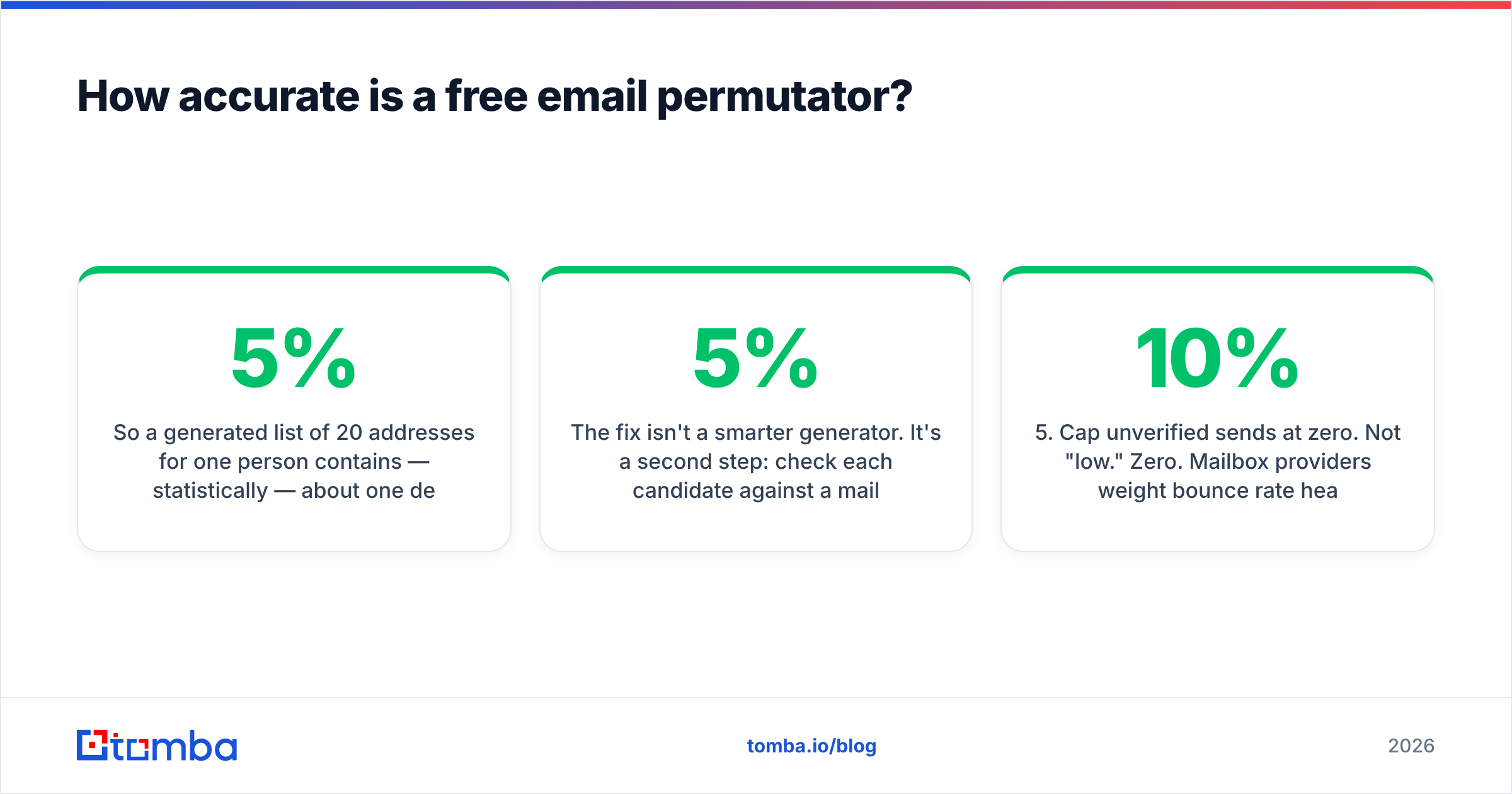
So a generated list of 20 addresses for one person contains — statistically — about one deliverable address. That's a 5% precision rate on the raw output.
The fix isn't a smarter generator. It's a second step: check each candidate against a mail server before you send anything. A free email checker run over 20 candidates collapses them to the one or two that actually accept mail. Now your 5% list is a 100% list.
Two structural limits no free permutator can escape:
- Catch-all domains. Some servers accept mail to every address at the domain, valid or not. SMTP verification returns "valid" for all 20 of your guesses. You need a catch-all verifier that scores likelihood rather than a binary yes/no.
- Aliases and forwarders.
sales@andinfo@accept mail but land in a shared queue nobody reads. Technically deliverable, practically dead.
The generation-to-send workflow that doesn't burn your domain#
- Confirm the company's pattern first. Find any one known address at the domain — a press page, a support ticket, a
mailto:in the footer. One confirmed address tells you the pattern for every other employee. A company email pattern lookup does this in a click. - Generate only the pattern that matched. Don't spray 20 variants when you already know the format is
first.last. One candidate per contact. - Verify every candidate. SMTP-level check, no exceptions, before the address touches a sending tool.
- Segment catch-alls separately. Don't mix scored guesses with confirmed addresses in the same campaign — they behave differently and you want the bounce data clean.
- Cap unverified sends at zero. Not "low." Zero. Mailbox providers weight bounce rate heavily in sender reputation, and a 10% bounce week takes a month to recover from.
- Re-verify anything older than 90 days. People change jobs. Roughly a quarter of B2B contact data goes stale annually.
Which free email generator should you use?#
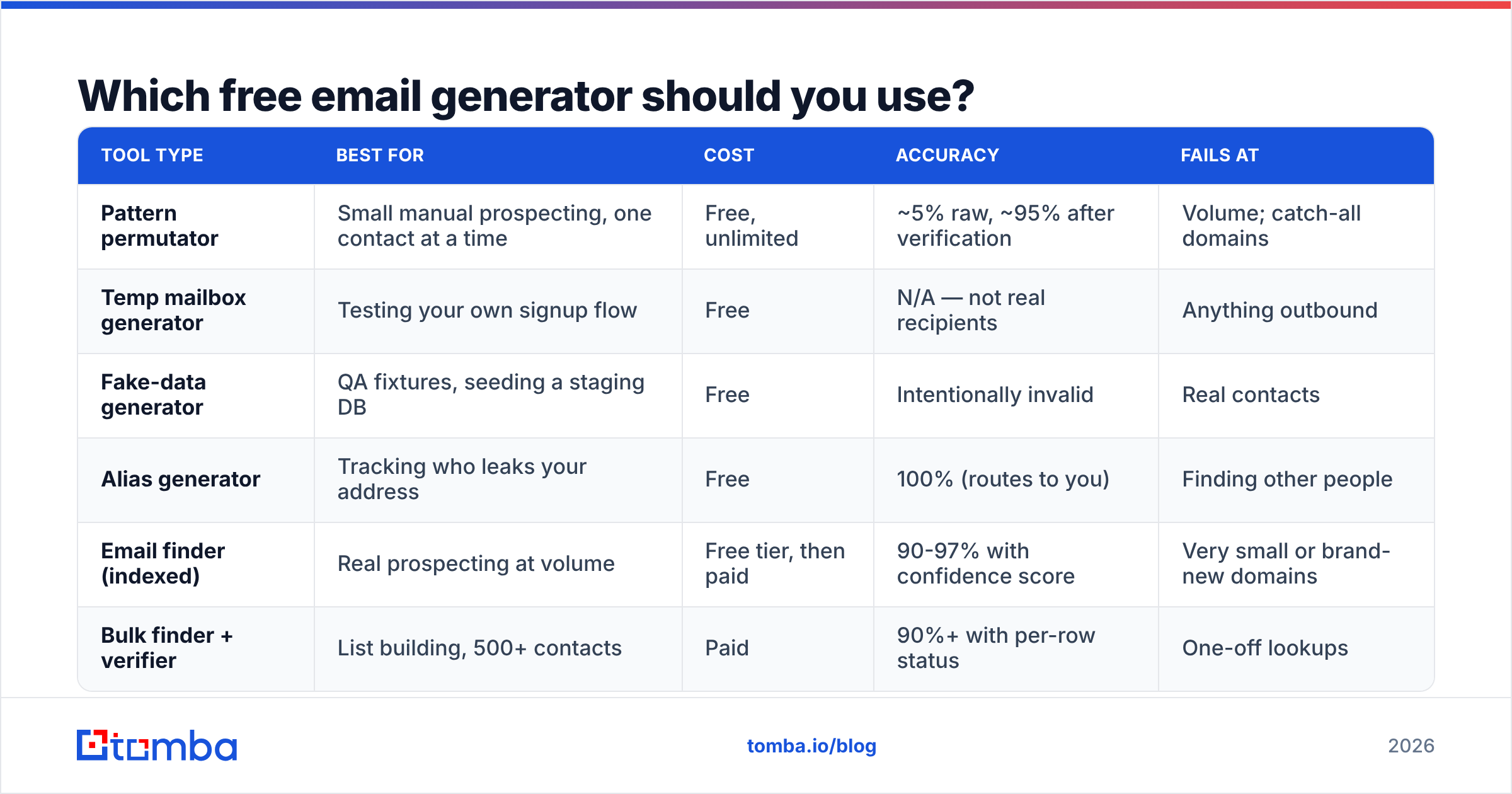
Depends entirely on the job. Here's the honest mapping.
| Tool type | Best for | Cost | Accuracy | Fails at |
|---|---|---|---|---|
| Pattern permutator | Small manual prospecting, one contact at a time | Free, unlimited | ~5% raw, ~95% after verification | Volume; catch-all domains |
| Temp mailbox generator | Testing your own signup flow | Free | N/A — not real recipients | Anything outbound |
| Fake-data generator | QA fixtures, seeding a staging DB | Free | Intentionally invalid | Real contacts |
| Alias generator | Tracking who leaks your address | Free | 100% (routes to you) | Finding other people |
| Email finder (indexed) | Real prospecting at volume | Free tier, then paid | 90-97% with confidence score | Very small or brand-new domains |
| Bulk finder + verifier | List building, 500+ contacts | Paid | 90%+ with per-row status | One-off lookups |
If your answer is "I need real addresses for real prospects," rows 1 and 5 are your only options, and row 5 is what you graduate to.
What's the difference between generating and finding an email?#
Generating guesses. Finding retrieves.
The analogy: a permutator is a person standing outside an apartment building pressing every buzzer until someone answers. A finder is someone with the building directory. Both eventually reach the right door; only one is welcome to keep doing it.
Technically, a finder like Tomba Email Finder queries an index built from public web sources, crawled corporate pages, published documents, and pattern inference validated against observed data — then returns a single best address with a confidence score. You get one answer plus a number telling you how much to trust it, instead of 20 answers and a shrug.
The confidence score is the part free permutators structurally cannot offer. A score requires observed evidence: has this exact address been seen in the wild, does the domain's pattern hold across other confirmed employees, does the mail server accept it. A permutator has none of that context — it's doing string concatenation.
Where finders genuinely struggle, and where a permutator plus manual verification can still win:
- Companies under ~10 employees with no web footprint
- Domains registered in the last few months
- Heavily privacy-shielded orgs (some EU firms, law practices, healthcare)
- Personal domains and freelancers
For those, generate the four most common patterns, verify each, and take whichever accepts.
How do the free tiers compare across tools?#
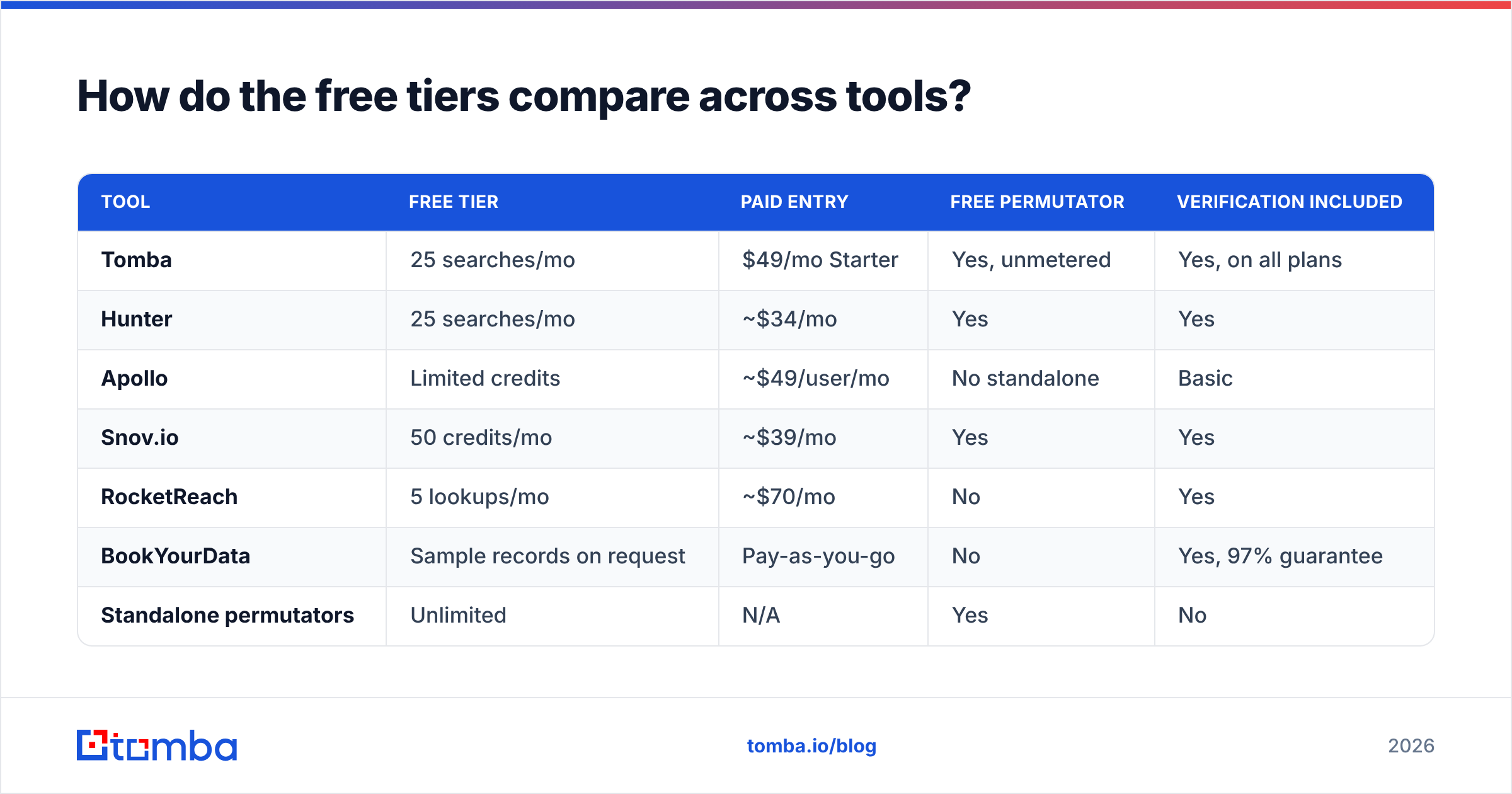
The market has settled into a pattern: browser tools are free and unmetered, indexed lookups are metered.
| Tool | Free tier | Paid entry | Free permutator | Verification included |
|---|---|---|---|---|
| Tomba | 25 searches/mo | $49/mo Starter | Yes, unmetered | Yes, on all plans |
| Hunter | 25 searches/mo | ~$34/mo | Yes | Yes |
| Apollo | Limited credits | ~$49/user/mo | No standalone | Basic |
| Snov.io | 50 credits/mo | ~$39/mo | Yes | Yes |
| RocketReach | 5 lookups/mo | ~$70/mo | No | Yes |
| BookYourData | Sample records on request | Pay-as-you-go | No | Yes, 97% guarantee |
| Standalone permutators | Unlimited | N/A | Yes | No |
A few honest notes on that table. Pricing shifts; check each vendor's page before you commit. BookYourData works differently from the rest — it's a pay-as-you-go database with a delivery guarantee rather than a search-credit model, which suits teams buying a defined list once instead of prospecting continuously. Standalone permutators cost nothing and will keep costing nothing, but they hand you a bounce risk instead of an answer.
On the paid side, Tomba pricing runs $49/mo Starter, $99/mo Growth, and $249/mo Pro, with Enterprise quoted per account. The relevant question isn't which number is lowest — it's how many verified addresses each plan actually produces after you subtract the ones that bounce.

When is a free generator genuinely the right call?#
More often than vendors admit. Four scenarios:
You're sending fewer than 20 emails a month. Founder doing manual outreach to a hand-picked list. Permutator plus a verifier per contact costs nothing and takes two minutes each. Paying $49/mo for 20 lookups is silly.
You already know the company's format. If you've confirmed first.last@acme.com from one employee, generating the rest of the org chart is free and reliable. Verify each one, but you're not guessing anymore — you're applying a known rule.
You're testing your own systems. Fake-data and temp-mailbox generators are the correct tool for QA. Don't overthink it.
Budget is genuinely zero. A free tier plus browser tools gets a bootstrapped founder to first revenue. Tomba's free tier is 25 searches/month, which is enough to validate whether outbound works for your market before you spend anything.
Where free stops working: the moment you need more than about 50 addresses a month, or the moment a bounce costs you more than the subscription. Manual generate-then-verify runs roughly two to three minutes per contact. At 200 contacts that's a full working day, every month, for a task a bulk email finder completes in minutes.
What should you never do with generated addresses?#
Five hard rules, ranked by how badly violating them hurts.
- Never send to an unverified generated address. This is the whole article in one line. Mailbox providers treat repeated hard bounces as a spam signal, and the damage compounds.
- Never import a raw permutator dump into a sending platform. Some tools will happily send to all 20 variants. That's 19 bounces per contact and a domain you'll be replacing.
- Never use temp/disposable addresses in a business list. If they appear in a list you bought, the list is contaminated. Filter them out before import.
- Never assume a catch-all "valid" result means a real person. Score it, segment it, and send to it last.
- Never skip re-verification on old lists. A list verified in 2024 is not a verified list in 2026.
For rules 1 and 5, an email verifier is the enforcement mechanism — SMTP handshake, MX record check, disposable-domain detection, and role-account flagging in one pass. Google's own sender guidelines spell out the bounce and complaint thresholds you're being measured against; they are not generous.
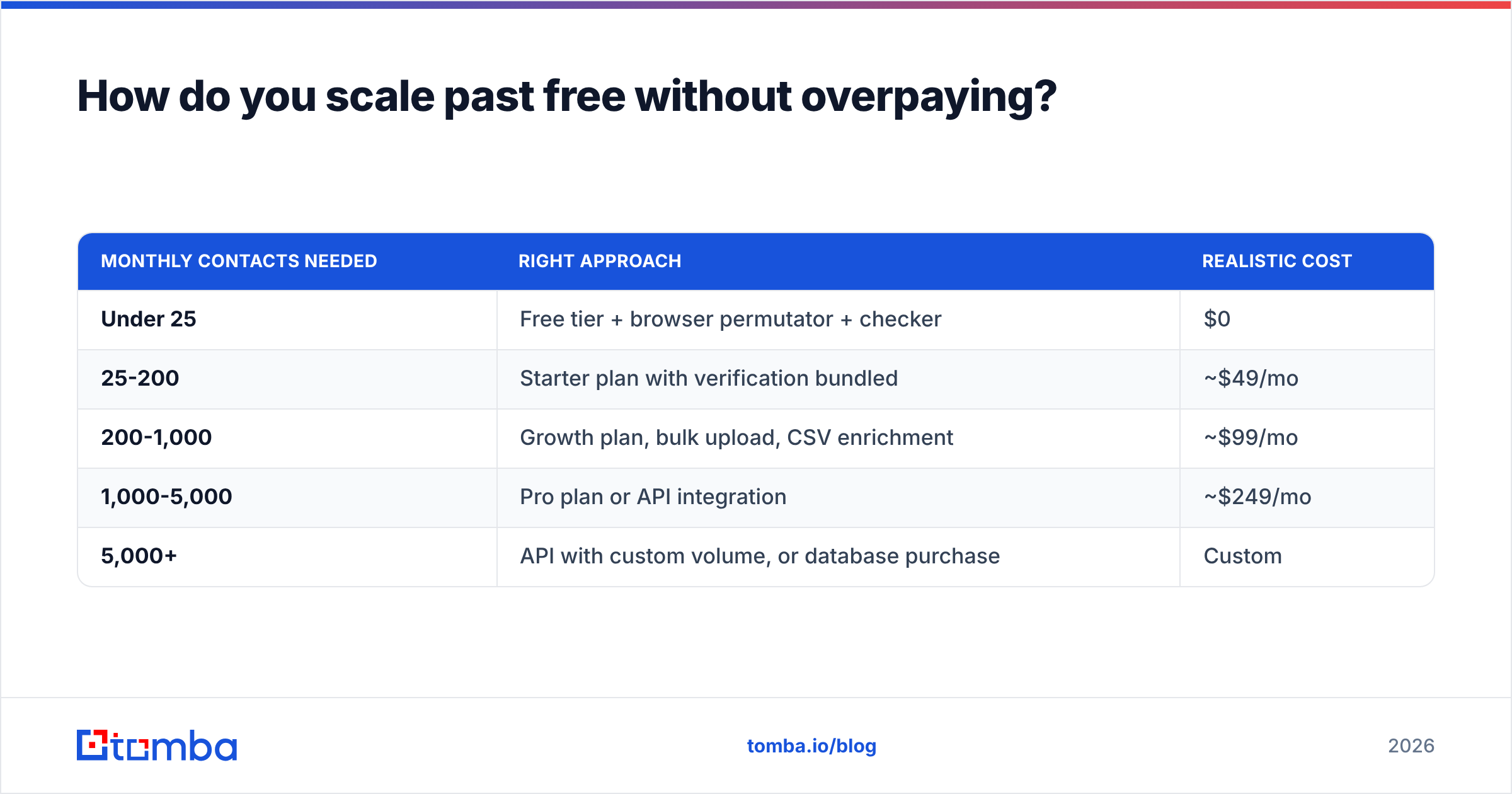
How do you scale past free without overpaying?#
Match the tool tier to your actual monthly volume, not your ambition.
| Monthly contacts needed | Right approach | Realistic cost |
|---|---|---|
| Under 25 | Free tier + browser permutator + checker | $0 |
| 25-200 | Starter plan with verification bundled | ~$49/mo |
| 200-1,000 | Growth plan, bulk upload, CSV enrichment | ~$99/mo |
| 1,000-5,000 | Pro plan or API integration | ~$249/mo |
| 5,000+ | API with custom volume, or database purchase | Custom |
Two things change when you cross out of the free tier, and they matter more than the credit count:
Verification stops being a separate step. On a paid finder, results arrive already scored. You're not exporting to a second tool and re-importing.
The workflow moves to where your data lives. A Google Sheets add-on, an Excel add-in, a HubSpot integration, or the Tomba API for engineering teams. The time saved on copy-paste usually exceeds the subscription cost by a wide margin at any real volume.
If you want to compare methodologies before committing, G2's email-finder category carries enough verified reviews to spot the gap between marketing accuracy claims and what users report.
Frequently asked questions#
Is it legal to use a generated email address for outreach? In the US, CAN-SPAM permits unsolicited commercial email with accurate headers, a physical address, and a working opt-out. Under GDPR, you need a lawful basis — legitimate interest is defensible for genuinely relevant B2B outreach, but you must document it and honor objections immediately. Generating the address isn't the legal question; what you send and how you handle opt-outs is.
Can a free generator find personal Gmail addresses? Not reliably. Personal addresses follow no organizational pattern. A reverse email lookup works in the other direction — you have the address and want the person.
Do free email generators work for catch-all domains? They generate fine. Verification is the problem: every guess returns "valid." Use a catch-all-specific scoring tool.
How many patterns should I generate per contact?
Four, if you don't know the format: first.last, first, flast, firstlast. Those cover the large majority of corporate domains. Verify all four, send to the one that passes.
Get verified addresses instead of guesses#
Start with the free tools if that's where you are — the email permutator and email checker cost nothing and will get a small list built.
When manual guessing starts eating hours you'd rather spend selling, Tomba Email Finder gives you 25 free searches a month to test it against your own target accounts. Every result arrives with a confidence score and verification status attached, so the address you export is the address that lands. If the free tier runs out, Starter is $49/mo, and you can move to bulk upload, Sheets, or the API without changing anything about your process.
Generate if you must. Verify always.
Related guides#
Ready to find emails that actually work?
Join 150,000+ professionals who stopped guessing and started sending. Free credits on signup — no credit card required.
Get the Tomba newsletter
Practical outbound tactics and product updates — once every two weeks.
About the author