Email Hygiene Solutions: The Complete 2026 Buyer's Guide
List rot costs you 2-3% of your database every month. Here's how email hygiene solutions actually work, what they cost in 2026, and how to build a cleaning workflow that keeps bounce rates under 2%.
TL;DR
- Email hygiene solutions are the tools and processes that keep your contact database deliverable: syntax checks, MX and SMTP validation, bounce suppression, engagement-based pruning, and re-verification on a schedule.
- B2B data decays roughly 2-3% per month. A list you cleaned in January is measurably dirty by June — hygiene is a recurring job, not a one-time purchase.
- Most teams need two layers: a verification layer (does this mailbox exist?) and a suppression/engagement layer (should we still be mailing it?). Buying only one is the most common mistake.
- Pricing in 2026 splits into per-credit verifiers ($0.001-$0.01 per email at volume) and platform plans that bundle finding, verifying, and enrichment — Tomba's Starter plan is $49/mo, Growth $99/mo.
- Success is measured in three numbers: hard bounce rate under 2%, spam complaint rate under 0.1%, and unknown-user rejections trending toward zero.
What are email hygiene solutions?#
Email hygiene solutions are the tools that decide which addresses in your database are safe to send to — and which ones will quietly wreck your sender reputation if you keep mailing them.
Think of your contact list like the produce section of a grocery store. Nothing rots on day one. But if nobody walks the aisle, pulls the bruised fruit, and rotates stock, the whole display starts to smell in about a month. Email hygiene is the person walking the aisle.
Technically, a hygiene stack does five distinct jobs:
- Syntax and formatting validation — catches typos, illegal characters, and malformed domains before they ever reach an SMTP server. Cheap, instant, catches maybe 3-5% of a raw list.
- Domain and MX record checks — confirms the domain resolves and actually accepts mail. Kills dead companies, parked domains, and typo domains like
gmial.com. - Mailbox-level SMTP verification — opens a conversation with the receiving server and asks whether the specific mailbox exists, without sending a message. This is where the real accuracy differences between vendors show up.
- Risk classification — flags role accounts (
info@,sales@), disposable domains, spam traps, and known complainers. These addresses may be technically valid but are commercially toxic. - Suppression and engagement pruning — permanently removes hard bounces, unsubscribes, and contacts who haven't opened anything in 6-12 months.
Vendors bundle these differently. A pure verifier does 1-4. An email verifier built into a broader prospecting platform does 1-4 and hands the output straight to your CRM. Your ESP typically only does 5, and only for mail it sent itself.
Why does list decay make hygiene non-optional?#
Because your database is losing accuracy while you read this sentence.
The commonly cited figure across B2B data vendors is 2-3% monthly decay — people change jobs, companies get acquired, domains get retired, and email formats change after a rebrand. At 2.5% per month, a 50,000-contact list that was 95% accurate in January is roughly 70% accurate by December. That's 15,000 addresses you're mailing into the void.
The consequences compound in a specific order:
- Bounce rate climbs. Mailbox providers read hard bounces as a signal that you don't have permission or don't maintain your list.
- Reputation drops. Google's own sender guidelines require bulk senders to keep spam complaint rates below 0.3% and strongly recommend staying under 0.1%. Unknown-user bounces feed the same reputation model.
- Inbox placement falls before open rates do. You'll see reply rates sag for weeks before anyone notices the mail is landing in Promotions or Spam.
- Your ESP throttles or suspends you. Most cold-email platforms enforce bounce ceilings between 3% and 5%. Cross it on a shared IP pool and you get rate-limited.
The order matters because the damage is invisible for the first two stages. By the time your open rate visibly drops, you've been building a bad sender reputation for a month.
How do the main types of email hygiene solutions compare?#
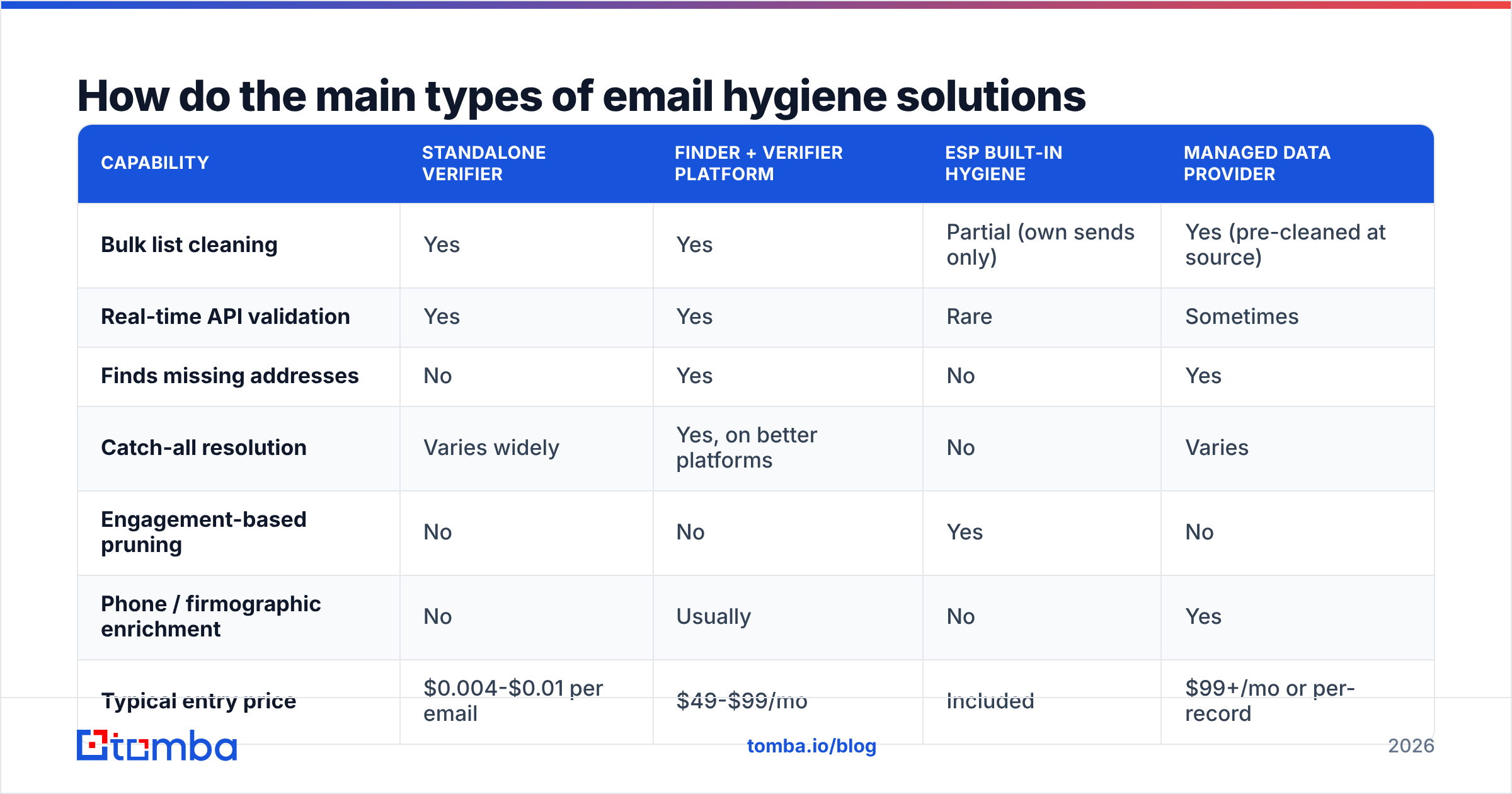
There are four categories of tool, and most teams need two of them. Here's how they line up:
| Capability | Standalone verifier | Finder + verifier platform | ESP built-in hygiene | Managed data provider |
|---|---|---|---|---|
| Bulk list cleaning | Yes | Yes | Partial (own sends only) | Yes (pre-cleaned at source) |
| Real-time API validation | Yes | Yes | Rare | Sometimes |
| Finds missing addresses | No | Yes | No | Yes |
| Catch-all resolution | Varies widely | Yes, on better platforms | No | Varies |
| Engagement-based pruning | No | No | Yes | No |
| Phone / firmographic enrichment | No | Usually | No | Yes |
| Typical entry price | $0.004-$0.01 per email | $49-$99/mo | Included | $99+/mo or per-record |
| Best for | One-off list cleanup | Ongoing prospecting + hygiene | Newsletter suppression | Buying net-new contacts |
A few honest observations about this table.
Standalone verifiers are commodity infrastructure now. ZeroBounce, NeverBounce, Bouncer, and Clearout all do syntax, MX, and SMTP checks competently. The differences show up on catch-all domains and on small non-US providers. If you already have your addresses and just need them scrubbed, any of them will get you from a 12% bounce rate to under 3%.
Platforms win when your list is incomplete, not just dirty. If half your "hygiene problem" is that 4,000 rows have a company name and no email, a verifier can't help you. That's a job for domain search or a bulk email finder that finds and validates in one pass.
Managed providers solve a different problem. BookYourData and similar vendors sell pre-verified contacts with accuracy guarantees, which is a legitimate shortcut when you need net-new coverage in a segment you have zero data on. It's complementary to hygiene rather than a replacement — anything you buy still needs re-verification before your third send.
Your ESP's hygiene is necessary but not sufficient. HubSpot, Mailchimp, and Klaviyo all suppress hard bounces and unsubscribes automatically. That's table stakes. None of them will tell you that sarah.chen@acme.com left Acme eight months ago, because she never bounced — the company kept a forwarding rule.
What does a working email hygiene workflow look like?#
Six steps, run on a schedule. This is the part most teams skip.
- Validate at the point of capture. Wire a real-time API check into your web forms, chat widget, and CRM create flow. Rejecting
test@test.comat the source costs one API call; finding it eight months later costs a bounce. The email verification API pattern here is a single sub-second call before the record is written. - Clean before every cold campaign, without exception. Not "before every quarter." Cold lists assembled from scraping, exports, or third-party sources should be re-run within 7 days of the send. Data older than a week is already stale for outbound.
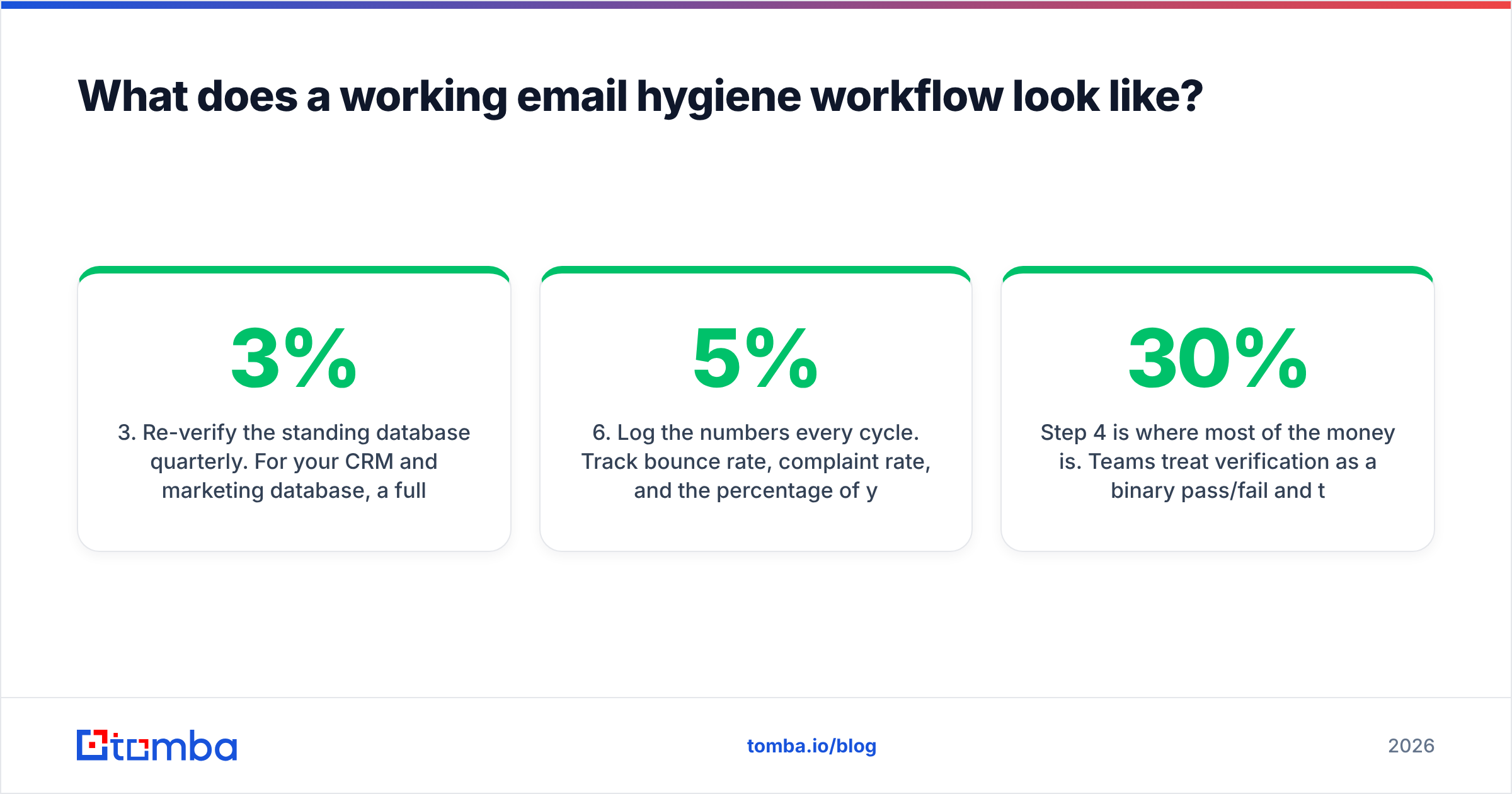
- Re-verify the standing database quarterly. For your CRM and marketing database, a full re-run every 90 days matches the 2-3% decay curve without burning credits monthly. Bump it to monthly for high-velocity segments like startup founders or agency staff.
- Segment by risk tier, don't just delete. Split results into Valid, Catch-all, Risky, and Invalid. Delete Invalid. Mail Valid freely. Mail Catch-all only from a secondary domain or in low volume. Park Risky (role accounts, disposables) in a suppression list you can revisit.
- Prune by engagement, not just validity. An address can be perfectly valid and still be a liability. If a contact hasn't opened in 12 months across 10+ sends, they're deadweight that drags your engagement signals down. Remove them or move them to a quarterly-only cadence.
- Log the numbers every cycle. Track bounce rate, complaint rate, and the percentage of your list that changed status between runs. If the change rate spikes above 5% in a quarter, your data source has a problem upstream.
Step 4 is where most of the money is. Teams treat verification as a binary pass/fail and throw away catch-all addresses entirely — often 20-30% of a B2B list, and disproportionately the enterprise accounts, since large companies are the ones running catch-all configurations.
Are catch-all domains worth verifying separately?#
Yes, and this is the single biggest accuracy differentiator between hygiene vendors in 2026.
A catch-all domain accepts mail for every possible address at that domain, so a standard SMTP check gets a "yes" for asdfgh@company.com just as readily as for the CEO's real address. Cheap verifiers return "unknown" or "accept-all" and stop there. That's an honest answer, but it leaves you with a pile of addresses you don't know what to do with.
Better approaches layer additional signals: known email pattern for the domain, evidence the specific mailbox has appeared in public sources, historical send outcomes, and probabilistic scoring across the vendor's own data. A dedicated catch-all verifier will typically resolve 50-70% of accept-all addresses into a confident valid/invalid call rather than dumping them in an "unknown" bucket.
The practical rule: if catch-all addresses are over 15% of your list, pay for a tool that resolves them. If they're under 5%, suppress them and move on.
How much do email hygiene solutions cost in 2026?#
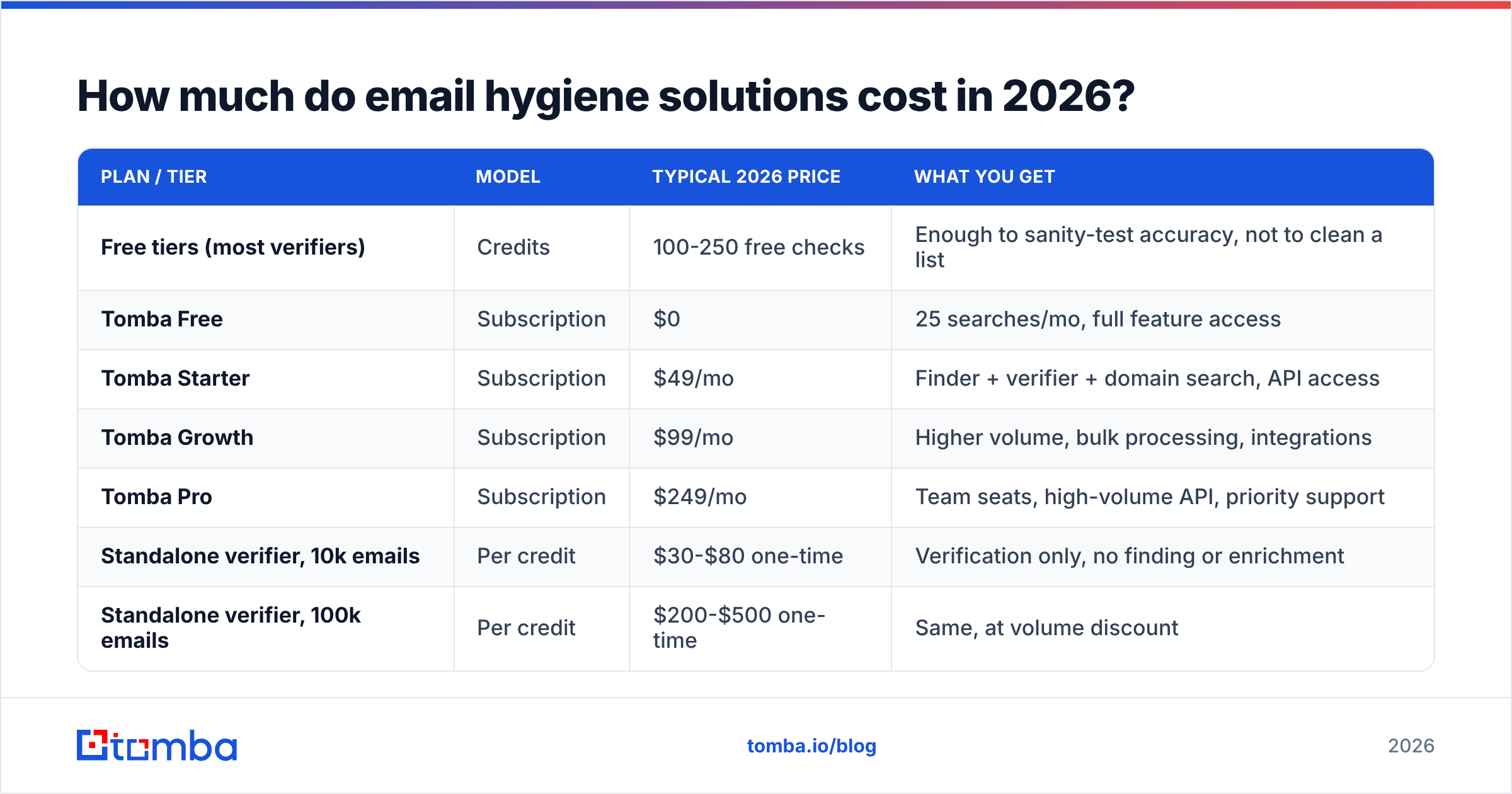
Two pricing models dominate. Per-credit verifiers charge by the address, with volume discounts. Platforms charge a monthly subscription that bundles finding, verifying, and enrichment credits together.
| Plan / tier | Model | Typical 2026 price | What you get |
|---|---|---|---|
| Free tiers (most verifiers) | Credits | 100-250 free checks | Enough to sanity-test accuracy, not to clean a list |
| Tomba Free | Subscription | $0 | 25 searches/mo, full feature access |
| Tomba Starter | Subscription | $49/mo | Finder + verifier + domain search, API access |
| Tomba Growth | Subscription | $99/mo | Higher volume, bulk processing, integrations |
| Tomba Pro | Subscription | $249/mo | Team seats, high-volume API, priority support |
| Standalone verifier, 10k emails | Per credit | $30-$80 one-time | Verification only, no finding or enrichment |
| Standalone verifier, 100k emails | Per credit | $200-$500 one-time | Same, at volume discount |
| Managed B2B data provider | Per record or subscription | $99+/mo | Pre-verified contacts, accuracy guarantee |
Check current Tomba pricing and each vendor's own page before budgeting — everyone in this category adjusts credit ratios more often than headline prices.
The math that usually decides it: if you're cleaning under 20,000 addresses a year and never need to find an address, per-credit verification is cheaper. The moment you're also filling gaps, enriching records, or running verification through an API on every form submit, a subscription that bundles those wins on both cost and integration overhead. Independent user reviews on G2 are a reasonable sanity check on which vendors deliver the accuracy they advertise at your volume.
How do you measure whether your hygiene program is working?#
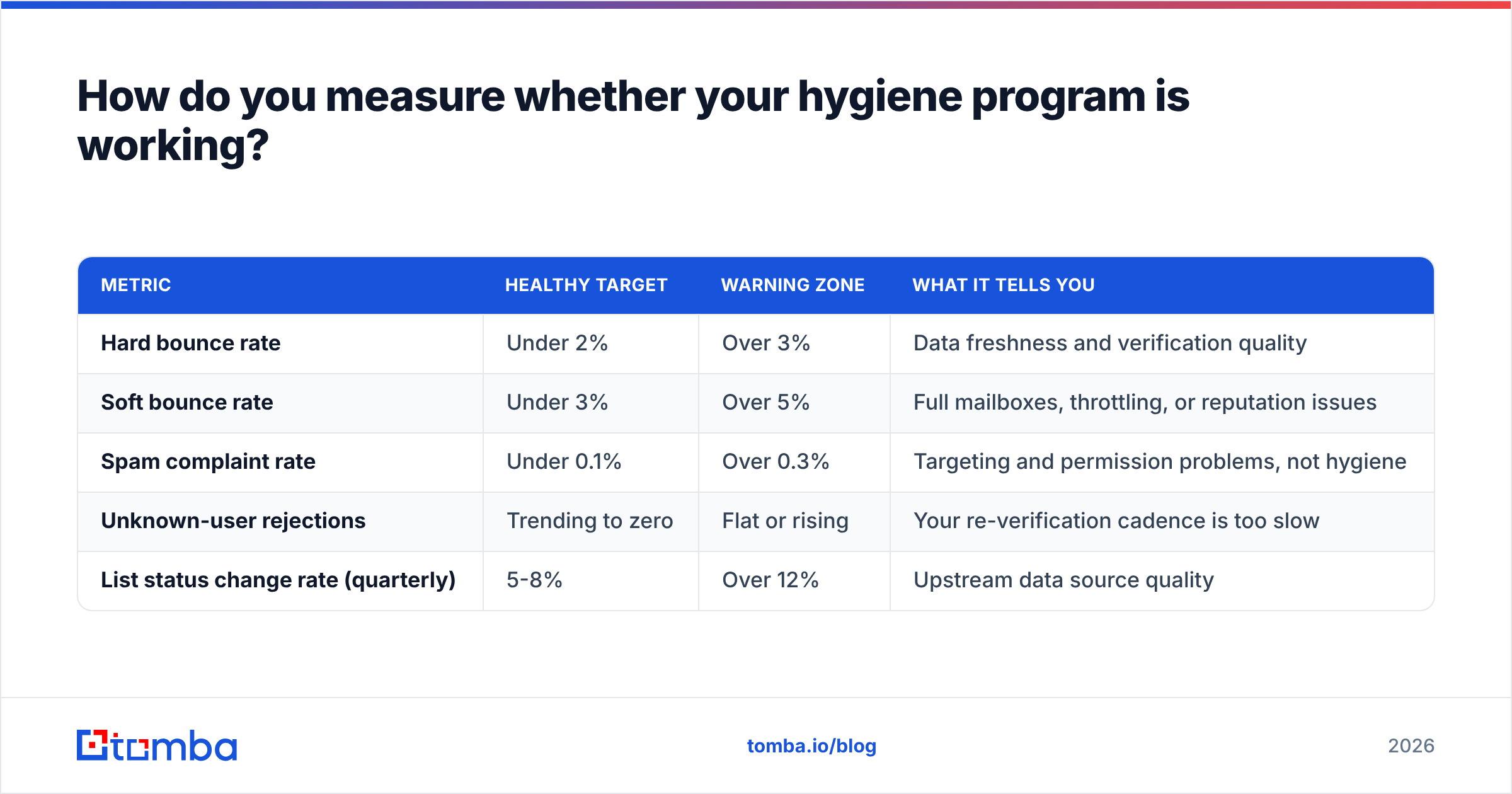
Track four numbers per campaign and per quarter. If you only look at open rates, you'll miss the problem until it's expensive.
| Metric | Healthy target | Warning zone | What it tells you |
|---|---|---|---|
| Hard bounce rate | Under 2% | Over 3% | Data freshness and verification quality |
| Soft bounce rate | Under 3% | Over 5% | Full mailboxes, throttling, or reputation issues |
| Spam complaint rate | Under 0.1% | Over 0.3% | Targeting and permission problems, not hygiene |
| Unknown-user rejections | Trending to zero | Flat or rising | Your re-verification cadence is too slow |
| List status change rate (quarterly) | 5-8% | Over 12% | Upstream data source quality |
Complaint rate deserves a note: hygiene tools cannot fix it. A perfectly verified list mailed with irrelevant offers generates complaints, and complaints damage email deliverability faster than bounces do. Verification gets you to the inbox; relevance keeps you there.
What mistakes quietly kill hygiene programs?#
- Cleaning once and calling it solved. The most common failure. Decay is continuous; hygiene must be too.
- Deleting every catch-all address. You're throwing away your enterprise accounts. Resolve them or quarantine them, don't bin them.
- Trusting a purchased list's "verified" label. Vendors verify at the time of compilation, which may have been months ago. Re-run it yourself.
- Mailing role accounts in cold campaigns.
info@andsupport@addresses convert poorly and complain often. Suppress them for outbound; keep them for support workflows. - Ignoring the authentication layer. Clean data won't save you if SPF, DKIM, and DMARC aren't right. Run an SPF checker before you blame the list.
- Verifying but not writing results back. If your CRM still holds the dead address, someone will mail it again next quarter. Push status fields back into the system of record.
- No suppression list across tools. A contact who unsubscribed from your ESP can still get hit by your outbound sequencer if the two don't share a suppression file.
Which email hygiene solution should you actually pick?#
Match the tool to the shape of your problem:
- Your list is complete but old → a standalone per-credit verifier. Cheapest path to a clean send.
- Your list has gaps as well as rot → a combined finder and verifier platform, so one workflow both fills and validates.
- You capture emails through forms and want to stop the problem at the source → API-first validation, wired into the create path.
- You need net-new contacts in an unfamiliar segment → a managed data provider first, then your own verification pass before send three.
- You run a newsletter, not outbound → your ESP's built-in suppression plus an annual full re-verification is usually enough.
Most B2B teams land on the second option, because the "dirty list" and "incomplete list" problems are the same problem wearing different clothes.
If that's you, start with the Tomba Email Finder. It finds professional addresses by domain, name, or company, validates them in the same pass, resolves catch-all domains rather than shrugging at them, and exposes everything through an API you can wire into your CRM create flow. The free tier gives you 25 searches a month to test accuracy against a list you already know the answers for — which is exactly how you should evaluate any hygiene vendor before you hand them your database.
Related guides#
// get started
Find, verify and enrich your first contacts today
Start on the free plan with 25 searches a month, then scale when your team is ready.
Free plan · No credit card required · GDPR & CCPA
// about the author