Email ID Search by Name: How to Find Anyone's Work Email
A name and a company is the thinnest possible input for finding an email address. Here's how name-based lookup actually works, what hit rates are realistic in 2026, and how the main tools compare.
TL;DR
- An email ID search by name works by mapping a person's name onto their company's known email pattern, then confirming that the resulting address actually exists on the mail server.
- Pattern guessing alone gets you roughly 60–70% right. The verification step is what separates a usable list from a bounce factory.
- Hit rates are highest for mid-size and enterprise companies with a consistent format, and worst for tiny startups, catch-all domains, and freelancers on personal domains.
- You need the company domain, not just the company name. "John Smith at Acme" is ambiguous; "John Smith at acme.com" is solvable.
- Tools differ mostly in database depth and whether verification is included in the same credit. Compare on verified hit rate, not raw contact counts.
What is an email ID search by name?#
An email ID search by name is the process of finding a person's professional email address using only their first name, last name, and the company they work for. You supply the human; the tool supplies the address.
Think of it like finding an apartment number when you only know someone's name and the building. You don't search every door at random. You learn how that building numbers its units, work out which floor the person is on, then knock once to confirm somebody's home. Email lookup follows the same logic: learn the company's format, apply the name, confirm the address responds.
The "ID" part of the phrase is a regional habit more than a technical distinction — in India, the Middle East, and much of Southeast Asia, "email ID" is the everyday term for an email address. There's no separate ID system involved. If you're searching for email id search by name, you're searching for a name-to-email lookup.
Two things this is not:
- It is not a reverse lookup. That runs the other direction — you have an address and want the person behind it. That's a reverse email lookup.
- It is not a personal-email finder. Legitimate B2B tools return work addresses tied to a company domain. Anything promising someone's private Gmail from a name alone is either guessing or selling scraped consumer data you shouldn't touch.
How does name-based email lookup actually work?#
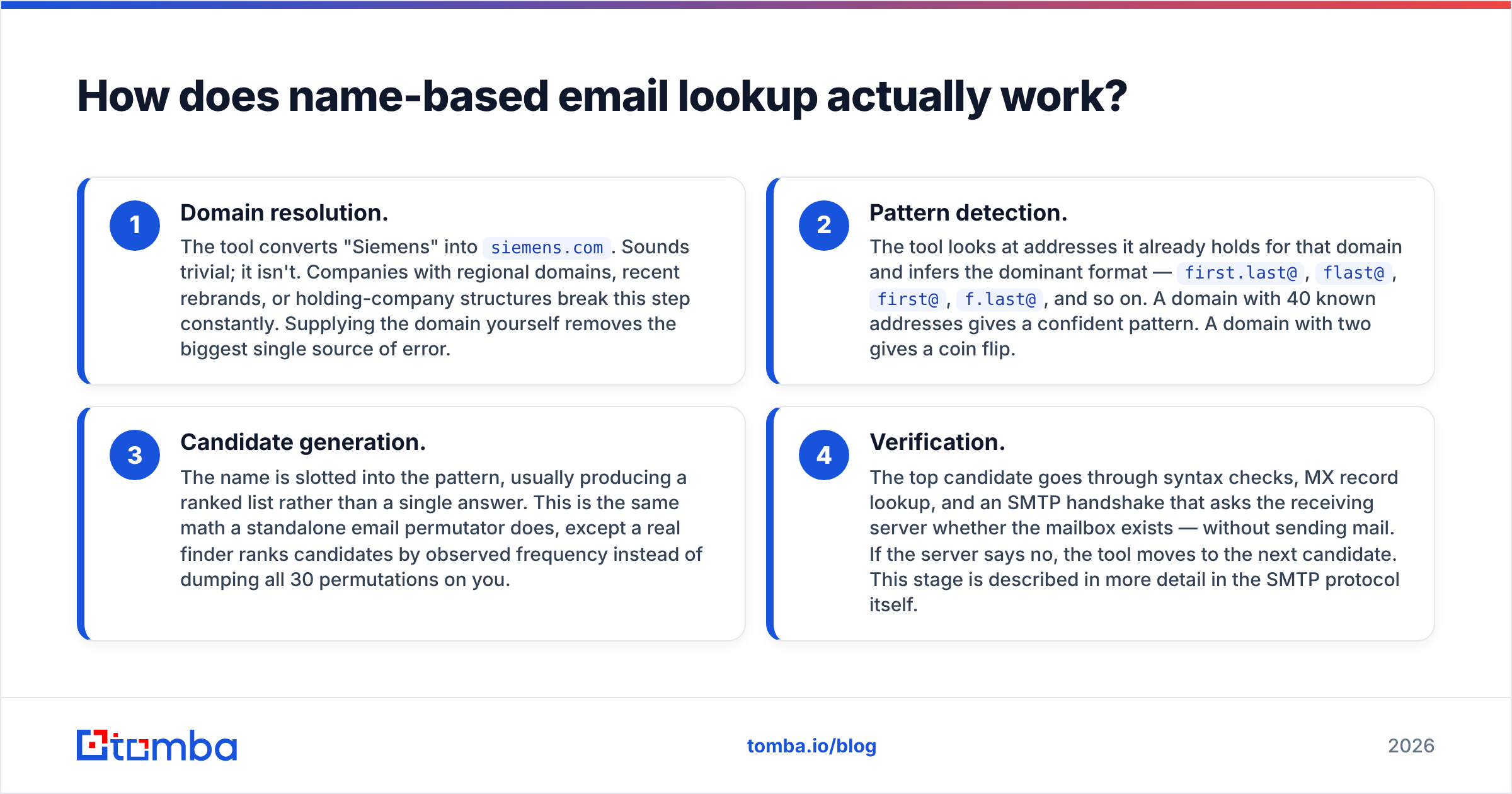
Every provider markets this differently, but under the hood the pipeline has four stages. Understanding them tells you exactly where results go wrong.
- Domain resolution. The tool converts "Siemens" into
siemens.com. Sounds trivial; it isn't. Companies with regional domains, recent rebrands, or holding-company structures break this step constantly. Supplying the domain yourself removes the biggest single source of error. - Pattern detection. The tool looks at addresses it already holds for that domain and infers the dominant format —
first.last@,flast@,first@,f.last@, and so on. A domain with 40 known addresses gives a confident pattern. A domain with two gives a coin flip. - Candidate generation. The name is slotted into the pattern, usually producing a ranked list rather than a single answer. This is the same math a standalone email permutator does, except a real finder ranks candidates by observed frequency instead of dumping all 30 permutations on you.
- Verification. The top candidate goes through syntax checks, MX record lookup, and an SMTP handshake that asks the receiving server whether the mailbox exists — without sending mail. If the server says no, the tool moves to the next candidate. This stage is described in more detail in the SMTP protocol itself.
Cheap tools stop at step three and hand you a "probable" address. That's the difference between a tool that costs you credits and a tool that costs you your sending domain.

Why do name-only searches fail so often?#
Most failures trace back to one of five causes. None of them are the tool being "bad" — they're structural limits of guessing an address from a name.
- Ambiguous names. Two people named Maria Garcia at a 5,000-person company will not both hold
maria.garcia@. One gets a middle initial, a number, or a completely different format. Name-only input cannot disambiguate. - Non-Latin and transliterated names. A Korean, Arabic, or Cyrillic name has multiple valid romanizations. If the company chose one and you typed another, the pattern match fails silently.
- Catch-all domains. Roughly a fifth of business domains accept mail to every address, real or not. SMTP verification returns "valid" for
asdfgh@domain.com. Any tool that reports high confidence on a catch-all without flagging it is misleading you — this is why a dedicated catch-all verifier exists as a separate step. - Small companies with no pattern. A 6-person agency where everyone picked their own alias has no format to detect.
- Stale data. B2B contact data decays at roughly 22–30% per year through job changes alone. An address that was correct in 2024 may now bounce or, worse, forward to someone who never opted into hearing from you.
The practical consequence: treat any name-based result as a hypothesis until verification confirms it. A tool that returns fewer results but marks each one honestly is more valuable than one that returns everything at 100% "confidence."
What accuracy should you expect in 2026?#
Realistic benchmarks, drawn from testing against known-good lists rather than vendor marketing:
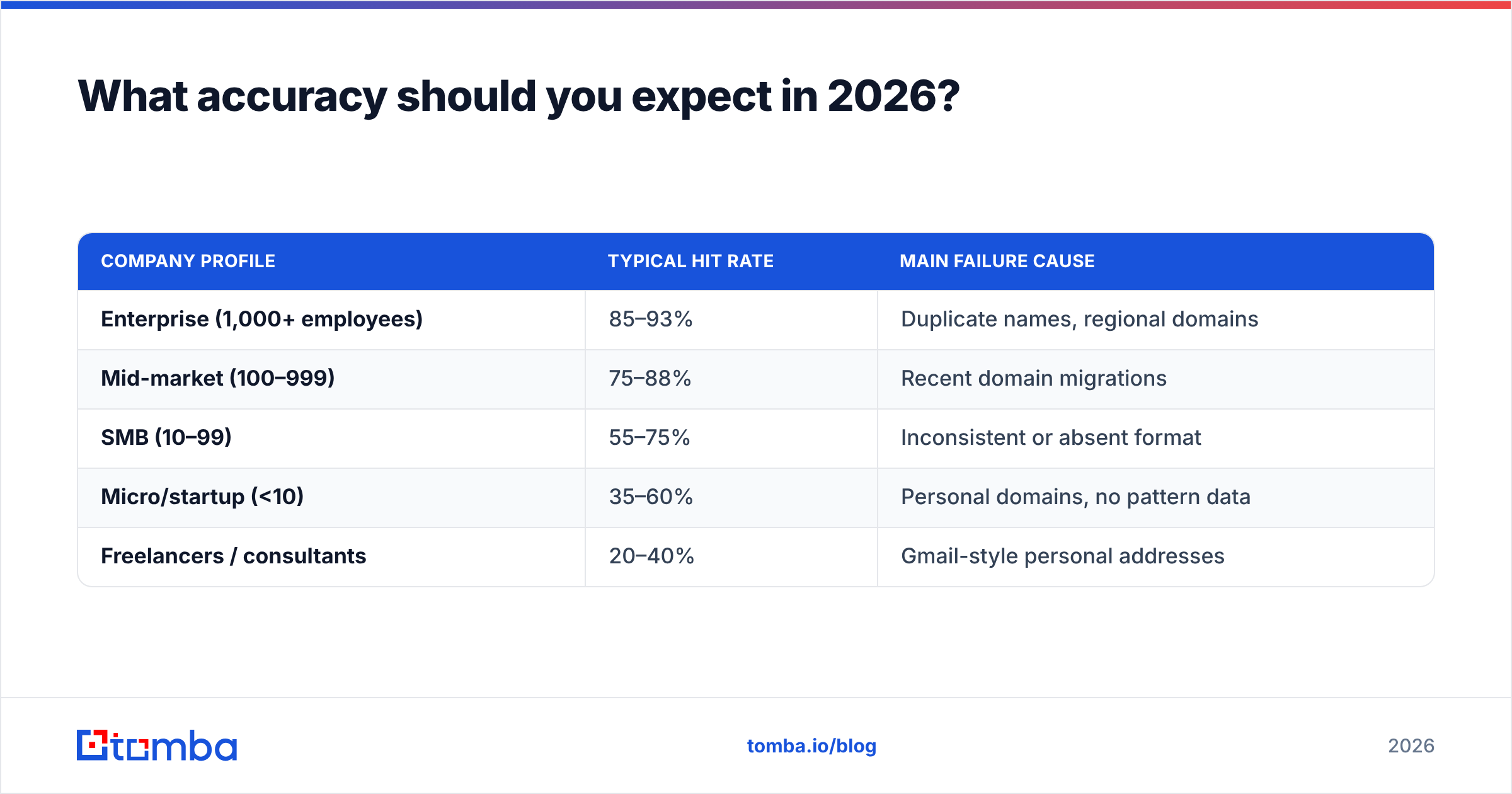
| Company profile | Typical hit rate | Main failure cause |
|---|---|---|
| Enterprise (1,000+ employees) | 85–93% | Duplicate names, regional domains |
| Mid-market (100–999) | 75–88% | Recent domain migrations |
| SMB (10–99) | 55–75% | Inconsistent or absent format |
| Micro/startup (<10) | 35–60% | Personal domains, no pattern data |
| Freelancers / consultants | 20–40% | Gmail-style personal addresses |
"Hit rate" here means a verified deliverable address returned, not a guess. Any vendor quoting a single blended number above 95% across all company sizes is measuring something else — usually the percentage of searches that return any string.

The second number that matters is bounce rate on the addresses you actually send to. Keep it under 2%. Google and Yahoo's bulk-sender requirements, in force since 2024, put the spam-complaint ceiling at 0.3% and expect authenticated, low-bounce sending — the details are published in Google's sender guidelines. A name-search workflow that skips verification will blow past both thresholds within a week.
Which email ID search tools compare best?#
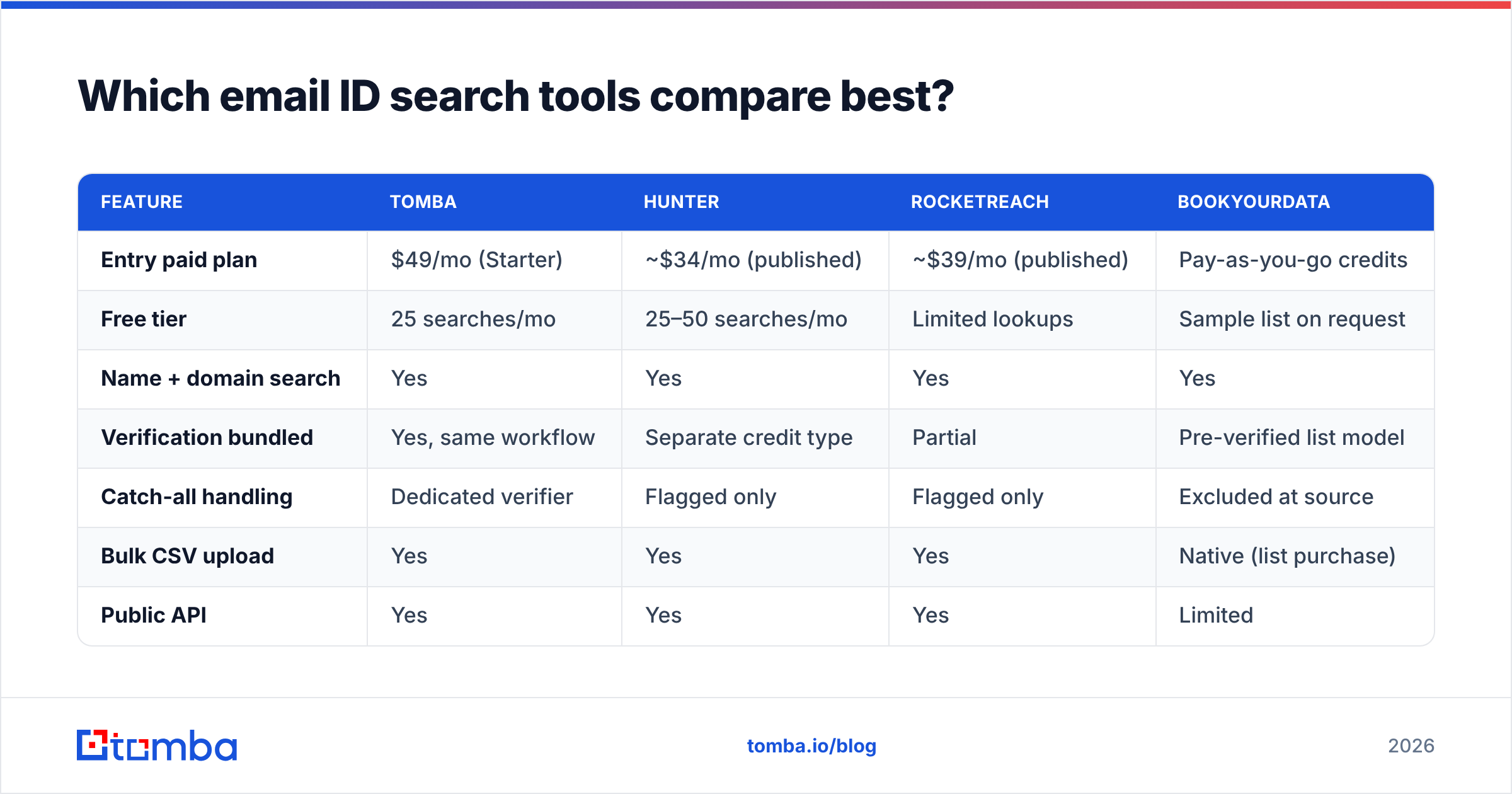
Feature parity is closer than vendor pages suggest. The real differentiators are whether verification is bundled, how the free tier is capped, and whether you can run the whole thing through an API instead of a UI.
| Feature | Tomba | Hunter | RocketReach | BookYourData |
|---|---|---|---|---|
| Entry paid plan | $49/mo (Starter) | ~$34/mo (published) | ~$39/mo (published) | Pay-as-you-go credits |
| Free tier | 25 searches/mo | 25–50 searches/mo | Limited lookups | Sample list on request |
| Name + domain search | Yes | Yes | Yes | Yes |
| Verification bundled | Yes, same workflow | Separate credit type | Partial | Pre-verified list model |
| Catch-all handling | Dedicated verifier | Flagged only | Flagged only | Excluded at source |
| Bulk CSV upload | Yes | Yes | Yes | Native (list purchase) |
| Public API | Yes | Yes | Yes | Limited |
| Phone numbers | Yes (add-on) | No | Yes | Yes |
| Best for | Verified email-first workflows | Simple domain lookups | Recruiting and exec search | Buying a ready-built list |
Published prices move; check each vendor's page before committing. Full Tomba pricing runs Free → Starter $49/mo → Growth $99/mo → Pro $249/mo → Enterprise custom, with search and verification drawing from the same credit pool rather than two separate meters.
BookYourData sits in a genuinely different category from the other three: instead of resolving names one at a time, you filter a pre-verified database and buy the slice you need. If your input is "500 CFOs in German manufacturing" rather than "these 40 specific people," that model is faster and cheaper than name-by-name lookup. If your input is a list of named prospects from a conference badge scan, a finder is the right tool.

For a broader view of how buyers rate these categories, the G2 sales intelligence grid aggregates verified reviews across all four vendors.
How do you run an email ID search by name, step by step?#
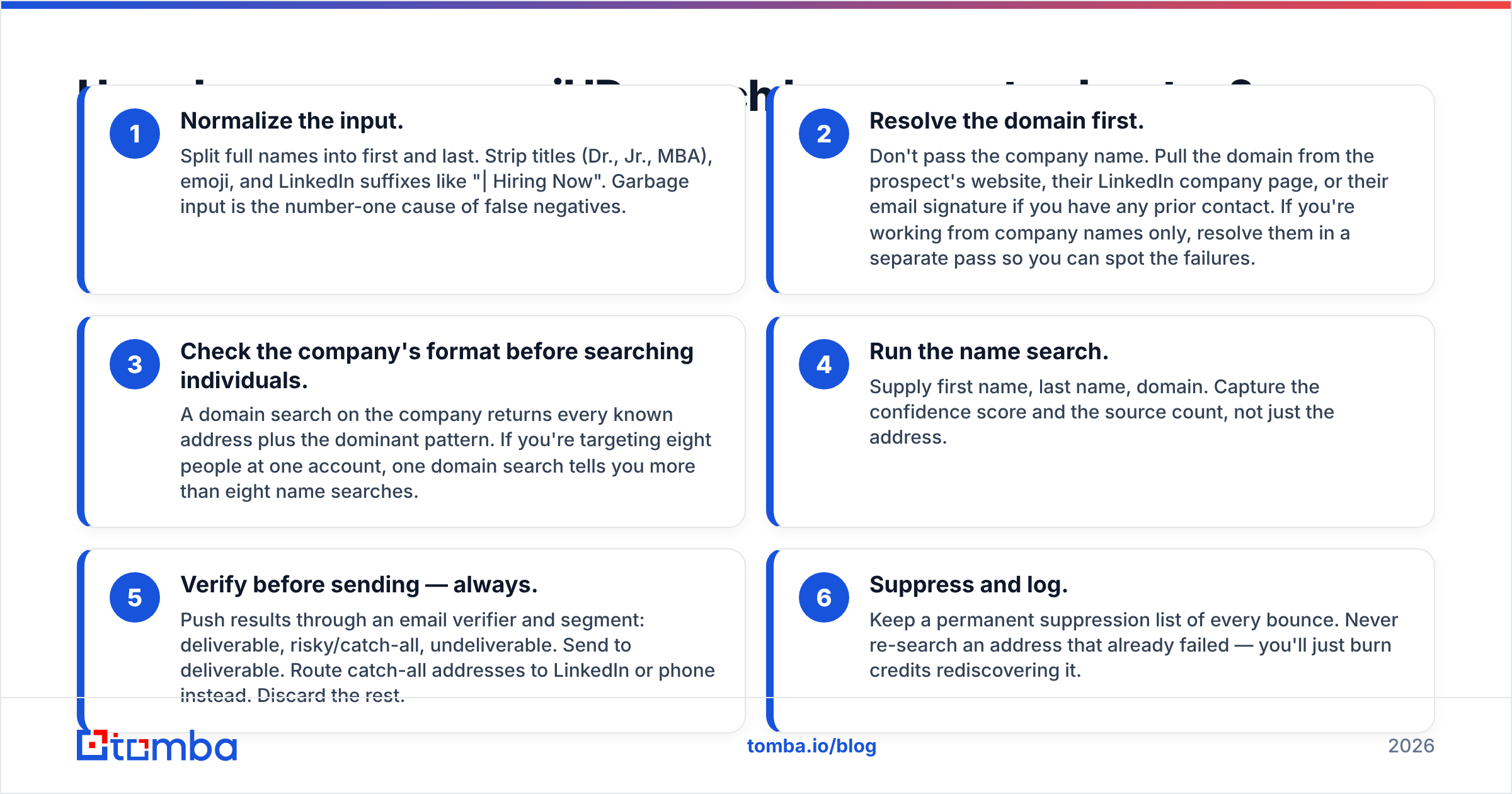
Here's the workflow that produces the fewest bounces, whether you do it in a UI or over an API.
- Normalize the input. Split full names into first and last. Strip titles (Dr., Jr., MBA), emoji, and LinkedIn suffixes like "| Hiring Now". Garbage input is the number-one cause of false negatives.
- Resolve the domain first. Don't pass the company name. Pull the domain from the prospect's website, their LinkedIn company page, or their email signature if you have any prior contact. If you're working from company names only, resolve them in a separate pass so you can spot the failures.
- Check the company's format before searching individuals. A domain search on the company returns every known address plus the dominant pattern. If you're targeting eight people at one account, one domain search tells you more than eight name searches.
- Run the name search. Supply first name, last name, domain. Capture the confidence score and the source count, not just the address.
- Verify before sending — always. Push results through an email verifier and segment: deliverable, risky/catch-all, undeliverable. Send to deliverable. Route catch-all addresses to LinkedIn or phone instead. Discard the rest.
- Suppress and log. Keep a permanent suppression list of every bounce. Never re-search an address that already failed — you'll just burn credits rediscovering it.
For anything over a few hundred names, do steps 4 and 5 as a single bulk email finder job rather than one-at-a-time. Batch verification is dramatically cheaper per record and gives you a clean deliverability report before you touch your sending tool.

Is it legal to search someone's email by name?#
Short answer: finding a business email address is legal in most jurisdictions; how you use it is where the rules bite.
Under GDPR, a work email tied to a named individual is personal data, so you need a lawful basis. Legitimate interest can cover B2B outreach when the message is relevant to the person's professional role, you can document the balancing test, and you honor opt-outs immediately. Some member states layer stricter national rules on top — Germany and Austria in particular. The ICO's guide to direct marketing is the clearest plain-English reference for corporate subscribers.
In the US, CAN-SPAM permits cold commercial email without prior consent but requires accurate headers, a physical mailing address, a working unsubscribe, and honoring opt-outs within 10 business days.
Practical guardrails regardless of jurisdiction:
- Target roles, not individuals scraped indiscriminately.
- Keep a record of where each contact came from.
- Process deletion requests within the statutory window and add the address to permanent suppression.
- Never use name-based search to find someone's personal or non-work address.
What about free email ID search by name options?#
Free tiers are real but small, and they're built for evaluation rather than volume. Tomba's free plan gives 25 searches a month; competitors sit in a similar 25–50 range. That's enough to test accuracy against contacts you already know are correct — which is exactly what you should do before paying anyone.
The genuinely free path is manual and slow:
- Guess the pattern yourself from any published address on the company site, then build candidates. A free email checker will tell you whether the syntax and MX records hold up.
- Search the address as a quoted string in Google alongside the domain. Conference speaker pages, GitHub commits, PDF whitepapers, and press releases leak work addresses constantly.
- Check the person's own outputs. Academic authors publish addresses in papers. Journalists publish them in bylines. An author finder automates that specific case.
What you can't get for free at any meaningful scale is verification. SMTP checking requires clean IP infrastructure and rate management; run it from your own server and you'll get your IP blocked by the major providers within a day. That's the actual product you're paying for.
When should you skip name search entirely?#
Name-based lookup is the wrong tool in three situations.
- You don't have specific names yet. If your target is "VPs of Engineering at Series B fintechs," start with a filtered B2B database or a domain search across an account list. Name search is for when you already know who you want.
- The company is under ten people. Hit rates fall off a cliff. Use the generic contact address on their site, or reach out on LinkedIn.
- Email isn't the right channel. For senior executives at large enterprises, inbox volume makes cold email a low-probability play. A phone finder plus a well-researched call often outperforms a fifth follow-up email.
The best-performing outbound teams treat name-to-email as one input among several, not the whole prospecting motion. The lookup is a five-second technical step. The research that makes the message worth reading is the actual work.
Start with verified addresses, not guesses#
If you have a list of names and companies and you need work addresses that survive a send, run them through the Tomba Email Finder. Name plus domain in, verified address out — with the SMTP check, catch-all flag, and confidence score attached to every result, drawn from the same credit pool rather than billed twice. Test it on 25 contacts you already know are correct on the free tier, measure the hit rate yourself, and only then decide whether it's worth $49 a month to you. That's the honest way to evaluate any tool in this category, including this one.
Related guides#
Ready to find emails that actually work?
Join 150,000+ professionals who stopped guessing and started sending. Free credits on signup — no credit card required.
Get the Tomba newsletter
Practical outbound tactics and product updates — once every two weeks.
About the author