Email Identifier: How It Works and Best Tools in 2026
An email identifier turns a name and a domain into a deliverable inbox. Here is how the pattern matching, SMTP checks, and catch-all traps actually work — plus a neutral cost and accuracy comparison for 2026.
TL;DR
- An email identifier is software that resolves a person + company into a specific, deliverable email address — it is the "find" half of the workflow, not the "verify" half.
- The engine is three layers stacked: a pattern library per domain, a sourced-data index, and an SMTP/MX validation pass. Tools that skip layer three sell you guesses.
- Realistic accuracy in 2026 is 85–95% on standard corporate domains and 40–70% on catch-all domains. Anyone advertising "99% accuracy" flat is measuring something else.
- Price per confirmed email matters more than price per credit. A $39 plan that returns 40% guesses is more expensive than a $49 plan that returns 90% confirmed.
- Pick by data source, not by UI. Sourced-index tools win on coverage; pattern-only tools win on speed and price.
What Is an Email Identifier?#
An email identifier takes what you already know — a first name, a last name, and a company domain — and returns the working email address for that person. That is the whole job.
The term gets used loosely, and vendors do not help. Depending on who is selling, "email identifier" can mean any of five different things:
- Forward identification (name + domain → email). The classic use case. You have "Dana Whitfield" and "stripe.com" and you need
dana@stripe.comordwhitfield@stripe.com. This is what most people mean, and what an email finder does. - Domain-level identification (domain → all emails). You do not have a name yet. You want everyone at the company with a role that matters. This is domain search territory.
- Reverse identification (email → person). You have an address in your CRM with no owner attached. A reverse email lookup resolves it back to a name, title, and company.
- Profile-based identification (LinkedIn/social URL → email). You are working a list scraped from a social platform and need the address behind each profile.
- Visitor identification (anonymous traffic → company or contact). Different technology entirely — IP and pixel based — and worth separating in your head, because the accuracy characteristics are nothing alike.
If a vendor's landing page blurs those five, read the API docs before you read the pricing page. The endpoints tell you what they actually built.
How Does an Email Identifier Actually Work?#
Three layers, in order. Understanding the order is the difference between buying a real tool and buying a permutation script with a logo.
Layer 1 — Pattern inference. Every company standardizes on an email format: first.last@, flast@, first@, f.last@, and roughly a dozen more. A good identifier maintains a per-domain pattern table built from addresses it has already confirmed. If it knows Stripe uses first@, it does not need to test eight permutations for the next Stripe contact. You can see this logic in isolation with a free company email pattern checker.
Layer 2 — Sourced index lookup. The identifier queries its own store of addresses harvested from public sources: company sites, press releases, developer commits, conference listings, published papers, regulatory filings. If the exact address is already in the index with a recent confirmation timestamp, layer 1 becomes irrelevant. This is the layer that separates tiers of vendors, because it is the expensive one to build. Tomba publishes a breakdown of its data sources if you want to see what a sourced index is built from.
Layer 3 — SMTP validation. The candidate address is tested against the receiving mail server without sending a message. The tool opens an SMTP conversation, issues RCPT TO, and reads the server's response code. A 250 means the mailbox exists. A 550 means it does not. This is where the confidence score comes from, and it is why a tool that returns results instantly with no network round trip is not really identifying anything.
The catch: a growing share of domains are catch-all, meaning the server accepts mail for every possible address and sorts it out later. Layer 3 returns 250 for asdfgh@company.com just as happily as for the real one. That is why catch-all handling is the single most important thing to interrogate before you buy — a catch-all verifier uses different signals entirely.
Email Identifier vs Email Verifier vs Reverse Lookup: What's the Difference?#
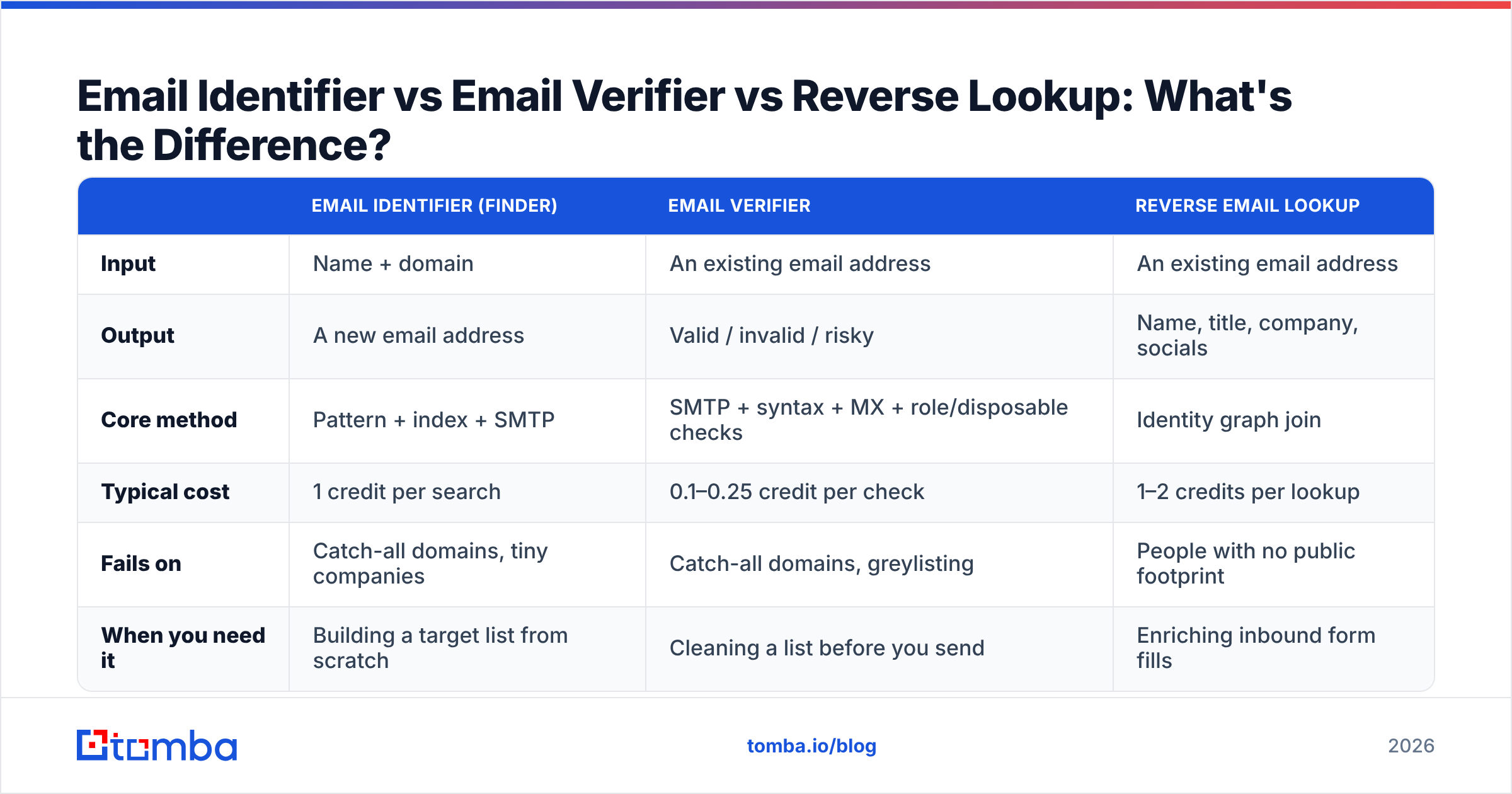
These three get conflated constantly, and buying the wrong one is the most common procurement mistake in this category.
| Email Identifier (Finder) | Email Verifier | Reverse Email Lookup | |
|---|---|---|---|
| Input | Name + domain | An existing email address | An existing email address |
| Output | A new email address | Valid / invalid / risky | Name, title, company, socials |
| Core method | Pattern + index + SMTP | SMTP + syntax + MX + role/disposable checks | Identity graph join |
| Typical cost | 1 credit per search | 0.1–0.25 credit per check | 1–2 credits per lookup |
| Fails on | Catch-all domains, tiny companies | Catch-all domains, greylisting | People with no public footprint |
| When you need it | Building a target list from scratch | Cleaning a list before you send | Enriching inbound form fills |
The operational sequence is: identify → verify → send. Skipping the middle step is what produces 8% bounce rates and a burned sending domain. Even a well-sourced identifier hands you addresses that went stale between confirmation and export, which is why running an email verifier pass right before a campaign is not redundant work.
How Accurate Are Email Identifiers in 2026?#
Accuracy is the most abused number in this category, so here is how to read it.
Vendors quote accuracy in at least three incompatible ways:
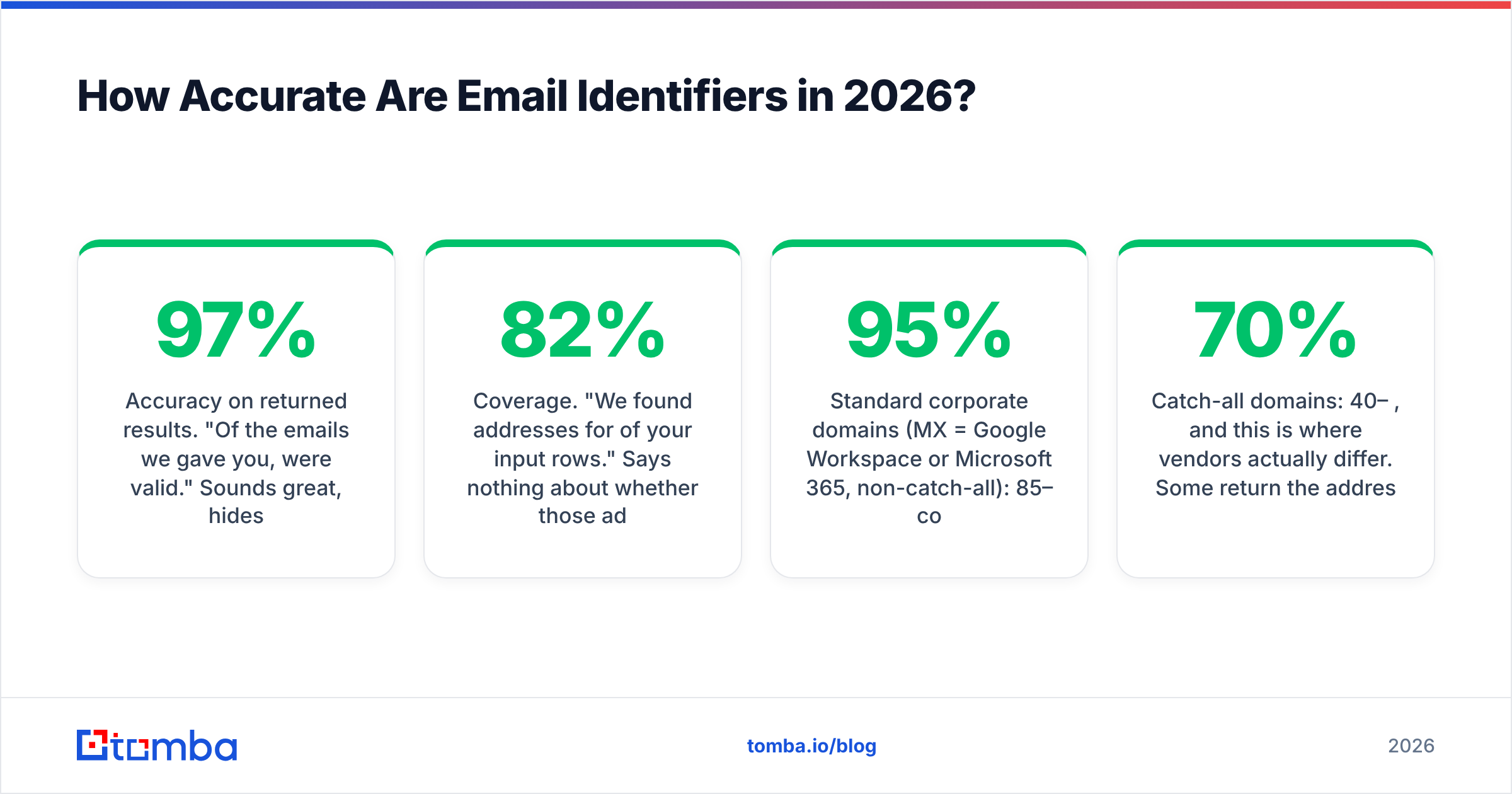
- Accuracy on returned results. "Of the emails we gave you, 97% were valid." Sounds great, hides the fact that they returned results for only 45% of your list.
- Coverage. "We found addresses for 82% of your input rows." Says nothing about whether those addresses work.
- Confirmed-hit rate. Coverage × accuracy. The only number that predicts your bounce rate and your cost per usable contact.
Ask every vendor for the third one, on a sample of your data, not theirs. A 100-row pilot with your own ICP will separate the field faster than any review site.

Realistic 2026 benchmarks, from public testing and vendor-published methodology:
- Standard corporate domains (MX = Google Workspace or Microsoft 365, non-catch-all): 85–95% confirmed-hit rate across the serious tools. The gap between vendors here is small.
- Catch-all domains: 40–70%, and this is where vendors actually differ. Some return the address with a "risky" flag and charge you a credit. Some suppress it. Some run a secondary pattern-confidence model and give you a real probability.
- Sub-20-employee companies: 50–70%. Small firms have thin public footprints, so layer 2 has nothing to work with and layer 1 is guessing.
- Non-US, non-English domains: typically 10–20 points below the vendor's headline number. If you sell into DACH, LATAM, or APAC, test specifically there.
- Generic/role addresses (
info@,sales@): near 100%, and near useless. Check whether your vendor counts these in the accuracy figure. Several do.
One more thing to test: staleness. Ask when the address was last confirmed. An index entry from 2023 for a person who changed jobs in 2024 is technically an accurate historical record and practically a bounce.
Which Email Identifier Tools Are Worth It in 2026?#
Here is the honest landscape. Prices are list prices at the time of writing — check each vendor's page before you commit, because this category re-prices often.

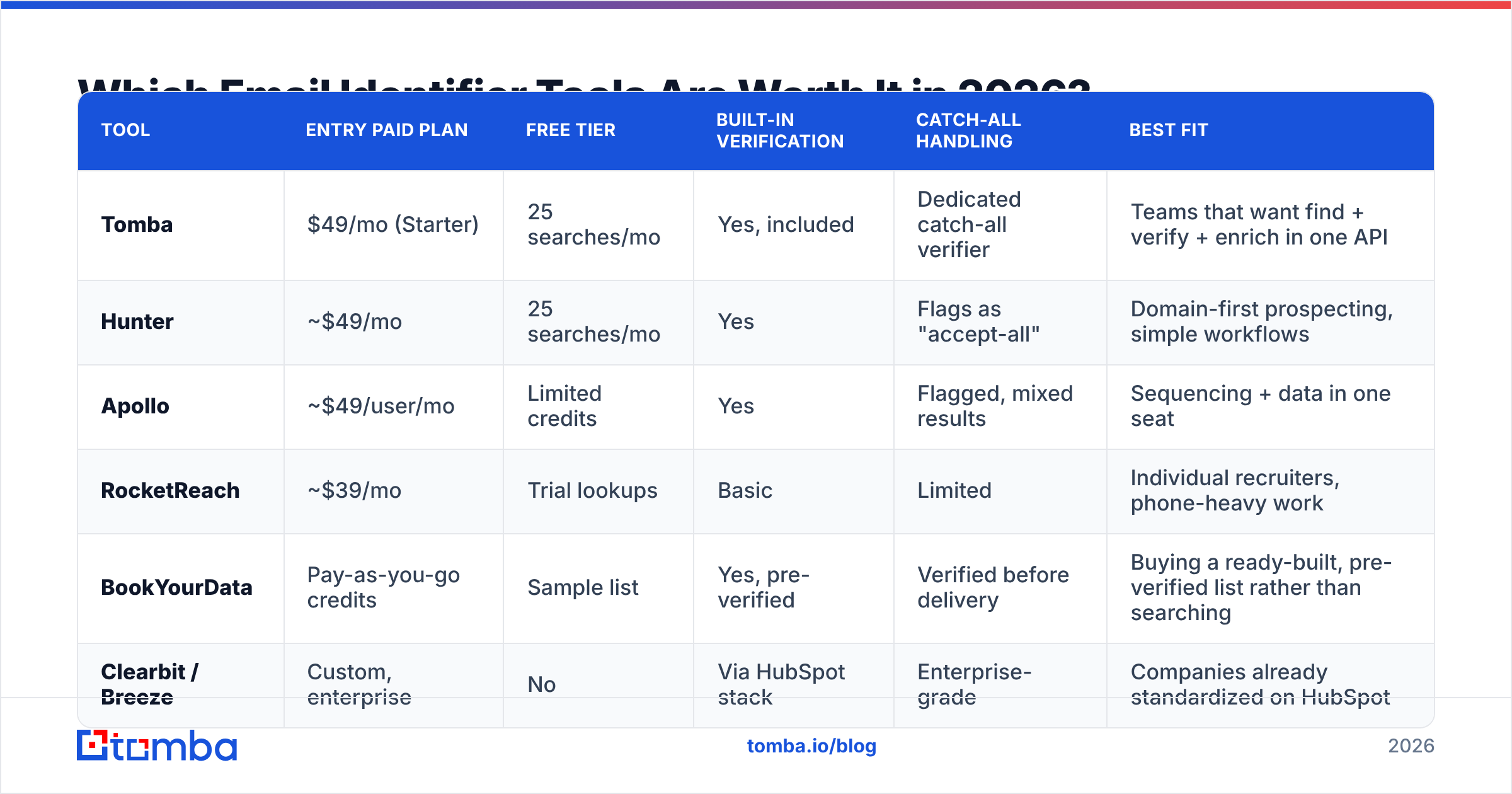
| Tool | Entry paid plan | Free tier | Built-in verification | Catch-all handling | Best fit |
|---|---|---|---|---|---|
| Tomba | $49/mo (Starter) | 25 searches/mo | Yes, included | Dedicated catch-all verifier | Teams that want find + verify + enrich in one API |
| Hunter | ~$49/mo | 25 searches/mo | Yes | Flags as "accept-all" | Domain-first prospecting, simple workflows |
| Apollo | ~$49/user/mo | Limited credits | Yes | Flagged, mixed results | Sequencing + data in one seat |
| RocketReach | ~$39/mo | Trial lookups | Basic | Limited | Individual recruiters, phone-heavy work |
| BookYourData | Pay-as-you-go credits | Sample list | Yes, pre-verified | Verified before delivery | Buying a ready-built, pre-verified list rather than searching |
| Clearbit / Breeze | Custom, enterprise | No | Via HubSpot stack | Enterprise-grade | Companies already standardized on HubSpot |
A few notes that the table cannot carry:
Search-based vs list-based. Most of the tools above are search-based: you bring names, they resolve addresses. BookYourData works differently — you filter a pre-verified database and export a list, which suits teams who want volume without building the input list first. Neither model is strictly better; they solve different upstream problems. If you already have your target accounts, search-based is cheaper. If you are opening a new segment cold, list-based gets you moving faster.
Per-user vs per-account pricing. Apollo prices per seat, which is fine for a five-person SDR team and painful for an ops team that just wants API access. Tomba, Hunter, and RocketReach price per account with credit pools. For a RevOps workflow feeding a CRM, per-account is almost always the cheaper structure.
API quality is not optional anymore. In 2026, most real usage is programmatic — enrichment on form fill, enrichment on CRM insert, enrichment inside an agent workflow. Check rate limits, batch endpoints, and whether the vendor offers an MCP server or CLI before you judge the web UI. Tomba's email finder API exposes the same confidence scores the dashboard shows, which matters when you are writing threshold logic.
Independent buyer reviews on G2's lead intelligence category are useful for surfacing support and billing complaints that no vendor page will tell you about. Read the 3-star reviews, not the 5-star ones.

What Does an Email Identifier Actually Cost?#
Credit math, not sticker price. Here is how to compute the number that matters.
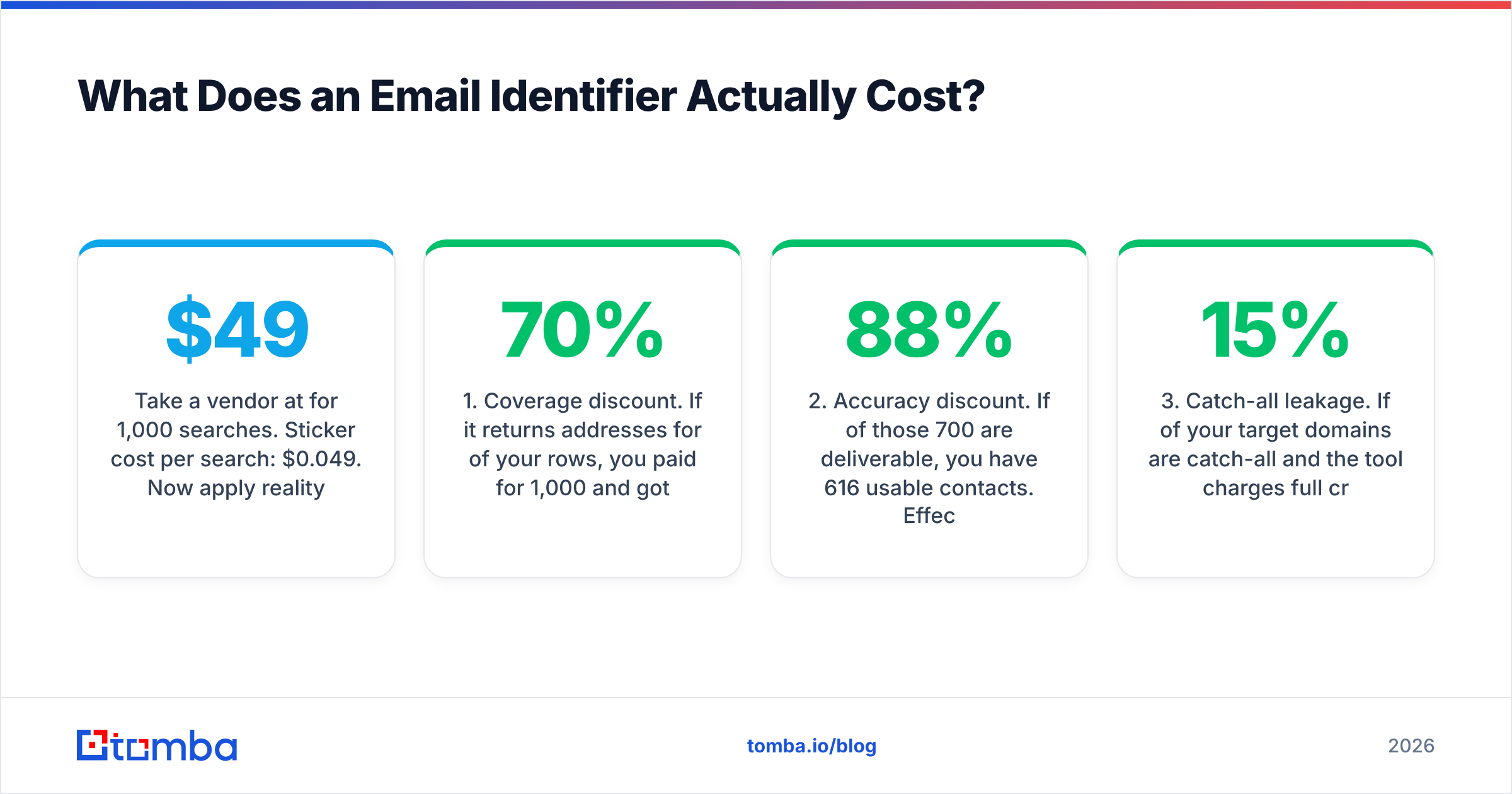
Take a vendor at $49/mo for 1,000 searches. Sticker cost per search: $0.049. Now apply reality:
- Coverage discount. If it returns addresses for 70% of your rows, you paid for 1,000 and got 700. Effective cost: $0.070.
- Accuracy discount. If 88% of those 700 are deliverable, you have 616 usable contacts. Effective cost: $0.080.
- Catch-all leakage. If 15% of your target domains are catch-all and the tool charges full credits for "risky" results you cannot use, subtract again.
- Verification cost. If verification is a separate SKU, add it. If it is bundled, you just saved a line item.
- Re-find cost. Contacts decay at roughly 2–3% per month as people change jobs. Budget for re-running your core list quarterly.
Run that math on two vendors and the "cheaper" one frequently flips. A tool at $39/mo with 55% coverage costs more per usable contact than one at $49/mo with 85% coverage — you just pay the difference in wasted sends and reputation damage instead of on the invoice.
The other cost line people forget: the free tier is a testing budget, not a strategy. 25 free searches a month is enough to validate a vendor on your ICP, which is exactly what it is for. Compare Tomba pricing tiers against your actual monthly contact volume rather than against the competitor's headline number, and check whether unused credits roll over.
How Do You Use an Email Identifier Without Burning Your Domain?#
Identification and deliverability are the same problem viewed from two ends. Bad identification produces bounces, bounces produce reputation damage, and reputation damage means your good emails stop landing too.
The workflow that holds up:
- Identify, then hold. Never pipe identifier output straight into a sequencer. Stage it.
- Verify the whole batch immediately before send, not at export time. Addresses go stale in the gap.
- Segment by confidence score. Send to 95%+ confidence first. Hold 70–94% for a second, smaller batch. Discard below 70% or route them to a LinkedIn touch instead.
- Suppress catch-all domains from cold campaigns entirely unless you have a secondary signal. The bounce risk is not worth the incremental volume.
- Cap unknown-domain volume at 5% of any send. If your bounce rate crosses 2%, stop and re-verify rather than pushing through.
- Re-verify quarterly. Job changes are the single largest source of decay in any B2B list.
Mailbox providers weight bounce rate heavily in filtering decisions, and both Google's and Microsoft's published sender guidelines make list hygiene an explicit requirement rather than a suggestion. An identifier that hands you a clean confidence score is doing deliverability work on your behalf.
What Do People Get Wrong About Email Identifiers?#
Treating the confidence score as binary. A 72% score is not "found." It is a coin flip weighted slightly in your favor. Build tiers.
Assuming coverage gaps mean the person has no email. It usually means the person has no public email. Small-company founders, technical staff at security-conscious firms, and anyone under a privacy-forward jurisdiction will show up as gaps regardless of vendor.
Buying on database size. "500M contacts" is a marketing number that counts every stale, role-based, and duplicate row. Coverage on your ICP is the only size that matters, and it is measurable in one afternoon.
Ignoring compliance. GDPR and similar regimes do not ban B2B email identification, but they do require a lawful basis, a clear opt-out, and honoring deletion requests. Check whether your vendor supports suppression list uploads and data-subject deletion before legal asks.
Skipping the pilot. Every vendor in this category will let you test. Load 100 rows of real ICP data into three tools, compare confirmed-hit rate, and buy the winner. It takes an hour and saves a year of arguing about vendor claims.
Get Started#
If you want to test an email identifier against your own list rather than a vendor's demo data, start with the free tier of the Tomba Email Finder — 25 searches a month, no card, with the same confidence scoring and SMTP validation the paid plans use. Run your hundred hardest rows through it, check the confirmed-hit rate, and compare that number against whatever you are using now. If it wins, the Starter plan is $49/mo; if it does not, you learned something for free. Either way, you will finally have a real number instead of a vendor's.
Related guides#
Ready to find emails that actually work?
Join 150,000+ professionals who stopped guessing and started sending. Free credits on signup — no credit card required.
Get the Tomba newsletter
Practical outbound tactics and product updates — once every two weeks.
About the author