Email Identity Verification in 2026: A Practical Guide
Syntax checks and MX lookups only prove an address is routable — not that a real person owns it. Here's how email identity verification actually works, which signals matter, and what it costs to run at scale.
TL;DR
- Email verification asks one thing: will this address accept mail?
- Email identity verification asks more: does a real person own this mailbox right now?
- Five layers do the work. Syntax, DNS and MX, SMTP reply, mailbox type, and identity proof.
- Layers 1 to 3 are cheap and commodity. Layer 5 is where vendors split on price and accuracy.
- Catch-all domains are the big blind spot. About one in five B2B domains accept every address.
- Plan on $49 to $249 a month. Expect a 1–3% bounce rate even when you do everything right.
What is email identity verification?#
Email identity verification confirms two things at once. First, the address can accept mail. Second, it belongs to a named person or company.
Think of a hotel front desk. The clerk checks that your booking exists. Then the clerk checks your ID against the name on it. Most tools sold as "email verifiers" stop at the first step. A green check means mail will probably land. It does not mean Sarah Chen, VP of Engineering at Acme, reads that inbox.
That gap costs you in three places:
- Outbound sales. A live but wrong address still counts as delivered. It never replies. If it is a spam trap, it hurts your sender reputation.
- Signup and fraud screening. A burner address passes every syntax and MX test. Only identity signals catch it.
- CRM hygiene. People change jobs all the time. An address that was clean in January can be an empty mailbox by June.
How is it different from plain email verification?#
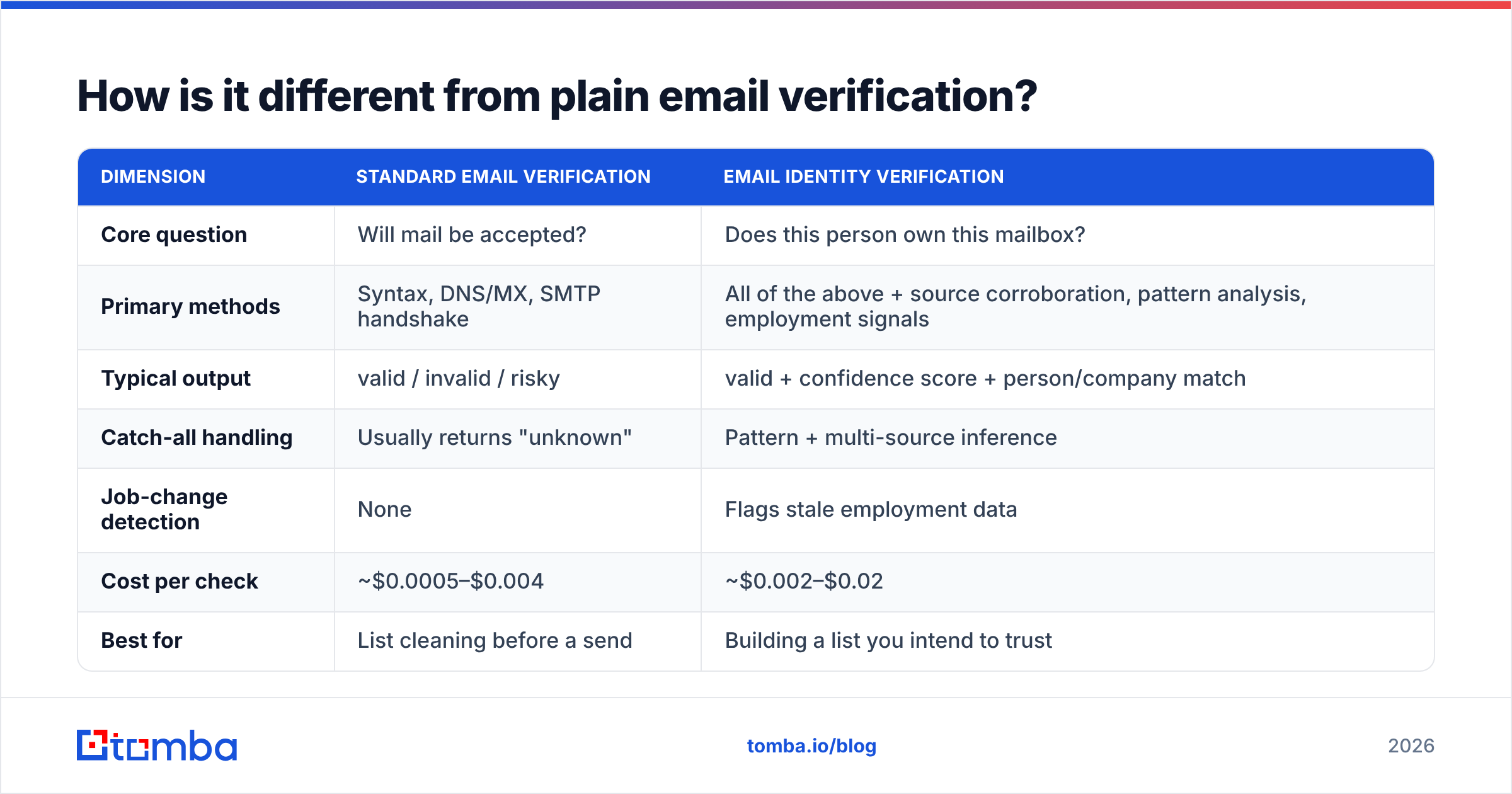
Both checks matter. They answer different questions.
| Dimension | Standard email verification | Email identity verification |
|---|---|---|
| Core question | Will mail be accepted? | Does this person own this mailbox? |
| Primary methods | Syntax, DNS/MX, SMTP handshake | All of the above, plus sources, patterns and job signals |
| Typical output | valid / invalid / risky | valid + confidence score + person match |
| Catch-all handling | Usually returns "unknown" | Pattern and multi-source inference |
| Job-change detection | None | Flags stale employment data |
| Cost per check | ~$0.0005–$0.004 | ~$0.002–$0.02 |
| Best for | Cleaning a list before a send | Building a list worth cleaning |
Neither one replaces the other. Plain verification is your last check before you hit send. Email identity verification runs earlier, while you build the list.
What signals does email identity verification rely on?#
Five layers, in the order a good pipeline runs them. Each layer costs more than the one before. So the order matters for budget as much as for accuracy.
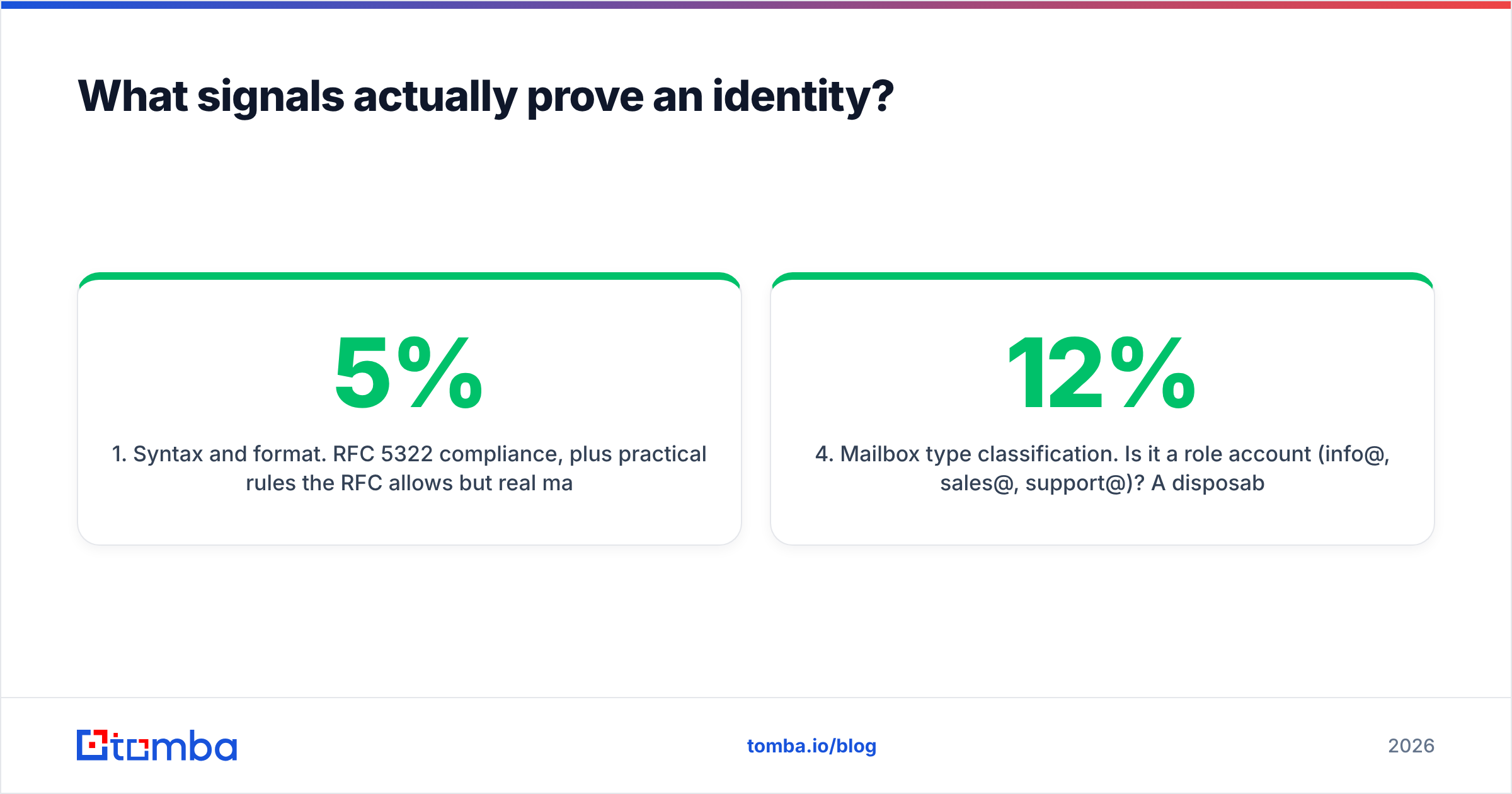
- Syntax and format. Start with RFC 5322 rules. Then block what real servers reject: leading dots, double dots, absurd local parts. This catches 3–5% of a raw scraped list, and it is free.
- Domain and MX records. Does the domain resolve? Does it publish mail records? No MX means no mail, ever. This also flags parked domains and dead companies. One DNS lookup, near zero cost.
- SMTP mailbox probe. Open a connection, send
RCPT TO, read the reply code and stop there. See the SMTP protocol reference for the handshake. A 250 means accept. A 550 usually means no such user.
Those three layers are commodity. The next two are where tools pull apart.
- Mailbox type. Is it a role account like
info@orsales@? A burner domain? A free consumer inbox? A catch-all that returns 250 for anything? Each type needs its own rule. Lump them all into "valid" and a list that scored 97% will bounce at 12%. - Identity proof. Has this exact address appeared in a public source, a company page, a byline, a git commit, a speaker list? Does the local part match the company pattern? Is the person still employed there? Confidence comes from sources that agree.
Spend your trial budget on layers 4 and 5. Every vendor handles the first three about equally well.
Is SMTP verification still reliable in 2026?#
Less than it used to be, and the trend runs one way.
Three things broke it. Microsoft 365 tenants often return 250 for unknown users, then bounce hours later. So the probe says valid and the real send fails. Google Workspace now throttles heavy probing per IP. A verifier with a small IP pool gets pushed into "unknown" results. And many mid-market domains sit behind gateways like Proofpoint, Mimecast or Barracuda. Those gateways answer for the whole domain, not for the mailbox.
What that means in practice:
- Read "valid" from SMTP as a probability, not a fact. On Microsoft-hosted domains, back it up with a second signal.
- Read "unknown" as a routing step, not a dead end. Send those to pattern inference or a catch-all verifier. Drop them and you lose 15–25% of a typical B2B list.
- Ask where your vendor probes from. A handful of cheap VPS IPs gets throttled fast. A large rotating pool does not. Most vendors will not raise this on their own.
How do catch-all domains break everything?#
A catch-all domain returns 250 for every address at that domain. definitely-not-real-xyz@company.com looks as good as the CEO.
About 20–25% of B2B domains work this way. The rate runs higher among the mid-market and enterprise accounts you most want. So the usual advice, "just skip catch-alls," quietly deletes a quarter of your market.
Better options, best first:
- Multi-source proof. If two crawled sources list the address, catch-all status stops mattering. Someone published it because it works.
- Pattern confidence. Say 40 known-good addresses at
company.comusefirst.last@. Thensarah.chen@company.comis a strong call for a confirmed employee. Check it with a company email pattern lookup. - Behavior scoring. Some vendors track whether mail to that address was ever opened or answered.
- Staged sending. Mail catch-alls in a small, separate campaign on a separate domain. Any bounce damage stays contained.
Two moves never work. Treating catch-all as valid. Treating catch-all as invalid. Both are guesses in a suit.

What should an email identity verification stack cost?#
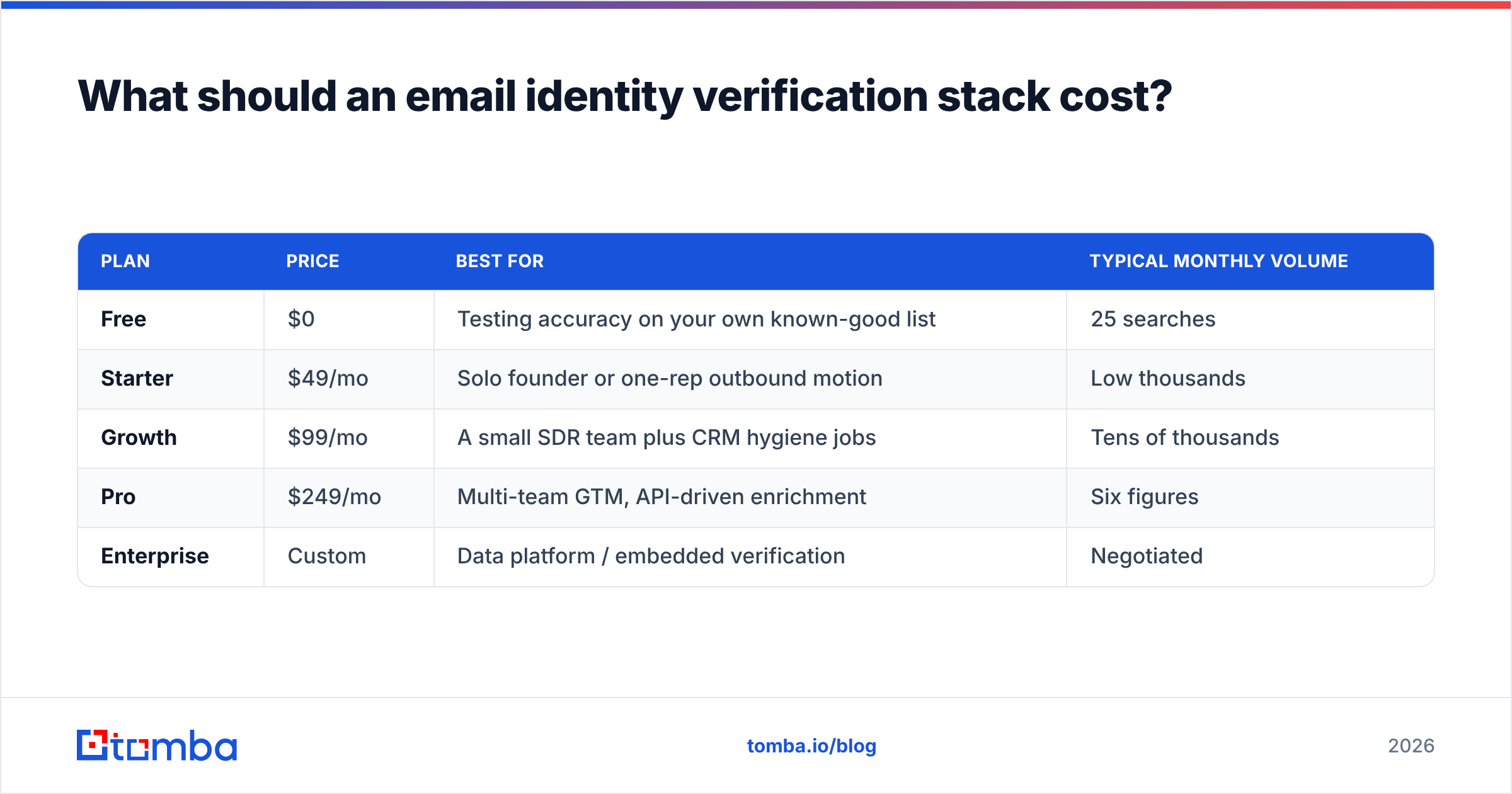
Pricing runs on credits, and credits mean different things at different vendors. Some charge for unknowns. Some charge twice: once to find, once to verify. Read the fine print before you compare headline numbers.
Here is how Tomba's tiers map to real workloads:
| Plan | Price | Best for | Typical monthly volume |
|---|---|---|---|
| Free | $0 | Testing accuracy on your own known-good list | 25 searches |
| Starter | $49/mo | Solo founder or one-rep outbound | Low thousands |
| Growth | $99/mo | A small SDR team plus CRM hygiene | Tens of thousands |
| Pro | $249/mo | Multi-team GTM, API-driven enrichment | Six figures |
| Enterprise | Custom | Data platform or embedded verification | Negotiated |
Tomba pricing shows which actions burn credits. Sticker price is the wrong test, though. Run the same 500 addresses through two or three vendors. Then measure cost per confirmed-valid address. That is the number tied to pipeline.
One more check. Filter email verification tools on G2 by your own company size. Read the 3-star reviews first. Five-star reviews repeat the marketing. Three-star reviews show where accuracy breaks.
How do you build a workflow that holds up?#
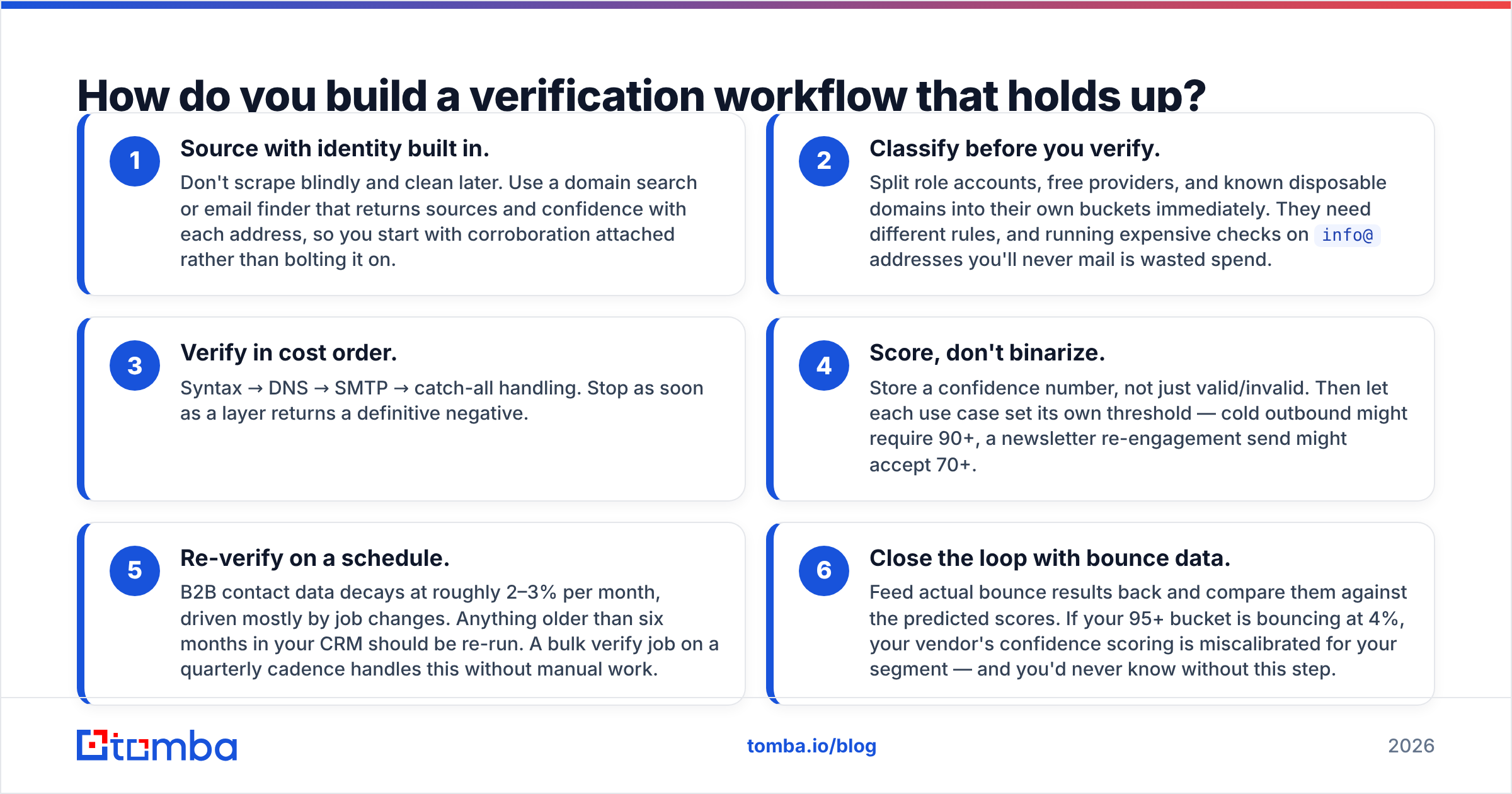
A working email identity verification workflow has six steps. Here are the first three.
- Source with identity built in. Do not scrape blindly and clean later. Use a domain search or email finder that returns sources and a score with each address.
- Sort before you verify. Split out role accounts, free inboxes and known burner domains right away. Each group needs its own rule. Paying to check
info@addresses you will never mail is waste. - Verify in cost order. Syntax, then DNS, then SMTP, then catch-all handling. Stop at the first hard no.
The last three steps are what keep a list clean over time.
- Score, do not binarize. Store a number, not a yes or no. Then each use case sets its own bar. Cold outbound might need 90+. A newsletter re-send might take 70+.
- Re-check on a schedule. B2B data decays 2–3% a month, mostly from job changes. Re-run anything older than six months. A quarterly bulk verify job covers it.
- Feed bounces back. Compare real bounces against the scores you stored. If your 95+ bucket bounces at 4%, the scoring is off for your segment.
Almost everyone skips step 6. It is the only step that tells you whether the other five work.
Where does it fit next to deliverability?#
They sit side by side. Email identity verification controls who you send to. Email deliverability controls whether your mail reaches the inbox. You can verify perfectly and still land in spam. A broken SPF record or a cold domain will do that.
Verification still comes first. Google and Yahoo cap complaint rates for bulk senders. Mailbox providers weigh unknown-user bounces heavily. A dirty list poisons the sending reputation everything else rests on. HubSpot's email deliverability guidance covers the auth side. Verification is what makes that work pay off.
Signup screening and fraud checks shift the bar again. There, "is this a real person" beats "will mail land." The useful signals are burner-domain detection, domain age, and whether the identity maps to a real company via data enrichment.
What are the most common mistakes?#
Four traps show up in almost every audit:
- Trusting a vendor's "valid" with no control test. Run known-good and known-bad addresses through any new tool first.
- Dropping all catch-alls. That deletes a quarter of the mid-market.
- Verifying once and never again. Data decays. A verified list is a snapshot, not an asset.
- Counting "unknown" as a win. Some vendors quote accuracy on resolved addresses only. A tool with 40% unknowns can then look better than one that resolves 90%.
Two more are easy to miss:
- Buying a static list with no verification layer. Curated vendors like BookYourData can be a fine start for a tight ICP. Any bought list still needs a re-check before it touches your sending domain, because time has passed since it was built.
- Ignoring role accounts in reply-rate math. They pad your delivered count and never reply. Every campaign then looks worse than it is.
Where should you start?#
Start with a control test, not a purchase. Take 200 addresses you already know. Use 100 that replied in the last quarter and 100 that hard-bounced. Run them through two providers. Then measure three things. How many known-good come back valid. How many known-bad come back valid. How many get no answer at all. That one hour beats any vendor comparison page, this one included.
When you are ready to build the sourcing side, the Tomba Email Finder returns each address with its sources and a confidence score, not a bare yes or no. That is the input an identity-aware workflow needs. The free tier gives you 25 searches to run the test before you spend a dollar.
Related guides#
Ready to find emails that actually work?
Join 150,000+ professionals who stopped guessing and started sending. Free credits on signup — no credit card required.
Get the Tomba newsletter
Practical outbound tactics and product updates — once every two weeks.
About the author