Email Introduction Templates: 12 Copy-Paste Scripts for 2026
Twelve tested email introduction templates for cold outreach, mutual-connection intros, new-rep handoffs, and warm referrals — plus the structure that decides whether any of them get a reply.
TL;DR
- An email introduction has four jobs in this order: prove you know who they are, state why you specifically are writing, make one small ask, and get out. Most templates fail on job two.
- Intro emails under 90 words consistently beat longer ones in reply rate. The extra paragraph you want to add is almost always about you.
- The three intro types — cold, mutual-connection, and internal handoff — need genuinely different structures, not the same body with a swapped first line.
- Double opt-in intros (asking the connector for permission before the forward) convert far better than a surprise CC, and they protect the connector's relationship capital.
- No template survives a bad address. Verify before you send, or your best-written intro becomes a bounce that damages your sending domain.
What Is an Email Introduction, and Why Do Most Fail?#
An email introduction is the first message in a relationship where the recipient has no prior context for you. That's it. Whether it's cold outreach, a referral forward, or a new account manager announcing themselves, the recipient's brain runs the same three-second triage: Who is this? Why me? What do they want?
Most intro emails fail because they answer question three first and never really answer question two. "Why me" is the hard one. It requires you to have actually looked at the person, the company, or the trigger event — and looking takes time, which is exactly what template users are trying to save.
Here's the trade-off nobody says out loud: a template can carry the structure, the transitions, and the ask. It cannot carry the relevance. Budget 60–90 seconds of research per intro and the template does the rest of the work. Skip the research and you've built a very efficient machine for getting ignored.
The other silent killer is deliverability. A perfectly written intro to a stale address bounces, and enough bounces put your domain in the spam folder for everyone else on your list. Fix the data layer before you optimize the copy layer.
What Are the Different Types of Email Introductions?#
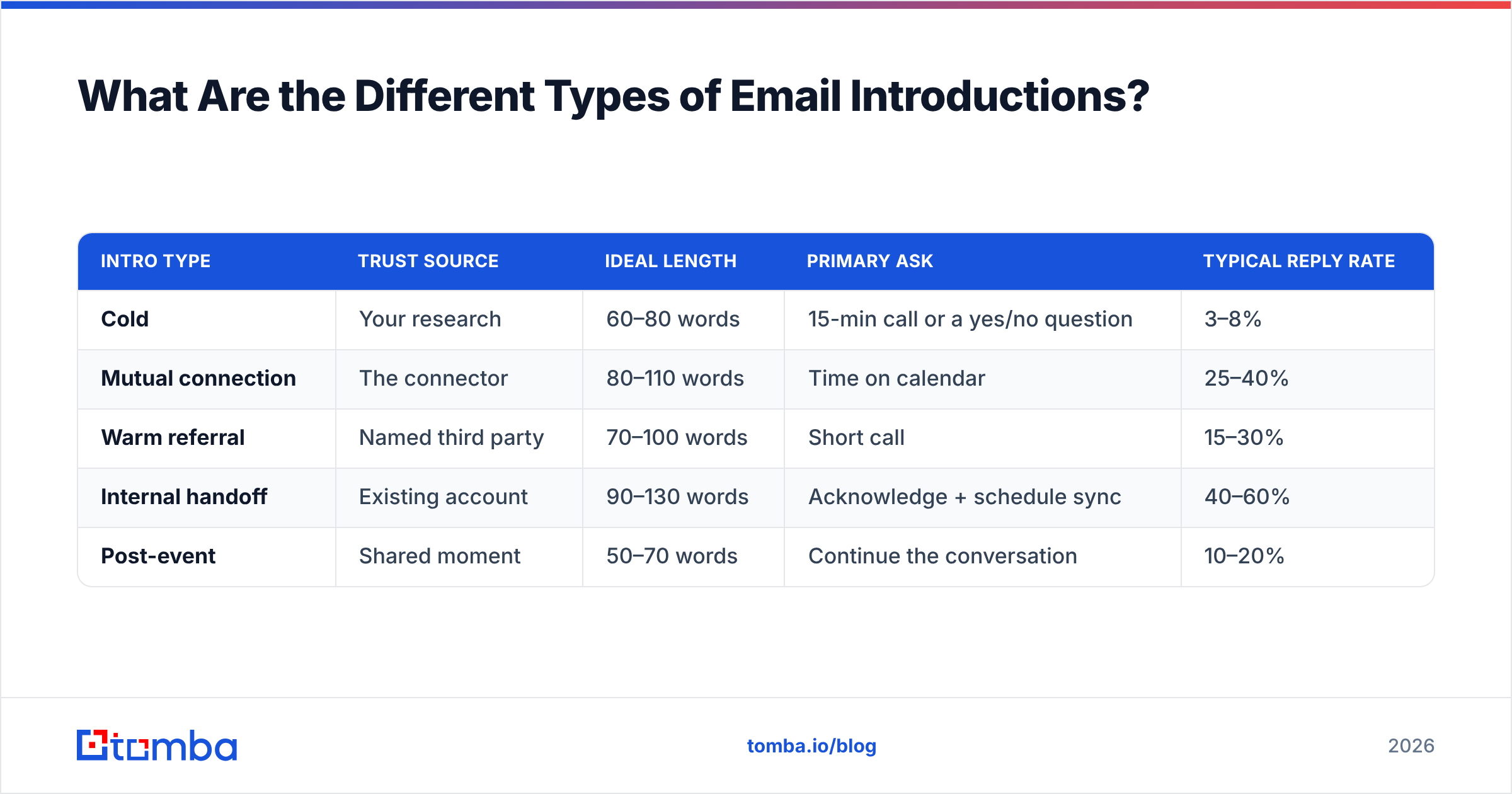
The word "introduction" covers at least four distinct scenarios, and treating them identically is the most common structural mistake in B2B outreach.
- Cold introduction — no shared context at all. You found them via research. Burden of proof is entirely on you, so relevance must be in the first sentence.
- Mutual-connection introduction — someone you both know is vouching. The connector's name does the trust work; your job is to be worth the vouch.
- Warm referral introduction — a customer or colleague suggested you reach out but isn't forwarding anything. You carry the name yourself.
- Internal handoff introduction — a new rep, CSM, or account manager taking over an existing relationship. The relationship exists; continuity is the entire message.
- Self-introduction after an event — conference, webinar, LinkedIn comment thread. A shared moment substitutes for a shared person.
- Founder-to-founder or peer introduction — no sales motion, mutual curiosity. Shortest of the lot, and the most sensitive to any whiff of a pitch.
| Intro type | Trust source | Ideal length | Primary ask | Typical reply rate |
|---|---|---|---|---|
| Cold | Your research | 60–80 words | 15-min call or a yes/no question | 3–8% |
| Mutual connection | The connector | 80–110 words | Time on calendar | 25–40% |
| Warm referral | Named third party | 70–100 words | Short call | 15–30% |
| Internal handoff | Existing account | 90–130 words | Acknowledge + schedule sync | 40–60% |
| Post-event | Shared moment | 50–70 words | Continue the conversation | 10–20% |
Those reply-rate ranges vary wildly by industry and list quality — treat them as relative ordering, not benchmarks to hold your team to.
What Structure Makes an Introduction Email Work?#
Every intro template below is a variation on one skeleton. Learn the skeleton and you can write your own in ninety seconds.
Line 1 — the hook that proves specificity. A trigger event, a shared connection, a detail from their site. Never "I hope this email finds you well." Never a description of your company.
Line 2 — who you are, compressed. One clause. "I run partnerships at Acme, we handle warehouse routing for mid-market retailers." Not a paragraph. Not your mission statement.
Line 3 — the bridge. The single sentence connecting their situation to your reason for writing. This is where you earn the reply, and it's the line templates cannot write for you.
Line 4 — one ask, sized to the relationship. Cold intro: ask a question they can answer in one word, or propose a 15-minute call with a specific purpose. Warm intro: ask for time directly. Never stack two asks.
Signature — human, not a billboard. Name, role, company, one link. Image-heavy signatures with four social icons and a banner are a measurable deliverability tax.
What to cut: the "quick question" opener, the "just circling back" energy in a first email, adjectives about your own product, and any sentence that starts with "We are a leading."
What Are the Best Cold Email Introduction Templates?#
Template 1 — The trigger-event intro#
Subject: your new Dallas facility
Hi {First},
Saw the announcement about the Dallas facility opening in Q3 — congrats.
I work with ops teams at {similar company type} on the routing side, and the pattern we see is that a second facility roughly triples the exception handling in month one.
Is that something your team is already sized for, or is it on the list for later?
{Your name}
The ask is a yes/no question. It costs the recipient four words to answer, and any answer opens a thread.
Template 2 — The specific-observation intro#
Subject: the pricing page on {company}.com
Hi {First},
Your pricing page lists three tiers but the enterprise tier has no self-serve path — I'm guessing that's deliberate.
I'm {name} at {company}; we help {category} teams shorten the enterprise evaluation cycle without adding a self-serve tier.
Worth 15 minutes to compare notes on what's working for teams your size?
{Your name}
Template 3 — The peer-benchmark intro#
Subject: how {peer company} handles {problem}
Hi {First},
{Peer company} moved their {process} in-house last quarter and cut their cycle time by about a third. Different stack than yours, same bottleneck.
I'm {name}, I run {function} at {company}. Happy to walk through what they changed — no pitch, it's a 10-minute story.
Want it as a call or as a two-paragraph email?
{Your name}
The either/or close ("call or email?") outperforms a single call ask, because the low-cost option is genuinely low-cost.
Template 4 — The "wrong person" intro#
Subject: right person for {topic}?
Hi {First},
You may not own this — if so, a name is all I need.
We're working with {2–3 named similar companies} on {specific outcome}. Who at {company} would care about that?
Thanks,
{Your name}
This one has an unfair advantage: it's easy to be helpful when the only ask is a referral inside the recipient's own building.
Cold templates only perform if the address behind them is real. Run your list through an email verifier before the send, and use a proper email finder rather than guessing at first.last@ patterns — pattern-guessing is where most bounce rates originate.
How Do You Write a Mutual-Connection Introduction?#
The mutual-connection intro has two audiences and most people only write for one.
The double opt-in is non-negotiable. Before anyone forwards anything, the connector asks the recipient if they want the intro. This is standard practice in venture and increasingly in B2B sales, and the reason is simple: a surprise forward spends the connector's credibility without asking.
Template 5 — Asking your connector for the intro#
Subject: intro to {Name} at {Company}?
Hi {Connector},
I noticed you're connected to {Name} at {Company}. Would you be comfortable introducing us?
Forwardable blurb below so you can send it in one click — and no problem at all if it's not a relationship where that makes sense.
{Your name} runs {function} at {company}. They've been working with {2 named companies} on {specific outcome}. They're asking for 15 minutes to see whether the same approach fits {Company}'s setup — happy to say no if the timing's wrong.#
Thanks either way,
{Your name}
The forwardable blurb is the whole trick. You're removing the writing burden from the person doing you a favor. Note the explicit permission to decline — it raises acceptance, not lowers it.
Template 6 — The connector's forward (write this for them too)#
Subject: {Person A} <> {Person B}
{A}, meet {B} — {one-line description of B and why A should care}.
{B}, meet {A} — {one-line description of A and why B should care}.
I'll let you two take it from here.
Template 7 — Your reply after the intro lands#
Hi {Name}, thanks {Connector} — moving you to BCC.
{Name}, short version: we {one-sentence what you do} and {Connector} thought the overlap with {specific thing at their company} was worth a conversation.
Are you open to 15 minutes on {two specific day/time options}? Happy to work around whatever's easier.
{Your name}
Moving the connector to BCC in your first reply is a small courtesy that experienced operators notice immediately. Reply within 24 hours — the connector's goodwill has a short half-life.
What Does a Good Internal Handoff Introduction Look Like?#
Account transitions are where intro emails do the most damage when they're generic. The customer isn't meeting a stranger — they're being told their relationship just changed, which reads as risk unless you handle it well.
Template 8 — New account manager handoff#
Subject: taking over from {Predecessor} — quick hello
Hi {First},
{Predecessor} handed me the notes on your account this week, and I wanted to introduce myself before anything lands in your inbox that isn't from a name you recognize.
Three things I've already read: your renewal is {month}, {specific open issue} is still open on our side, and you flagged {specific request} in June. I've picked up the open one.
No agenda for our first call beyond hearing what {Predecessor} may not have written down. Does {day} at {time} work?
{Your name}
The specificity in paragraph three is the entire message. Anything vaguer ("I'm excited to learn about your goals!") tells the customer they're starting from zero, which is exactly the fear you're trying to defuse.
Template 9 — Introducing a colleague into an existing thread#
Hi {First} — looping in {Colleague}, who owns {area} here and has done this migration four times this year.
{Colleague}, {First}'s team is on {specific setup} and the open question is {specific question}.
Over to you both — I'll stay on the thread.

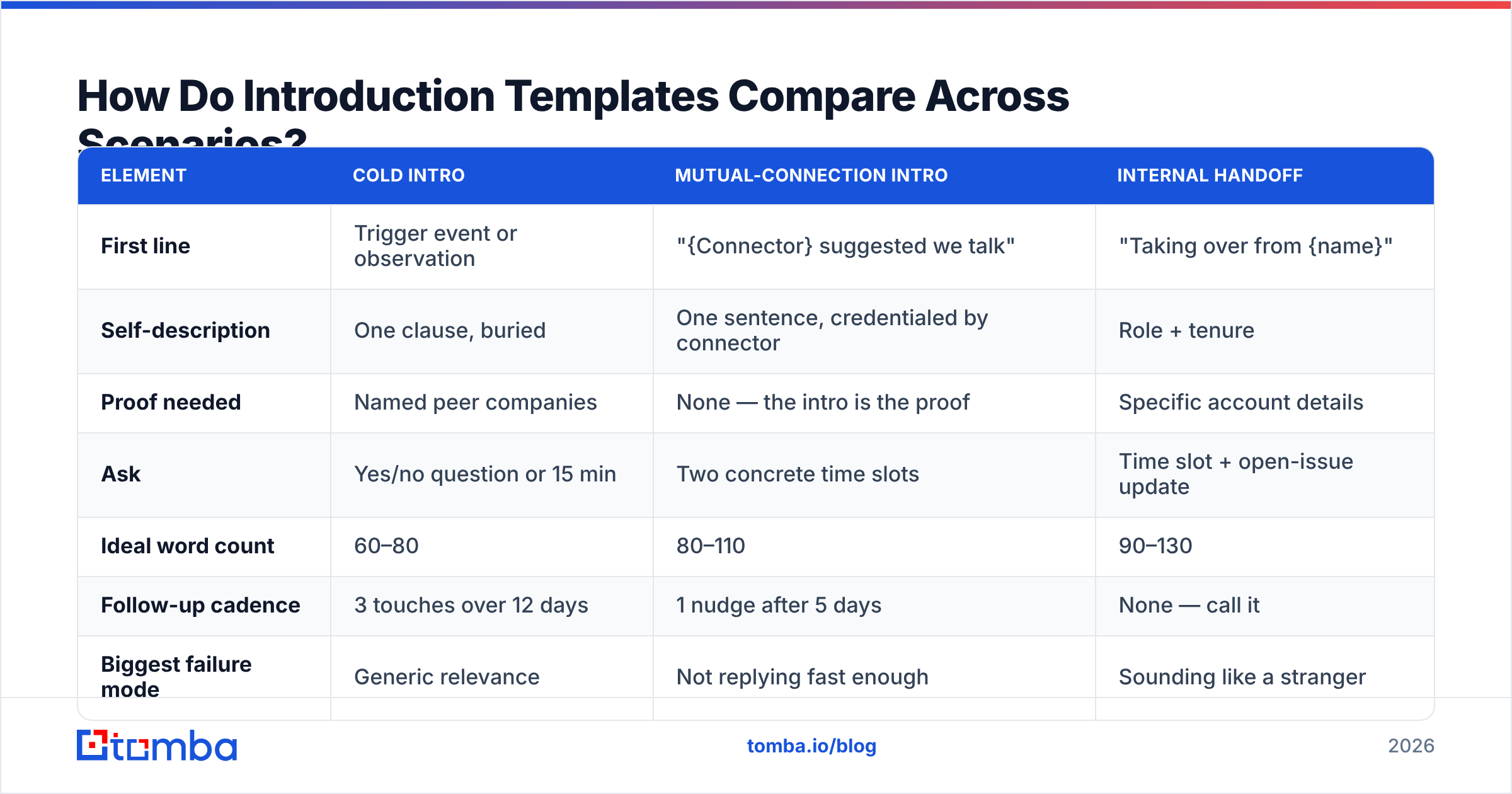
How Do Introduction Templates Compare Across Scenarios?#
| Element | Cold intro | Mutual-connection intro | Internal handoff |
|---|---|---|---|
| First line | Trigger event or observation | "{Connector} suggested we talk" | "Taking over from {name}" |
| Self-description | One clause, buried | One sentence, credentialed by connector | Role + tenure |
| Proof needed | Named peer companies | None — the intro is the proof | Specific account details |
| Ask | Yes/no question or 15 min | Two concrete time slots | Time slot + open-issue update |
| Ideal word count | 60–80 | 80–110 | 90–130 |
| Follow-up cadence | 3 touches over 12 days | 1 nudge after 5 days | None — call it |
| Biggest failure mode | Generic relevance | Not replying fast enough | Sounding like a stranger |
What About Subject Lines and Follow-Ups?#
Subject lines for intros follow one rule: they should look like something a colleague would write, not something a marketing team would.
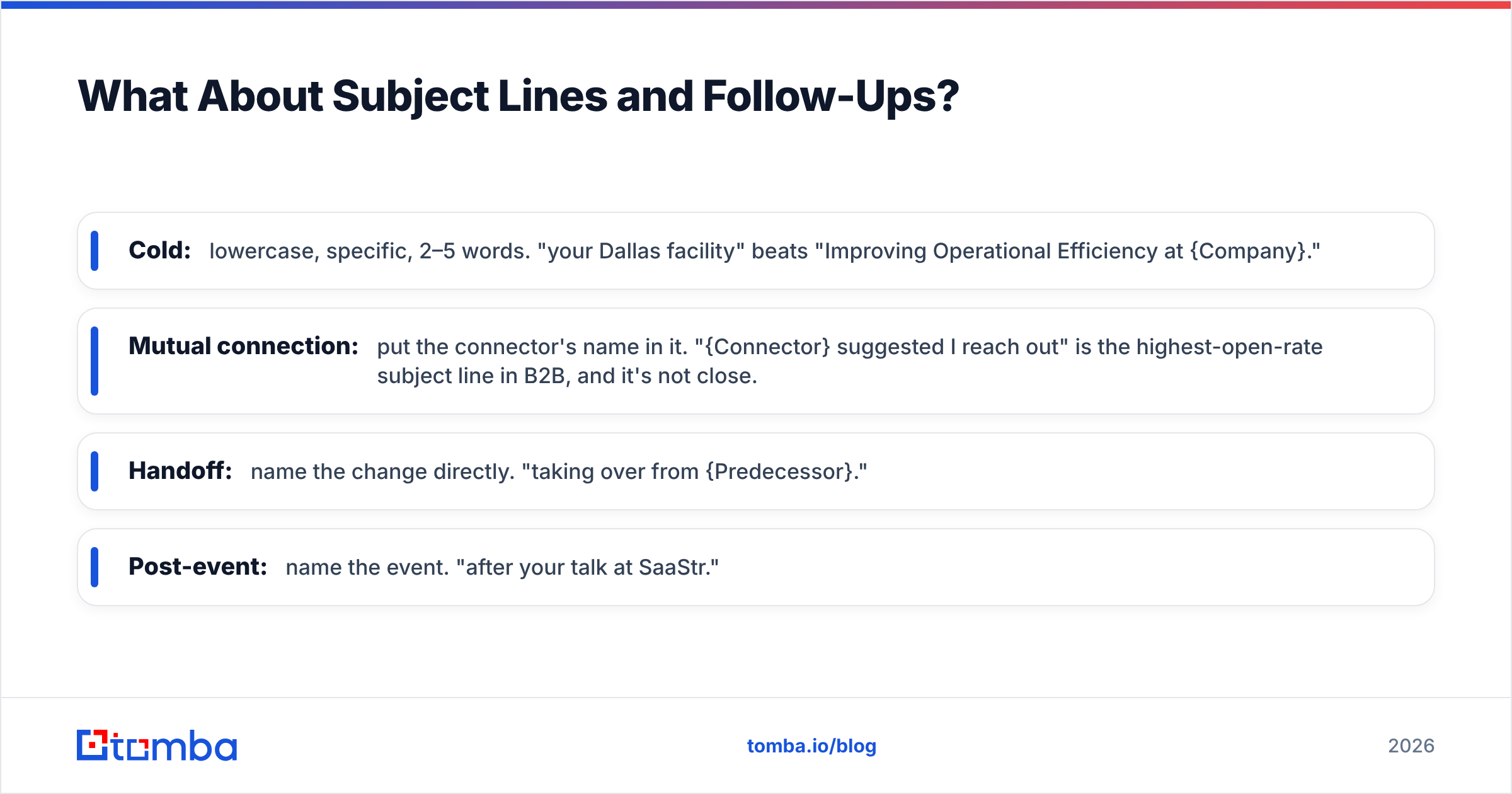
- Cold: lowercase, specific, 2–5 words. "your Dallas facility" beats "Improving Operational Efficiency at {Company}."
- Mutual connection: put the connector's name in it. "{Connector} suggested I reach out" is the highest-open-rate subject line in B2B, and it's not close.
- Handoff: name the change directly. "taking over from {Predecessor}."
- Post-event: name the event. "after your talk at SaaStr."
Avoid brackets, avoid ALL CAPS, avoid the word "quick." If you want to sanity-check a line before sending, a subject line tester will flag the spam-adjacent phrasing you've stopped noticing.
For follow-ups on cold intros: three touches maximum, spread across roughly twelve days, and each one must add something new — a different angle, a relevant piece of news, a shorter ask. A follow-up that says "just bumping this up" is a request for the recipient to feel guilty, which is not a strategy.
For mutual-connection intros, one nudge after five days is the ceiling. Beyond that you're taxing the connector, not the recipient.
What Deliverability Basics Protect Your Intro Emails?#
You can write the best intro in your category and still land in spam. Three things matter more than the copy:
- List hygiene. Bounce rates above 2–3% signal to mailbox providers that you're not maintaining your data. Verify before every campaign, not once a quarter.
- Authentication. SPF, DKIM, and DMARC records on your sending domain. Both Google and Yahoo now enforce authentication requirements for bulk senders, and non-compliant mail gets rejected outright rather than filtered.
- Volume ramp. A new domain sending 500 intros on day one will be throttled. Ramp over weeks, not days.
If your intros are landing but not converting, the copy is the problem. If they're not landing at all, no template rewrite will help you — check your SPF record and your bounce logs first. Vendor documentation from providers like HubSpot covers the sending-side configuration in depth, and G2 reviews are a reasonable starting point for comparing deliverability tooling.
One more structural note: personalizing at scale requires clean firmographic data, not just an email address. Knowing someone's title, headcount, and tech stack is what makes line three of the skeleton writable. Data enrichment is the unglamorous input that makes the glamorous copy possible.
How Do You Personalize Templates Without Spending All Day?#
Batch the research, not the writing.
Pull 25 prospects. Spend 20 minutes collecting one specific fact about each — a funding round, a job posting, a product launch, a podcast appearance. Store the fact in a column next to the contact. Then write all 25 intros in one sitting, dropping the fact into line one.
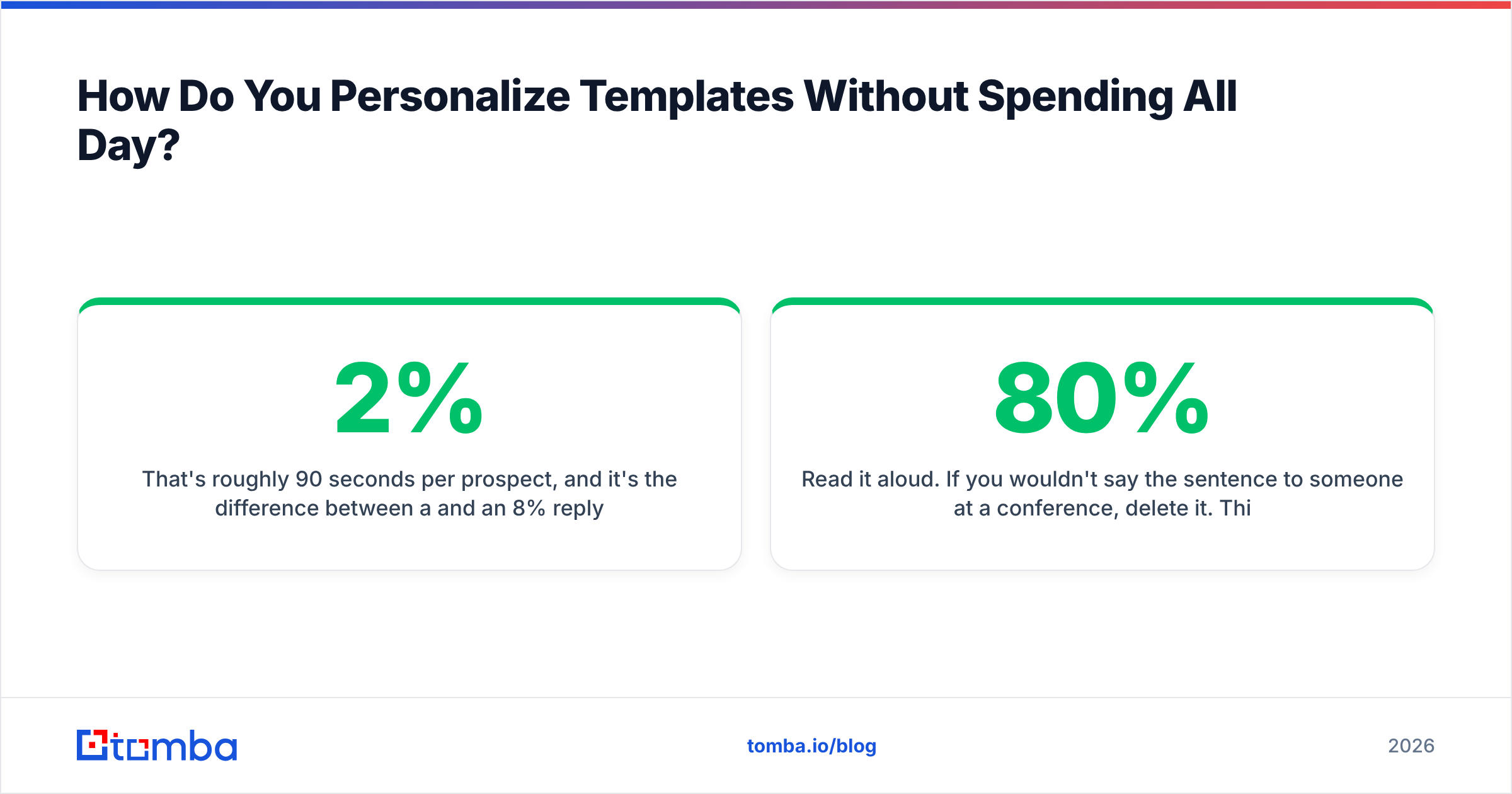
That's roughly 90 seconds per prospect, and it's the difference between a 2% and an 8% reply rate. The trap is trying to research and write simultaneously; context-switching kills the throughput of both.
For teams doing this weekly, wire the data collection into your workflow rather than a spreadsheet you forget about. A domain search surfaces the full contact set at a target company in one pass, so you're selecting who to write to rather than hunting for anyone reachable.
Two habits worth keeping:
- Write the ask before the hook. Deciding what you actually want prevents the rambling middle paragraph.
- Read it aloud. If you wouldn't say the sentence to someone at a conference, delete it. This single test removes about 80% of B2B email filler.
Where Should You Start?#
Pick the intro type you send most often, take the matching template above, and rewrite line three — the bridge — for your next ten prospects. Leave everything else alone. That one line carries most of the reply-rate variance, and changing one variable at a time is the only way you'll know what worked.
Then fix your data. Every template on this page assumes the address is deliverable and the person still holds the role you think they hold. When that assumption breaks, the copy never gets a fair test.
The Tomba Email Finder covers that layer: verified professional addresses by name, company, or domain, with confidence scoring so you know which contacts deserve your best intro and which need a second look. The free tier includes 25 searches a month if you want to test it against a list you already have, and paid plans start at $49/mo — see Tomba pricing for the full breakdown. Write the intro once; send it to an address that exists.
Related guides#
Ready to find emails that actually work?
Join 150,000+ professionals who stopped guessing and started sending. Free credits on signup — no credit card required.
Get the Tomba newsletter
Practical outbound tactics and product updates — once every two weeks.
About the author