Email Lead Finder: How to Find and Verify B2B Leads in 2026
An email lead finder is only useful if the addresses actually deliver. Here's how these tools work under the hood, where accuracy claims fall apart, and how the main 2026 options compare on coverage, verification depth, and price.
TL;DR
- An email lead finder maps a person plus a company domain to a deliverable business email address — and the good ones verify it before handing it back.
- Coverage and accuracy are different metrics. A tool that returns an address 90% of the time but bounces 12% is worse than one that returns 65% with a 2% bounce rate.
- Pattern guessing (
first.last@domain.com) still powers a surprising share of "AI-powered" finders. The differentiator in 2026 is what happens after the guess. - Catch-all domains are where most tools quietly fail. Ask any vendor how they handle them before you commit to an annual plan.
- Budget realistically: usable B2B email data runs roughly $0.01–$0.05 per verified contact at mid-tier volumes. Anything advertised as unlimited-and-free is a list resale.
What is an email lead finder?#
An email lead finder takes what you already know about a prospect — a full name and a company domain, a LinkedIn profile URL, or just a company website — and returns the business email address for that person.
Think of it like a phone directory that was never actually printed. The information exists in public: in press releases, git commit logs, conference speaker lists, WHOIS records, published PDFs, staff pages, and the header of every email that company ever sent to a mailing list. An email lead finder crawls those surfaces, resolves the pattern each company uses, and reconstructs the address you asked for.
That reconstruction step is why "finder" is slightly misleading. Only a fraction of returned addresses were found verbatim somewhere. The rest were derived — inferred from the company's dominant format and then tested. Whether that test is rigorous determines whether your campaign lands in the inbox or in a bounce log.
If you want the formal definitions of the surrounding vocabulary, the B2B glossary covers terms like catch-all, SMTP handshake, and sender reputation without the marketing gloss.
How does an email lead finder actually work?#
Every credible tool runs a version of the same five-stage pipeline. Understanding it tells you exactly which questions to ask a vendor.
- Domain resolution — The tool converts "Stripe" into
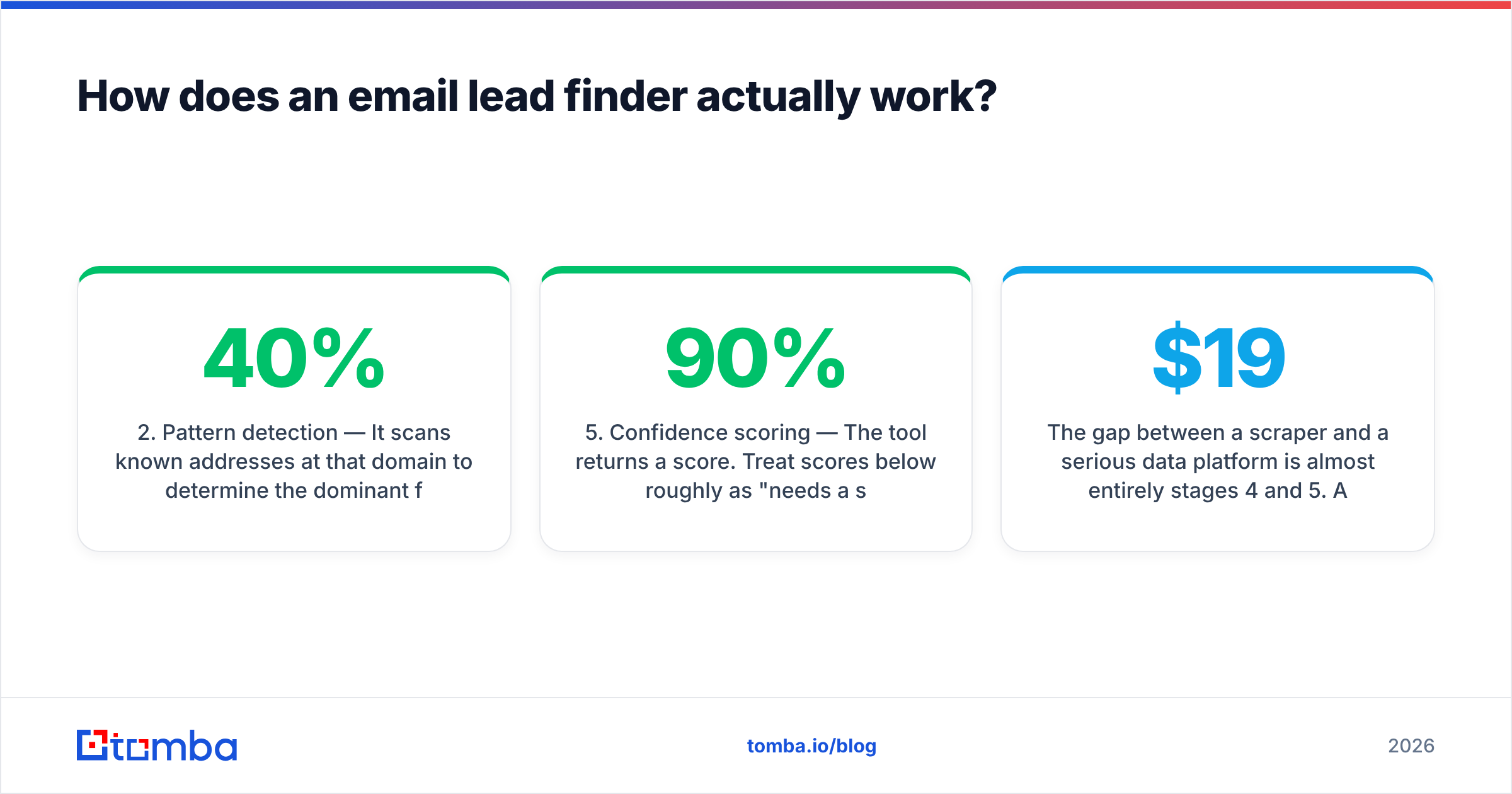
stripe.com. Sounds trivial, fails constantly on companies with rebrands, regional TLDs, or holding-company structures. Test it with a mid-market European firm, not with Salesforce. - Pattern detection — It scans known addresses at that domain to determine the dominant format. Most companies use one of about eight patterns; roughly 40% use
first.last@. You can inspect a company's format yourself with a company email pattern check before you ever spend a credit. - Candidate generation — Name plus pattern yields one to four candidate addresses. This is the step a free email permutator replicates in a browser tab, which is why permutation alone is not a product.
- Verification — Each candidate is checked: MX records exist, the domain accepts mail, and — where the receiving server allows it — an SMTP handshake confirms the specific mailbox. This is the expensive stage, and it's where cheap tools cut corners.
- Confidence scoring — The tool returns a score. Treat scores below roughly 90% as "needs a second check," not as "probably fine."
The gap between a $19/mo scraper and a serious data platform is almost entirely stages 4 and 5. Anyone can do stages 1 through 3.

Why do email lead finders disagree so much on accuracy?#
Because they measure different things and rarely say which.
Vendor A claims 98% accuracy. Vendor B claims 95%. Vendor A is measuring only the addresses it chose to return after discarding everything it wasn't sure about. Vendor B is measuring across all lookups attempted. On the same list, Vendor B might deliver you twice as many usable contacts.
Three numbers matter, and you should compute all three yourself on a sample:
- Hit rate — of 100 prospects submitted, how many came back with any address at all?
- Bounce rate — of the addresses returned, how many hard-bounced on send?
- Effective yield — hit rate multiplied by (1 − bounce rate). This is the only number that maps to pipeline.
A tool with a 55% hit rate and a 2% bounce rate gives you 54 usable contacts per 100. A tool with an 85% hit rate and a 20% bounce rate gives you 68 — but it also torches your domain reputation getting there, which costs you the next three campaigns. Mailbox providers weight hard bounces heavily; Google's own postmaster guidance treats elevated bounce and complaint rates as a direct signal to route future mail to spam.

The practical takeaway: never send to raw finder output on a cold domain. Run the list through a dedicated email verifier as a second pass, even when the finder claims it already verified. The two systems fail differently, and the intersection is far cleaner than either alone.
Which email lead finder should you use in 2026?#
The market has split into three shapes: real-time finders (query a person, get an address now), static databases (buy access to a pre-built contact set), and all-in-one sequencers that bundle mediocre data with a sending engine.
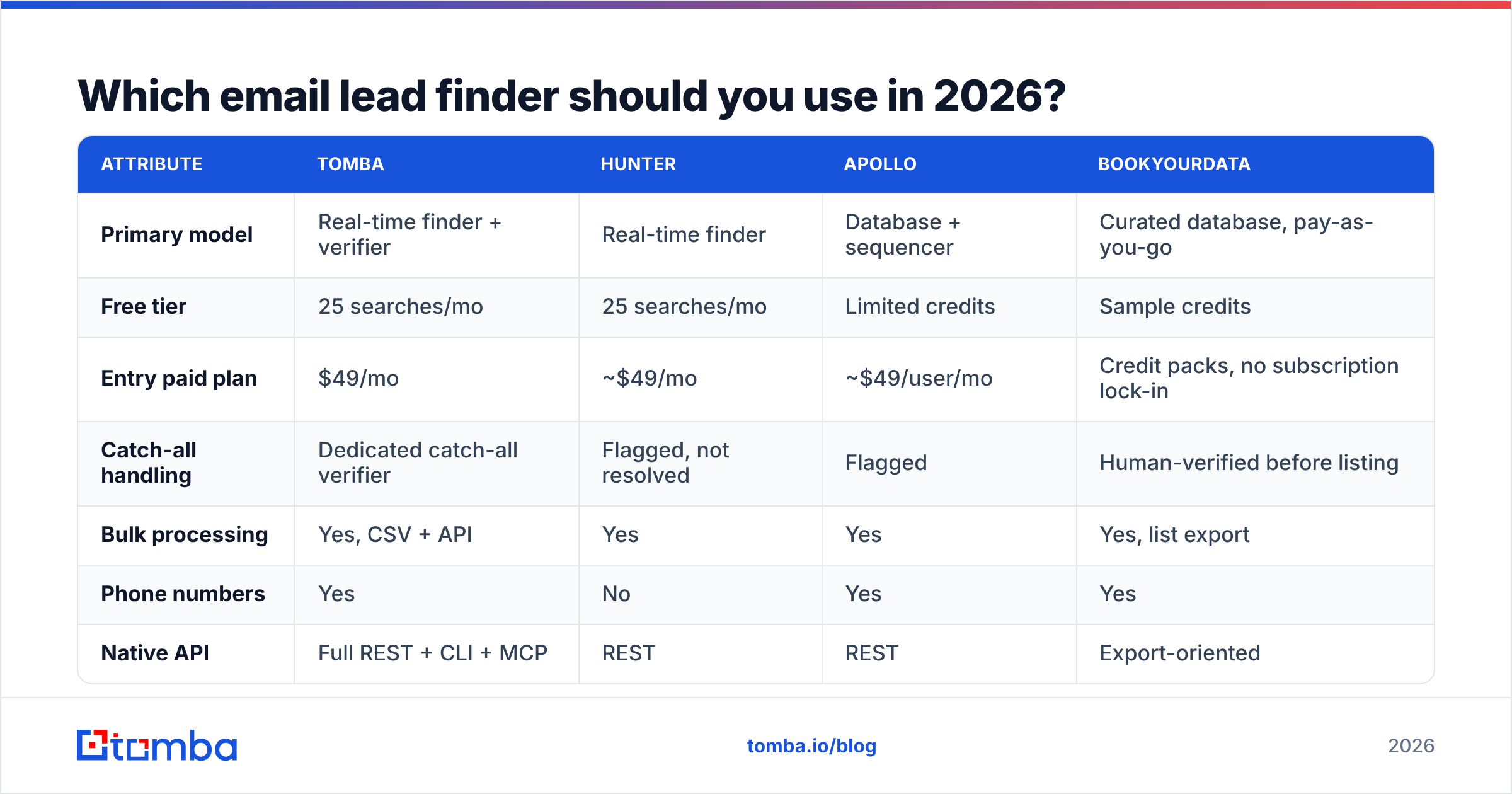
Here's how the main options compare on the attributes that actually change your results.
| Attribute | Tomba | Hunter | Apollo | BookYourData |
|---|---|---|---|---|
| Primary model | Real-time finder + verifier | Real-time finder | Database + sequencer | Curated database, pay-as-you-go |
| Free tier | 25 searches/mo | 25 searches/mo | Limited credits | Sample credits |
| Entry paid plan | $49/mo | ~$49/mo | ~$49/user/mo | Credit packs, no subscription lock-in |
| Catch-all handling | Dedicated catch-all verifier | Flagged, not resolved | Flagged | Human-verified before listing |
| Bulk processing | Yes, CSV + API | Yes | Yes | Yes, list export |
| Phone numbers | Yes | No | Yes | Yes |
| Native API | Full REST + CLI + MCP | REST | REST | Export-oriented |
| Best fit | Teams that need verified emails at API scale | Simple domain lookups | Teams wanting data + sequencing in one seat | Buyers who want a vetted list without a subscription |
BookYourData deserves a specific note: it's built around human-verified, purchase-by-the-credit lists, which is a genuinely different buying model. If you need 2,000 contacts once for a single campaign and don't want a recurring seat, that structure often beats a monthly subscription on pure cost. If you need continuous, programmatic lookups wired into a CRM or an enrichment job, a real-time API is the better shape. Both are legitimate — they solve different problems.

For direct head-to-heads, the Apollo alternative breakdown covers the data-versus-sequencing trade-off in more depth, and third-party review aggregation on G2 is useful for spotting support and billing complaints that never appear on a vendor site.

What should an email lead finder cost?#
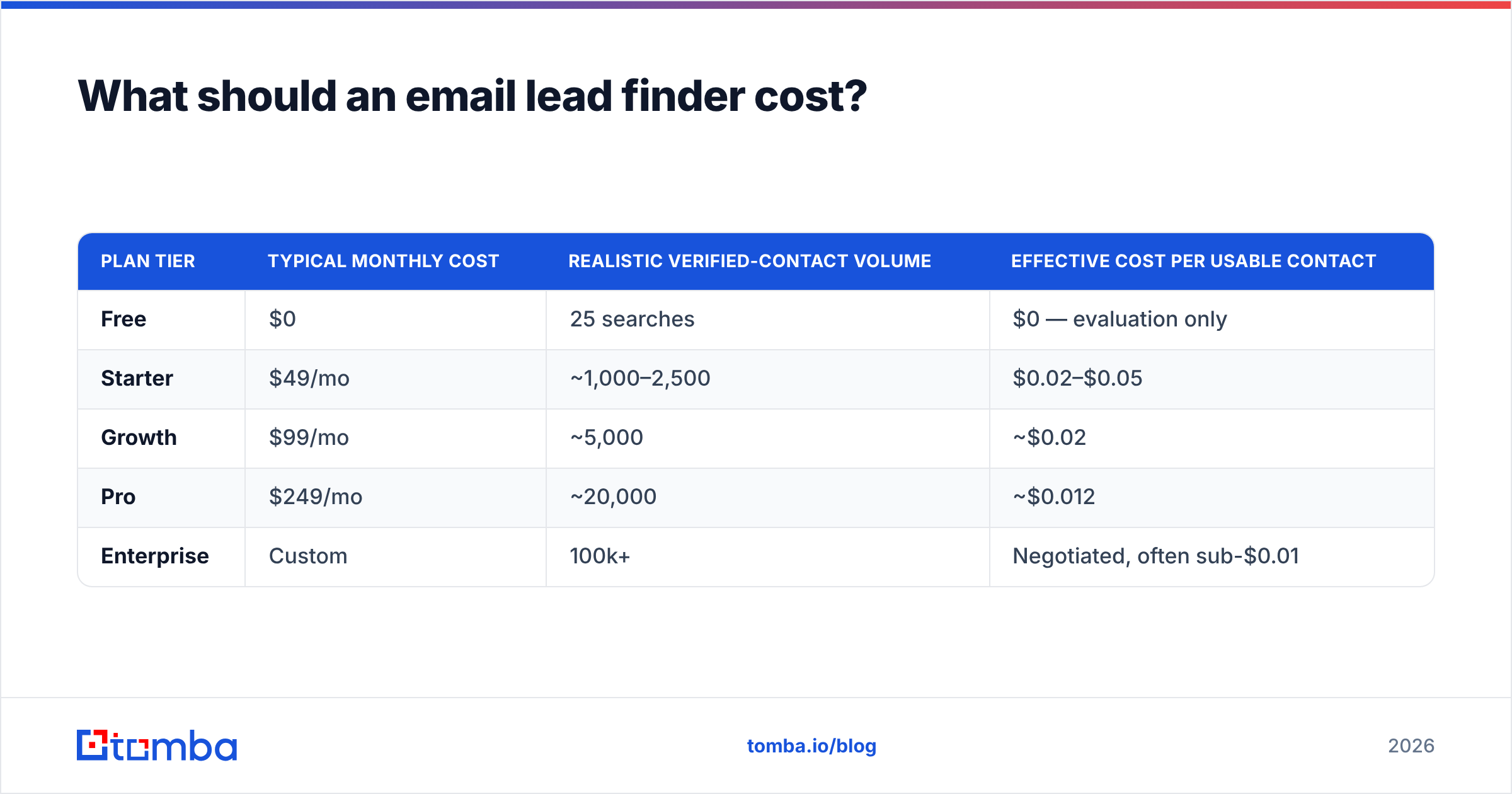
Price per returned address is meaningless. Price per verified, non-bouncing address is the number.
| Plan tier | Typical monthly cost | Realistic verified-contact volume | Effective cost per usable contact |
|---|---|---|---|
| Free | $0 | 25 searches | $0 — evaluation only |
| Starter | $49/mo | ~1,000–2,500 | $0.02–$0.05 |
| Growth | $99/mo | ~5,000 | ~$0.02 |
| Pro | $249/mo | ~20,000 | ~$0.012 |
| Enterprise | Custom | 100k+ | Negotiated, often sub-$0.01 |
Those bands hold roughly across the category. Tomba's published pricing follows exactly that shape: free at 25 searches/mo, $49 Starter, $99 Growth, $249 Pro, custom Enterprise.
Two cost traps to watch:
- Credit burn on failed lookups. Some tools charge a credit whether or not they return an address. Over a 10,000-row list with a 60% hit rate, that's 4,000 credits for nothing. Confirm the policy in writing.
- Annual lock-in before a real test. The discount is real, but so is the 11 months you spend regretting it. Run a paid month first.
How do you test an email lead finder before you buy?#
Do this in an afternoon. It's the single highest-leverage 90 minutes in your tooling decision.
- Build a 100-row truth set. Pull 100 prospects whose email addresses you already know — past customers, inbound leads, conference contacts. You need ground truth to measure against.
- Strip the emails out. Leave only name, company, and domain. Feed that to each tool you're evaluating.
- Score hit rate and correctness. How many came back? How many exactly matched your known address? Case-insensitive comparison, ignore aliases.
- Deliberately include hard cases. At least 20 rows should be non-US companies, hyphenated or non-Latin names, and firms under 50 employees. Every tool aces Fortune 500 US contacts. Nobody sells only to those.
- Send a 50-address warm test. From a secondary domain, not your primary. Count hard bounces after 48 hours.
- Check the catch-all subset separately. Isolate rows where the domain accepts all mail and see which tool gives you a real verdict rather than a shrug.
Run the same 100 rows through every candidate. Differences that look like rounding error on 20 rows become obvious at 100.
Where do email lead finders still break?#
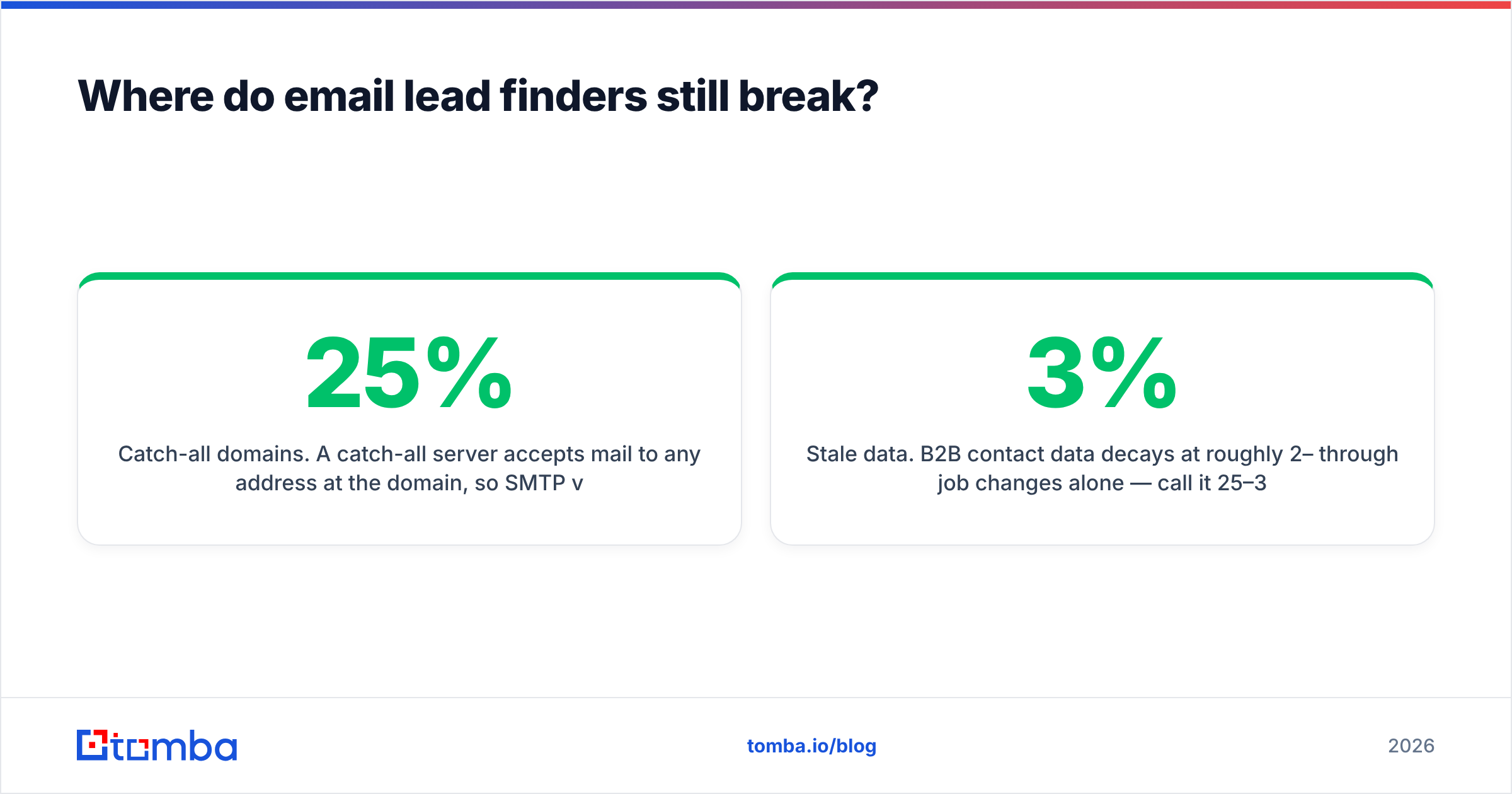
Catch-all domains. A catch-all server accepts mail to any address at the domain, so SMTP verification returns "valid" for asdfgh@company.com too. Roughly 20–25% of business domains are configured this way, and it's rising as companies adopt aggressive spam filtering upstream. Most finders flag these as "risky" and stop. Resolving them requires cross-referencing multiple independent signals — which is the entire job of a catch-all verifier.
Role accounts. info@, sales@, support@ are technically deliverable and practically worthless for one-to-one outreach. They also correlate with higher complaint rates. Filter them out unless your motion specifically targets shared inboxes.
Stale data. B2B contact data decays at roughly 2–3% per month through job changes alone — call it 25–30% annually, a figure HubSpot and most CRM vendors report consistently. A database purchased in January is meaningfully wrong by October. Real-time lookup sidesteps this; static lists do not, unless the vendor re-verifies on a published cadence.
Greylisting and rate limits. Large mail providers throttle verification traffic. A tool hitting those limits will silently downgrade to pattern-guessing without telling you. The tell: suspiciously fast bulk jobs with uniformly high confidence scores.
Compliance scope. GDPR and similar regimes permit B2B outreach under legitimate interest in many jurisdictions, but the requirements around sourcing, disclosure, and opt-out are non-trivial. Know where your vendor sources data — Tomba publishes its data sources — and keep your own suppression list current.
Should you use a real-time finder or a static database?#
Use a real-time finder when your prospect list is generated dynamically — from website visitors, inbound signups, LinkedIn activity, funding announcements, or job-change triggers. You're asking about specific people you've already identified, and freshness matters more than volume.
Use a static database when you need to discover who to target inside a firmographic segment and you don't have names yet. Databases are built for filtering: industry, headcount, tech stack, geography.
Most teams past their first year end up using both, and the integration point is where operations get messy. Whichever you pick, wire it into your CRM rather than living in CSV exports — HubSpot and Salesforce connectors exist precisely so enrichment happens on record creation instead of in a weekly manual batch.
What does a good workflow look like end to end?#
A workable stack in 2026 looks like this:
- Source — identify accounts via firmographic filters, intent signals, or website visitor reveal on your own traffic.
- Find — resolve contacts at those accounts with a real-time email finder or domain search for whole-company sweeps.
- Verify — second-pass everything through verification before it enters a sequence, including catch-all resolution.
- Enrich — add title, seniority, location, and phone so segmentation and personalization have something to work with.
- Sync — push to CRM with source attribution so you can attribute pipeline back to the data vendor at renewal time.
The verification step is the one teams skip when they're behind on quota. It's also the one that determines whether the next quarter's sends reach anyone at all.
Get verified leads without the bounce cleanup#
If you're evaluating an email lead finder right now, start with the part that's cheapest to test and most expensive to get wrong: accuracy on your own prospect list.
The Tomba Email Finder gives you 25 free searches a month with no card — enough to run the 100-row truth-set test described above across a meaningful sample. Every result comes back with a confidence score and verification status, catch-all domains get resolved rather than shrugged at, and the same lookups are available through the Tomba API, a CLI, and a Chrome extension when you're ready to automate. Paid plans start at $49/mo.
Test it against whatever you're using now on the same 100 rows. The effective-yield number will tell you everything you need to know.
Related guides#
Ready to find emails that actually work?
Join 150,000+ professionals who stopped guessing and started sending. Free credits on signup — no credit card required.
Get the Tomba newsletter
Practical outbound tactics and product updates — once every two weeks.
About the author