Email Lead Generation Software: The 2026 Buyer's Guide
Most email lead generation software sells credits, not contacts. Here is how the five layers of the stack actually work, what they cost in 2026, and where accuracy quietly falls apart.
TL;DR#
- "Email lead generation software" is not one product. It is five layers — capture, discovery, enrichment, verification, and sending — and most vendors are strong in one and mediocre in the rest.
- Credits are the real unit of pricing. A $99/mo plan that returns 60% valid addresses is more expensive than a $49/mo plan that returns 95%.
- Verification is the cheapest insurance you can buy. A 3% bounce rate on a new domain can cost you the domain, not just the campaign.
- Buy discovery and verification from a data-first vendor, buy sending from a sending-first vendor. Suites that promise both usually compromise the data side.
- For most teams under 50 seats, the honest stack in 2026 is: one finder/verifier (Tomba, roughly $49–$99/mo), one sequencer, and a CRM you already own.
What is email lead generation software?#
Email lead generation software is any tool that turns an unknown company or person into a contactable, verified email address you own in your CRM. That is the whole job. Everything else — scoring, sequencing, dashboards — sits on top of that one output.
The confusion in the category comes from vendors describing five different jobs with the same three words. Break the stack into its actual layers before you compare a single price:
- Capture — inbound forms, chat widgets, lead magnets, and website visitor identification. These convert traffic you already have. Highest intent, lowest volume.
- Discovery — finding email addresses for people who never visited your site. This is the email finder layer: domain search, name-plus-domain lookup, LinkedIn extraction, bulk lists.
- Enrichment — attaching firmographics, job titles, tech stack, and phone numbers to a thin record so your segmentation and personalization have something to work with.
- Verification — confirming an address exists and will accept mail before you send. SMTP checks, catch-all handling, role-account and disposable-domain filtering.
- Activation — sequencing, warmup, inbox rotation, reply detection, and CRM sync. This is where deliverability lives or dies.
A tool that claims to do all five is making a trade-off somewhere. Usually it is layer 2 and 4 — the data itself — because those are the expensive parts to maintain.
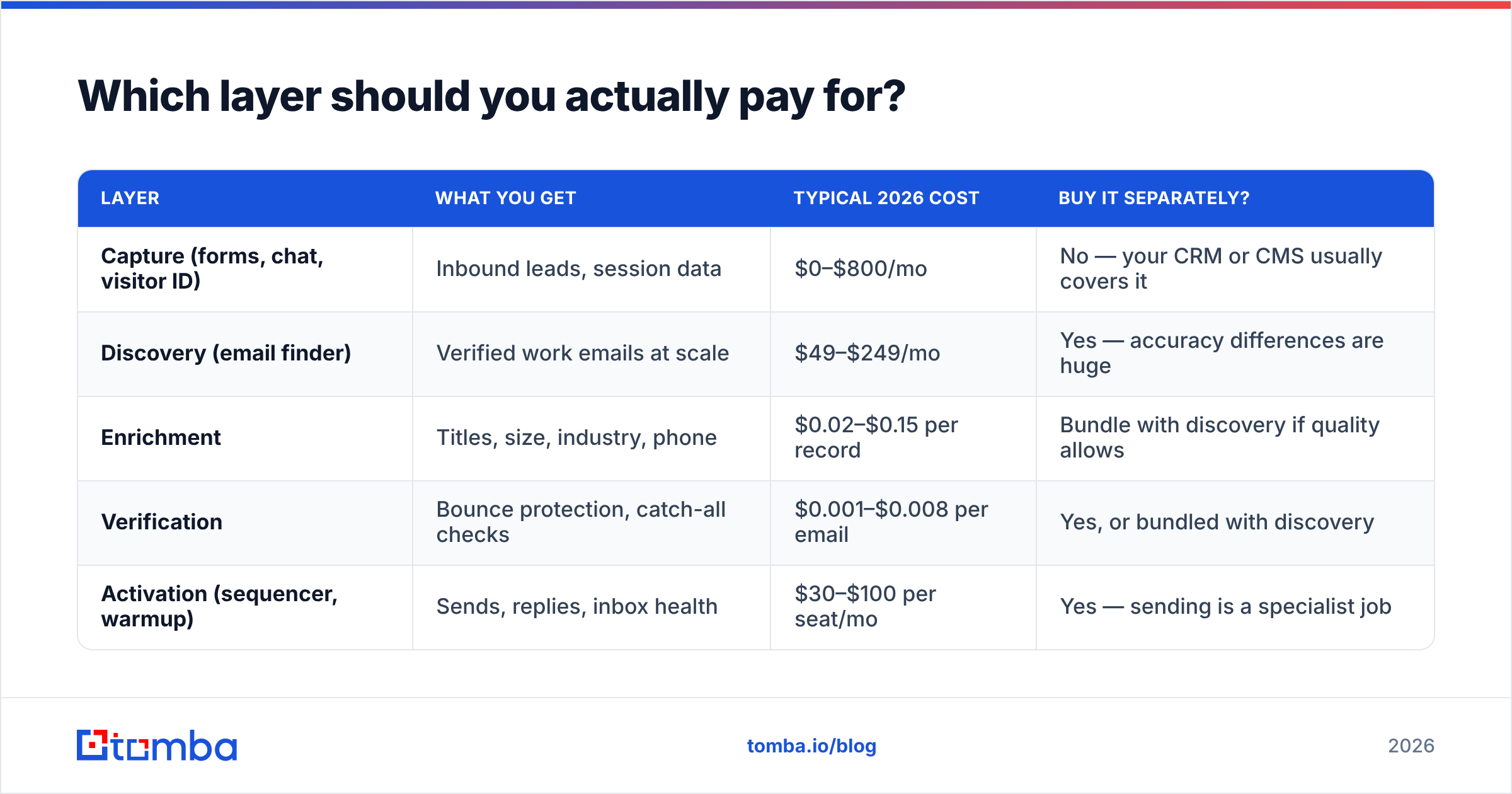
Which layer should you actually pay for?#
| Layer | What you get | Typical 2026 cost | Buy it separately? |
|---|---|---|---|
| Capture (forms, chat, visitor ID) | Inbound leads, session data | $0–$800/mo | No — your CRM or CMS usually covers it |
| Discovery (email finder) | Verified work emails at scale | $49–$249/mo | Yes — accuracy differences are huge |
| Enrichment | Titles, size, industry, phone | $0.02–$0.15 per record | Bundle with discovery if quality allows |
| Verification | Bounce protection, catch-all checks | $0.001–$0.008 per email | Yes, or bundled with discovery |
| Activation (sequencer, warmup) | Sends, replies, inbox health | $30–$100 per seat/mo | Yes — sending is a specialist job |
The pattern most successful outbound teams land on: pay a data-first vendor for layers 2–4, pay a sending-first vendor for layer 5, and let your CRM handle layer 1. Two invoices, clear accountability. When bounce rates spike, you know exactly which vendor to interrogate.

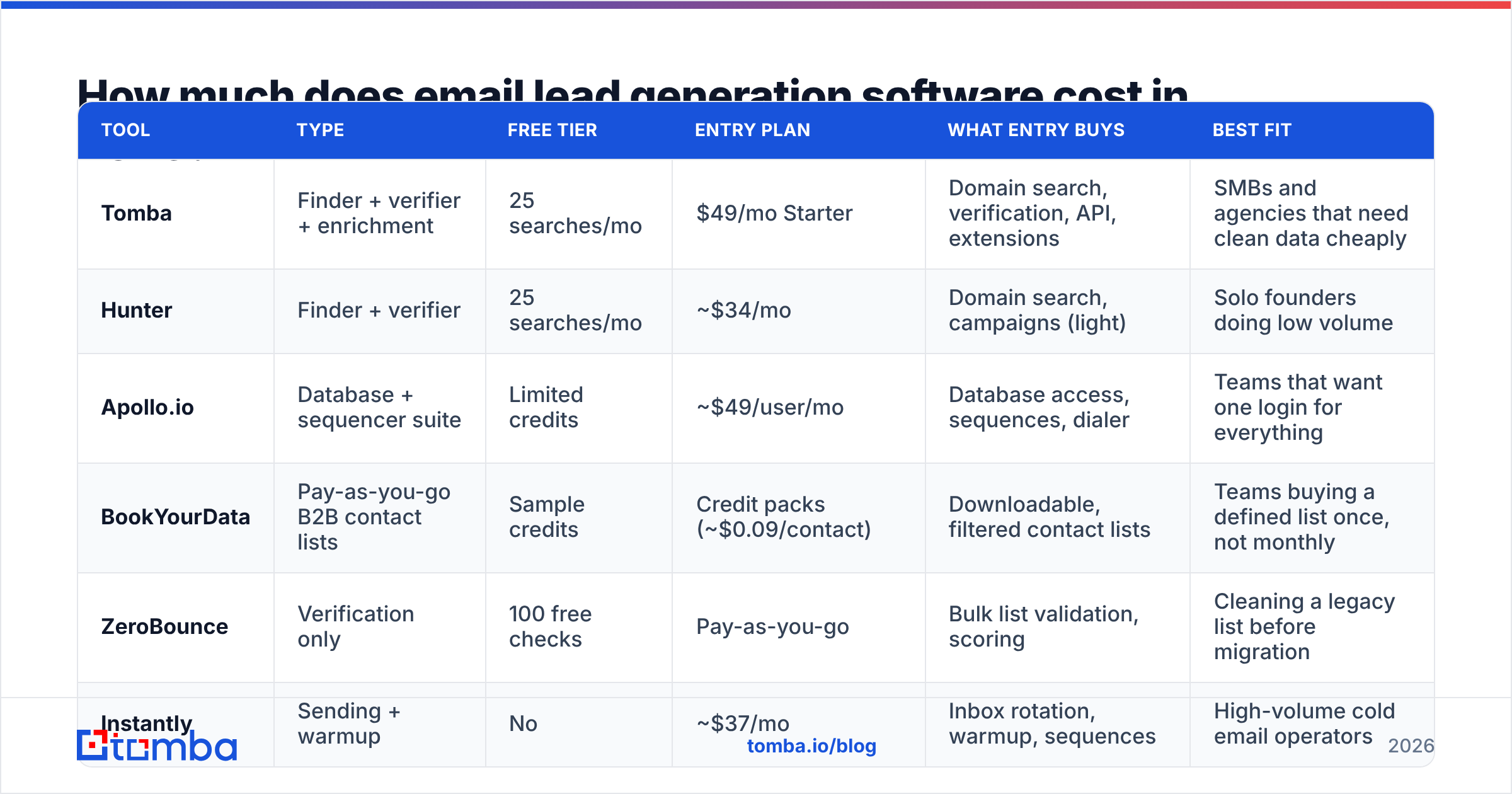
How much does email lead generation software cost in 2026?#
Sticker price is the least useful number in this category. What matters is cost per usable contact — the price you paid divided by the number of addresses that actually delivered and belonged to the right person.
Here is how published entry pricing compares across the main tool types. Verify current numbers on each vendor's own pricing page before you buy; this market changes plans often.
| Tool | Type | Free tier | Entry plan | What entry buys | Best fit |
|---|---|---|---|---|---|
| Tomba | Finder + verifier + enrichment | 25 searches/mo | $49/mo Starter | Domain search, verification, API, extensions | SMBs and agencies that need clean data cheaply |
| Hunter | Finder + verifier | 25 searches/mo | ~$34/mo | Domain search, campaigns (light) | Solo founders doing low volume |
| Apollo.io | Database + sequencer suite | Limited credits | ~$49/user/mo | Database access, sequences, dialer | Teams that want one login for everything |
| BookYourData | Pay-as-you-go B2B contact lists | Sample credits | Credit packs (~$0.09/contact) | Downloadable, filtered contact lists | Teams buying a defined list once, not monthly |
| ZeroBounce | Verification only | 100 free checks | Pay-as-you-go | Bulk list validation, scoring | Cleaning a legacy list before migration |
| Instantly | Sending + warmup | No | ~$37/mo | Inbox rotation, warmup, sequences | High-volume cold email operators |
Two things stand out when you lay it out this way.
First, per-seat pricing punishes growing teams. A five-person SDR pod on a $49/user/mo suite pays $245/mo before a single email is sent. A domain-based tool like Tomba charges by the data, not the headcount — see Tomba pricing for the full ladder ($49 Starter, $99 Growth, $249 Pro, Enterprise custom).
Second, list vendors and finder tools solve different problems. BookYourData and similar list providers are a good fit when you know exactly the segment you want and would rather buy 5,000 filtered contacts once than run a monthly subscription. A finder tool is better when your targeting changes weekly and you are working from company names, domains, or LinkedIn profiles you gathered yourself. Plenty of teams run both — a purchased base list for the core ICP, a finder for the long tail.
What accuracy should you realistically expect?#
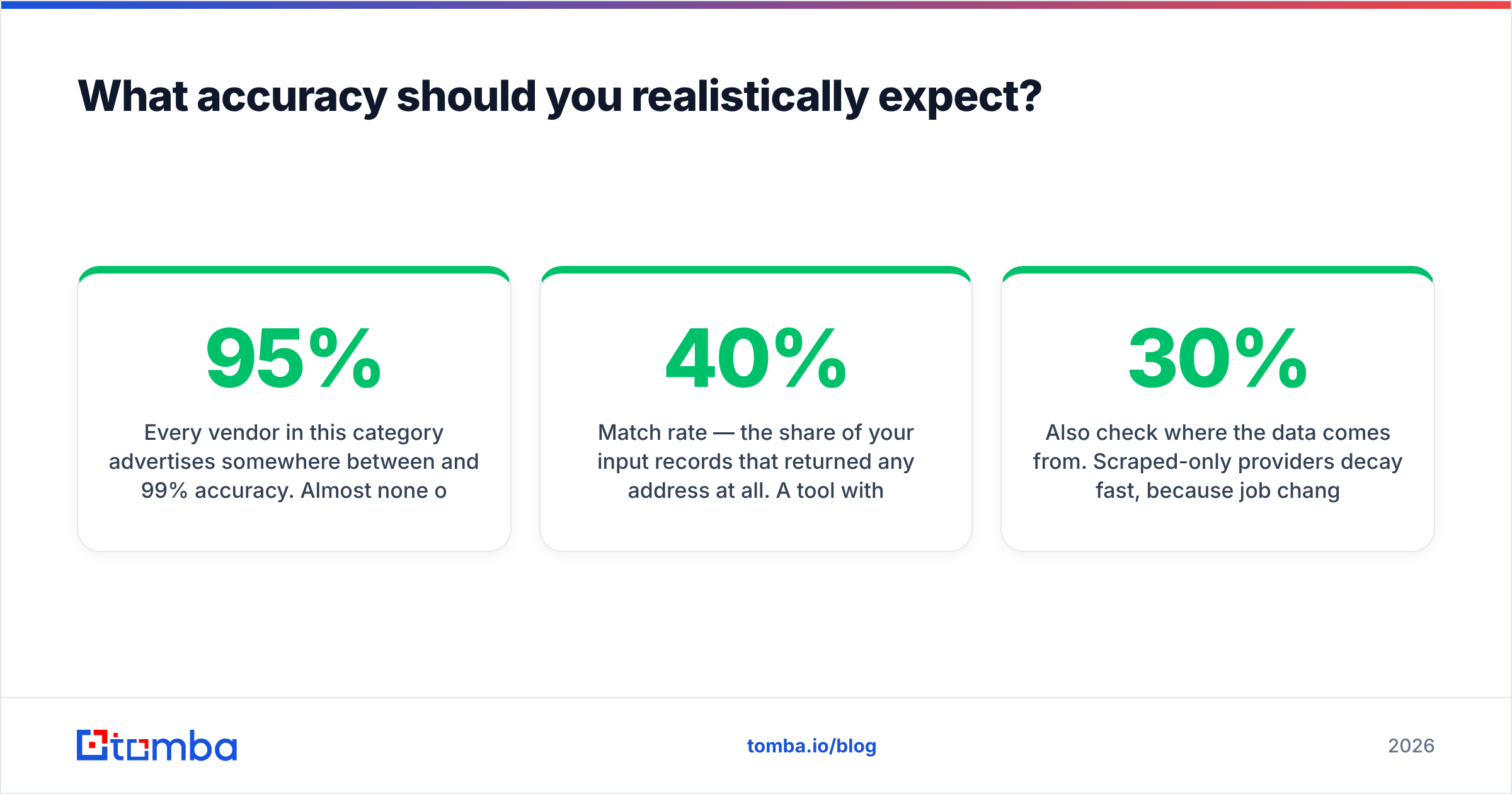
Every vendor in this category advertises somewhere between 95% and 99% accuracy. Almost none of them define the term the same way.
Three definitions are in circulation:
- Deliverability rate — the share of addresses that do not hard bounce. Easiest number to hit, and the one most marketing pages quote.
- Match rate — the share of your input records that returned any address at all. A tool with a 40% match rate and 99% deliverability found emails for fewer than half your list.
- Person-accuracy — the share of addresses that belong to the specific human you asked for. This is what actually matters and almost nobody publishes it.
Run your own test before committing. Take 100 known contacts from your CRM where you already have confirmed emails, strip the email column, and feed the names and domains through each trial. Measure all three numbers. A tool that returns 82 addresses of which 78 are correct beats a tool that returns 95 addresses of which 61 are correct — even though the second one shows a bigger number in the dashboard.
Catch-all domains are where most of the hidden failure lives. Roughly a quarter of business domains accept mail for any address at the SMTP layer, so a naive verifier marks them all "valid" and your bounce rate looks fine right up until you send. Tools that treat catch-all as its own category — with a dedicated catch-all verifier rather than a green checkmark — save you from that. If a vendor's docs never mention catch-all handling, assume they are guessing.
Also check where the data comes from. Scraped-only providers decay fast, because job changes hit B2B records at roughly 25–30% per year. Vendors that publish data sources and refresh cadence give you something to audit; vendors that call it proprietary are asking you to take it on faith.

How do you build a stack that actually delivers?#
The order matters more than the tool choice. Do these in sequence:
- Define the segment before you buy credits. Industry, headcount, geography, and the three job titles that can say yes. Vague targeting wastes credits faster than any pricing tier can absorb.
- Build the company list first, contacts second. Domains are cheap and stable; people move. Use domain search to see who exists at each account and what the email pattern is before you spend on individual lookups.
- Verify everything, including the addresses the finder already marked valid. Run the full list through an email verifier as a separate step. Yes, it is redundant. Redundancy is the point.
- Segment by confidence, not just fit. Send high-confidence addresses from your primary domain. Send catch-all and lower-confidence addresses from a secondary domain, in smaller batches, so a bad segment cannot take down your main sender reputation.
- Warm the sending infrastructure for at least two weeks. New domains that jump to 200 sends/day get filtered. Google's own bulk sender guidelines spell out the authentication and complaint-rate thresholds; treat them as hard requirements, not suggestions.
- Sync back to the CRM the same day. Leads that live only in a sequencer are leads you will lose at the next tool migration.
Steps 3 and 5 are the ones teams skip when they are in a hurry, and they are the two that cause 90% of the "our cold email doesn't work anymore" posts.
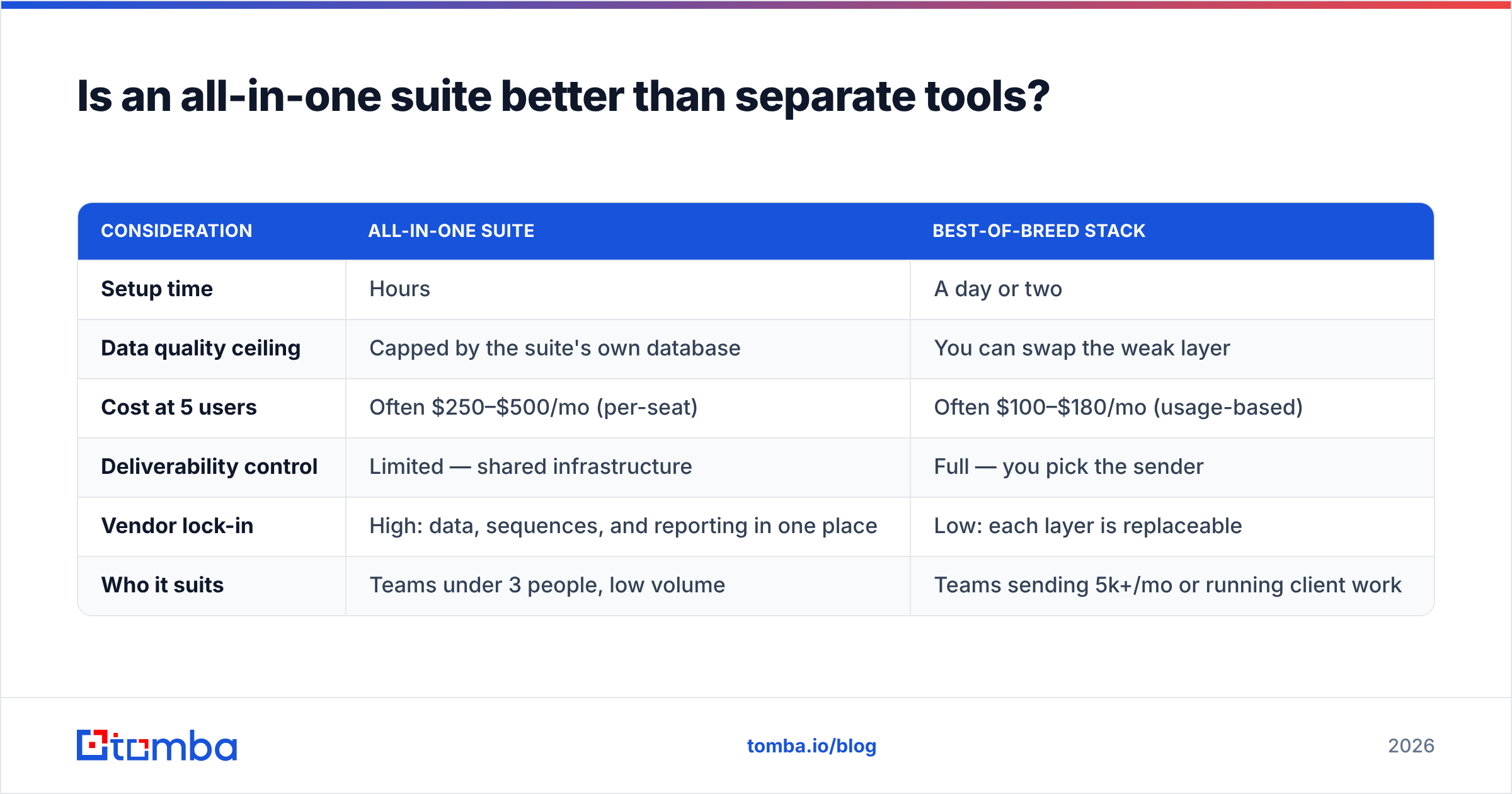
Is an all-in-one suite better than separate tools?#
It depends on how much you send and how much a bad list costs you.
| Consideration | All-in-one suite | Best-of-breed stack |
|---|---|---|
| Setup time | Hours | A day or two |
| Data quality ceiling | Capped by the suite's own database | You can swap the weak layer |
| Cost at 5 users | Often $250–$500/mo (per-seat) | Often $100–$180/mo (usage-based) |
| Deliverability control | Limited — shared infrastructure | Full — you pick the sender |
| Vendor lock-in | High: data, sequences, and reporting in one place | Low: each layer is replaceable |
| Who it suits | Teams under 3 people, low volume | Teams sending 5k+/mo or running client work |
All-in-one wins on speed. If you are a two-person startup sending 500 emails a month, the extra 15% bounce rate from a mediocre bundled database is not going to hurt you enough to justify a second vendor.
Best-of-breed wins on economics past roughly 5,000 sends a month, and on control always. Agencies in particular should never run client outreach through a suite's shared sending pool — one client's aggressive campaign degrades every other client's results, and you have no visibility into why.
For an honest look at the trade-offs from the suite side, G2's lead capture category has enough recent reviews to see the same complaints repeat. And if inbound is a meaningful part of your motion, HubSpot's free CRM covers the capture layer well enough that paying a separate vendor for forms is hard to justify in 2026.
What are the mistakes that cost the most money?#
Buying volume instead of accuracy. A 100,000-contact database at $0.01 per record sounds cheaper than 10,000 verified contacts at $0.05. If the cheap list is 55% accurate and you burn a domain sending to it, the real cost includes domain replacement, warmup time, and a month of pipeline you did not build.
Ignoring role accounts. info@, sales@, and support@ inflate your match rate and destroy your reply rate. Filter them out at the enrichment stage, not after the campaign.
Treating enrichment as optional. An email with no title, company size, or industry attached cannot be personalized beyond first name. Data enrichment is what makes the difference between "Hi {{first_name}}" and a first line that references something real.
Running everything manually. If you are copying addresses between tabs, you will stop doing it under pressure. Push discovery and verification into the workflow with the Tomba API, a Sheets add-on, or your automation platform of choice so the clean-data step cannot be skipped.
Measuring the wrong thing. Open rates are unreliable post-MPP, and reply rate alone rewards spammy subject lines. Track meetings booked per 1,000 verified contacts. That single metric exposes bad data, bad targeting, and bad copy in one number.
What should you do next?#
Pick one segment, pull 200 companies, and run the full loop end to end before you commit to an annual contract anywhere. Measure match rate, person-accuracy, bounce rate, and meetings booked. Two weeks of that data will tell you more than any comparison post — including this one.
If you want the data layer handled without a per-seat bill, start with the Tomba Email Finder. The free tier gives you 25 searches a month to run exactly the accuracy test described above, Starter is $49/mo when you are ready to scale, and finder, verifier, catch-all handling, and enrichment sit under the same key — so the clean-data step stays part of the workflow instead of the thing you skip on a busy Tuesday.
Related guides#
Ready to find emails that actually work?
Join 150,000+ professionals who stopped guessing and started sending. Free credits on signup — no credit card required.
Get the Tomba newsletter
Practical outbound tactics and product updates — once every two weeks.
About the author