Email Lead Generation Tools in 2026: A Buyer's Guide
Most email lead generation tools sell you the same database with a different UI. Here's how the categories actually differ, what accuracy claims mean, and which stack fits your motion.
TL;DR
- "Email lead generation tools" is four different product categories wearing one label: finders, verifiers, databases, and sequencers. Buying the wrong category is the most common and most expensive mistake.
- Advertised accuracy numbers are nearly meaningless unless the vendor tells you the coverage rate alongside them. A tool that returns 40% of your list at 98% accuracy is worse than one returning 80% at 95%.
- Credit models differ more than headline prices. Charging for unverified results, monthly-reset credits, and per-seat minimums are where budgets actually go.
- The realistic 2026 stack is two or three tools, not one: a finder/verifier for data quality, a sequencer for sending, and a CRM for the record of truth.
- Start with a free tier and run the same 100-contact test list through every candidate. Vendor benchmarks are marketing; your list is the only benchmark that matters.
What Are Email Lead Generation Tools, Exactly?#
An email lead generation tool is any software that helps you turn a company or person into a deliverable, permission-appropriate email address you can start a conversation with. That definition sounds broad because the market genuinely is broad — and vendors exploit the ambiguity.
Think of it like buying kitchen equipment. "Cooking tools" covers a knife, a stove, a fridge, and a delivery app. All four help you eat, but nobody would buy a fridge expecting it to chop onions. The same category confusion drives most of the buyer's remorse in this space.
Here are the four categories that actually exist:
- Email finders — You supply a name plus a domain (or just a domain) and the tool returns the address. Pattern detection, crawled sources, and SMTP checks do the work. This is the "chop the onion" tool: narrow, fast, and the thing you'll use most days.
- Email verifiers — You supply an address and the tool tells you whether it will bounce. Syntax check, MX record lookup, SMTP handshake, catch-all detection, role-account flagging. Cheap per credit, and the single biggest lever on email deliverability.
- B2B contact databases — Pre-built, static-ish repositories you search by filter: industry, headcount, tech stack, job title. Great for building a target list from scratch. Weak when you already know exactly who you want and just need their address.
- Sequencers / sending platforms — Instantly, Smartlead, Reply.io, Salesloft. They do not find emails; they send them, warm inboxes, rotate domains, and track replies. Many now bundle a database, which is where the category confusion gets deliberately manufactured.
A fifth thing exists at the edges: enrichment APIs that take a partial record and fill in the gaps. That's less a lead source and more a data-hygiene layer bolted onto a CRM.
Which Category Do You Actually Need?#
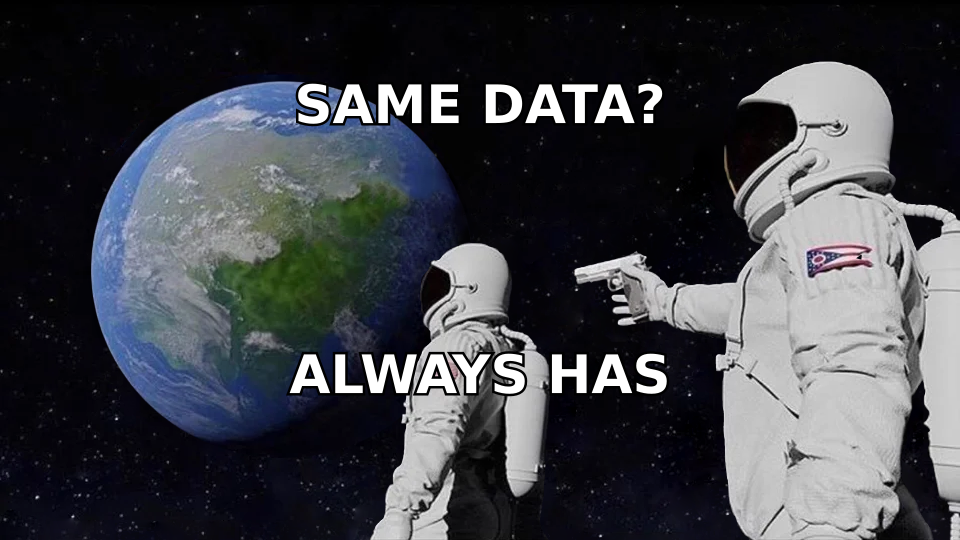
Match the tool to the gap in your workflow, not to the feature list with the most checkmarks.
| If your bottleneck is… | Buy this category | Don't buy | Typical entry cost |
|---|---|---|---|
| "I have 500 companies, no contacts" | Database + domain search | A standalone verifier | $49–$99/mo |
| "I have names from LinkedIn, no emails" | Email finder | A full sales-engagement suite | $39–$99/mo |
| "My bounce rate is 8%+" | Email verifier (bulk) | More lead data | $10–$40 per 10k |
| "I have great lists, nobody replies" | Sequencer + copy work | Any data tool | $37–$97/mo |
| "My CRM records are 60% empty" | Enrichment API | A prospecting UI | Usage-based |
| "I need phone numbers too" | Multi-channel data provider | Email-only finder | $99+/mo |
Read that table honestly before you demo anything. Roughly half the teams that ask me for a "better email finder" actually have a copy problem or a deliverability problem — no data vendor on earth fixes either.
How Do You Compare Email Lead Generation Tools Fairly?#
The industry has trained buyers to look at one number: accuracy. That's the wrong single number, because accuracy without coverage is trivially gameable.
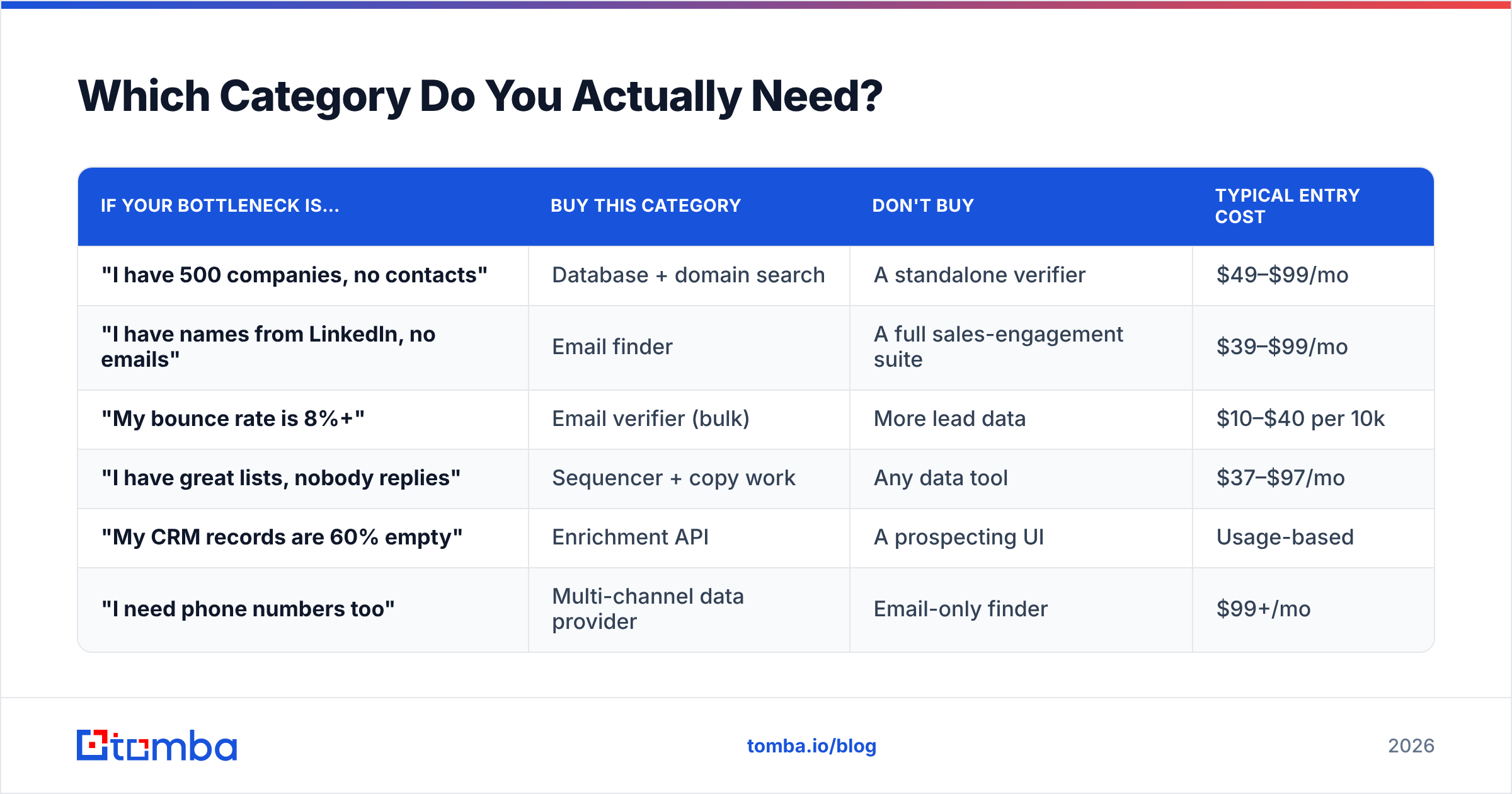
Consider two tools run against the same 1,000-row list:
- Tool A: returns 400 emails, 98% accurate → 392 usable contacts.
- Tool B: returns 820 emails, 94% accurate → 771 usable contacts.
Tool A wins every marketing page comparison. Tool B gives you nearly twice the pipeline. The metric that matters is usable contacts per dollar, which is coverage × accuracy ÷ price.

The second trap is what counts as a charged credit. Vendors handle this three ways:
- Charge on any result — including "guessed" or unverified addresses. Most expensive in practice.
- Charge only on verified results — you pay for hits, not attempts. Findymail and Tomba both work closer to this model.
- Charge on lookup regardless of outcome — common in enterprise API pricing, fine at volume, brutal on messy lists.
Third: catch-all domains. Somewhere between 15% and 25% of B2B domains accept everything at the SMTP layer, so a standard verifier returns "unknown" and you're left guessing. Tools that do genuine catch-all verification rather than shrugging at it will meaningfully change your usable-contact count on enterprise lists. Ask every vendor how they handle catch-alls and treat a vague answer as a no.
Fourth: data provenance. Where does it come from? Crawled public web, contributed inboxes, opt-in panels, purchased third-party files, or user-contributed contact books? This matters for GDPR/CCPA posture and for freshness. Vendors who publish their data sources are giving you something you can actually audit.
What Do the Leading Email Lead Generation Tools Cost in 2026?#
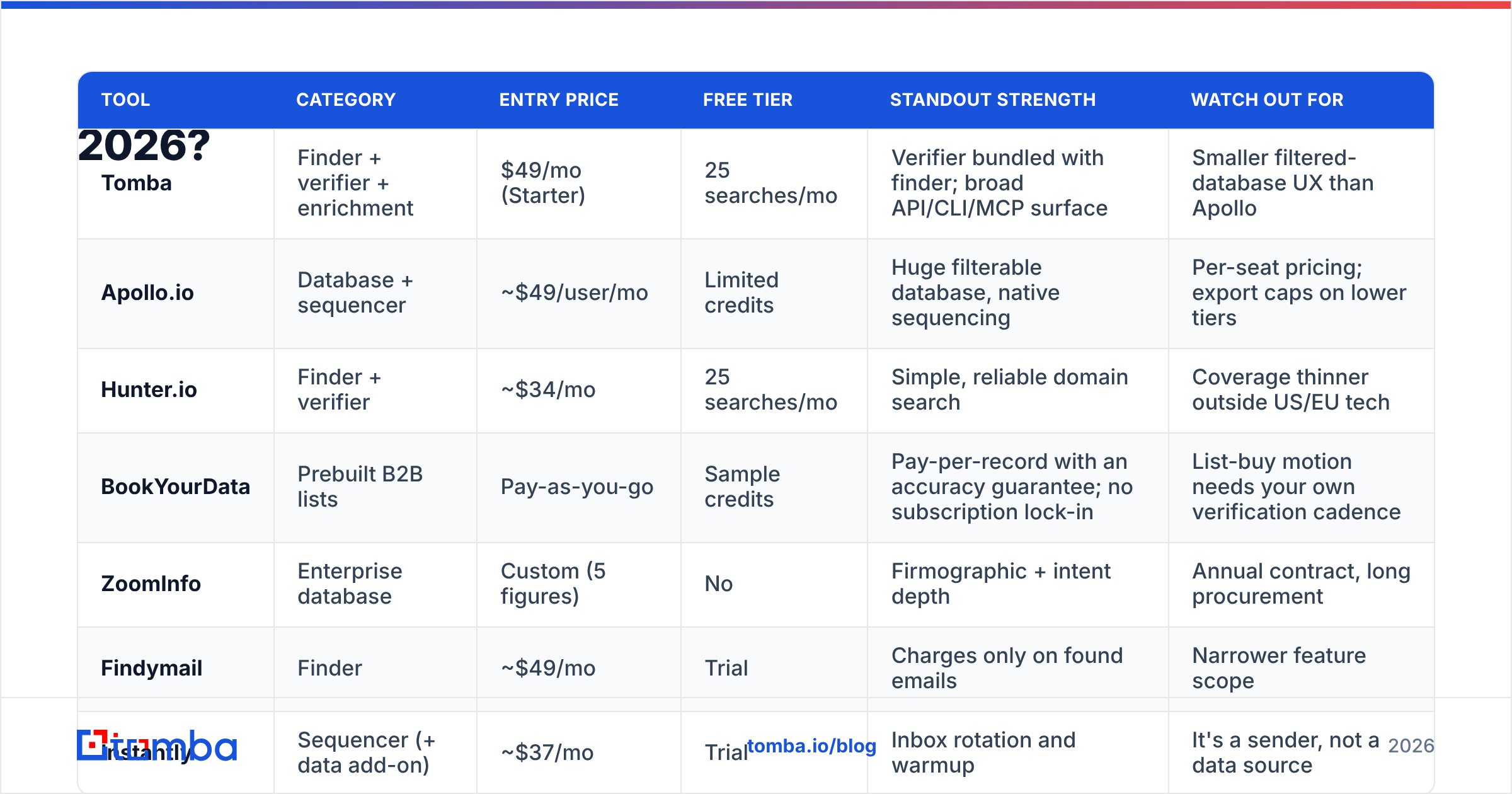
Prices below reflect publicly listed entry tiers as of early 2026. Always re-check on the vendor's own pricing page — this market re-prices constantly.
| Tool | Category | Entry price | Free tier | Standout strength | Watch out for |
|---|---|---|---|---|---|
| Tomba | Finder + verifier + enrichment | $49/mo (Starter) | 25 searches/mo | Verifier bundled with finder; broad API/CLI/MCP surface | Smaller filtered-database UX than Apollo |
| Apollo.io | Database + sequencer | ~$49/user/mo | Limited credits | Huge filterable database, native sequencing | Per-seat pricing; export caps on lower tiers |
| Hunter.io | Finder + verifier | ~$34/mo | 25 searches/mo | Simple, reliable domain search | Coverage thinner outside US/EU tech |
| BookYourData | Prebuilt B2B lists | Pay-as-you-go | Sample credits | Pay-per-record with an accuracy guarantee; no subscription lock-in | List-buy motion needs your own verification cadence |
| ZoomInfo | Enterprise database | Custom (5 figures) | No | Firmographic + intent depth | Annual contract, long procurement |
| Findymail | Finder | ~$49/mo | Trial | Charges only on found emails | Narrower feature scope |
| Instantly | Sequencer (+ data add-on) | ~$37/mo | Trial | Inbox rotation and warmup | It's a sender, not a data source |

Two notes on reading this table. First, per-seat pricing (Apollo, ZoomInfo) scales very differently from flat-workspace pricing (Tomba, Hunter) once you pass three users — model your 12-month cost at your projected headcount, not today's. Second, pay-as-you-go models like BookYourData's suit spiky, campaign-driven buying where a monthly subscription would sit idle; if you build one big list per quarter, that's a genuinely better fit than any $99/mo plan.
For a full breakdown of what each tier includes on the Tomba side, the pricing details run Free (25 searches/mo) → Starter $49 → Growth $99 → Pro $249 → Enterprise custom, with verification credits included rather than sold separately.
How Do You Test These Tools Before You Commit?#
Run the same benchmark against every candidate. It takes an afternoon and saves quarters.
- Build a 100-row control list. Mix your real ICP: 40 SMB, 40 mid-market, 20 enterprise. Include at least 15 non-US domains and 10 companies you know use catch-all (large enterprises usually do). Include first name, last name, company domain.
- Run it through each tool's free tier. Record: rows returned, rows marked "verified," rows marked "risky/unknown," and credits burned.
- Verify the winners with a neutral third party. Don't let a vendor grade its own homework. Run the output of Tool A through Tool B's email verifier and vice versa. Disagreements are where the truth lives.
- Send a 20-address seed test. Actual delivery beats every prediction. Use a throwaway domain, send a plain-text one-liner, and count hard bounces after 48 hours.
- Calculate usable contacts per dollar. (Verified rows × delivery rate) ÷ credits spent × credit price. Rank on this number and nothing else.
- Check the API before you scale. If you'll ever automate this, hit the email finder API with 10 calls and read the rate-limit headers, the error shapes, and the response latency. Beautiful UIs hide terrible APIs surprisingly often.
Most teams skip steps 3 and 4, then wonder why a "97% accurate" list bounced at 9%.

Is a Single All-in-One Tool Better Than a Stack?#
Usually not, and the reason is structural. All-in-one platforms are strong at one thing and adequate at the rest, because data acquisition and email delivery are genuinely different engineering problems. A vendor optimizing for inbox placement is not simultaneously running the crawling and verification infrastructure that produces clean addresses.
The pattern that holds up across most teams under 50 reps:
- One data layer — a finder + verifier with an API. This is where accuracy money should go.
- One sending layer — a dedicated sequencer with warmup, domain rotation, and reply detection.
- One system of record — HubSpot, Salesforce, or Pipedrive, with the data layer writing into it automatically. HubSpot's own research consistently shows fragmented data as a top cause of wasted rep hours, and it's fragmented mostly because nobody wired the layers together.
The counter-argument for all-in-one is real but narrow: if you're a solo founder or a two-person team, tool sprawl costs more in attention than it saves in quality. Buy one platform, accept the compromises, revisit at ten reps.
Where the stack approach pays off immediately is automation. Connecting a finder to your CRM through the HubSpot integration or a Zapier integration means new records get enriched on creation instead of during a quarterly cleanup sprint that never happens.
What About Compliance and Data Sourcing?#
This is the question that gets skipped until legal asks it in week nine.
Under GDPR, B2B outreach in most EU jurisdictions relies on legitimate interest, which requires a documented balancing test, a clear opt-out in every message, and the ability to honor deletion requests across every system holding the record. That last part is where multi-tool stacks get you: if a contact is deleted from your CRM but persists in your sequencer and your enrichment cache, you haven't complied.
Practical checks before you sign anything:
- Does the vendor publish a DPA? No DPA, no EU sending. Non-negotiable.
- Can you request deletion via API? Manual-only deletion doesn't scale past a handful of requests.
- Where is data stored and processed? Ask for the sub-processor list.
- Is the source contributed contact books? Some tools scrape users' own address books. That's legally murkier than crawling public web pages, and worth knowing before you build a motion on top of it.
- CAN-SPAM basics for US sending — physical address, honest subject line, working unsubscribe. The FTC's guidance is short and worth reading once.
None of this makes cold email impossible. It makes sloppy cold email expensive, which is arguably a market improvement.
How Do You Keep Lists Clean After You Buy?#
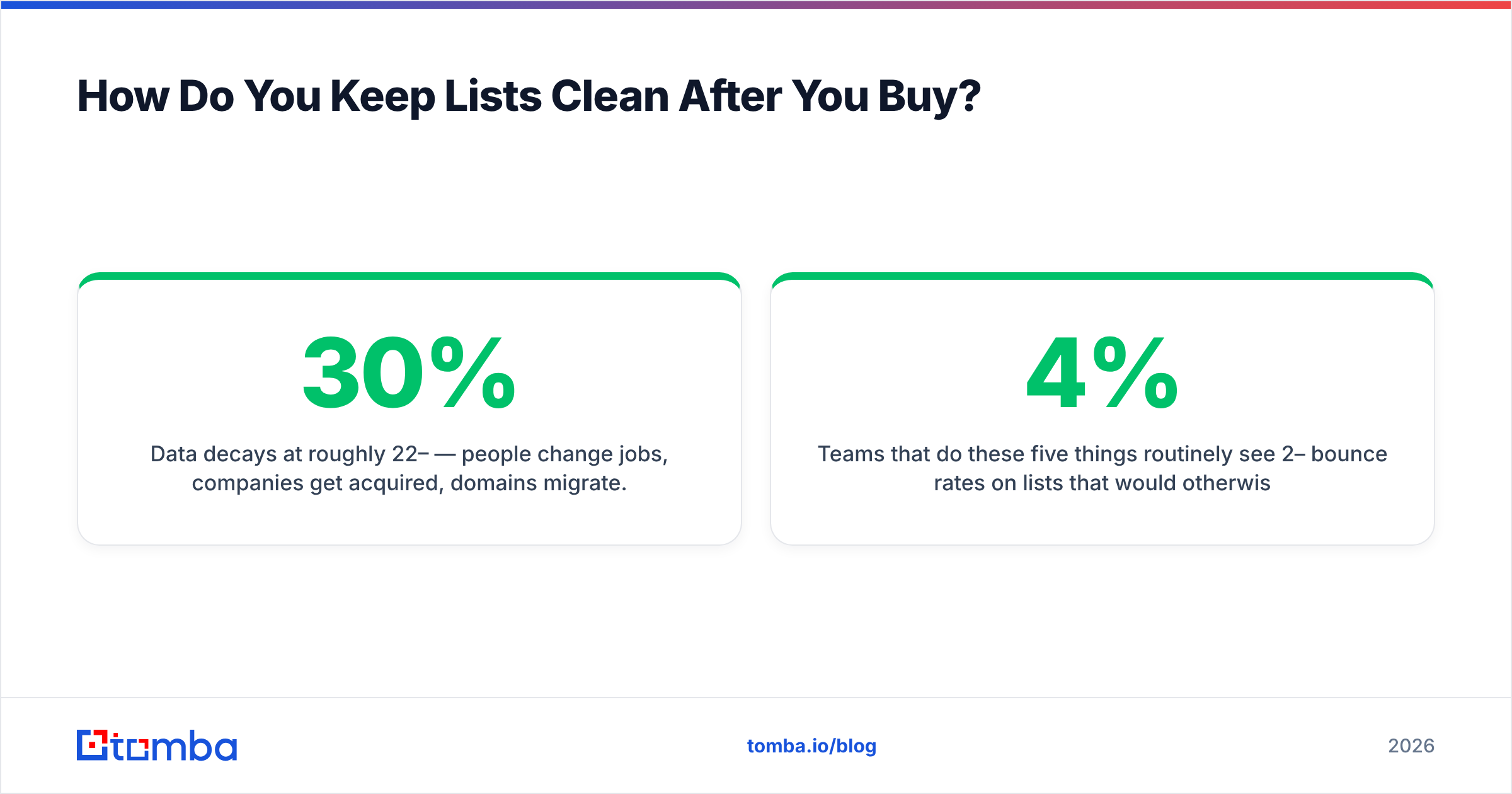
Data decays at roughly 22–30% per year — people change jobs, companies get acquired, domains migrate. A list you bought in January is materially worse in July.
Build a maintenance loop instead of a one-time purchase:
- Re-verify quarterly. Push your active list through bulk verify every 90 days. It's the cheapest insurance in your stack.
- Suppress hard bounces immediately. One bounce is data. Two sends to the same bounced address is a reputation problem.
- Watch your sender reputation, not just your bounce rate. Sender reputation degrades before bounces spike, so it's the earlier warning signal.
- Cap send volume per domain. Fresh domains at 200/day burn. Ramp instead.
- Segment catch-all contacts. Send to them, but from a separate domain, so an unexpected bounce cluster doesn't damage your primary sending reputation.
Teams that do these five things routinely see 2–4% bounce rates on lists that would otherwise sit near 10%. That difference decides whether your domain lands in the inbox or the spam folder six months from now.
Which Email Lead Generation Tool Should You Start With?#
If you're buying your first data tool and you want one recommendation rather than a matrix: start with a finder that includes verification in the same credit pool, prove the accuracy on your own list, then add a sequencer once your data is clean. Buying the sequencer first is the single most common sequencing error — you end up with excellent delivery infrastructure pointed at bad addresses.
The Tomba Email Finder is a reasonable place to run that test. The free tier gives you 25 searches a month with no card, verification is bundled rather than upsold, and there's a Chrome extension, Google Sheets add-on, and a documented API so the same data path works whether you're prospecting manually or wiring it into an automated pipeline. Run your 100-row control list through it alongside two competitors, compare usable contacts per dollar, and let the numbers pick your vendor instead of the landing page.
Related guides#
Ready to find emails that actually work?
Join 150,000+ professionals who stopped guessing and started sending. Free credits on signup — no credit card required.
Get the Tomba newsletter
Practical outbound tactics and product updates — once every two weeks.
About the author