Email List Building Software in 2026: A Buyer's Guide
Most email list building software sells you volume. The tools that actually grow revenue optimize for deliverable, permissioned, enriched contacts. Here's how the 2026 categories compare on price, data quality, and fit.
TL;DR
- "Email list building software" covers six different product categories that barely overlap. Buying the wrong one is the most common and most expensive mistake in this market.
- The metric that matters is cost per deliverable, permissioned contact — not list size, not credits, not seats. A 10,000-address list at 68% deliverability is worse than a 4,000-address list at 97%.
- B2B teams need a finder + verifier + enrichment stack. Ecommerce and newsletter teams need capture forms + ESP. These are not substitutes.
- Budget roughly $50–$120/month for a solo operator or small team, $250–$600/month once you are running multi-channel outbound at volume.
- Whatever you buy, verification is non-negotiable. Bounce rates above 3% put your sending domain at risk with Google and Microsoft, and no amount of list size compensates for a burned domain.
What is email list building software?#
Email list building software is any tool that helps you grow a database of contactable email addresses you can legitimately market or sell to. That definition is broad on purpose, because the market is broad — and vendors exploit the ambiguity.
Think of it like "vehicle." A cargo van and a motorcycle are both vehicles, but if you order one expecting the other, nothing about your day works. Same here: a Sumo-style popup builder and a B2B email finder both claim the "list building" keyword, but one grows an inbound newsletter and the other builds a cold outbound prospect list. They solve opposite problems.
Here are the six categories actually sold under this label:
- Email finders / prospecting databases — you supply a name, domain, or ICP filter; the tool returns work email addresses. Built for outbound B2B. Examples: Tomba, Hunter, Apollo, BookYourData.
- Opt-in capture tools — popups, embedded forms, exit-intent overlays, lead magnets. Built for inbound. Examples: OptinMonster, ConvertKit forms, Klaviyo signup forms.
- Email verification services — they don't find addresses, they clean them. Examples: ZeroBounce, NeverBounce, Tomba's verifier.
- Enrichment platforms — take a partial record (a domain, a LinkedIn URL, an email) and fill in job title, company size, phone, tech stack.
- Scrapers and extractors — browser extensions and crawlers that pull addresses off pages, directories, or social profiles. Legally the highest-risk category.
- All-in-one sales platforms — finder + sequencer + CRM bundled. Convenient, usually expensive, usually weakest on data accuracy.
Most buyers need two or three of these, not one. The pitch that a single subscription covers all six is where the money gets wasted.
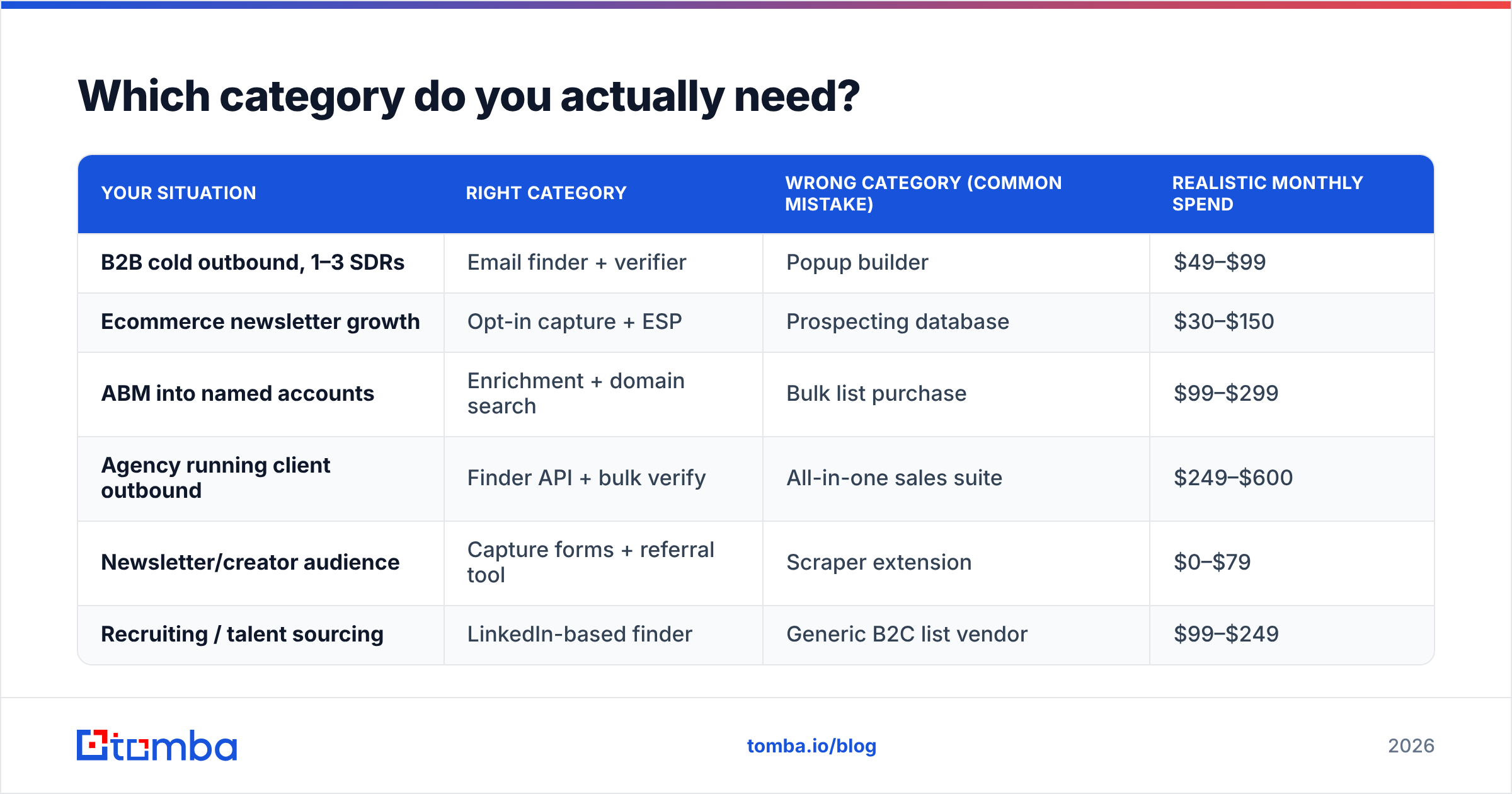
Which category do you actually need?#
Answer three questions and the category picks itself.
Question 1: Do these people know you exist? If yes, you want capture tools. If no, you want a finder or database.
Question 2: Are you selling B2B or B2C? B2C list building is almost entirely opt-in — buying consumer emails is a fast route to a GDPR complaint and a blocked ESP account. B2B has a legitimate legitimate-interest path in most jurisdictions, which is why the finder category exists at all.
Question 3: What's your monthly volume? Under 500 new contacts per month, a $49 plan and a spreadsheet is fine. Above 5,000, you need API access, dedupe logic, and CRM sync, or you will drown in manual cleanup.
| Your situation | Right category | Wrong category (common mistake) | Realistic monthly spend |
|---|---|---|---|
| B2B cold outbound, 1–3 SDRs | Email finder + verifier | Popup builder | $49–$99 |
| Ecommerce newsletter growth | Opt-in capture + ESP | Prospecting database | $30–$150 |
| ABM into named accounts | Enrichment + domain search | Bulk list purchase | $99–$299 |
| Agency running client outbound | Finder API + bulk verify | All-in-one sales suite | $249–$600 |
| Newsletter/creator audience | Capture forms + referral tool | Scraper extension | $0–$79 |
| Recruiting / talent sourcing | LinkedIn-based finder | Generic B2C list vendor | $99–$249 |

How do the major tools compare on price and data?#
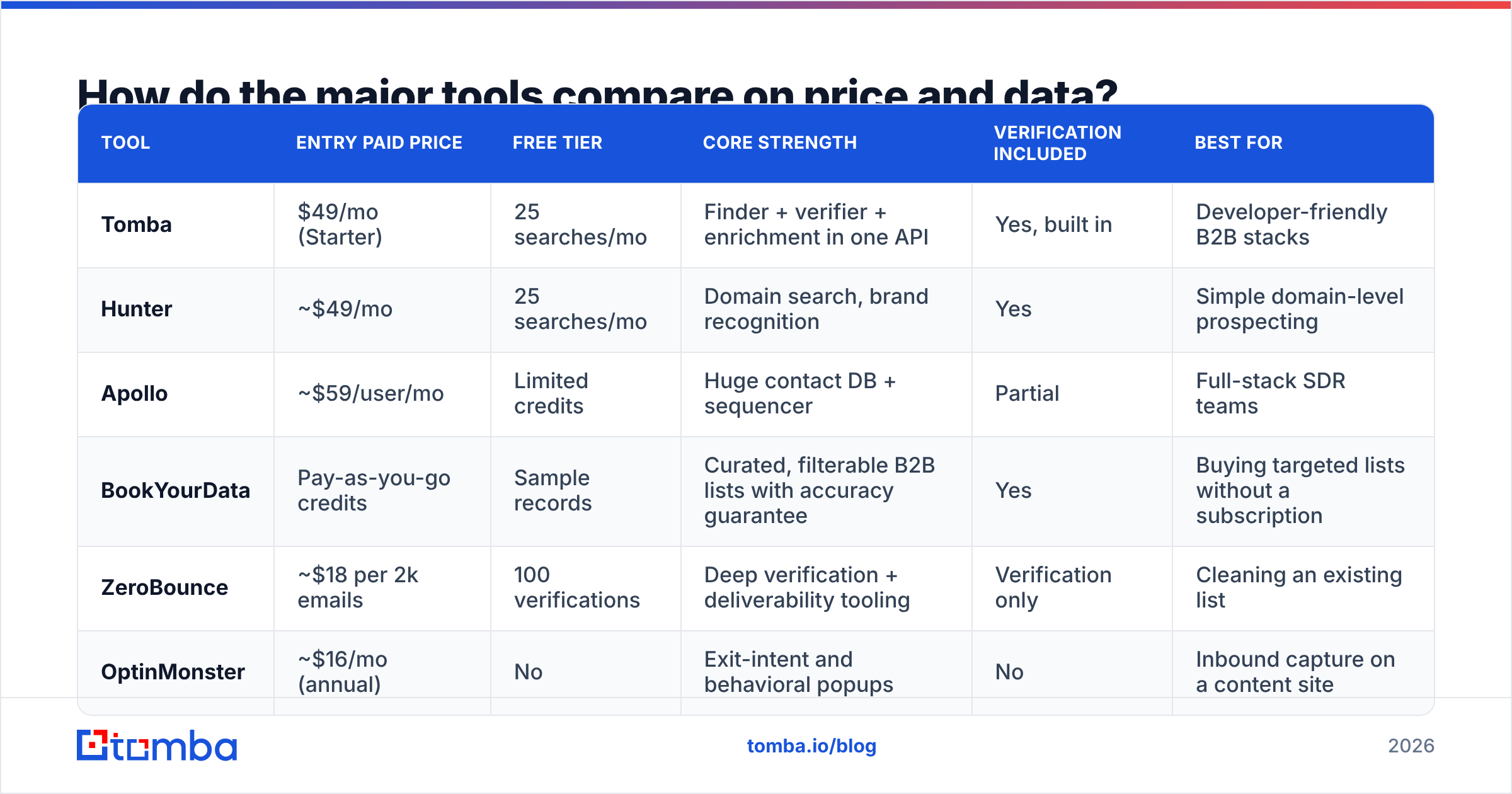
Below is a like-for-like comparison of the tools B2B teams shortlist most often in 2026. Prices are entry paid tiers as published by each vendor; check current pages before you buy, since this market reprices often.
| Tool | Entry paid price | Free tier | Core strength | Verification included | Best for |
|---|---|---|---|---|---|
| Tomba | $49/mo (Starter) | 25 searches/mo | Finder + verifier + enrichment in one API | Yes, built in | Developer-friendly B2B stacks |
| Hunter | ~$49/mo | 25 searches/mo | Domain search, brand recognition | Yes | Simple domain-level prospecting |
| Apollo | ~$59/user/mo | Limited credits | Huge contact DB + sequencer | Partial | Full-stack SDR teams |
| BookYourData | Pay-as-you-go credits | Sample records | Curated, filterable B2B lists with accuracy guarantee | Yes | Buying targeted lists without a subscription |
| ZeroBounce | ~$18 per 2k emails | 100 verifications | Deep verification + deliverability tooling | Verification only | Cleaning an existing list |
| OptinMonster | ~$16/mo (annual) | No | Exit-intent and behavioral popups | No | Inbound capture on a content site |
Two things stand out. First, the finder tools cluster tightly around $49 for entry tiers — price is rarely the deciding factor, data coverage in your niche is. Second, verification is bundled by some vendors and sold separately by others, which makes headline prices misleading. A $30/mo finder plus a $25/mo verifier costs more than a $49 all-in plan.
BookYourData is worth calling out separately because it works on a different model: instead of a monthly seat, you filter a curated database and pay per record, with an accuracy guarantee attached. If your buying pattern is "one campaign per quarter, 3,000 contacts," a credit model beats a subscription you underuse. If you're prospecting daily, the subscription wins on unit economics.

Accuracy claims deserve skepticism across the board. Every vendor publishes a number between 95% and 99%, and every number is measured on a sample the vendor chose. The only accuracy figure that means anything is the one you measure on 200 contacts from your own ICP. Run that test during a free tier before you commit to annual billing.

Why does verification matter more than list size?#
Because mailbox providers now enforce what they used to merely suggest.
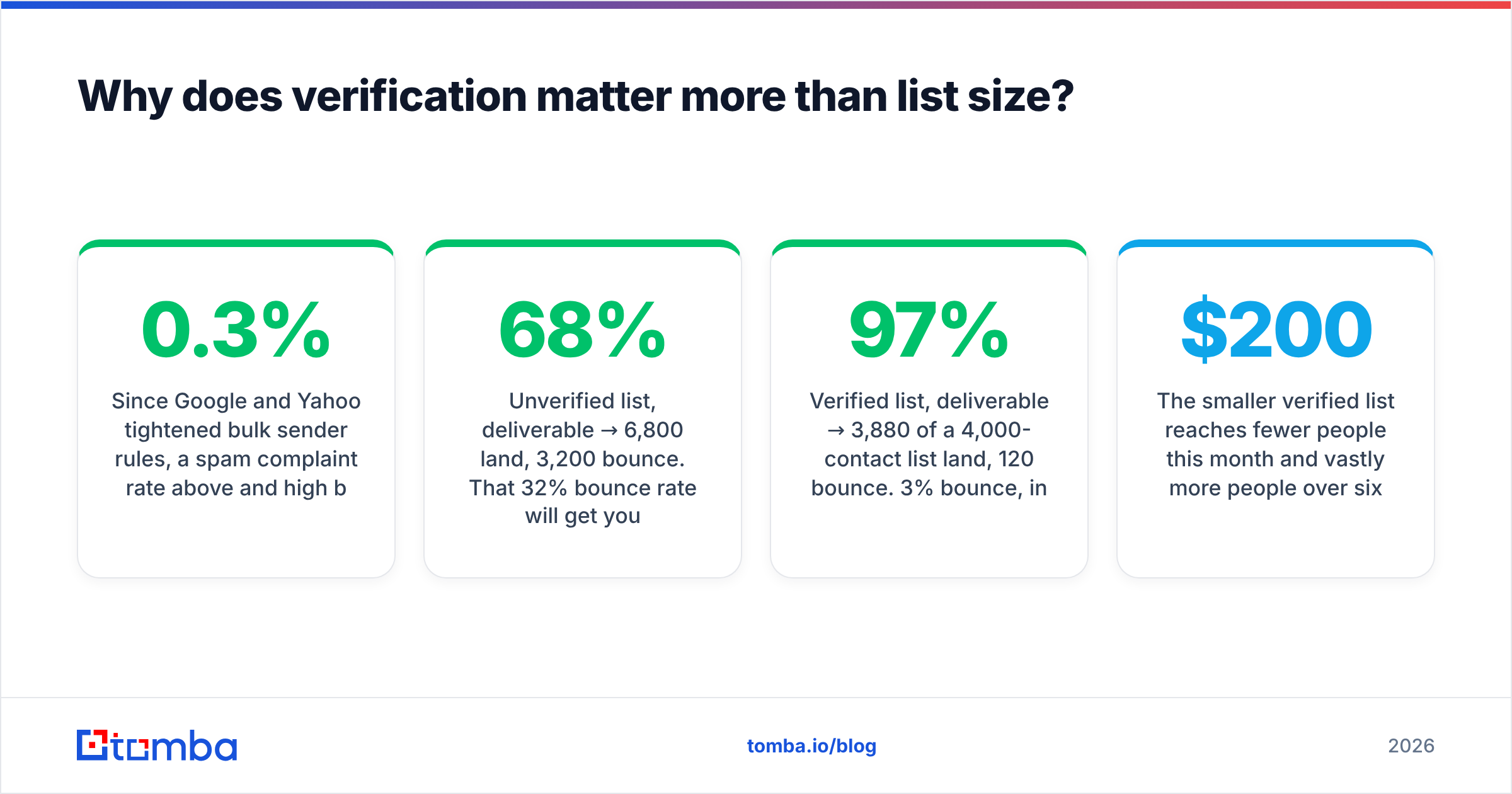
Since Google and Yahoo tightened bulk sender rules, a spam complaint rate above 0.3% and high bounce volume are treated as reputation signals, not accidents. Microsoft followed with similar enforcement on Outlook and Office 365 inboxes. The practical consequence: a dirty list doesn't just waste sends, it degrades your ability to reach the good addresses on that same list.
Do the arithmetic on a 10,000-contact list:
- Unverified list, 68% deliverable → 6,800 land, 3,200 bounce. That 32% bounce rate will get your domain throttled within two campaigns.
- Verified list, 97% deliverable → 3,880 of a 4,000-contact list land, 120 bounce. 3% bounce, inside safe thresholds, and your reputation survives to send again next month.
The smaller verified list reaches fewer people this month and vastly more people over six months. This is why cost per usable contact is the only sane unit of comparison. If a vendor sells you 10,000 addresses for $200 and 32% bounce, you paid $0.029 per usable address and inherited a deliverability problem. If another sells 4,000 for $150 at 97%, you paid $0.039 per usable address and kept your domain healthy. The second deal is cheaper once you price the risk.
A few operational rules that follow from this:
- Verify at capture, not at send. Real-time verification through an email verification API stops bad addresses entering your CRM in the first place.
- Re-verify anything older than 90 days. B2B data decays roughly 2–3% per month as people change jobs.
- Handle catch-all domains explicitly. A catch-all server accepts everything, so standard SMTP checks return "valid" for addresses that don't exist. Use a dedicated catch-all verifier rather than trusting a green checkmark.
- Segment by confidence score, don't just filter. Send to high-confidence addresses first, warm the domain, then test the medium-confidence tier in small batches.
- Suppress hard bounces permanently. Re-mailing a known-dead address is one of the fastest ways to look like a spammer.
What features separate good tools from mediocre ones?#
Feature lists all look identical on comparison pages. These are the ones that change your day-to-day.
Bulk processing that actually scales. Uploading a 5,000-row CSV and getting results back in minutes, not a queue that silently drops rows. Test this before committing — bulk email finder throughput varies wildly between vendors at the same price point.
A real API, not a marketing API. Check for documented rate limits, webhook callbacks, sandbox keys, and SDKs in your language. A tool with a clean email finder API can be wired into your signup flow, your CRM, and your data warehouse. A tool with a 20-request-per-minute cap and no webhooks will stay a manual browser tab forever.
Native CRM sync. If contacts land in HubSpot or Salesforce without a Zapier tax, adoption goes up and data hygiene improves. Check whether the HubSpot integration writes custom properties or just dumps an email string.
Confidence scores you can act on. "Valid / invalid" is less useful than a 0–100 score with the evidence behind it (pattern match, SMTP response, source count). Scores let you route: send to 90+, verify 60–89 again, discard below 60.
Transparent sourcing. Ask where the data comes from and get a straight answer. Vendors who publish their data sources are easier to defend in a GDPR conversation than ones who won't say.
Credit rollover and fair overage. Read the fine print. Some vendors expire unused credits monthly; others roll them for a quarter. On a $249 plan that difference is real money.
Is buying an email list ever a good idea?#
Sometimes — with heavy caveats, and only in B2B.
Buying a curated, filterable, verified B2B list from a reputable vendor is a legitimate practice in the US under CAN-SPAM, which permits unsolicited commercial email provided you identify yourself, disclose the commercial nature, and honor opt-outs. Vendors like BookYourData operate squarely in this space and attach accuracy guarantees to what they sell, which is meaningfully different from a $99 "50 million emails" ZIP file on a marketplace.
Where it goes wrong:
- EU/UK targeting. GDPR and PECR make purchased consumer data effectively unusable, and B2B purchased data usable only under a narrow legitimate-interest argument that you must document. Read the ICO's direct marketing guidance before you send a single message into the UK.
- Loading purchased lists into your main ESP. Mailchimp, Klaviyo, and most ESPs prohibit purchased lists in their terms. Use a dedicated cold-outreach sender on a separate domain instead.
- Skipping re-verification. Even a guaranteed list decays between the vendor's last check and your send date. Verify again on the day you upload.
- Treating it as a substitute for targeting. A precise 500-contact list beats a sloppy 50,000-contact one on every metric that matters — reply rate, complaint rate, pipeline.
The honest framing: buying a list is a shortcut on sourcing, never a shortcut on relevance. If your message would be irrelevant to a self-sourced prospect, it will be equally irrelevant to a purchased one, and the complaint rate will tell you so.
How do you build a list without buying one?#
The durable approach combines three motions, and most teams only run one.
Motion 1 — Targeted finding. Define the ICP tightly (industry, size, geography, tech stack, trigger event), then resolve contacts at those companies. Domain search is the workhorse here: give it a company domain and get back the addressable people with roles and confidence scores. This is fast, targeted, and legally defensible when documented.
Motion 2 — Inbound capture. Every content page, tool page, and comparison post should have a capture mechanism proportionate to its intent. A blog post about a problem earns a checklist download; a pricing page earns a demo form. This list converts far better than any sourced list, but it grows slowly and can't be scheduled.
Motion 3 — Reverse identification. Identify companies already visiting your site and resolve contacts at those accounts. Website visitor reveal turns anonymous traffic into named accounts, which sits between the two motions above — warmer than cold, larger than opt-in.
Run all three and the list compounds. Run only Motion 1 and you're permanently dependent on outbound volume. Run only Motion 2 and growth is capped by traffic. Compare vendor claims on G2 before committing to any single-motion tool — the review volume there is a decent proxy for whether a vendor's support survives contact with real customers.
What does a sensible 2026 stack look like?#
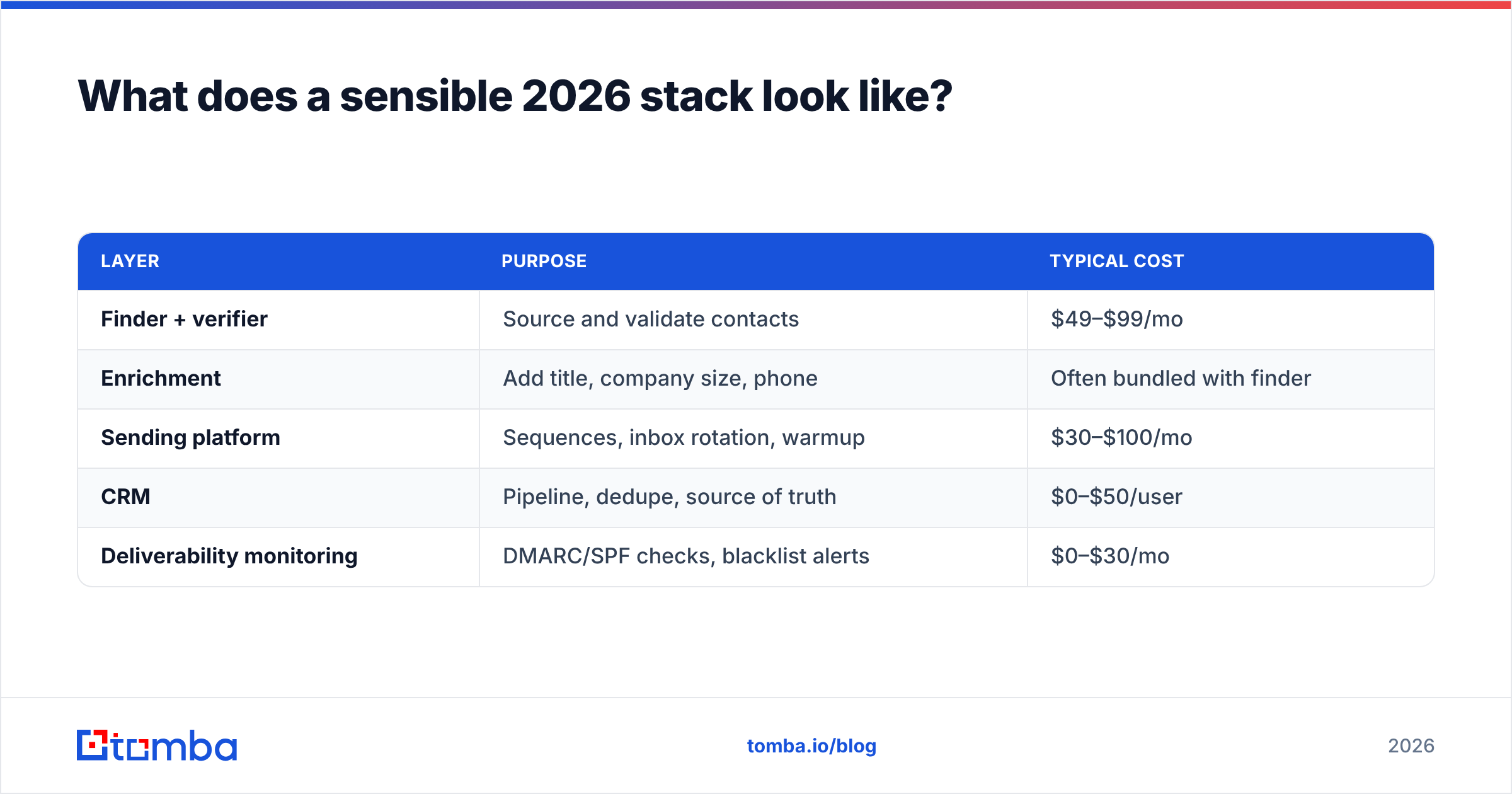
For a small B2B team doing outbound, this configuration covers the whole workflow without redundant spend:
| Layer | Purpose | Typical cost |
|---|---|---|
| Finder + verifier | Source and validate contacts | $49–$99/mo |
| Enrichment | Add title, company size, phone | Often bundled with finder |
| Sending platform | Sequences, inbox rotation, warmup | $30–$100/mo |
| CRM | Pipeline, dedupe, source of truth | $0–$50/user |
| Deliverability monitoring | DMARC/SPF checks, blacklist alerts | $0–$30/mo |
Total: roughly $130–$280/month for a two-person outbound motion. Anything materially above that, and you're paying for bundling convenience rather than capability. Anything below $80 and you're likely skipping verification, which — see above — costs more than it saves.
Start with the free tiers. Run the same 200 ICP contacts through two or three finders, verify the outputs independently, and count how many are genuinely deliverable and correctly titled. That test takes an afternoon and beats every comparison article, including this one.
Where to start#
If you're building a B2B list and want the finding, verification, and enrichment layers under one roof rather than stitched together, start with the Tomba Email Finder. The free tier gives you 25 searches a month — enough to run the 200-contact accuracy test described above across a couple of sessions — and paid plans start at $49/month with verification included rather than sold as an add-on. Check the Tomba pricing page for credit allowances per tier, then benchmark it against whatever else is on your shortlist using your own ICP data. That's the only comparison that will actually predict your results.
Related guides#
Ready to find emails that actually work?
Join 150,000+ professionals who stopped guessing and started sending. Free credits on signup — no credit card required.
Get the Tomba newsletter
Practical outbound tactics and product updates — once every two weeks.
About the author