Email List Cleaner: How to Clean Your List Without Losing Leads
Most email list cleaners agree on the easy 80% of a list and disagree wildly on the rest. Here's how cleaning actually works, what the status codes mean, and how to pick a tool without deleting good leads.
TL;DR
- An email list cleaner removes addresses that will bounce, complain, or trap you before you send — it does not make bad prospects into good ones.
- Every serious cleaner agrees on roughly the easy 80% of a list. The money is in how each one handles catch-all domains, role accounts, and stale B2B data.
- Budget $0.001–$0.008 per address depending on volume. Anything advertised as unlimited free cleaning is either sampling, storing your list, or both.
- Keep bounce rate under 2% and you stay inside Google and Microsoft's bulk-sender thresholds. Above 5% and your domain reputation starts eating the damage.
- Cleaning is a patch. If more than 15% of a fresh list fails verification, the problem is your data source, not your cleaner.
What is an email list cleaner?#
An email list cleaner is a tool that takes a list of email addresses and tells you which ones are safe to send to. Think of it as a bouncer at the door of your outbound campaign: it checks IDs before anyone gets in, so you're not explaining to the mailbox providers later why half your guests were fake.
Mechanically, a cleaner runs each address through a chain of checks — syntax, domain records, mailbox existence, and risk classification — and returns a status: valid, invalid, catch-all/accept-all, role, disposable, or unknown. You then decide what to do with each bucket.
The confusion in this category comes from naming. "Email list cleaner," "email verifier," "bulk email validation," and "list hygiene tool" all describe the same core function. What differs is packaging: some vendors sell only bulk file cleaning, some sell a real-time API, and some — like the email verifier inside a broader data platform — bundle cleaning with the sourcing step that created the list in the first place.
Wait — that image should read: 
Why do B2B email lists decay so fast?#
B2B lists rot faster than consumer lists because the data is tied to employment, not identity. A personal Gmail lasts a decade. A work address dies the day someone changes jobs.
Here's what actually drives decay:
- Job changes. B2B contact data commonly degrades at roughly 2–3% per month, which compounds to a quarter or more of a list per year. A list you bought 18 months ago is a different list today.
- Company events. Rebrands, acquisitions, and domain migrations invalidate every address at that domain at once — sometimes overnight.
- Alias sprawl. Companies spin up
first.last@,flast@, andfirst@patterns inconsistently. Guessing tools generate all three; only one is real. - Spam traps. Recycled traps are real addresses abandoned and re-enabled by providers to catch senders who never clean. They look perfectly valid to a naive syntax check.
- Form garbage. Typos (
@gmial.com), disposables, and deliberately fake entries accumulate in any self-serve signup flow. - Suppression drift. Unsubscribes and complaints recorded in one tool but never synced back to your master list.
The practical consequence: a list is not a fixed asset. It's a perishable one, and an email list cleaner is the refrigeration.
How does an email list cleaner actually work?#
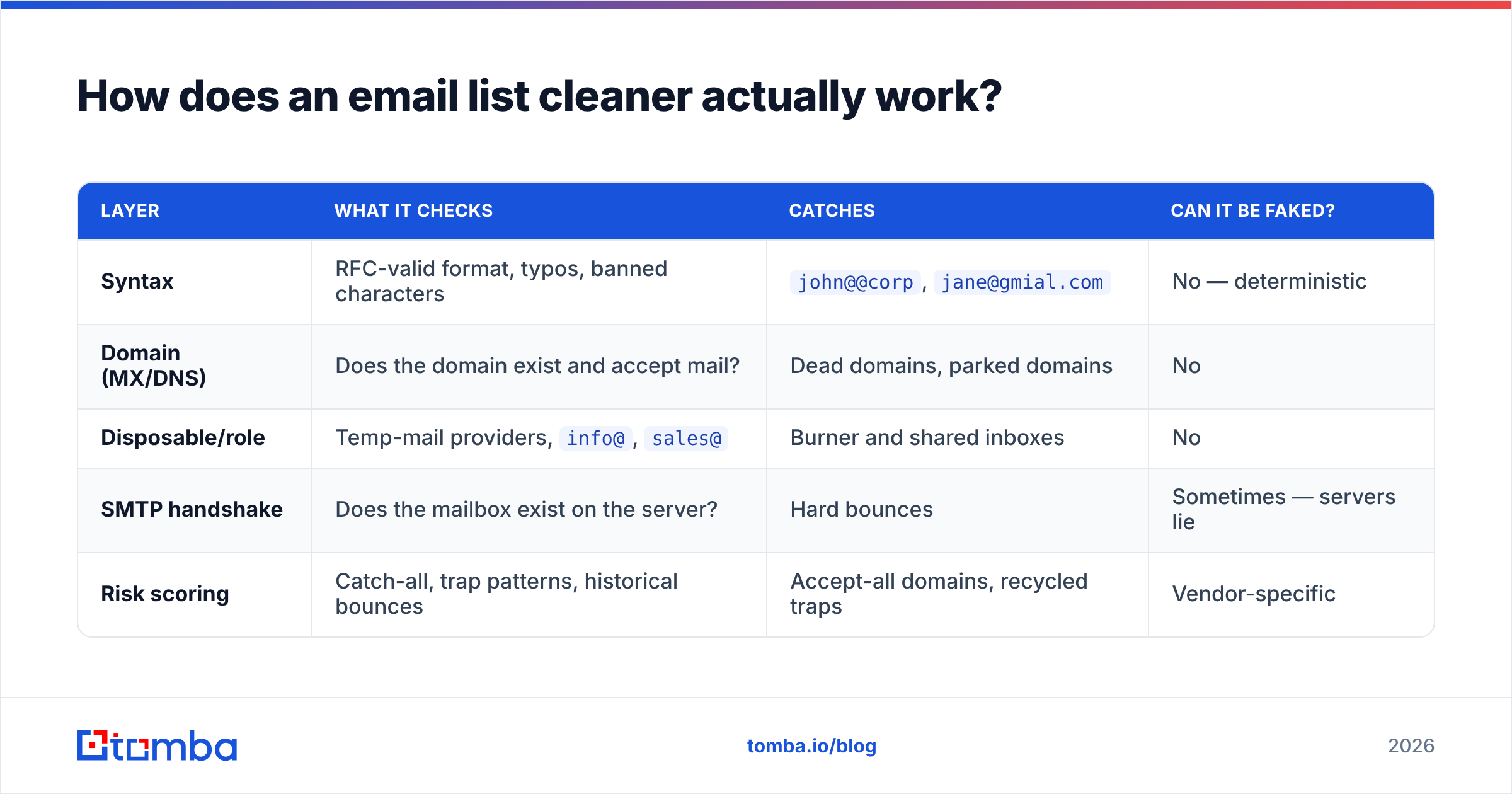
Most vendors describe this as a black box. It isn't. There are five layers, and knowing them tells you exactly where a given tool is cutting corners.
| Layer | What it checks | Catches | Can it be faked? |
|---|---|---|---|
| Syntax | RFC-valid format, typos, banned characters | john@@corp, jane@gmial.com |
No — deterministic |
| Domain (MX/DNS) | Does the domain exist and accept mail? | Dead domains, parked domains | No |
| Disposable/role | Temp-mail providers, info@, sales@ |
Burner and shared inboxes | No |
| SMTP handshake | Does the mailbox exist on the server? | Hard bounces | Sometimes — servers lie |
| Risk scoring | Catch-all, trap patterns, historical bounces | Accept-all domains, recycled traps | Vendor-specific |
The first three layers are commodity. Any vendor can do them and any vendor will get the same answer. If two tools disagree on a syntax check, one of them is broken.
Layer four is where quality separates. An SMTP handshake opens a conversation with the receiving mail server and asks, in effect, "would you accept a message for this person?" Servers increasingly refuse to answer honestly — Microsoft 365 tenants in particular return "yes" to almost everything to defeat directory harvesting. A cleaner that treats that "yes" as a validation is selling you confidence, not accuracy.
Layer five is the actual product. A catch-all verifier has to make a probabilistic call using signals the SMTP conversation doesn't provide: known email patterns for that domain, whether the person appears in public sources, how similar addresses at the same company behaved, and historical bounce data. That's why two cleaners can return 91% and 68% "deliverable" on the same file — they're scoring the ambiguous middle differently.
What do the verification statuses actually mean?#
Vendors use different labels for the same states, which makes cross-tool comparison harder than it needs to be. Here's the translation table and what to do with each bucket.
| Status | Common aliases | What it means | Send to it? |
|---|---|---|---|
| Valid | Deliverable, OK, safe | Mailbox confirmed to exist | Yes |
| Invalid | Undeliverable, bad, hard bounce | Mailbox does not exist | Never — delete |
| Catch-all | Accept-all, unknown-domain | Server accepts everything; existence unproven | Only with a pattern-confidence score |
| Role | Generic, group | Shared inbox (info@, support@) |
Rarely — high complaint risk |
| Disposable | Temporary, burner | Throwaway provider | No |
| Unknown | Greylisted, timeout, risky | Server didn't answer conclusively | Retry later, then treat as risky |
The single most expensive mistake in list hygiene is treating "catch-all" and "unknown" as the same bucket and deleting both. On typical B2B files, catch-all domains account for 15–25% of addresses, and they skew toward larger enterprises — exactly the accounts you don't want to drop. A tool that dumps all catch-alls into "risky" is quietly deleting your best segment.
Equally, don't send blind to catch-alls. The correct treatment is a confidence score plus a low-volume, separately-warmed sending channel so a bad guess doesn't damage your primary domain reputation.
Which email list cleaner should you use in 2026?#
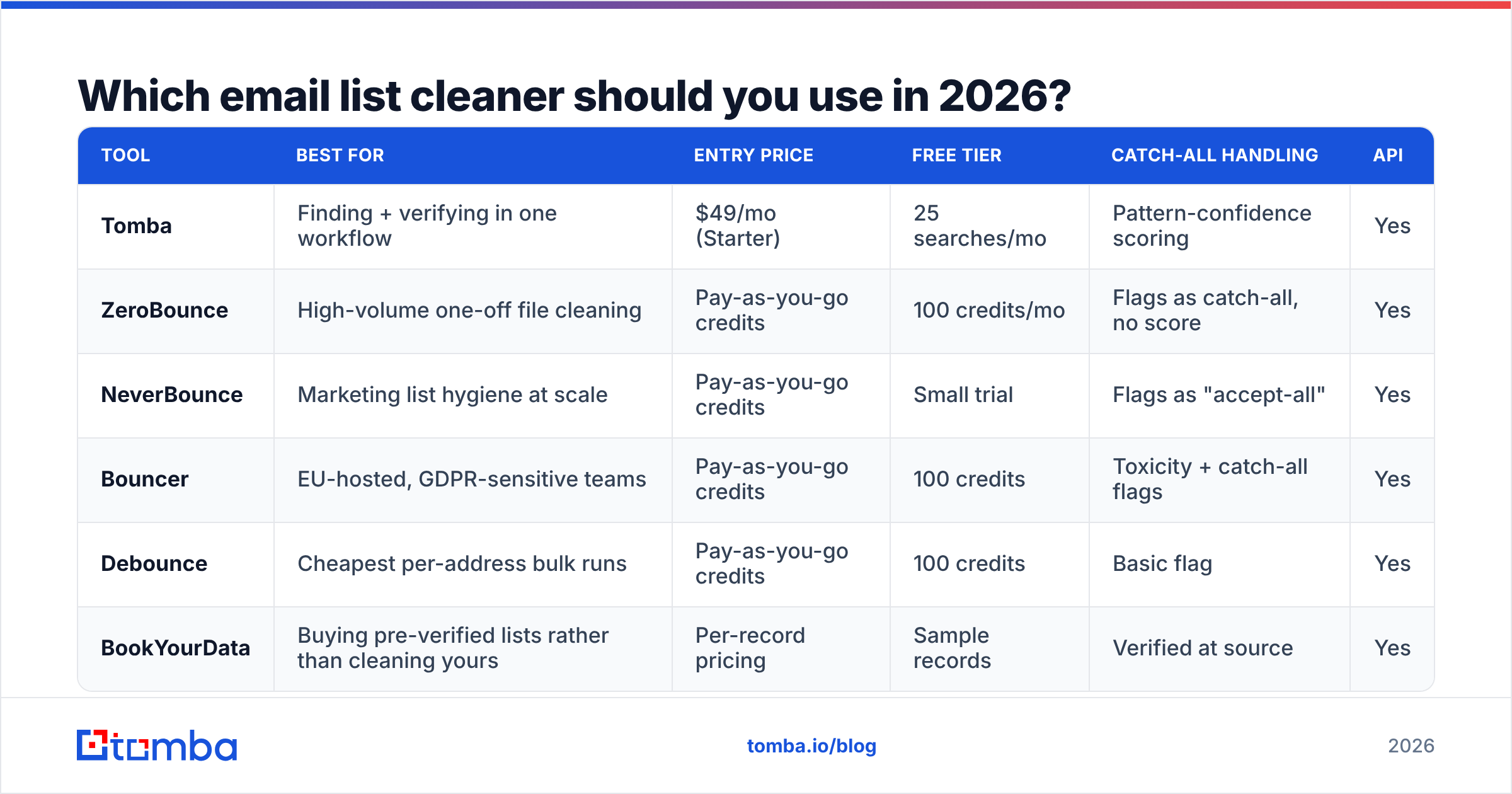
There is no single winner, because the category splits into three jobs: one-time file cleaning, continuous API verification, and verification bundled with sourcing. Pricing below reflects publicly listed rates in early 2026 and moves frequently — check the vendor before you buy.
| Tool | Best for | Entry price | Free tier | Catch-all handling | API |
|---|---|---|---|---|---|
| Tomba | Finding + verifying in one workflow | $49/mo (Starter) | 25 searches/mo | Pattern-confidence scoring | Yes |
| ZeroBounce | High-volume one-off file cleaning | Pay-as-you-go credits | 100 credits/mo | Flags as catch-all, no score | Yes |
| NeverBounce | Marketing list hygiene at scale | Pay-as-you-go credits | Small trial | Flags as "accept-all" | Yes |
| Bouncer | EU-hosted, GDPR-sensitive teams | Pay-as-you-go credits | 100 credits | Toxicity + catch-all flags | Yes |
| Debounce | Cheapest per-address bulk runs | Pay-as-you-go credits | 100 credits | Basic flag | Yes |
| BookYourData | Buying pre-verified lists rather than cleaning yours | Per-record pricing | Sample records | Verified at source | Yes |
Read that table as a decision tree, not a leaderboard:
- You have one old 50,000-row CSV and no ongoing need. Buy credits from a pure-play verifier. You don't need a subscription.
- You verify continuously as leads enter a CRM. You need an API and a real SLA, and you should compare cost per 1,000 calls, not sticker price. Look at Tomba pricing alongside pay-as-you-go vendors — subscription plans usually win past ~20,000 verifications a month.
- Your list is being built right now, by you. Cleaning after the fact is the expensive path. Verify at the point of discovery instead.
- You want a list you didn't build. Buying pre-verified records from a reputable provider like BookYourData shifts the hygiene problem to the vendor — a legitimate trade if the compliance paperwork checks out.
For a broader vendor landscape with buyer reviews, the G2 email verification category is a reasonable neutral starting point.

Is cleaning enough, or is your data source the problem?#
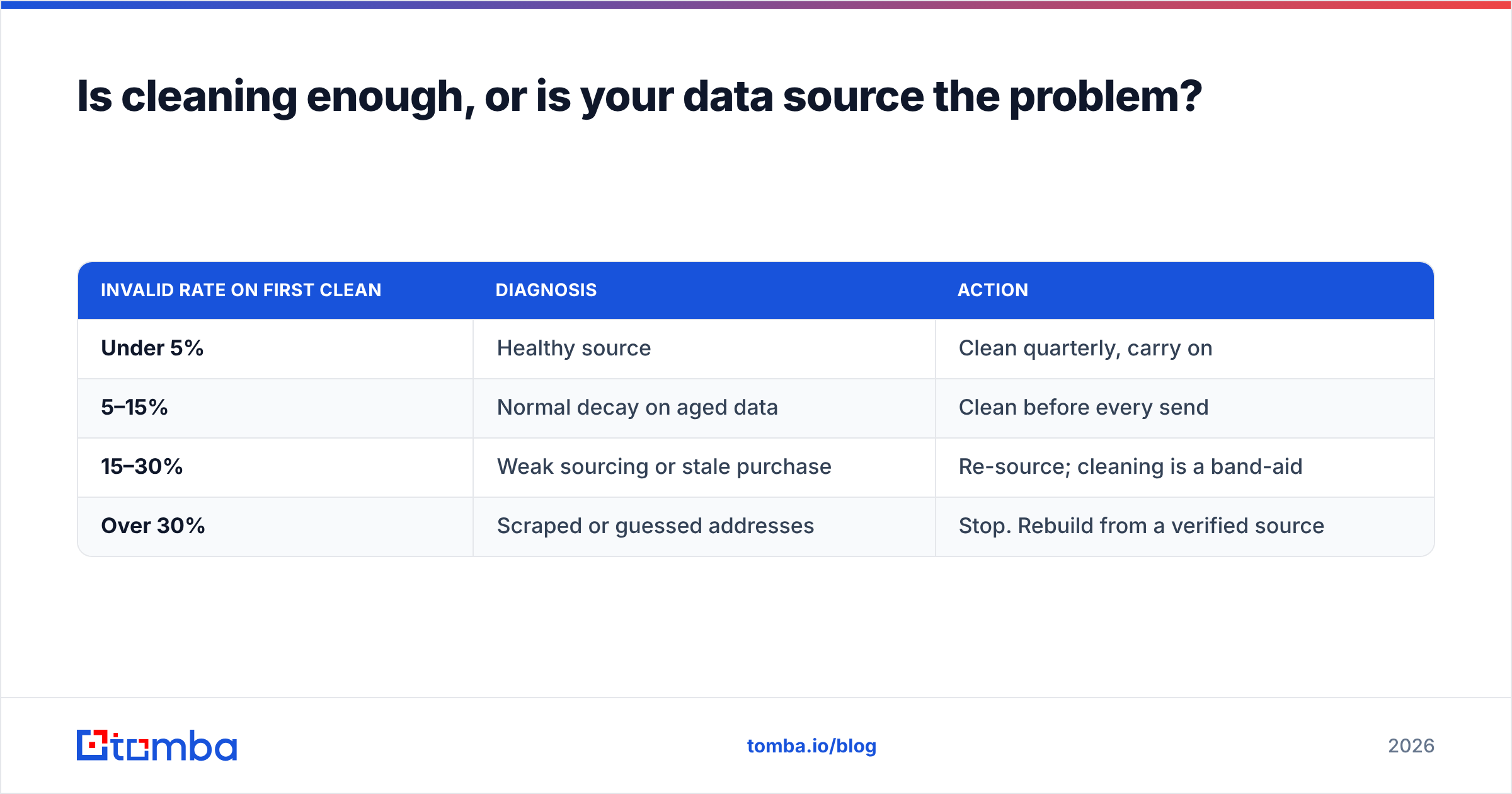
Here's the uncomfortable arithmetic. Cleaning a list is subtractive — it can only ever make your list smaller. If you clean 10,000 addresses and 3,000 fail, you paid to delete 30% of what you bought and you still have a 7,000-contact campaign.
Run this diagnostic on any fresh list:
| Invalid rate on first clean | Diagnosis | Action |
|---|---|---|
| Under 5% | Healthy source | Clean quarterly, carry on |
| 5–15% | Normal decay on aged data | Clean before every send |
| 15–30% | Weak sourcing or stale purchase | Re-source; cleaning is a band-aid |
| Over 30% | Scraped or guessed addresses | Stop. Rebuild from a verified source |
Anything over 15% means your cleaner is doing quality control that should have happened upstream. That's the argument for verification-at-discovery: when you find an address with an email finder that checks the mailbox as part of the lookup, the invalid never enters your CRM, so you never pay to store it, sync it, or delete it. Pair that with domain search when you want every reachable contact at a target account rather than a single guessed pattern.
Permutator-style tools sit at the opposite end. Generating j.smith@, john.s@, jsmith@ and mailing all three is how you manufacture a bounce rate. If you use an email permutator, treat its output as hypotheses to verify, never as contacts to send.
How often should you clean, and what does it change?#
Frequency depends on how the list is used, not how old it is.
- Cold outbound lists: verify within 7 days of sending. B2B decay makes anything older a gamble.
- Newsletter/marketing lists: full clean every quarter, plus continuous suppression of soft-bounces after three consecutive failures.
- CRM records: re-verify on a rolling 90-day cycle for open opportunities, annually for closed-lost.
- Form captures: real-time API validation at submission. Cheapest possible moment to catch a typo.
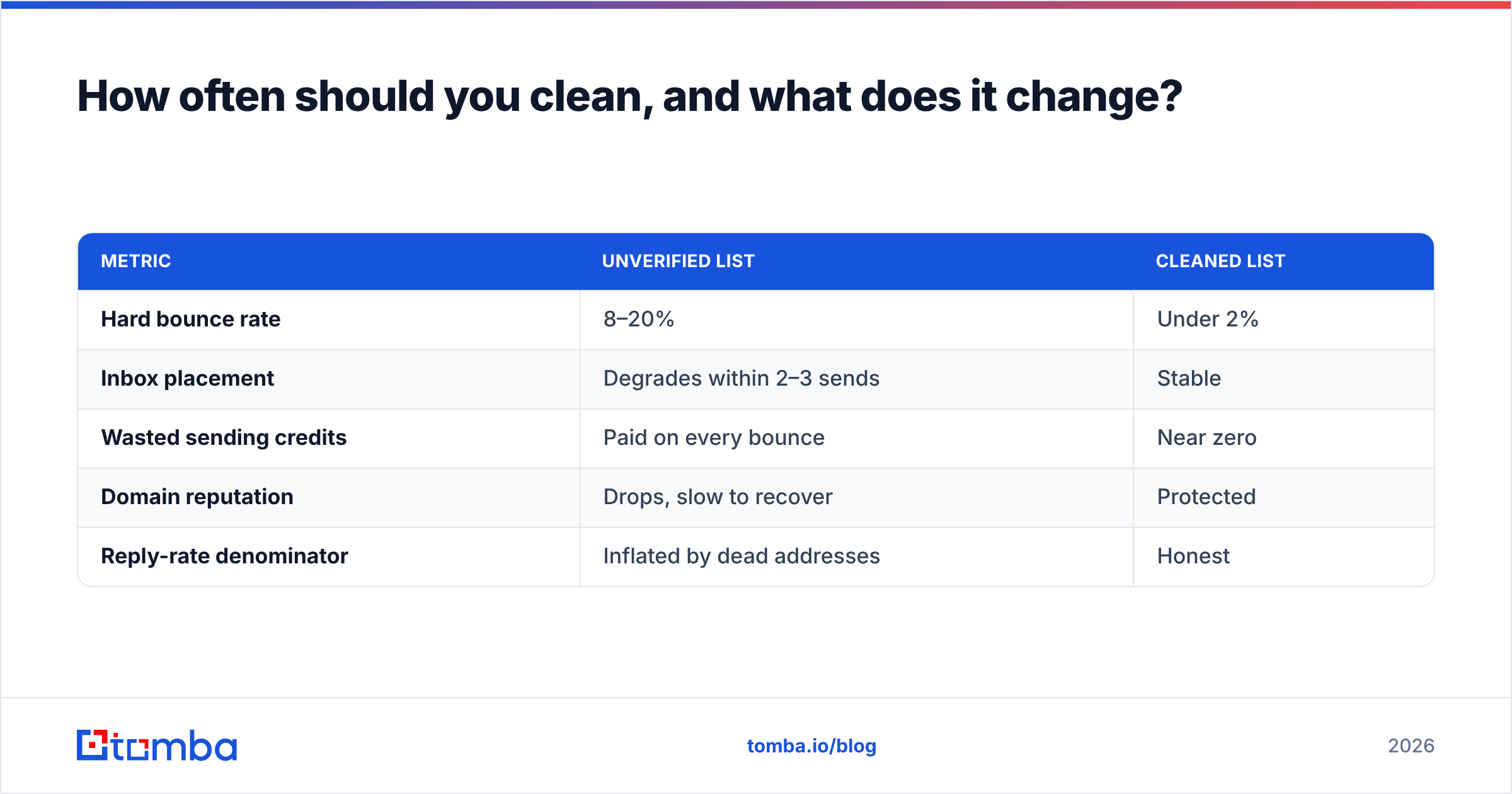
The measurable effect isn't "better open rates" in some abstract sense — it's staying inside the thresholds mailbox providers actually enforce. Google's bulk sender requirements put the spam complaint ceiling at 0.3%, and high hard-bounce volume is one of the fastest ways to get filtered before you ever hit that number. You can monitor the aftermath in Google Postmaster Tools, which shows domain reputation and spam rate for your sending domain.
| Metric | Unverified list | Cleaned list |
|---|---|---|
| Hard bounce rate | 8–20% | Under 2% |
| Inbox placement | Degrades within 2–3 sends | Stable |
| Wasted sending credits | Paid on every bounce | Near zero |
| Domain reputation | Drops, slow to recover | Protected |
| Reply-rate denominator | Inflated by dead addresses | Honest |
That last row matters more than teams realize. If 15% of your list can't receive mail, your reply rate is understated by 15% and every A/B test you run on messaging is measuring noise. Cleaning doesn't just protect deliverability — it makes your experiments valid. A bounce message is the mail system telling you the test never ran.
What mistakes should you avoid?#
Deleting every catch-all. You just removed most of your enterprise accounts. Score them instead.
Trusting a 99% accuracy claim. Accuracy is only meaningful with a stated denominator. 99% on syntax-checkable addresses is trivial; 99% on catch-all domains is not credible from anyone.
Cleaning once and calling it done. A list cleaned in January is a stale list by April. Hygiene is a schedule, not an event.
Uploading your list to a free unlimited cleaner. Free bulk cleaning at scale has a business model. Read what happens to the data you upload, and prefer vendors that document their data sources and retention.
Cleaning without deduplicating. You'll pay twice to verify the same address in two casings. Dedupe first — it's free.
Ignoring role accounts entirely. info@ is a bad cold-outbound target, but it's a legitimate support or billing contact. Segment, don't delete.
Assuming a clean list fixes bad copy. Verification gets you to the inbox. What happens after that is not the cleaner's job.
How do you build a cleaning workflow that scales?#
A workable pipeline for a team sending at any real volume:
- Capture — verify at the point of entry with an API call on form submit or CRM create.
- Dedupe — normalize casing and strip plus-aliases before any paid verification runs.
- Bulk verify — run the remaining file through a bulk email finder or verifier in batches, not one enormous job.
- Segment by status — valid to the main sequence, catch-all to a separate low-volume channel, unknown to a retry queue.
- Suppress permanently — invalid and complained addresses go to a master suppression list that every sending tool reads.
- Re-verify on a clock — 90-day rolling cycle, automated, no manual CSV shuffling.
Steps 1 and 6 are where most teams lose. Everyone runs step 3 once, after a bad send, then goes back to sending from an unmanaged list. The teams with stable deliverability treat verification as infrastructure — a scheduled job, not a rescue mission.
The bottom line#
An email list cleaner is a necessary tool and an insufficient strategy. Buy one, run it on a schedule, and pay attention to how it handles catch-all domains — that single behavior separates a cleaner that protects your list from one that quietly shrinks it.
But the cheaper long-term move is not cleaning more often. It's building lists that don't need aggressive cleaning, by verifying at the moment of discovery instead of months later. If your invalid rate on fresh data is consistently above 15%, no cleaner will fix that; only a better source will.
If you're rebuilding from the source, start with Tomba Email Finder. It finds addresses by domain, name, or company and verifies the mailbox as part of the lookup, so bad data never reaches your CRM in the first place. The free tier gives you 25 searches a month to test it against a list you've already cleaned — run both, compare the overlap, and let the numbers decide.
Related guides#
Ready to find emails that actually work?
Join 150,000+ professionals who stopped guessing and started sending. Free credits on signup — no credit card required.
Get the Tomba newsletter
Practical outbound tactics and product updates — once every two weeks.
About the author