Email List Cleaning Service: What Works in 2026
Bounce rates over 3% now trigger Gmail and Microsoft filtering. Here's how email list cleaning services actually work, what they cost, and when scrubbing is worth the credits.
TL;DR
- An email list cleaning service removes hard bounces, spam traps, role accounts, duplicates, and syntax errors before you send — typically catching 8–25% of a list that hasn't been touched in a year.
- Gmail and Microsoft both enforce complaint and bounce thresholds. Sustained bounce rates above 2–3% get you throttled, then foldered, then blocked.
- Pricing clusters around $0.0015–$0.008 per record. The spread is mostly about catch-all handling, not raw accuracy.
- Cleaning is triage, not a cure. If your acquisition source is bad, you'll pay to clean the same garbage every quarter.
- The cheapest fix is upstream: verify at capture, source contacts from a provider that validates before delivery, and re-verify anything older than 90 days.
What is an email list cleaning service?#
An email list cleaning service takes a list of addresses you already have and tells you which ones are safe to send to. You upload a CSV, the service runs each address through a chain of checks, and you get back a scored file — usually with statuses like valid, invalid, catch-all/accept-all, role-based, disposable, and unknown.
Think of it like a bouncer checking IDs at the door. The bouncer doesn't create guests. He just stops the obviously fake ones from getting in and embarrassing the venue. Your sending domain is the venue, and mailbox providers are the licensing board watching how many fakes you let through.
The checks run in a rough order of cost:
- Syntax validation — malformed addresses, illegal characters, missing TLDs. Free and instant.
- Domain and MX record lookup — does the domain exist, and does it have mail servers configured? Dead domains are the single largest bucket in an aged list.
- Disposable and temporary domain matching — mailinator, 10minutemail, and the thousands of rotating burner domains behind them.
- Role account detection — info@, sales@, support@, admin@. Deliverable, but they route to shared inboxes and generate complaints at 3–5x the rate of personal addresses.
- SMTP handshake — the service opens a connection to the receiving mail server and asks whether the mailbox exists, without actually delivering a message.
- Catch-all and spam-trap logic — the hard part, and where services differ most.
Steps 1 through 4 are commodity work. Any vendor can do them. Step 5 is where infrastructure quality shows up, because a lot of mail servers rate-limit or greylist verification traffic. Step 6 is where you're actually buying judgment.

Why do bounce rates matter more in 2026 than they did in 2022?#
Because the thresholds became enforcement, not guidance.
Google's bulk sender requirements set a hard spam-complaint ceiling of 0.3% and require authenticated sending with SPF, DKIM, and DMARC for anyone sending over 5,000 messages a day to Gmail addresses. Microsoft rolled equivalent requirements into Outlook.com sending in 2025. Neither publishes an exact bounce threshold, but the operational consensus from deliverability teams sits around 2% — cross it consistently and your mail starts landing in Junk before it starts getting rejected outright.
The mechanism is straightforward. Mailbox providers score your sending domain and IP on a rolling basis. High bounce rates signal that you're mailing a list you didn't earn: scraped, purchased, or ancient. That signal degrades your sender reputation, and reputation is what decides whether your next campaign hits Primary or Promotions or nothing at all.
The painful part is the lag. You send to a stale 20,000-record list on Monday, see a 12% bounce rate, fix the list on Wednesday — and still deal with suppressed inbox placement for the next four to six weeks. Reputation recovers slowly by design, because that's what makes it expensive to abuse.
Worth checking your SPF record and DMARC alignment at the same time you clean. A perfectly scrubbed list still fails if authentication is broken.
How do the main cleaning approaches compare?#
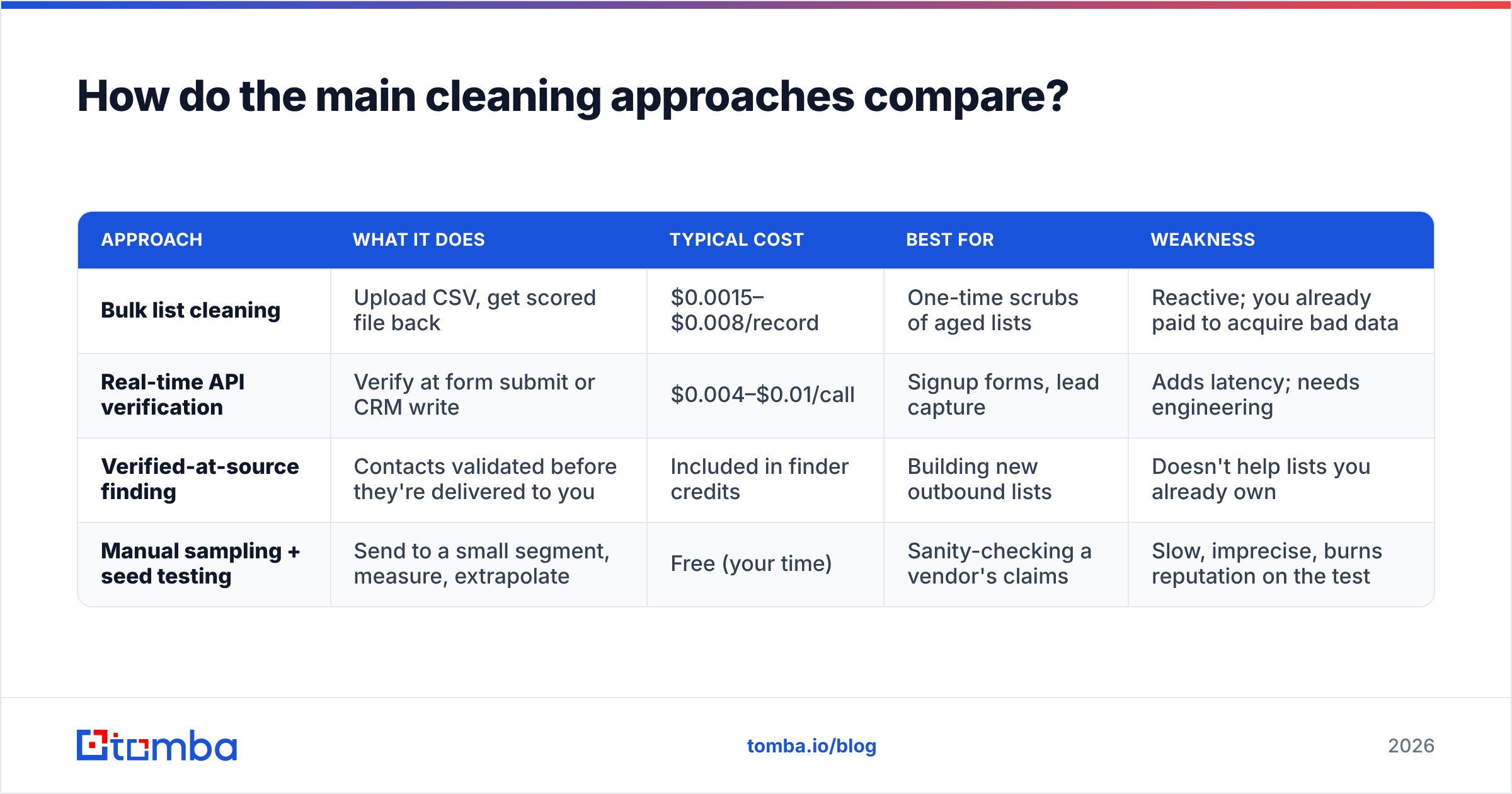
There are three distinct models, and people conflate them constantly.
| Approach | What it does | Typical cost | Best for | Weakness |
|---|---|---|---|---|
| Bulk list cleaning | Upload CSV, get scored file back | $0.0015–$0.008/record | One-time scrubs of aged lists | Reactive; you already paid to acquire bad data |
| Real-time API verification | Verify at form submit or CRM write | $0.004–$0.01/call | Signup forms, lead capture | Adds latency; needs engineering |
| Verified-at-source finding | Contacts validated before they're delivered to you | Included in finder credits | Building new outbound lists | Doesn't help lists you already own |
| Manual sampling + seed testing | Send to a small segment, measure, extrapolate | Free (your time) | Sanity-checking a vendor's claims | Slow, imprecise, burns reputation on the test |
Most teams need two of these, not one. Real-time verification at capture stops new rot. Bulk cleaning handles the existing pile. Verified-at-source removes the problem for anything you're building fresh.
The mistake is buying only bulk cleaning and treating it as a subscription. If you're cleaning the same list every quarter and it keeps coming back 15% invalid, the list isn't the problem — the acquisition channel is.
What does an email list cleaning service actually cost?#
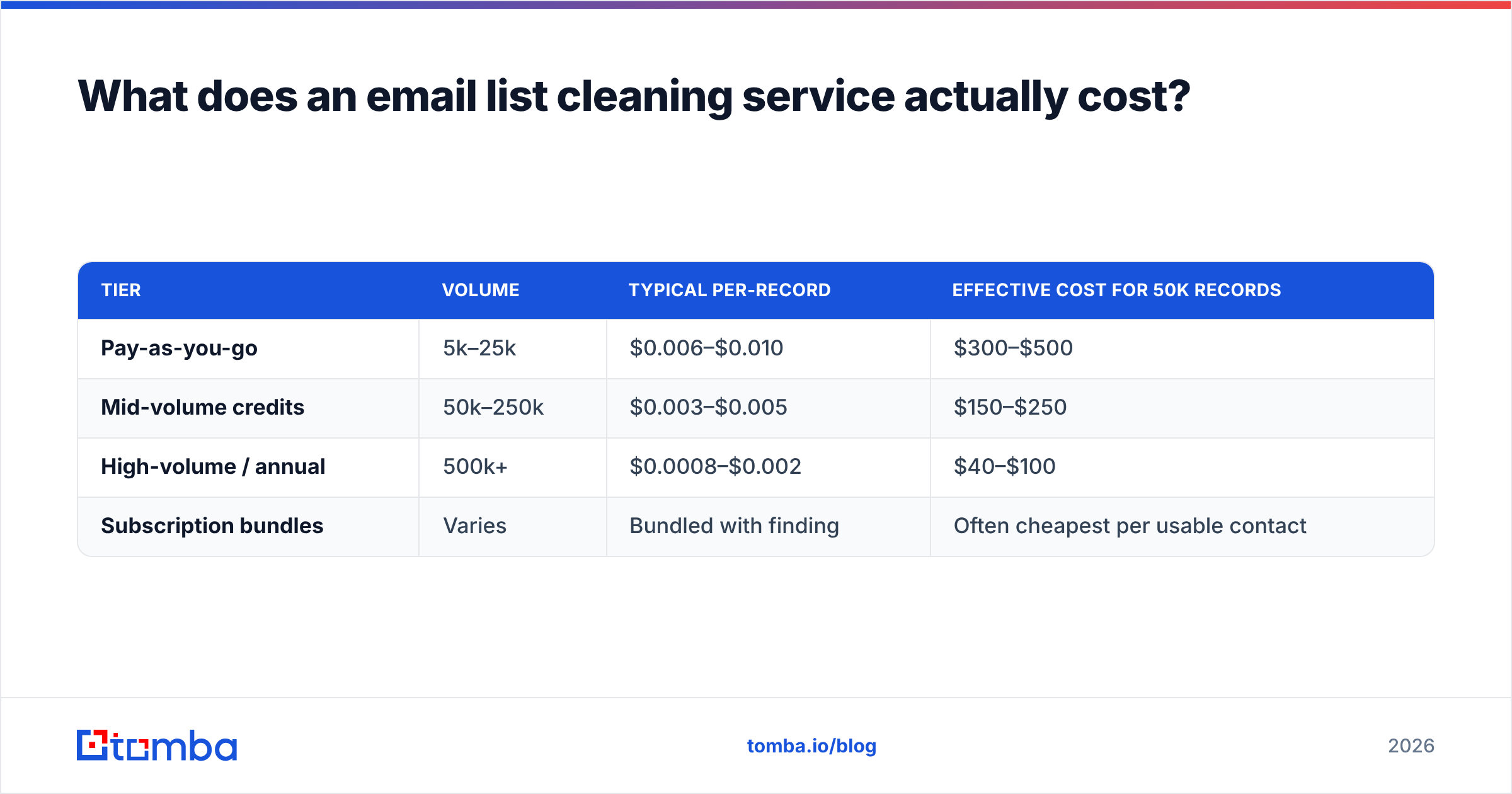
Per-record pricing is the headline number and the least useful one. Here's what the market looks like across the common tiers.
| Tier | Volume | Typical per-record | Effective cost for 50k records |
|---|---|---|---|
| Pay-as-you-go | 5k–25k | $0.006–$0.010 | $300–$500 |
| Mid-volume credits | 50k–250k | $0.003–$0.005 | $150–$250 |
| High-volume / annual | 500k+ | $0.0008–$0.002 | $40–$100 |
| Subscription bundles | Varies | Bundled with finding | Often cheapest per usable contact |
Three cost traps show up repeatedly:
- Charging for unknowns. Some services bill you for every record processed, including the ones they return as "unknown" or "risky." If 12% of your list comes back unknown, you paid full price for zero decisions.
- Catch-all handling as an upsell. Catch-all domains accept every address at the SMTP layer, so a standard handshake tells you nothing. Some vendors mark them all "risky" and charge you anyway. Others resolve them with pattern inference and secondary signals. That's a real difference in usable output, and it's rarely visible in the pricing table.
- Credit expiry. Annual credits that expire monthly are a common structure. Do the math on your actual monthly volume, not your annual total.
For context on bundled models, Tomba pricing runs a free tier at 25 searches/month, then Starter at $49/mo, Growth at $99/mo, Pro at $249/mo, and custom Enterprise — with finding and verification sharing the same credit pool, so you're not buying two separate contracts to solve one problem.

Which statuses should you actually send to?#
This is where most teams either get too aggressive or too timid.
- Valid / Deliverable — send. This is the baseline, typically 60–85% of a healthy list.
- Invalid / Undeliverable — suppress permanently. Do not re-verify these next quarter hoping for a different answer. Mailbox deletion is one-directional.
- Catch-all / Accept-all — judgment call. On a well-sourced B2B list these are often fine; on a scraped list they're a coin flip. Segment them separately and send to them on a warmed secondary domain first. A dedicated catch-all verifier narrows the guess considerably by combining pattern data with domain-level signals rather than relying on the SMTP response alone.
- Role-based — suppress for cold outbound, keep for support and transactional. info@ and sales@ addresses generate complaints far above baseline because whoever reads them didn't opt into anything.
- Disposable — suppress. Always. These were created to receive one message and die.
- Unknown — suppress on the first send, retry once in 30 days. Servers greylist. Sometimes an unknown resolves cleanly on the second pass.
A practical rule: if suppressing a status category costs you less than 2% of your addressable list, suppress it. The reputation risk of a marginal segment almost never justifies the marginal reach.
Is cleaning a purchased list enough to make it safe?#
No, and this is the most expensive misunderstanding in the category.
An email list cleaning service answers one question: does this mailbox exist? It cannot answer the two questions that actually determine whether your campaign works:
- Does this person want to hear from you? Verification has no opinion on consent. A perfectly valid address belonging to someone who never heard of you still generates a spam complaint, and complaints hurt more than bounces under current Gmail rules.
- Is this person still in this role? B2B contact data decays at roughly 22–30% per year depending on the segment, per HubSpot's and other vendors' published decay estimates. Someone who left the company six months ago may still have a live forwarding mailbox — valid status, worthless lead.
Cleaning a purchased list will lower your bounce rate. It will not lower your complaint rate, and it will not make the contacts relevant. If the list was bad on both dimensions, you've spent money to make a bad campaign fail more quietly.
The better sequence for cold outbound: define the account and role criteria first, find contacts against those criteria with an email finder that validates before returning a result, verify the output, and then send. That inverts the order — you're paying to acquire correct data rather than paying to identify how much of your existing data is wrong. Tomba's data sources page walks through how the pre-delivery validation works, which is worth reading before you assume all providers hand over unchecked records.
How do you clean a list without wrecking your sending reputation?#
The cleaning itself is safe. The re-engagement afterward is where people get hurt.
Step 1 — Segment by last engagement before you clean. Anyone who opened or clicked in the last 90 days is low-risk regardless of what the verifier says. Anyone dormant for 12+ months is high-risk even if their address validates. Engagement recency predicts complaints better than deliverability status does.
Step 2 — Run the bulk verification. Use a bulk email finder or verification endpoint for anything over a few thousand records. Manual one-by-one checking stops making sense past about 500 addresses.
Step 3 — Suppress hard, segment soft. Invalid and disposable go straight to a permanent suppression list. Catch-all and unknown go into a separate sending segment, not into your main list.
Step 4 — Ramp, don't blast. After cleaning a large dormant list, send in ascending volume tranches over 10–14 days. Start with your most recently engaged 500, watch the bounce and complaint numbers, then expand. Mailbox providers evaluate volume changes as a signal on their own — a domain that sends 200 messages a day suddenly sending 40,000 looks like a compromised account, clean list or not.
Step 5 — Re-verify on a schedule. Quarterly for active outbound lists, monthly if you're sending high volume. Set a rule in your CRM that any contact record untouched for 180 days gets flagged for re-verification before it enters a sequence.
Step 6 — Fix the intake. Add email verification at the form level so bad addresses never enter the database. This is the step everyone skips and the only one that stops the cycle.
What should you look for when choosing a vendor?#
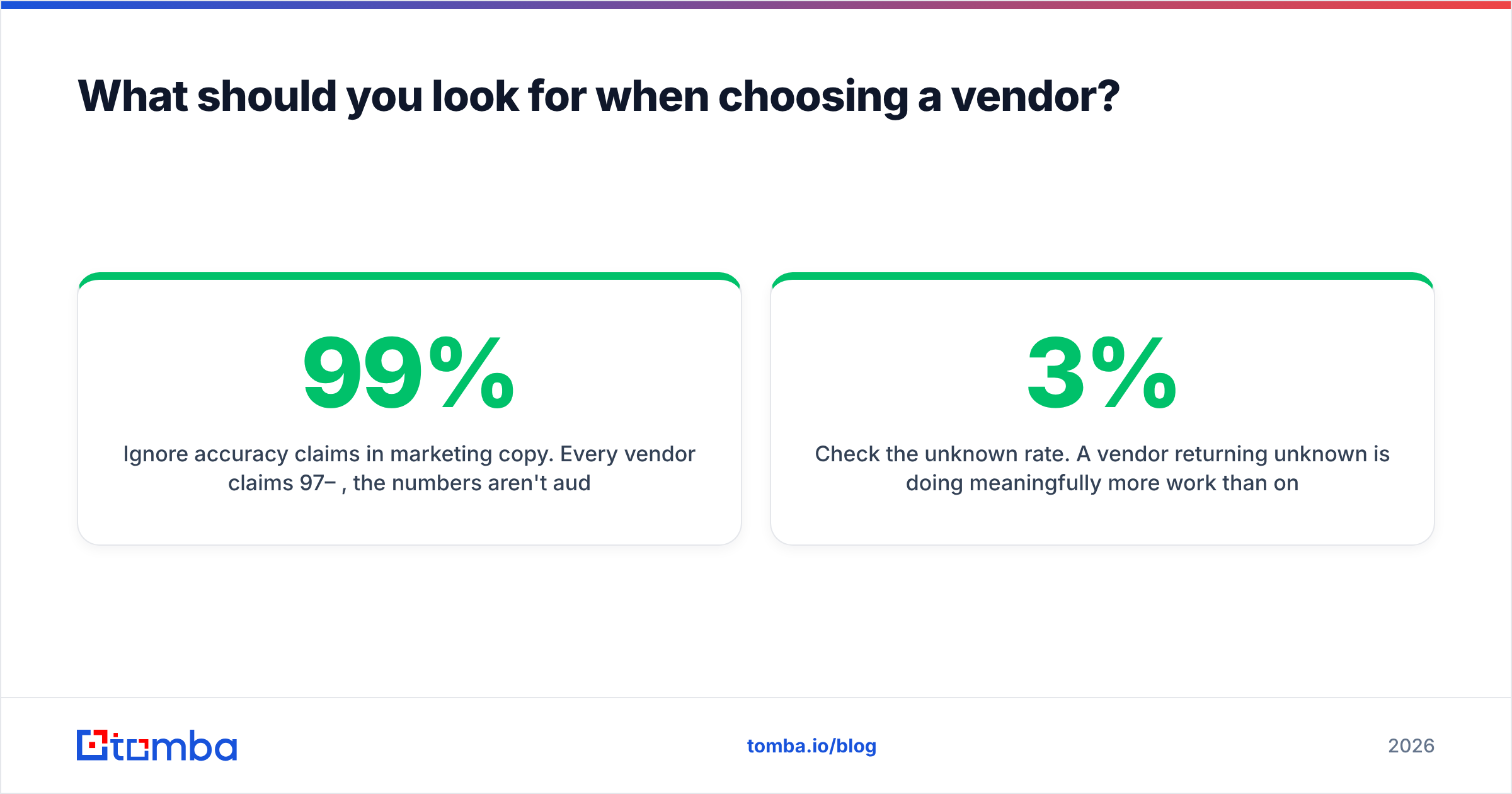
Ignore accuracy claims in marketing copy. Every vendor claims 97–99%, the numbers aren't audited, and the methodology is never disclosed. Evaluate on these instead:
- Test with your own data. Take 1,000 records where you already know the outcome — a list you sent to last month and have bounce logs for. Run it through the trial tier of two or three vendors and compare against your actual results. This takes an afternoon and tells you more than every review site combined.
- Check the unknown rate. A vendor returning 3% unknown is doing meaningfully more work than one returning 15%. Ask for this number before you buy; a real vendor will give it to you.
- Confirm the catch-all policy in writing. Do they attempt resolution or blanket-flag? Do they charge for catch-alls? These two answers explain most of the price gap in the market.
- Look at the API, not just the dashboard. If you'll eventually verify at capture, you need real-time endpoints with sane rate limits and documented latency. The email verification API docs should tell you response times and concurrency limits without you having to ask sales.
- Check compliance posture. GDPR data processing agreements, SOC 2 if you're selling into enterprise, and clear statements on whether your uploaded list is retained or used to enrich their own database. Some verification services quietly keep what you upload. Read the terms.
- Consider bundled providers. If you're also building lists, a provider like BookYourData or Tomba that combines sourcing with verification usually beats stitching a finder and a separate scrubber together — fewer contracts, one credit pool, and no format mismatch between the two steps.
Cross-check any shortlist against G2's email verification category for recent review volume, but weight your own 1,000-record test far higher than the star rating.
Where does cleaning fit in the wider deliverability picture?#
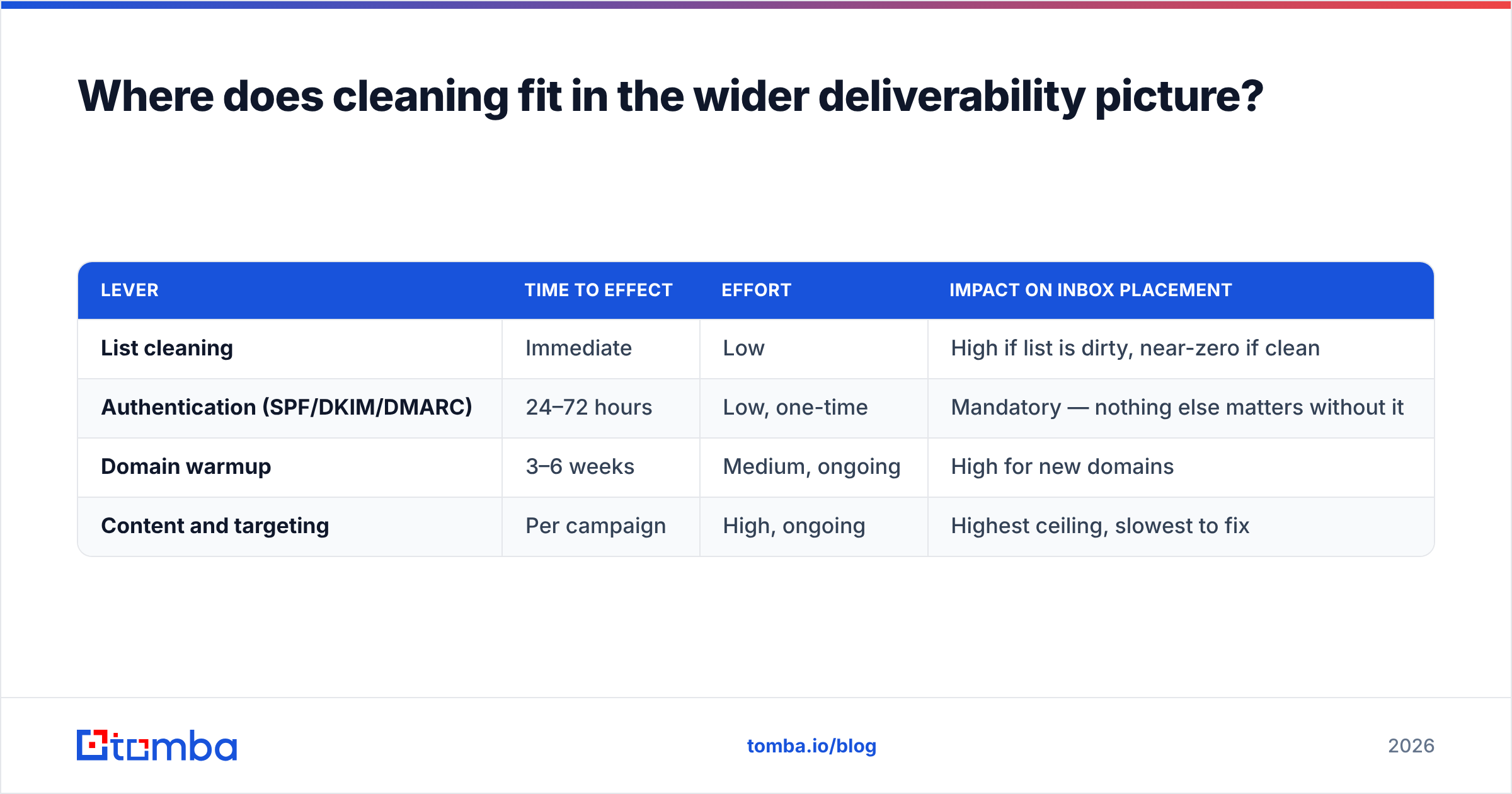
Cleaning is one of four levers, and it's the fastest but not the deepest.
| Lever | Time to effect | Effort | Impact on inbox placement |
|---|---|---|---|
| List cleaning | Immediate | Low | High if list is dirty, near-zero if clean |
| Authentication (SPF/DKIM/DMARC) | 24–72 hours | Low, one-time | Mandatory — nothing else matters without it |
| Domain warmup | 3–6 weeks | Medium, ongoing | High for new domains |
| Content and targeting | Per campaign | High, ongoing | Highest ceiling, slowest to fix |
If you're diagnosing a deliverability drop, check in that order. Authentication failures and dirty lists are cheap to rule out. Content and targeting problems take a quarter to diagnose properly, so you don't want to start there.
Worth reading the broader email deliverability fundamentals if bounce rate is the only metric you're currently tracking. Complaint rate, spam-trap hits, and engagement-based filtering all move independently of it.
The bottom line#
An email list cleaning service is worth the money when you have an existing list of unknown quality and a real reason to send to it. It's a waste of money when you use it as a laundering step for data you shouldn't have bought — verification removes the bounces, not the consequences of mailing strangers.
The durable version of this is boring: source contacts that were validated before they reached you, verify at the point of capture, re-verify on a schedule, and suppress aggressively. Do that and cleaning stops being a recurring line item and becomes a quarterly formality.
If you're building lists rather than inheriting them, start upstream. The Tomba Email Finder validates addresses before delivering them, so the records entering your CRM are already clean — and the free tier gives you 25 searches a month to test the output against your own known-good data before you commit to anything.
Related guides#
Ready to find emails that actually work?
Join 150,000+ professionals who stopped guessing and started sending. Free credits on signup — no credit card required.
Get the Tomba newsletter
Practical outbound tactics and product updates — once every two weeks.
About the author